Tkinter Designer: Quickly Turn Figma Design to Python Tkinter GUI
github.comI’ve always thought there’s so much low hanging fruit in making simple interfaces easy to make.
We’ve lost so much ground since vb6.
Yea, it is really amazingly nice to have this. People don’t like Pascal, even though it’s a nice, readable and very fast language. Compile time wise, modern languages are a joke, but not a funny one. I can compile a million lines of pascal faster than updating a hello world typescript site. I have been looking how to add a borrow checker to fps with minimal damage. It seems with compiler directives it can work. The compiler can tell you how many frees are not guaranteed.
I loved VB6, and HyperCard before that. But when VB.NET came out, I switched to Python.
For a while, I missed the ability to draw interfaces, and tried some tools for building interfaces in Python, but they all added too much overhead and complexity compared to VB6.
Then I realized: My interfaces will never be beautiful. Whether I can draw a layout that's better than random, or worse, is a coin toss. Instead, I wrote a simple "wrapper" around commonly used Tkinter widgets, allowing me to build an interface in one line of code per widget, and my wrapper just lays them out in order from top to bottom. That, plus Matplotlib graphs, which are heavenly.
Today, nobody uses my programs because the interface is beautiful. They need a problem solved, and the top-down layout is usually as good if not better than anything I could dream up myself. It's actually liberating.
Youll be happy to hear Delphi is still alive and well, thanks to Embarcadero
More like in spite of Embarcadero...
There's still Lazarus[1], and Common Lisp got CLOG [2] which is very much like Delphi except in the web and in Lisp
[1] https://www.lazarus-ide.org/ [2] https://github.com/rabbibotton/clog
Well, my wallet's not that happy :D
Pretty impressive. I've never very much liked how TKinter looks out of the box and i didn't know it's capable custom UI visuals as in the examples. If tkinter looked like the OS native UI it would be optimal, but in my experience it mostly doesn't. Will be following this project for my future GUI needs in Python. Nice work!
Tkinter looks native on platforms that have native GUIs (Windows, macOS). On Unix you can use any of the numerous platform-independent (non-native) skins for Ttk:
- https://ttkbootstrap.readthedocs.io/en/latest/#sample-themes
- https://wiki.tcl-lang.org/page/List+of+ttk+Themes#60ca3eb80e...
- https://ttkthemes.readthedocs.io/en/latest/themes.html
The main issue with Tk/Ttk is mostly documentation and of course that it's a classic GUI framework, not a 3D-GPU-layer-based framework suitable for highly animated and composited UIs.
There's a bunch of stuff that you really wanna know about but simply isn't included in the Python docs, and the real API docs are for Tcl and you need to understand how those tclisms map over to Python.
Here’s IDLE’s settings window on Windows 11: https://i.imgur.com/DnwviOr.png
Those combo boxes are definitely not native. The menus are also off (the menu items are shorter and they turn blue instead of gray when highlighted).
IDLE uses the pre-ttk widget set and is indeed ugly.
See https://tkdocs.com/tutorial/idle.html for a case-study involving IDLE (Search for "Another Example" to see the settings window). You should be able to tell from the windows and mac screenshots how old this article is.
> The main issue with Tk/Ttk is mostly documentation and of course that it's a classic GUI framework, not a 3D-GPU-layer-based framework suitable for highly animated and composited UIs.
That and accessibility.
This site has a pretty good tutorial and conceptual overview: https://tkdocs.com/
See also https://github.com/rdbende/Sun-Valley-ttk-theme (couple more themes are linked at the end of readme)

I've never seen License laid out in a table like this and I kinda love it:
Our company made the switch to QT, dev time and code readability has improved, but the code runs significantly slower in debug mode. (Yes I know we can run headless)
Sad because I learned so much tkinter, and despite that, I'm fine with moving away from tkinter. I'm not sure who the problem is.
Have you tried QML? My efficiency improved dramatically since switching from C++ Qt for the UI.
Do you have to pay to license QML?
Qt looks nice but license fees are pretty expensive for small shops.
Could use the GPL version but I’m just afraid of becoming dependent on a tool that will keep the most interesting features only available for the commercial version.
Not at all! Qt comes with an LGPL version that you just must 1. link it dynamically and 2. If you change Qt's source code you need to publish the changes. (Not legal advice).
Most of what you'll need will be under the LGPL version. You can use the commercial version by paying and not publishing your source or via the GPL license and publish your full source code and everything else GPL requires.
I cannot recommend it more, give it a try it's easy to learn (I studied the basics in a day and a working prototype quite fast).
Something I've been working on: converting Markdown text into a Kanban view (in QML).[1]
That project looks nifty!
Alright, you convinced me to give it a shot!
Haha awesome. Thanks (:
We use GPL version, but its internal software that isnt distributed outside.
Neat! I can see this being a useful way to build quick demos from a Figma design, not sure I would use it for proper apps though.
If I follow correctly, it's building the whole UI from images from the Figma file, so isn't using any native OS styling. Thats fine for demos and some simple apps.
It would be interesting if it was possible to combine this with BeeWhare [0] for mobile UIs, mobile is much more forgiving with none native style. I wander if it could be modified to output BeeWhare/Toga code.
I find chatgpt good for this kind of simple GUI design tasks, you can just tell it to create a simple GUI incl drop downs etc. It won’t be perfect but removes a lot of the tedious work.
How do you maintain the generated code? Once you make changes to it, you can't regenerate it without losing the changes.
I just use it to create the initial layout and then if I need anything additional I just ask chatgpt to create it. You still have to know what you’re doing but I find that GUI code is mostly boilerplate code that is really tedious to create from scratch. ChatGPT is a 5x productivity boost.
How do you describe the overall layout to Chatgpt? individual components sounds simple.
How does it compare to using code assistants AIs?
I have used chatgpt a bit for coding tasks, and it is alright. Kind of like getting a not that smart student to do something, and repeatedly prodding them to do it right.
It would be exciting to see future iterations of this tool incorporate native OS styling or even output to other GUI frameworks like QT or Toga.
Haven’t tried but I think Qt Designer has already integration with Figma
The examples look horrible imho
This would be a more productive comment if you could explain why you have this opinion.
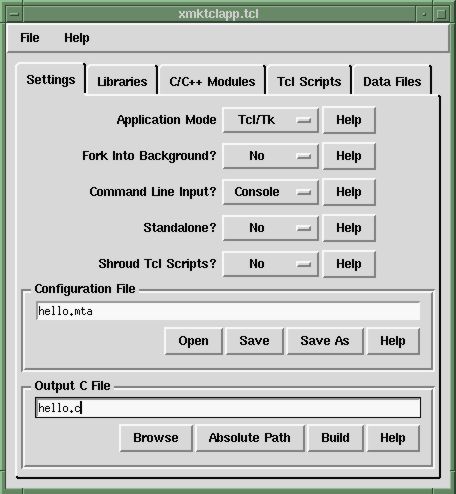
Not the parent but the world of tk/wish used to be associated with this motif widget set like so
https://www.hwaci.com/sw/mktclapp/xmta1.jpg
It had compactness, consistency, accessibility, multi language built in, composability, ability for the User to customize things like contrast and sizes, etc.
Personally I was excited that maybe this would be a project that would get back to those sane foundations.
Oh well, fuck that I guess
I suspect because they don't leverage the main advantage of a GUI toolkit: provide a coherent, familiar and proven user interface. These examples all look like websites and all have completely different styles. I can see how this fits into the current just-ship-a-webapp-plus-browser trend though.