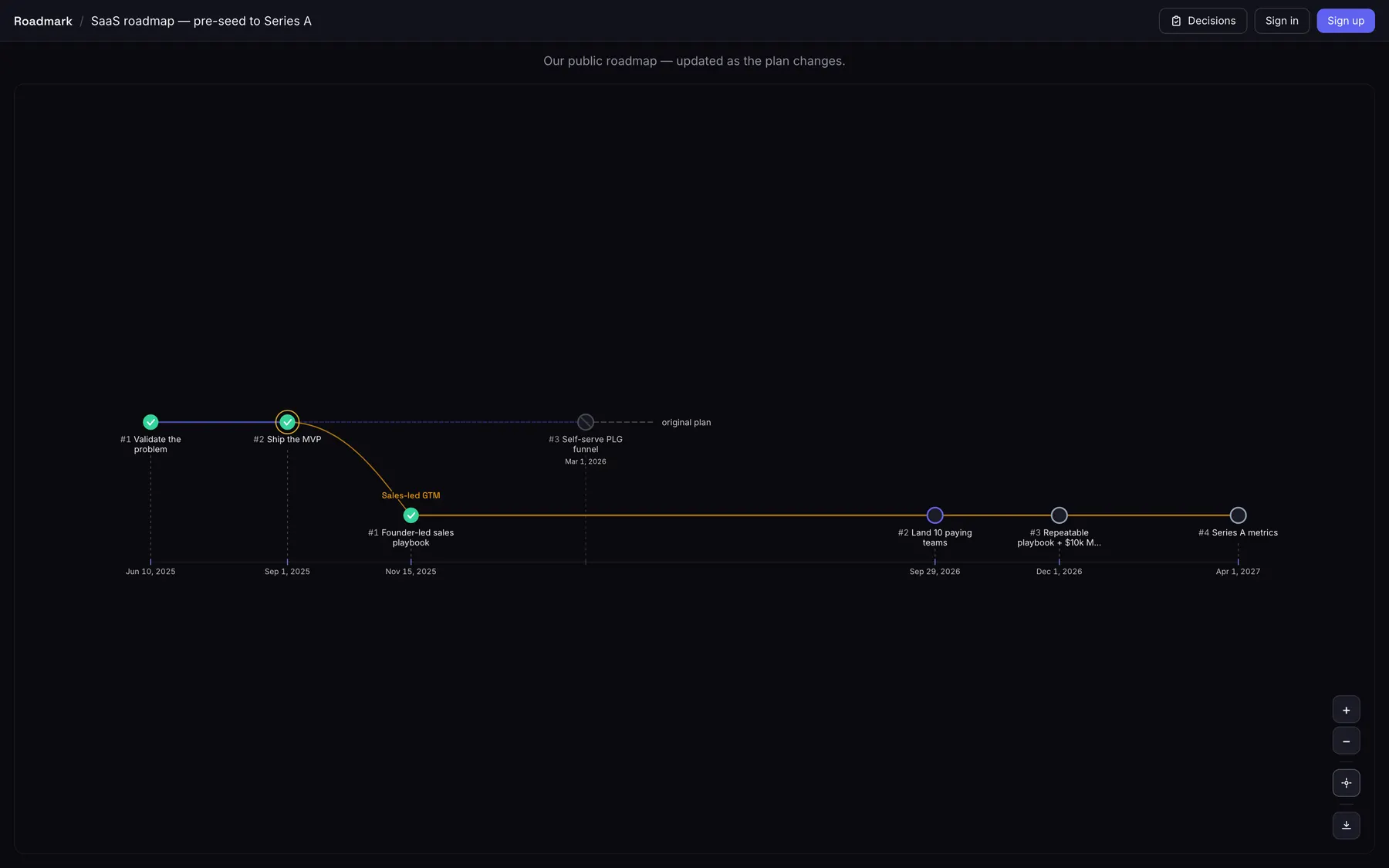
Branch the plan instead of overwriting it — the route you took and the one you dropped sit side by side, each with the decision behind it. Required, not an optional field.
The old route keeps its dates and stays on the canvas, greyed out. Nothing is overwritten, so nothing has to be remembered.
The reason is a required field
Twenty characters minimum, or the branch is not created. Other tools offer a notes box; we refuse the fork without one.
The link you sent stays true
Pull the plan in from the tracker you already use, read-only, and it keeps itself current after you have shared it.
Imports from
GitHub
GitLab
Linear
Jira
Shortcut
YouTrack
Azure DevOps
Asana
Notion
monday.com
.CSV
Read-only — we never write to your source.
30-second tour
The whole flow, start to finish
Create a board, import an existing roadmap, and branch a pivot with its decision log — see it end to end.
Who it's for
Built for the people you report to — and for you
Whether you’re answering to investors, building in public, or just keeping a promise to yourself, the same trajectory keeps the why on the record. Strongest fit first.
Companies & startups
Investor-grade transparency
The roadmap you show investors shouldn’t be a deck slide that’s stale the day after you send it. Share a living trajectory instead — one that survives a pivot and keeps the hypothesis, and the numbers, behind every change of direction. When a board member opens the link they see not just where you’re headed, but the reasoning trail of how the plan got there.
A living link, not a slide — always current, no re-export before every update
Every pivot keeps the hypothesis and the metrics that drove it: a decision trail a data room can audit
Read-only access for stakeholders; owner and editor roles keep the team in control
Makers & creators
Build in public
Flip one toggle and a private board becomes a public link — no exports, no screenshots. Share it like a post and your followers watch the trajectory move, pivots and all. The link is the update.
One toggle to go public, one link to share it anywhere
Followers watch the roadmap evolve — pivots as a visible narrative
Decision logs double as honest "why we changed" updates
Personal goals
Study, sport, side-projects
Map a learning path, a training block or a side-project as a trajectory you actually look at. When life forces a change of plan, you fork — the old track stays on the canvas as history instead of getting deleted and forgotten.
Turn vague intentions into a visible path with dated milestones
Pivot to a new track without erasing the one you abandoned
See, months later, exactly why you changed direction
Every feature
See exactly what you get
Every capability, shown in the real product on a Team account with nothing locked — and the plans each one is included in.
Included inFreeProTeam
Plans that branch like git
Fork your roadmap at any milestone. The path you took and the one you abandoned both stay on the canvas — the dotted "original plan" never disappears.
1 of 21
What changes
The difference shows up later, in three specific moments
Not what the product does — what your plan does once the reasoning stays attached.
Someone asks why the date moved.
BeforeThe answer lives with whoever remembers the meeting, and the board shows only the plan that survived.
AfterThe branch carries the decision that created it — written when the call was made, not reconstructed six months later.
You reconsider a plan you dropped.
BeforeThe old route was overwritten, so the argument gets had again from the start.
AfterIt is still on the canvas with its original dates, greyed out, beside the route you took instead.
You send the roadmap outside the team.
BeforeAn export that is stale the day after, and a fresh one before every update.
AfterOne link that keeps itself current from the tracker you already plan in — read-only, and it never uses a seat.
Pricing
Start free. Show a plan that holds up.
Start free with a 7-day Pro trial — no card required. When it ends you move to Free, and everything you've made stays — you just can't add more until you upgrade.
Free
Map and share a roadmap, end to end.
$0forever
One roadmap
Unlimited milestones & branches
Decision log on every pivot
Import from GitHub, Linear, Jira & more
AI milestone drafting (bring your own key)
Public sharing & read-only discussions
Unlimited read-only viewers — a share link never uses a seat
Export to PNG, SVG, PDF & PowerPoint
Recommended
Pro
For a roadmap other people read.
$12.50/mo
billed annually — $150/yr, 2 months free
or $150/yr — 2 months free
Everything in Free, plus:
Unlimited roadmaps
You + 3 collaborators per board; viewers free
Realtime collaboration
Post comments & @mention teammates
Roadmap releases, AI investor updates & stress-test
Password-protected & expiring share links
Managed AI — 100 generations/mo pooled across your team, no key to bring
Remove the "Made with Roadmark" badge
Top tier
Team
For roadmaps a whole team drives.
~$41/mo
billed annually — $490/yr, 2 months free
or $490/yr — 2 months free
Everything in Pro, plus:
Unlimited collaborators
Managed AI — 500 generations/mo pooled across your team
Audit log
Shared-link view analytics
Milestone demand analytics & audience export
Prices exclude VAT and sales tax. Lemon Squeezy, our merchant of record, adds it at checkout where your country requires it.
FAQ
How this actually works
What is Roadmark, and how is it different from Notion or a Gantt chart?
Roadmark is a roadmap tool built around the one thing static docs never capture: how and why your plan changed. You fork your roadmap at any milestone like a git branch — the path you took and the one you abandoned both stay on the canvas, each pivot carrying a required decision log. No doc, spreadsheet, or Gantt chart gives you that history.
Is it really free — and is there a trial?
The Free plan is genuinely free, for good: create one roadmap, import from any supported tool, share public read-only links with anyone, draft milestones with your own AI key, and export to PNG, SVG, PDF and PowerPoint. Inviting named collaborators onto a board, posting comments on milestones, and capturing roadmap releases are paid features (Pro/Team) — on a Free board you can still read the discussion and any releases, and public link sharing always stays free. Sign up free and your first 7 days also include full Pro (no card); when the trial ends you move to Free with all your roadmaps kept — you just can’t add more until you upgrade. Upgrading to Pro mid-trial doesn’t cost you the days you haven’t used: your first Pro payment lands when the trial would have ended, not the moment you subscribe. Team has no trial of its own, so choosing Team starts billing right away. See the pricing page for what Pro and Team include.
Do I have to start from a blank board?
No — you can start from a template. The Templates gallery has filled-in roadmaps for companies, for makers and creators, and for personal goals, from a quarterly product roadmap, OKRs or a SOC 2 audit to a course launch or marathon training. Most are one plain line; some carry an example pivot with the reasoning behind it. Search the gallery or filter it by who it is for and by type. Preview one, click Use this template, and it forks into a fresh private board you own for you to reshape, with its dates starting from the day you fork it. You can also import an existing roadmap from another tool, or duplicate one of your own boards.
Who can see my boards?
Private by default — only you and the people you explicitly invite (as owner, editor, or viewer). A board becomes visible to anyone else only if you flip it public, and even then it’s strictly read-only. A public board can also be embedded on your own site or docs as a live read-only iframe — either the board itself or its decision feed (Share → “Embed on your site”). Your internal honesty signals — the ⚠ at-risk and confidence markers — are hidden from visitors unless you switch them on, and so are your captured release tags. On Pro you can lock that public link with a password or set it to expire, so “public” can still mean “only the people I gave the link and password to, until a date I choose”.
Can I make a board public and read-only?
Yes — one toggle gives you a link customers or investors can open without an account, with no edit access. Flip it back to private any time. On Pro you can also password-protect that link or set it to expire on a date — so you can share a roadmap like a data room and revoke access when you’re done (members of the board always get straight in, no password needed). And when a live link doesn’t fit — a slide deck, an email, an attachment — download the board as a PNG, SVG or PDF instead, or as a PowerPoint deck whose milestone tables you can still edit.
Will importing change anything in my source tool?
Never. Every import is a one-way, read-only snapshot — we read your project once and build a Roadmark board from it. Your source tool is never written to, and nothing there changes.
Are my keys and tokens encrypted?
Yes. Everything sensitive you connect is encrypted at rest with AES-256-GCM and is never logged or stored in plaintext — both your AI provider keys (Anthropic, OpenAI, Google) and the credentials that link your import sources, whether an OAuth token or a personal access token you paste for a self-hosted tool. Once saved, you can replace a key or token but never view it again — only the app reads it, behind the scenes, to reach the provider.
Start your trajectory today
Create your first board in under a minute. No credit card, no setup — just your goals and the branches you'll take to reach them.