· Updated · Andrew Arrow
Sue and Joe are stranded beside a station wagon on a desert road. Joe emerges from behind the engine. “Good news. It’s definitely the car.” That’s enough for me to understand the scene. To film it, somebody still has to decide where Joe is standing, how he gets into view, and whether the camera can see him do it. Leaving those decisions to the video model can produce a man walking through a car.
AIVS is the AI video studio I’m building around that gap. You write or import a screenplay, choose a scene, and cast its roles. The recent work gives the scene a visual plan before video generation starts: Codex designs the shots, a local image model composes their first frames, and Codex inspects those images before directing the motion. Joe’s entrance has to make sense from the picture the video model will actually receive.
Import the script, film one scene
The story can start in another editor. Fountain is an open screenplay format that keeps the script in readable plain text. The nyousefi/Fountain repository provides an open source implementation and a full-length Big Fish screenplay as an example. Open that file and you can read the scenes and dialogue directly, without a screenwriting app.
Choose File → Import… in AIVS to bring in a .fountain file. Scene headings, action, character cues, parentheticals, dialogue, and transitions become editable elements. Import replaces the current screenplay and clears its casting; Undo restores both. The original file stays untouched, and the imported document autosaves to screenplay.json. The importer leaves out title-page metadata, outlines, notes, omitted passages, page breaks, and emphasis formatting. Simultaneous dialogue becomes dialogue in source order.
You can keep the full screenplay in the editor and work on one scene at a time. The scene selector above Generate video lists its headings. Choose one and cast its roles; only that scene and its cast go to the generation pipeline. Uncast roles elsewhere don’t block it. The 100,000-character generation limit applies to the selected scene, so a long document can stay together while you render scenes individually.
Sue is a role. Ava can play her.
The script originally called its two people Ava and Eli, the same names as their saved character profiles. The rename to Sue and Joe made the distinction explicit. Ava belongs in the library of performers; Sue belongs in the story. Recasting Sue shouldn’t require hunting through the script to replace every name.
Drag Ava’s portrait or name onto Sue’s dialogue, and every Sue cue gets that assignment. Drop Eli onto Joe, and both parts are cast. The Uncast / played by control beside a character cue also opens a picker. This diagram shows the assignments in an earlier, five-line version of the scene:

Those assignments now carry saved assets into production. Portraits guide the image model when it composes each shot. Stable identity stays separate from costume, pose, expression, and emotional delivery, which belong to the scene. A portrait’s sweater shouldn’t quietly become a wardrobe requirement for every film. Generated frames still need comparison with the portraits; reference conditioning doesn’t guarantee a likeness.
The screenplay needs a shooting script
The screenplay supplies the story’s meaning, emotional progression, and essential events. A shooting script works out how the audience will see them. In the saved desert-road screenplay, one sentence reads:
SUE, 30s, turns a battered postcard over in her hands. JOE, late 20s, emerges from behind the engine.
An early shooting script expands that entrance into physical staging:
SUE stands on the gravel screen left beside the front passenger door, holding a battered postcard in both hands. JOE stands on the ground screen right alongside the engine bay, empty hands clear of the engine, upper body partly screened by the raised hood. His feet and route along the near fender remain visible.
Joe has somewhere to stand and a route into view. The rest of the prompt directs his step, eyeline, and line delivery, then Sue’s almost-smile. It also supplies the quiet ending: dry wind, cooling-engine ticks, and gravel under his feet. The saved plan divides its three spoken lines into two shots totaling 21 seconds. It predates the current storyboard workflow, but it shows what the translation adds. The writer can keep “emerges from behind the engine” in the screenplay.
The director also has to choose coverage. A reaction can carry a change in mood; a close view can make a prop legible; a cut can spare the model an awkward continuous movement. Those choices must preserve the event and its timing. Showing Sue already smiling at the opening would lose the moment when Joe’s joke almost gets through to her.
Compose the first frame before animating it
The storyboard change puts image generation between two Codex directing passes. First, Codex designs the shots and their starting compositions: who is visible, where they stand, their costumes, the light, the props, and the camera. Each shot also gets a dramatic purpose and concrete events the audience must see. A local FLUX.2 Klein model then generates one starting image per shot, using the saved cast portraits as references.
The earlier renderer carried one shot’s last frame into the next. That helped hold onto clothes and faces, but it tied the next shot to whatever composition the model happened to leave behind. Every new production shot now gets its own composed first frame, including reverse angles within the same scene. These prepared inputs from the separate production-comparison experiment show the idea: Lena as Sue in one composition, Owen as Joe in the reverse. They were prepared before the automatic storyboard stage was added.
Sue · prepared first frame

Joe · prepared reverse angle
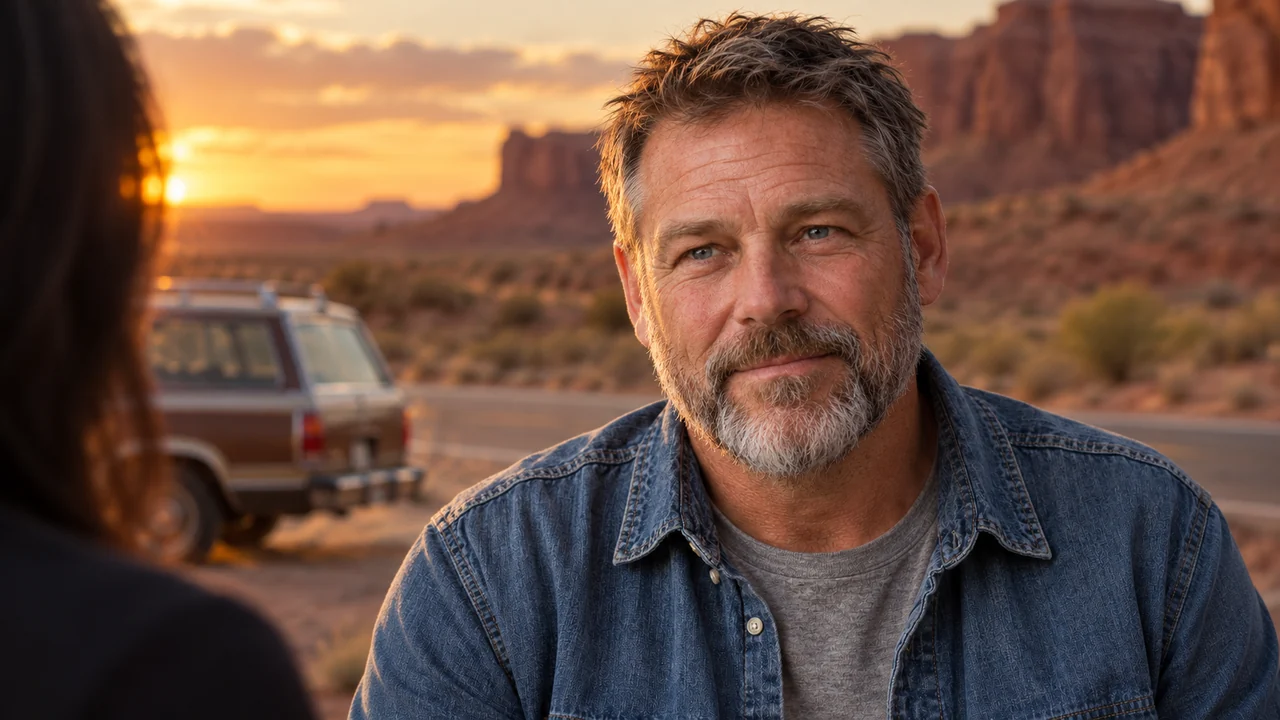
In the second pass, Codex sees the actual generated images and writes motion, acting, camera, dialogue, and sound directions from those compositions. If a hand starts occupied, the action has to account for it. If a required prop is hidden by the crop, more motion prose won’t make that opening image suitable. The preproduction code can regenerate offending storyboards, capped at two repair rounds, and inspect the replacements before proceeding.
Python tracks source actions and dialogue lines as ordered beats, checking their coverage, exact dialogue, timing, and prompt limits. An independent source-fidelity check also reads the final motion prompts against essential actions and reveals. A beat number appearing in the plan isn’t enough if the action itself disappeared during rewriting. The finalized plan is bound to the images Codex inspected, so replacing a storyboard invalidates the corresponding saved work.
The two main directing passes and their planning checks share a ten-minute Codex budget by default. Local image and video generation sit outside that budget. Completed preproduction can be reused when the scene, cast assets, format, and planning code match. Switching between HQ and distilled video inference can therefore keep the plan and starting images fixed.
Compare complete scenes across renderers
Normal generation now defaults to local LTX-2.5 HQ; Preview (distilled) uses the same storyboard workflow with faster inference. Each generation lasts four to twelve seconds. Settings offer landscape or portrait delivery, and assembly crops the model’s output to the chosen frame rather than stretching it. Codex planning and visual review use the configured service; still-image generation and video inference run on the Mac.
The production-comparison CLI provides a separate way to compare complete candidates. Arm A uses the older continuation-based plan and local distilled model. B uses prepared first frames and local HQ, with distilled available for a controlled comparison. C sends the same controlled plan and images to the paid LTX-2.5 Pro API. Candidate numbers let the experiment keep several takes from each path.
That’s the beginning of a multi-model renderer. The desktop workflow currently renders each missing shot once; it doesn’t automatically shop among local and cloud candidates. The comparison report leaves quality scores and winner selection unassigned for someone to watch with sound. A versus B also changes coverage and conditioning along with inference, so preferring B wouldn’t establish that HQ alone caused the improvement.
Voice consistency has moved into the main workflow too. For a shot with one speaking performer, Seed-VC converts the generated soundtrack toward that performer’s saved voice sample while copying the video stream unchanged. A shot with multiple speakers keeps generated voices because it lacks isolated dialogue tracks. Conversion can affect ambience, and neither the saved sample nor an unchanged picture proves voice identity or lip synchronization.
The critic has to inspect what happened
An early render report described Joe emerging through the car without opening a door. The frame below comes from that older three-shot run. Even the requested red-rock desert became a tree-lined road. A structurally valid plan had produced the wrong scene.
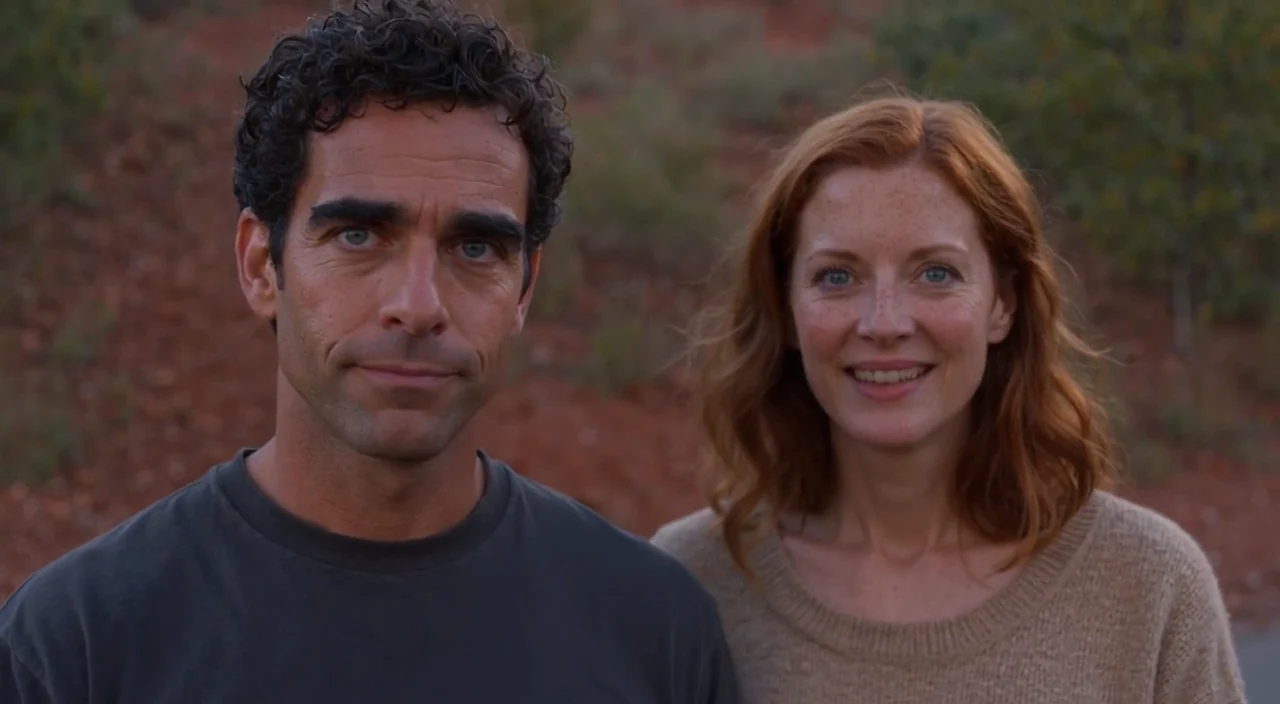
The current visual reviewer receives frames sampled at four per second plus the final frame. It records what is visible, checks required actions and reveals, and distinguishes the observed ending from the planned one. A scene-level review then considers cause and effect across cuts, emotional progression, and unintended comedy. A correct final pose can still follow an impossible movement.
The renderer can use a concrete continuity problem in that observed ending to revise an upcoming shot in the same scene. For storyboard shots, that can include a regenerated first frame and a check that the adaptation preserves the source. It changes work that hasn’t been rendered yet. A later prompt can’t retroactively fix Joe’s earlier walk through the car.
This critic still has a narrow view of the film. Sampling can miss a brief glitch, and it doesn’t establish natural motion at playback speed. The reviewer doesn’t listen to the soundtrack or judge pronunciation and lip sync. The production Whisper gate from the earlier version has been removed; generated dialogue is trusted without transcription. Exact source words remain in the prompts, but the spoken performance still needs listening.
Visual findings survive in the result. The renderer distinguishes rendered-with-issues and rendered-needs-review from completion. Those findings don’t trigger another video generation or prevent FFmpeg from assembling video.mp4. The media checks establish a playable export with valid frames and timing. They leave the artistic judgment open.
What should count as a finished scene?
I want AIVS to carry the scene through a whole film crew’s work. The screenplay’s meaning has to survive each handoff, including the quiet reaction that makes a line land. The target pipeline has seven jobs:
| Stage | Responsibility |
|---|---|
| Original screenplay | Preserve story meaning, emotional progression, and essential events. |
| AI director and cinematographer | Plan coverage, compositions, reactions, cuts, and dramatic timing. |
| Storyboard and reference-frame generator | Establish actors, costumes, locations, props, lighting, and framing consistently. |
| Multi-model video renderer | Generate several candidates with suitable local or cloud models. |
| Automatic film critic | Evaluate motion, acting, script fidelity, continuity, and cinematic quality. |
| Automatic film editor | Select takes, recut, repair transitions, and refine dialogue and sound. |
| Finished scene | Publish only after meeting a defined quality threshold. |
The director, storyboard generator, local renderer, and sampled-frame critic now have concrete implementations. The comparison tool provides a way to collect alternative takes. Automatic selection and recutting, sound refinement, and an enforced cinematic quality threshold remain work to do. Today’s editor assembles the planned shots and final fade; it doesn’t decide that a stronger reaction belongs half a second earlier.
For the desert-road scene, “finished” should mean Joe enters plausibly, Sue’s almost-smile arrives after his joke, and the postcard and performers remain recognizable across the cuts. The new first frames give the director much more control over that scene. The next step is making the critic and editor use the resulting footage to earn those moments before AIVS calls the film finished.