Published on , 1943 words, 8 minutes to read
I got tired with all the AI scrapers that were bullying my git server, so I made a tool to stop them for good.

AI scrapers have been bullying the internet into oblivion and there's not much we can do about it. The well-behaved bots will relent when you ask them to, add entries to your robots.txt (even though they should understand the intent behind a wildcard), or block their user agents.
A majority of the AI scrapers are not well-behaved, and they will ignore your robots.txt, ignore your User-Agent blocks, and ignore your X-Robots-Tag headers. They will scrape your site until it falls over, and then they will scrape it some more. They will click every link on every link on every link viewing the same pages over and over and over and over. Some of them will even click on the same link multiple times in the same second. It's madness and unsustainable.
I got tired of this and made a tool to stop them for good. I call it Anubis. Anubis weighs the soul of your connection using a sha256 proof-of-work challenge in order to protect upstream resources from scraper bots. It's a reverse proxy that requires browsers and bots to solve a proof-of-work challenge before they can access your site, just like Hashcash.
To test Anubis, click here.
If you want to protect your Gitea, Forgejo, or other self-hosted server with Anubis, check out the instructions on GitHub.
If you would like to purchase commercial support for Anubis including an unbranded or custom branded version (namely one without the happy anime girl), please contact me.
How Anubis works
Anubis is a man-in-the-middle HTTP proxy that requires clients to either solve or have solved a proof-of-work challenge before they can access the site. This is a very simple way to block the most common AI scrapers because they are not able to execute JavaScript to solve the challenge. The scrapers that can execute JavaScript usually don't support the modern JavaScript features that Anubis requires. In case a scraper is dedicated enough to solve the challenge, Anubis lets them through because at that point they are functionally a browser.
The most hilarious part about how Anubis is implemented is that it triggers challenges for every request with a User-Agent containing "Mozilla". Nearly all AI scrapers (and browsers) use a User-Agent string that includes "Mozilla" in it. This means that Anubis is able to block nearly all AI scrapers without any configuration.
Doesn't that mean that you're allowing any AI scraper that simply chooses to not put "Mozilla" in their User-Agent string?
At a super high level, Anubis follows the basic idea of hashcash. In order to prevent spamming the protected service with requests, the client needs to solve a mathematical operation that takes a certain amount of time to compute, but can be validated almost instantly. The answer is stored as a signed JWT token in an HTTP cookie, and the client sends this token with every request to the protected service. The server will usually validate the signature of the token and allow it through, but the server will also randomly select the token for secondary screening. If the token is selected for secondary screening, the server will validate the proof-of-work and allow the request through if everything checks out.
Challenges are stored on the client for one week, requiring the client to solve a new challenge once per week. This is to balance out the inconvenience of solving a challenge with protecting the server from aggressive scrapers.
If any step in the validation fails, the cookie is removed and the client is required to solve the proof-of-work challenge again. This is to prevent the client from reusing a token that has been invalidated.
Anubis also relies on modern web browser features:
- ES6 modules to load the client-side code and the proof-of-work challenge code.
- Web Workers to run the proof-of-work challenge in a separate thread to avoid blocking the UI thread.
- Fetch API to communicate with the Anubis server.
- Web Cryptography API to generate the proof-of-work challenge.
This ensures that browsers are decently modern in order to combat most known scrapers. It's not perfect, but it's a good start.
This will also lock out users who have JavaScript disabled, prevent your server from being indexed in search engines, require users to have HTTP cookies enabled, and require users to spend time solving the proof-of-work challenge.
This does mean that users using text-only browsers or older machines where they are unable to update their browser will be locked out of services protected by Anubis. This is a tradeoff that I am not happy about, but it is the world we live in now.
The gorey details
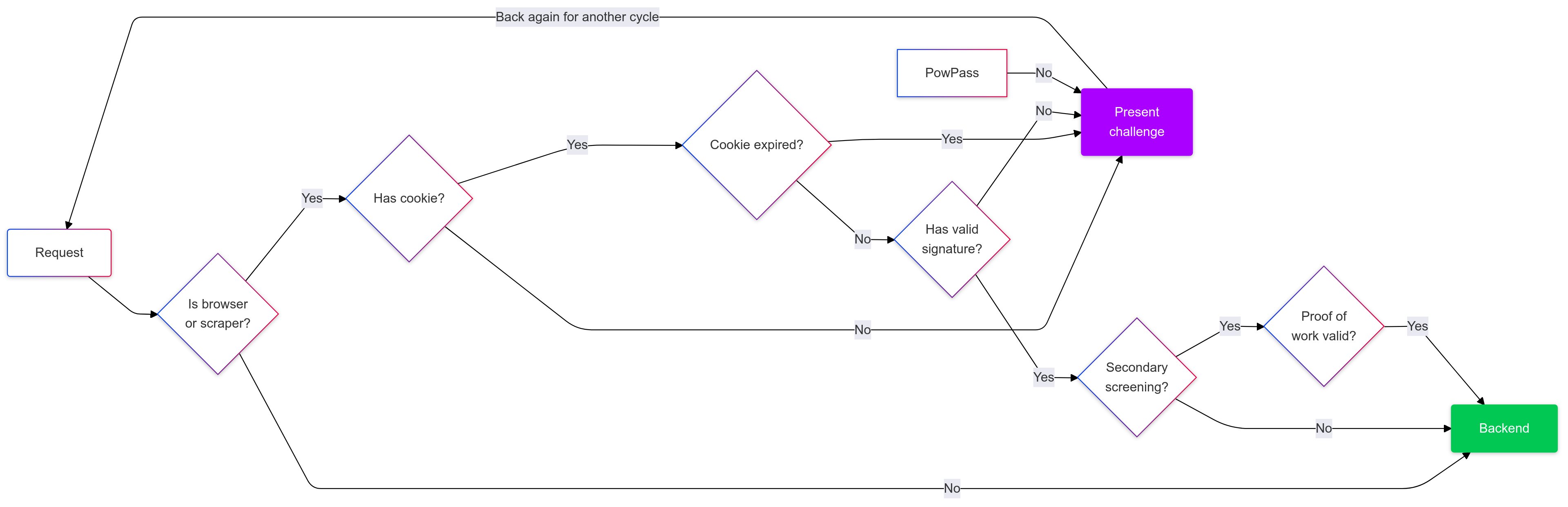
Anubis decides to present a challenge using this logic:
- If the client has a User-Agent that does not contain "Mozilla", the client is allowed through.
- If the client does not have a cookie with a valid JWT token, the client is presented with a challenge.
- If the cookie is expired, the client is presented with a challenge.
- If the client is not selected for secondary screening, the client is allowed through.
- If the client is selected for secondary screening, server re-validates the proof-of-work and allows the client through if everything checks out.
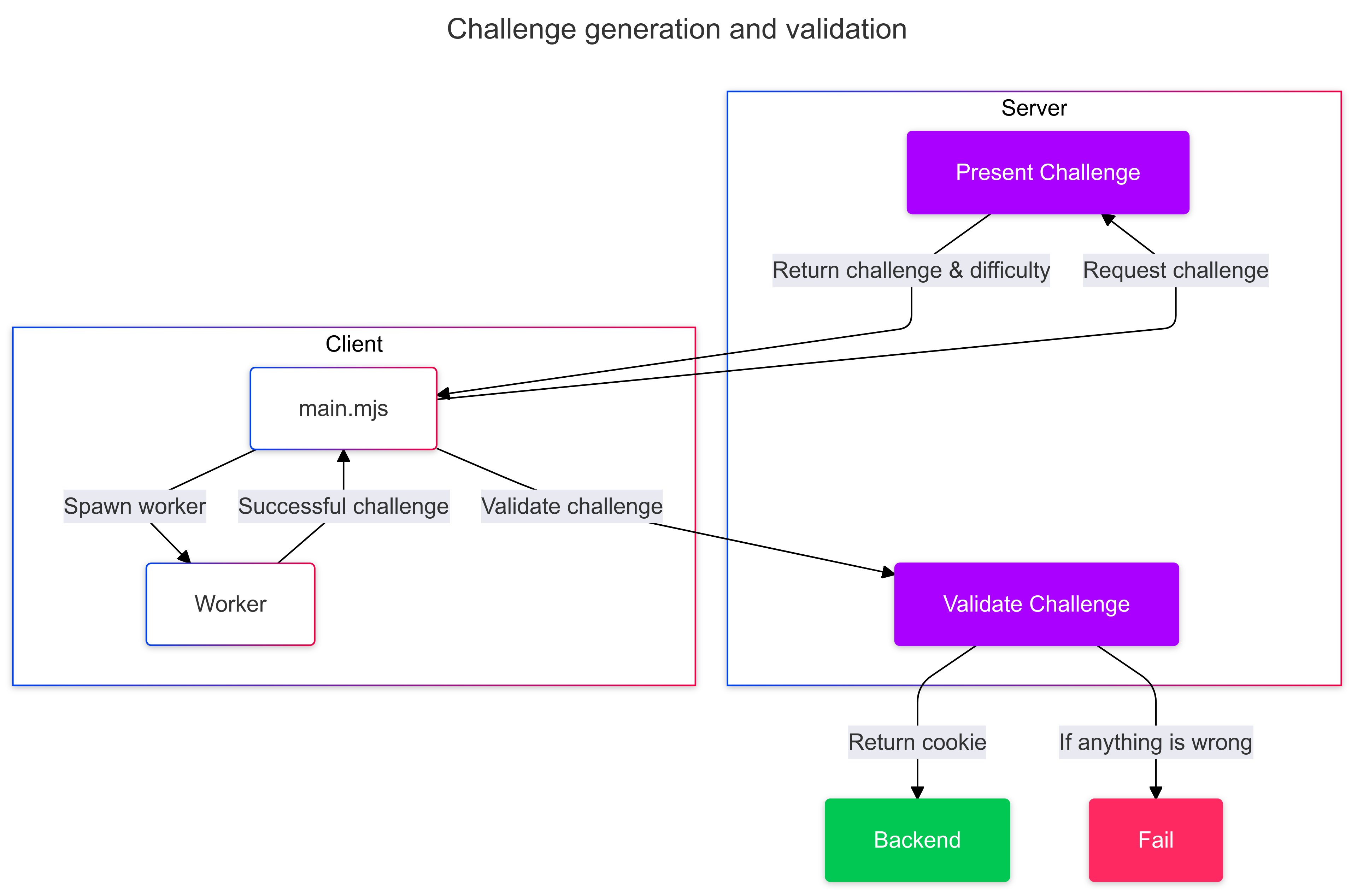
When you get requested to solve a challenge, a HTML page is served. It references JavaScript code that is loaded as an ES6 module. The server is asked for a challenge, and then the client goes ham making a SHA256 hash of the challenge and a nonce until the hash has a certain number of leading zeroes. This is the proof-of-work challenge. The client then sends the answer to the server, and the server validates the answer. If the answer is correct, the server signs a JWT token and sends it back to the client in an HTTP cookie. The client then sends this cookie with every request to the server.
Challenges are SHA-256 sums of user request metadata. The following inputs are used:
Accept-Encoding: The content encodings that the requestor supports, such as gzip.Accept-Language: The language that the requestor would prefer the server respond in, such as English.X-Real-Ip: The IP address of the requestor, as set by a reverse proxy server.User-Agent: The user agent string of the requestor.- The current time in UTC rounded to the nearest week.
- The fingerprint (checksum) of Anubis' private ED25519 key.
This forms a fingerprint of the requestor using metadata that any requestor already is sending. It also uses time as an input, which is known to both the server and requestor due to the nature of linear timelines. Depending on facts and circumstances, you may wish to disclose this to your users.
Anubis uses an ed25519 keypair to sign the JWTs issued when challenges are passed. Anubis will generate a new ed25519 keypair every time it starts. At this time, there is no way to share this keypair between instance of Anubis; but that will be addressed in future releases.
Setting up Anubis
Anubis is meant to sit between your reverse proxy (such as Nginx or Caddy) and your target service. One instance of Anubis must be used per service you are protecting.
Anubis is shipped in the Docker image ghcr.io/techarohq/anubis:latest. Other methods to install Anubis may exist, but the Docker image is currently the only supported method.
Anubis has very minimal system requirements. I suspect that 128Mi of ram may be sufficient for a large number of concurrent clients. Anubis may be a poor fit for apps that use WebSockets and maintain open connections, but I don't have enough real-world experience to know one way or another.
Anubis uses these environment variables for configuration:
| Environment Variable | Default value | Explanation |
|---|---|---|
BIND | :8923 | The TCP port that Anubis listens on. |
DIFFICULTY | 5 | The difficulty of the challenge, or the number of leading zeroes that must be in successful responses. |
METRICS_BIND | :9090 | The TCP port that Anubis serves Prometheus metrics on. |
SERVE_ROBOTS_TXT | false | If set true, Anubis will serve a default robots.txt file that disallows all known AI scrapers by name and then additionally disallows every scraper. This is useful if facts and circumstances make it difficult to change the underlying service to serve such a robots.txt file. |
TARGET | http://localhost:3923 | The URL of the service that Anubis should forward valid requests to. |
Docker compose
Add Anubis to your compose file pointed at your service:
services:
  anubis-nginx:
    image: ghcr.io/techarohq/anubis:latest
    environment:
      BIND: ":8080"
      DIFFICULTY: "5"
      METRICS_BIND: ":9090"
      SERVE_ROBOTS_TXT: "true"
      TARGET: "http://nginx"
    ports:
      - 8080:8080
  nginx:
    image: nginx
    volumes:
      - "./www:/usr/share/nginx/html"
Kubernetes
This example makes the following assumptions:
- Your target service is listening on TCP port
5000. - Anubis will be listening on port
8080.
Attach Anubis to your Deployment:
containers:
  # ...
  - name: anubis
    image: ghcr.io/techarohq/anubis:latest
    imagePullPolicy: Always
    env:
      - name: "BIND"
        value: ":8080"
      - name: "DIFFICULTY"
        value: "5"
      - name: "METRICS_BIND"
        value: ":9090"
      - name: "SERVE_ROBOTS_TXT"
        value: "true"
      - name: "TARGET"
        value: "http://localhost:5000"
    resources:
      limits:
        cpu: 500m
        memory: 128Mi
      requests:
        cpu: 250m
        memory: 128Mi
    securityContext:
      runAsUser: 1000
      runAsGroup: 1000
      runAsNonRoot: true
      allowPrivilegeEscalation: false
      capabilities:
        drop:
          - ALL
      seccompProfile:
        type: RuntimeDefault
Then add a Service entry for Anubis:
# ...
 spec:
   ports:
+  - protocol: TCP
+    port: 8080
+    targetPort: 8080
+    name: anubis
Then point your Ingress to the Anubis port:
   rules:
   - host: git.xeserv.us
     http:
       paths:
       - pathType: Prefix
         path: "/"
         backend:
           service:
             name: git
             port:
-              name: http
+              name: anubis
RPM packages and unbranded (or customly branded) versions are available if you contact me and purchase commercial support. Otherwise your users have to see a happy anime girl every time they solve a challenge. This is a feature.
Conclusion
In a just world, this software would not need to exist. Scraper bots would follow the unspoken rules of the internet and not scrape sites that ask them not to. But we don't live in a just world, and we have to take steps to protect our servers from the bad actors that scrape them. This is why I made Anubis and I hope it helps you protect your servers from the bad actors that scrape them.
Please let me know what you think and if you run into any problems.
Facts and circumstances may have changed since publication. Please contact me before jumping to conclusions if something seems wrong or unclear.
Tags: