self-hosted workspace runtime
Code and state, in separate sandboxes.
A Harvard architecture for self-hosted software. Agents and terminals rewrite a tile's code from inside the workspace; its live state answers only to the tile's own API.
$ curl -fsSL https://xbin.dev/install.sh | sh
prints the plan and asks before changing anything · Linux & macOS (Lima VM) · MIT / Apache-2.0 · no SaaS or telemetry
Free for an hour, no signup: ssh xbin@vcpu.sh
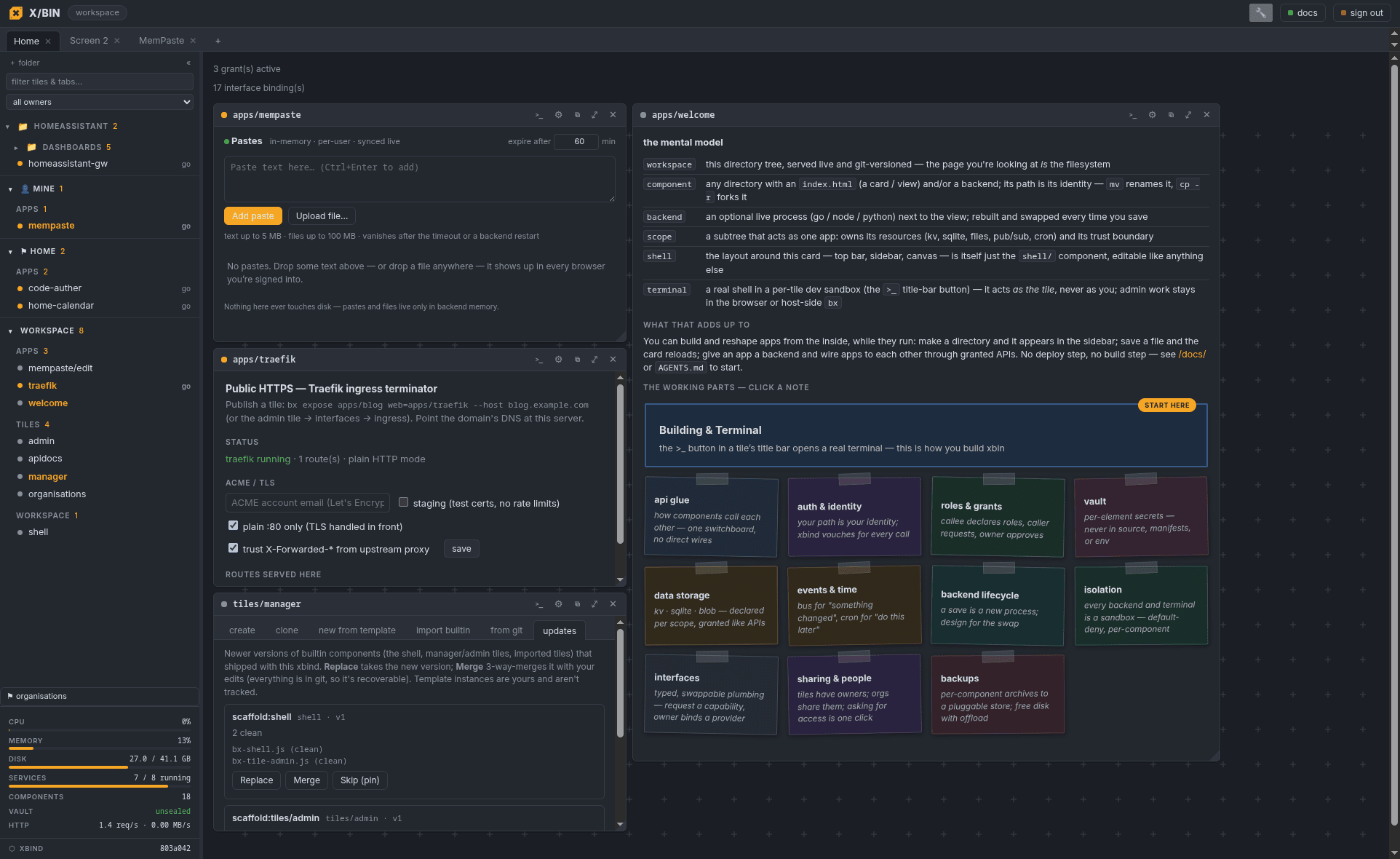
01the model
Everything is a directory.
No registry, no build step: a component is a directory and its path is its identity. Open a terminal in it and grant it what it needs; everything stays inside the workspace by default.
1
A tile is a directory
An index.html and/or a backend (Go, Node, Python, or none). mv renames it, cp -r forks it, rm -r deletes it.
2
Terminals in the browser
Attach a sandboxed shell to any tile to edit, build, and run agents. No SSH, no local checkout.
3
Grants are default-deny
A tile cannot reach the network or another tile until you approve a grant. Secrets come from its own vault.
4
Internal by default
Tiles serve their users inside the workspace. Publishing one to the internet is a
separate opt-in (bx expose, behind your TLS) that most tiles never need.
apps/dashboard — terminal
# scaffold a tile, edit it live, ship it
$ bx new apps/dashboard --runtime go
$ bx term apps/dashboard        # a shell, in the browser
  ~/apps/dashboard $ vim backend/main.go
  ~/apps/dashboard $ git commit -am ship

$ bx grant apps/dashboard res:apps/db reader
✓ live in the workspace · sandboxed · versioned · backed up
Yours
One unprivileged daemon on a box you control: your files and your git history on your disk. No accounts, no SaaS; nothing phones home. Dual MIT / Apache-2.0.
Sandboxed
Every tile runs rootless: user, mount, pid and net namespaces, seccomp and landlock. Grants are default-deny; secrets live encrypted in a vault.
Self-modifying
Open a browser terminal in any tile: edit and rebuild it live, or point an agent at it. Each tile is its own git repo, versioned and backed up.
02composition
Small tiles with typed wires.
Tiles don't hardcode each other. A tile declares typed interface slots: "I need an LLM", "I need MCP servers", "I need somewhere to archive". The owner binds each slot to any tile that speaks that contract. Same mechanism for the network, in both directions.
Call another tile's API
Declare uses, get a role-gated grant. The callee sees your verified identity
instead of a shared secret, and holds no ambient authority.
Typed slots with swappable providers
An agent's llm slot binds to a gateway tile; its mcp slot (multi)
binds to several MCP servers at once. Rebind later. The code never changes.
Egress is composition too
A tile has zero network until its net slot is bound to the internet,
a LAN, or through another tile: a WireGuard/firewall tile that provides net. Chains compose.
agent · llmhttp:llmtiles/llm-gw
one key, every model; swap the gateway and the agent code stays put
agent · mcp ×2http:mcpgithub-mcp + search-mcp
agent · archivehttp:archivetiles/s3-archivers3://backups
agent · netnettiles/wg-vpninternet
all egress rides the VPN tile—the agent can't bypass it
interfaces to bind
apps/agentmcphttp:mcp github-mcpsearch-mcp▾ bind
apps/agentarchivehttp:archive tiles/s3-archiver▾ bind
apps/agentnetnet tiles/wg-vpn (net provider)▾ bind
Binding is the owner's click: a tile — or an agent inside one — can request a capability, but it can't wire itself to anything. Until you bind, it has nothing. The same mechanism gates the outside world: no egress without a net binding, and no public endpoint until an exposes endpoint is bound to an ingress terminator — an opt-in most tiles never take.
03terminals
Terminals in the browser.
Every tile opens a real shell in the browser. xbin has zero opinion about your harness: run whatever you already use. Every workspace ships an AGENTS.md / CLAUDE.md contract, so any agent lands with the full mental model.
Claude CodeOpenCodeCodexHermesaider…or just vim
The terminal is where tiles get built, and it is a sandbox with a job to do. It can ship this tile; it can't wander the box. A rogue agent's blast radius is one tile's directory, and its apt installs land in a throwaway overlay, never in the base image.
Your $HOME follows you: one per-user homedir across all your terminals. Dotfiles, harness config, and keys are set up once.
apps/dashboard agent+ >_{ }⇋ net: internet ▾ api ✓
# any harness—the workspace doesn't care ~/apps/dashboard $ head -1 $XBIN_WORKSPACE/AGENTS.md # AGENTS.md—building in this xbin workspace ~/apps/dashboard $ claude "wire the archive slot to S3" ● read AGENTS.md · edit backend/main.go +24 −3 · build ✓ ~/apps/dashboard $ sudo apt install ripgrep → lands in this terminal's overlay—the base image stays read-only ~/apps/dashboard $ cat ../billing/backend/main.go → read-only (and only because you can read that tile) ~/apps/dashboard $
Read-only base imageEach terminal stacks a throwaway overlay on the shared base. apt install anything; the image never changes.
One home, all your terminals$HOME is your per-user directory: persistent, shared across your sessions, and separate from the host's home.
This tile read-write, the rest read-onlyOnly the tile the terminal was opened on is writable. Sibling tiles are readable for patterns and APIs, and only the ones your account can read.
Network is a switchPer-terminal scope: none, internet, or host. Flip it in the titlebar; offline agents are a first-class mode.
Tile API access is a toggleThe terminal's token acts as this tile and never as the owner. You can switch API access off entirely, so an agent can edit code without reaching the live app.
Runtime state stays with the backendThe tile's live resources (its database, its resource filesystem) are not mounted in the terminal. State is reached through the tile's API, on its terms.
04workflows
See real workflows.
Change a tile
an in-memory paste bin gains file uploads
Create a tile
a home calendar from empty directory to shipped in one prompt
05who it's for
From solo homelab to small team.
Homelab & self-hosters
Everything in one place on your box
Dashboards, notes, a calendar, a media tool, an agent: one binary with backups built in, reachable over Tailscale. No docker-compose sprawl.
Linux enthusiasts
Real isolation you can inspect
Rootless user namespaces, cgroups v2, seccomp, and landlock with no container wrapper in between. Buildless frontend (no npm); the shell itself is a tile you can hack.
IT admins
Multi-user with real RBAC
Users, orgs, per-tile ownership and access levels, approvals delegated to org admins. An audit log records who approved what. Least privilege by default.
Small teams
Own your internal tools
No per-seat SaaS, no vendor lock-in. Agents build the dashboards and integrations; they run on your infrastructure, versioned and auditable.
06users & orgs
Users and orgs.
Every tile has an owner (you or an org). Admins set policy once; org admins run their own day-to-day, down to the 2am approval.
Accounts
Accounts by invitation only
Admins hand out single-use invite links; the invitee sets their own password. Pause an account without losing a grant. Hit a tile you can't read and the page itself offers request access; the owner approves at a level and that's it.
Orgs
Roles that mean what they say
Flat orgs with per-member viewer / developer / admin presets. Org admins manage members, sharing, lifecycle, and wiring, with real authority inside the org and none outside it.
Ownership
Tiles move like property
Transfer a tile to an org and its governance moves with it. Every transfer shows a preview first: your remaining access, which bindings die under the new owner's policy, who gains control. No silent surprises.
Delegation
The 2am loop without the admin
Workspace admins grant orgs allowances as precise as "internet, but only *.stripe.com". Org admins approve inside those bounds; requests outside them wait, visibly, for you.
07security
Isolation is the default.
xbin is a rootless sandbox runtime first and a UI second. The boundary is the kernel, and it's on for every tile from the start.
Per-tile rootless sandboxesUser, mount, pid, IPC, UTS and net namespaces per backend, mapped to a delegated sub-uid range with no host root.
seccomp + landlockA syscall block-list and a filesystem allow-list on every tile; the mount family and friends are denied unless a tile is explicitly a container host.
Default-deny grantsAn element principal reaches no other tile, resource, or network until the owner approves an explicit grant. Inbound identity headers are stripped.
Encrypted vaultPer-component secrets and stateful resources are encrypted at rest; the workspace can start sealed and be unsealed after login. A tile's secrets are read only by its own running backend.
Git per component + backupsEvery tile is its own repo; scheduled backups and one-click restore are built in.
Bound network egressTiles have zero IP egress until you bind a net interface: internet, host, a LAN CIDR, or through another tile (a firewall/VPN).
08in the box
All of it ships in one binary.
Tiles & screensA snappable grid of apps; drag, pin, float, or full-page any of them.
Browser terminalsA real sandboxed shell on any tile, with a code + diff review pane.
Git per componentVersion, diff, and restore every tile independently.
Optional ingressPublish HTTP or raw TCP/UDP behind your TLS with the Traefik tile; off unless you bind it.
ContainersAn opt-in cap:containers tile runs rootless podman for dev boxes.
Backups & restoreScheduled, encrypted, one-click restore of any tile or the whole workspace.
bx CLI + Go SDKZero-dependency SDK; a bx CLI for everything the UI does.
Agent-readyAn AGENTS.md contract, per-tile terminals, and a status channel agents drive.
09install
Self-host it in one line.
On any Linux box with unprivileged user namespaces: the installer preflights the kernel, builds from source, and starts the daemon on loopback.
$ curl -fsSL https://xbin.dev/install.sh | sh
The installer explains both modes (a
dedicated xbin system user, or everything under your account), prints the
numbered plan for each, and asks; it escalates via sudo only if you pick system-wide. On macOS
the same command sets up a sized Lima VM and installs inside it. Already decided?
… | sudo bash or … | bash -s -- --user skip the
chooser; both still print the plan first.
tailscale serve 127.0.0.1:8642 or point Caddy / Traefik at it or build from source: make