Table of contents
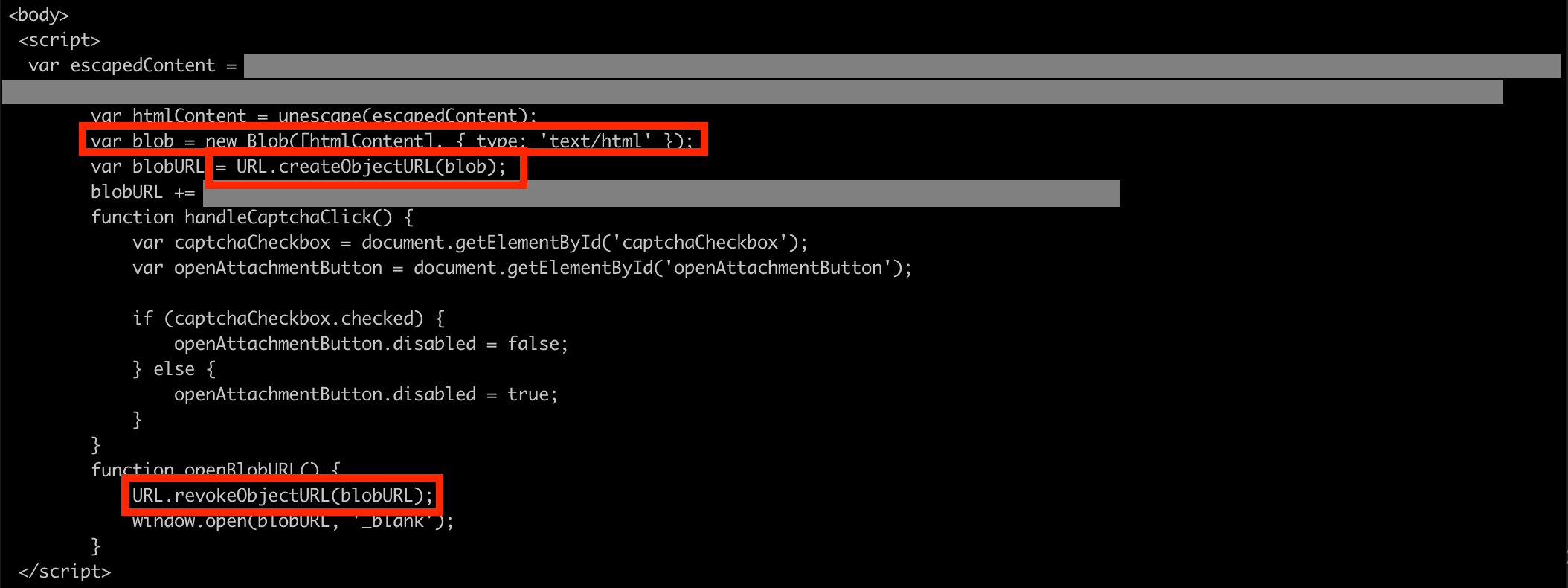
HTML smuggling pattern: There are plenty of articles written that analyze the different malware deployed through HTML smuggling. In this article, we will instead do a large-scale analysis of JavaScript and HTML functionality that we frequently see in HTML smuggling but rarely in legitimate business communication. The analysis was performed on data collected from 14 large organizations, within varying industries and sectors. The data was collected over a period of 3 months, and during that time, 9617 malicious and 2229 legitimate emails containing HTML attachments with JavaScript were seen. Based on this analysis, we will give some recommendations of simple but effective ways to improve your organization’s protection against HTML smuggling. Note that all the code examples are benign (either created by us or defanged) HTML smuggling attacks commonly use default JavaScript and HTML functionality to obfuscate parts of the HTML file. This could for example be to obfuscate inlined data, the domain/IP of a malicious server or to hide JavaScript logic. Here are the 4 most common JavaScript and HTML functionalities that we’ve seen being used in HTML smuggling attacks. Decoding functions is one of the most commonly seen obfuscation techniques, where atob(), decodeURIComponent(), decodeURI(), unescape() and String.fromCharCode() are topping the list. Here’s a dummy example containing pseudo-code, illustrating how a URL can be obfuscated and decoded using multiple nested atob(): To hide HTML content, it’s common for malicious actors to obfuscate parts or the complete content by converting it into a single <script> tag containing one large encoded document.write(...), reconstructing the HTML file: will result in: Data object creation is a technique used to make a HTML file construct and download a malicious payload to the victim's computer. File, Blob, createObjectURL and revokeObjectURL are often used together to construct a file. This is a technique that has been seen used to smuggle e.g. Qakbot. In this dummy example, the variable Here's a real-world example of data object creation being used in HTML smuggling: Another way used to inline and obfuscate HTML/JavaScript in HTML smuggling is Data URLs. In benign HTML, Data URLs are commonly used to inline e.g. images: But as these URLs allow the user to define the MIME-type, they are also seen used by malicious actors to smuggle JavaScript, either directly by using the MIME-type In this example, we’ve Base64-encoded the following SVG-image, which contains JavaScript: The Base64-encoded SVG-image is then inlined using an <embed>-tag in a HTML file. When this HTML file is opened, the SVG-image will be decoded and the JavaScript will be executed. Here's a real-world example of a Data URL being used to obfuscate javascript logic:
We know that the previously described JavaScript and HTML features are used in HTML smuggling, but is it also seen in legitimate business communication? This is an important question, because if we can conclude that it is not frequently used in legitimate communication, then it’s possible to simply remove the entire attack surface by blocking all HTML files that use those features, thus drastically reduce exposure to HTML smuggling. To start of, we wanted to get an understanding for how common it is for legitimate business communication to contain HTML attachments with JavaScript. As it turns out, 81% of the emails containing HTML files with JavaScript are malicious, while only 19% are legitimate. That we’re seeing legitimate communication using JavaScript is reasonable, as it can be used in e.g. Based on this information, it’s clear that straight-out blocking HTML attachments with JavaScript is not an option for most organizations, as it would impact important business communication. But what about the previously mentioned JavaScript and HTML functionalities? Are they also used in legitimate communication? Our analysis above shows that Obviously, each organization must analyze their own legitimate email flow to understand how HTML attachments with JavaScript are used. Our large-scale analysis shows that for a lot of organizations, simply not allowing the use of
JavaScript and HTML functionality seen in HTML smuggling
Decoding functions
a = atob(
  atob('YUhSMGNITTZMeTkwYUdseg==') +
  atob('WTI5dWRHRnBibk50WVd4cA==') +
  atob('WTJsdmRYTmpiMjUwWlc1MA==') +
  atob('TWpRMk9ERXdMbU52YlE9PQ==')
)

a == "https://thiscontainsmaliciouscontent246810.com" // True
Document write
<script language="javascript">
  document.write(
    unescape( '%3C%68%74%6D%6C%3E%0A%20%20%20%20%3C%62%6F%64%79%3E%0A%20%20%20%20%20%20%20%20%3C%68%31%3E%48%45%4C%4C%4F%3C%2F%68%31%3E%0A%20%20%20%20%3C%2F%62%6F%64%79%3E%0A%3C%2F%68%74%6D%6C%3E')
  )
</script>
<html>
  <body>
    <h1>HELLO</h1>
  </body>
</html>
Data object creation
dummyMaliciousData contains Base64-encoded bytes of a dummy ZIP-file. When the HTML file is opened by the victim, the inlined Base64-encoded ZIP-file gets reverted into the original ZIP-file and a download-popup is triggered.<script>
function getFileObject(b64EncodedString) {
var decodedRawData = atob(b64EncodedString);
var decodedByteArray = new Uint8Array(decodedRawData.length);
for (var i = 0; i < decodedRawData.length; i++) {
decodedByteArray[i] = decodedRawData.charCodeAt(i);
}
return new File([decodedByteArray], "attachment.zip", {type: "application/zip"});
}
function revokeDownload(file) {
var url = URL.createObjectURL(file);
window.location.assign(url);
}
var dummyMaliciousData = "UEsDBBQACAAIACGHzlYAAAAAAAAAAB0AAAASACAAZGFuZ2Vyb3VzX2ZpbGUudHh0VVQNAAc/1Ylk2dWJZNfViWR1eAsAAQT1AQAABBQAAAAL8fAMVnD29wtx9PQLVnBx9HN3DfIPBbFCHLkAUEsHCH68+0EcAAAAHQAAAFBLAQIUAxQACAAIACGHzlZ+vPtBHAAAAB0AAAASACAAAAAAAAAAAACkgQAAAABkYW5nZXJvdXNfZmlsZS50eHRVVA0ABz/ViWTZ1Ylk19WJZHV4CwABBPUBAAAEFAAAAFBLBQYAAAAAAQABAGAAAAB8AAAAAAA=";
var fileObject = getFileObject(dummyMaliciousData);
revokeDownload(fileObject);
</script>
Data URLs
<html>
  <body>
  <img src="data:image/png;base64,iVBORw0KGgoAAAANSUhEUgAAACAAAAAgCAYAAABzenr0AAAACXBIWXMAAAsTAAALEwEAmpwYAAABJklEQVR4nO2UsU7CUBSGv9VEnUwMpiRubvIi8A7uOHVhtJvMvoHKoCxsMMjAzu4LQEhM1AhhRK8hOU1umpbS9vaw9E/O8t+cc77bc26hUqVkmT3iF5gDT0CDAwAYKzaAf0gAI9F1DZCmI+AW+LNyAhQBQo0jXyLQBghcj8NkBGgl7ISvBXCx43VcawBsVQOawB3wZi3mIyUBXKact6XGrAyAG+BljycajsEpQFOKvheskyvxFPiwzp+BB2ANHGeokyqTkNjZ8RtuaQBMxV8A9xGAoQbAUvztEp4APWAi3pcGwEr8c8s7E+9HA2Agvmd5dfFeNQCugG+ZtyfNR8BnBKo0AKRpX/ZhKTePa14aQBYVBvDIr7oLgGFOiHA3CgMYR1GpEnH6Byo1yVbu7rhFAAAAAElFTkSuQmCC">
  </body>
</html>
application/javascript or through a SVG-image (image/svg+xml), which supports JavaScript execution.<svg xmlns="http://www.w3.org/2000/svg" xmlns:xlink="http://www.w3.org/1999/xlink">
<script>
// REPLACE WITH MALICIOUS JAVASCRIPT
</script>
</svg><html>
<body>
<embed src="data:image/svg+xml;base64,PHN2ZyB4bWxucz0iaHR0cDovL3d3dy53My5vcmcvMjAwMC9zdmciIHhtbG5zOnhsaW5rPSJodHRwOi8vd3d3LnczLm9yZy8xOTk5L3hsaW5rIj4KICAgIDxzY3JpcHQ+CiAgICAgICAgLy8gUkVQTEFDRSBXSVRIIE1BTElDSU9VUyBKQVZBU0NSSVBUCiAgICA8L3NjcmlwdD4KPC9zdmc+">
</body>
</html>

HTML smuggling vs. legitimate business communication
Out of all emails containing a HTML-attachment with JavaScript, what percentage was malicious vs. legitimate
Malicious
Legitimate
81%
19%
Forms, Website dumps of e.g. products, ERP-generated documents (invoices, reports etc), Encrypted emails (e.g. Incamail) and benign code sent as an email attachment.
Malicious HTML smuggling
Legitimate business communication
Decoding functions
26%
2%
Document write
39%
0.3%
Data object creation
0.5%
1.7%
Data URLs
11%
4%
Decoding functions and Document write are mostly used in HTML smuggling (26% and 39%), while they’re rarely seen in legitimate communication (2% and 0.3%).Data URLs are seen used in both HTML smuggling (11%) and legitimate communication (4%). Data object creation is much less common and also more frequently used in legitimate communication.Recommendation to improve your organization’s protection against HTML smuggling
Decoding functions and Document write could significantly reduce the exposure to HTML smuggling, with a minimal impact on legitimate communication.