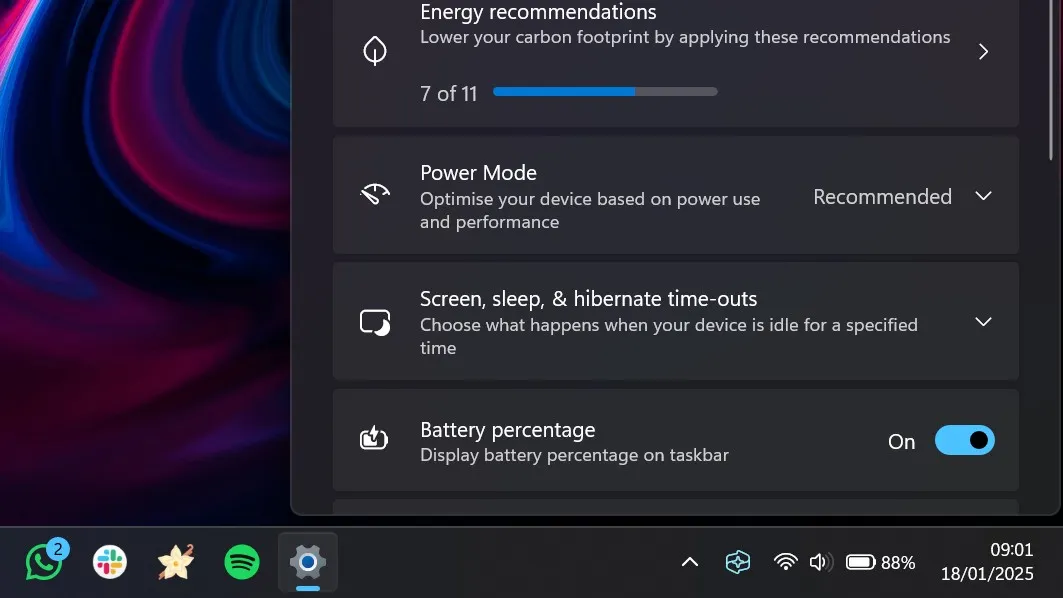
It's a feature that pretty much all other modern operating systems have, and it's now finally coming to Windows 11. Spotted in the latest Windows 11 preview build, Microsoft is adding an option to show your PCs battery percentage next to the battery icon in the System Tray on the Taskbar.
Pretty much all operating systems on the market today include an option to show your battery percentage on screen, with the only outlier being Windows. You can enable such feature on macOS, iPadOS, iOS, and most Android devices. The only modern operating system that doesn't currently offer this functionality is Windows, so it's good to see Microsoft finally addressing this.
Being able to show your battery percent on the Taskbar is great for quickly figuring out your battery life, without needing to guess how much you have left in the tank based off the ambiguous icon displayed in the Taskbar. You've always been able to see your battery percent by hovering over the battery icon, so this option will just remove that extra step.
Currently, the new battery percentage option is hidden in the latest Windows 11 Dev Channel build. It was first discovered by Windows sleuth @phantomofearth on X, and has even provided instructions on how to enable it if you're running the build. You need a third-party tool called ViveTool to flip the hidden feature ID:
To get the option, run vivetool /enable /id:48822452 and reboot. If that doesn't work, enable 48433719. This will also enable some other changes to the battery icon that were present in earlier CUs: https://t.co/HNig2kUQ55January 18, 2025
With this now hidden in the latest preview build, it only a matter of time before it gets officially enabled for Insiders to test. The company is also working on some other changes to the battery icon in the Taskbar, including giving it a new orange color when battery saver is enabled.
It's always good to see Microsoft focusing on these small quality of life features and changes in Windows 11, as it really makes the overall experience feel more polished.