For those of you who forgot the gameplay of hangman: the challenge is to guess a word. You can pick a letter, one at a time. If the word contains the chosen letter, it is indicated at the correct location(s). If the word does not contain the letter, you loose a turn and get one step closer to hanging. To win, you need to find the word before you die hanging. In our version, we will let the user choose a dictionary (English or Dutch), and we keep track of users and his high-scores.
4.1. A first custom widget
We first discuss the HangmanWidget, which is a custom widget that encapsulates the game itself: it allows a user to play one or more games. It does not deal with updating the user’s score, instead it indicates score update events to other widget(s) using a signal.
The following screenshot shows how the widget is composed of different widgets:
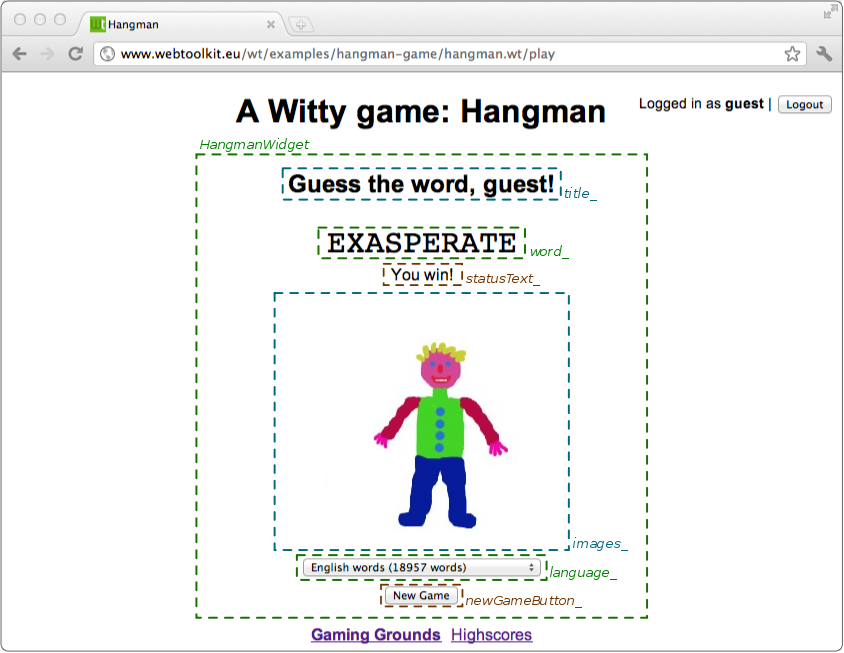
The HangmanWidget combines widgets provided by the library
(WText: title_, statusText_,
WComboBox: language_), and three
custom widgets (WordWidget: word_, ImagesWidget: images_ and
LettersWidget: letters). As you will see, custom widgets are
instantiated and used in pretty much the same way as library widgets,
including reacting to events generated by these widgets.
With this information, we can implement the class definition.
HangmanWidget declaration
class HangmanWidget : public Wt::WContainerWidget
{
public:
    HangmanWidget(const std::string &name);

    Wt::Signal<int>& scoreUpdated() { return scoreUpdated_; }

private:
    Wt::WText        *title_;
    WordWidget       *word_;
    ImagesWidget     *images_;
    LettersWidget    *letters_;
    Wt::WText        *statusText_;
    Wt::WComboBox    *language_;
    Wt::WPushButton  *newGameButton_;

    Wt::Signal<int>   scoreUpdated_;

    std::string       name_;
    int               badGuesses_;

    void registerGuess(char c);
    void newGame();
};
This widget is implemented as a specialized
WContainerWidget. This is a
typical choice for widgets that combine other widgets in a simple
layout. We declare one public method scoreUpdated(), which provides access
to the signal that will be used to indicate changes to the user’s
score as he plays through games. A
Signal<int> used here, indicates that an
integer value will be passed as event information, and will reflect
the score update itself (positive when the user wins, or negative when
the user loses). Any function or object method with a signature
compatible with the signal may be connected to it and will receive the
score update.
The private section of the class declaration holds references to the contained widgets, and state related to the game.
The constructor implementation shows some resemblance with the hello world application we discussed earlier: widgets are instantiated and event signals are bound. There are some novelties however.
HangmanWidget constructor
using namespace Wt;

HangmanWidget::HangmanWidget(const std::string &name)
    : name_(name),
      badGuesses_(0)
{
    setContentAlignment(AlignmentFlag::Center);

    title_ = addNew<WText>(tr("hangman.readyToPlay"));

    word_ = addNew<WordWidget>();
    statusText_ = addNew<WText>();
    images_ = addNew<ImagesWidget>(MaxGuesses);

    letters_ = addNew<LettersWidget>();
    letters_->letterPushed().connect(this, &HangmanWidget::registerGuess);

    language_ = addNew<WComboBox>();
    language_->addItem(tr("hangman.englishWords").arg(18957));
    language_->addItem(tr("hangman.dutchWords").arg(1688));

    addNew<WBreak>();

    newGameButton_ = addNew<WPushButton>(tr("hangman.newGame"));
    newGameButton_->clicked().connect(this, &HangmanWidget::newGame);

    letters_->hide();
}
Wt supports different techniques to layout widgets that may be combined (see also the sidebar): namely widgets with CSS layout, HTML templates with CSS layout, or layout managers. Here, we chose to use the first approach, since we simply want to put everything vertically centered.
The LetterWidget exposes a signal that indicates that the user chose
a letter. We connect a private method registerGuess() to it, which
implements the game logic of dealing with a letter pick. Notice how
this event handling for a custom widget is no different from reacting
to an event from a push button, making that widget as much reusable as
the widgets provided by the library (assuming you are in the business
of hangman games).
To support internationalization, we use the tr("key") function
(which is actually a method of WWidget
which calls
WString::tr(),
to look up a (localized) string given a key. This happens in a message
resource bundle (see
WMessageResourceBundle),
which contains locale-specific values for these strings. Values may be
substituted in these strings using a "{x}" notation and the
arg()
method of WString, as used for example for the
"hangman.englishWords" string which has as actual English value
"English words (\{1\} words)".
For completeness, we show below the rest of the HangmanWidget implementation.
HangmanWidget: game logic implementation
void HangmanWidget::newGame()
{
    WString title(tr("hangman.guessTheWord"));
    title_->setText(title.arg(name_));

    language_->hide();
    newGameButton_->hide();

    Dictionary dictionary = (Dictionary) language_->currentIndex();
    word_->init(RandomWord(dictionary));
    letters_->reset();
    badGuesses_ = 0;
    images_->showImage(badGuesses_);
    statusText_->setText("");
}

void HangmanWidget::registerGuess(char c)
{
    if (badGuesses_ < MaxGuesses) {
      bool correct = word_->guess(c);

      if (!correct) {
          ++badGuesses_;
          images_->showImage(badGuesses_);
      }
    }

    if (badGuesses_ == MaxGuesses) {
        WString status = tr("hangman.youHang");
        statusText_->setText(status.arg(word_->word()));

        letters_->hide();
        language_->show();
        newGameButton_->show();

        scoreUpdated_.emit(-10);
    } else if (word_->won()) {
        statusText_->setText(tr("hangman.youWin"));
        images_->showImage(ImagesWidget::HURRAY);

        letters_->hide();
        language_->show();
        newGameButton_->show();

        scoreUpdated_.emit(20 - badGuesses_);
    }
}
4.2. Unleashing (some of) Wt’s power
Until now, we introduced a rather unique way to develop web
applications, and a powerful building block for reuse: the
widget. The next widget in the Hangman game that we will tackle, is
one we’ve already used just earlier: the ImagesWidget. It
illustrates an important aspect of the library that highly enhances
the user experience for users with an Ajax session (which should be
the majority of your users). One of the most appealing features of
popular web applications like Google’s Gmail and Google Maps is an
excellent response time. Google may have spent quite some effort in
developing client-side JavaScript and Ajax code to achieve this. With
little effort – indeed almost automatically – you can get similar
responsiveness using Wt, and indeed the library will be using similar
techniques to achieve this. A nice bonus of using Wt is that the
application will still function correctly when Ajax or JavaScript
support is not available. The ImagesWidget class, which we’ll
discuss next, contains some of these techniques. Hidden widgets are
prefetched by the browser, ready to be displayed when
show()
is called.
ImagesWidget: implementation
ImagesWidget::ImagesWidget(int maxGuesses)
{
    for (int i = 0; i <= maxGuesses; ++i) {
        std::string fname = "icons/hangman";
        fname += std::to_string(i) + ".jpg";
        WImage *theImage = addNew<WImage>(fname);
        images_.push_back(theImage);

        theImage->hide();
    }

    WImage *hurray = addNew<WImage>("icons/hangmanhurray.jpg");
    hurray->hide();
    images_.push_back(hurray);

    image_ = 0;
    showImage(maxGuesses);
}

void ImagesWidget::showImage(int index)
{
    image(image_)->hide();
    image_ = index;
    image(image_)->show();
}

WImage *ImagesWidget::image(int index) const
{
    return index == HURRAY ? images_.back() : images_[index];
}
In the constructor, we meet one more basic widget from the library:
WImage, which unsurprisingly corresponds
to an image in HTML. The code shows how widgets corresponding to each
state of the hangman example are created and added to our
ImagesWidget, which specializes a WContainerWidget. Each image is
also hidden – we’ll want to show only one at a time, and this is
implemented in the showImage() function.
But why do we create these images only to hide them? A valid alternative could be to simply create the WImage that we want to show and delete the previous, or even better, to simply manipulate the image to point to another URL? The difference has to do with the response time, at least when Ajax is available. The library first renders and transfers information of visible widgets to the web browser. When the visible part of web page is rendered, in the background, the remaining hidden widgets are rendered and inserted in the DOM tree. Web browsers will also preload the images referenced by these hidden widgets. As a consequence, when the user clicks on a letter button and we need to update the hangman image, we simply hide and show the correct image widget, and this no longer requires a new image to be loaded. An alternative implementation would have caused the browser to fetch the new image, making the application appear sluggish. Using hidden widgets is thus a simple and effective way to preload contents in the browser and improve the responsiveness of your application. Important to remember is that these hidden widgets do not compromise the application load time, since visible widgets are transferred first. A clear win-win situation thus.
4.3. Internal paths
Ignoring the login screen for a moment, then our application has two
main windows: the game itself and the high scores. These are
implemented by the HangmanWidget which we discussed earlier, and a
HighscoreWidget (which we will not be discussing in this
tutorial). Both are contained by a
WStackedWidget, which is a
container widget which shows only one of its contained children at a
time (and which, in all honesty we should have used to implement the
ImagesWidget, were it not that we wanted to explain a bit more about
preloading of contents). Unless we do something about it, a Wt
application presents itself as a single URL, and is thus a single-page
web application. This is not necessarily bad, but, it may be better to
support multiple URLs which allows a user to navigate within your
application, bookmark particular “pages”, or put links to them. It
also is instrumental to unlock the contents within your application to
search engine robots. Wt provides you with a way to manage URLs which
are subpaths of the application URL, which are called “internal
paths”.
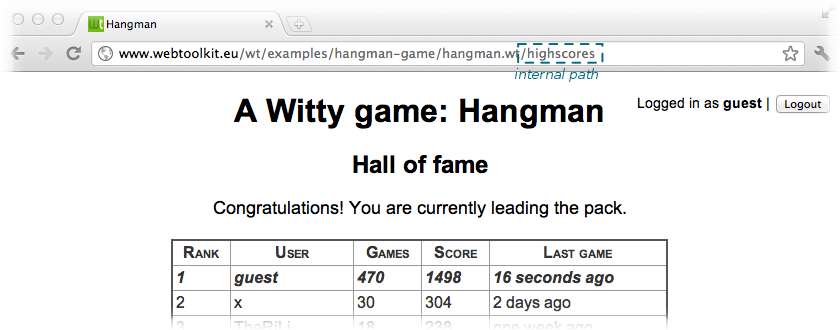
Internal paths are best used in combination with anchors (provided by
another basic widget, WAnchor). An
anchor can point either to external URLs, to private application
resources (which we’ll not discuss
but are useful for dynamic non-HTML contents), or to internal
paths. When such an anchor is activated, this changes the
application’s URL (as one could expect), and the
internalPathChanged()
signal is emitted. Thus, to respond to an internal path change, we
connect an event handler to this signal.
This is the implementation of the method that we connected:
HangmanGame: internal path handling
void HangmanGame::handleInternalPath(const std::string &internalPath)
{
    if (session_.login().loggedIn()) {
        if (internalPath == "/play")
            showGame();
        else if (internalPath == "/highscores")
            showHighScores();
        else
            WApplication::instance()->setInternalPath("/play",  true);
    }
}
Thus, if a user is logged in, we show the game when the path is
"/play" and the high scores when the path is "/highscores". For
good form, we redirect all other paths to "/play" (which will end up
triggering the same function again). In our game we make
authentication (whether a user is currently logged in) orthogonal to
the internal paths: in this way a user may arrive at the game using
any internal path, log in, and automatically proceed with the function
for that internal path. You may imagine that this is what you want in
a complex application: the login function should not prevent the user
from directly going to a certain “page” within your application.
We did not discuss other parts of the hangman game example
application: namely how user scores are stored, and the authentication
system. Database access is implemented using a Wt::Dbo, which is a
C++ ORM that comes with Wt. This tutorial
introduces the database layer. The authentication module, Wt::Auth,
as used in this example, is introduced here.