Mar 25, 2025 • By Daniel & Michael
Mar 25, 2025
•
By Daniel & Michael
DeepSeek's new V3-0324 model rivals OpenAI's GPT-4.5 and Claude 3.7 Sonnet in performance across multiple benchmarks. You can now run the model using Unsloth's Dynamic GGUFs on your favorite inference frameworks. Read our Guide for detailed instructions + examples on running DeepSeek-V3-0324 locally. To ensure the best tradeoff between accuracy and size, we do not to quantize all layers, but selectively quantize e.g. the MoE layers to lower bit, and leave attention and other layers in 4 or 6bit. Use our Unsloth Dynamic DeepSeek-V3-0324 GGUFs here
Heptagon Comparison test
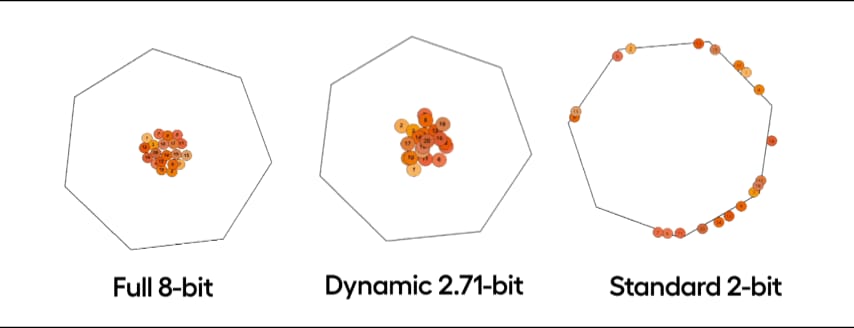
We test our dynamic quants via the Heptagon puzzle, which tests the model on creating a basic physics engine to simulate balls rotating in a moving enclosed heptagon shape. Our 2.71bit produces near identical results to full fp8 while standard 3-bit fails to produce functional code or follow prompt instructions. We saw similar results with our Flappy Bird game tests where dynamic 2.71-bit executed the code nearly identical to full 8-bit, whilst standard 2-bit and 3-bit fails. We found that non-reasoning models have a larger hit when quantized, so, for best results while running, use the 2.71-bit Dynamic version and have at least 160GB+ combined VRAM + RAM. You could run the model without a GPU but try not to unless you're using Apple's unified memory. For 1.78bit, you can get 140 tokens/s for throughput and 14 tokens/s for single user inference on 2x H100 80GB GPUs with all layers offloaded. A 24GB GPU like RTX 4090 should be able to get at least 1 to 3 tokens/s.
🐋How to Run DeepSeek-V3-0324
We provide 5 dynamic quantized versions. The first 2 uses an importance matrix to calibrate the quantization process (imatrix via llama.cpp) to allow lower bit representations. The last 3 use standard quantization with no calibration done. This time we also added 3.5 + 4.5-bit dynamic quants.
🦙 How to Run V3 in llama.cpp:
- Obtain the latest llama.cpp on GitHub here. You can follow the build instructions below as well. Change -DGGML_CUDA=ON to -DGGML_CUDA=OFF if you don't have a GPU or just want CPU inference.
apt-get update apt-get install pciutils build-essential cmake curl libcurl4-openssl-dev -y git clone https://github.com/ggml-org/llama.cpp cmake llama.cpp -B llama.cpp/build \ -DBUILD_SHARED_LIBS=OFF -DGGML_CUDA=ON -DLLAMA_CURL=ON cmake --build llama.cpp/build --config Release -j --clean-first --target llama-quantize llama-cli llama-gguf-split cp llama.cpp/build/bin/llama-* llama.cpp- Download the model via (after installing pip install huggingface_hub hf_transfer ). You can choose UD-IQ1_S(dynamic 1.58bit quant) or other quantized versions (like Q4_K_M).
# !pip install huggingface_hub hf_transfer import os os.environ["HF_HUB_ENABLE_HF_TRANSFER"] = "1" from huggingface_hub import snapshot_download snapshot_download( repo_id = "unsloth/DeepSeek-V3-0324-GGUF", local_dir = "unsloth/DeepSeek-V3-0324-GGUF", allow_patterns = ["*UD-Q2_K_XL*"], # Dynamic 2.7bit (230GB) Use "*UD-IQ_S*" for Dynamic 1.78bit (151GB) )- Run Unsloth's Flappy Bird test as described in our 1.58bit Dynamic Quant for DeepSeek R1.
- Edit --threads 32 for the number of CPU threads, --ctx-size 16384 for context length, --n-gpu-layers 2 for GPU offloading on how many layers. Try adjusting it if your GPU goes out of memory. Also remove it if you have CPU only inference.
./llama.cpp/llama-cli \ --model unsloth/DeepSeek-V3-0324-GGUF/UD-Q2_K_XL/DeepSeek-V3-0324-UD-Q2_K_XL-00001-of-00006.gguf \ --cache-type-k q8_0 \ --threads 20 \ --n-gpu-layers 2 \ -no-cnv \ --prio 3 \ --temp 0.3 \ --min_p 0.01 \ --ctx-size 4096 \ --seed 3407 \ --prompt "<|User|>Create a Flappy Bird game in Python. You must include these things:\n1. You must use pygame.\n2. The background color should be randomly chosen and is a light shade. Start with a light blue color.\n3. Pressing SPACE multiple times will accelerate the bird.\n4. The bird's shape should be randomly chosen as a square, circle or triangle. The color should be randomly chosen as a dark color.\n5. Place on the bottom some land colored as dark brown or yellow chosen randomly.\n6. Make a score shown on the top right side. Increment if you pass pipes and don't hit them.\n7. Make randomly spaced pipes with enough space. Color them randomly as dark green or light brown or a dark gray shade.\n8. When you lose, show the best score. Make the text inside the screen. Pressing q or Esc will quit the game. Restarting is pressing SPACE again.\nThe final game should be inside a markdown section in Python. Check your code for errors and fix them before the final markdown section.<|Assistant|>"- We also test our dynamic quants via the Heptagon test which tests the model on creating a basic physics engine to simulate balls rotating in a moving enclosed heptagon shape.
./llama.cpp/llama-cli \
    --model unsloth/DeepSeek-V3-0324-GGUF/UD-Q2_K_XL/DeepSeek-V3-0324-UD-Q2_K_XL-00001-of-00006.gguf \
    --cache-type-k q8_0 \
    --threads 20 \
    --n-gpu-layers 2 \
    -no-cnv \
    --prio 3 \
    --temp 0.3 \
    --min_p 0.01 \
    --ctx-size 4096 \
    --seed 3407 \
    --prompt "<|User|>Write a Python program that shows 20 balls bouncing inside a spinning heptagon:\n- All balls have the same radius.\n- All balls have a number on it from 1 to 20.\n- All balls drop from the heptagon center when starting.\n- Colors are: #f8b862, #f6ad49, #f39800, #f08300, #ec6d51, #ee7948, #ed6d3d, #ec6800, #ec6800, #ee7800, #eb6238, #ea5506, #ea5506, #eb6101, #e49e61, #e45e32, #e17b34, #dd7a56, #db8449, #d66a35\n- The balls should be affected by gravity and friction, and they must bounce off the rotating walls realistically. There should also be collisions between balls.\n- The material of all the balls determines that their impact bounce height will not exceed the radius of the heptagon, but higher than ball radius.\n- All balls rotate with friction, the numbers on the ball can be used to indicate the spin of the ball.\n- The heptagon is spinning around its center, and the speed of spinning is 360 degrees per 5 seconds.\n- The heptagon size should be large enough to contain all the balls.\n- Do not use the pygame library; implement collision detection algorithms and collision response etc. by yourself. The following Python libraries are allowed: tkinter, math, numpy, dataclasses, typing, sys.\n- All codes should be put in a single Python file.<|Assistant|>"
🛠️ Extra info:
A GPU will not necessary. You could run the model without a GPU but try not to unless you're using Apple's unified memory. Try to have at least 180GB of combined VRAM + RAM to get ~2 tokens/s otherwise the model will be too slow to run. Although the are the minimum requirement is a CPU with 60GB RAM, performance will be very slow. Expect less than 1.5 tokens per second on minimal hardware - but that doesn't mean you can't experiment! Using a GPU will make your inference faster.
💕 Thank you!
As usual, a huge thank you to everyone for using & sharing Unsloth - we really appreciate it. 🙏 As always, be sure to join our Reddit page and Discord server for help or just to show your support! You can also follow us on Twitter and newsletter.
Thank you for reading!
Daniel & Michael Han 🦥
25 Mar 2025