
TLDR: When building a remote MCP server, you will most likely need an OIDC layer between clients (Claude, Cursor etc) and your upstream IdP (Auth0, Clerk etc). We have created a ready to use solution for you that's vendor neutral: use any IdP you want.
MCP servers need real authentication and authorization. Tokens must be issued, refreshed, validated, and tied to upstream identity. Clients need to log in, obtain credentials, and call your MCP server securely. It's complicated, especially if you aren't a security engineer. You shouldn't roll your own auth, but if the existing tools don't work out of the box, what do you do?
Implementing a remote hosted MCP server requires implementing MCP Authorization Protocol which is based on OAuth 2.1 (DRAFT). In theory, this is straightforward because modern applications either implement OAuth specs themselves or use an OAuth-compliant IdP like Auth0 or Clerk. That's what I thought at least, but ran into major issues the moment I started implementing.
That's why we built and open-sourced the mcp-oidc-provider: a minimal, production-ready OIDC provider designed specifically for MCP workflows.
MCP Protocol Requires Discovery (OAuth or OIDC)
The MCP Specification (2025-11-25) explicitly requires OAuth. Per the spec:
- A protected MCP server acts as an OAuth 2.1 resource server, capable of accepting and responding to protected resource requests using access tokens.
- An MCP client acts as an OAuth 2.1 client, making protected resource requests on behalf of a resource owner.
And for Discovery, MCP authorization servers (which is what this package is used for) MUST provide at least one of the discovery mechanisms:
- OAuth 2.0 Authorization Server Metadata (RFC8414)
- OpenID Connect Discovery 1.0
OpenID Connect Discovery (OIDC) is technically optional, but you'll need some identity layer to fully secure your MCP server. OAuth provides a way for the client to ask your MCP authorization server to go and get authorization from the resource owner. It doesn't verify the identity of the client. OIDC handles the identity part for you.
Without OIDC, you have to build custom integrations per provider to verify
identity. You'll need to implement your own token refresh logic including
offline_access support. Redirect URIs like mcp://cursor/auth or
claude://oauth/callback will get rejected by standard IdPs, since they are not
web URLs and require explicit OIDC support. And your MCP server wouldn't work
with desktop clients like Claude and Cursor.
Just use OIDC. It's way easier.
You need both OAuth and OIDC
In this package, I have implemented both the OAuth and OIDC discovery endpoints,
the reason? MCP clients MUST support trying both discovery mechanisms, but not
all the clients conform to the specification. So for example, if they only
implemented OpenID Connect Discovery 1.0 for discovery, mcp-oidc-provider will
still work.
Our well known OIDC endpoint is out-of-the-box from OpenID. For maximum compatibility, we implement the OAuth endpoints:
- https://mcp.storage.dev/.well-known/oauth-authorization-server
- https://mcp.storage.dev/.well-known/oauth-protected-resource/
Dynamic Client Registration: Upstream IdPs alone don't solve this
Per the MCP Specification: "Authorization servers and MCP clients SHOULD support the OAuth 2.0 Dynamic Client Registration Protocol (RFC7591)." On its face, it seems like this should make IdPs that support dynamic client registration work for most MCP clients.
When using Auth0 for the first iteration, we enabled dynamic client registration. It technically worked for authorizing MCP clients without any middleware, but each ephemeral client showed up in the list of long-lived third party apps. So for each user, we had a third party app for each session. As you can imagine, our fingers hurt from clicking through that list. And issuing scoped access tokens per client was a pain.
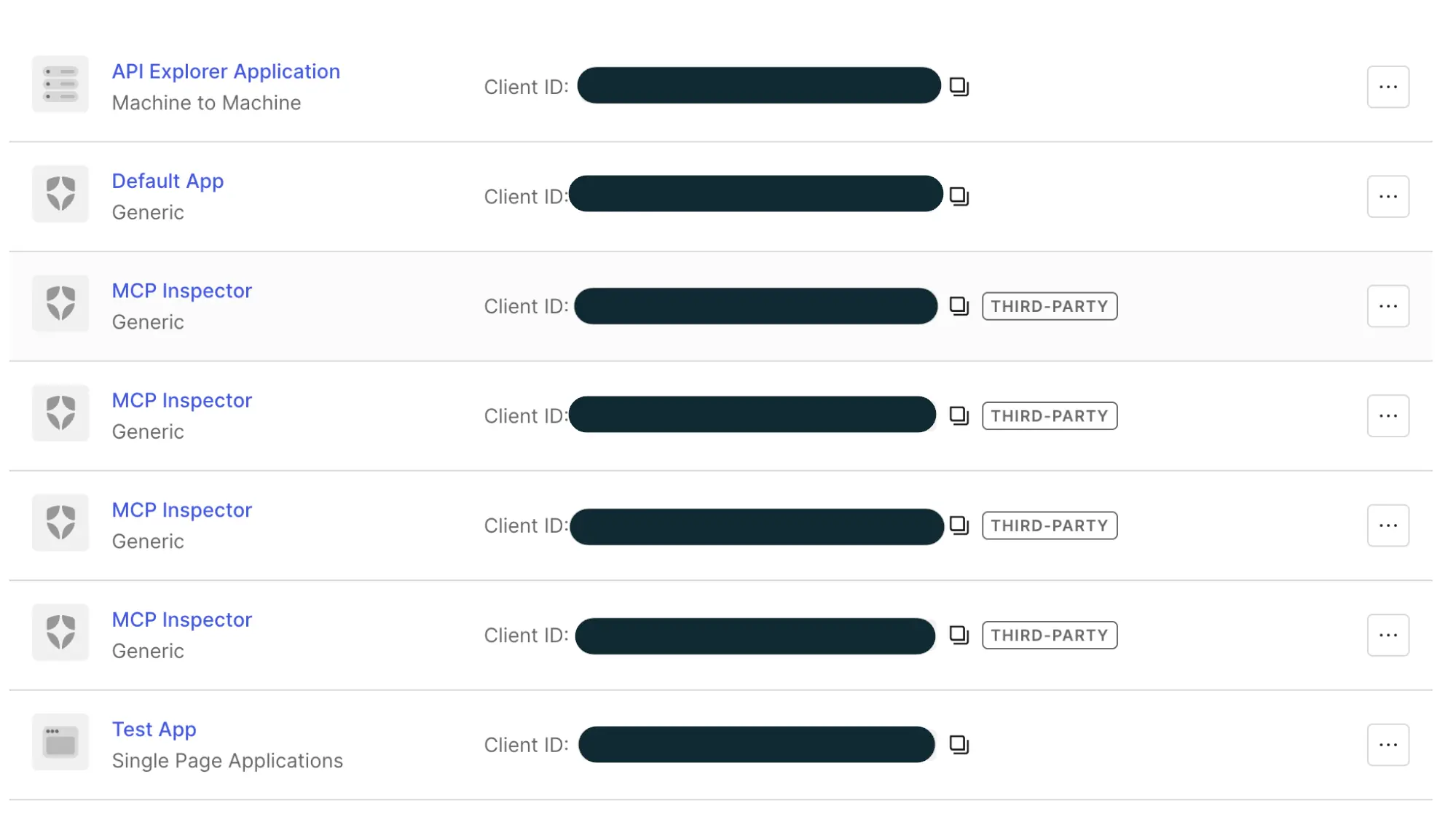
We needed one third party app in the list, a small OIDC provider, that could control access for all the MCP clients. Lest our eyes bleed from the dashboard bloat.
Introducing mcp-oidc-provider
A minimal, opinionated OIDC provider built specifically for MCP servers that you can use with any OIDC compatible IdP.
Using this, you get exactly what the specification requires:
- A protected MCP server acts as an OAuth 2.1 resource server, capable of accepting and responding to protected resource requests using access tokens.
- A client that acts as an OAuth 2.1 client, making protected resource requests on behalf of a resource owner.
Additionally, we store sessions, tokens, grants, and OIDC adapter data in a key value store. You can use Tigris as your KV store like we did, or any other store that is supported by Keyv, like Redis or Postgres.
Usage: Referencing the Standalone Implementation
The best place to start is the standalone OIDC provider. Use it if you already have your MCP implementation in a different stack than Express, or if you want to run Auth as a standalone microservice you can scale independently. You can have your MCP server use NextJS or another framework, then you can run this server standalone and proxy the Auth requests to this server.
The standalone provider has:
- bootstrap server code
- provider configuration
- upstream IdP wiring
- routing setup
- storage adapter example
- complete OIDC endpoint registration
And, optionally, you can use Tigris as your key-value store.
Once you have the repo cloned and your dependencies installed with
npm install, setup your environment:
cat .env
# configure your upstream IdP
UPSTREAM_ISSUER=https://YOUR_DOMAIN.auth0.com
UPSTREAM_CLIENT_ID=...
UPSTREAM_CLIENT_SECRET=...
UPSTREAM_REDIRECT_URI=http://localhost:3000/callback

#configure your own provider issuer
OIDC_ISSUER=http://localhost:4000
OIDC_PORT=4000

# Tigris (for @tigrisdata/keyv-tigris)
TIGRIS_STORAGE_ACCESS_KEY_ID=tid_xxxxx
TIGRIS_STORAGE_SECRET_ACCESS_KEY=tsec_yyyyy
TIGRIS_STORAGE_BUCKET=my-kv-bucket
MCP clients will fetch
[http://localhost:4000/.well-known/openid-configuration](http://localhost:4000/.well-known/openid-configuration)
to discover which endpoints they need for the OAuth flow.
You run the provider with npm start. You can run it alongside your MCP server,
and the Auth requests will proxy to it.
Point your clients to your OIDC issuer. For example, Claude Desktop expects:
{
  "auth": {
    "issuer": "http://localhost:4000"
  }
}
And when you get a request to your MCP server, you verify the tokens using JWKS:
import { createRemoteJWKSet, jwtVerify } from "jose";

const jwks = createRemoteJWKSet(new URL("http://localhost:4000/jwks"));

const { payload } = await jwtVerify(accessToken, jwks);

console.log("User:", payload.sub);
That's it. You have a fully functioning OIDC-based MCP auth flow.
Usage: Integrated Mode (Express + MCP)
This is the easiest way to get started if you're using Node / Express for your MCP server. In integrated mode, you run one Express app that:
- Hosts the OIDC provider (/.well-known/openid-configuration, /authorize, /token, /jwks, /register)
- Hosts your MCP endpoint
- Handles all OAuth + OIDC flows end-to-end
- Exposes a single BASE_URL you point your MCP client at
First, install your dependencies:
npm install mcp-oidc-provider keyv openid-client express
You'll also want typescript, ts-node, etc. if you're using TS, but that's
standard.
Second, generate your JWKS signing keys once. You'll save them in your .env.
npx mcp-oidc-provider --pretty
Copy the printed JSON and store it in a secure location (e.g. secret manager), then inject it via the JWKS environment variable.
For dev, you can skip this (keys are auto-generated, but tokens break on restart, after the token cache expires).
Third, configure your environment:
cat .env
BASE_URL=http://localhost:3000          # Where this combined server runs
OIDC_CLIENT_ID=your-idp-client-id
OIDC_CLIENT_SECRET=your-idp-client-secret
SESSION_SECRET=some-long-random-string
JWKS=...                                # JSON from `npx mcp-oidc-provider --pretty` (prod only)
BASE_URL must be the public URL clients will use for:
- OIDC discovery (/.well-known/openid-configuration)
- OAuth callback (/oauth/callback)
- MCP endpoint (whatever route you choose under this server)
Now you can add the OIDC provider to your sever by using the function
setupMcpExpress(). It will:
- Mount the OIDC provider routes onto the Express app
- Wire up MCP auth (bearer auth + token verification)
- Return:
- app: the configured Express instance
handleMcpRequest(handler): a helper to register your MCP request handler with auth + user already resolved
Here's an example of how to use it:
import express from "express";
import { Keyv } from "keyv";
import { setupMcpExpress } from "mcp-oidc-provider/mcp";
import { OidcClient } from "mcp-oidc-provider/oidc";
import type { JWKS } from "mcp-oidc-provider";

async function main() {
  // Parse JWKS from environment variable (required for production)
  const jwks: JWKS | undefined = process.env.JWKS
    ? JSON.parse(process.env.JWKS)
    : undefined;

  if (!process.env.BASE_URL) {
    throw new Error("BASE_URL is required");
  }
  if (!process.env.OIDC_CLIENT_ID || !process.env.OIDC_CLIENT_SECRET) {
    throw new Error("OIDC_CLIENT_ID and OIDC_CLIENT_SECRET are required");
  }
  if (!process.env.SESSION_SECRET) {
    throw new Error("SESSION_SECRET is required");
  }

  // Configure upstream IdP client (Auth0 / Clerk / Okta / Keycloak / etc.)
  const idpClient = new OidcClient({
    issuer: "https://your-tenant.auth0.com", // or any OIDC issuer
    clientId: process.env.OIDC_CLIENT_ID,
    clientSecret: process.env.OIDC_CLIENT_SECRET,
    redirectUri: `${process.env.BASE_URL}/oauth/callback`,
    // optional: scopes, additionalAuthParams, extractCustomData, ...
  });

  // Persistent store for sessions, grants, tokens, etc.
  const store = new Keyv(); // or new Keyv({ store: new KeyvTigris() }) in prod

  // This sets up:
  // - OIDC endpoints (/authorize, /token, /jwks, /.well-known/openid-configuration, /register)
  // - MCP auth wiring
  // - A helper to register your MCP handler
  const { app, handleMcpRequest } = setupMcpExpress({
    idpClient,
    store,
    baseUrl: process.env.BASE_URL,
    secret: process.env.SESSION_SECRET,
    jwks,
  });

  // Your MCP handler: runs after a valid, authenticated request.
  // req.user contains the authenticated user (from upstream IdP claims).
  handleMcpRequest(async (req, res) => {
    console.log("Authenticated user:", req.user);

    // Implement your MCP server here:
    // - parse req.body for MCP messages
    // - respond with MCP-compliant responses

    // For now, return a simple MCP-style stub:
    res.json({
      jsonrpc: "2.0",
      id: req.body?.id ?? null,
      result: {
        message: "Hello from integrated MCP + OIDC server!",
        user: req.user,
      },
    });
  });

  const port = Number(process.env.PORT ?? 3000);
  app.listen(port, () => {
    console.log(`MCP + OIDC server listening on ${port}`);
    console.log(`Base URL: ${process.env.BASE_URL}`);
  });
}

main().catch((err) => {
  console.error(err);
  process.exit(1);
});
Finally, you can point your clients to your MCP server. For example, Claude Desktop expects:
{
  "auth": {
    "issuer": "http://localhost:4000"
  }
}
The actual config shape depends on the client, but the pattern is:
- Issuer = BASE_URL of this server
- MCP endpoint = whatever MCP route your integrated server exposes (the one wired by handleMcpRequest)
Once configured:
- The client hits
/.well-known/openid-configurationon your server. - It performs
/.authorize→/tokenflows against your server. - Your server federates login to upstream IdP via OidcClient.
- Your server issues MCP-specific tokens and validates them for /mcp requests.
- Your handler gets authenticated requests with req.user populated.
That's it. Your server is now an integrated OIDC issuer, token endpoint, and MCP endpoint.
Using the mcp-oidc-provider in production
We use it for our hosted MCP server, and we trust it enough to offer it to you. It uses standard libraries for authentication and authorization. And, it doesn't lock you into any vendor.
We've made mcp-oidc-provider as generic as possible, including adding additional
configurations to enhance what your IdP offers. For example, we allow you to
configure your JWKS caching settings just in case your IdP doesn't provide
Cache-Control: max-age headers. This can be helpful if your company has
security requirements around key rotation events that require expiring keys
after a certain period of time.
If you're using jose.createRemoteJWKSet, the way you typically control
expiration is by passing options when creating the JWKS fetcher:
import { createRemoteJWKSet } from "jose";

const jwksUri = new URL("https://your-issuer/.well-known/jwks.json");

const jwks = createRemoteJWKSet(jwksUri, {
  /** Minimum time between JWKS fetches (milliseconds). Default: 30 seconds */
  cooldownDuration: 30_000,
  /** Maximum age of cached JWKS (milliseconds). Default: 10 minutes */
  cacheMaxAge: 600_000,
});
If you need any other customization, reach out! We'd love to make mcp-oidc-provider fit into your MCP server.
Try mcp-oidc-provider
Ready to build a secure MCP server? Get started with mcp-oidc-provider and use any OIDC-compatible IdP you want.