Setting up an event
Keep entry free for people who show up while refundable deposits give attendees a reason to attend.
- For
- Planning attendance, staffing, stock and sponsor expectations for a free event
- Takes
- 8 minutes
Before you start
- You have an owner or admin role for the event. Freefund is available on every plan.
- Your event has a start time and end time.
- You have chosen a deposit large enough to put off people who RSVP without meaning to come.
-
Choose the Freefund RSVP template
When you create a new event, choose the Freefund RSVP template. It adds the setting for all admission tickets and a refundable-deposit ticket type.
Note: For an existing event, open Tickets and use the same settings below. The template leaves the confirmation beside the Freefund setting for you to tick.

Create event, template gallery. -
Turn on Freefund for all admission tickets
In Tickets, turn on Make every admission ticket free when the attendee checks in. All admission ticket prices then work as refundable deposits.
Note: The event-wide rule applies to all admission ticket types and takes priority over individual ticket settings. Table types keep their existing payment settings.
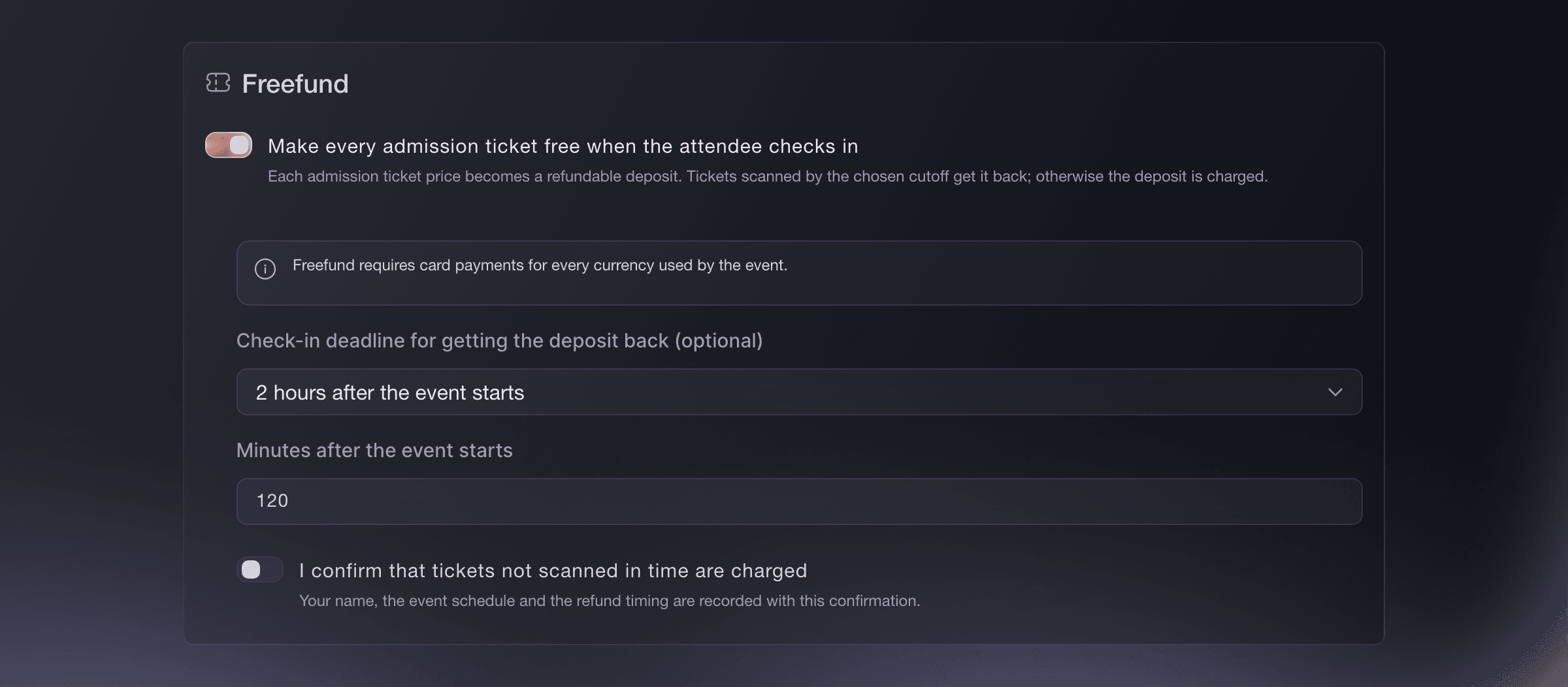
Tickets, Freefund. -
Turn on Freefund for one ticket type instead
Optional: For one admission ticket type, turn on Make this ticket free when the attendee checks in in that ticket editor instead.
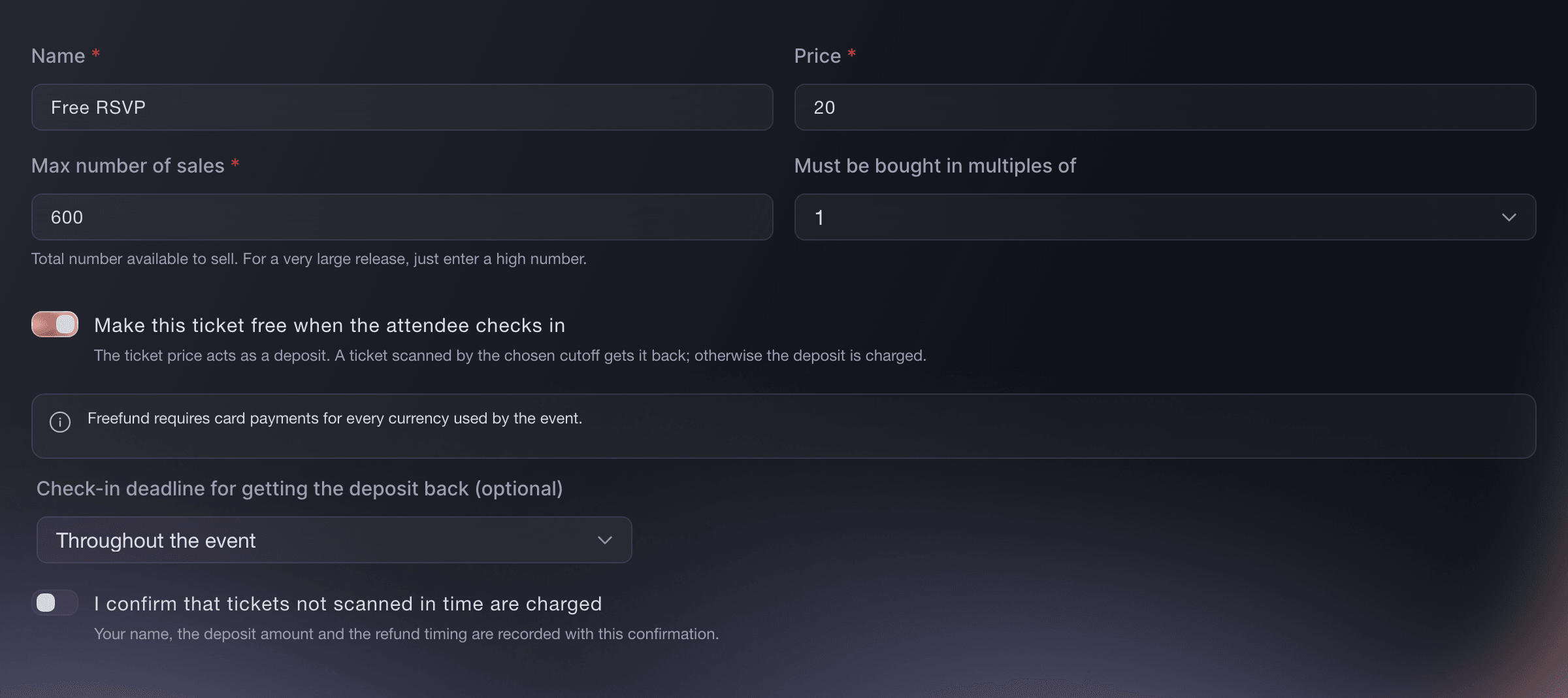
Tickets, ticket editor. -
Enter the deposit
Enter the ticket price as the deposit amount.
Note: The deposit must be greater than zero. An order close to the event may use one card hold for all its Freefund deposits, and each ticket is still judged on its own check-in.
-
Explain it on the event page
Describe the tickets on your event page as free entry for attendees who check in, backed by a refundable deposit.
-
Choose the check-in cutoff
Choose Throughout the event, a relative option such as 2 hours after the event starts, 4 hours before the event ends, or a specific time. New choices stay within the event start and end times.
Note: A ticket scanned after the cutoff is admitted but does not earn its deposit back. If you shorten the event and the current cutoff no longer fits, it stays visible so you can choose a new one.
-
Confirm that unscanned tickets are charged
For the event-wide rule, turn on I confirm that tickets not scanned in time are charged, then save. The ticket editor shows the same confirmation for that ticket type.
Note: Ticket Fairy records who confirmed the rule, when, and the refund timing; a ticket-level rule also records its deposit. You confirm again when you change where Freefund applies or change the cutoff.


Deposits released at the door
Door staff scan each ticket as its attendee arrives. Ticket Fairy tells an eligible attendee straight away that the deposit is on its way back to their card. If three tickets from an order of five are scanned by the cutoff, those three deposits are returned and the other two are charged. If every ticket covered by a card hold is scanned in time, Ticket Fairy releases the full hold; otherwise, it charges only the deposits for tickets that were not scanned in time.
Note: The card issuer can take several days to update a released hold or show an issued refund.
-
Check or change the rule later
Open Tickets again to check, change or turn off Freefund.
Note: Each purchase keeps the Freefund terms agreed at checkout, so a saved change applies to later purchases and does not change existing orders. Confirm again after you change where Freefund applies or change the cutoff.
Or have it done for you
Fai can turn Freefund on for all admission tickets or one admission ticket type, set a relative or specific cutoff and show exactly what is charged before asking you to approve it. The approval records your confirmation.
In your dashboard, with Fai
Set up Freefund for my event. Ask if it should cover all admission tickets or one admission ticket type, what deposit to use and when check-in stops earning it back
Questions you might have
- Does Ticket Fairy charge every deposit at checkout?
- When a card hold can stay in place until the event ends, Ticket Fairy holds one amount for the order and later charges only the deposit amounts for tickets not scanned by the cutoff. Otherwise, Ticket Fairy charges the card at checkout and issues each eligible ticket refund when staff scan it.
- What happens when every ticket in the order is scanned?
- Ticket Fairy releases the full card hold. If the card was charged at checkout, Ticket Fairy refunds every eligible scanned ticket in full.
- When is a deposit kept or collected?
- For an order with a card hold, Ticket Fairy charges only the deposit amounts for tickets not scanned by the cutoff after the event ends. When the card was charged at checkout, the payment stays charged and Ticket Fairy refunds each eligible scanned ticket.
Related guides
- More ways to use Ticket Fairy
- Run ticketing for a nightclub
- Approve orders before buyers receive tickets
- Create a reusable event template
- Run an A/B test for your event
- Make your event invitation-only
- Password-protect your event
- Sell tickets by personal invitation
- Unlock hidden tickets with an access code
- Schedule when your event goes live
- Postpone or reschedule an event
- Set up ticketing for a multi-day festival
- Sell parking, camping and merchandise with your tickets
- Group your tickets into categories
- Issue reusable event passes to crew and artists
- Create an event
- Set up ticket types
- Duplicate an event
- Run a recurring event series
- Sell VIP tables and bottle service through your promoters
- Run ticketing for a club night
- Start from the freefund rsvp template
- Every Ticket Fairy guide
Do this on your own event
Create your account, build your event and follow the steps in your own dashboard. You do not need to book a sales call.