Emmabuntüs is just another Linux distro, but it's one guided by ethics more than tech. With exceptional help, documentation, beginner-friendly tooling and accessibility, there's a lot to like.
The Emmabuntüs collective is a group of mostly French Linux folks which has been maintaining its eponymous Linux distribution for about 15 years. The collective has multiple goals, including helping several non-profit groups – notably, Emmaus International – an international humanitarian charity, headquartered in France, which aids people around the world. The goals of the Emmabuntüs collective are to help the reuse of old computers, to help beginners and newcomers to discover Linux, and to reduce electronic waste by keeping old computers useful.
The project got its name because the first four releases of Emmabuntüs, between 2012 and 2015, were based on Ubuntu – but since Emmabuntüs DE in 2016, the collective switched their basis to Debian. It released the latest Emmabuntüs DE 6 a month ago, and this one is especially focused on improving accessibility. It has built-in screenreaders for both the graphical desktop and text console, available from the first boot; it supports both Braille displays and Braille embossers (the equivalent of printers); it has additional sound effects and tools for visually impaired users, for example to notify of USB device insertion, tools to make it easier to eject and safely remove media, as well as options to do things like simplify the screen display.
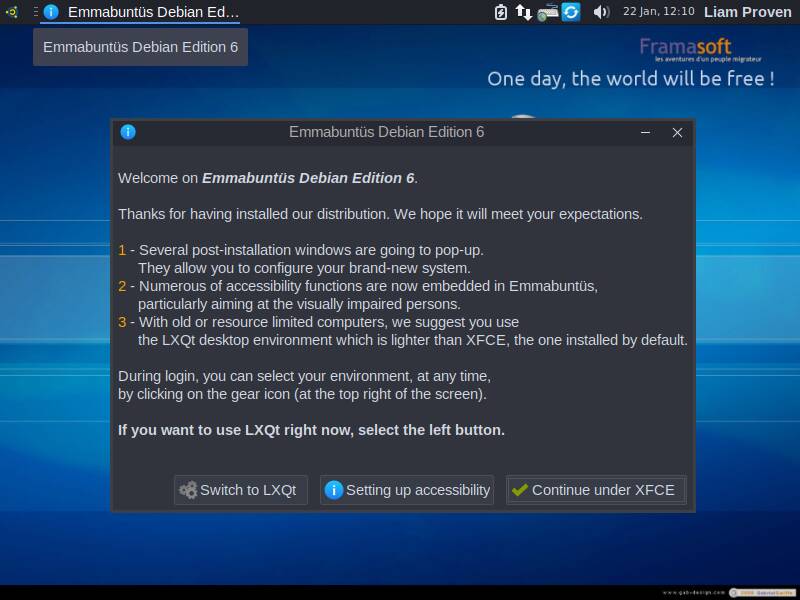
Emmabuntüs defaults to Xfce 4.20 but post-install you can opt for LXQt if you prefer - click to enlarge
There's plenty here for people who are not disabled yet too. The underlying tech behind Emmabuntüs is nothing exceptional: it's Debian 13 "Trixie," with a live medium that also lets you boot straight into the Debian installer. It uses the latest Xfce 4.20 as the default desktop, set up with a single top panel and a snazzy looking Cairo dock along the bottom of the screen. Saying that, you can choose LXQt 2.1 instead if you want something even lighter weight. It installs onto a plain old ext4 partition with a separate swap partition – there's no fancy immutable setup or anything here. It has Flatpak support pre-installed, but no Flatpaks by default.
What impressed us is the range of extra tools provided: the distro goes above and beyond almost any other Debian derivative we've seen in how much it tries to help out newbie users. There's a good range of solid tools in most categories installed: updated ESR versions of Firefox and Thunderbird, and Firefox is preconfigured with UBlock Origin for ad-blocking. There's also Falkon for anything that might not work right in Firefox, plus other handy tools like Pidgin, Jitsi for free video-conferencing, file-download and file-sharing apps and more. Most of the dock is filled with groups of apps: Communications, Office, Audio, Video, Photo, Burn, Interests, Education, Utilities, Maintenance, Accessibility, and Help.
There's a lot of documentation pre-installed locally – as part of the design, you don't need an internet connection to install the OS and get up and running. There are tools like BleachBit for cleaning up your files, DWService for free remote-control, Reg FOSS desk favorite Ventoy for making boot media, and so on.
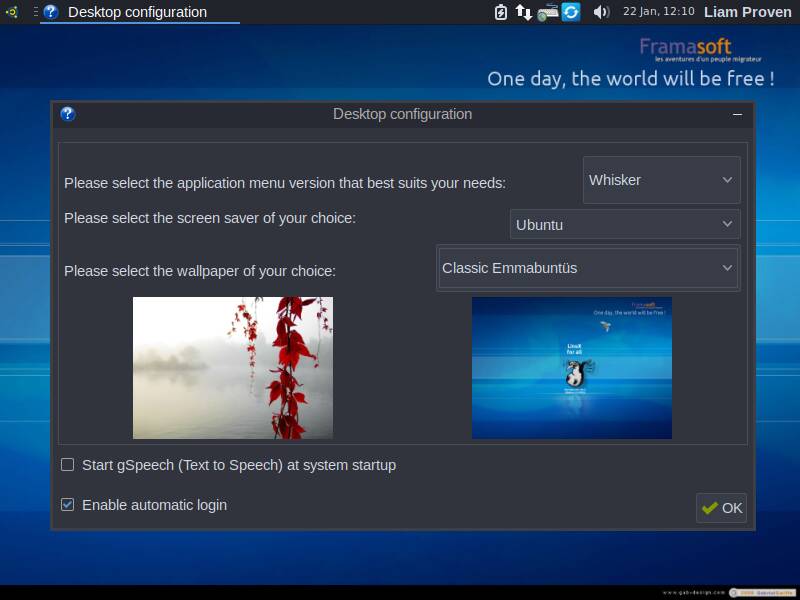
It also helps newbies tweak their desktop settings, too: it goes out of its way to hold your hand - click to enlarge
This isn't unprecedented, but it's good to see. Some other distros, such as the Arch-based Garuda Linux or the systemd-optional MX Linux come with lots of custom tools to help fairly clued-up Linux users who might not yet be masters of the command line – applets to install packages and drivers, optionally switch to performance-tuned kernels, and other handy advanced features. This is all good stuff, and there's a place for that.
Emmabuntüs does that, but is aimed more at new Linux users and migrants from Windows. It has lots of pre-installed apps, and as well as the GNOME Software store (and the GNOME graphical Packages manager). There are installers for handy non-FOSS extras such as Microsoft's free fonts and some additional audio and video codecs. As well as this, the app-launch menu is populated with entries for handy extras such as Steam and WINE. The apps are not pre-installed, but clicking these links offers to do that for you.
After installation, a series of welcome screens appears, which helps a new user customize their setup: switching desktop environments, adding languages and, interestingly, removing unused or unwanted ones, which is handy. Other screens help choose the desktop layout, wallpaper, screensaver, type of Xfce launch menu, and so on. Every one has a check-box at the bottom, asking if the tools should run next time – so once you've made your choices, you can stop seeing them. Finally, there's a Welcome screen, with links to documentation, tools, settings, a user forum, instructional videos, and more.
Both web browsers default to the French Lilo search engine which donates its income to various environmental and humanitarian causes.
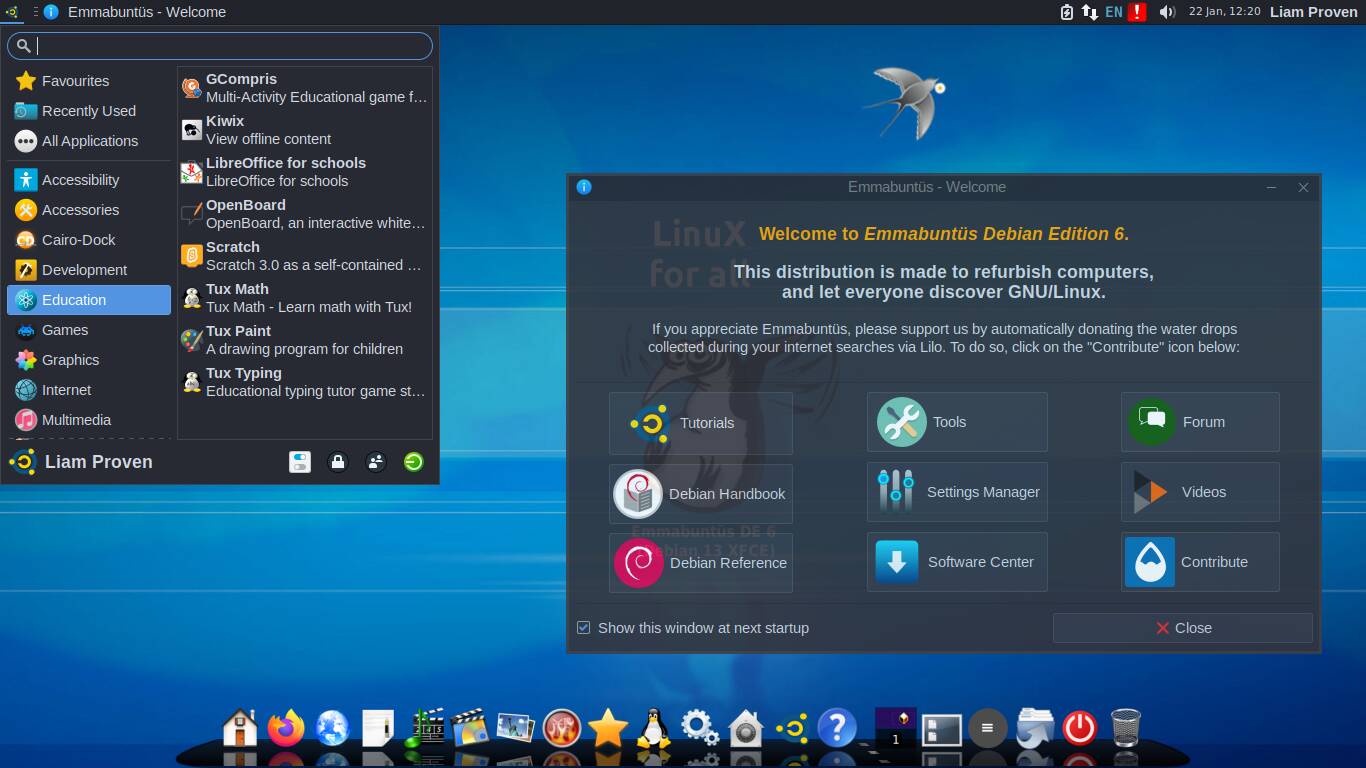
When the post-install setup is finally done, there's a friendy welcome screen and lots of app choices - click to enlarge
There's a lot to like here. It's not perfect, and it doesn't look as smooth and polished as, say, Ubuntu, or even Linux Mint or Zorin OS. The screen is a little cluttered, and because it cheerfully picks up tools from multiple different desktops, not all the applications have a uniform look and feel – fonts and themes and things don't all match. Very occasionally, some things do pop up in French.
- Debian's FreedomBox Blend promises an easier home cloud
- MX Linux 25.1 brings back switchable init systems
- Remember VoidLink, the cloud-targeting Linux malware? An AI agent wrote it
- Just the Browser claims to tame the bloat without forking
But in our experience, introducing Windows users to Linux for the first time, most people are so impressed by the variety of free stuff they can have that they're not too bothered about whether it looks very polished or not. For people more bothered about how shiny it looks, there are more polished distros out there, such as the very pretty AnduinOS, based on Ubuntu but stripped out and heavily customized.
If you want lots of useful apps pre-installed, then the paid-for Zorin OS Pro comes with tens of gigabytes of the leading Linux flagship apps, all in Flatpak form.
Emmabuntüs is not a super-lightweight distro. It took about 11 GB of disk space and idles at about ¾ GB of RAM. It's much lighter than any modern GNOME or KDE Plasma desktop, though, and there is a lot to like: a rich collection of apps here, plenty of help to get you started, build confidence, and set you on the way to expert status. All this, and excellent accessibility too. ®