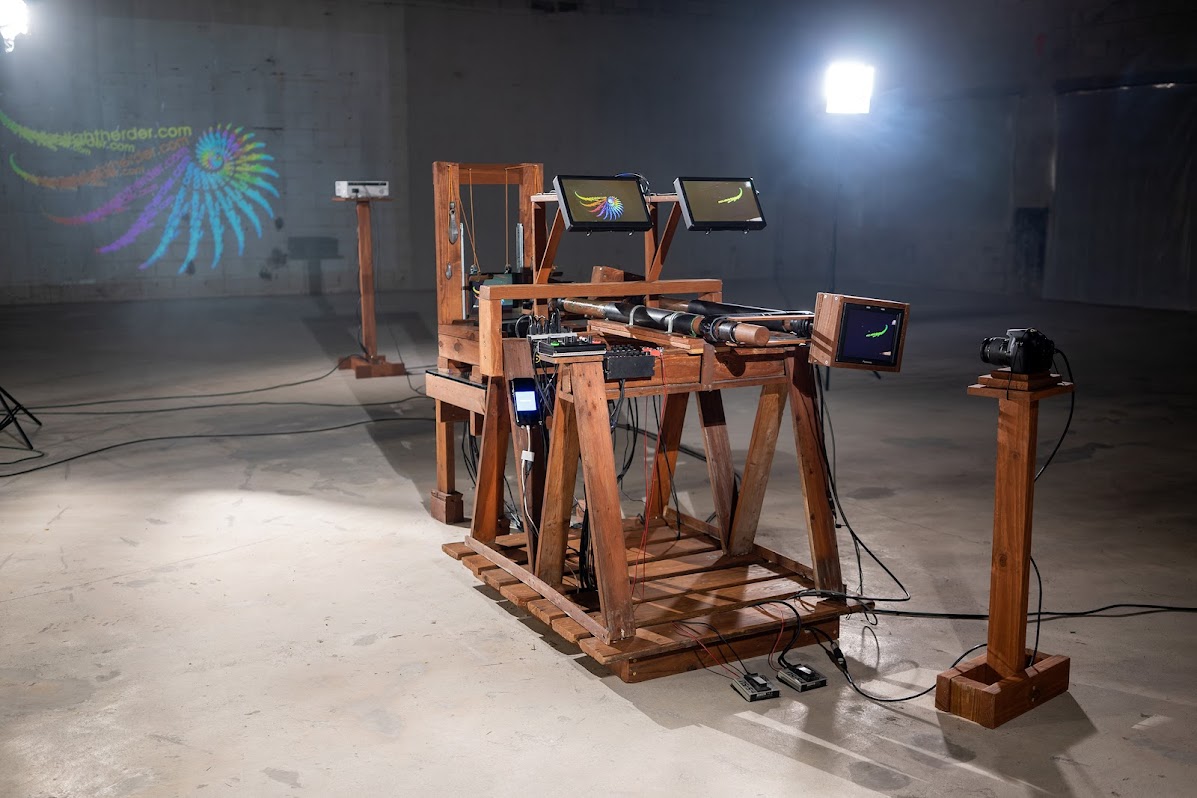
The Light Herder Device is now 4K with analog hue/saturation/brightness/contrast knobs controlling five 4K screens!
The operator at the helm of the Device plays god with light and recursion, using high resolution analog video feedback fractals to create spirals
within spirals, loops within loops, galaxies, cell structures, strands of DNA, trees, insects, tentacled primordial creatures, and classic fractal images.
When the camera sees itself, a universe is born.
See the 4K Device in Hackaday and CDM, and the HD Device in Make Magazine, Boingboing, Hackaday, again in Make Magazine, Boingboing and Hackaday, on Kottke and Slaschcam, watch an artist's interpretation, read a review by Rich Walkling, and read an in-depth analysis by Armaan Ahmed.
"It really is quite tangled...very impressive. Lots of wonderful fern-like stuff, also some jellyfish-like stuff, and the Sierpiński gasket now and then. Congratulations!"
- Email from Douglas Hofstadter
"I like what you are doing very much. It's fascinating. Reminds me of the days when I was playing - experimenting - discovering...
Thank you very much for sharing your amazing work. I wish I could visit and play. If I ever give another presentation on chaos and fractals I will include your fantastic work."
- Email from Heinz-Otto Peitgen
"i have piloted the device a few times, and the extended light herding session at the end of the latest half-hour video is really moving, striking in fact. i can feel the movement, anticipate the changes and flows, and respect the effort it takes to save the patterns from dying.
It's a beast that needs constant attention, until an elusive loop emerges where it feels as if the device has taken over for a time; i LOVE playing along to music and finding that state where the movement and the visuals are part of the same energy.
i don't know how it's built, i barely know how to make things happen, but when things do happen i feel otherworldly."
- Ty Hardaway, Fellow Light Herder
Check out more videos, explanations, and a detailed account of building and testing the Device on my blog: Forward Chronology / Reverse Chronology.
4K Resolution Finally Achieved!
VIEW ON VIMEO / VIEW ON YOUTUBE
Custom 4K screens with analog hue/saturation/brightness/contrast knobs make doing finely controlled analog 4K video feedback possibile for the first time.


No computers were injured (or used) in the creation of these images. This is a segment of a video commissioned by Filip Ivarsson and Carl Fredrik Emrik to be projected on a loop during their MOMENT Exhibition in Copenhagen, Denmark, on April 25, 2025.
MOMENT Exhibition Video Extract
VIEW ON VIMEO / VIEW ON YOUTUBE
Here, live images of fish are used as the secondary input on the Video Feedback Device, influencing the fractals being made. Music: Girls Against Boys, Satin Down St. Vincent, Broken Man (instrumental) VIEW ON VIMEO / VIEW ON YOUTUBE Made
of maple, mahogany, aluminum, three cameras, five HD feedback monitors, three Roland video switchers, two viewing monitors, two
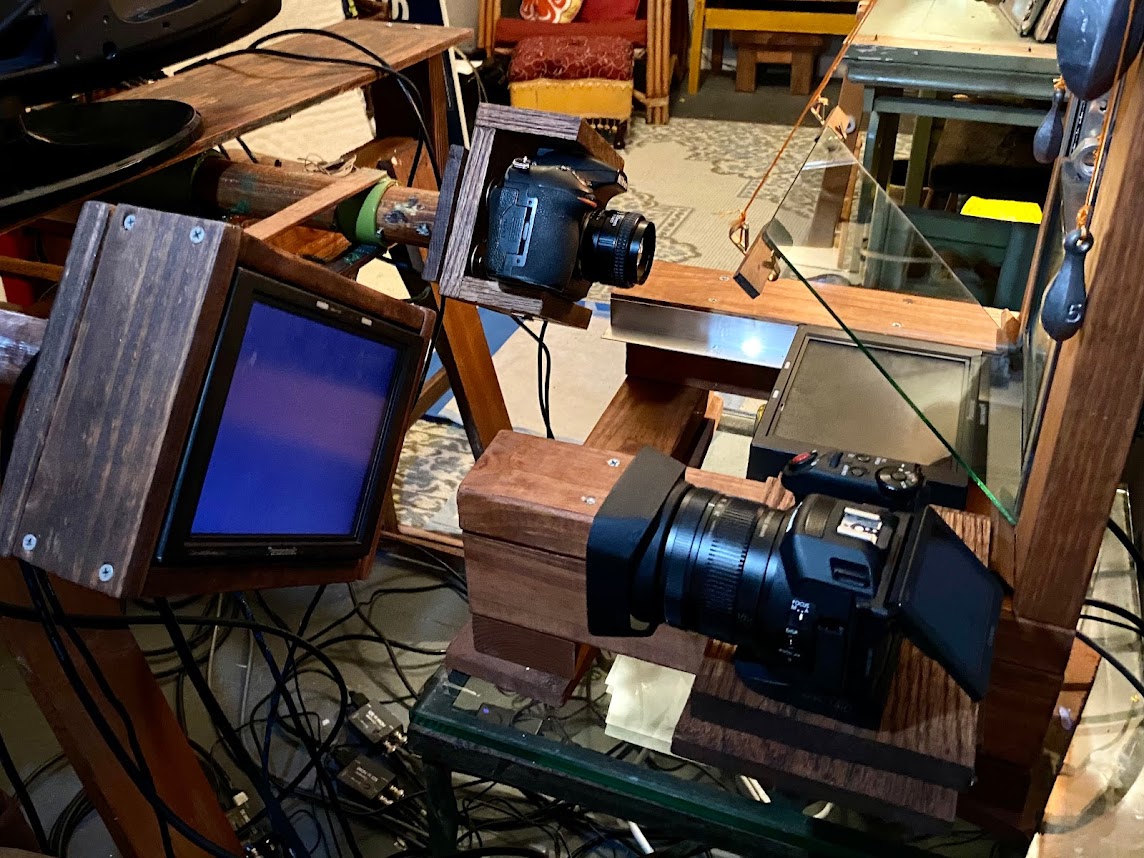
sheets of beam splitter glass, and a video input.The device now has two monitor structures. Both structures have two HD monitors (with analog hue/contrast/saturation knobs) at right angles to one another, with a sheet of beam splitter glass between them. The feedback loop between these two monitors, the reflection in the glass, and the camera, creates fractals in real-time, without a computer. Using the video switchers, the left monitor structure can interact with the right monitor structure, and vise-versa. When they both interact with each other at the same time, yet another feedback loop is created, producing unexpected and strange results. There is also a feedback loop between the third camera and the rotating
HD monitor. The output of this loop can be folded into the other loops. Music:Toyo y Moi, The Medium VIEW ON VIMEO / VIEW ON YOUTUBE In this mode of the Video Feedback Kinetic Sculpture, each of the four monitors effects every other monitor, and the image on the left is composed of the image on the right, while the image on right is composed of the image on the left - all at once (they create each other!) - making fractal sets within fractals sets within fractal sets within fractal sets... Here, there's a feedback loop between two cameras and two monitor structures (each monitor structure has a top and bottom monitor with a sheet of beam splitter glass between the two). There's also a feedback loop between the monitor structures themselves, where the image created on the left structure is sent to the right structure, while the image created on the right structure is sent to the left structure. Music: the Kingdom of Leisure VIEW ON VIMEO / VIEW ON YOUTUBE This was created before the introduction of the very smooth motion of the linear bearings. This video will be replaced with a better one in the coming days... Music: Danielson, Eagle Pink Floyd, Live at Pompeii 1972 VIEW ON VIMEO / VIEW ON YOUTUBE This is the first collaboration with Stephen Malinowski.
In this video I'm using one of Stephen's musical animations
as an input to the
Device. Read about Stephen on his website, and his Wikipedia page. Check out more of his musical animations on his Youtube channel. Music: Bach, Cello Suite No. 1, 1st movement; Performed by Vito
Paternoster High Definition video feedback has been made before, but this is the first tightly controlled feedback using HD monitors with analog hue
/ contrast / brightness / saturation knobs. These knobs are normally
found only on old, Standard Definition TV sets, and are all-important
when making video feedback. VIEW ON VIMEO TV Boy Productions in New York gave me a great deal on some monitors in return for making them a video feedback video with their logo. Thanks again, and here's your video! Forward Chronology Had a great time in Colorado with the folks of LEAF. Check out part of the performance in this video. VIEW ON VIMEO Check out how this was made here. Bach's Musical Offering used as a tribute to VIEW ON VIMEO These images were made with Phase I of the Device. VIEW ON VIMEO This is a brief ontogenetic overview of Phase 3.5. Phase 3 was the addition of the second monitor structure. Now, Phase 3.5 is the addition of the 3rd Roland Switcher, 5th (rotating) Panasonic monitor, and 3rd camera. Fractals made of fractals made of fractals. Plus, the Insanity Loop! See the previous video shoot with the Device here (and an alternate music version here). Thanks to TVBoy Production for a great deal on these monitors. Music: Apache 98 by Rich Walkling VIEW ON VIMEO This is the latest build of the device using t-slot aluminum. Here in Phase III two monitor structures sit side-by-side. The fractal made in the right structure can effect the fractal made in the left structure - and the fractal made in the left structure can effect the fractal made in the right structure, and since they are both effecting each other, another feedback loop is created between the structures. This is madness! This takes things a step beyond the last iteration where I had
one feedback loop influencing another, but the other didn't not
influence the first, and The next step is adding a 5th Panasonic monitor on the end of the 2nd dowel where the 4th Panasonic used to be (and putting the 3rd camera back). If you're not interested in the explainy stuff, skip to 2:58 in this video for images created with this build (or see the video of just these images here). The fractal created on Loop A can influence the fractal created on Loop B, and the Fractal Created on Loop B can influence the fractal created on Loop A. When both of these things are happening at the same time, there is a feedback loop between the two structures, creating even more intricate complexities. When the monitors are on Input 1 they see the camera directly. When they are on Input 2, they see the output of the Roland Switcher. Input 1 on the Switcher is from the camera, and Input 2 is from the output of the other loop (so Switcher A’s Input 2 is the output of Loop B, and Switcher B’s Input 2 is the output of Loop A). An HDMI splitter could have been used instead of converter box C (I used this because I like the slight delay these boxes create, and it’s what I had). See previous schematics here. VIEW ON VIMEO I'd like to thank David Kislin and Federico Baldeschi at JEL Developement for being nice enough to let me use one of their empty properties (free of charge, no less!) to make this video. Music: "3 Birds" by The Dead Weather Forward Chronology VIEW ON VIMEO This is old-school video feedback - no computers were used (or harmed) in the creation of these images. The output of the camera goes to the upper monitor (which the camera sees). The camera's output also goes to the lower monitor (which the camera also sees in the reflection of the sheet of beam-splitter glass between the two monitors). It's this feedback loop, with the two images combined together, that creates emergent behavior and fractals made in real-time - and it's the feedback loop between the Device and the person at its helm that creates organic movements, plants swaying in the the wind, sea creatures, cells, ancient insects and galaxies. This is a little self-contained universe, and the laws of this universe, which dictate what images are created, are the angle of the glass, the height of the
upper monitor and position and rotation of the lower monitor, plus the
position of the control dials of both monitors and rotation and position of the camera. Through iterations, worlds are created. It looks like magic, but it's really mathematics. Credit goes to Peter King for his 1997 diagram that inspired this configuration of the device. Music: Nils Petter Molvær VIEW ON VIMEO Loops within loops within loops: maybe the most complex video feedback ever made? This is one of my favorites, and I've not been able to replicate it. Music: John Lurie, Alone Forward Chronology VIEW ON VIMEO The Canon’s output now not only goes to the original Panasonic Rotating Monitor through the Roland Switcher, but goes to the new Panasonic Rotating Monitor through the Blackmagic Video Converter (to make a signal the Monitor can see). The Phone’s camera sees the 2nd Rotating Monitor and its output goes to Source 2 of the Switcher. When this image is luma keyed (bright areas are included but dark areas are not) over Source 1 (the Canon feedback), fractals are created because the two feedback loops influence each other. This keying of the feedback does electronically what the beam-splitter glass does on the Primary Loop. The Phone can still be used to supply images to do what's done in the previous video. Note: I say the output of the new monitor is from the Canon - meant to say the input is from the Canon. VIEW ON VIMEO Music: Los Guitarlos Dangeroso by The Kingdom of Leisure, live in Sliver Lake, July 26, 2013 The
first layout switched between the main Nikon feedback loop (with the
two monitors and the half-mirrored glass) and the second input (which
started out as just the phone, then the phone’s output on the rotating monitor, then evolved to the Canon feedback loop).Now, the layout itself is fractal in nature,
and the main switcher switches between the Nikon feedback loop (with
the two monitors and the half-mirrored glass) and the Canon loop, which
itself has a switcher that goes between that loop and the phone (or the
phone keyed over that loop). Or, the main switcher keys that second
input Canon loop (with phone involvement) over the main Nikon loop. Yikes. Once
again I’m not sure what all this will look like, and once again I’m
posting before it’s all setup and ready to go, because, ya never know. Notes (mostly for myself) Preview Out of the Roland Switcher is just used to access the Switcher settings. I’m
using the Blackmagic Video Converter in place of a simple HDMI to SDI
converter to see what effect a delay caused by converting from one video
format to another will have on the feedback loop. A 1 in 3 out HDMI splitter could replace the two HDMI splitters in the
Secondary Loop, and an HDMI splitter could be used in the Main Loop. This is an
updated schematic that puts the Phone back on the Rotating Monitor (I
had somehow forgotten about that aspect). Now, the Canon sees the
Phone’s output on the rotating Panasonic Monitor when Switcher 2 is
on Source 2, then when switched to Source 1, the Canon sees its own
output on the Rotating Monitor. Switching quickly between Source 1 and 2 will have the effect of the Phone's image going into a feedback pattern. On the Main Loop, when the Panasonic Monitors are on Input 2, they show the Nikon when Switcher 1 is on Source 1. When Switcher 1 is on Source 2, they show the Secondary Loop. Switching quickly between Source 1 and 2 will have the effect of the Secondary Loop going into a feedback pattern. Forward Chronology VIEW ON VIMEO I thought this looked a bit like the images made from particles smashing into each other in a particle accelerator (and it was at the Edwards particle accelerator at Ohio University, when I was 13 years old, that I learned what a crowned pulley was when someone working there - I don't remember his name - made a couple of them for me for the Music: Jerry Sneede VIEW ON VIMEO In this video, there are two dots keyed over the Canon feedback as the seed for the 2nd loop - as opposed to the one dot in the previous video (below). This creates nautilus-like shapes, and 3D looking wave-like curves. Music: Russill Paul VIEW ON VIMEO Last night I spent hours trying to get something good out of the Device. It was another time of complete frustration where I just wanted to give up. There have been many of these times. I was trying to recreate what I had done the night before, with a spiral on the Canon loop, but I was only getting circle-type shapes. After a few hours I finally looked at that video again, and realized the spiral was created from the reflection of the red record light on the front of the Canon - and, since I wasn’t getting anything good tonight, I hadn’t hit record (this, creating it’s own frustration feedback loop). Tonight, with some rewiring, I keyed a small dot in the lower left corner of the Canon feedback as a seed for the spiral. Watch galaxies being created, matter flowing between them. Music: Pink Floyd VIEW ON VIMEO A brief explanation and a quick test. I knew this setup would create something interesting. I didn't know it would be so beautiful. Inspired by the Phase III idea. Some description here.I've made a version of this video with the Canon loop in the corner (to better understand what's happening) And
then - controlled video feedback between the Canon and the new rotating Panasonic
monitor will be the 2nd input to the switcher. So, instead of the text “Merry Christmas,” for instance, influencing the Nikon feedback, now another entirely different feedback loop will. It’s
kind of hard to picture what this new setup will create, especially
since both loops will be locked together, the Panasonic moving in unison
with the Nikon. This was inspired by the Phase III idea, two devices next to each other, two people working
synchronously. In a couple days the Blackmagic Mini Converter arrives, which will make the Canon work with the Panasonic monitor. Very exciting. Check out the schematic for this new setup here. VIEW ON VIMEO If you're not quite sure what the half-reflective glass does, or what
the rotating monitor is for, this might clear things up a bit. [There's a small inaccuracy at 3:02. Some of the words are rotating, and some are not.] Music: Phish VIEW ON VIMEO Real-time Christmas Fractals with the HD Video Feedback Kinetic Sculpture. Music: Thinking Fellers Union Local 282 with some Stylophone mixed in VIEW ON VIMEO The second iteration of Chrystal's Tree Spirit - the output is now input. Painting by Josh Ford Music: Ravi Shankar VIEW ON VIMEO This is a simulation of a what it might look like if two people were using two Video Feedback Kinetic Sculptures in unison. Originally I thought the next step for the device would be replicating it in 4K. I have an idea for a step before that though - Phase III: Two Video Feedback Kinetic Sculptures next to each other, two people working together to create the final image. Setup 1: Person 2 operates Device 2, and just the upper monitor is used. The feedback created by this device is displayed on the lower monitor of Device 1 (by way of the rotating monitor). This image is mixed into the feedback created by Person 1. This is a pretty straightforward way of combining the two feedback loops. Example: Person 2 has a lot of rotation on the camera and is making a circle. Person 1 has very little rotation on the camera, and a “tail” is created with the circle. As the circle changes, the shape of the creature with the tail changes. Setup 2: The same as Setup 1, except now the output of Device 1 (the combination of images from Person 1 and 2) is displayed on the lower monitor of Device 2 (by way of the rotating monitor). This mixes the images from the two devices back into the image from Device 2. This is a much more complicated way of combining the two loops. Example: This is kind of hard to wrap your mind around: Person 2 makes a circle, which is displayed on the lower monitor of Device 1, which puts a tail on it, but now this circle with a tail is on the lower monitor of Device 2, which means Device 2 is no longer sending a circle to Device 1, it’s sending the circle with a tail in a circle, which means Device 1 is putting a tail on the circle with a tail in a circle, and so on... I did an approximate recreation using just the one device, recording each step, and playing it back on the lower monitor as if it were from Device 2. It’s still a mystery what this would truly look like beyond just the five iterations. I think this feedback of the feedback is somehow something important. Music: Edgard Varèse VIEW ON VIMEO This is an example of how small changes over many iterations can create complex looking emergent behavior. Painting by Josh Ford Music: Zappa, Watermelon in Easter Hay VIEW ON VIMEO Each monitor has two inputs. Here I explain what's what with that. VIEW ON VIMEO This is a quick test using the rotating monitor with text as the 2nd input. This is with just one word - a story, poem or maybe song lyrics is the logical next step. To see the setup, go HERE and to see a demonstration of what the rotating monitor actually does, go HERE, and the beginning of Phase II HERE Music: Maybe She’ll Fly by The Daily Evening VIEW ON VIMEO This is the first test using the input from the synchronized rotating blue screen (and monitor). This allows actual physical objects to be used as the keyed secondary input to influence the fractals being created (here I had some leaves taped to the blue screen), or the monitor can be used instead of the blue screen (starting at 1:14). The Roland switcher/keyer gets Input 2 from the Canon, which is looking at the rotating blue screen/Elecrow monitor. The Elecrow monitor gets its input from the phone. This image is keyed over the switcher’s Input 1. The switcher’s Input 1 is from the Nikon, which is looking at the upper Panasonic monitor, which gets its input from the switcher’s Program Out. The lower Panasonic monitor get its input from the Nikon. This adds movement synchronized to the Nikon to an otherwise static keyed object. Check out the video HERE to see this setup. Music: Rubba On the end of this dowel is a monitor/blue screen that's used to give the static 2nd input motion. Now the Roland switcher/keyer gets Input 2 not from the phone, but from the Canon, which is looking at this new rotating blue screen/monitor (which gets its input from the phone). VIEW ON VIMEO Some experimenting with mixing video I shot with feedback. Music: The Kingdom of Leisure's last show - the The Velvet Lounge, Washington, DC. 1999 VIEW ON VIMEO VIEW ON VIMEO In this video I play around with variations on one camera / monitor setup. This marks the end of Phase I. Stranger things to come in Phase II... This Music is from Bach's Musical Offering as a tribute to Douglas Hofstadter and his book Gödel, Escher, Bach (where I first learned about video feedback).
VIEW ON VIMEO A little VIEW ON VIMEO See better wiring for the viewing monitor here. VIEW ON VIMEO In
this video the upper and lower monitors have different input sources. Instead of both monitors displaying what the Nikon camera sees, now the lower monitor is getting its input from an iPhone camera. Go here to see this setup (I'm using the 50/50 glass for the first time here). How the previous videos were made Originally,
both monitors were showing the same thing - the output of the Nikon camera on
the rod (what I'll call the main camera). This created the feedback loop between that camera and the upper
monitor. The glass between the two monitors is beam splitter glass with a
rating of 50/50 - that is, 50% transmission, 50% reflection Depending on the
rotation of the lower monitor you get different fractal patterns. The
jellyfish-like images are created when How this video is different Instead of the lower monitor having the same input as the upper monitor, it gets its image from an iPhone. Originally, I was going to put something on the lower monitor like a photo of a face, and have that, in effect, be half-dissolved with the
feedback in the upper monitor. The way this works is the main camera would be looping with the
upper monitor, but also see the face from the iPhone in the lower monitor in the reflection of the glass. This image of the face would influence the feedback. When I made the above-mentioned video on my tumblr site explaining the new second input setup, I realized that having
two feedbacks loops would be more interesting than just having the image
of a face on the lo In this video the phone was looking down, through the beam splitter
glass, to the lower monitor, and the phone was close to perpendicular to the lower monitor. I zoomed that camera in so it started
making a feedback pattern. So,
the thing being mixed in with the feedback loop of the main camera and
the upper monitor is another feedback loop - the one between the phone's camera and the lower monitor. Since the phone's camera is
looking down through the beam splitter glass, it is not only feeding
back with the lower monitor, it's influenced by what is on the upper
monitor in the reflection of the glass. And, since the main camera is
also looking through the glass, it is not only feeding back with the upper
monitor, it's influenced by what is happening on the lower monitor in the reflection of the glass - which, of course, is influenced by what is happening on the upper
monitor, and on and on... This creates a feedback loop of a feedback loop. I'm not sure if this is the infinite squared or the infinite to the power of infinity, or what. I just discovered this setup a few days ago, and haven't really been able to wrap my mind around everything that's going on here. I'm not sure if anything like this has been tried before. There
are so many more things I'd like to do with this new two input setup. For instance, it might
be interesting for the second camera to be looking at the entire
structure while I'm using it, or just at the main camera as it moves
around, or even at my hand on the rod as it moves, so the movement of the structure
as it is being used influences the feedback made by the structure. And it occurs to me that pointing the second
camera at the device itself (either the full thing or a piece of it), is also a feedback loop of sorts - not a
direct one like a camera looking at a monitor that is displaying what
the camera sees - but one involving the operator as an intermediate
step. So let's say the second camera is looking at my hand on the rod that moves the main camera. This image is mixed in, and influences the feedback
created by the main camera, which I, as the operator then see, which
influences how I move my hand (and on and on).
Music: Russill Paul
VIEW ON VIMEO This is one of the first tests of the new HD device using both monitors. Here I'm still using 60/40 glass. VIEW ON VIMEO This is a test of the HD device using only the upper monitor. Music: Pink Floyd VIEW ON VIMEO Testing the HD device using only the upper monitor. Music: The Grateful Dead VIEW ON VIMEO First test using only the upper monitor. I've built a third incarnation of the Video Feedback Device. This one uses two High Definition monitors and a Nikon D810 for the camera. Music: Jerry Sneede (this track and this track)
To read the full text, go here. This is old-school analog light herding using a standard definition prototype of the Video Feedback Machine. No computers were used (or harmed) in the creation of these images. This was created with the second incarnation of the (2007) with an old standard definition cathode ray tube TV. I de-soldiered the hue / contrast / saturation / brightness knobs and removed them from the TV's circuit board, then lengthened the wires going to them so I could change the camera's position and rotation while turning these analog knobs (it's all about the knobs). Music: Einstürzende Neubauten This was also made with the second (2007) device. This was made with the first incarnation of the feedback device (2003) with a standard definition CRT TV and a Sony Mavica Music: Russill Paul The second iteration (Hollywood, Florida, 2007) had the television's
Fractals and the Remote Fish Tank
The God Machine II (2023)
Insanity Mode: Fractals Made of Fractals Made of Fractals... (2023)

A Long, Traditional, 1 Camera 1 Monitor Feedback Session
Malinowski Collaboration #1
A Two Year Ontogenetic Review (2022)
The Device has evolved
naturally since its first iteration, as have the images it creates. This video chronicles the evolution of the Device from 2020 to 2022.
TV Boy Fractal Logo Treatment (Feb, 2022)
Reverse Chronology
Lafayette Electronic Arts Festival [LEAF]: April, 2022
Bach Segment
This is a portion of the Exhibition video.
Zemlinsky Segment
This is a portion of the Exhibition video.
Phase 3.5: Fractals Made of Fractals Made of Fractals!

Phase III: A New Complexity (Aug, 2021)
2nd Video Shoot: The God Machine (May, 2021)
Check out an alternate version of this video with different music.
This is the most recent video, shot almost exactly one year to the day from the project’s beginning.
"Starless" by King Crimson
"We Did it Again" by Bongwater
Reverse Chronology
1st Video Shoot: Fractals Come Alive (June, 2020)
Reverse Chronology
Approaching the Infinite: Loops Within Loops (Feb, 2021)
Reverse Chronology
Fractals Made of Fractals: 2nd Rotating Monitor Added!
2nd Roland Switcher Added! (Feb, 2021)
Some description of feedback, and what the switchers are for.
Dual Loop / Dual Switcher Schematic (Feb, 2021)

Reverse Chronology
Dual Feedback Loops: Particle Accelerator Images?
Dual Feedback Loops: The Nautilus (Jan, 2021)
Dual Feedback Loops: Spirals Made of Spirals
Phase 2.5: Dual Video Feedback Loops (Jan, 2021)
Music: Anandamayi Ma
Phase 2.5: Feedback Made from Feedback, Explanation
Phase 2.5 is replacing the Elecrow monitor with a third Panasonic monitor with the analog knobs.
Some Explaning Before Phase 2.5 (Jan, 2021)
Merry Christmas, 2020
Dance of the Wu Li: A Plan for Phase III (Dec, 2020)
Five Iterations: A plan for Phase III
Phase II - Chrystal's Tree Spirit
Some Monitor Input Explanation (Nov, 2020)
Phase II: Typography Test (Sep, 2020)
Phase II - Synced Rotating Blue Screen / Monitor Test
Phase II - Synced Rotating Blue Screen / Monitor Added
I added a second dowel through PVC tube that moves in unison with the main dowel. The rotation is transferred from the main dowel using a rubber belt for a Van der Graaf Generator (tape is wrapped over the belt to keep it from being springy). The transfer of forward and backward motion was harder to figure out (I later use a thin strip of tape wrapped around the dowel on either side of the PVC segments to catch and push and pull the second dowel).
Phase II - A Weird Mix of Video and Feedback (Aug, 2020)
Phase II: Roland Switcher / Keyer Added (Aug, 2020)
Phase II incorporates the Roland V-02HD Switcher / Keyer. This allows smooth switching between an image and feedback, and the keying of an image over the feedback.
Perfecting the Image (Aug, 2020)
Live Audio Weirdness: A Creature is Born (Aug, 2020)

Large Viewing Monitor Added and Audio Integration
The large viewing monitor makes it easier to see what's going on, and the Stylophone Gen X-1 makes it weirder.
Dual Integrated Feedback Loops (July, 2020)

More to come.
Practice Four (June, 2020)
Practice Three
Practice Two
Practice One (May, 2020)
Original Light Herder Header and Sculpture Concept (2010)

"...This is like opening up the brain, poking around, and trying to find the
mind or soul. These things grow through iterations, through cycles that
start small and flourish, and can't be seen once they are gone (or the
screen has gone blank).
Imagine a dark room where the camera is looking at a dark screen. It
will stay dark this way forever (no life, no soul) until a 'spark of
life' (say the lighting of a match) brings forth an image, which will
then perpetuate itself on and on. But, then imagine something blocking
the camera's view of the screen, just for an instant. All of a sudden,
the image goes out (death), never to return exactly as it was. To me,
this is what the mind is, just a complex pattern."
One (2007 Incarnation)
VIEW ON VIMEO
Two (2007 Incarnation)
VIEW ON VIMEO
Music: Jerry Sneede & Harmon Leste
A Spark of Life (2003 Incarnation)
VIEW ON VIMEO
First Prototype (2003)

This is the first incarnation (Provincetown, MA, 2003). Max "Baby Noodles" Mueller helped me find what I needed for this at the hardware store.
This photo is slightly faked. Since I had only one camera, this picture was taken with the camera that would normally be sitting in the wooden box (with the output wire going to the TV), and the image on the TV is playback from VHS of a previous recording session.
The camera in this first prototype was a Sony Mavica MVC-CD500, and the camera in the second prototype was a small mid-90s era security camera.