Zotac 5090 Solid disabled ROPs

7 min read Original article ↗

Hey guys. I'm desperate, I have spent such a big amount of money on this piece of hardware and got this. I don't know wtf is going on with my card. Because I couldn't find a problem similar to mine on the Internet, looks like nobody's ever dealt with this before.

The story:
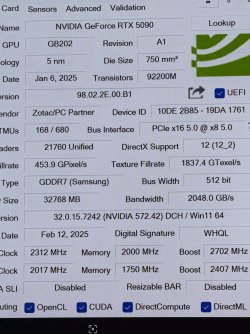
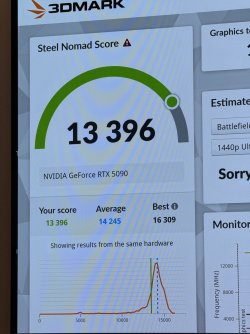
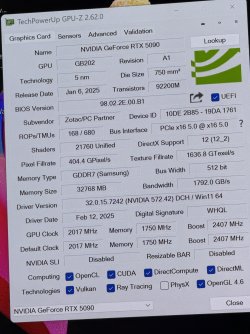
Have been using this card for a while, no problem whatsoever, except one small thing: the ROP count in GPU-Z (and other programs like AIDA64 and HWinfo64) is incorrect, it's different from the official specs given by Nvidia. My card has only 168 ROPs, while a 'normal' 5090 has 176 ROPs. Initially I thought I was just a software glitch, that has nothing to do with the card's real perfomance... but recently I ran 3DMark and got some slightly underperforming results: about 13000-13300(while the average is about 14200 for users with the same HW config) which can be explained by the disabled ROPs.

What I have tried:
Reinstalling drivers with DDU
Reinstalling Windows
Switching VBIOS(my card has dual bios: a normal one and a silent one)
Nothing helped
Want to try to take off the gpu riser but not sure

My config:
CPU: AMD Ryzen 9800X3D no OC
RAM: G.Skill Trident Z5 ddr5-6400 48GBx2 XMP turned on
Mobo: Gigabyte X870E Pro Ice rev 1.1 with the latest BIOS
GPU: Zotec RTX5090 Solid (Non-OC version), installed on a gpu riser
Drivers: 572.42, the latest
PSU: Phanteks amp GH1200W ATX3.1/PCIE 5.1
GPU-Z 2.62.0(the latest one)

I'm at my wits end.
My guesses: 1)Corrupted VBIOS 2)A problem with the riser(but I think it's quite unlikely 3)Defective card(but how?)
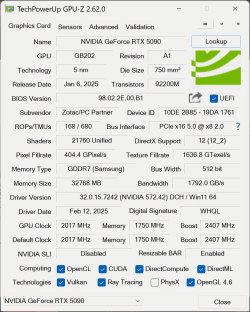
  • 5090.gif

    5090.gif

    97.7 KB · Views: 1,351

Is it a PCI-e 4 riser or 5?

Is it a PCI-e 4 riser or 5?

Pcie 5, in gpuz it also shows as pcie 5.0 x8(because I’m using pcie ssd sharing lines with the card)

Reminds me of the 1060 line between 6gb and 3gb models where the 3gb got the screws to it in shaders, tmus, rops

There are no alternate variants of the RTX 5090, the 5090 D is a separate SKU sold exclusively in China. I believe this is a glitch with GPU-Z, in any case, W1zzard should know better.

This isn’t a 5090 D is it???

Pcie 5, in gpuz it also shows as pcie 5.0 x8(because I’m using pcie ssd sharing lines with the card)

In your screenshot it's showing 2.0 x8. Is that just unloaded and it shows up correctly when there's a load on the GPU?

Most likely a bug in GPU-Z. COULD be a card with some weird bios from the manufacturer, but I highly doubt.

I would test with the riser out of the equation.

Does not looks like D variant by device id

Code:

NVIDIA_DEV.2B85 = "NVIDIA GeForce RTX 5090"
NVIDIA_DEV.2B87 = "NVIDIA GeForce RTX 5090 D"

thats excerpt from drivers inf file

Btw, the difference of the D version is non-obvious "would any parameter displayed in GPU-Z be different for D version"

e1f0460a-13d2-447a-9024-5892dcb565f3 copy_large.jpg

The 5090D is identical in every hardware spec to the ordinary 5090, it's just BIOS or driver limited to have lower inferencing, same way as the LHR cards worked. So even if this was a 5090D it wouldn't matter, because it should still have 176 ROPS not 168.

In your screenshot it's showing 2.0 x8. Is that just unloaded and it shows up correctly when there's a load on the GPU?

Yes, it’s pcie 5.0 x8 when under load.

  • image.jpg

    image.jpg

    2.8 MB · Views: 392

Last edited:

Update.
Took out the riser, put the card in the pcie x16 mobo slot, even took out the ssd that was ‘stealing’ pcie lines from the gpu and now it’s pcie 5.0 x16

NOTHING changed, ahaha. So the riser is fine.
The result in 3DMark is almost the same. And the GPU-Z info is the same.
So I think it’s not a software bug, it looks like a firmware or hardware problem, that affecting performance.

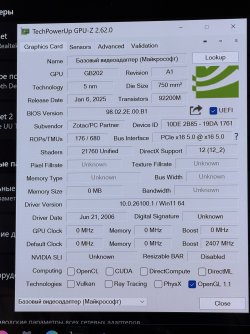
But if I delete the drivers via DDU, I see this. The ROPs count is correct, it changes back to 168 only after I install drivers. Very interesting

  • image.jpg

    image.jpg

    2.4 MB · Views: 650

  • image.jpg

    image.jpg

    2.8 MB · Views: 671

  • IMG_4638.jpeg

    IMG_4638.jpeg

    2 MB · Views: 689

Last edited:

1740137872683.png

I tried to submit my vbios to online database, but it says BIOS reading not supported on this device.

UPDATE: I upgrade GPUZ to 2.63.0 and successfully upload my vbios to the online database.

Last edited:

Seems like a driver or BIOS issue, but as the image above has, the BIOS and Driver are the same but has the correct amount of ROPs.

The computerbase image had a different BIOS "B5" and a press release driver.

But if I delete the drivers via DDU, I see this. The ROPs count is correct, it changes back to 168 only after I install drivers. Very interesting

What's happening is that without an installed driver, GPU-Z will fallback to a hardcoded table, which has the expected ROP count

This is a reasonable approximation on virtually every card in the market, because such a discrepancy is very strange and has never happened in a long long time

So I check my Zotac 4090 , all good .

View attachment 385881
I tried to submit my vbios to online database, but it says BIOS reading not supported on this device.

UPDATE: I upgrade GPUZ to 2.63.0 and successfully upload my vbios to the online database.

Thank you very much for uploading your BIOS, dude, I downloaded it and compared it with mine(which I managed to extract too using the newest version of GPU-Z). And you know what? No difference at all, the files have the same size(I mean identical down to the byte). So VBIOS is probably not to blame here. But wtf is causing this problem... What a ridiculous situation.

Thank you very much for uploading your BIOS, dude, I downloaded it and compared it with mine(which I managed to extract too using the newest version of GPU-Z). And you know what? No difference at all, the files have the same size(I mean identical down to the byte). So VBIOS is probably not to blame here. But wtf is causing this problem... What a ridiculous situation.I

I download an Asus bios, it also has same num of bytes(1,961,983). An easy way to check whether there is a difference is to choose "Submit to online database" when extracting bios. It will automatically check whether there are duplicates. If the bios is exact same, it will say there exists one in database.

By the way, is your card also made in Indonesia?

Last edited:

your card is internet-famous now dude.

you'll need RMA

what a crapshow of a launch. bricked cards, melted connectors, defective GPUs........ how is there no Q/C phase at tsmc/nvidia/zotac to filter out impaired dies ?

I hope it's the BIOS and not the die. Such a fail ..everyone should check their Nvidia cards to see if they match the specs. :)

...

I can't believe it's actually a hardware defect, I've never seen this before in all my life, what the hell is going on with this GPU's launch

your card is internet-famous now dude.

you'll need RMA

what a crapshow of a launch. bricked cards, melted connectors, defective GPUs........ how is there no Q/C phase at tsmc/nvidia/zotac to filter out impaired dies ?

I think I'm gonna wait for a Zotac/Nvidia response to the situation. My card was bought in Korea, while I'm in China, so RMA'ing the card can be difficult and time-consuming, especially now when there is a big shortage of 5090's so I'm not sure if I can get a replacement quickly. Maybe wait several months, I mean, I still can use the card and play games without any problems, so I'm not in a hurry.

Have you checked if my bios is different from yours ? If they are same, then the issue is probably on the die.