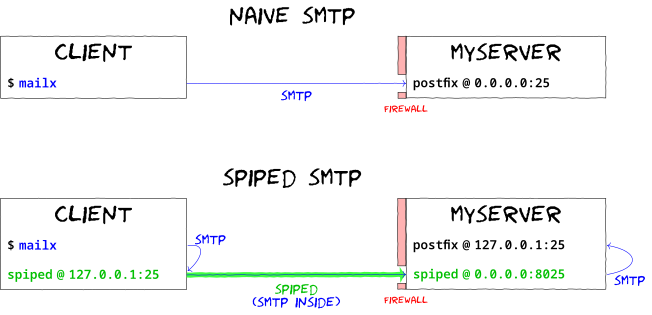
To set up an encrypted and authenticated pipe for sending email between two systems (in the author's case, from many systems around the internet to his central SMTP server, which then relays email to the rest of the world), one might run
dd if=/dev/urandom bs=32 count=1 of=keyfile
spiped -d -s '[0.0.0.0]:8025' -t '[127.0.0.1]:25' -k keyfile
on a server and after copying keyfile to the local system, run
spiped -e -s '[127.0.0.1]:25' -t $SERVERNAME:8025 -k keyfile
at which point mail delivered via localhost:25 on the
local system will be securely transmitted to port 25 on the server
(which is configured to relay mail which arrives from 127.0.0.1 but
not from other addresses).
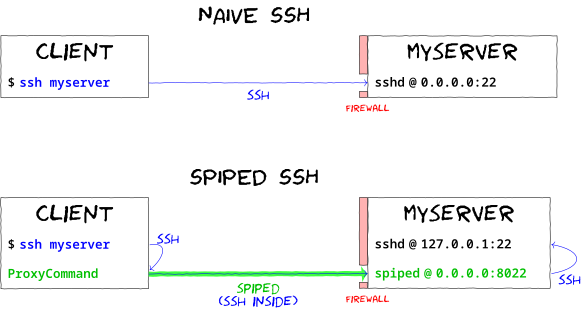
You can also use spiped to protect SSH servers from attackers: Since data is authenticated before being forwarded to the target, this can allow you to SSH to a host while protecting you in the event that someone finds an exploitable bug in the SSH daemon — this serves the same purpose as port knocking or a firewall which restricts source IP addresses which can connect to SSH. On the SSH server, run
dd if=/dev/urandom bs=32 count=1 of=/etc/ssh/spiped.key
spiped -d -s '[0.0.0.0]:8022' -t '[127.0.0.1]:22' -k /etc/ssh/spiped.key
then copy the server's /etc/ssh/spiped.key to
~/.ssh/spiped_HOSTNAME_key on your local system and add
the lines
Host HOSTNAME
    ProxyCommand spipe -t %h:8022 -k ~/.ssh/spiped_%h_key
to the ~/.ssh/config file. This will cause ssh
HOSTNAME to automatically connect using the spipe client via
the spiped daemon; you can then firewall off all incoming traffic on
port tcp/22.