"Talk is expensive. Show me the code."
― Željko Obrenović
What is Sokrates?
- Sokrates is a tool built by Željko Obrenović. It implements his vision on how to document and analyze software architectures of complex systems.
- Sokrates is provides a pragmatic, inexpensive way to extract rich data from any source code repositories. No need for long interviews and workshops. Just show the code.
- Sokrates can help you to understand your code by making visible the size, complexity, and coupling of software, as well all people interactions and team topologies.
- Sokrates is one of several open-source tools we use when implementing Grounded Architecture Lightweight Architectural Analytics
- Sokrates borrows ideas from code spelunking tool, in particular grep, adding structure on top of regex source code searches.
Recent examples of complex Sokrates analyses:
Sokrates in 5 minutes
See a 5 minutes video on using Sokrates CLI to analyze source code of Sokrates:
See a 5 minutes video on using Sokrates Explorer to analyze source code of JUnit4:
Background
- Sokrates looks on the source code from a perspective of maintenance, making visible the size, complexity and coupling of software.
- Sokrates is one of several open-source tools we frequently used when implementing Grounded Architecture Lightweight Architectural Analytics
- For more details see my O'Reilly Video Training (from my time at Software Improvement Group): Building Maintainable Software (4 hours), and O'Reilly Webcast: Building Maintainable Software (1 hour, together with Rob van der Leek).
- The fragment of my training video on building maintainable software is freely avaliable at Youtube:
PRE-REQUIREMENTS
- Java runtime
- Graphviz
- Sokrates automatically looks for Graphviz dot program at the following locations: "/opt/local/bin/dot", "/usr/local/bin/dot", "/usr/bin/dot", "c:\Program Files\Graphviz\dot.exe", "c:\Program Files (x86)\Graphviz\dot.exe"
- If on your machine Graphviz dot is installed on another location, you can provide that location to Sokrates by defining the GRAPHVIZ_DOT system variable.
- Optional set the SOKRATES_ANALYSIS_DATE system variable (in the YYYY-MM-dd format) to define the reference date for commit history analyses. By default, Sokrates uses the current date to calculate the number of commits and contributors in different periods relative to the reference date (e.g. past 30 days, past 90 days, past year).
- If you want to run Sokrates in a Docker container, see Sokrates Dockerfile
COMMAND LINE INTERFACE (CLI) JAR
DOWNLOAD: sokrates-LATEST.jar (40 MB)
Command Line Usage:
Usage: java -jar sokrates.jar <command> <options>

Help: java -jar sokrates.jar <command> -help

Commands: init, generateReports, updateLandscape, updateConfig, extractGitHistory, createConventionsFile, exportStandardConventions, extractGitSubHistory

* init: Creates a new Sokrates analysis configuration file based on standard and optional custom conventions
   - options: [-srcRoot <arg>] [-confFile <arg>] [-conventionsFile <arg>] [-name <arg>] [-description <arg>] [-logoLink <arg>] [-addLink <arg>] [-timeout <arg>] [-help]

* generateReports: Generates Sokrates reports based on the analysis configuration
   - options: [-confFile <arg>] [-outputFolder <arg>] [-internalGraphviz] [-timeout <arg>] [-date <arg>] [-help]

* updateLandscape: Updates or creates a Sokrates landscape report, aggregating results of multiple analyses
   - options: [-analysisRoot <arg>] [-confFile <arg>] [-recursive] [-setName <arg>] [-setDescription <arg>] [-setLogoLink <arg>] [-addLink <arg>] [-timeout <arg>] [-date <arg>] [-help]

* updateConfig: Updates an analysis configuration file and completes missing fields
   - options: [-confFile <arg>] [-skipComplexAnalyses] [-setCacheFiles <arg>] [-setName <arg>] [-setDescription <arg>] [-setLogoLink <arg>] [-addLink <arg>] [-timeout <arg>] [-help]

* extractGitHistory: Extract a git history in a format used by Sokrates and saves it in the git-history.txt file
   - options: [-analysisRoot <arg>] [-help]

* createConventionsFile: Create a new analysis conventions file and saves it in <current-folder>/analysis_conventions.json

* exportStandardConventions: Export standard Sokrates analysis convention to <current-folder>/standard_analysis_conventions.json.

* extractGitSubHistory: A utility function to split a git history file (git-history.txt) into smaller ones based on a commit file path prefix, removing the prefix from file path in split files
   - options: [-prefix <arg>] [-analysisRoot <arg>] [-help]
CLI Usage Example 1. Analyze a single projects (Junit4):
    git clone https://github.com/junit-team/junit4
    cd junit4

    java -jar <sokrates-folder>/sokrates-LATEST.jar extractGitHistory
    java -jar <sokrates-folder>/sokrates-LATEST.jar init
    java -jar <sokrates-folder>/sokrates-LATEST.jar generateReports

    open _sokrates/reports/html/index.html
CLI Usage Example 2. Analyze multiple projects and create a landscape page that summarizes data from these two analyses:
    git clone https://github.com/junit-team/junit4
    cd junit4
    java -jar <sokrates-folder>/sokrates-LATEST.jar extractGitHistory
    java -jar <sokrates-folder>/sokrates-LATEST.jar init
    java -jar <sokrates-folder>/sokrates-LATEST.jar generateReports

    cd ..

    git clone https://github.com/junit-team/junit5
    cd junit5
    java -jar <sokrates-folder>/sokrates-LATEST.jar extractGitHistory
    java -jar <sokrates-folder>/sokrates-LATEST.jar init
    java -jar <sokrates-folder>/sokrates-LATEST.jar generateReports

    cd ..

    mkdir landscape
    mv junit4/_sokrates landscape/junit4
    mv junit5/_sokrates landscape/junit5

    rm -rf junit4
    rm -rf junit5

    cd landscape
    java -jar <sokrates-folder>/sokrates-LATEST.jar updateLandscape

    open _sokrates_landscape/index.html
CLI Usage Example 3. Analyzing a project using custom configurations:
    git clone https://github.com/junit-team/junit5
    cd junit5
    java -jar <sokrates-folder>/sokrates-LATEST.jar extractGitHistory
    java -jar <sokrates-folder>/sokrates-LATEST.jar createConventionsFile
    # edit the 'analysis_conventions.json' file to define your custom conventions
    java -jar <sokrates-folder>/sokrates-LATEST.jar init -conventionsFile analysis_conventions.json
    java -jar <sokrates-folder>/sokrates-LATEST.jar generateReports
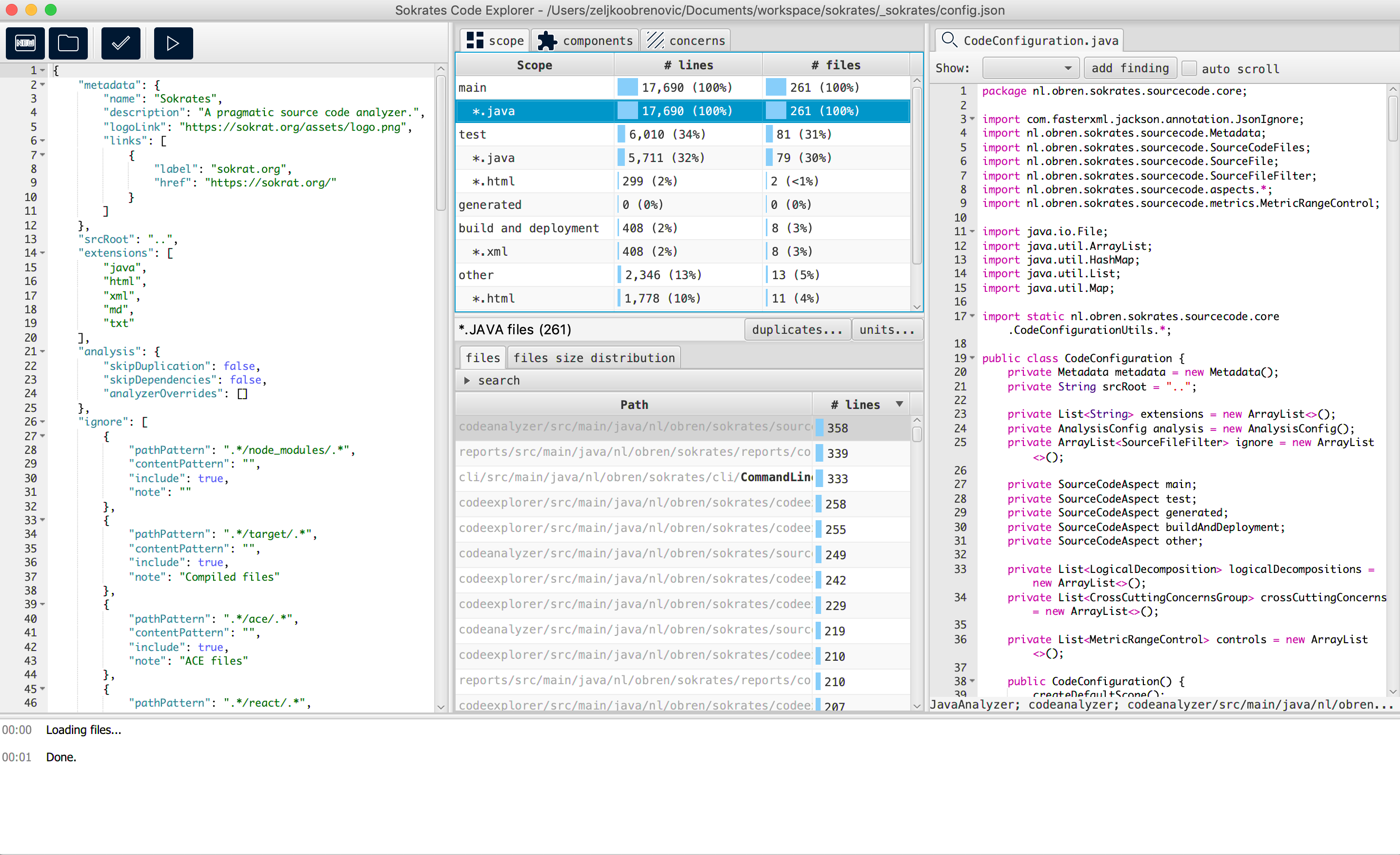
VISUAL EXPLORER
DOWNLOAD: sokrates-explorer-LATEST.jar (78 MB)
NOTE: require JavaFX (download it and install it from openjfx.io)
java --module-path $JAVAFX_HOME/lib --add-modules=javafx.controls,javafx.web -jar sokrates-explorer-LATEST.jar
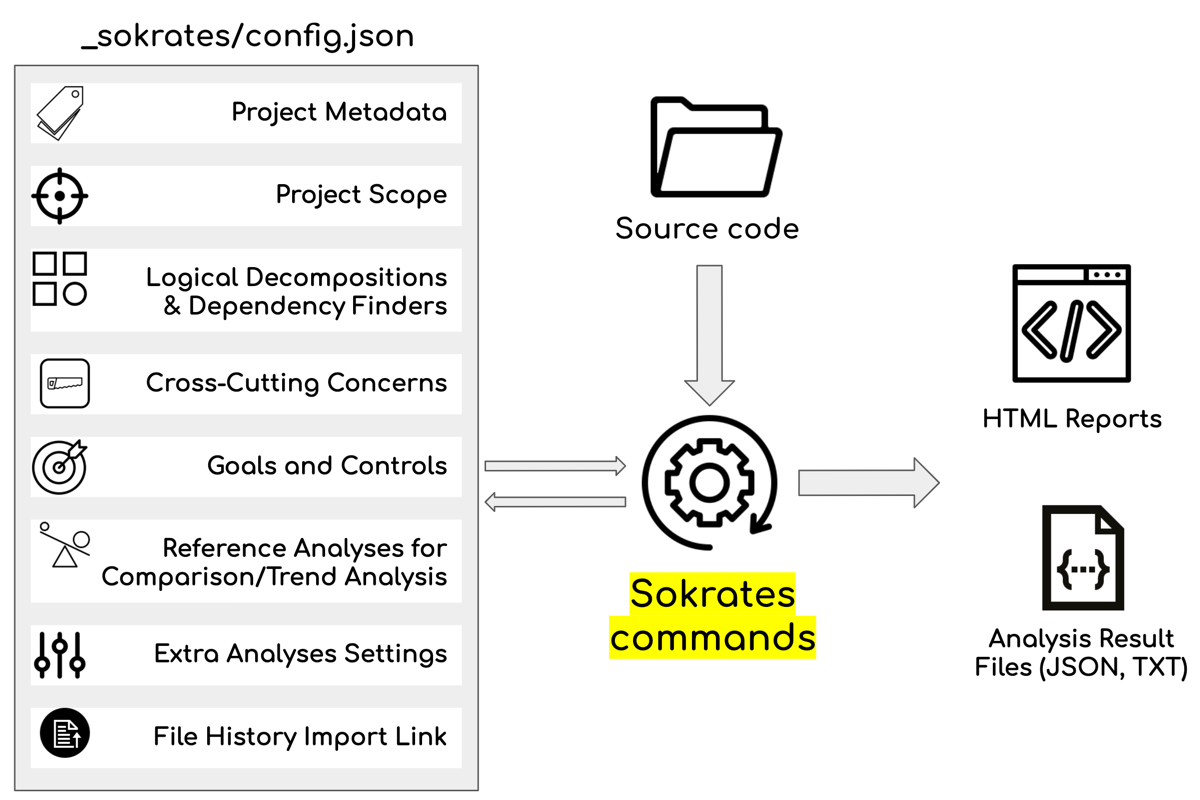
Configuration File for Project Analyses
- Sokrates project analysis configuration is defined in a JSON file.
- You can use the init command to generate default file for your project (see Download tab for details).
- The default location of the configuration file is <your-project>/_sokrates/config.json
- Based on this configuration Sokrates will generate a number of reports. The default reports folders is <your-project>/_sokrates/reports/
- To learn more about details of the configuration file see the configuration file structure definition (in Java).
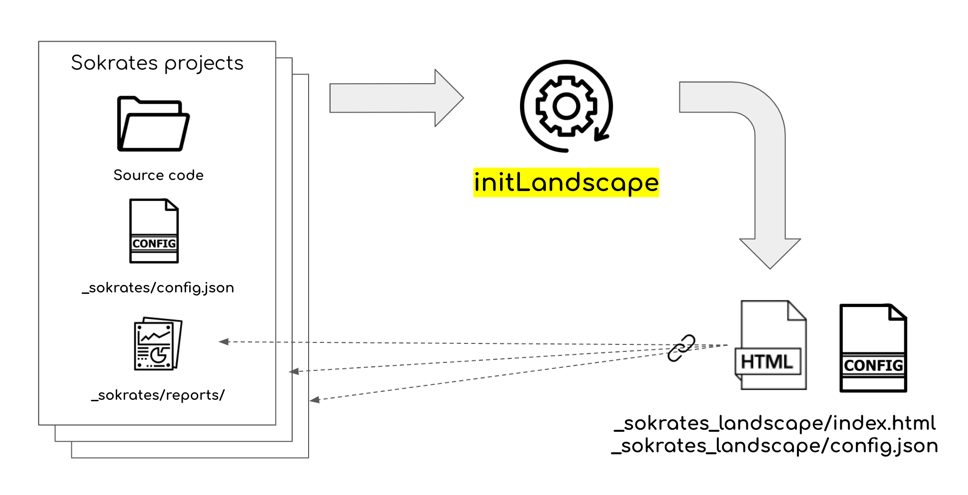
Configuration File for a Landscape Analysis
- Sokrates landscape analysis configuration is defined in two JSON files: config.json and config-tags.json.
- You can use the updateLandscape command to generate default files.
- java -jar sokrates.jar updateLandscape [options]
- The default location of the configuration files is <your-project>/_sokrates_landscape/
- See an example of a Sokrates landscape configuration file ⤇
- See an example of a Sokrates landscape tags configuration file ⤇
- Based on this configuration Sokrates will generate a number the landscape reports. The default reports folders is <your-project>/_sokrates_landscape/reports/
- To learn more about details of the configuration file see the configuration file structure definition (in Java).
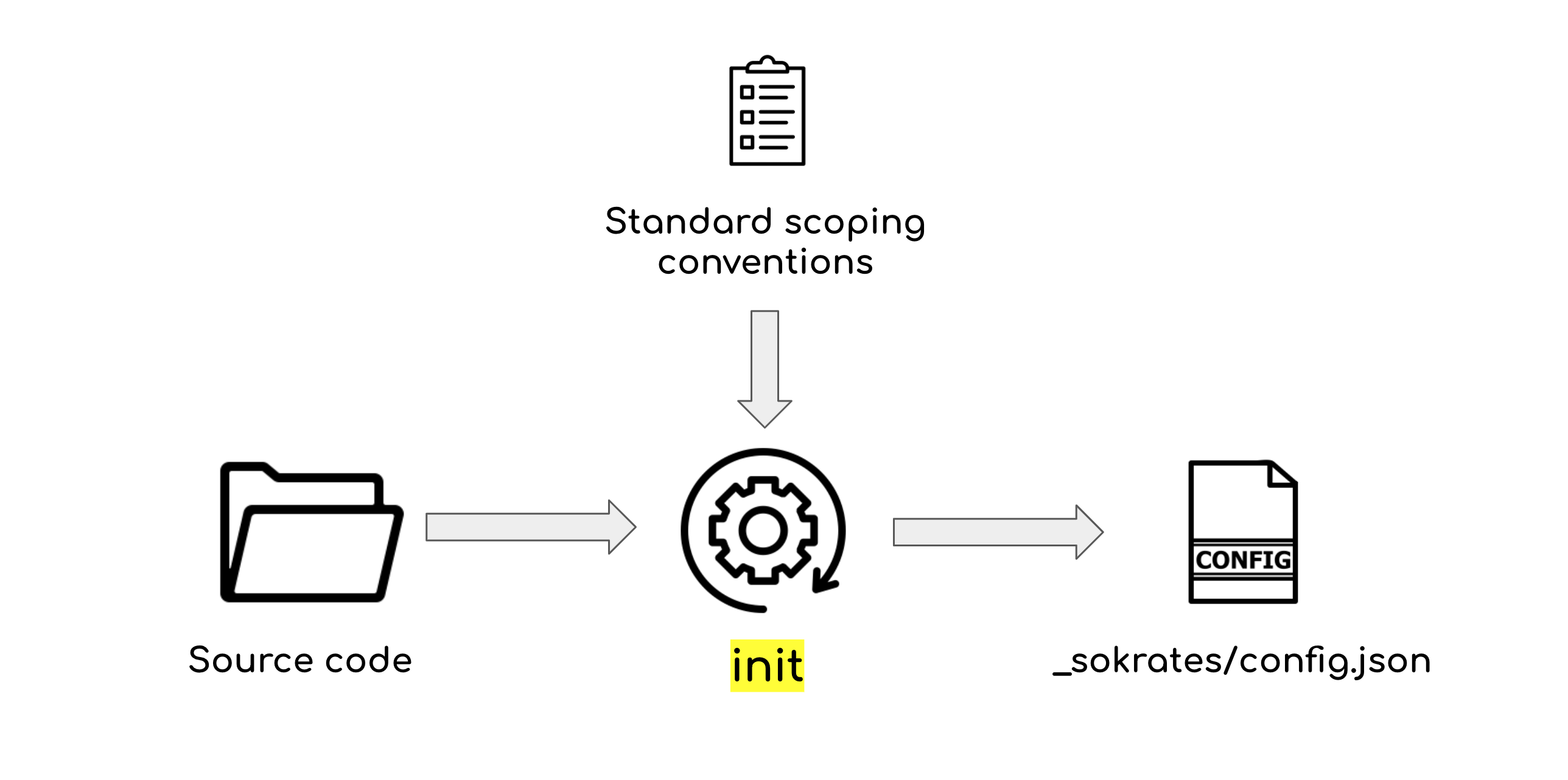
Configuring the Analysis Initialization
- The init command creates a configuration file for project analyses. Without any parameters, this command uses the standard conventions to generate a project analysis configuration.
- You can also use your own custom conventions to initialize projects and create new configuration files:
    java -jar <sokrates-folder>/sokrates-LATEST.jar createConventionsFile
    # edit the 'analysis_conventions.json' file to define your custom conventions
    java -jar <sokrates-folder>/sokrates-LATEST.jar init -conventionsFile analysis_conventions.json
- See example of a custom conventions file
- The exportStandardConventions command exports Sokrates conventions to a JSON file that you can use as inspiration for your custom conventions:
-
java -jar <sokrates-folder>/sokrates-LATEST.jar exportStandardConventions - See example of a standard_analysis_conventions.json file
- To learn more about details of the configuration file see the configuration file structure definition (in Java).
Examples: Sokrates Analyses of Individual Repositories
Recent Sokrates Analyses of Big Projects and Whole GitHub Organizations
NOTE: Analysis is limited to repositories with commits in past year or two.
Older Examples
 Source Code Overview
- For analysis purposes Sokrates separate files in scope into several categories: main, test, generated, deployment and build, and other.
- The main category contains all manually created source code files that are being used in the production.
- Files in the main category are used as input for other analyses: logical decomposition, concerns, duplication, file size, unit size, and cyclomatic complexity.
- Test source code files are used only for testing of the product. These files are normally not deployed to production.
- Build and deployment source code files are used to configure or support build and deployment process.
- Generated source code files are automatically generated files that have not been manually changed after generation.
- While a source code folder may contain a number of files, Sokrates is primarily interested in the source code files that are being written and maintained by developers.
- Files containing binaries, documentation, or third-party libraries, for instance, are excluded from analysis. The exception are third-party libraries that have been changed by developers.
 Duplication
- For duplication, Sokrates look at places in code where there are six or more lines of code that are exactly the same.
- Before duplication is calculated, the code is cleaned to remove empty lines, comments, and frequently duplicated constructs such as imports.
 Logical Decomposition: Components and Dependencies
Logical decomposition is a representation of the organization of the main source code, where every and each file is put in exactly one logical component.
- A software system can have one or more logical decompositions.
- A logical decomposition can be defined in two ways.
- First approach is based on the folders structure. Components are mapped to folders at defined folder depth relative to the source code root.
- Second approach is based on explicit definition of each component. In such explicit definitions, components are explicitly named and their files are selected based on explicitly defined path and content filters.
- A logical decomposition is considered invalid if a file is selected into two or more components.This constraint is introduced in order to facilitate measuring of dependencies among components.
- Files not assigned to any component are put into a special "Unclassified" component.
 Features of Interest
- Features of interests are cross-curring concerns of a software system that can be identified thourgh patterns in code.
- A single fetaure of interest may be present in multiple files. One source code file may contain multiple concerns.
 File Size
- File size measurements show the distribution of size of files.
- Files are classified in four categories based on their size (lines of code): 1-200 (small files), 200-500 (medium size files), 501-1000 (long files), 1001+ (very long files).
 Unit Size
- Unit size measurements show the distribution of size of units of code (methods, functions...).
- Units are classified in four categories based on their size (lines of code): 1-20 (small units), 20-50 (medium size units), 51-100 (long units), 101+ (very long units).
 Conditional Complexity
- Conditional complexity (also known as cyclomatic complexity) is a software metric (measurement), used to indicate the complexity of a program. It is a quantitative measure of the number of linearly independent paths through a program's source code.
- Conditional complexity is measured at the unit level (methods, functions...).
- Units are classified in four categories based on the measured McCabe index: 1-5 (simple units), 6-10 (medium complex units), 11-25 (complex units), 26+ (very complex units).
File Age
- File age measurements show the distribution of file ages (days since the first commit) and the recency of file updates (days since the latest commit).
 Trend
Trend
- Trend report shows difference in metric between the latest measurements and previous reference measurements.
Supported Languages
Any textual file can be analyzed in Sokrates with standard analyses (empty lines cleaning, source code overview, duplication, file size, file age, file change frequency, temporal dependencies, committers & contributions, features of interest, findings, metrics, controls).
For several popular languages Sokrates provides more in-depth analyses:
| Language | Units Analysis | Dependencies | Extensions |
|---|---|---|---|
| Abap | X | - | .abap |
| AdabasNatural | X | - | .nsd .nsh .nsn .nsm .nsp |
| CSharp | X | X | .cs .csx .cake |
| CStyle | X | - | .c .idc .cats |
| Cfg | - | - | .cfg |
| ClojureLang | - | - | .cljscm .wisp .cl2 .hl .clj .rg .boot .cljc .cljx .cljs .hic .edn |
| Cpp | X | X | .ipp .cc .h .hpp .cp .m .hh .c++ .hxx .tpp .mm .cpp .re .cxx .dart .h++ .tcc .inl .ino |
| Css | - | - | .css |
| D | X | - | .d .di |
| Dbc | - | - | .dbc |
| GoLang | X | X | .v .go |
| Gradle | X | X | .gradle |
| Groovy | X | X | .grt .gvy .groovy .gtpl |
| Hack | X | - | .hack |
| Html | X | X | .ascx .jsx .haml .mustache .htm .ashx .razor .erb .asmx .vue .aspx .soy .mtml .njk .deface .phtml .st .asp .jinja .handlebars .vbhtml .jinja2 .hbs .xhtml .axd .rtml .hhi .cshtml .xht .ecr .html .asax .eex |
| Java | X | X | .ck .j .java .uc |
| JavaScript | X | - | .jsb .jsm .cy .pac .es .xsjslib .jake .gs .cjs .sjs .js .es6 .xsjs .frag ._js .njs .ssjs .bones .jscad .jsfl |
| Json | - | - | .sublime-mousemap .sublime-theme .sublime-menu .webmanifest .json .tfstate.backup .geojson .sublime-commands .yyp .avsc .sublime_session .tfstate .sublime-workspace .gltf .sublime_metrics .json5 .sublime-macro .sublime-project .jsonc .webapp .ice .jsonl .har .topojson .jsonld .yy .mcmeta .sublime-completions .sublime-settings .sublime-build .jsoniq .sublime-keymap .JSON-tmLanguage |
| Jsp | - | - | .jsp .gsp |
| Julia | X | - | .jl |
| Kotlin | X | X | .ktm .kts .kt |
| Less | - | - | .less |
| Lua | X | - | .wlua .rbxs .rockspec .p8 .nse .pd_lua .lua |
| ObjectPascal | X | - | .dfm .p .pas .dpr .pascal .lpr |
| Perl | X | X | .al .t .ph .pl .plx .pm .psgi .perl |
| Php | X | X | .aw .php .php4 .php5 .php3 .phpt .phps .ctp .inc |
| PlSql | X | X | .plsql .pck .pkb .pks .plb .pls |
| Puppet | - | - | .pp |
| Python | X | X | .numpyw .pyde .xpy .wsgi .eb .gn .smk .gyp .rpy .pytb .py .numsc .numpy .gypi .lmi .py3 .pxd .pxi .pyi .pyp .pyt .pyx .pyw .tac |
| R | X | - | .rda .r .rds .rdata .rd .rsx |
| Ruby | - | X | .rbi .rbw .rbx .podspec .god .gemspec .rbuild .watchr .ruby .rb .eye .ru .builder .rabl .jbuilder .thor .mspec .rake |
| Rust | X | - | .rlib .in .rs |
| Sass | - | - | .sass |
| Scala | X | X | .sbt .kojo .sc .scala |
| Scss | - | - | .scss |
| Shell | - | - | .ksh .zsh .tool .sh .bats .tmux .bash .command |
| Sql | - | - | .viw .bdy .fnc .tpb .tps .spc .trg .cql .sql .mysql .prc .vw .tab .udf .ddl |
| Swift | X | - | .swift |
| Thrift | - | - | .thrift |
| TypeScript | X | - | .tsx .ts |
| VisualBasic | X | - | .bas .frm .cls .frx .ctl .vb .vba .vbs |
| Xml | - | - | .xmi .xml .sch .axml .csdef .glade .gml .gmx .wsdl .nuspec .cscfg .xsp-config .xquery .ct .rdf .xpl .xql .xqm .vcxproj .xacro .xqy .csproj .mxml .xsd .xsl .ivy .cproject .xproc .x3d .wsf .xul .tml .shproj .xproj .admx .ccproj .odd .adml .fsproj .wixproj .scxml .psc1 .targets .ncl .pluginspec .dita .workflow .sublime-snippet .wxi .wxl .wxs .xliff .fxml .ditamap .stTheme .jelly .dotsettings .clixml .ant .tmTheme .xslt .csl .pt .ccxml .builds .pkgproj .natvis .storyboard .sfproj .vsixmanifest .rss .tmSnippet .launch .xaml .nproj .ui .dll.config .ux .grxml .zcml .tmPreferences .xspec .tmLanguage .filters .xq .vbproj .mod .osm .srdf .props .ps1xml .depproj .kml .jsproj .plist .tmCommand .proj .ndproj .ditaval .owl .xml.dist .xib .mdpolicy .iml .mjml .vxml .vstemplate .urdf .resx .xlf .vssettings |
| Yaml | - | - | .sed .syntax .reek .rviz .mir .tf .yaml .sublime-syntax .yaml-tmlanguage .yml |