Postgres extensions are pushing the boundaries of modern data workloads, and there’s a powerful combination that enhances time series workloads. By using Here’s a brief overview of the relevant tools:. All of these extensions are maintained by the Postgres team at Snowflake, with an eye on engineering quality and enterprise requirements. Let’s build a system to track temperature readings. This setup uses local "warm" storage for recent data and moves "cold" data to an Apache Iceberg™ table on S3 for long-term storage and cost efficiency. Here’s an overview of the sample we’ll explore below: First, we create a local Postgres table that will hold our recent, transactional data, partitioned by time. The benefit of using a time-partitioned table for time series data is that it allows us to drop old data efficiently and query time ranges more efficiently, and it avoids fragmentation (data from different time ranges being stored adjacently), all of which improve performance.pg_lake with pg_partman and pg_incremental, you can have a vendor-agnostic, 100% open source time series data stack designed to support high-performance workloads in a cost-conscious way.An open source Postgres time series stack
Hands-on example: Internet of Things sensor data
pg_partman.pg_lake (bonus hidden partitioning).pg_incremental to automatically append to Iceberg.pg_partman.Create sample partitioned table
-- Create the parent "shell" table
CREATE TABLE sensor_data (
   reading_number BIGINT GENERATED ALWAYS AS IDENTITY,
   sensor_id INT,
   reading_time TIMESTAMPTZ NOT NULL,
   temperature NUMERIC(38,9)
) PARTITION BY RANGE (reading_time);  -- Index on important fields
CREATE INDEX ON sensor_data (sensor_id);
CREATE INDEX ON sensor_data (reading_time);
Next, we enable pg_partman and use it to create time partitions and automate partition maintenance.
CREATE EXTENSION IF NOT EXISTS pg_partman;
 -- Initialize pg_partman BEFORE inserting data.
-- This creates the child tables so Postgres has a place to put your rows.
SELECT public.create_partition(
   p_parent_table := 'public.sensor_data',
   p_control := 'reading_time',
   p_interval := '1 day',
   p_start_partition := '2025-12-01'
);
-- Schedule pg_partman maintenance daily at 2:00 AM to create new partitions
SELECT cron.schedule('daily_partition_maintenance', '0 2 * * *', $$
  CALL public.run_maintenance_proc()
$$);
Finally, we’ll generate 10,000 rows of sensor readings spread across the last 60 days.
INSERT INTO sensor_data (sensor_id, reading_time, temperature)
SELECT
   (random() * 100)::int,
   now() - (random() * interval '60 days'),
   (random() * 30 + 10)::numeric(4,2)
FROM generate_series(1, 10000);Now, we create the destination for our older data: an Iceberg table with the same columns.Create the Iceberg table with pg_lake
CREATE EXTENSION pg_lake cascade;

-- Creating an Iceberg table through pg_lake
CREATE TABLE sensor_data_iceberg (LIKE sensor_data)
USING iceberg
WITH (
   partition_by = 'month(reading_time)'
);
By using The partition_by = 'month(reading_time)', when you run a query against the sensor_data_iceberg table later with a WHERE clause on reading_time, pg_lake is smart enough to request only the specific monthly folders from S3. This prevents a “full bucket scan,” which can help reduce unnecessary S3 egress and associated costs. It also makes deleting very old data much faster.Use pg_incremental to automatically copy data into Iceberg
pg_incremental extension can move data into Iceberg tables in small batches. It periodically runs a command that can take a range of sequence numbers and insert it into Iceberg. Internally, pg_incremental waits for existing writers to finish before performing the query, which guarantees that there are no ongoing inserts whose sequence number might fall within the range, which makes this a safe and efficient way to incrementally process data.
CREATE EXTENSION IF NOT EXISTS pg_incremental CASCADE;
 SELECT incremental.create_sequence_pipeline('sensor-archival', 'sensor_data', $$
 INSERT INTO sensor_data_iceberg
 SELECT *
 FROM sensor_data
 WHERE reading_number BETWEEN $1 AND $2
$$);
If you want to peek at how things are progressing, query the Iceberg table.
-- Compare counts to confirm everything made it over
SELECT
   'local' AS source, count(*) FROM sensor_data
UNION ALL
SELECT
   'iceberg' AS source, count(*) FROM sensor_data_iceberg;
By default, Since pg_incremental is configured to copy data every minute, so most rows are typically synchronized in under a minute, depending on workload.Drop old partitions with pg_partman
pg_incremental is already copying data into Iceberg, we just need pg_partman to clean up old local partitions. This can be done automatically during maintenance by updating the part_config table.
-- Tell pg_partman to automatically drop local partitions older than 30 days
UPDATE public.part_config
SET retention = '7 days',
   retention_keep_table = false
WHERE parent_table = 'public.sensor_data';In Postgres we can now easily switch between using Postgres data now in Iceberg
sensor_data for data from the last seven days and using sensor_data_iceberg for historical data.
-- Query last few sensor readings from Postgres table (fast for lookups)
SELECT * FROM sensor_data WHERE sensor_id = 12 ORDER BY reading_time DESC LIMIT 10;

-- Aggregate historical data from Iceberg table (fast for aggregations)
SELECT
   date_trunc('week', reading_time) AS week,
   round(avg(temperature), 2) AS avg_temperature
FROM sensor_data_iceberg
WHERE reading_time >= now() - interval '60 days'
GROUP BY 1
ORDER BY 1;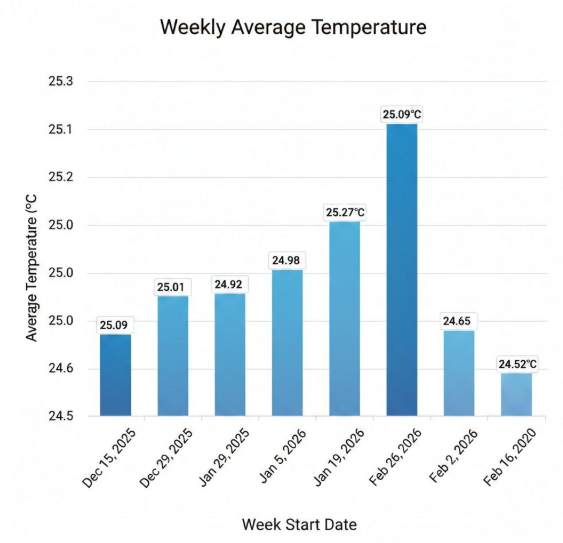
Figure 1: Aggregated IoT data via bar chart.
With the data in Iceberg, it's immediately ready for many other things, such as processing in Snowflake. This architecture provides a lot of flexibility in terms of balancing performance and cost, while automatically integrating with your broader data architecture.