Postgres has a big range of user-facing features that work across many different use cases — with complex abstraction under the hood. Working with APIs and arrays in the But why shred a JSON object into rows and columns and then rehydrate it later to send it back to the client? The answer is efficiency. Postgres is most efficient when working with rows and columns, and hiding data structure inside JSON makes it difficult for the engine to go as fast as it might. How does JSON work in a database like Postgres that is optimized for rows and columns? Like the Under the covers, the PostgreSQL database stores all data in fixed-size 8-KB pages. But how can a data type with no size limit, like It does this by using The Oversize Attribute Storage Technique, aka "TOAST." Ordinarily, all the attributes in a row can fit inside a page.jsonb type has become increasingly popular recently, and storing pieces of application data using jsonb has become a common design pattern.JSONB in Postgres
text, bytea and geometry types, the jsonb type is "variable length" — there is no limit to how big it can be.jsonb, exist in a database with such a small fixed storage size limit?

But sometimes, one or more of the attributes are too big to fit.

Under the covers, PostgreSQL quietly cuts up the big attributes, puts them in a side table and replaces them in the original page with a unique identifier.
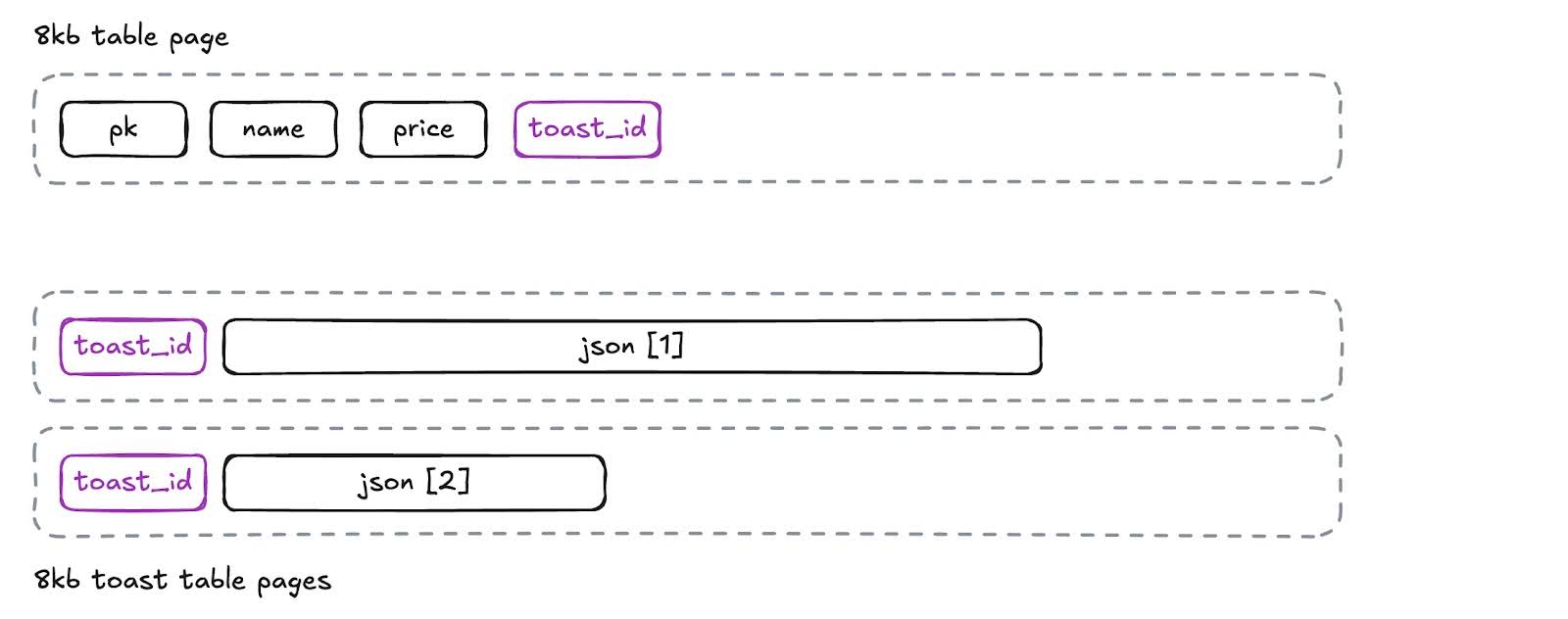
So even for large attributes, the user does not have to do anything special to store them. The database abstraction remains intact. Or does it? We are going to test JSONB performance for differently sized documents. The function The JSONB column types are convenient, but are they fast?
generate_item_json will generate a jsonb object of arbitrary size.item_description can be expanded to make the object too big to fit on a page. This example generates a JSON object with a 40-byte description.
SELECT generate_item_json(40);{
"item_pk": 482910,
"item_name": "adipiscing",
"item_price": 42.55,
"item_description": "lorem ipsum dolor sit amet consectetur "
}Here we create a 10,000-row table with four columns, a key, a name and price, and the original JSON document.
CREATE TABLE json_40 (
  pk SERIAL,
  name TEXT
    GENERATED ALWAYS
    AS (json->>'item_name')
    STORED,
  price FLOAT8
    GENERATED ALWAYS
    AS (float8(json->>'item_price'))
    STORED,
  json JSONB
);

INSERT INTO json_40 (json)
  SELECT generate_item_json(40)
    FROM generate_series(1,10000);
(Note that by using generated columns for the name and price, all the columns are automatically kept in sync by the database.) If we inspect the size of the table (which includes TOAST entries) and the relation (which is just the base table), we see that with these small JSON objects TOAST is not being used.
SELECT
  pg_relation_size('json_40') AS table_size,
  pg_table_size('json_40') - pg_relation_size('json_40')
    AS toast_size;
table_size | 2056192
toast_size | 32768A query to find all the JSON documents that have an item_name starting with “a” runs in less than 10 ms on this 10,000-record table.
SELECT count(*)
  FROM json_40
 WHERE json->>'item_name' LIKE 'a%';
So far, so good. Now we replicate the first table, but with large, 40-KB JSON documents.Large JSONB documents end up TOASTed
CREATE TABLE json_40000 (
  pk SERIAL,
  price FLOAT8
    GENERATED ALWAYS
    AS (float8(json->>'item_price'))
    STORED,
  name TEXT
    GENERATED ALWAYS
    AS (json->>'item_name')
    STORED,
  json JSONB
  );

INSERT INTO json_40000 (json)
  SELECT generate_item_json(40000)
    FROM generate_series(1,10000);
This time, the TOAST table is very large, because all the JSON documents have been stored in TOAST.
SELECT pg_relation_size('json_40000') AS table_size,
       pg_table_size('json_40000') - pg_relation_size('json_40000') AS toast_size;
table_size | 671744
toast_size | 124329984But the number of rows in the table is the same — just 10,000! What kind of performance do we get searching the JSON documents for item_name starting with "a"?
SELECT count(*)
  FROM json_40000
 WHERE json->>'item_name' LIKE 'a%';
We see that it takes a brutal 500 ms to scan these 10,000 rows! That's 40 times slower. Why? This is the TOAST tax. In order to check the value of Get the TOAST ID from the base table Find all records with that ID in the TOAST table and pull the data from each record Concatenate all that data Decompress the concatenated data Once the object is rebuilt and decompressed, only then can the database read the In order to avoid paying the TOAST tax, avoid accessing the whole object unless you really need to. In our example, when we ingested the JSON object, we used a generated column to read the As a general rule, using table columns for the predictable parts of your documents allows the database to perform much more efficiently than reaching into the JSONB object every time it needs to read a common column value. In our example, queries that filter on that tiny name column do not pay the TOAST tax and take only 5 ms to run. Reading big objects is slow; reading small ones is fast.item_name in the JSON object, the database first needs to retrieve the JSON object. And because the object is in TOAST, retrieval is a multistep process, repeated for every JSON object in the query (because in this example, all the objects are TOASTed):
item_name and check the first character.Best practices to avoid the TOAST tax
Put common fields into table columns
item_name value and put it in the name column of the table.
SELECT count(*)
  FROM json_40000
 WHERE name LIKE 'a%';
In general, this is the best way to avoid the TOAST tax: Ensure the keys you care about are pulled out into real columns during JSON ingestion. Note that for our examples, we used GENERATED ALWAYS and STORED on our generated columns, to ensure that the columns are always in sync with the JSONB document and can be efficiently read and indexed.
CREATE TABLE json_40000 (
  pk SERIAL,
  price FLOAT8 GENERATED ALWAYS
    AS (float8(json->>'item_price'))
    STORED,
  name TEXT GENERATED ALWAYS
    AS (json->>'item_name')
    STORED,
  json JSONB
);
Be careful about using virtual generated columns for storing extracted values, because the virtual columns have the same problem as the JSON document: The whole document has to be read (paying the TOAST tax) before the virtual value can be calculated. An alternative way to avoid reading the full JSON document when filtering is to index the piece of the document you are searching, using an "expression index." Expression indexes allow you to index any expression, allowing the planner to use the index when the expression occurs in the SQL Expression index for frequently queried values in the document
WHERE clause. In our case, we want to index an expression that reaches into the JSON document and pulls out the item_name.
CREATE INDEX json_40000_name_x
    ON json_40000 ((json->>'item_name') text_pattern_ops);

SELECT count(json->>'item_name')
  FROM json_40000
 WHERE json->>'item_name' LIKE 'a%';
Querying on the expression index takes 80 ms, which is faster than 500 ms but still slower than the direct filter on the When we used a table column, the full JSONB document was read zero times, since the column of interest was already available in the table. By default, name column. There is not a free lunch here, because reapplying the filter after the index scan means the 983 rows that passed the filter still pay the TOAST tax.Document index if you are searching for exact keys and values
jsonb columns can be indexed using the PostgreSQL “GIN” index method. For example:
CREATE INDEX json_40000_json_x
    ON json_40000 USING GIN (json);
The GIN index method is an “inverted index,” good for indexing objects with variable number values. The classic use case for a GIN index is indexing an array type column, and then searching for which arrays include a particular value. For JSON, this means a GIN index is good for searching for exact item values, like this example that finds all the objects with “item_name” equal to “laborum.”
SELECT Count(*) FROM json_40000
 WHERE json @> '{"item_name": "laborum"}';
These equality searches are also quite fast. This one takes about 23 ms. Note that you cannot use the inverted index to search for partials (such as “starts with a”) in the same way you can use the expression index. Columns with more data than the standard 8 KB in Postgres will be TOASTed. This gives you a lot of flexibility with data storage, but TOASTed data is not as fast to retrieve as non-TOASTed data, so be careful! For optimal performance, consider: Generated columns, to pull frequently searched data out of the JSON object Expression indexes, to surgically reach into the object for known search patterns GIN indexing, to enhance queries where you are doing exact equality tests on valuesSummary