REPACK is my favorite feature in Postgres 19. It's not the flashiest, but it is the one that’s going to matter most if you’re running a production database. Vacuum, autovacuum and bloat have always been this sore spot for Postgres users. On the one hand, Postgres MVCC design is not new. And yet, on high update systems, this churn of having dead rows that get freed up later, vacuum being tweaked to the right levels to maintain low bloat is still a bit of an inexact science. Once bloat does exist, it’s just sitting there. And you see that unclaimed space not being used. Before Postgres 19, your options for reclaiming that space were: Enter Postgres 19: Let’s back up. You may be familiar with bloat as a seasoned Postgres user, but just to make sure we’re all on the same page… It's one of those Postgres realities, the tradeoff for MVCC. Tables accumulate dead tuples over time: when rows are updated or deleted, the old versions stick around. Regular autovacuum typically marks that space as reusable. For most tables, that's enough. But for large, update-intensive tables, vacuum can fall behind. Dead rows accumulate as table bloat. The file grows, but since VACUUM can only mark that space as internally reusable, it doesn't shrink the table or return space to the OS. To actually reclaim disk space, you need to rebuild the table. How do you know if you have a bloat problem? You can do a quick check using pg_stat_user_tables. The tuple counts are estimates, but this is one good diagnostic signal.
How Postgres tables become bloated
SELECT
    schemaname,
    relname,
    pg_size_pretty(pg_relation_size(schemaname || '.' || relname)) AS size,
    n_live_tup,
    n_dead_tup,
    CASE WHEN n_live_tup > 0
         THEN round((n_dead_tup::float / n_live_tup::float)::numeric, 4)
    END AS dead_tup_ratio,
    last_autovacuum,
    last_autoanalyze
FROM pg_stat_user_tables
ORDER BY dead_tup_ratio DESC NULLS LAST;
(Query adapted from Crunchy Data's bloat checking guide) A rough rule of thumb: Below 50% bloat: Generally acceptable. Monitor it and check autovacuum settings, but no urgent action needed. Above 50% bloat: You're likely wasting disk space and paying a performance cost from extra page reads. It's at least worth investigating — and possibly addressing — if you see slow queries or growing table sizes. There is no single bloat percentage that determines whether a table needs attention. Consider wasted bytes, workload, growth, and whether reclaiming space is worth the rewrite. The pg_repack extension was the option for online table rebuilds for years. Here's how it works: This worked well, and many production systems relied on it for years. But installing third-party extensions makes some teams nervous, and the external binary adds operational overhead. pg_squeeze (from CYBERTEC, the same team behind much of the Postgres 19 REPACK work) came along and took a more modern approach. It's also seen wide production use. pg_squeeze in a sense is the prototype for what became PG 19's REPACK (CONCURRENTLY). The built-in version inherits the logical decoding approach but integrates it directly into the server without an extension, shared_preload_libraries, or separate configuration tables. Postgres 19 adds REPACK as a first-class SQL command with three modes:How pg_repack works
How pg_squeeze works
Enter REPACK
-- Basic repack, like VACUUM FULL — takes ACCESS EXCLUSIVE lock
REPACK my_table;

-- Online repack using CONCURRENTLY just like you would with indexes
REPACK (CONCURRENTLY) my_table;

-- Online repack + reorder by index
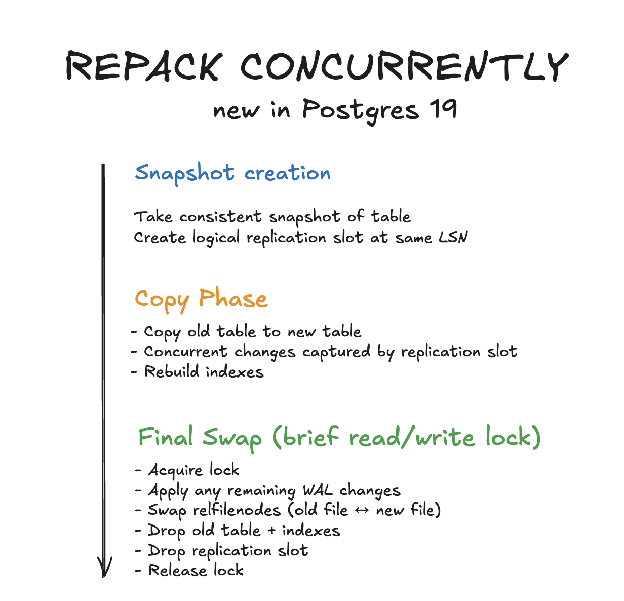
REPACK (CONCURRENTLY) my_table USING INDEX my_index;This is what makes the feature production-ready. With CONCURRENTLY, the ACCESS EXCLUSIVE lock is only held briefly at the end. During the bulk of the operation, which for a large table could take minutes, the table remains fully readable and writable. Here's what happens internally:REPACK (CONCURRENTLY)
REPACK (CONCURRENTLY, VERBOSE, ANALYZE) repack_test;INFO: repacking "public.repack_test" in physical order
INFO: "public.repack_test": found 0 removable, 1000000 nonremovable
row versions in 38452 pages
Time: 9406.788 ms (00:09.407)
Before: 493 MB → After: 228 MB (54% reduction)Three options in play here: REPACK can also physically reorder your table's rows to match an index. If your workload frequently reads ranges of related rows, clustering with USING INDEX may improve locality. Measure the effect on your own queries; later updates are not automatically clustered. This is a big deal for the REPACK feature beyond just bloat removal. It's a performance feature in its own right. For example, say you have an orders table and frequently query WHERE created_at BETWEEN '2026-01-01' AND '2026-01-31'. Without physical ordering, those rows could be scattered across hundreds of pages. With REPACK orders USING INDEX idx_orders_created_at, the rows are stored sequentially on disk in date order, so a range scan reads pages in sequence instead of random I/O across the whole table. You might know CLUSTER from older Postgres versions. It did the same thing, but took a lock.
REPACK with USING INDEX
REPACK (VERBOSE, ANALYZE) product_inventory USING INDEX idx_product_category;INFO: repacking "public.product_inventory" using index scan
on "idx_product_category"
Time: 15230.264 ms (00:15.230)
Before: 618 MB → After: 320 MB (48% reduction, rows now ordered by category)I did some testing just to verify how this works. For the 493 MB test case with 1M live rows remaining after deleting 1M of the original 2M rows, the reported timings were:REPACK vs. VACUUM FULL sample performance
Method
Time
Result
Table Accessible?
VACUUM FULL
2.7s
228 MB
No (locked entire time)
REPACK
5.9s
228 MB
No (locked entire time)
REPACK (CONCURRENTLY)
9.4s
228 MB
Yes (brief lock at end only)
In one test on a constrained system, REPACK (CONCURRENTLY) took 9.4 seconds for the stated table and test conditions. Results vary with table, indexes, workload, and hardware. REPACK CONCURRENTLY is slower in wall-clock time. It's doing more work: logical decoding and WAL replay on top of the table rebuild. The tradeoff here is more time to keep your table online. A note on MVCC safety: REPACK CONCURRENTLY is not fully MVCC-safe. During the brief final swap, a long-running transaction could theoretically miss concurrent changes. A concurrent transaction using a snapshot taken before repacking began can see the table as empty. This is the same limitation pg_repack had, and it's documented in the Postgres 19 release notes. Review this behavior against your workload’s transaction and consistency requirements. Regular VACUUM and REPACK solve different problems:Requirements for REPACK CONCURRENTLY
When to use REPACK vs. VACUUM
Situation
Use
Why
Routine maintenance
VACUUM (autovacuum)
Marks dead tuples reusable, updates visibility map. Fast, no lock, runs automatically.
Some bloat, may be growing faster than autovacuum clears dead rows
Tune autovacuum settings
Adjust autovacuum_vacuum_scale_factor for large/busy tables. Also worth trying the parallel vacuum features in Postgres 19.
Table has high bloat AND you need disk space back
REPACK (CONCURRENTLY)
Rewrites the table, returns space to OS, table stays online
Table has high bloat AND you have a maintenance window
REPACK or VACUUM FULL
Faster than REPACK CONCURRENTLY, but locks the table
Range queries are slow on a column that has an index
REPACK CONCURRENTLY ... USING INDEX
Physically reorders rows for better sequential access patterns
Index is bloated but table is fine
REINDEX CONCURRENTLY
Rebuilds just the index without touching the table
The rule of thumb: autovacuum handles day-to-day maintenance. REPACK is for when you need to reclaim space back to the OS or physically reorder data, —hings that regular VACUUM fundamentally cannot do. REPACK time scales with table size, index count and available I/O. A rough model:Estimating how long REPACK will take
REPACK time ≈ (time to read entire table) + (time to write new copy) + (time to rebuild all indexes)You can estimate this before running REPACK:
-- How large is the table + indexes that need to be rewritten?
SELECT
    pg_size_pretty(pg_relation_size(relid)) AS table_data,
    pg_size_pretty(pg_indexes_size(relid)) AS all_indexes,
    pg_size_pretty(pg_total_relation_size(relid)) AS total,
    n_live_tup AS rows_to_copy
FROM pg_stat_user_tables
WHERE relname = 'my_table';
From my tests on a constrained system (1 CPU, 512 MB, 4 MB maintenance_work_mem):
Table Size (before)
Live Rows
Time (REPACK)
Time (CONCURRENTLY)
493 MB
1M
5.9s
9.4s
839 MB
2M
7.5s
~12s (estimated)
1,252 MB
1.7M
17.2s
~27s (estimated)
The CONCURRENTLY overhead is roughly 1.5x to 2x the basic REPACK time, because it has to set up logical decoding and replay any concurrent changes. On a real production server with fast NVMe and more CPUs, these times would be significantly lower, but the ratio holds. For very large tables (100+ GB), expect REPACK to take minutes to tens of minutes. Plan accordingly, and use pg_stat_progress_repack to monitor. While REPACK is running, query pg_stat_progress_repack from another session:Monitoring REPACK progress
SELECT
    pid,
    datname,
    relid::regclass AS table_name,
    command,
    phase,
    heap_tuples_scanned,
    heap_tuples_inserted,
    heap_blks_total,
    heap_blks_scanned,
    index_rebuild_count
FROM pg_stat_progress_repack;
The phases you'll see progress through:
Phase
What's Happening
initializing
Preparing to scan
seq scanning heap
Reading the old table sequentially
index scanning heap
Reading via index
sorting tuples
Sorting rows by index order
writing new heap
Writing compacted rows to new file
catch-up
Replaying concurrent DML (CONCURRENTLY only)
swapping relation files
Brief lock, swapping old/new files
rebuilding index
Rebuilding each index on the new heap
performing final cleanup
Done, cleaning up
You can estimate percent complete during the scan phase:
SELECT
    phase,
    heap_blks_scanned,
    heap_blks_total,
    CASE WHEN heap_blks_total > 0
         THEN round(100.0 * heap_blks_scanned / heap_blks_total, 1)
    END AS pct_complete
FROM pg_stat_progress_repack;
REPACK CONCURRENTLY is the most significant DBA-facing feature in Postgres 19. It brings online table rebuilds into core, eliminates the need for pg_repack, in most cases, and gives you a cleaner interface than the VACUUM FULL / CLUSTER split that's existed forever. If you manage tables with significant bloat in production, this is your upgrade reason. Postgres 19 currently has a first release candidate (RC1) with an expected RC2 Nov 12 and GA expected later in November/December 2026. If you want to try REPACK today, spin up a beta instance and see how it performs on your most bloated tables.