A case-study in using Hypermedia as the Engine of Application State (HATEOAS) architecture to build a flexible control system for a local haunted house on a tight delivery schedule.
Contents
Open Contents
Constraints, Escape Rooms, and a Haunted House
I had 10 days to build a control system for a local business looking to create a haunted house show on top of their escape room business for the Halloween season. They needed 15 rooms across 2 floors to run on 5 Arduino-compatible controllers and be managed by 1 admin app on a Raspberry Pi and operate in 2 modes: one for the escape room and another for the haunted house. The three existing escape rooms needed to remain operational throughout development and into October, when they’d continue to run the escape rooms between haunted house sessions.
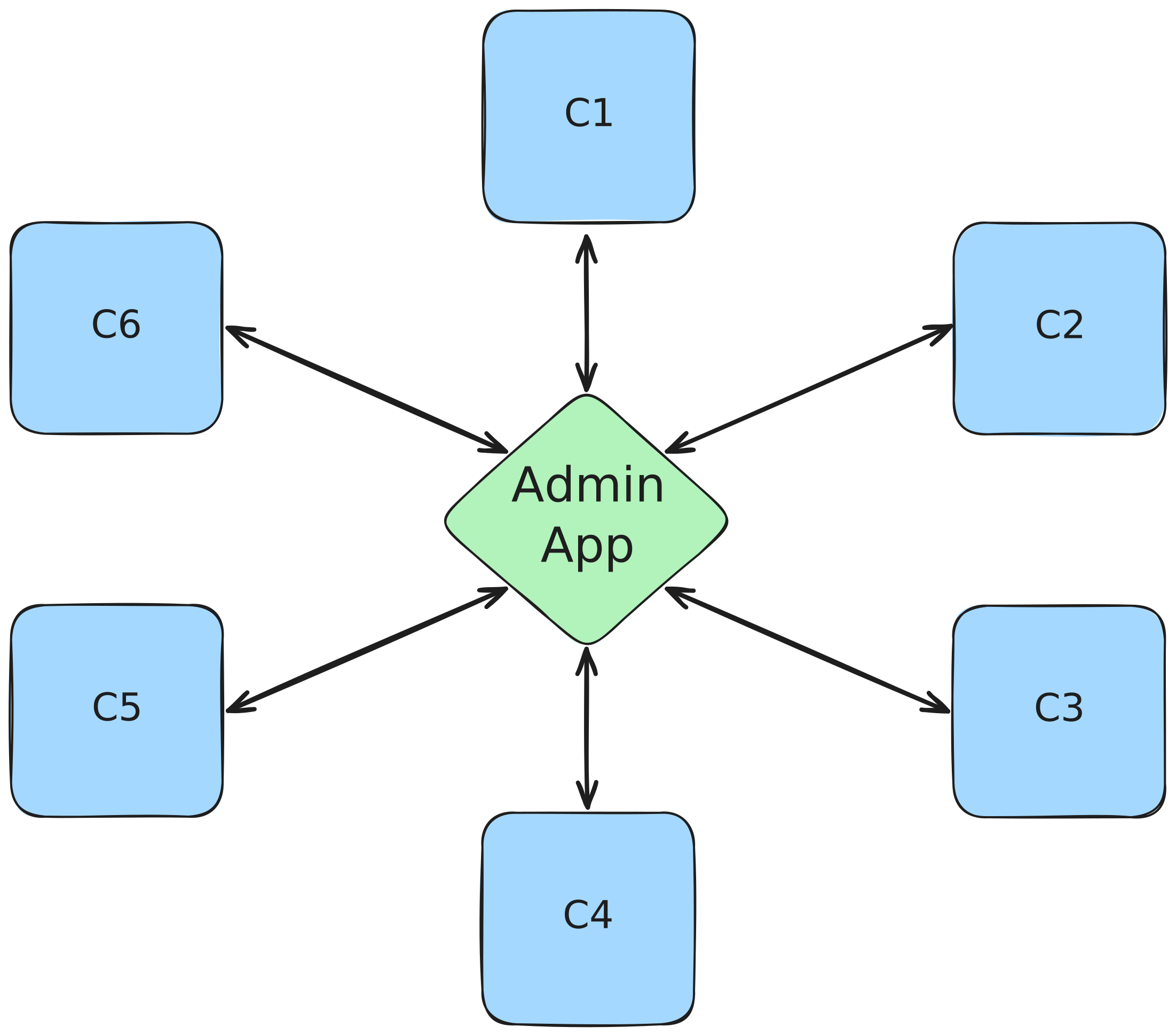
The admin app needs to interact with the controllers that operate the house’s rooms.
The controllers needed to work offline, without the admin app, had limited memory (8KB RAM and 250KB Flash), and a single working thread. Most of that memory goes to managing room state and hardware pins, leaving little room for a web framework. These controllers needed to manage multiple rooms due to cost (think of both the controllers and the media hardware they control), timeline, and the practicalities of wiring up an older two-story building.
Rooms have puzzles - solvable by guests or by staff (if the guests get stuck) - and triggerable events, like opening a secret door or playing a spell sound effect. The behavior of each room differs between modes and could change based on guest feedback.
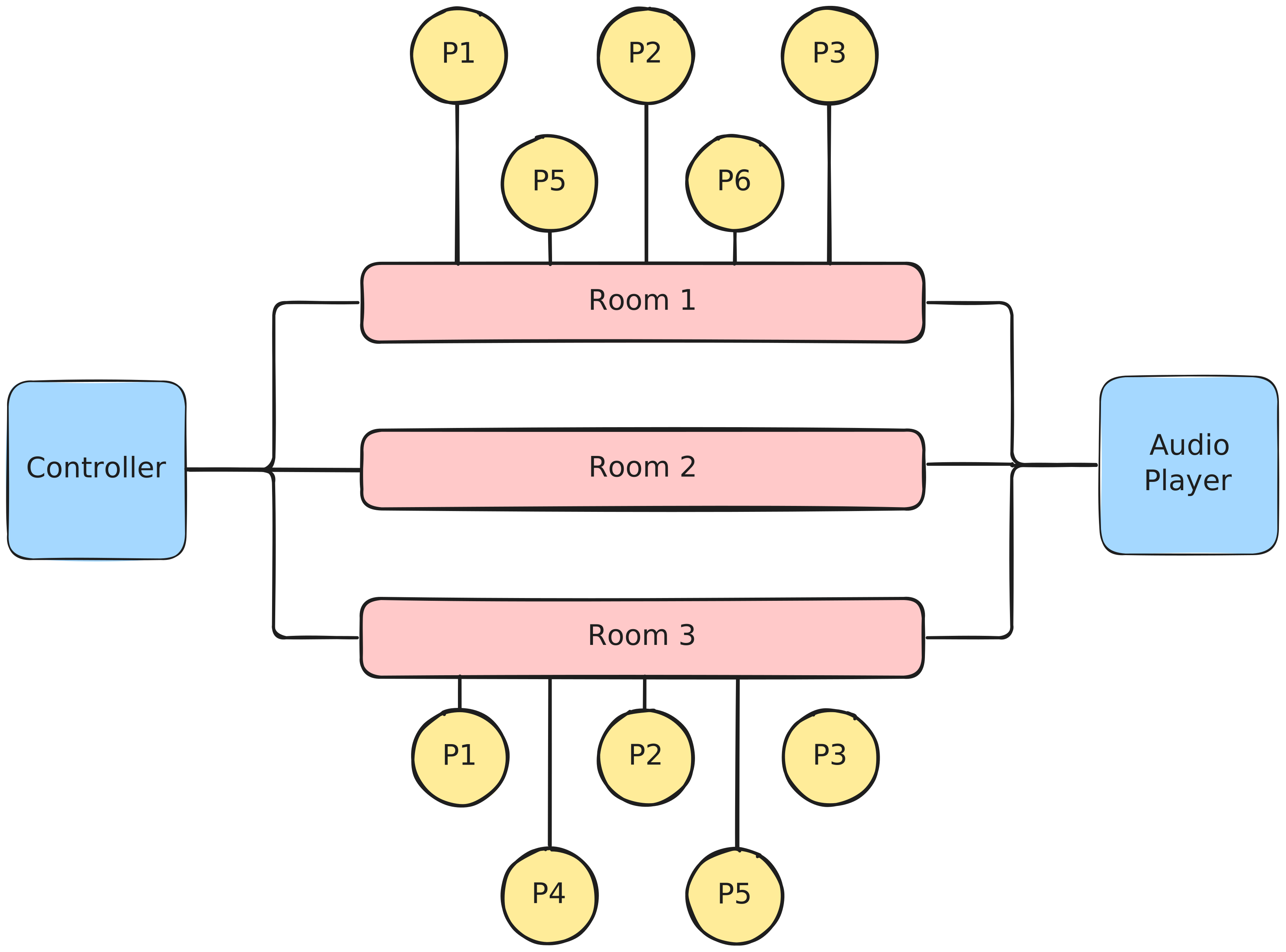
One controller manages multiple rooms, each of which has multiple puzzles. The controller also handles interacting with an audio player to orchestrate music across the rooms it controls.
I wanted the business to be able to lean on its in-house development experience - primarily C++ hardware prototyping and light CSS - to make changes after the project, so I wanted an architecture that minimized future work on both the admin app and the controller network layer.
Why HATEOAS?
HATEOAS is an acronym for Hypermedia as the Engine of Application State. Although it’s viewed in industry as academic purism, I’d experienced the practical benefits of this architectural pattern building Sabal Finance, a FinTech startup I founded. HATEOAS eliminates the coordination tax between the client and server: faster implementation (simpler clients), lower complexity (no duplication of logic across the network boundary), and easier maintenance (independent server evolution) compared to the typical JSON data API and frontend framework pairing.
What is HATEOAS?
HATEOAS is a Representational State Transfer (REST) pattern that decouples the client and server by having the server describe the resource’s state, the available actions given that state, and how to invoke those actions. It uses hypermedia (HTML, in our case) to communicate between a server that produces the state representation and a client that presents it.
<x-room mode="escape-room" state="in-progress">
	<x-room-heading>
		Secret Parlor
	</x-room-heading>
	<x-room-actions>
		<button name="fail" hx-post="/rooms/0/fail/">
			Fail
		</button>
		<button name="music" hx-post="/rooms/0/toggle-music/">
			Toggle Music
		</button>
		<button name="reset" hx-post="/rooms/0/reset/">
			Reset
		</button>
	</x-room-actions>
</x-room>
A HATEOAS-compliant HTML fragment describing a room and its actions.
The HTML fragment above - for example - would be returned by a controller managing the room. The named tags (x-room, x-room-heading, x-room-actions) are custom HTML elements, which we’ll revisit when we discuss the admin app. The hx- attributes come from htmx, a Javascript library that uses HTML element attributes to define hypermedia controls.
By looking at the response alone, we can tell:
- We’re looking at a room called Secret Parlor
- It’s operating in escape-room mode
- It’s currently in-progress
- We know how to fail the room, toggle the music, or reset it. The HTTP verbs and URLs for performing each action are provided.
If the controller changed to allow picking a specific music track, the response would change to show the current track and available options:
<select
	name="select-track"
	hx-post="/rooms/0/set-track/"
	hx-trigger="changed"
>
	<option value="t1" selected>Background Music</option>
	<option value="t2">Transition Music</option>
	<option value="t3">Ending Music</option>
</select>
Updated “Toggle Music” functionality that allows track selection. This would be returned from the controller instead of the original button.
Every time we select a new option, a POST request is sent to the provided URL. The client doesn’t need any code changes to support this new functionality, even though the action name, URL, and underlying HTML elements all changed. The server describes what’s possible - the client presents it.
If we were to take a client-centric (aka. heavy client, thick client) approach using something like React, the app would need to consume data - presumably using a JSON API over HTTP - that returns information about the controller, like the mode, music player state, and supported tracks. The contract would have many optional fields to model the varying characteristics of each controller. The client would need to know how to render the appropriate buttons based on the controller’s state and how to trigger each controller’s actions (URLs and supported HTTP methods). As controllers diverge - some with audio players, some without; different room capabilities; different requirements for room behavior - the client accumulates conditional logic for each variation.
HATEOAS inverts this by leaning into the state and behavior logic the server already owns. Implementing a new feature and exposing it for use requires one change instead of two. The client doesn’t need to know which actions exist, when they’re valid, or how to invoke them. It just renders what it receives.
How HATEOAS Handles Our Constraints
The 10-day timeline and hardware constraints made HATEOAS practical, not just elegant. The system breaks into two groups: hardware controllers acting as HATEOAS servers and browsers rendering the admin app as HATEOAS clients. The pattern fits because controllers are heterogeneous - different rooms support different features, different hardware, different modes - and need to evolve independently as the business adds functionality using their in-house C++ experience.
Hardware Constraints
The controllers know the state of their hardware pins and operating mode. They can operate offline and respond to hardware buttons without needing network connectivity. This sets the controllers up as the source of truth for the system state, making them the servers in the HATEOAS model.
The controllers already had HTTP servers that served full HTML pages, so switching to hypermedia fragments was simple and reduced memory usage. The existing implementation created the full page and styling using dynamic variables stored in RAM. I switched to serving chunks of HTML that described the controller’s state primarily using strings stored in Flash memory, leaving more RAM available for room logic. I was able to comfortably fit room logic, a web server, and response buffers (~500 bytes) onto one controller with 2.7KB to spare (~33%).
RAM:   [=======   ]  66.7% (used 5465 bytes from 8192 bytes)
Flash: [==        ]  17.6% (used 44724 bytes from 253952 bytes)
Memory usage of a controller with 3 rooms, 10 puzzles, and an audio controller. It shows 66.7% of the available 8192 bytes of RAM are used by the program and 17.6% of the available ~254KB of Flash memory.
Business Constraints
The controllers define supported modes, so the client knows which have haunted house mode available and which only support the escape room mode.
Puzzles and triggers can be added or changed on each controller without impacting the other controllers or the other operating mode. Adding new actions to the controllers immediately exposes those actions in the admin app. This process requires small C++ changes, with occasional CSS if styling a new element type - both well within the business’ wheelhouse.
Using HATEOAS at the networking layer cut down admin app development time. The controllers return their complete, updated state after each action, which updates the admin app view automatically. This avoids duplicating view logic on the client (which actions are valid for which state) and maximizes code reuse on the server
The admin app only needs to know the IP address of each controller (static on the local network) to discover the state of the house and available actions on each room. Adding a completely new room only requires adding a new URL for the admin app to check - the rest is handled by HATEOAS. If the app were to go offline, staff could still visit a controller’s root URL to interact with the system.
Implementing a HATEOAS Server on an Arduino
Let’s dive into the Arduino-compatible code running on the controllers.
Networking Layer
The code I inherited for the project had an HTTP server already. The implementation used the arduino-libraries/Ethernet library and handled looking for ethernet connections, parsing out the HTTP verb (GET and POST), simple routing, and body decoding. I added in support for OPTIONS requests - needed to support cross-origin requests from the admin app - and parsing out identifiers (ex. roomIds, modeIds) from routes.
output.println("Access-Control-Allow-Origin: *");
output.println("Access-Control-Allow-Methods: GET, POST, OPTIONS");
output.println("Access-Control-Allow-Headers: *");
HTTP Headers required when responding to a preflight OPTIONS request, written out to the ethernet client (output).
I pulled the server logic and other functionality shared across the controllers into a C++ library in the same Git repository as the controllers. This monorepo setup was managed by PlatformIO, which offers a stand-alone IDE, VS Code extension, and CLI tool. Apart from managing libraries, PlatformIO lets you control most aspects of compiling your code for a specific environment - like the platform type, board, and upload protocol - inside a platformio.ini file.
Pulling base server, room, and puzzle implementations into a library helped derisk the platform separately from individual rooms and maintain consistency across controllers. Since the escape rooms stayed operational during development, I could test library changes against actively-used rooms while we were building out the haunted house.
HTML Templating and Response Buffering
To streamline creating HTML responses across controllers, I added a Python script (referenced in my platformio.ini) that transforms .html files inside a specific directory into character arrays in a C++ header file (Templates.h) before compilation. The HTML templates use handlebars-inspired syntax for dynamic content and worked out-of-the-box with my IDE’s syntax highlighting, allowing me to quickly catch invalid HTML
<!-- room.html -->
<x-room-heading>
	<h3>{{ROOM_NAME}}</h3>
	<x-room-mode>{{MODE_STR}}</x-room-mode>
</x-room-heading>
<x-room-state-container>
{{ROOM_STATE_STRS}}
</x-room-state-container>
Room template called room.html with dynamic room ({{ROOM_NAME}}), mode ({{MODE_STR}}), and room state ({{ROOM_STATE_STRS}}) data.
and the character arrays are stored in flash memory using the PROGMEM keyword, saving the controller’s RAM usage.
// Template.h
const char x_room_template[] PROGMEM = "<x-room-heading><h3>{{ROOM_NAME}}</h3>\n <x-room-mode>{{MODE_STR}}</x-room-mode>\n</x-room-heading>\n<x-room-state-container>\n {{ROOM_STATE_STRS}}\n</x-room-state-container>";
Escaped template string generated from room.html stored in Templates.h.
Storing all of the templates in one header file resulted in a better developer experience than creating one header file per template. Rewriting that file on build automatically handled template removals and renames, preventing orphaned header files from templates no longer used. Orphaned files would result in a minor increase in the FLASH memory used, so avoiding them also has a concrete hardware benefit.
Using these templates inside a controller’s server code consists of copying the string into a buffer, replacing the templated pieces in the buffer, and writing the populated chunk out to the ethernet client.
// Note _P because we're copying from PROGMEM
strcpy_P(htmlBuffer_, x_room_template);

replaceTokenInBuffer(htmlBuffer_, "{{ROOM_NAME}}", room_.getRoomName());
replaceTokenInBuffer(htmlBuffer_, "{{MODE_STR}}", "Escape Room");

if (currentMode_ == ESCAPE_ROOM_MODE_ID) {
  // Adding the Timer component, which is only relevant in
  // escape room mode
  replaceTokenInBuffer_P(htmlBuffer_, "{{ROOM_STATE_STRS}}", x_timer_template);
  replaceTokenInBuffer(htmlBuffer_, "{{DIRECTION}}", "down");

  // Using a working buffer to format dynamic content before
  // inserting into the HTML buffer
  unsigned long remainingTime = room_.secondsRemaining();
  ulongToString(workingBuffer_, remainingTime);

  replaceTokenInBuffer(htmlBuffer_, "{{TIME_SEC}}", workingBuffer_);
  formatTimeRemaining(workingBuffer_, remainingTime);
  replaceTokenInBuffer(htmlBuffer_, "{{FORMATTED_TIME}}", workingBuffer_);
}

// Add the Room State to a working buffer
snprintf(
  workingBuffer_,
  sizeof(workingBuffer_),
  "<x-room-state>%s</x-room-state>\n{{ROOM_STATE_STRS}}",
  room_.getRoomStateDisplayString());
replaceTokenInBuffer(htmlBuffer_, "{{ROOM_STATE_STRS}}", workingBuffer_);

// No more dynamic state components to add, so we remove the template
replaceTokenInBuffer(htmlBuffer_, "{{ROOM_STATE_STRS}}", "");

// Flush the current HTML chunk out to the ethernet connection
output.println(htmlBuffer_);
Usage of the x_room_template and x_timer_template with a controller’s server code. Note the x_timer_template is only used in this scenario if the controller is in escape room mode.
The repeated {{ROOM_STATE_STRS}} token serves as a reference point for adding sibling components. Each replacement includes the same token again, allowing sibling components to be appended without tracking where the next write would need to be in the buffer. When all components are added, the token is removed.
I used two buffers when producing the HTML chunks: htmlBuffer_ for the final response and workingBuffer_ to stage dynamic components before writing them to the htmlBuffer_. Keeping both of these buffers small is a critical part of controlling your overall RAM usage. Using the full HTTP response as a starting point, I found 512 bytes for the htmlBuffer_ and 256 bytes for the workingBuffer_ were both large enough that I could reliably generate responses. That said, I left the sizes configurable per controller in case they needed to be tuned to save RAM later.
Relatedly, it’s important to design your components to minimize the amount of nesting. Shallow component trees require less staging in the working buffer and can be written out more frequently. Deeply nested components require more staging in the working buffer since you need to build inner components before inserting them into outer ones. You could work with partial templates, but tracking what’s been written and managing buffer state across writes adds complexity. Keep things simple by keeping your components - and consequently your buffers - small.
Response times varied by room based on puzzle count, but typically ranged from 97ms to 118ms for 3KB to 4KB responses from controller to the Pi. Most of that time (60-80ms) was Content Download, which makes sense given we’re streaming HTML chunks from single-threaded hardware. I also capped the maximum request processing time per iteration of the Arduino’s loop() function to 250ms to make sure networking wouldn’t bog down the responsiveness of the room.
Although my replaceTokenInBuffer-based approach to templating requires going through the buffer multiple times, the performance numbers validated that this approach was sufficient for the project’s needs. It’s also very copy-paste friendly, making it easier for the business to add new room actions by copying existing button blocks or create new room types by duplicating controller response logic.
State-based Controller Responses
Here’s how the Secret Room declares available actions based on its current state:
if (room_.getRoomState() == RoomState::READY) {
  // Start Button
  strcpy_P(htmlBuffer_, x_button_template);
  snprintf(workingBuffer_, sizeof(workingBuffer_), "name=\"start\" hx-target=\"closest x-controller-wrapper\" hx-post=\"%s/%d/start/\"", getOrigin(), SECRET_ROOM_ID);

  replaceTokenInBuffer(htmlBuffer_, "{{BTN_ATTRS}}", workingBuffer_);
  replaceTokenInBuffer(htmlBuffer_, "{{BTN_TXT}}", "Start");
  output.println(htmlBuffer_);
}
else if (room_.getRoomState() == RoomState::IN_PROGRESS) {
  // Fail Button
  strcpy_P(htmlBuffer_, x_button_template);

  snprintf(workingBuffer_, sizeof(workingBuffer_), "name=\"fail\" hx-target=\"closest x-controller-wrapper\" hx-post=\"%s/%d/stop/\"", getOrigin(), SECRET_ROOM_ID);

  replaceTokenInBuffer(htmlBuffer_, "{{BTN_ATTRS}}", workingBuffer_);
  replaceTokenInBuffer(htmlBuffer_, "{{BTN_TXT}}", "Fail");
  output.println(htmlBuffer_);
}
if (room_.getRoomState() != RoomState::DISABLED) {
  // Reset Button
  strcpy_P(htmlBuffer_, x_button_template);

  snprintf(workingBuffer_, sizeof(workingBuffer_), "name=\"reset\" hx-target=\"closest x-controller-wrapper\" hx-post=\"%s/%d/reset/\"", getOrigin(), SECRET_ROOM_ID);

  replaceTokenInBuffer(htmlBuffer_, "{{BTN_ATTRS}}", workingBuffer_);
  replaceTokenInBuffer(htmlBuffer_, "{{BTN_TXT}}", "Reset");
  output.println(htmlBuffer_);
}
Writing room actions to the response buffer based on room’s state.
In the example above, we see that certain actions are only available in certain room states: a READY room gets a Start button, an IN_PROGRESS room gets a Fail button, and a Reset button is available unless the room is DISABLED. The server declares what’s possible based on current application state using hypermedia.
To simplify the implementation, all of the server actions (ex. reset, fail, start) return the full state of the controller after the action has been processed by the controller. We’ll see in the next section how this works with client polling to visualize the controller’s state without much code.
Implementing a HATEOAS Client on a Raspberry Pi
The admin app polls controllers for their current state and renders the hypermedia they return. The only hardcoded information is controller IP addresses.
Using htmx for Hypermedia Controls
I built the admin app using Astro as a web framework, htmx for hypermedia controls, and Tailwind with DaisyUI for styling.
Here’s an HTML snippet from an Astro component that sets up client polling:
<x-controller-wrapper
    class="card card-padded"
    hx-get={controllerUrls[id]}
    hx-request='{"timeout":1500}'
    hx-trigger="load, every 3s"
>
    <x-controller-info>
        <h2>{data.name} Controller</h2>
        <!-- ... -->
    </x-controller-info>
    <x-room class="skeleton h-46 w-full bg-neutral-10"></x-room>
</x-controller-wrapper>
Part of a static HTML file created using Astro that configures the x-controller-wrapper element using htmx to poll a controller.
The hx-get attribute tells htmx the room state can be loaded by issuing a GET request to the provided URL. The hx-trigger attribute has two values: load and every 3s. This instructs htmx to make the request when the page loads and then subsequently every 3 seconds. The hx-request sets a timeout to handle controllers that might be offline or under load. When a response arrives, htmx swaps the returned HTML into the element, replacing the skeleton loader with actual room state and actions.
When a user clicks an action button returned from the controller, htmx handles the interaction. For example:
<button name="start" hx-post="/rooms/0/start/" hx-target="closest x-controller-wrapper">
    Start
</button>
A button returned in a controller’s state response that exposes a “Start” control
htmx sends a POST request to the specified URL and swaps the response into the closest x-controller-wrapper element, updating the entire controller’s state. The client doesn’t know what “start” means or what endpoints exist: it just follows the hypermedia controls the server provides.
Web Components for Client Interactivity
The controllers return custom HTML elements like x-timer and x-music-state. The admin app defines web components that define the client-side behavior of these elements:
class XTimer extends HTMLElement {
    connectedCallback() {
        const lastTimeSec = parseInt(this.getAttribute('last-time') || '0')
        const direction = this.getAttribute('direction') || 'down'
        const increment = direction === 'down' ? -1 : +1
        let elapsed = lastTimeSec;

        const state = this.closest('x-room')?.getAttribute('state') || 'ready'
        if (state === 'in-progress') {
            setInterval(() => {
                elapsed += increment;
                this.innerText = this.formatTime(elapsed);
            }, 1000)
        }
    }

    private formatTime(seconds: number): string {
        const hours = Math.floor(seconds / 3600);
        const minutes = Math.floor((seconds % 3600) / 60);
        const secs = seconds % 60;
        return `${hours.toString().padStart(2, '0')}:${minutes.toString().padStart(2, '0')}:${secs.toString().padStart(2, '0')}`;
    }
}
customElements.define('x-timer', XTimer)
A custom XTimer element that interpolates the timer value in between server responses. A count-up timer tracks elapsed time and is used in haunted house rooms. A count-down timer tracks time remaining and is used in escape rooms.
When a controller uses the x-timer element in a response, the browser automatically upgrades it to a XTimer element using this component definition. The timer reads its server-specified HTML attributes (last-time="3600" and direction="down") and updates its text according to the direction and most-recent time. Since the timer resets to the controller’s state after each poll, the timing drift is bounded by the time it takes to download the content and to upgrade the custom element - roughly 100ms on the business’ network, acceptable for a haunted house control panel.
As another example, I wanted to show an SVG icon on the client’s music controls without defining this icon on each controller. This keeps the presentation logic on the client. I defined a custom element that pulled in hidden icons on the client, determined which to show based on the controller’s state, and then updated its inner HTML with the appropriate icon:
class XMusicState extends HTMLElement {
  connectedCallback() {
    const state = this.getAttribute('state') || 'playing';
    this.innerHTML = ''
    if (state === 'playing'){
      this.appendChild(this.pauseIcon());
    } else {
      this.appendChild(this.playIcon());
    }
  }

  pauseIcon(): HTMLElement {
    const pauseIcon = document.querySelector('[data-icon="lucide:pause"]')?.cloneNode(true) as HTMLElement;
    pauseIcon.classList.remove('hidden');
    return pauseIcon;
  }

  playIcon(): HTMLElement {
    const playIcon = document.querySelector('[data-icon="lucide:play"]')?.cloneNode(true) as HTMLElement;
    playIcon.classList.remove('hidden');
    return playIcon;
  }
}
customElements.define('x-music-state', XMusicState)
A custom XMusicState element definition that adds an icon as a child element based on the state attribute.
This separation is key: the server declares structure and data, the client defines presentation and client-side behavior.
All I needed to do was return the music state in the controller’s state response and the UI automatically started showing the correct button:
<x-music-state state="playing"></x-music-state>`A custom element tracking the music player’s state added to a controller’s response
State-based Styling with CSS Attribute Selectors
The server-controlled attributes on custom elements also enable state-based styling. Using attribute selectors, the admin app styles rooms differently based on their mode and state without requiring JavaScript:
x-controller-wrapper.hide-disabled x-room[state="disabled"] {
    @apply hidden;
}

x-room[state='disabled'] {
    @apply flex flex-row justify-between;
}

x-room[mode="emr"] x-room-mode {
    @apply border-[#1c415c] bg-[#1c415c] text-white;
}

x-room[mode="dm"] x-room-mode {
    @apply border-[#BC9057] bg-[#BC9057] text-white;
}

x-room[state="ready"] x-room-state {
    @apply badge-success;
}

x-room[state="in-progress"] x-room-state {
    @apply badge-info;
}

:where(x-room[state="stopped"], x-room[state="stopping"]) x-room-state {
    @apply badge-warning;
}
Attribute selectors based on server state. The @apply comes from Tailwind and means that the definitions of the utility classes that follow will be applied to the selected elements.
Combined with web components for behavior and htmx for controls, CSS attribute selectors complete the client-side adaptation layer: the server sends semantic state, the client handles all presentation.
Building Orchestration Controls
The web component pattern also enables global controls that coordinate multiple controllers. For example, clicking a “Set Escape Room” button can switch all controllers currently in haunted house mode:
switchControllersWithMode(mode: "escape-room" | "haunted-house"): void  {
    document.querySelectorAll(`x-controller-info-mode[active='${mode}']`).forEach((modeEl) => {
        (modeEl.parentElement?.querySelector("button[name='mode-switch']") as HTMLButtonElement).click();
    })
}
A method from the XGlobalControls web component that switches controllers from one mode to another. Called with mode="haunted-house" when the “Set Escape Room” button is clicked.
The control queries for controllers currently in the opposite mode and programmatically clicks their mode-switch buttons. Since each button already knows its endpoint and target from the server’s hypermedia response, the orchestration code doesn’t need controller URLs, state structures, or knowledge of what mode-switching does on the server. This same pattern extends to other global controls like house lighting or emergency triggers.
Serving the Admin App with Caddy
Astro supports prerendering pages as well as creating Node-based server APIs. Our admin app only interacts with the controllers, so I had Astro generate static assets. I served those assets using Caddy on the Raspberry Pi. Installing Caddy via apt-get on Raspberry Pi OS automatically registered Caddy as a systemd service. I enabled the service to start on boot so that the admin app would start up again after a power outage. I also enabled SSH on the Pi to simplify deploying updates to the app.
The specific infrastructure choices matter less than the architecture. Any static site generator and web server would work. What matters is that the client consumes hypermedia without hardcoding server behavior.
Closing Thoughts
The system was delivered within the 10-day timeline and has been running since. As new hardware becomes available and staff test different room configurations, the HATEOAS architecture enables a tight feedback loop: changes to a controller immediately appear in the admin app without coordination between the two codebases.
The hard part was handling embedded systems constraints, not HATEOAS. Tuning buffer sizes and designing components shallow enough to fit in 512 bytes required iteration. But once those were solved, the HATEOAS approach minimized work on both the networking layer and the admin app, leaving more time and memory for room logic.
This architecture’s value comes from matching how these applications actually work: heterogeneous server-driven state machines with thin presentation layers. I’ve used this approach in my FinTech startup and now in embedded systems. The architecture adapts because it puts complexity where it belongs: on the server managing state. As a result, clients are simple while being robust enough to handle independently evolving servers.
For applications where the server owns the logic and clients need to stay synchronized with evolving server capabilities, HATEOAS eliminates the coordination tax, leading to faster implementations and easier maintenance.