Since this package makes use of built-in treesitter mode this package requires GNU Emacs 29.1+.
Introduction
dwim-coder-mode is a Rube Goldberg machine (but simpler and one that works) mode for GNU Emacs. Currently good support for C, Python, and Rust programming are included.
dwim-coder-mode hacks around the characters as you type in the buffer to do various stuff often reducing the effort to accomplish something.
Say for example, in c-ts-mode, pressing space bar often inserts _ or sometimes
real spaces depending on the context. It also inserts - when inside #include
header names.
If you find this useful, you may:
- Help free software by switching to any GNU/Linux.
Regardless of the Operating System you use, always buy Debian main compatible hardware or at least ask for one.
- This can help free software, improve hardware lifetime and reduce Planned obsolescence.
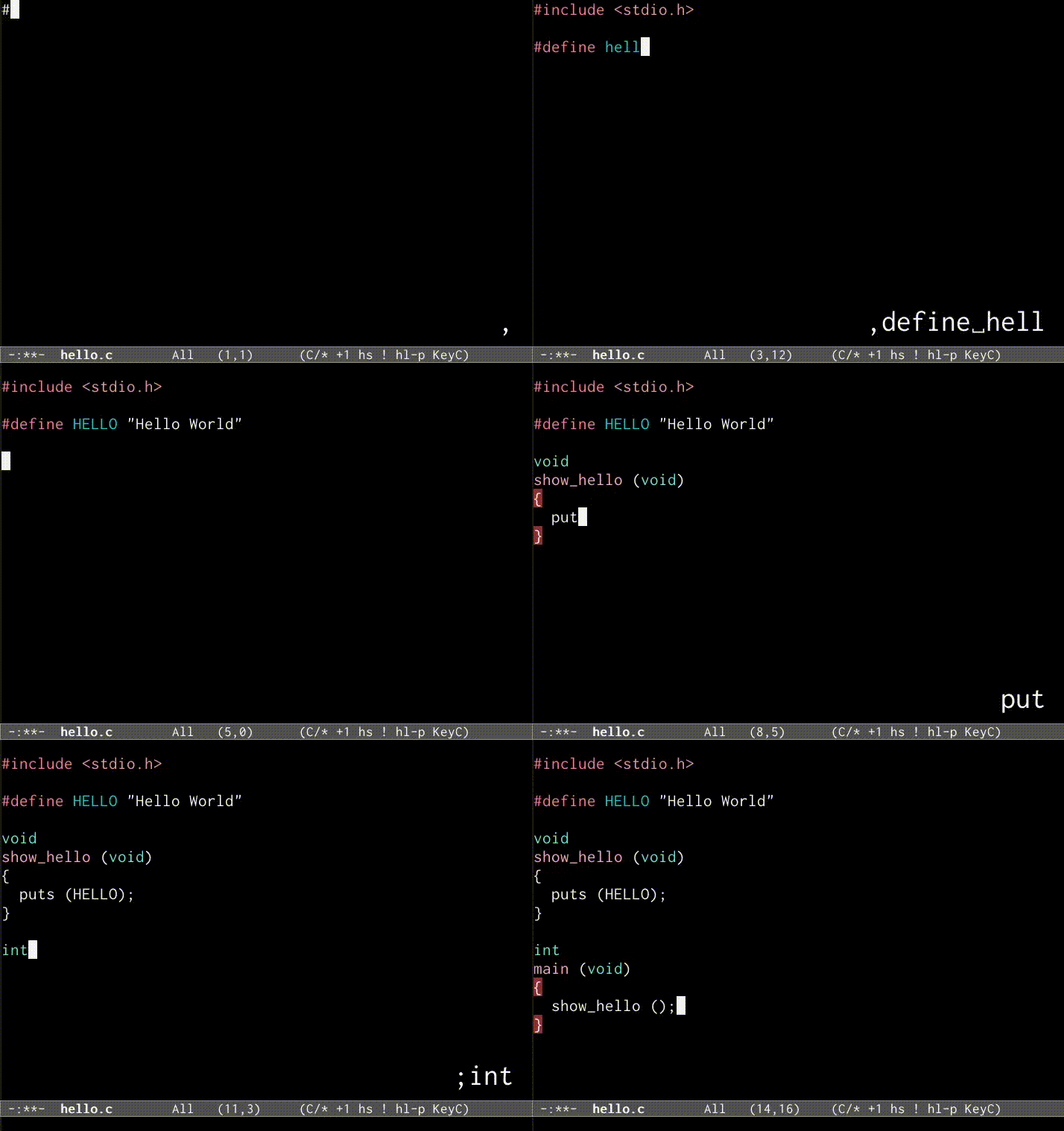
Figure 1: dwim-coder-mode demo
History
It's known that GNU Emacs is extremely extensible, and when I was first introduced to GNU Emacs, I decided to do something weird. I liked the idea of dwim which is very popular in the Emacs world, and I wanted to reduce as much keystrokes to write my code. I wrote some elisp hacks to do so, which worked really great.
Since I has been using this in my personal config for quite some time, I decided to write a mode for that which is more maintainable.
Installation
dwim-coder-mode requires GNU Emacs 29.1+ with treesitter support. dwim-coder-mode
requires electric-pair-mode to work properly.
The following modes are also recommended for proper working of the mode:
electric-operator (for autospace around operators),
ws-butler (to trim whitespace in modified lines).
Install using use-package
You can installl dwim-coder-mode from melpa unstable.
(use-package dwim-coder-mode
  :ensure t
  :hook ((c-ts-mode python-ts-mode rust-ts-mode) . dwim-coder-mode))
Install from git
emacs --batch --eval='(package-vc-install "https://gitlab.com/sadiq/dwim-coder-mode")'
Hacks
| in the examples is the cursor point. You can always do C-q key
when do you wan't dwim-coder-mode to act crazy for the given key.
Utmost care has been taken to avoid tracking CPU heat when spacebar is pressed, so as to avoid possible break of your workflow on future software updates.
See tests in ./tests/*/*-tests to see the complete list of available hacks.
c-ts-mode, python-ts-mode, rust-ts-mode
- S-SPC (shift + space)
- insert real space (may not work without a GUI)
- . key
..=>(|)
- pressing space bar
gtk|=>gtk_|
- ' key
gtk_window|=>GTK_WINDOW|GTK_WINDOW|=>GtkWindow|
- , key
power, |=>power = |- comma twice inserts '='
- ; key - move to the end of current statement
power = pow(3, 4|)=>power = pow(3, 4)|
c-ts-mode
- , key
#include,=>#include <|>#include <,>=>#include "|"func(|)=>func(&|)func(&|)=>func(*|)
- " key
gtk_window|=>GtkWindow *|
- pressing space bar
foo_|=>foo->|(ie, pressing space bar twice gives->)foo->|=>foo__|#include <example|>=>#include <example-|>func(|)=>func(_|)
- …
rust-ts-mode
- pressing space bar
foo_|=>foo::|(ie, pressing space bar twice gives::)foo::|=>foo__|func(|)=>func(_|)
- , key
func(|)=>func(&|)func(&|)=>func(*|)
Examples
electric-pair-mode or similar should be enabled for dwim-coder-mode to work You shall have to type using keyboard or so. Copy paste won't work
C
Input:
,include,stdio.h;;

int main..{
const char"str,,"Hello, World;;;"
puts..str;;
Output:
#include <stdio.h>

int
main (void)
{
  const char *str = "Hello, World";
  puts (str);
}
Python
Input:
,Show Hello World

def show SPC hello..;:;
        print.."Hello, World"

show SPC hello..
Output:
def show_hello():
    print("Hello, World")

show_hello()
Other files
You can enable dwim-coder-mode in any mode derived from prog-mode or conf-mode.
Also, it's possible to use file local variables to set config.
Input: weston.ini file
[libinput;;]
enable SPC tap,,true
Output:
[libinput]
enable-tap=true
See also
License
Written in 2022-2023 by Mohammed Sadiq <sadiq@sadiqpk.org>
To the extent possible under law, the author(s) have dedicated all copyright and related and neighboring rights to this software to the public domain worldwide. This software is distributed without any warranty.
You should have received a copy of the CC0 Public Domain Dedication along with this software. If not, see the license online.