RTMP, short for Real-Time Messaging Protocol, is a TCP-based protocol commonly used to publish live video from an encoder to a media server or streaming platform. It remains useful for ingest because many encoders and services support it, while browser playback usually uses a different delivery path.
This guide explains what RTMP does, how the publishing workflow works, where it fits alongside WebRTC, SRT, and HLS, and when to choose an RTMP streaming server or a different protocol.
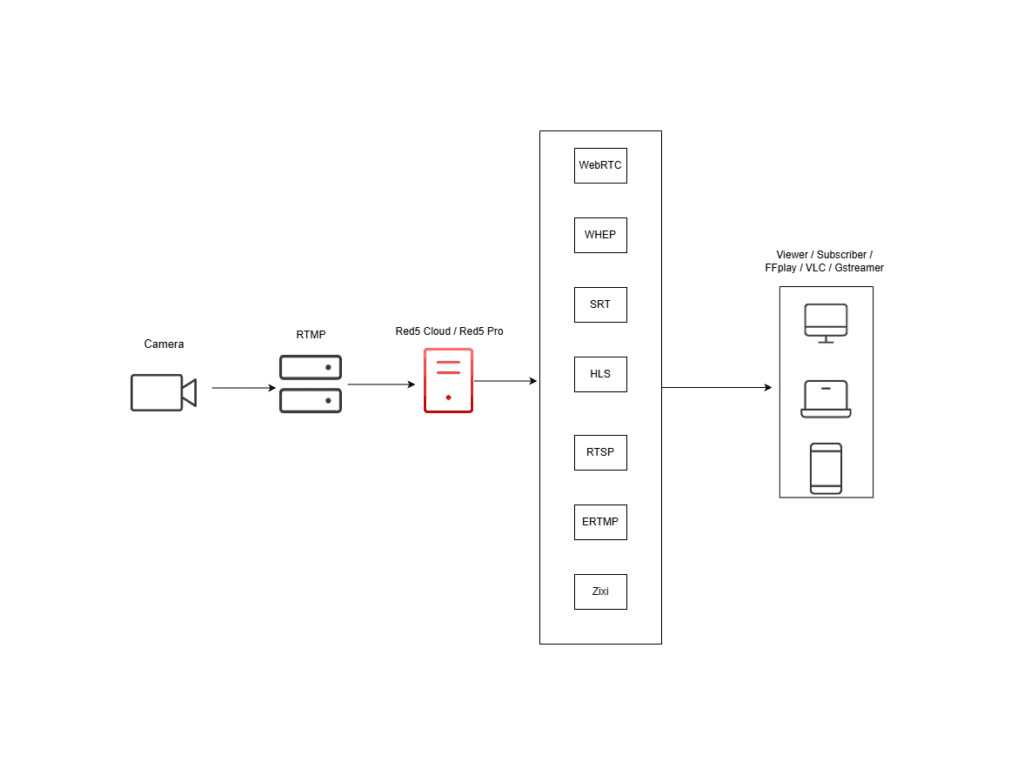
Real-Time Messaging Protocol (RTMP) is a protocol for streaming audio, video, and data over the internet. It originated in the Flash era, but its most common modern role is live ingest: an encoder sends a feed to a server, platform, or cloud service using an RTMP endpoint.
RTMP uses TCP and typically listens on port 1935, although deployments can use another port. It sends media and control messages in chunks over a persistent connection. Red5 Pro documentation describes both RTMP and the backwards-compatible Enhanced RTMP (ERTMP), which adds enhanced codec signaling for supported workflows.
How RTMP Streaming Works

RTMP is a contribution path, not a promise of a particular viewer latency. End-to-end delay depends on the encoder, network, server processing, player, and the protocol used for delivery to viewers.
- Connect: An encoder opens a connection to the RTMP server and completes the RTMP handshake.
- Publish: The encoder authenticates where required and sends its audio, video, and metadata to the assigned application and stream name.
- Process: The server can route, record, transcode, or prepare the incoming feed for one or more playback workflows.
- Deliver: Viewers receive the stream through the player and delivery protocol selected for the application, rather than relying on native RTMP playback in modern browsers.
RTMP in a Live-Streaming Workflow
A practical RTMP setup has four pieces: an encoder such as OBS, an RTMP publish endpoint, a stream name or key, and a viewer delivery path. Red5 Cloud documentation shows the workflow from creating a stream through configuring OBS and embedding a player.
Where RTMP Fits Today

RTMP is often a good fit when an existing encoder, production tool, or destination expects RTMP ingest. It is less suitable as the direct browser-facing playback format because modern browsers do not natively play Flash-era RTMP streams.
Advantages of RTMP
- Established encoder support: Many software and hardware encoders can publish RTMP.
- Persistent TCP connection: TCP provides ordered, reliable delivery for the publishing connection.
- Straightforward ingest workflow: An endpoint plus stream name or key is familiar to many broadcasters and creators.
- Flexible downstream workflow: A media server can route the ingest stream to recording, processing, or delivery components.
Limitations of RTMP
- Not native browser playback: A modern web player normally needs a browser-compatible delivery format or technology.
- TCP trade-offs: Packet loss can increase delay because TCP prioritizes reliable, ordered delivery.
- Audience scale needs architecture: Large audiences usually require a distribution design that suits the selected playback protocol and infrastructure.
- Codec and implementation limits vary: Check the exact encoder, server, and player documentation rather than assuming every RTMP workflow supports the same codecs.
RTMP vs. Other Streaming Protocols
The right protocol depends on which leg of the workflow you are choosing: contribution from an encoder, real-time interactive delivery, or large-scale viewer playback. The following distinctions are directional, so verify the exact product and player requirements.
RTMP vs. RTSP
RTMP is commonly used for publishing a live feed to a server or platform. RTSP is frequently associated with IP cameras and controlled-network video workflows. Neither protocol is automatically the better choice: use the format supported by the camera or encoder, media server, and intended delivery path.
RTMP vs. WebRTC
RTMP is a familiar ingest option. WebRTC is designed for real-time media communication and is commonly used when a browser-based, interactive experience is required. See RTMP vs. WebRTC for a deeper comparison of the two workflows.
RTMP vs. SRT
RTMP runs over TCP. SRT uses UDP and includes mechanisms intended for reliable video transport across variable networks. SRT can be a better candidate for contribution links where network conditions and recovery behavior are central requirements; RTMP can be simpler where the destination expects RTMP ingest.
RTMP vs. HLS
RTMP is commonly used to publish a live feed, while HLS is commonly used for HTTP-based playback. They can appear in the same workflow: an RTMP source enters a media server, then the server prepares an HLS-compatible stream for viewers. Read our HLS streaming guide for the playback side.
RTMP vs. RTMPS
RTMPS is RTMP carried over a TLS-secured connection. Use RTMPS when the receiving service requires it or when encryption in transit is part of the publishing requirement. Confirm the endpoint, certificate, and encoder support with the service you are connecting to.
Choose an RTMP Setup
Choose the setup based on how much infrastructure you want to operate and whether you need a learning environment, managed service, or software you control.
Learn with a Free RTMP Server
For a hands-on local or development setup, follow our tutorial to set up a free RTMP server with Red5 and OBS. That tutorial owns the step-by-step configuration details.
Use a Managed RTMP Workflow
If you prefer managed infrastructure, Red5 Cloud provides a documented RTMP publishing workflow. Start with the Red5 Cloud RTMP quick-start guide to configure a stream and an OBS publisher.
Deploy Self-Hosted RTMP Software
For a deployment you operate and integrate, evaluate Red5 RTMP streaming server software. Red5 Pro documentation covers RTMP and ERTMP, including enhanced codec signaling in its documented ERTMP workflow.
Troubleshoot RTMP Publishing

Start with the publishing endpoint, credentials or stream key, firewall rules, encoder log, and current network capacity. A successful connection does not by itself prove that the viewer path is configured correctly.
| Symptom | Check first | Next action |
|---|---|---|
| Encoder cannot connect | Endpoint, port, application path, credentials, and firewall | Compare the encoder settings with the receiving service’s current documentation. |
| Stream connects but does not appear | Stream name, key, publish permissions, and server-side logs | Verify that the intended application and viewer delivery path use the same stream. |
| Unstable publishing | Upload capacity, packet loss, encoder load, and bitrate | Test a lower bitrate and inspect encoder and server logs before changing architecture. |
FAQs
What is RTMP used for?
RTMP is commonly used to send a live stream from an encoder, such as OBS, to a media server or streaming platform. The server can then prepare that feed for viewer playback using a suitable delivery protocol, player, or distribution workflow.
How does RTMP streaming work?
An encoder opens an RTMP connection to a server, completes a handshake, and publishes audio, video, and metadata in chunks. The server receives that ingest stream and can route, record, transcode, or package it for the audience-facing playback path.
What is an RTMP URL?
An RTMP URL identifies the publishing endpoint an encoder connects to. It usually includes the protocol, server host, port when required, and application path. The stream name or stream key may be supplied as part of the URL or as a separate field, depending on the service.
What does RTMP stand for?
RTMP stands for Real-Time Messaging Protocol. It was created for streaming media and data over the internet and is still widely used as a live-video ingest protocol, even though Flash playback is no longer part of modern browser workflows.
Conclusion
RTMP remains a practical live-streaming ingest protocol when your encoder, server, or destination supports it. Use it for the publishing leg it fits best, then choose the playback and distribution technology around your audience, latency needs, network conditions, and operational model.