From time to time we feature guest posts from folks in the MCP ecosystem doing interesting things. This post comes from Jiquan Ngiam, co-founder of MintMCP, who are expertly navigating bringing MCP into enterprise customer hands.
MCP gateways are becoming an increasingly established pattern: connect all the MCP servers you care about to one, and have it aggregate all the tools together so that your users have access to hundreds of MCP servers and thousands of tools. But everyone is quickly learning that this only exacerbates the problem of having too many tools active at once, thus blowing up LLM context windows.
To address this, some gateways try to throw more LLM at the problem - there are gateways now that dynamically figure out which among hundreds to thousands of tools to use on the fly (e.g. using RAG), and then run those specific tools. Even though this helps the problem with the context window, it doesn't work well in practice.
On top of that, many security concerns remain unaddressed. For example, take an agent accidentally chaining together tools you don't want combined Your Stripe MCP tools don't need to be available alongside your Twitter posting MCP tools.
In this post, we instead propose taking a use case based approach, with the insight that the relevant set of tools we need for an agent can be quite narrow at a given point in time. In practice, we want to combine MCP tools from multiple servers for each use case, and only have a curated set of tools available to the agent or sub-agent: this way, the agent is on good guardrails, and more likely to complete the task correctly.
How could we design MCP servers at the abstraction of use cases? What would an MCP server that's designed for a specific use case look like?
We call this the virtual MCP Server concept: take multiple MCP servers and tools, group them by use cases and present this still as a standalone MCP server. You have not just one gateway, but hundreds of gateways, each representing a use case in your organization.
Start with the use case
When we use agents, we often have a goal in mind. We know where we want the agent to get its data from, how to process it, and what to do with it.
Consider a sales outreach workflow, which needs LinkedIn tools to get data for a lead, Gmail to draft and send emails, web research to get latest information about the company, and Salesforce to retrieve and track lead history. That's four different MCP servers comprising 50+ tools, but probably only a dozen tools total that you actually need for this workflow.
Next, consider a frontend engineering workflow, which needs the Figma MCP server for designs, Linear for ticket tracking, Playwright for getting screenshots, and GitHub for code and PRs. Again, four MCP servers - completely distinct from the set that the sales outreach workflow needs.
Then take a product manager workflow, requiring Linear for ticket tracking, Salesforce for customer tracking, and Intercom for support issues. Notice something interesting here - the PM needs Salesforce just like the sales team does, but probably only needs read access to customer data, while sales needs to be able to update lead information.
One quickly realizes that the types of tool access for each use case and role is quite different. The same MCP server might need different permissions and tool subsets depending on who's using it and what they're trying to accomplish.
So that leads us to organizing tools via virtual MCP servers for each use case.
Virtual MCP Servers explained
Armed with a set of MCP servers and their tools, and a concrete set of use cases, we can use virtual MCP servers to provide bundling at the gateway layer.
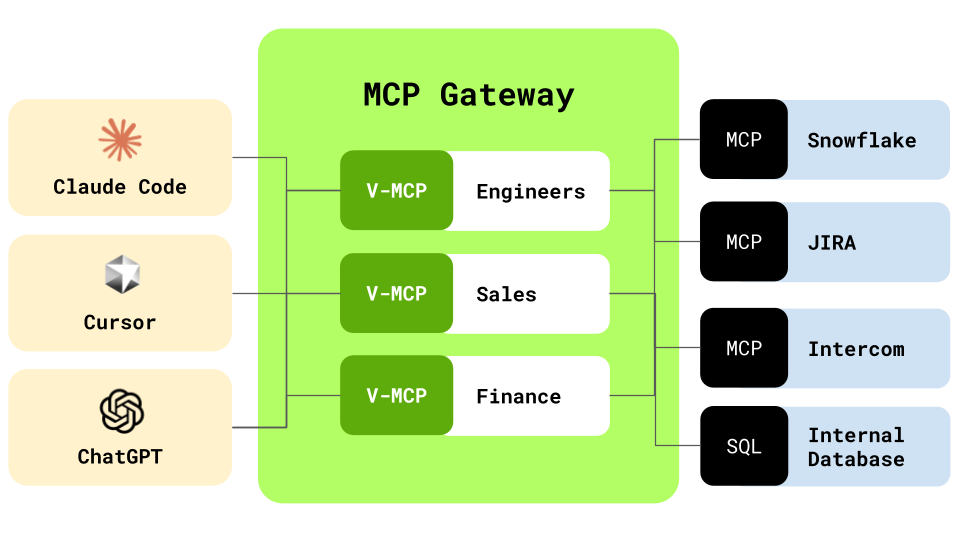
We set up virtual servers for each use case and role, and then specify only the set of tools that we want to make available for each use case. We give the virtual MCP servers useful names such as frontend-mcp-server, outreach-mcp-server, and so on. When a virtual MCP server is installed, it is installed just like a regular remote MCP server. It shows all the tools combined across many MCP servers - but only the ones relevant to your current task.
When a request is made, the virtual MCP server routes the tool call to the correct MCP server behind the scenes. Operationally, a virtual MCP server provides an interface matching a single gateway today. But when we have multiple virtual MCP servers, they can start sharing the same backend connectors and authentication, making it seamless for users to transition between using different virtual servers.
Walking through a sales outreach use case
Let's see what this looks like in practice. Say we're setting up a virtual MCP server for our sales team's outreach workflow.
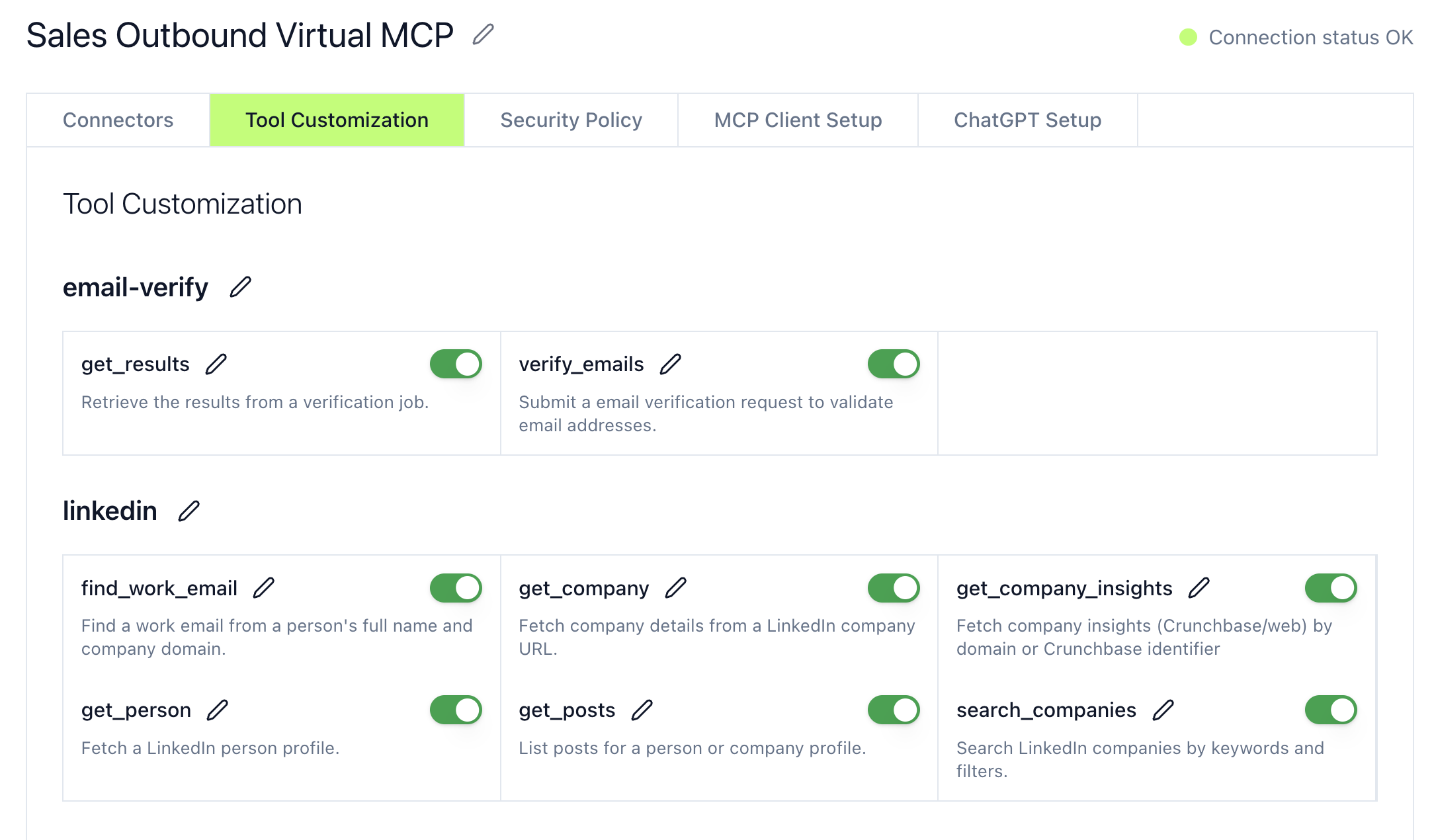
First, we define what tools from each server we actually need. From LinkedIn, we might only need search_profiles, get_company_info, and get_recent_posts - we don't need the tools for posting content. From Gmail, we need draft_email and send_email, but not the tools for managing labels or even reading emails. From Salesforce, we need create_lead, add_lead_to_campaign, and create_campaign. And the regular web research tools.
That's about a dozen tools total, much fewer than the 100+ available across all these servers combined.
When your sales team member starts their agent with this virtual server, they get only the tools they need, pre-configured permissions appropriate for their role, and a focused, performant agent that can't accidentally access engineering tools or financial systems.
The routing happens transparently. When the agent calls search_profiles, the virtual MCP server recognizes this belongs to the LinkedIn server, routes the request there, handles authentication using shared credentials, and returns the response as if it came from a single server. The agent doesn't know or care that it's talking to multiple servers behind the scenes.
A setup for frontend engineering
Now consider how different the frontend engineering virtual server would be. This virtual server would have completely different tools - get_design_context, get_screenshot, and get_variable_defs from Figma, with read-only access. It would have get_issue, update_issue, and create_comment from Linear with write access. It would include tools like browser_click, browser_type, and browser_navigate from Playwright. And it would need GitHub access for pull reviews and comments.
The frontend engineer never sees Salesforce tools. The sales person never sees Figma. Each role gets exactly what they need for their workflows.
Benefits beyond tool management
One clear benefit of a virtual MCP server is that it now semantically groups tools together. When using MCP clients like Claude Web, you can easily disable an entire tool group together by disabling that server. Switching between the right set of tools becomes trivial.
Further, there are several other advantages that emerge from this architecture.
Security improves through minimal access. Each virtual server exposes only the minimum set of tools needed for a task. Your finance tools are never active when you're doing frontend development. Your production database tools are never available when you're doing sales outreach.
Performance improves through focus. The agent only considers 10-20 tools for every request rather than 1000+ tools. This means smaller context windows, faster tool selection, and more accurate tool usage. The agent spends less time figuring out which tool to use and more time actually using it effectively.
Onboarding becomes simpler. New team members get access to pre-configured virtual servers for their role. No need for them to figure out which of 50 MCP servers they need or how to configure them. They just connect to the "frontend-engineer-mcp" or "customer-success-mcp" and they're ready to go.
Virtual servers can share authentication backends. An admin can connect to Salesforce once, and all virtual servers that need Salesforce access can use the underlying MCP, each with their appropriate permission levels, or even requiring per-user credentials.
Since all requests flow through virtual servers, you can track which use cases consume the most resources, audit tool usage by role and use case, and ensure compliance with data access policies. You know exactly who's accessing what and when.
Implementation details
The beauty of virtual MCP servers is that they require no changes to the MCP protocol itself. They're purely an architectural pattern built on top of existing primitives.
At its core, a virtual MCP server is a router. It maintains a mapping of which tools belong to which backend servers. When a tool call comes in, it looks up the appropriate server, checks permissions, and forwards the request. The response comes back through the same path.
Tool discovery works by aggregating the tools from all configured backend servers, filtering them based on the use case configuration, and presenting this filtered list to the client. The client sees a cohesive set of tools as if they all came from a single server.
Authentication can be handled through a shared layer that maintains credentials for all backend servers and provides them with appropriate restrictions based on the use case. This means users authenticate once to each underlying service, and all virtual servers can leverage those credentials within their defined permission boundaries.
Getting started with virtual MCP servers
If you're interested in implementing virtual MCP servers in your organization, start by auditing your current tool usage. Which MCP servers do different teams actually use? You might be surprised to find that most roles only regularly use a small subset of available tools.
Next, identify your key use cases. What are the five to ten most common workflows in your organization? You can start by observing which tools are actually used in an agent/chat session. These become your initial mapping of tools to use cases.
Start with a simple implementation for one use case. Once you have one virtual server working well, the pattern becomes clear for implementing more.
The path forward
As the MCP ecosystem matures, I expect we'll see standard use case templates emerge corresponding to virtual MCP server configurations. In fact, virtual servers make it easy for teams to share best practices across the organization.
Rather than needing to install 10 different servers and selecting the right tools, a single virtual MCP server encapsulates all the tools needed for the user. This works well with sub-agents and skills as well.
Virtual servers are essentially implementing role-based access control at the MCP layer. This pattern will likely influence how the MCP spec itself evolves to support permissions and access control more natively.
By giving our agents focused toolsets designed for specific use cases, we create agents that are practical, performant, and secure. All this is possible with the MCP spec as it stands today, we just need to start thinking about how we should organize the tool access differently.