From time to time we feature guest posts from folks in the MCP ecosystem doing interesting things. This post comes from a collaboration with Adam Jones, Member of Technical Staff at Anthropic, who has been deep on exploring the edges of MCP since MCP's earliest days.
Most MCP demos feature a single server connecting to a single client. For example, you might wire up a Gmail MCP server to Claude Code. It works! It triages your inbox, drafts replies, finds that thing from three weeks ago.
But… it’s a little pointless. Gmail already has a perfectly good interface for email. It’s called Gmail. Google has spent twenty years refining it. If “chat with your inbox” were all MCP got you, you’d be right to wonder what the fuss is about.
Connecting to multiple servers starts the unlock
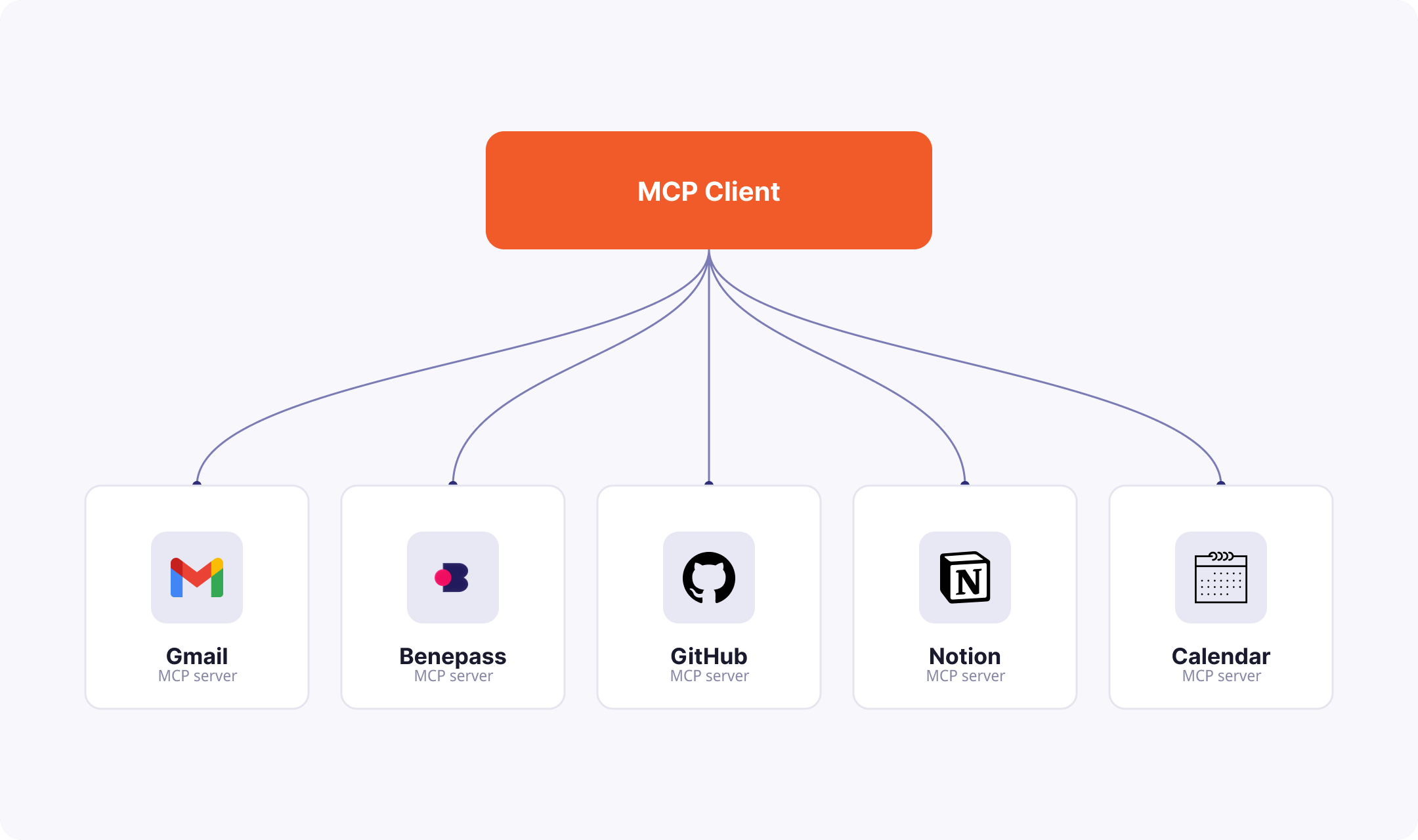
Here’s the same Gmail MCP server doing something Gmail can’t do alone: filing business expense receipts.
An IKEA order confirmation is sitting in my inbox, receipt attached. Benepass — a benefits provider — wants that receipt uploaded and submitted. Claude Code can find the email, pull the attachment, log into Benepass by retrieving the one-time code from Gmail, upload the receipt, and submit. Done.
No single app could do this, because the job crosses apps. Server composition is a killer feature of MCP, not just “your AI talks to one integration.”
Where things get really interesting: multiple clients
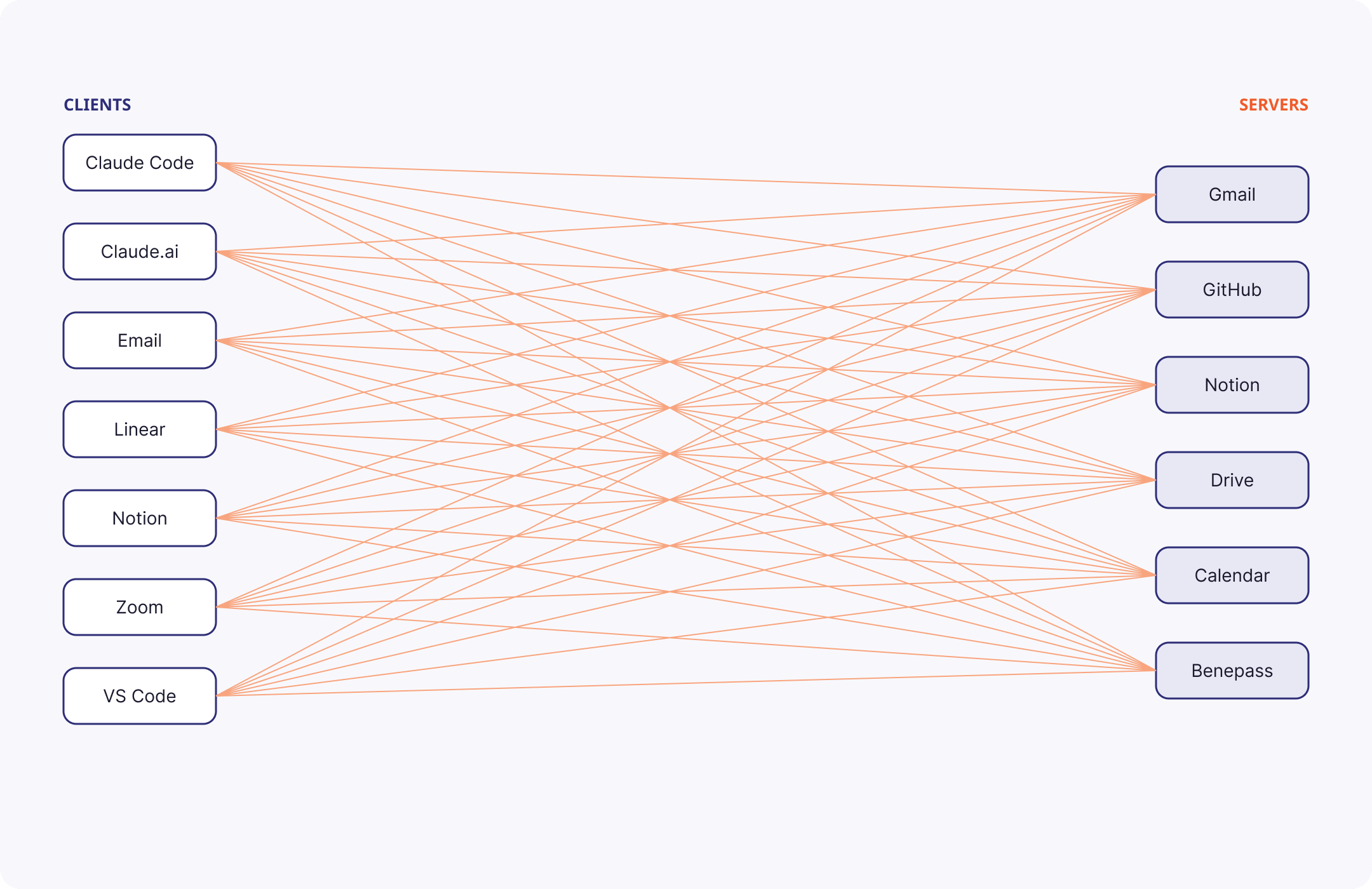
7 clients × 6 servers = 42 connections to configure
There is clear value in connecting multiple servers to a client like Claude Code. Taking the pattern a step further: there’s also value in connecting those same servers to other interfaces you like to use. Claude Code in your terminal shouldn’t be the only way you access AI. Claude.ai can be another entrypoint. Gmail can be another. Linear yet another. The list goes on.
You’ll often want the same integrations available when you’re doing a quick task inside Slack as you would while running a long agentic task with Claude Code.
You could be conversing with a coworker, cc in “@ai does our discussion here align well with current company strategy?” and get an inline response that incorporates your company OKRs from Notion and some recent Zoom transcripts from the last few product strategy meetings.
Or you’re working through your to-do list in Linear, realize you need to schedule a meeting as the action item for one of your tickets, and you can comment on a ticket, “@ai schedule a meeting with John and draft an agenda based on the meeting I just had with Pam to address this.”
These native MCP client functionalities are officially on their way to many of the interfaces you use today. And we’re starting to see prominent non-native integrations like Claude Tag fill this need, too.
But even better: you can already set up yourself and your team with these capabilities today. You just need to bridge the desired surface to your own agent harness behind the scenes.
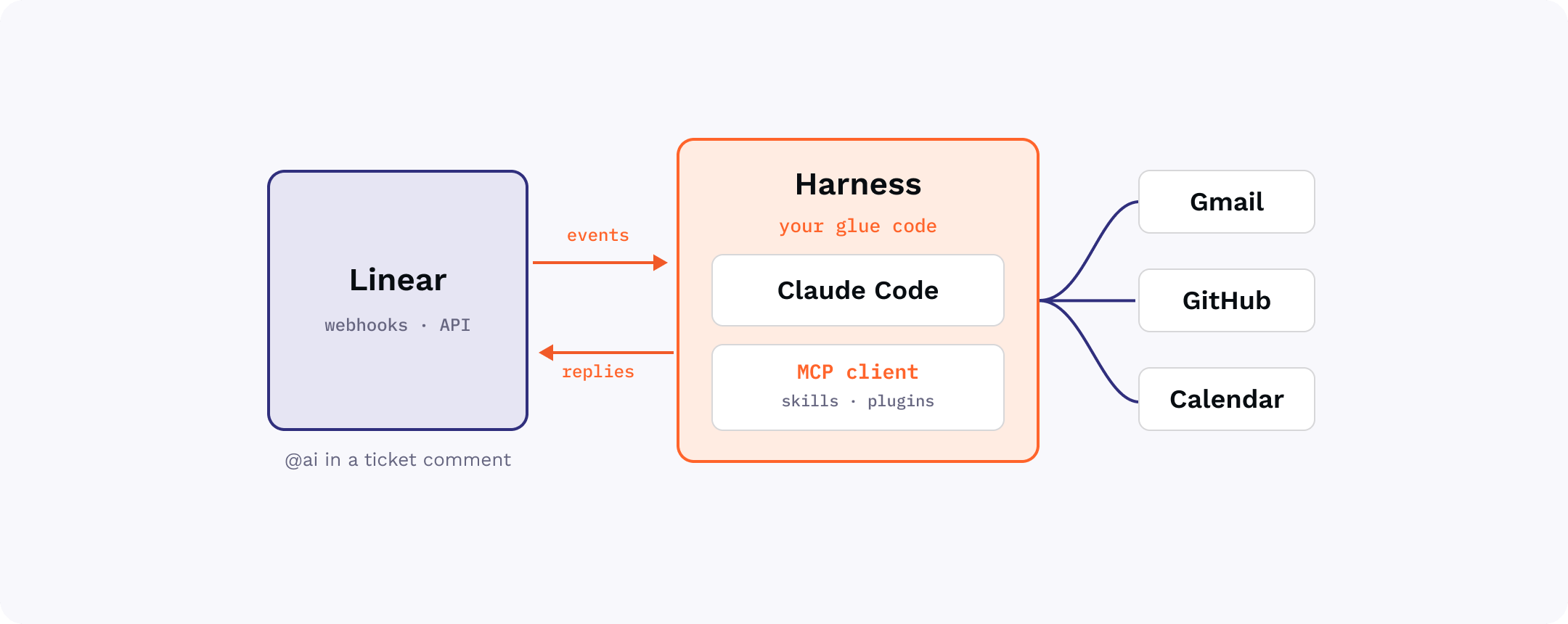
A small bit of glue injects a fully capable agentic harness and MCP client behind a webhook or polling process — no native support needed.
All it takes is awareness of the right patterns and some MCP-friendly glue.
Go remote ASAP; local servers won’t get you far
Local servers are hard for end-users: “Just install npm, then edit this JSON file, then set these environment variables” is not something you want to say to most of your colleagues.
Remote servers are much easier: “here’s a URL to paste in somewhere”. Some surfaces only support remote servers, like claude.ai.
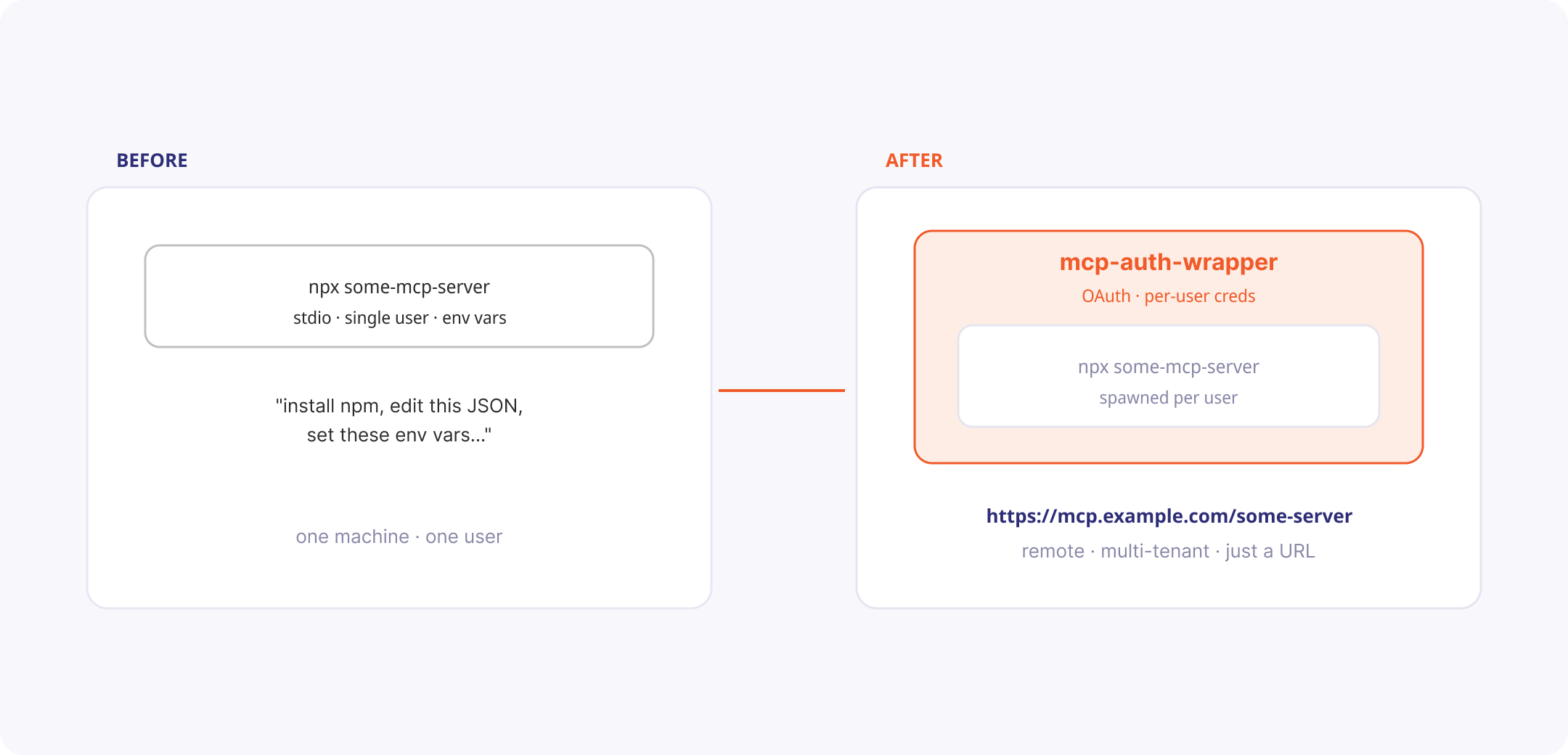
Wrap any local server: OAuth in front, per-user credentials behind. Share a link, not a setup guide.
So you can use local servers to prove out some flow, but you should prefer remote. Many servers you may want to use are only provided as local implementations, so you need a tool to convert them to remote servers. Because most local servers were designed to be used by one authenticated user at a time, this can be tricky.
The pattern that solves this pain point: use a bridge like mcp-auth-wrapper to take a local server and turn it into a remote, multi-tenant one: OAuth in front, per-user credentials behind. Sharing any server becomes sharing a link.
Remove friction from the configuration process
Okay, we’re down to one link per server. But exactly where do my users put this link?
The one-size-fits-all pattern here is to provide installation guidance for every possible MCP client app. A service like install-mcp makes this easy: clean UX to generate the right install link and per-client instructions, so you share one page instead of writing a tutorial.
Or, if you want to roll it into your own interface, tap into the TypeScript library version of this: mcp-install-instructions.
We’re working on standardizing the mcp.json file format here to simplify this story in the long term, but ultimately we still expect non-CLI interfaces to each have a slightly different flow for “enabling a connector.” For many enterprises, this responsibility may soon become solely an IT affair with Enterprise-Managed Auth.
Remove the need to do it again, and again
What happens when we start to bring new clients into the fold? By default, each user has to configure and authenticate each MCP server independently. 10+ “add connector” flows. 10+ OAuth dances. Done once for Claude Code, then again for Linear, for email… and so on.
The solution: centralize your configuration and auth storage in a single, aggregated MCP server. A deployment of mcp-aggregator can do this for you: one endpoint, one login, every tool namespaced behind it. Configure each client once. Login once per service. Share one link with your teammates.
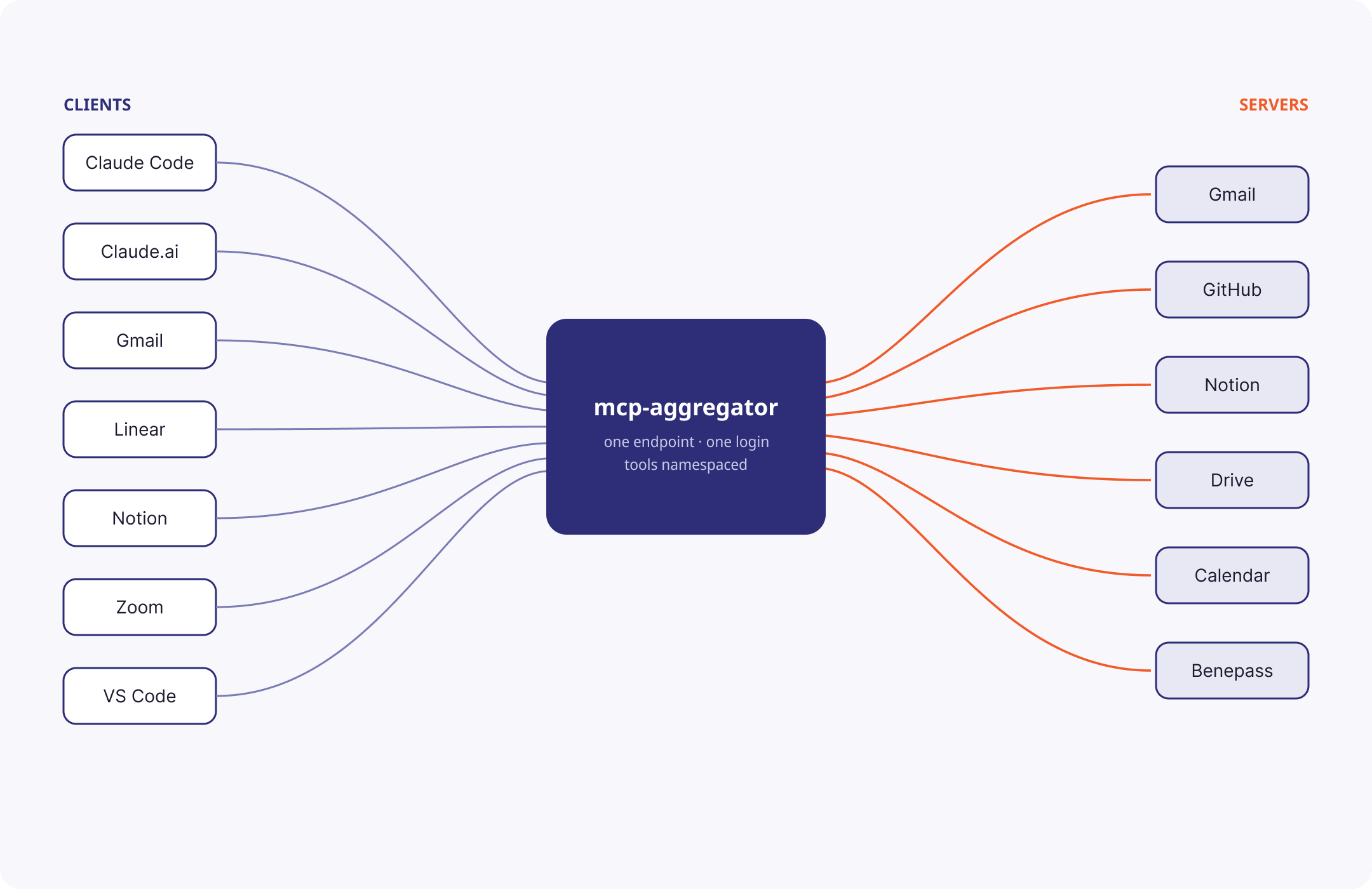
7 + 6 = 13 connections — configure each side once
mcp-aggregator is the minimal, DIY version of an MCP Gateway. If you have enterprise needs like SSO integration or fine-grained IT admin controls, you could use this layer of MCP server consolidation as the piece of your infrastructure where you can add those bells and whistles.
By default, mcp-aggregator also loses out on the ability to use MCP server configurations as per-session constraints. However, you could build out your mcp-aggregator deployment to re-enable the constraints that matter to you. For example, by offering query parameters like ?readOnlyTools=true or ?serversEnabled=datadog,sentry. Or by giving discrete MCP servers unique endpoints (but still aggregating the auth concerns under the hood).
Work around the long-tail of missing MCP servers
Most of your MCP server needs can be solved by walking through the options for choosing (or building) an MCP server. But is it always worth the effort?
Say you switched home utilities plans. An energy provider, Octopus Energy, emailed you a confirmation. You want the pricing data in Home Assistant, which controls your smart thermostat, and Octopus Energy does have an API for it — but the API key is behind a website login, and there’s no API for getting the API key.
Solution: give the agent a screen. computer-use-mcp is a minimal example of an MCP server that can click and type like a human: log into the website, copy the key, then back to clean API calls to set up the dashboard.
With that one escape hatch, and “there’s no API for that” or “it’s too much work to find an MCP server” stops being a blocker forever.
To borrow from Anthropic’s framing of this problem:
- If you have an MCP server for the service, Claude uses that.
- If the task is a shell command, Claude uses Bash.
- If the task is browser work and you have Claude in Chrome set up, Claude uses that.
- If none of those apply, Claude uses computer use.
And indeed, if you find yourself regularly leaning on inefficient approaches like browser use or computer use to get a predictable workflow done, it may be worth your while to abstract away those Playwright calls into a reliable MCP server, like this Good Eggs example.
You can even bring local-only servers into the remote-first fold
Some servers only work when they run on your own personal machine. computer-use is the obvious example. And sometimes, you just want to use your phone to tell Claude to do something that relies on something readily available on your laptop upstairs.
mcp-local-tunnel shows off the pattern that makes machine-bound servers available through remote aggregation just like everything else.
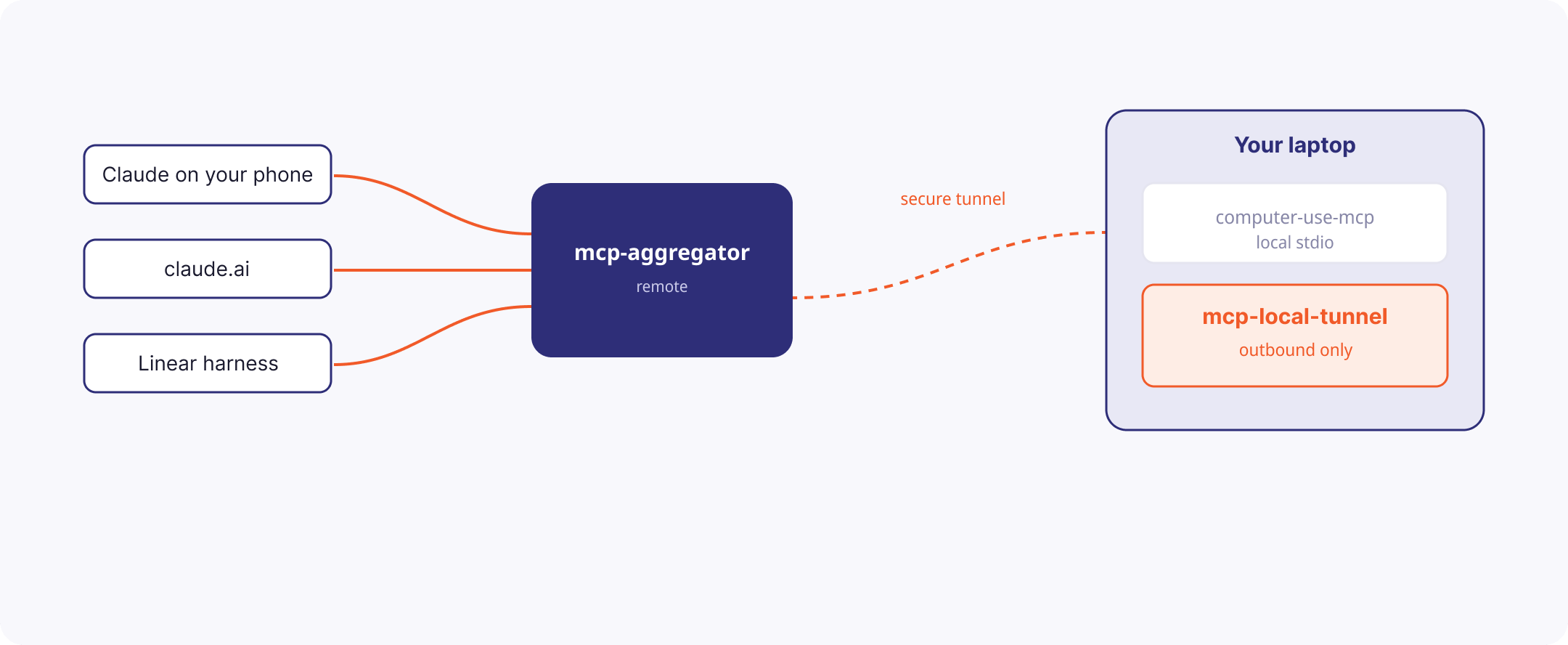
A tunnel makes machine-bound servers look like any other remote endpoint.
Don’t forget the context bloat footgun
Naive tool calling has a much-maligned drawback: every intermediate result flows through the model. And for many clients, every tool definition is placed in context up front — meaning you’ve spent tens of thousands of tokens before even starting.
For example, asking the agent to copy a doc’s contents from Google Drive into Salesforce means the entire doc passes through the model twice — for no reason. Anthropic measured one workflow dropping from 150,000 tokens to 2,000 by fixing this.
There are several ways to solve this problem, each with its own trade-offs worth its own blog post:
- Code execution with MCP.
tool-sandbox-mcpshows how a singleexecute_codeabstracts away the problem by adding a layer of code execution in between your agent and your aggregated set of servers. Works inside any MCP client. - MCP as a CLI tool.
call-mcpshows how wrapping your tools this way means you can compose them with your usual CLI toolkit — shell,jq, cron, scripts, and other CLI tools. - Search tools, truncate large responses. This is the way Claude Code does it natively, but could be implemented as a bridge, much like the above examples.
Put these patterns together, and you’ve solved the MxN problem
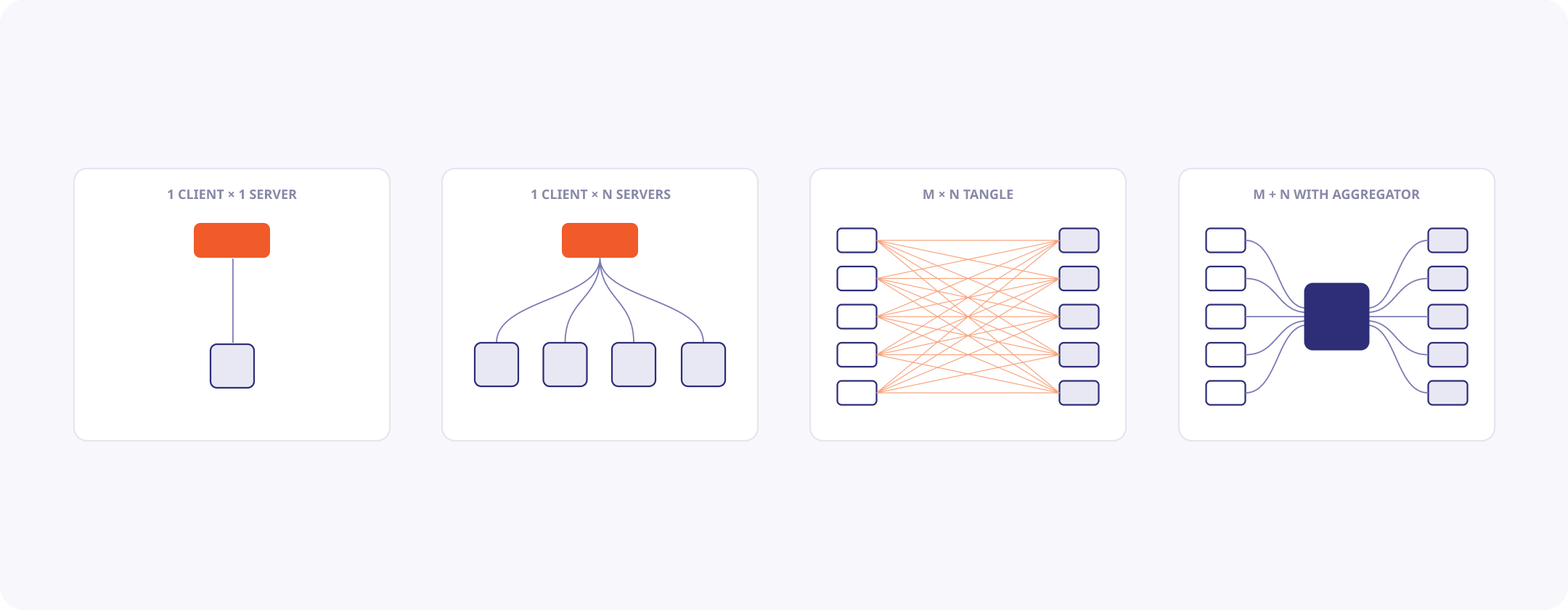
From 1×1 to M+N: the progression we’ve walked through
With your MCP aggregator in hand, you can now connect any service to any other service with just a little bit of glue code. When each service starts to implement an MCP client natively, this will be done-for-you. But for now, you can tackle the opportunities application-by-application.
Embed existing MCP client harnesses into SaaS apps you already love
We’ll use a Linear integration as our example, and you can imagine doing almost the exact same thing with any project management tracker like Jira, Asana, and so on.
The goal: inject a highly-capable MCP client, powered by your favorite coding agent, into a workflow inside a SaaS application you already use. We’ll take advantage of the fact that we have already consolidated all our integrations in the mcp-aggregator pattern above.
Here’s an end-to-end project showing off how to build this sort of “Linear harness” that bolts a Claude Code setup to serve as the MCP client.
You can see how:
- The harness can listen to any sort of activity on Linear — in our case, naively reading all ticket comments
- You can equip the harness with whatever Skills, Plugins, or other MCP connections you please
- It can respond back on Linear by way of a Linear MCP server (or, ideally, the MCP aggregator setup from above)
There’s no limit to where you can embed these capabilities
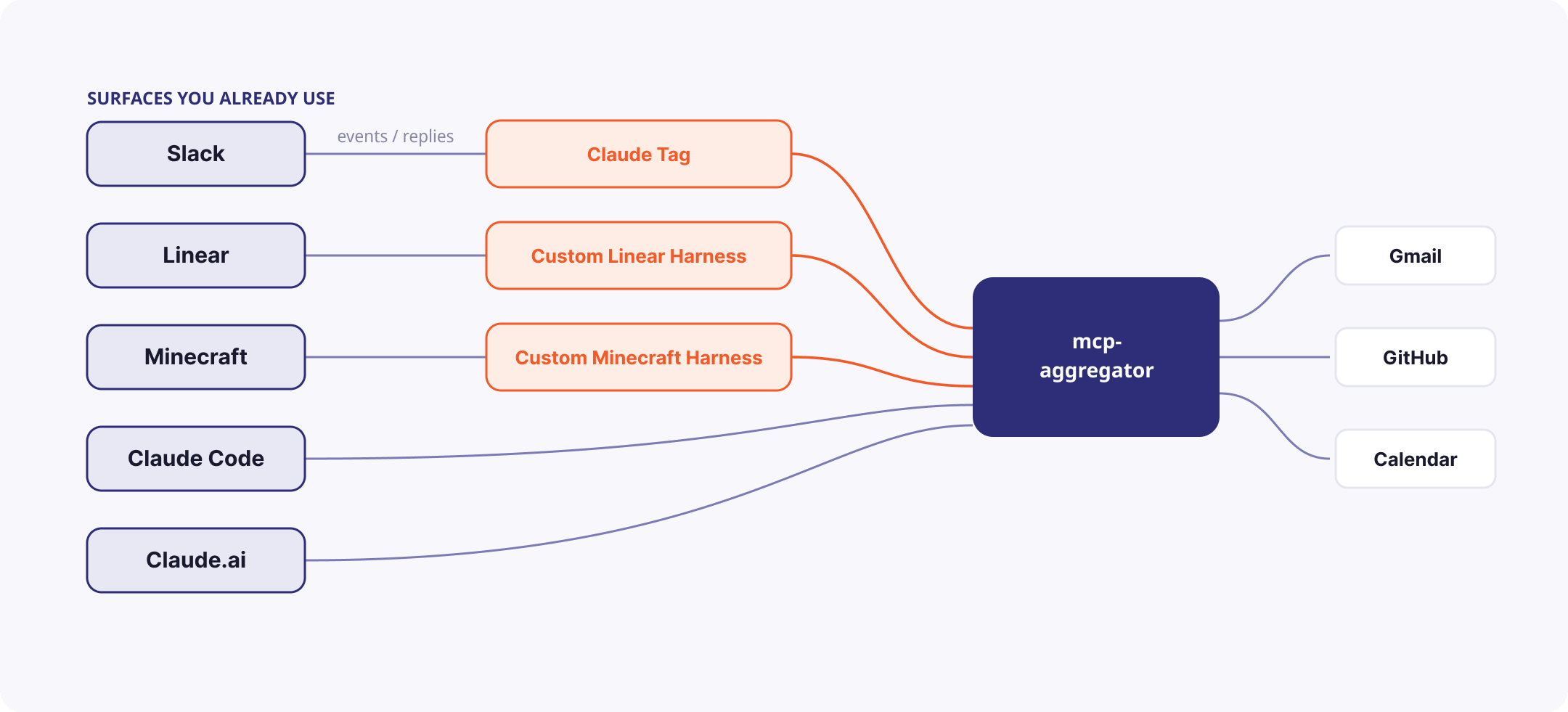
Each surface gets the harness it needs, and some talk to the aggregator natively.
Going beyond Linear and task management: here’s a Claude Code-powered agent that lives inside Minecraft in a few hundred lines. In game, we ask it to:
- Write a PR to edit itself.
- Check the upcoming energy prices and put a calendar event in for when to run the washing machine.
- Build a town-square notice board in-game with a sign that reminds us of that time
It’s silly on purpose. The point: a fully capable agent — all our tools, all these patterns — can run anywhere with a little glue. And it’s all attainable today, for individuals, for teams, and for enterprises alike.