High-Performance Denoising Library for Ray Tracing
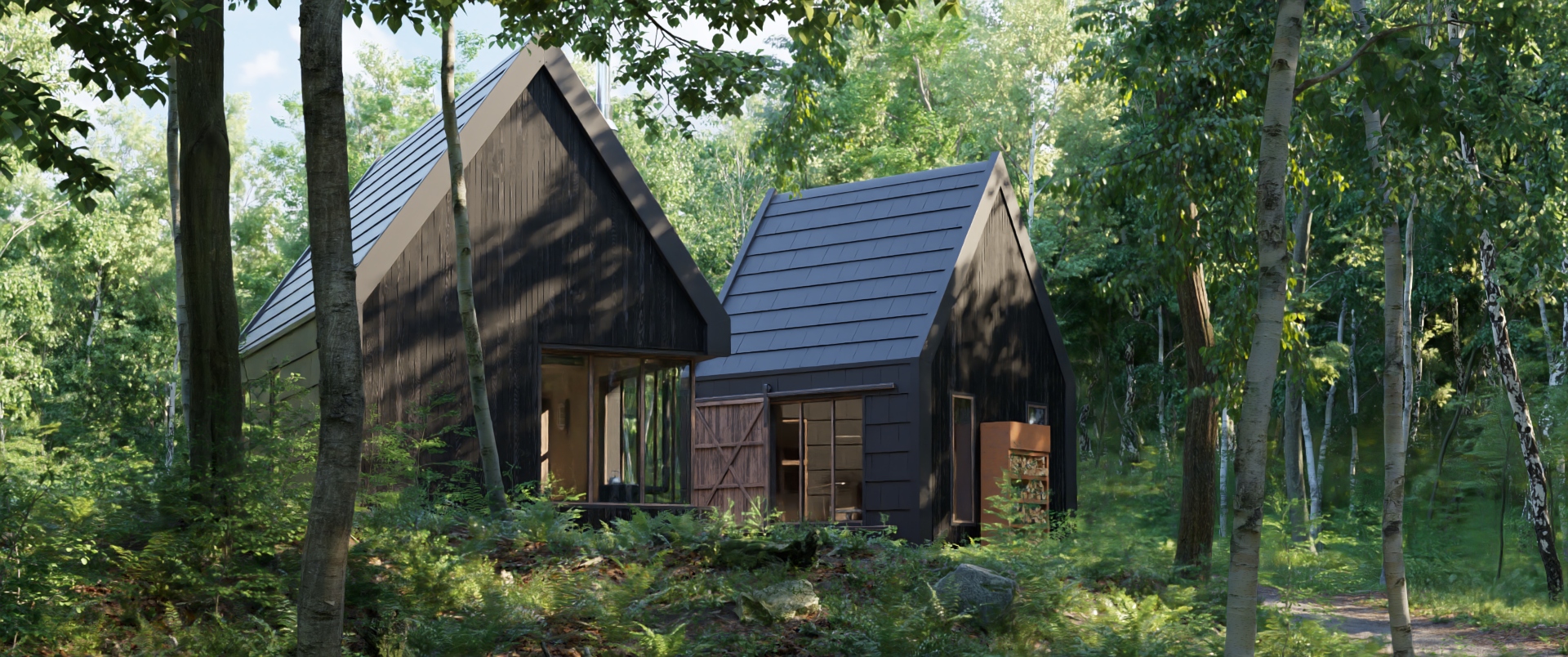 Denoised
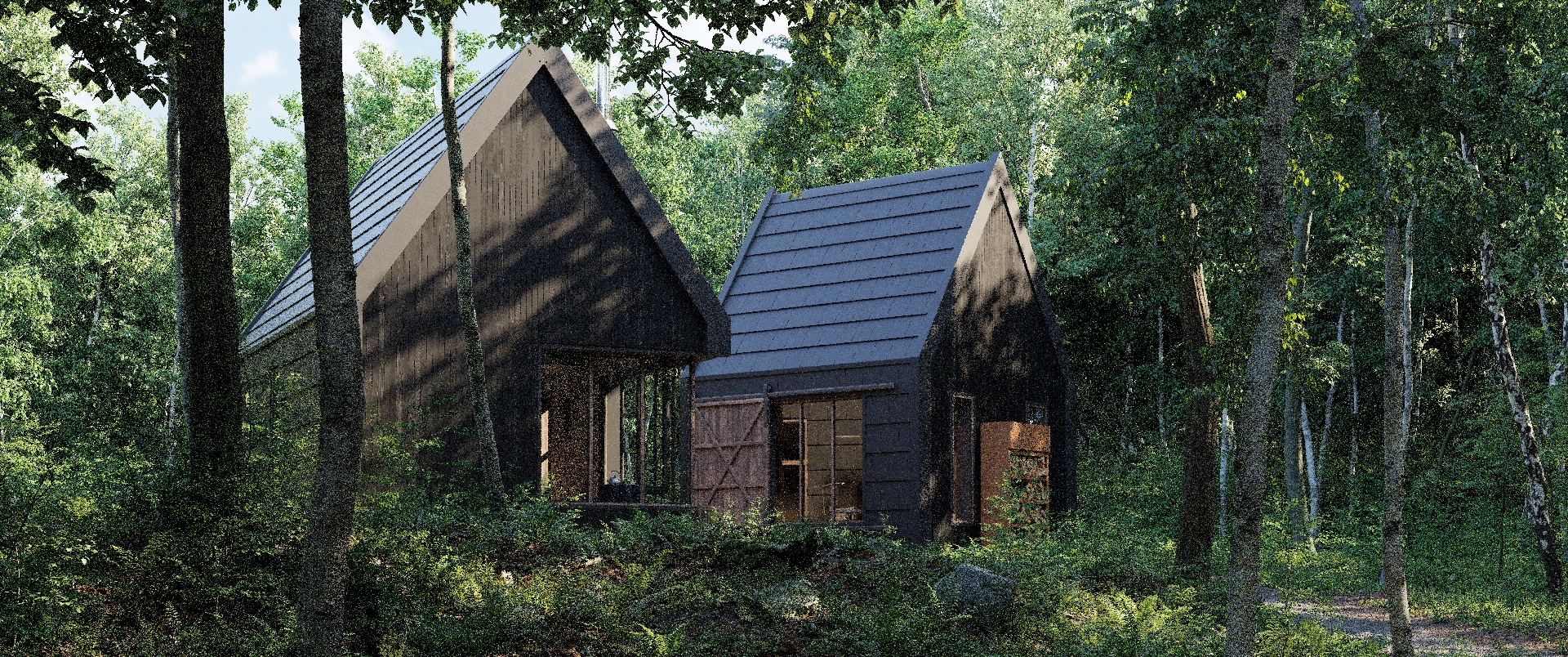 Original
Evermotion 15th Anniversary Collection scene rendered with Chaos Corona and denoised with Intel® Open Image Denoise using prefiltered albedo and normal buffers. Hover over the image (or tap on it) to move the slider between the original and denoised versions.
Overview
Intel Open Image Denoise is an open source library of high-performance, high-quality denoising filters for images rendered with ray tracing. Intel Open Image Denoise is part of the Intel® Rendering Toolkit and is released under the permissive Apache 2.0 license. It has been recognized with a Technical Achievement Award by the Academy of Motion Picture Arts and Sciences in 2025 for its contribution to the motion picture industry.
The purpose of Intel Open Image Denoise is to provide an open, high-quality, efficient, and easy-to-use denoising library that allows one to significantly reduce rendering times in ray tracing based rendering applications. It filters out the Monte Carlo noise inherent to stochastic ray tracing methods like path tracing, reducing the amount of necessary samples per pixel by even multiple orders of magnitude (depending on the desired closeness to the ground truth). A simple but flexible C/C++ API ensures that the library can be easily integrated into most existing or new rendering solutions.
At the heart of the Intel Open Image Denoise library is a collection of efficient deep learning based denoising filters, which were trained to handle a wide range of samples per pixel (spp), from 1 spp to almost fully converged. Thus it is suitable for both preview and final-frame rendering. The filters can denoise images either using only the noisy color (beauty) buffer, or, to preserve as much detail as possible, can optionally utilize auxiliary feature buffers as well (e.g. albedo, normal). Such buffers are supported by most renderers as arbitrary output variables (AOVs) or can be usually implemented with little effort.
Although the library ships with a set of pre-trained filter models, it is not mandatory to use these. To optimize a filter for a specific renderer, sample count, content type, scene, etc., it is possible to train the model using the included training toolkit and user-provided image datasets.
Intel Open Image Denoise supports a wide variety of CPUs and GPUs from different vendors:
Intel® 64 architecture compatible CPUs (with at least SSE4.1)
ARM64 (AArch64) architecture CPUs (e.g. Apple silicon CPUs)
Intel Xe, Xe2, and Xe3 architecture dedicated and integrated GPUs, including Intel® Arc™ B-Series Graphics, Intel® Arc™ A-Series Graphics, Intel® Arc™ Pro Series Graphics, Intel® Data Center GPU Flex Series, Intel® Data Center GPU Max Series, Intel® Iris® Xe Graphics, Intel® Core™ Ultra Processors with Intel® Arc™ Graphics, 11th-14th Gen Intel® Core™ processor graphics, and related Intel Pentium® and Celeron® processors (Xe-LP, Xe-LPG, Xe-LPG+, Xe-HPG, Xe-HPC, Xe2-LPG, Xe2-HPG, Xe3-LPG, and Xe3p-XPC microarchitectures)
NVIDIA GPUs with Turing, Ampere, Ada Lovelace, Hopper, and Blackwell architectures
AMD GPUs with RDNA 2, RDNA 3, RDNA 3.5, and RDNA 4 architectures
Apple silicon GPUs (M1 and newer)
It runs on most machines ranging from laptops to workstations and compute nodes in HPC systems. It is efficient enough to be suitable not only for offline rendering, but, depending on the hardware used, also for interactive or even real-time ray tracing.
Intel Open Image Denoise exploits modern instruction sets like SSE4, AVX2, AVX-512, Intel® Advanced Matrix Extensions (Intel® AMX), and NEON on CPUs, Intel® Xe Matrix Extensions (Intel® XMX) on Intel GPUs, and various other AI acceleration capabilities on NVIDIA, AMD, and Apple GPUs.
System Requirements
You need an Intel® 64 (with SSE4.1) or ARM64 architecture compatible CPU to run Intel Open Image Denoise, and you need a 64-bit Windows, Linux, or macOS operating system as well.
For Intel GPU support, please also install the latest Intel graphics drivers:
Windows: Intel® Graphics Driver 31.0.101.4953 or newer
Linux: Intel® software for General Purpose GPU capabilities release 20230323 or newer
Using older driver versions is not supported and Intel Open Image Denoise might run with only limited capabilities, have suboptimal performance or might be unstable. Also, Resizable BAR must be enabled in the BIOS for Intel dedicated GPUs if running on Linux, and strongly recommended if running on Windows.
For NVIDIA GPU support, please also install the latest NVIDIA graphics drivers:
Windows: Version 528.33 or newer
Linux: Version 525.60.13 or newer
For AMD GPU support, please also install the latest AMD graphics drivers:
Windows: AMD Software: Adrenalin Edition 25.3.1 or newer
Linux: Radeon Software for Linux version 25.30.1 or newer
For Apple GPU support, macOS Ventura or newer is required.
Intel Open Image Denoise is under active development, and though we do our best to guarantee stable release versions a certain number of bugs, as-yet-missing features, inconsistencies, or any other issues are still possible. Should you find any such issues please report them immediately via the Intel Open Image Denoise GitHub Issue Tracker (or, if you should happen to have a fix for it, you can also send us a pull request); for missing features please contact us via email at openimagedenoise@googlegroups.com.
Join our mailing list to receive release announcements and major news regarding Intel Open Image Denoise.
Citation
If you use Intel Open Image Denoise in a research publication, please cite the project using the following BibTeX entry:
@misc{OpenImageDenoise,
  author = {Attila T. {\'A}fra},
  title  = {{Intel\textsuperscript{\textregistered} Open Image Denoise}},
  year   = {2026},
  note   = {\url{https://www.openimagedenoise.org}}
}
Version History
Changes in v2.4.1:
- Added AMD RDNA 3.5 GFX1152 GPU support
Changes in v2.4.0:
- Added Intel AMX-FP16 support, dramatically improving performance on Intel Granite Rapids CPUs
- Added Intel BMG-G31, Wildcat Lake, Nova Lake, and Crescent Island GPU support
- Added AMD RDNA 3.5 GPU support, extended RDNA 2 support
- Fixed integer overflow and out-of-bounds write issues in image loaders (only affects the
oidnDenoiseexample application) - Added support for compilation with CUDA 13
- Added support for compilation with ROCm 7
- Removed support for NVIDIA Volta GPUs
Changes in v2.3.3:
- Added NVIDIA Blackwell GPU support
- Added AMD RDNA4 GPU support
- Improved performance for AMD RDNA3 GPUs
- Added
OIDN_DEPENDENTLOADFLAGCMake option for setting theDEPENDENTLOADFLAGlinker flag on Windows - Added
OIDN_LIBRARY_VERSIONEDCMake option for toggling versioning in the Open Image Denoise library files - Known issue: performance regression for AMD RDNA2 GPUs
Changes in v2.3.2:
- Improved performance for Intel Lunar Lake and Battlemage GPUs
- Added Intel Panther Lake GPU support
- Fixed compile error when building with OpenImageIO 3.x
Changes in v2.3.1:
- Fixed corrupted output when in-place denoising high-resolution (> 1080p) images where the input and output are stored in different shared buffer objects (created with
oidnNewSharedBuffer*) that overlap in memory - Fixed issues with cancellation through progress monitor callbacks:
- Fixed cancellation requests not being fulfilled on CPU devices since
v2.3.0 - Fixed not calling the callback anymore after requesting cancellation, while the operation is still being executed
- Fixed cancellation requests not being fulfilled on CPU devices since
- Added support for creating shared buffers on Metal devices
- Enabled accessing system allocated memory for CUDA devices which support this feature (see
systemMemorySupporteddevice parameter) - Added LUID support for HIP devices. Importing DX12 and Vulkan buffers is now functional when using recent AMD GPU drivers on Windows
Changes in v2.3.0:
- Significantly improved image quality of the
RTfilter in high quality mode for HDR denoising with prefiltering, i.e., the following combinations of input features and parameters: - HDR color + albedo + normal +cleanAux- albedo - normal In these cases a much more complex filter is used, which results in lower performance than before (about 2x). To revert to the previous performance behavior, please switch to the balanced quality mode. - Added fast quality mode (
OIDN_QUALITY_FAST) for even higher performance (about 1.5-2x) interactive/real-time previews and lower default memory usage at the cost of somewhat lower image quality. Currently this is implemented for theRTfilter except prefiltering (albedo, normal). In other cases denoising implicitly falls back to balanced mode. - Added Intel Arrow Lake, Lunar Lake, and Battlemage GPU support
- Execute
Asyncfunctions asynchronously on CPU devices as well - Load/initialize device modules lazily (improves stability)
- Added
oidnIsCPUDeviceSupported,oidnIsSYCLDeviceSupported,oidnIsCUDADeviceSupported,oidnIsHIPDeviceSupported, andoidnIsMetalDeviceSupportedAPI functions for checking whether a physical device of a particular type is supported - Release the CUDA primary context when destroying the device object if using the CUDA driver API
- Added
OIDN_LIBRARY_NAMECMake option for setting the base name of the Open Image Denoise library files - Fixed device creation error with
oidnNewDevicewhen the default device of the specified type (e.g. CUDA) is not supported but there are other supported non-default devices of that type in the system - Fixed CMake error when building with Metal support using non-Apple Clang
- Fixed iOS build errors
- Added support for building with ROCm 6.x
oidnNewCUDADeviceandoidnNewHIPDeviceno longer accept negative device IDs. If the goal is to use the current device, its actual ID needs to be passed.- Upgraded to oneTBB 2021.12.0 in the official binaries
- Training:
- Improved training performance on CUDA and MPS devices, added
--compileoption - Added
--qualityoption (high,balanced,fast) for selecting the size of the model to train, changed the default frombalancedtohigh - Added new models to the
--modeloption (unet_small,unet_large,unet_xl) - Added support for training with prefiltered auxiliary features by passing
--aux_resultstopreprocess.pyandtrain.py - Added experimental support for depth (
z)
- Improved training performance on CUDA and MPS devices, added
Changes in v2.2.2:
- Fully fixed GPU memory leak when releasing SYCL, CUDA and HIP device objects
- Fixed CUDA context error in some cases when using the CUDA driver API
- Fixed crash on systems with an unsupported AMD Vega integrated GPU and old driver
Changes in v2.2.1:
- Fixed memory leak when releasing SYCL, CUDA and HIP device objects
- Fixed memory leak when initializing Metal filters
Changes in v2.2.0:
- Improved denoising quality (better fine detail reconstruction)
- Added Intel Meteor Lake GPU support (in Intel® Core™ Ultra Processors)
- Added Metal device for Apple silicon GPUs (requires macOS Ventura or newer)
- Added ARM64 (AArch64) CPU support on Windows and Linux (in addition to macOS)
- Improved CPU performance
- Significantly reduced overhead of committing filter changes
- Switched to the CUDA driver API by default, added the
OIDN_DEVICE_CUDA_APICMake option for manually selecting between the driver and runtime APIs - Fixed crash when releasing a buffer after releasing the device
Changes in v2.1.0:
- Added support for denoising 1-channel (e.g. alpha) and 2-channel images
- Added support for arbitrary combinations of input image data types (e.g.
OIDN_FORMAT_FLOAT3forcolorbutOIDN_FORMAT_HALF3foralbedo) - Improved performance for most dedicated GPU architectures
- Re-added
OIDN_STATIC_LIBCMake option which enables building as a static (CPU support only) or a hybrid static/shared (GPU support as well) library - Added
release()method to C++ API objects (DeviceRef,BufferRef,FilterRef) - Fixed possible crash when releasing GPU devices, buffers or filters
- Fixed possible crash at process exit for some SYCL runtime versions
- Fixed image quality inconsistency on Intel integrated GPUs, but at the cost of some performance loss
- Fixed future Windows driver compatibility for Intel integrated GPUs
- Fixed rare output corruption on AMD RDNA2 GPUs
- Fixed device detection on Windows when the path to the library has non-ANSI characters
- Added support for Intel® oneAPI DPC++/C++ Compiler 2024.0 and compatible open source compiler versions
- Upgraded to oneTBB 2021.10.0 in the official binaries
- Improved detection of old oneTBB versions
Changes in v2.0.1:
- Fixed performance issue for Intel integrated GPUs using recent Linux drivers
- Fixed crash on systems with both dedicated and integrated AMD GPUs
- Fixed importing
D3D12_RESOURCE,D3D11_RESOURCE,D3D11_RESOURCE_KMT,D3D11_TEXTUREandD3D11_TEXTURE_KMTexternal memory types on CUDA and HIP devices - Fixed the macOS deployment target of the official x86 binaries (lowered from 11.0 to 10.11)
- Minor improvements to verbose output
Changes in v2.0.0:
- Added SYCL device for Intel Xe architecture GPUs (Xe-LP, Xe-HPG and Xe-HPC)
- Added CUDA device for NVIDIA Volta, Turing, Ampere, Ada Lovelace and Hopper architecture GPUs
- Added HIP device for AMD RDNA2 (Navi 21 only) and RDNA3 (Navi 3x) architecture GPUs
- Added new buffer API functions for specifying the storage type (host, device or managed), copying data to/from the host, and importing external buffers from graphics APIs (e.g. Vulkan, Direct3D 12)
- Removed the
oidnMapBufferandoidnUnmapBufferfunctions - Added support for asynchronous execution (e.g.
oidnExecuteFilterAsync,oidnSyncDevicefunctions) - Added physical device API for querying the supported devices in the system
- Added functions for creating a device from a physical device ID, UUID, LUID or PCI address (e.g.
oidnNewDeviceByID) - Added SYCL, CUDA and HIP interoperability API functions (e.g.
oidnNewSYCLDevice,oidnExecuteSYCLFilterAsync) - Added
typedevice parameter for querying the device type - Added
systemMemorySupportedandmanagedMemorySupporteddevice parameters for querying memory allocations supported by the device - Added
externalMemoryTypesdevice parameter for querying the supported external memory handle types - Added
qualityfilter parameter for setting the filtering quality mode (high or balanced quality) - Minor API changes with backward compatibility:
- Added
oidn(Get|Set)(Device|Filter)(Bool|Int|Float)functions and deprecatedoidn(Get|Set)(Device|Filter)(1b|1i|1f)functions - Added
oidnUnsetFilter(Image|Data)functions and deprecatedoidnRemoveFilter(Image|Data)functions - Renamed
alignmentandoverlapfilter parameters totileAlignmentandtileOverlapbut the old names remain supported
- Added
- Removed
OIDN_STATIC_LIBandOIDN_STATIC_RUNTIMECMake options due to technical limitations - Fixed over-conservative buffer bounds checking for images with custom strides
- Upgraded to oneTBB 2021.9.0 in the official binaries
Changes in v1.4.3:
- Fixed hardcoded library paths in installed macOS binaries
- Disabled VTune profiling support of oneDNN kernels by default, can be enabled using CMake options if required (
DNNL_ENABLE_JIT_PROFILINGandDNNL_ENABLE_ITT_TASKS) - Upgraded to oneTBB 2021.5.0 in the official binaries
Changes in v1.4.2:
- Added support for 16-bit half-precision floating-point images
- Added
oidnGetBufferDataandoidnGetBufferSizefunctions - Fixed performance issue on x86 hybrid architecture CPUs (e.g. Alder Lake)
- Fixed build error when using OpenImageIO 2.3 or later
- Upgraded to oneTBB 2021.4.0 in the official binaries
Changes in v1.4.1:
- Fixed crash when in-place denoising images with certain unusual resolutions
- Fixed compile error when building for Apple Silicon using some unofficial builds of ISPC
Changes in v1.4.0:
- Improved fine detail preservation
- Added the
cleanAuxfilter parameter for further improving quality when the auxiliary feature (albedo, normal) images are noise-free - Added support for denoising auxiliary feature images, which can be used together with the new
cleanAuxparameter for improving quality when the auxiliary images are noisy (recommended for final frame denoising) - Normals are expected to be in the [-1, 1] range (but still do not have to be normalized)
- Added the
oidnUpdateFilterDatafunction which must be called when the contents of an opaque data parameter bound to a filter (e.g.weights) has been changed after committing the filter - Added the
oidnRemoveFilterImageandoidnRemoveFilterDatafunctions for removing previously set image and opaque data parameters of filters - Reduced the overhead of
oidnCommitFilterto zero in some cases (e.g. when changing already set image buffers/pointers or theinputScaleparameter) - Reduced filter memory consumption by about 35%
- Reduced total memory consumption significantly when using multiple filters that belong to the same device
- Reduced the default maximum memory consumption to 3000 MB
- Added the
OIDN_FILTER_RTandOIDN_FILTER_RTLIGHTMAPCMake options for excluding the trained filter weights from the build to significantly decrease its size - Fixed detection of static TBB builds on Windows
- Fixed compile error when using future glibc versions
- Added
oidnBenchmarkoption for setting custom resolutions - Upgraded to oneTBB 2021.2.0 in the official binaries
Changes in v1.3.0:
- Improved denoising quality
- Improved sharpness of fine details / less blurriness
- Fewer noisy artifacts
- Slightly improved performance and lowered memory consumption
- Added directional (e.g. spherical harmonics) lightmap denoising to the
RTLightmapfilter - Added
inputScalefilter parameter which generalizes the existing (and thus now deprecated)hdrScaleparameter for non-HDR images - Added native support for Apple Silicon and the BNNS library on macOS (currently requires rebuilding from source)
- Added
OIDN_NEURAL_RUNTIMECMake option for setting the neural network runtime library - Reduced the size of the library binary
- Fixed compile error on some older macOS versions
- Upgraded release builds to use oneTBB 2021.1.1
- Removed tbbmalloc dependency
- Appended the library version to the name of the directory containing the installed CMake files
- Training:
- Faster training performance
- Added mixed precision training (enabled by default)
- Added efficient data-parallel training on multiple GPUs
- Enabled preprocessing datasets multiple times with possibly different options
- Minor bugfixes
Changes in v1.2.4:
- Added OIDN_API_NAMESPACE CMake option that allows to put all API functions inside a user-defined namespace
- Fixed bug when TBB_USE_GLIBCXX_VERSION is defined
- Fixed compile error when using an old compiler which does not support OpenMP SIMD
- Added compatibility with oneTBB 2021
- Export only necessary symbols on Linux and macOS
Changes in v1.2.3:
- Fixed incorrect detection of AVX-512 on macOS (sometimes causing a crash)
- Fixed inconsistent performance and costly initialization for AVX-512
- Fixed JIT’ed AVX-512 kernels not showing up correctly in VTune
Changes in v1.2.2:
- Fixed unhandled exception when canceling filter execution from the progress monitor callback function
Changes in v1.2.1:
- Fixed tiling artifacts when in-place denoising (using one of the input images as the output) high-resolution (> 1080p) images
- Fixed ghosting/color bleeding artifacts in black regions when using albedo/normal buffers
- Fixed error when building as a static library (
OIDN_STATIC_LIBoption) - Fixed compile error for ISPC 1.13 and later
- Fixed minor TBB detection issues
- Fixed crash on pre-SSE4 CPUs when using some recent compilers (e.g. GCC 10)
- Link C/C++ runtime library dynamically on Windows too by default
- Renamed example apps (
oidnDenoise,oidnTest) - Added benchmark app (
oidnBenchmark) - Fixed random data augmentation seeding in training
- Fixed training warning with PyTorch 1.5 and later
Changes in v1.2.0:
- Added neural network training code
- Added support for specifying user-trained models at runtime
- Slightly improved denoising quality (e.g. less ringing artifacts, less blurriness in some cases)
- Improved denoising speed by about 7-38% (mostly depending on the compiler)
- Added
OIDN_STATIC_RUNTIMECMake option (for Windows only) - Added support for OpenImageIO to the example apps (disabled by default)
- Added check for minimum supported TBB version
- Find debug versions of TBB
- Added testing
Changes in v1.1.0:
- Added
RTLightmapfilter optimized for lightmaps - Added
hdrScalefilter parameter for manually specifying the mapping of HDR color values to luminance levels
Changes in v1.0.0:
- Improved denoising quality
- More details preserved
- Less artifacts (e.g. noisy spots, color bleeding with albedo/normal)
- Added
maxMemoryMBfilter parameter for limiting the maximum memory consumption regardless of the image resolution, potentially at the cost of lower denoising speed. This is internally implemented by denoising the image in tiles - Significantly reduced memory consumption (but slightly lower performance) for high resolutions (> 2K) by default: limited to about 6 GB
- Added
alignmentandoverlapfilter parameters that can be queried for manual tiled denoising - Added
verbosedevice parameter for setting the verbosity of the console output, and disabled all console output by default - Fixed crash for zero-sized images
Changes in v0.9.0:
- Reduced memory consumption by about 38%
- Added support for progress monitor callback functions
- Enabled fully concurrent execution when using multiple devices
- Clamp LDR input and output colors to 1
- Fixed issue where some memory allocation errors were not reported
Changes in v0.8.2:
- Fixed wrong HDR output when the input contains infinities/NaNs
- Fixed wrong output when multiple filters were executed concurrently on separate devices with AVX-512 support. Currently the filter executions are serialized as a temporary workaround, and a full fix will be included in a future release.
- Added
OIDN_STATIC_LIBCMake option for building as a static library (requires CMake 3.13.0 or later) - Fixed CMake error when adding the library with add_subdirectory() to a project
Changes in v0.8.1:
- Fixed wrong path to TBB in the generated CMake configs
- Fixed wrong rpath in the binaries
- Fixed compile error on some macOS systems
- Fixed minor compile issues with Visual Studio
- Lowered the CPU requirement to SSE4.1
- Minor example update
Changes in v0.8.0:
- Initial beta release