Persistent calendar alarms for iPhone
Never miss important moments again
Turn calendar events into persistent alarms you can't ignore. OnTimer helps you break through the final execution gap before meetings, flights, appointments, medication schedules, and other critical moments.
- ✓Works with Google Calendar & Microsoft 365 / Outlook
- ✓Persistent alarms that stay on screen until dismissed
- ✓No manual setup — your calendar is the source of truth
Direct Answer
OnTimer turns Google Calendar and Outlook events into persistent alarms instead of passive notifications. Unlike standard reminders that are easy to ignore, OnTimer uses loud, persistent alarms that interrupt you before important moments — meetings, flights, medication doses, and appointments. Connect your calendar once; every event gets an alarm automatically.
Free download • Connect your calendars in seconds
Works with Google & Microsoft calendars
Why reminders fail
The problem isn't remembering.
It's follow-through.
Notifications inform. Alarms interrupt behavior.
Most missed reminders happen after the notification is seen. The issue is rarely awareness — it's the gap between knowing and acting.
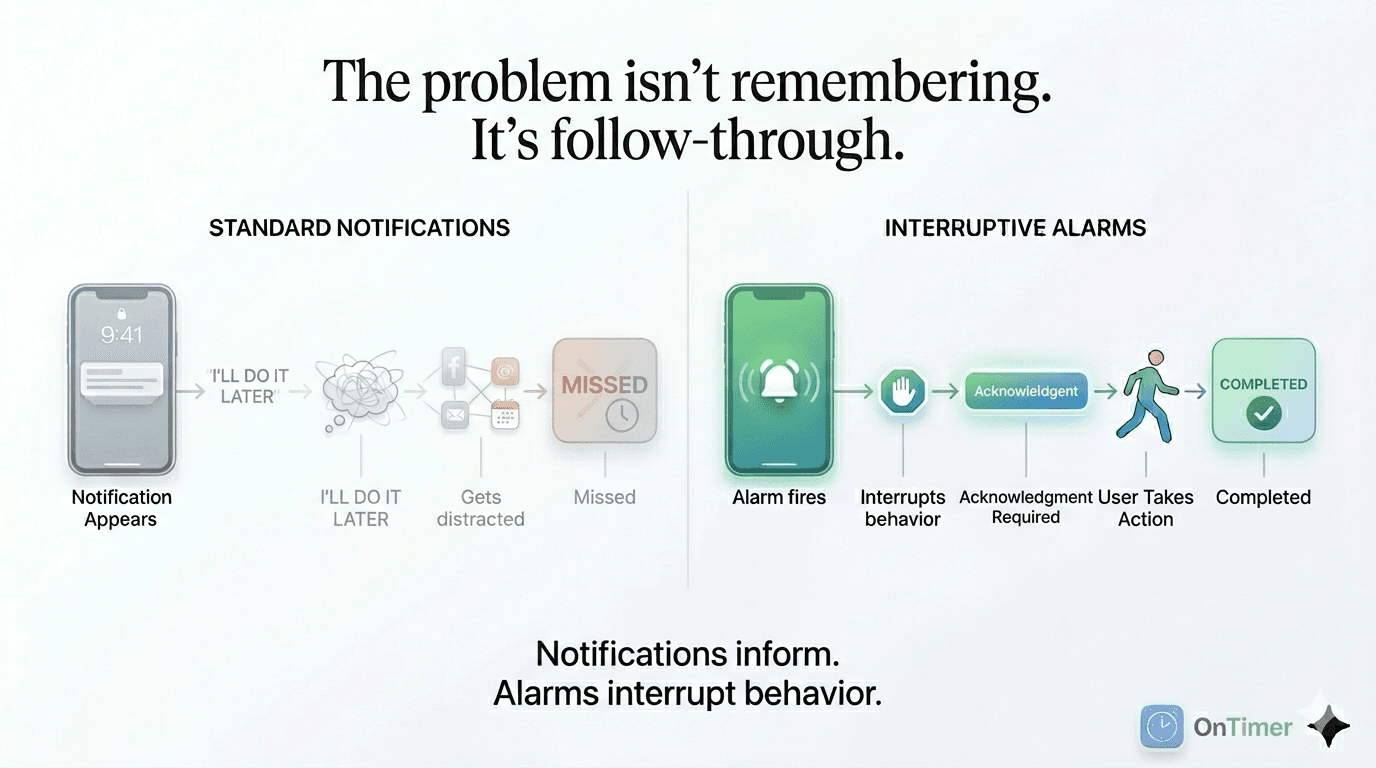
OnTimer was built around this problem. Not a notification upgrade — a different category of alert that stays on your screen until you respond.
People ask…
Is there an app that reminds you about meetings on iPhone?
Yes. OnTimer connects to your calendar and creates loud, persistent alarms before meetings and events so they are harder to miss than standard calendar notifications.
Why do I miss calendar reminders on iPhone?
Most calendar reminders are passive notifications that disappear quickly and are easy to ignore. OnTimer turns those events into alarms that stay visible until you dismiss them.
Can I get an alert when it's time to leave for a meeting?
Yes. For calendar events with a location, OnTimer offers Time To Leave alerts based on travel time and traffic. Time To Leave is a paid feature.
Does a calendar alarm app work with multiple calendars?
Yes. OnTimer supports multiple calendars, including Google and Microsoft accounts — simultaneously.
The Last 5 Minutes Problem
You knew about the meeting. You had the reminder set. You looked at the clock ten minutes ago. Somehow you still ended up late.
This isn't a memory problem. It's an execution gap — the space between receiving a reminder and acting on it before the window closes. Notifications fire and disappear. Alarms interrupt and wait.
Why notifications fail at the worst moment:
- —You're in the middle of something when the reminder fires
- —You glance at it, think "in a minute", and keep working
- —The notification disappears — and so does the urgency
- —Five minutes later you're late
What is OnTimer?
OnTimer is a calendar alarm app for iPhone. It connects to your Google Calendar or Microsoft Outlook and triggers loud, persistent alarms before meetings and events so you do not miss them or show up late.
It is designed for people who rely on their calendar but know that normal calendar notifications are easy to miss.
It works with your schedule. It does not replace your calendar.
Who should use OnTimer
OnTimer is especially useful for people who need something more reliable than standard calendar notifications.
Busy professionals
Packed workdays, back-to-back calls, client meetings. Passive notifications compete with everything else. Persistent alarms cut through.
People who miss notifications
You see the reminder. You think "in a minute." The notification disappears. That execution gap is exactly what OnTimer closes.
ADHD & time blindness
For people where 10 minutes can feel like 2. A persistent alarm that won't leave until dismissed is a categorically different signal.
Critical timing moments
Flights, medication doses, appointments, pickups. Any calendar event where missing the window has real consequences.
Why OnTimer is different
Standard calendar apps are built to show notifications. OnTimer is built to get your attention before it is too late.
Features that matter
Persistent alarms, not notifications
OnTimer alarms stay on your screen until you dismiss them. They don't disappear on their own. They interrupt — which is the point.
Every calendar event covered automatically
OnTimer watches your Google Calendar and Outlook and fires a persistent alarm for every upcoming event. No per-event setup.
Works across critical timing moments
Meetings, appointments, medication doses, flight departures. Any calendar event where the window closing has real consequences.
Time To Leave alerts
For events with a location, OnTimer calculates when you need to leave based on travel time and traffic — and alarms you. Paid feature.
How OnTimer works
1
Connect your calendars
Link your calendars and choose your preferences.
2
OnTimer prepares alarms
Upcoming calendar events get alarms automatically.
3
Get alerted before it is too late
When the alarm fires, you know it is time to join, leave, or wrap up what you are doing.
Common questions
What is a calendar alarm app?
A calendar alarm app connects to your existing calendar and fires persistent, interruptive alarms before each event — not passive notifications that disappear on their own. Unlike standard calendar reminders from Google Calendar or Outlook, these alarms stay on your screen until you actively dismiss them. OnTimer is a calendar alarm app for iPhone.
Can you turn Google Calendar or Outlook events into alarms?
Not natively — Google Calendar and Outlook only send notifications, which disappear automatically. OnTimer connects to your calendar and turns every event into a persistent alarm on iPhone that stays on screen until you respond. No manual setup per event.
What is the difference between a calendar notification and a calendar alarm?
A notification informs you — it appears and disappears whether or not you act on it. An alarm interrupts you — it stays on screen and requires a response before it stops. Google Calendar and Outlook send notifications. OnTimer turns those calendar events into alarms.
What is the Last 5 Minutes Problem?
The Last 5 Minutes Problem is the gap between knowing about a meeting and actually acting in time. A notification fires, you see it, you plan to act in a moment — and the window closes before you do. Persistent alarms solve this by staying on screen until you respond.
What is OnTimer?
OnTimer is a calendar alarm app for iPhone. It connects to your calendar and triggers loud, persistent alarms before meetings and events so you are less likely to miss them or arrive late.
How is OnTimer different from normal calendar notifications?
Normal calendar reminders are usually passive notifications that are easy to swipe away or ignore. OnTimer is designed to create a stronger alert that is louder, more persistent, and harder to miss.
Can OnTimer remind me when it is time to leave?
Yes. For calendar events with a location, OnTimer offers Time To Leave alerts based on travel time and traffic. Time To Leave is a paid feature.
Does OnTimer work with multiple calendars?
Yes. OnTimer supports multiple calendars, including Google and Microsoft accounts.
Who is OnTimer best for?
OnTimer is useful for busy professionals, people with back-to-back meetings, people who miss normal reminders, and people who struggle with time blindness or chronic lateness patterns.
Popular guides
- Why Calendar Notifications Fail (And What Actually Works) →
- The Last 5 Minutes Problem: Why Notifications Fail →
- Why Notifications Fail (And Persistent Alarms Work Better) →
- Calendar Notifications Not Working? Why Reminders Fail →
- Turn Calendar Events Into Alarms →
- Best Calendar Alarm App for Google & Outlook →
- Persistent Calendar Reminders →
- Calendar Notifications vs Alarms →
- Why Calendar Reminders Fail →
- ADHD Time Blindness Tools →
Stop missing meetings.
Download OnTimer and turn your calendar into a more reliable meeting alarm.