@supermux/core
A TypeScript library for building apps on top of Claude Code, Codex, Cursor, OpenCode, Grok Build and Antigravity.
It runs each agent's own CLI on your machine, with the login that CLI already has, and gives your code one API for sessions, events, permission prompts and subagents. Every session's agent runs behind a small keeper process, so your app can crash, restart or redeploy and pick a running turn back up.
Install
Node 22 or newer (22.18+ to run the examples' .ts files directly), or Bun. Install and log in to the agent CLIs you want to use: claude, codex, cursor-agent, opencode, grok, agy.
Quickstart
import { homedir } from "node:os"
import { join } from "node:path"
import { supermux } from "@supermux/core"

const core = supermux({
  stateDirectory: join(homedir(), ".supermux"), // outside every folder an agent works in
  agents: { claude: {}, codex: {} },
})

core.subscribe(e => {
  if (e.type !== "session.event") return
  if (e.event.kind === "assistant-delta") process.stdout.write(e.event.text)
  if (e.event.kind === "permission-request") {
    const allow = e.event.options.find(o => o.kind === "allow_once")
    if (allow) core.sessions.live(e.sessionId)?.requests.respond(e.event.requestId, { optionId: allow.id })
  }
})

for (const agent of ["claude", "codex"]) {
  // The id is yours. A session's record stays after close, so every run needs new ids.
  const session = await core.sessions.create({ id: `${agent}-${Date.now()}`, agent, cwd: process.cwd() })
  const { completed } = await session.send({ content: [{ type: "text", text: "Make the failing test pass" }], whenBusy: "queue" })
  console.log(agent, await completed)
}
await core.close({ agents: "shutdown" })
Run it from a project folder, not your home folder: its state directory is under ~, and supermux() refuses a working directory that contains the state directory.
supermux() fills in every option you leave out. console.log(defaults) prints all of them. The permission defaults are each CLI's own asking mode, so anything the agent needs approved reaches your code as a permission-request event. createCore() takes the same drivers with every option spelled out, for when you want full control.
The state directory holds the session records and each session's keeper. Keep it outside every folder an agent can write: its working directory, /tmp and $TMPDIR. supermux() refuses a working directory that contains the state directory or sits inside it, and the keepers never follow a symlink there. (Where the state directory lives)
What it handles for you
- One event stream for six agents. Text, reasoning, tool calls, command output, file diffs, plans, subagents and token usage arrive as the same normalized events, each with the vendor's original payload attached. (Events)
-
Sessions that outlive your process. The agent keeps working when your process exits.
core.sessions.resume(id)reconnects to the running turn and replays what your process missed, including permission prompts that arrived meanwhile. (Lifecycle) -
Permission prompts and questions as events. You answer them with
session.requests.respond(); nothing is approved behind your back. (Requests) -
Messages while the agent works. Messages queue until the current turn ends. Interrupt, and, where the agent supports it, steer, fork, switch model and read history.
session.capabilities()tells you which. -
Your TypeScript functions as tools.
mcpServer()andtool()with zod schemas give any of the six agents a tool that runs in your process. (Host MCP servers) - Skills, plugins and MCP servers per session. They can change while the session runs, and nothing is written into the repository or the agent's own config folders. (Session context)
- Subagents you can list, send a message to and stop.
- Several logins per agent, added through each CLI's own login flow. (Accounts)
Each agent runs as its vendor's own, unmodified CLI with the user's own login. If you ship this in a product, each user signs in with their own account through the CLI, as the vendors' terms require (for Claude Code, see Legal and compliance).
Examples
examples/chat |
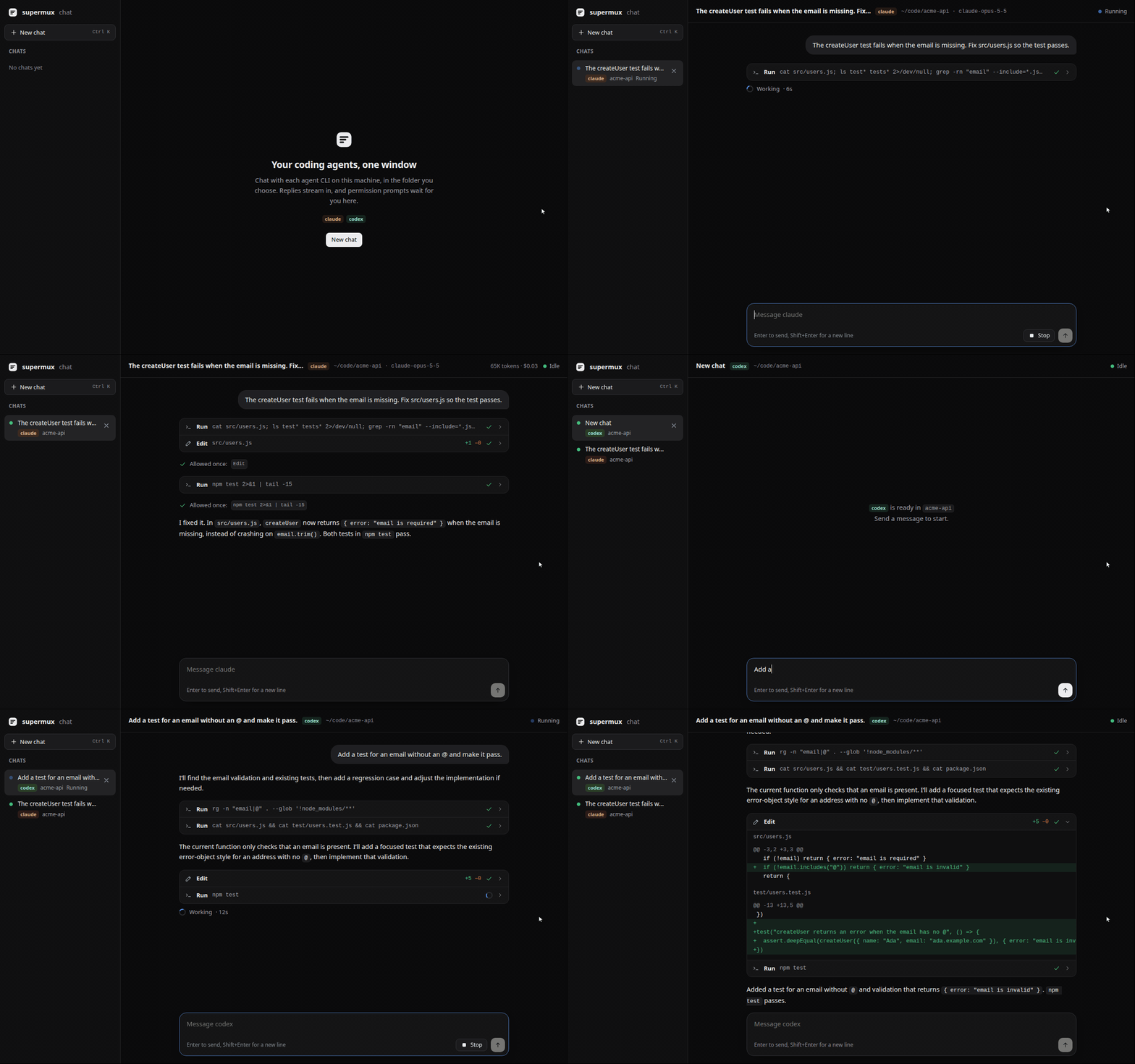
A chat app in the style of T3 Code: a sessions sidebar, streaming replies, tool calls, diffs, permission cards, Stop, and restart without losing the running turn. One server.ts and one index.html, no framework. |
examples/kanban |
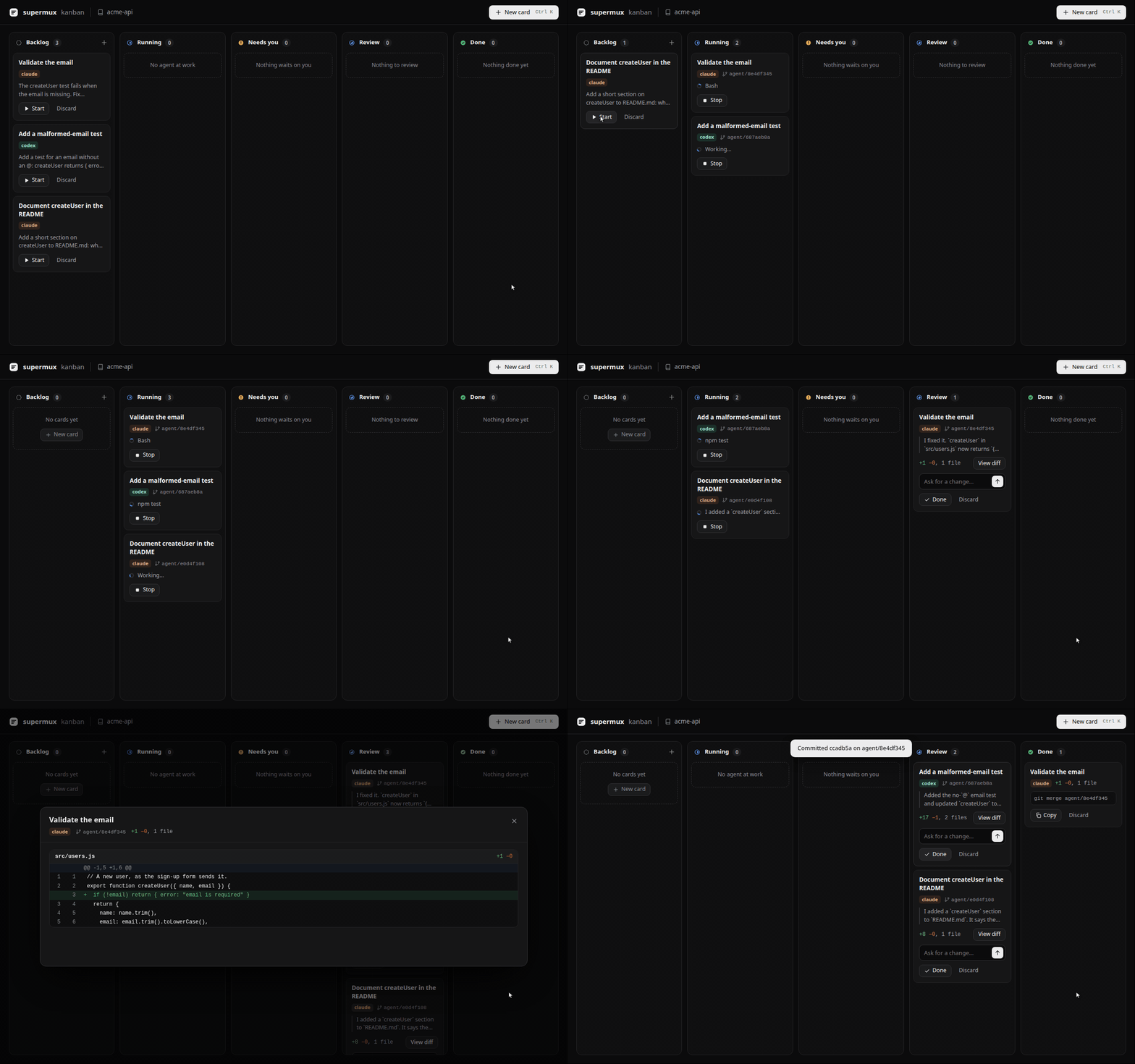
A board where each card is a task run by one agent in its own git worktree. A card moves to "Needs you" when the agent asks for permission and to "Review" with the diff when the turn ends; Done commits the work on the card's branch. |
examples/recipes |
The same task sent to three agents; a read-only review bot for CI; a deploy tool given to any agent. |
Copy one out and run it (Node 22.18 or newer runs its .ts files as they are):
npx degit UstaLabs/supermux/packages/supermux-core/examples/chat my-chat
cd my-chat && npm install && node server.ts
Build it with your agent
The package includes an agent skill that teaches Claude Code, Codex and other agents how to write apps with @supermux/core:
npx skills add UstaLabs/supermux --skill supermux-core
Then ask your agent for what you want, for example "Build a kanban board for my coding agents with @supermux/core".
Agents
| Agent | CLI | Protocol | Permission default | Resume | Re-attach | Steer | Fork | Model switch | History | Subagents | Questions |
|---|---|---|---|---|---|---|---|---|---|---|---|
| Claude Code | claude |
Claude stream-json | permissionMode: default |
yes | yes | — | — | — | — | list, message, stop | yes (AskUserQuestion) |
| Codex | codex app-server |
Codex app-server JSON-RPC | sandbox: workspace-write, approvalPolicy: on-request |
yes | yes | yes | yes | yes | yes | list, message, stop | yes (inline; the answer is steered into the running turn) |
| Grok Build | grok agent stdio |
ACP | policy: ask |
yes | yes | — | — | yes | — | list, message (once finished), stop | yes (_x.ai/ask_user_question) |
| OpenCode | opencode acp |
ACP | policy: ask |
yes | yes | — | — | — | — | list, message, stop | — |
| Cursor | cursor-agent acp |
ACP | policy: ask, mode: agent |
yes | yes | — | — | — | — | list, message | — |
| Antigravity | agy |
agy stream-json (init, step_update, result) |
mode: default (no prompt channel: agy denies risky actions itself) |
yes | yes | — | — | yes | — | — | — |
How it compares
As of October 2026. These tools solve related but different problems; this table only compares the points they have in common.
| What it is | Agents | Where the agents run | When the process that manages the agents restarts | |
|---|---|---|---|---|
| @supermux/core | A TypeScript library; no server | Claude Code, Codex, Cursor, OpenCode, Grok Build, Antigravity | Your machine, through each vendor's CLI | Running turns continue in their keepers; resume() reconnects and replays |
Vercel AI SDK HarnessAgent |
Part of AI SDK 7, marked experimental | Claude Code, Codex, Pi | Sandboxes | Not documented |
| Rivet Sandbox Agent SDK | An HTTP server you run in a sandbox, with TypeScript and Python SDKs | Claude Code, Codex, OpenCode, Amp, Pi | Inside the sandbox | Not documented; its event log can be persisted |
| Coder agentapi | An HTTP server that drives the agents through a terminal emulator | Claude Code, Codex, Gemini, Goose, Aider, Amp | Where the server runs | Not documented |
| Vendor SDKs (Claude Agent SDK, Codex SDK, Cursor SDK) | Each vendor's own library | One each | Your process or the vendor's cloud | Per SDK |
How it works
your process ──────────────── @supermux/core
                                   │  Unix socket + per-session token
                                   ▼
                     keeper (one small process per session)
                                   │  stdin / stdout, journaled
                                   ▼
   claude │ codex app-server │ grok agent stdio │ opencode acp │ cursor-agent acp │ agy
The library starts no server. Each session's CLI runs under a keeper process that owns its stdin and stdout and keeps a journal of what the agent sends. Your process talks to the keeper over a Unix socket. When your process exits, the agent keeps working; the next resume() connects again and replays from the last frame your process handled. Claude Code is driven through its stream-json mode, Codex through its app-server JSON-RPC, and Grok Build, OpenCode and Cursor through the Agent Client Protocol (ACP). The normalized events are derived from what each CLI actually emits.
Limits
- The API is pre-1.0 and can change between minor versions.
- Agents run as your user. An agent allowed to run shell commands can read and change anything you can, including other sessions' files; the CLIs' own permission modes and sandboxes (Codex's, for example) are what limit it. The chat and kanban examples keep each CLI in its own asking mode for that reason; the recipes say what each of them allows.
-
supermux()refuses a session in a folder that contains the state directory, such as your home folder when the state lives under~.refuseWorkdirsContainingState: falseallows it, knowing the agent can then write the state directory. - Linux and macOS. Native Windows is not supported: the keeper uses Unix sockets. On Windows, run it inside WSL.
- Grok Build, OpenCode and Cursor: a turn that finished while your process was down comes back on
resume()as raw updates, not normalized events. Claude Code and Codex replay it as normalized events. - Some subagent actions rely on behaviour the CLIs don't document.
bun run truth:subagentschecks every one of them against the real CLIs, and an action that stops working is switched off with a reason instead of failing. - A session's instructions are fixed when it is created, for every agent.
- Messages still queued in your process are lost if it crashes; the running turn is not.
- A per-session model (
configuration.model) works on Codex, Grok Build and Antigravity. For the others, setmodelper agent insupermux(). - Antigravity needs a prepared shadow HOME (
prepareAntigravityEnvironmentfrom@supermux/core/environment). - Cursor has had less live testing than the other agents.
Used by
supermux, an open-source app for running coding agents from your phone and desktop. Every agent session in supermux has run on this library since October 2026.
Docs
- API.md: every function, option and event.
- REFERENCE.md: lifecycle rules, edge cases and per-agent behaviour.
- examples: runnable code.
Development happens in the supermux repository. MIT licensed.