@mem0/openclaw-mem0
Long-term memory for OpenClaw agents, powered by Mem0.
Your agent forgets everything between sessions. This plugin fixes that. It watches conversations, extracts what matters, and brings it back when relevant — automatically.
How it works
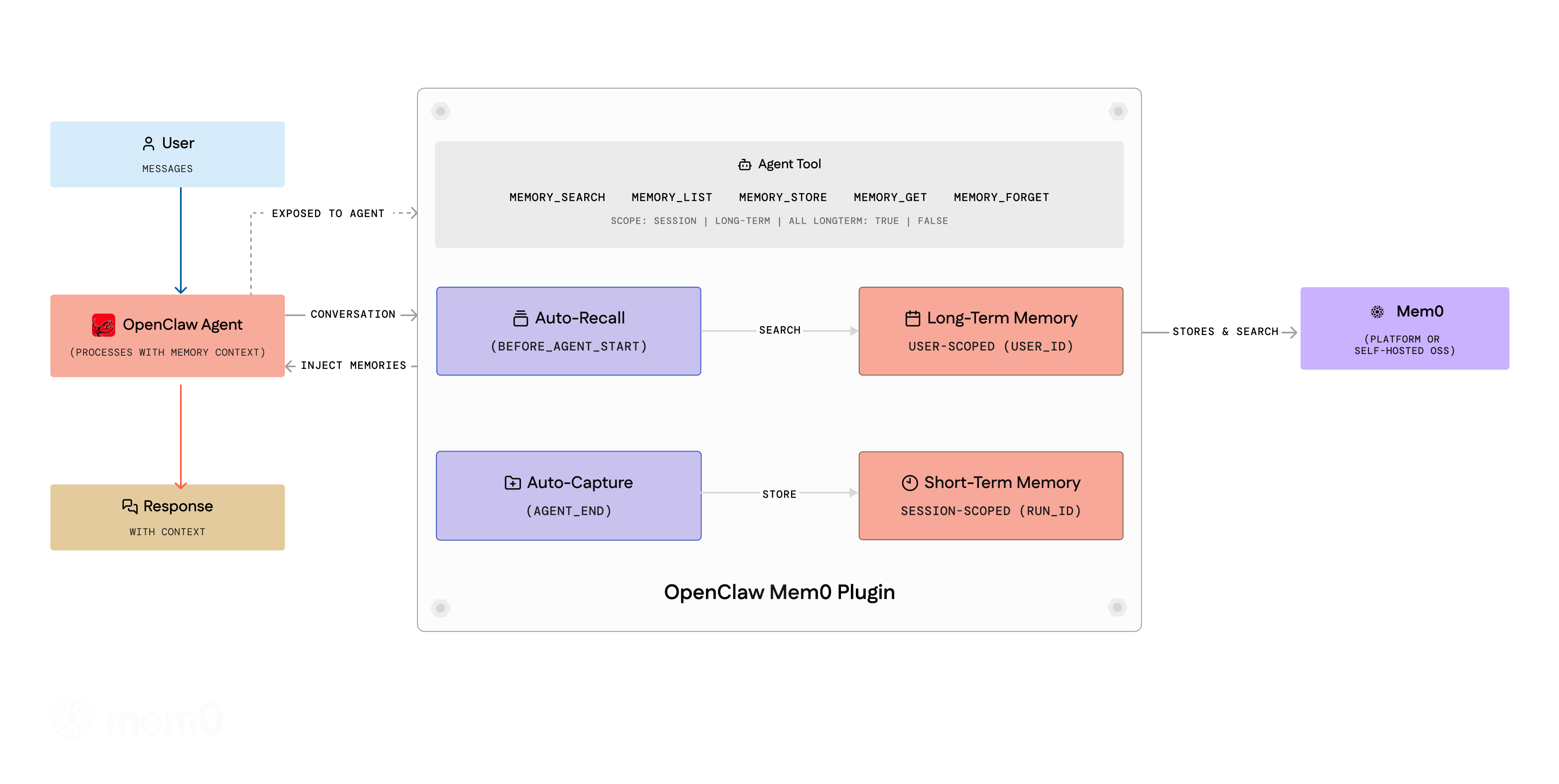
Auto-Recall — Before the agent responds, the plugin searches Mem0 for memories that match the current message and injects them into context.
Auto-Capture — After the agent responds, the plugin filters the conversation through a noise-removal pipeline, then sends the cleaned exchange to Mem0. Mem0 decides what's worth keeping — new facts get stored, stale ones updated, duplicates merged.
Both run silently. No prompting, no configuration, no manual calls.
Message filtering
Before extraction, messages pass through a multi-stage filtering pipeline:
-
Noise detection — Drops entire messages that are system noise: heartbeats (
HEARTBEAT_OK,NO_REPLY), timestamps, single-word acknowledgments (ok,sure,done), system routing metadata, and compaction audit logs. - Generic assistant detection — Drops short assistant messages that are boilerplate acknowledgments with no extractable facts (e.g. "I see you've shared an update. How can I help?").
- Content stripping — Removes embedded noise fragments (media boilerplate, routing metadata, compaction blocks) from otherwise useful messages.
- Truncation — Caps messages at 2000 characters to avoid sending excessive context.
Short-term vs long-term memory
Memories are organized into two scopes:
-
Session (short-term) — Auto-capture stores memories scoped to the current session via Mem0's
run_id/runIdparameter. These are contextual to the ongoing conversation and automatically recalled alongside long-term memories. -
User (long-term) — The agent can explicitly store long-term memories using the
memory_storetool (withlongTerm: true, the default). These persist across all sessions for the user.
During auto-recall, the plugin searches both scopes and presents them separately — long-term memories first, then session memories — so the agent has full context.
The agent tools (memory_search, memory_list) accept a scope parameter ("session", "long-term", or "all") to control which memories are queried. The memory_store tool accepts a longTerm boolean (default: true) to choose where to store.
All new parameters are optional and backward-compatible — existing configurations work without changes.
Per-agent memory isolation
In multi-agent setups, each agent automatically gets its own memory namespace. Session keys following the pattern agent:<agentId>:<uuid> are parsed to derive isolated namespaces (${userId}:agent:${agentId}). Single-agent deployments are unaffected — plain session keys and agent:main:* keys resolve to the configured userId.
How it works:
- The agent's session key is inspected on every recall/capture cycle
- If the key matches
agent:<name>:<uuid>, memories are stored underuserId:agent:<name> - Different agents never see each other's memories unless explicitly queried
Subagent handling:
Ephemeral subagents (session keys like agent:main:subagent:<uuid>) are handled specially:
- Recall is routed to the parent (main user) namespace — subagents get the user's long-term context instead of searching their empty ephemeral namespace
-
Capture is skipped entirely — the main agent's
agent_endhook captures the consolidated result including subagent output, preventing orphaned memories - A subagent-specific preamble is used: "You are a subagent — use these memories for context but do not assume you are this user"
Explicit cross-agent queries:
All memory tools (memory_search, memory_store, memory_list, memory_forget) accept an optional agentId parameter to query another agent's namespace:
memory_search({ query: "user's tech stack", agentId: "researcher" })
The agentId is always namespaced under the configured userId (e.g. agentId: "researcher" → utkarsh:agent:researcher), so it cannot be used to access other users' namespaces.
Concurrency safety
Lifecycle hooks (before_agent_start, agent_end) use ctx.sessionKey directly from the event context rather than shared mutable state. This prevents race conditions when multiple sessions run concurrently (e.g. multiple Telegram users chatting simultaneously).
Tools still read from a best-effort currentSessionId variable (since tools don't receive ctx), but hooks — where the critical recall and capture logic runs — are fully concurrency-safe.
Non-interactive trigger filtering
The plugin automatically skips recall and capture for non-interactive triggers: cron, heartbeat, automation, and schedule. Detection works via both ctx.trigger and session key patterns (:cron:, :heartbeat:). This prevents system-generated noise from polluting long-term memory.
Setup
openclaw plugins install @mem0/openclaw-mem0
Understanding userId
The userId field is a string you choose to uniquely identify the user whose memories are being stored. It is not something you look up in the Mem0 dashboard — you define it yourself.
Pick any stable, unique identifier for the user. Common choices:
- Your application's internal user ID (e.g.
"user_123","alice@example.com") - A UUID (e.g.
"550e8400-e29b-41d4-a716-446655440000") - A simple username (e.g.
"alice")
All memories are scoped to this userId — different values create separate memory namespaces. If you don't set it, it defaults to "default", which means all users share the same memory space.
Tip: In a multi-user application, set
userIddynamically per user (e.g. from your auth system) rather than hardcoding a single value.
Platform (Mem0 Cloud)
Get an API key from app.mem0.ai, then add to your openclaw.json:
// plugins.entries
"openclaw-mem0": {
  "enabled": true,
  "config": {
    "apiKey": "${MEM0_API_KEY}",
    "userId": "alice"  // any unique identifier you choose for this user
  }
}
Open-Source (Self-hosted)
No Mem0 key needed. Requires OPENAI_API_KEY for default embeddings/LLM.
"openclaw-mem0": {
  "enabled": true,
  "config": {
    "mode": "open-source",
    "userId": "alice"  // any unique identifier you choose for this user
  }
}
Sensible defaults out of the box. To customize the embedder, vector store, or LLM:
"config": {
  "mode": "open-source",
  "userId": "your-user-id",
  "oss": {
    "embedder": { "provider": "openai", "config": { "model": "text-embedding-3-small" } },
    "vectorStore": { "provider": "qdrant", "config": { "host": "localhost", "port": 6333 } },
    "llm": { "provider": "openai", "config": { "model": "gpt-4o" } }
  }
}
All oss fields are optional. See Mem0 OSS docs for providers.
Agent tools
The agent gets five tools it can call during conversations:
| Tool | Description |
|---|---|
memory_search |
Search memories by natural language. Optional agentId to scope to a specific agent, scope to filter by session/long-term. |
memory_list |
List all stored memories. Optional agentId to scope to a specific agent, scope to filter. |
memory_store |
Explicitly save a fact. Optional agentId to store under a specific agent's namespace, longTerm to choose scope. |
memory_get |
Retrieve a memory by ID. |
memory_forget |
Delete by ID or by query. Optional agentId to scope deletion to a specific agent. |
CLI
# Search all memories (long-term + session)
openclaw mem0 search "what languages does the user know"

# Search only long-term memories
openclaw mem0 search "what languages does the user know" --scope long-term

# Search only session/short-term memories
openclaw mem0 search "what languages does the user know" --scope session

# Stats
openclaw mem0 stats

# Search a specific agent's memories
openclaw mem0 search "user preferences" --agent researcher

# Stats for a specific agent
openclaw mem0 stats --agent researcher
Options
General
| Key | Type | Default | |
|---|---|---|---|
mode |
"platform" | "open-source"
|
"platform" |
Which backend to use |
userId |
string |
"default" |
Any unique identifier you choose for the user (e.g. "alice", "user_123"). All memories are scoped to this value. Not found in any dashboard — you define it yourself. |
autoRecall |
boolean |
true |
Inject memories before each turn |
autoCapture |
boolean |
true |
Store facts after each turn |
topK |
number |
5 |
Max memories per recall |
searchThreshold |
number |
0.5 |
Min similarity (0–1) |
Platform mode
| Key | Type | Default | |
|---|---|---|---|
apiKey |
string |
— |
Required. Mem0 API key (supports ${MEM0_API_KEY}) |
orgId |
string |
— | Organization ID |
projectId |
string |
— | Project ID |
enableGraph |
boolean |
false |
Entity graph for relationships |
customInstructions |
string |
(built-in) | Extraction rules — what to store, how to format. Built-in instructions include temporal anchoring, conciseness, outcome-over-intent, deduplication, and language preservation guidelines. |
customCategories |
object |
(12 defaults) | Category name → description map for tagging |
Open-source mode
Works with zero extra config. The oss block lets you swap out any component:
| Key | Type | Default | |
|---|---|---|---|
customPrompt |
string |
(built-in) | Extraction prompt for memory processing |
oss.embedder.provider |
string |
"openai" |
Embedding provider ("openai", "ollama", "lmstudio", etc.) |
oss.embedder.config |
object |
— | Provider config: apiKey, model, baseURL
|
oss.vectorStore.provider |
string |
"memory" |
Vector store ("memory", "qdrant", "chroma", etc.) |
oss.vectorStore.config |
object |
— | Provider config: host, port, collectionName, dimension
|
oss.llm.provider |
string |
"openai" |
LLM provider ("openai", "anthropic", "ollama", "lmstudio", etc.) |
oss.llm.config |
object |
— | Provider config: apiKey, model, baseURL, temperature
|
oss.historyDbPath |
string |
— | SQLite path for memory edit history |
oss.disableHistory |
boolean |
false |
Skip history DB initialization (useful when native SQLite bindings fail) |
Everything inside oss is optional — defaults use OpenAI embeddings (text-embedding-3-small), in-memory vector store, and OpenAI LLM. Override only what you need.
SQLite resilience: If the history DB fails to initialize (e.g. native binding resolution under jiti), the plugin automatically retries with history disabled. Core memory operations (add, search, get, delete) work without the history DB.
License
Apache 2.0