Three days ago, OpenAI introduced apps in ChatGPT, a way to bring UI experiences right inside ChatGPT, and other clients that adopt this in the future. They also released Apps SDK preview built on top of the Model Context Protocol (MCP). OpenAI provided a preview of this SDK to get developers started with building apps in their ecosystem.
Developing with Apps SDK is restricted as it requires ChatGPT developer mode access and an OpenAI partner to approve access. We built Apps SDK support in the MCPJam open source inspectorto help you test your Apps SDK server, give y'all a head start.
How Apps SDK + MCP works at a high level
MCP is the backbone of Apps SDK. It bridges communication between the content being served and the LLM chat interface. MCP provides authentication too. If you don’t have context on MCP, I highly recommend studying that up before digging into Apps SDK.
At a high level, UI is served to the client with "widgets". This is what the data model of a widget looks like:
Widget data model
{
  id: "pizza-map",
  title: "Show Pizza Map",
  templateUri: "ui://widget/pizza-map.html",
  invoking: "Hand-tossing a map",
  invoked: "Served a fresh map",
  html: `
    <div id="pizzaz-root"></div>
    <link rel="stylesheet" href="https://persistent.oaistatic.com/ecosystem-built-assets/pizzaz-0038.css">
    <script type="module" src="https://persistent.oaistatic.com/ecosystem-built-assets/pizzaz-0038.js"></script>
  `.trim(),
  responseText: "Rendered a pizza map!"
}
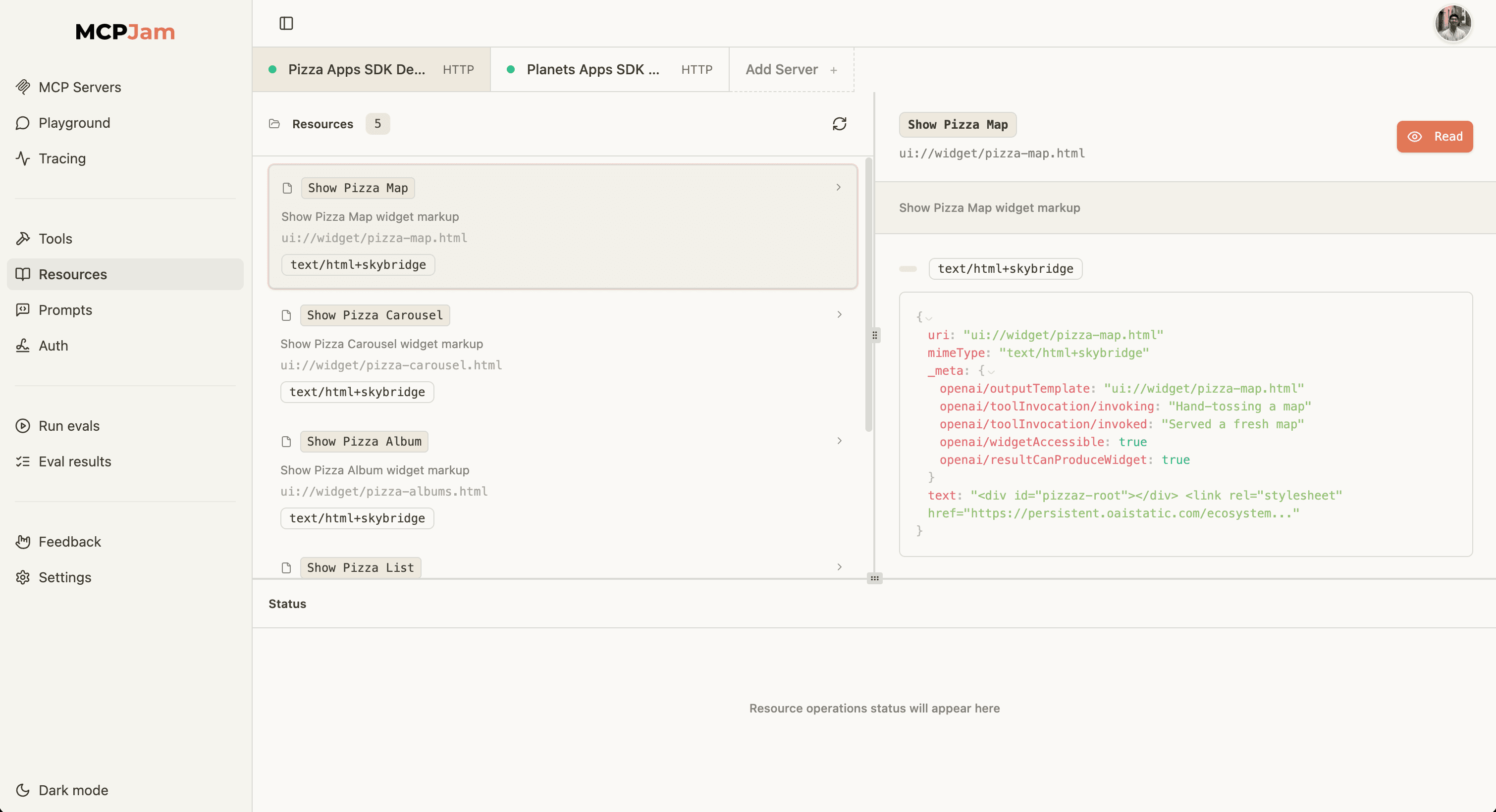
Every widget is converted into an MCP resource, and MCP server tools. When an MCP server's tools is invoked, it finds the correct corresponding resource via the templateUri. That MCP resource contains the raw HTML, which is then sent back to the client to be served in an iFrame.
This is what resources looks like for Apps SDK:
Subscribe to the blog
We share our learnings with you every week.
Helpful resources to get started with Apps SDK
We'll be publishing a step by step tutorial later this week on building with the Apps SDK, there's a lot to digest there. For now, here are some resources to help you get started:
- Official Apps SDK documentation- This is where you'll find detailed walkthroughs on the SDK.
- Official MCP SDKs for Python (FastMCP) and TypeScript - We recommend using the FastMCP TypeScript SDK.
- Apps SDK Examples - Python and TypeScript examples of MCP servers with Apps SDK.
- Kent C Dodds video - Excellent video explanation of Apps SDK. I highly recommend subscribing to his newsletter for more MCP tutorials.
Testing Apps SDK in MCPJam inspector
MCPJam inspector is an open source testing platform for MCP servers. It's a great place to start evaluating an MCP server by inspecting the protocol handshake and getting a deterministic list of tools, resources, prompts from the server. We also built an LLM playground to simulate your server in a real chat environment. You can check out our GitHub repo.
Here are the steps to get started playing around with Apps SDK in MCPJam:
- Clone the Apps SDK server examples repo.
- I recommend starting the
pizzaz_server_nodeserver. This is the Pizza maps MCP server. - Start up MCPJam inspector beta:
npx -y @mcpjam/inspector@beta - Connect to the MCP server via SSE. The server gets started with the URL
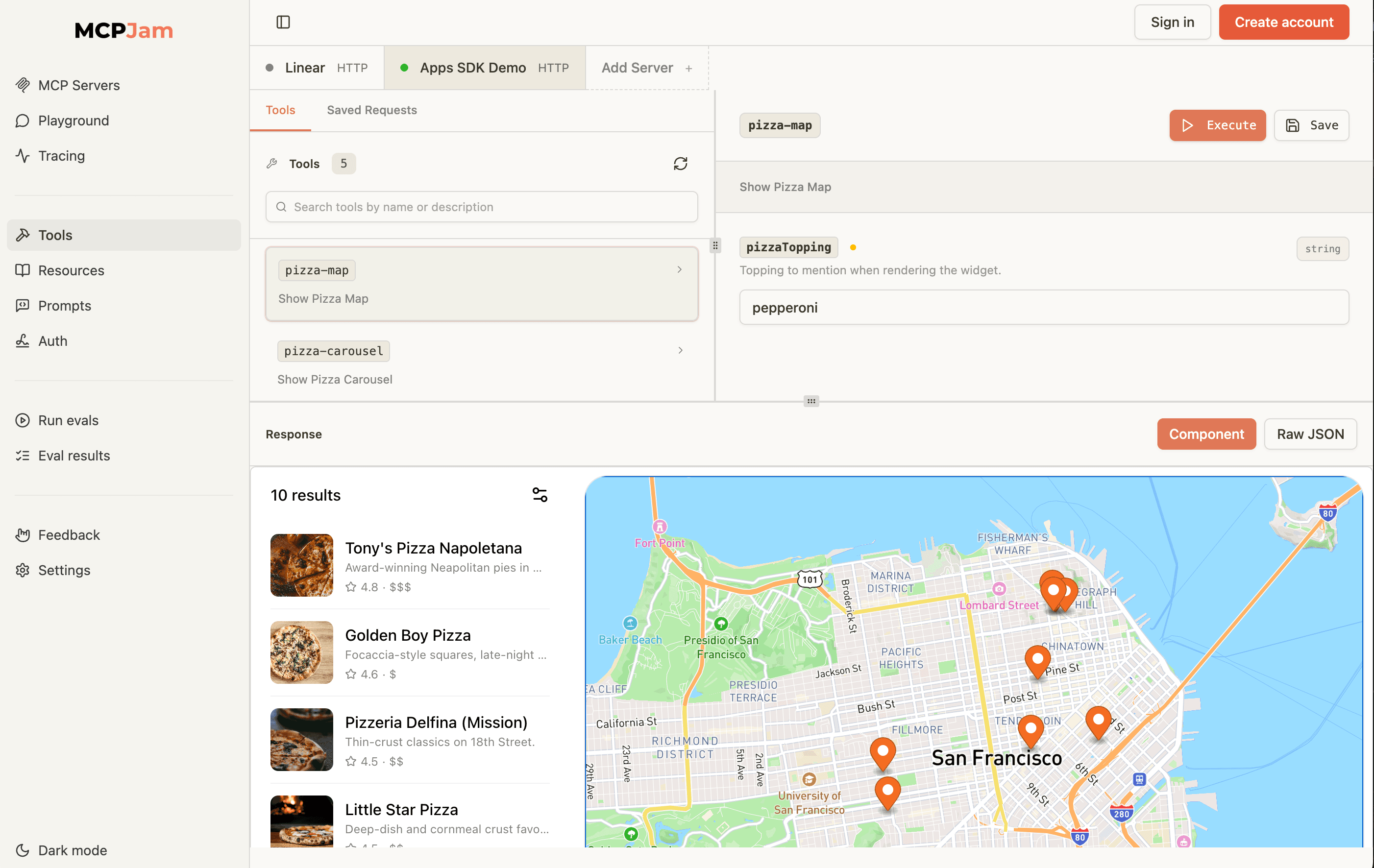
http://localhost:8000/mcp - Go to the tools tab, and invoke a tool.
When you invoke the Pizza tool, you should see the pizza map UI rendered in the bottom tab.
Help make our Apps SDK support better
MCPJam's Apps SDK support is still in beta, and we're working on polishing the support. We hope that it's also a great reference for client developers to look into our codebase and see our implementation. We're very open to the developer community to help contribute. Some Apps SDK support features are still buggy, like the LLM playground. Please report any issues in our GitHub issues page.
Please also consider joining our Discord group! Happy to help any time, or discuss anything MCP related.