
As great an OS as Linux is, there's still a major app-gap between it and other, more mainstream operating systems like Windows and macOS. However, that's not to say that there are no great programs for Linux users. In fact, you can do just about everything you can on other OSes on Linux, as long as you're willing to work with a replacement.
You can even run Windows games better than Windows with just a Linux distro, and there's no shortage of great tools and utilities that can take you from using Linux to really living in it. All you need is a little time, patience, and experimentation.
Btop
system monitoring you'll actually use
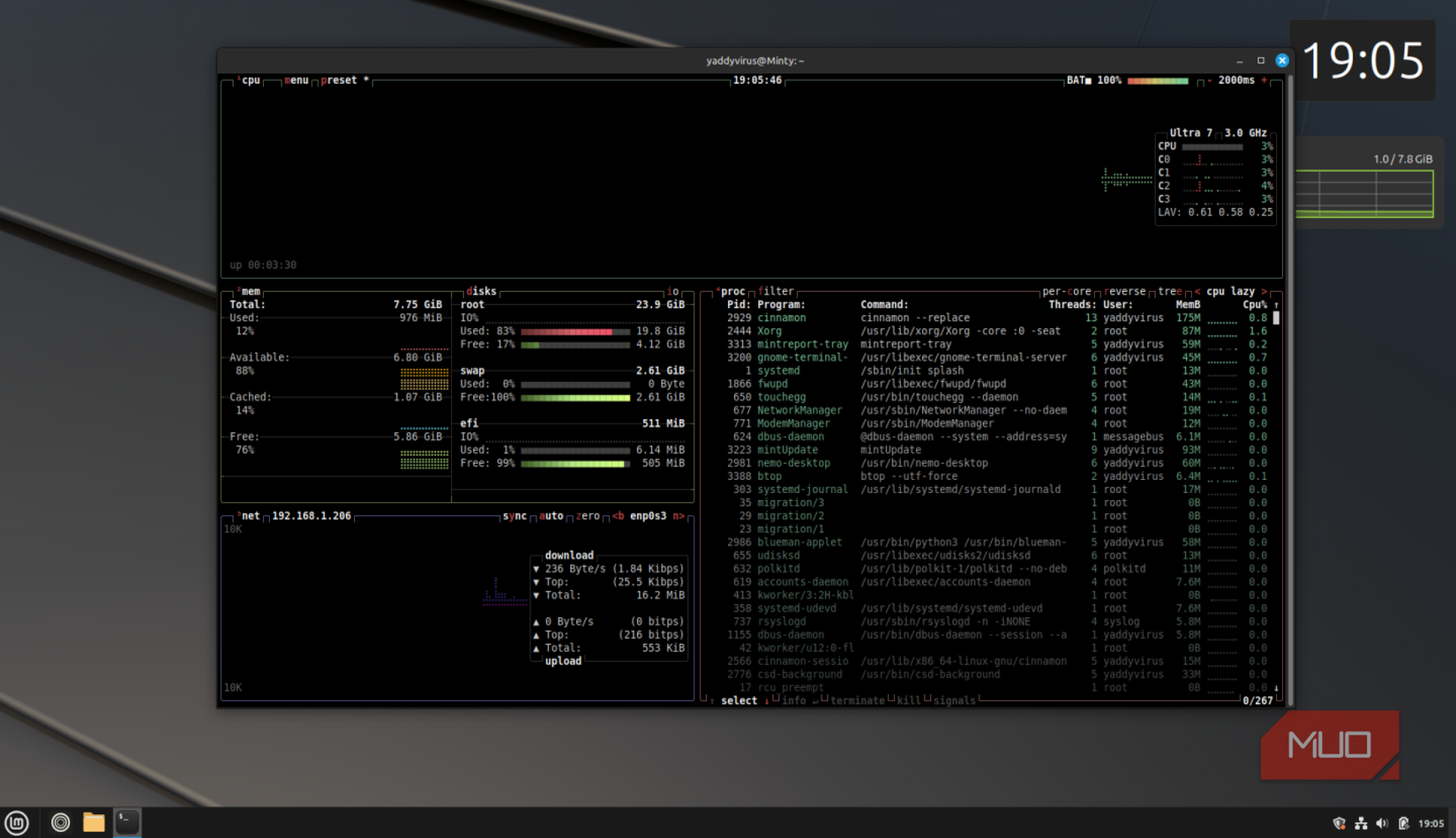
Btop is a modern, terminal-based resource monitor that makes keeping an eye on your system feel almost fun. Think of it as top or htop reimagined with a slick interface, smooth animations, and a ton of useful information presented at a glance. You get per-core CPU usage, temperature readouts, memory and swap stats, disk I/O, and network throughput, all color-coded and visually organized. It's the kind of dashboard you can leave open in a corner of your screen and understand in half a second when something feels off.
Where Btop really shines is the process management, however. You can sort processes by CPU, memory, or other metrics, filter them interactively, and kill or renice them without ever leaving the UI. It also supports mouse interaction, so if you're not in the mood for keybindings, you can point and click your way around. On laptops and desktops, it's great for spotting runaway apps; on servers, it's a brilliant tool for figuring out what's happening in the background. Once you get used to the clean layout and responsiveness, going back to plain top feels like downgrading.

btop
- OS
- Linux, macOS
- Developer
- Jakob P. Liljenberg
- Price model
- Free, Open-source
btop is a modern resource monitor for Linux and macOS that displays real-time CPU, memory, disk, and network usage in a clean, interactive terminal interface.
Brow6el
A fully fledged Chromium browser in your terminal
Brow6el is a terminal-based browser that I first laughed at, until I actually used it. It comes with full GUI rendering based on Chromium. It isn't Lynx with a fresh coat of paint. It's not W3M pretending it's still relevant. This is a full-blown, Chromium-powered browser that happens to render inside your terminal using Sixel graphics—a bitmap format from the 1980s that encodes images into terminal escape sequences. The developer, janantos, has essentially performed the software equivalent of fitting a Ferrari engine into a horse carriage, and somehow made it work.
Brow6el includes features that are easily on par with most modern browsers. You get bookmarks, a download manager, private browsing mode, a JavaScript console, page inspection tools, popup handling, and even a pre-installed ad blocker. It supports multiple instances, too, so you're not trapped in a single terminal window. The graphics re-render continuously to keep pages updated, just like any other browser.

Brow6el
- OS
- Linux
- Developer
- janantos
- Price model
- Free, Open-source
A terminal-based web browser that looks ridiculous at first glance—and then quietly proves it can handle the modern web better than you’d expect.
Rofi
A launcher that glues everything together
Rofi is billed as a window switcher and application launcher, but in practice, it becomes a universal menu for your entire desktop. At its simplest, you hit a keybinding, a minimal text box pops up, you start typing, and Rofi fuzzy-matches applications, windows, or commands. It's insanely fast, keyboard-driven, and gets out of your way the moment you press Enter. After using it for a while, digging through a traditional app menu feels sluggish in comparison.
The real power of Rofi is how extensible it is. You can use it as a run dialog, a window switcher, an SSH host selector, a clipboard manager front-end, or even a UI wrapper around your own scripts. Because it reads simple text lists and integrates well with shell scripts, it ends up acting like a generic interface for just about anything. On tiling window managers like i3, it almost becomes your main way of launching and navigating interfaces. On more traditional desktops, it still makes a great drop-in as a better application launcher.

Rofi
- OS
- Linux
- Developer
- Davatorium
- Price model
- Free, Open-source
Rofi is a lightweight, highly customizable application launcher and window switcher for Linux that runs directly from the keyboard.
Ncdu
When you're tired of storage space chaos
Ncdu (NCurses Disk Usage) is the tool you wish you had installed the last time you saw a "no space left on device" message. It's a text-based disk usage analyzer that turns the opaque output of the du tool into a navigable, sorted view of where your space is going. You point it at a directory—ncdu /, ncdu /home, or wherever—and it scans, then presents a list of folders and files ordered by size, complete with simple bar graphs and human-readable units.
The interface is wonderfully straightforward: arrow keys to move, Enter to dive into directories, and a delete action when you're sure something can go. This makes it ideal for both servers and desktops. On a VPS, you can quickly track down logs, caches, or accidental backups eating disk space. On your personal machine, it's great for finding forgotten folders full of massive ISOs or other files. Ncdu doesn't try to be clever; it just gives you the information and the controls you actually need, in one place.
Ncdu
- OS
- Linux, macOS
- Developer
- Yoran Heling
- Price model
- Free, Open-source
Ncdu is a fast, terminal-based disk usage analyzer that lets you browse directories interactively and quickly find what’s taking up space on your system.
i3wm
A tiling window manager that changes how you think
I switched to i3wm as a way to deal with Linux's floating windows. However, after trying this tiling window manager, I can't go back to normal desktops. As you can guess, it's a free, open-source tiling window manager that strikes a good balance between functionality and usability. It's lightweight, well-documented, and uses vim-style keybindings that felt instantly familiar.
Unlike some minimalist window managers that assume you're willing to dive into source code, i3 has straightforward configuration files and excellent community support on forums and Reddit. The default keybinding scheme follows Vim conventions, but if you don't like them, you edit a single configuration file and rebind everything to your preference. There's a learning curve, and it's definitely not for everyone. But if it clicks, you'll find floating window managers oddly frustrating.

i3wm
- OS
- Linux
- Developer
- Michael Stapelberg
- Price model
- Free, Open-source
i3wm is a lightweight, keyboard-driven tiling window manager that automatically organizes windows to maximize screen space and speed.
Linux is full of great programs waiting to be discovered
These programs aren't your usual kind of recommendations. They're more hidden upgrades that change how you think about your Linux environments. Depending on what you use Linux for, these programs can make daily management tasks much easier.
You don't need to adopt all of them at once, but picking even one or two and living with them for a week can make Linux feel less like just another OS and more like a tailored toolset built around how you actually work.