Since the beginning of December, Apple has been pushing iPhone users who opted to stay on iOS 18 to install iOS 26 instead. Apple started by making the iOS 18 upgrades less visible, and has now transitioned to making new iOS 18 updates unavailable on any device capable of running iOS 26.
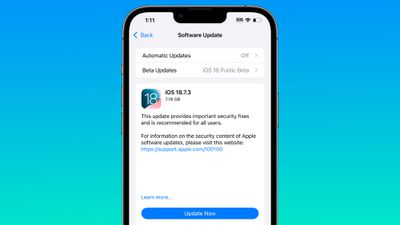
If you have an iPhone 11 or later, Apple is no longer offering new versions of iOS 18, even though there was a security update that came out alongside iOS 26.2. Apple stopped showing new iOS 18 updates when iOS 26.2 launched, forcing iOS 18 users to upgrade to iOS 26.2 if they want to keep their devices secure.
For now, there's a way to stay on iOS 18 and continue to get security updates. On a device running iOS 18, you can turn on iOS 18 public beta updates to force new versions of iOS 18 to show up. This may not remain an option for long, but it works at the current time.
Apple's move to push users to iOS 26 is timed with a long list of security updates introduced in iOS 26.2 and iOS 18.7.3, including a WebKit vulnerability known to be actively exploited. Both updates addressed the problem, so there is no technical need for the iOS 26.2 requirement.
Jason Snell wrote an article yesterday on Apple's decision not to offer iOS 18 users further iOS 18 upgrades and speculated that it might be a bug or an error, but the reality is that Apple does this every year.
The iOS 14 to iOS 15 transition in 2021 was the first time that Apple allowed users to remain on an older version of iOS. At the time, Apple said that iOS offered "a choice between two software update versions." Users would be able to update to iOS 15 at release, or opt to continue on iOS 14 and "still get important security updates."
As promised, Apple did allow users to stay on iOS 14 and avoid the iOS 15 update, but only temporarily. Apple started pushing people to iOS 15 in January 2022 by making the iOS 15 software update option more prominent and no longer offering iOS 14 security updates for devices capable of running iOS 15.
In fact, iOS 14 updates stopped being available when Apple launched iOS 15.2, which might sound familiar because it is the exact same path that it followed with the iOS 18 to iOS 26 transition. Apple did the same thing with the iOS 16 to iOS 17 transition, and the iOS 17 to iOS 18 transition.
For a clear answer why iOS 18 security updates are no longer available on devices capable of running iOS 26, we can look to what Apple had to say in 2022 after people complained about being forced to upgrade to iOS 15. According to Apple, the option for users to stay on iOS 14 and avoid iOS 15 was always meant to be temporary. Apple provided a grace period for people to remain on iOS 14 while iOS 15 bugs were worked out, but Apple ultimately wanted users on the latest version of iOS.
In a support document published in 2021, Apple clarified that users would be able to stay on the old version of iOS "for a period of time," but not forever.
If you're using iOS or iPadOS 14.5 or later, you might now see the option to choose between two software update versions. This option allows you to choose between updating to the latest version of iOS or iPadOS 15 as soon as it's released, or continuing on iOS or iPadOS 14 while still getting important security updates for a period of time.
Apple has continued with the same update policy since iOS 15, but the company's move to wean users off of iOS 18 is more visible this year due to the design changes introduced with iOS 26. Liquid Glass is a major user interface overhaul that's polarizing, and some users are unsurprisingly reluctant to update for that reason.
Update: Apple is no longer allowing the iOS 18 public beta to be used to skirt the iOS 18 to iOS 26 transition. Opting in to the iOS 18 beta no longer triggers the iOS 18.7.3 update.