When Apple released the second macOS 15.4 beta earlier this month, the company apparently made a change that means System Settings no longer shows how much local storage space Apple Intelligence features are taking up on a Mac.
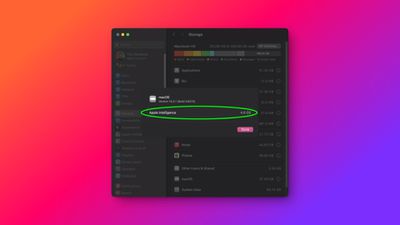
In macOS Sequoia 15.3.1, users with a Mac powered by Apple silicon can easily discover how much space any installed Apple Intelligence features are taking up on their drive by going to System Settings ➝ General ➝ Storage, and then clicking the circled "i" button next to macOS.
That hasn't been the case since the beta 2 release of Apple's upcoming macOS Sequoia 15.4 update. As spotted by MacRumors contributor Aaron Perris, when users click the "i" button, no further details are now given to explain the amount of storage that macOS is taking up locally.
However, it turns out that if the user has System Integrity Protection (SIP) disabled, System Settings reliably displays the information again. For those unfamiliar, SIP protects the entire system by preventing the execution of unauthorized code, and can only be disabled by entering Recovery Mode. The ability to disable SIP is useful for developers testing apps, but it is generally not recommended for most users.
According to iOS developer @b3lla_dev, Apple has made the Apple Intelligence assets unable to view unless SIP is disabled. This is apparently having a knock-on effect that makes the System Settings app unable to retrieve the file size of said assets.
Apple Intelligence utilizes something called the MobileAsset framework to manage and deliver its machine learning models and related assets to Apple devices. This framework dynamically downloads and updates the necessary components, ensuring that devices have access to the latest capabilities without requiring comprehensive system updates. According to Apple's support page, the assets for Apple Intelligence require up to 7GB of storage space on iPhones, iPads, and Macs.
When storage is tight, 7GB is a significant amount that is bound to influence users when it comes to deciding whether to enable Apple Intelligence or not. It's not clear if this was a factor in Apple's decision to effectively hide the storage space that its suite of AI features eats up locally, but users will come to their own conclusions.
Perris has submitted a feedback report to Apple to notify them about the change, which persists in the latest beta 3, so we'll have to wait and see what action Apple takes, if any. Apple plans to release macOS Sequoia 15.4 in early April.