Meetings
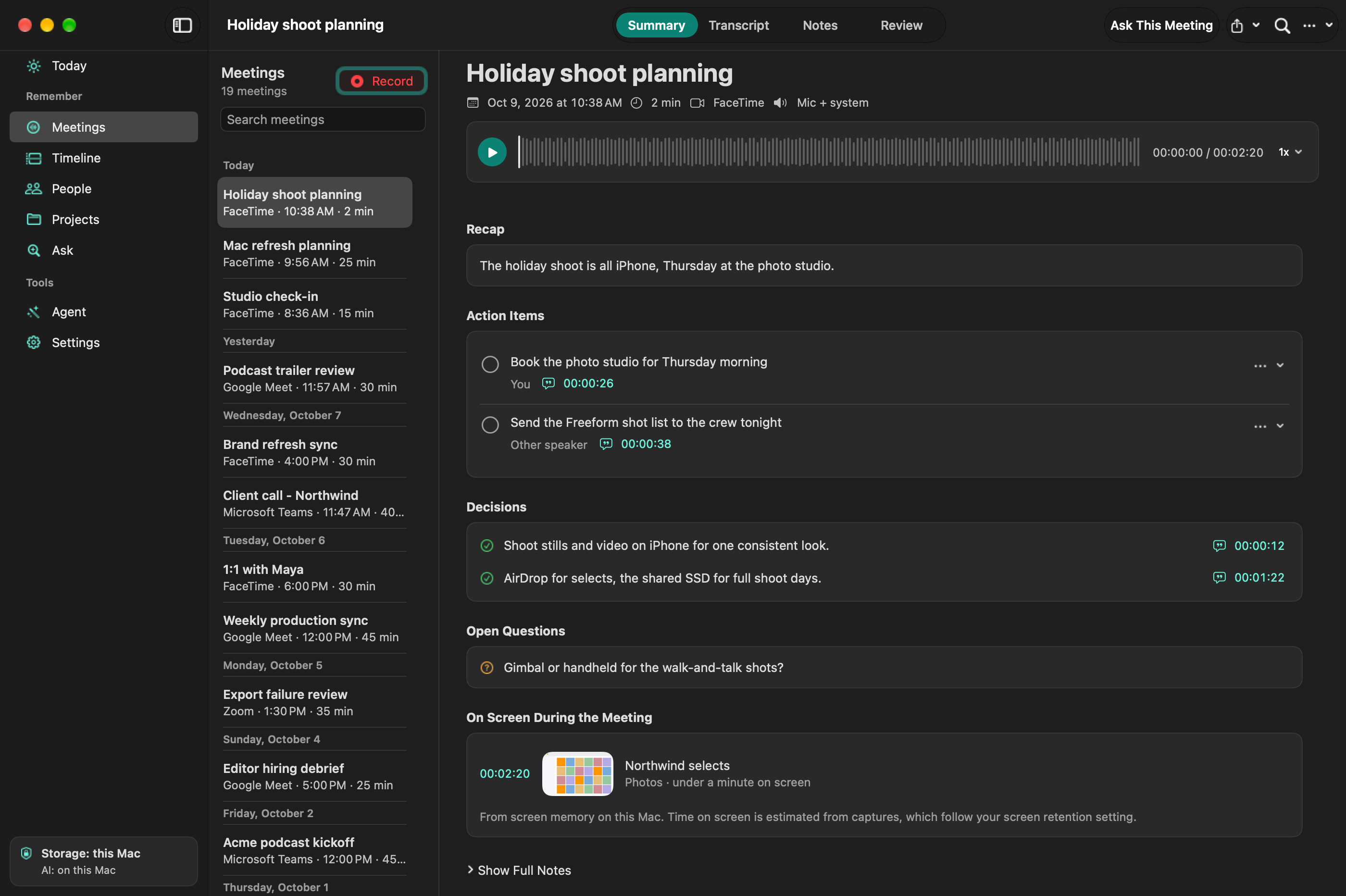
What did we agree on?
Find the decision and jump to the part of the call where it was discussed. Record both sides without a bot joining the meeting.
Name a speaker once, and LokalBot recognizes their voice in later meetings.
LokalBot
New LokalBot for Windows and Linux, in alpha
On-device work memory
Meeting notes, searchable screen memory, and dictation, all running locally by default. Your AI agents can search it too.
Free and open source · No account needed · Screen memory is opt-in
Apple Silicon · macOS 15+ · Windows and Linux in alpha
A quick look
A 45-second tour: what LokalBot keeps, the local models that do the work, and the real app in use.
Meetings
Find the decision and jump to the part of the call where it was discussed. Record both sides without a bot joining the meeting.
Name a speaker once, and LokalBot recognizes their voice in later meetings.
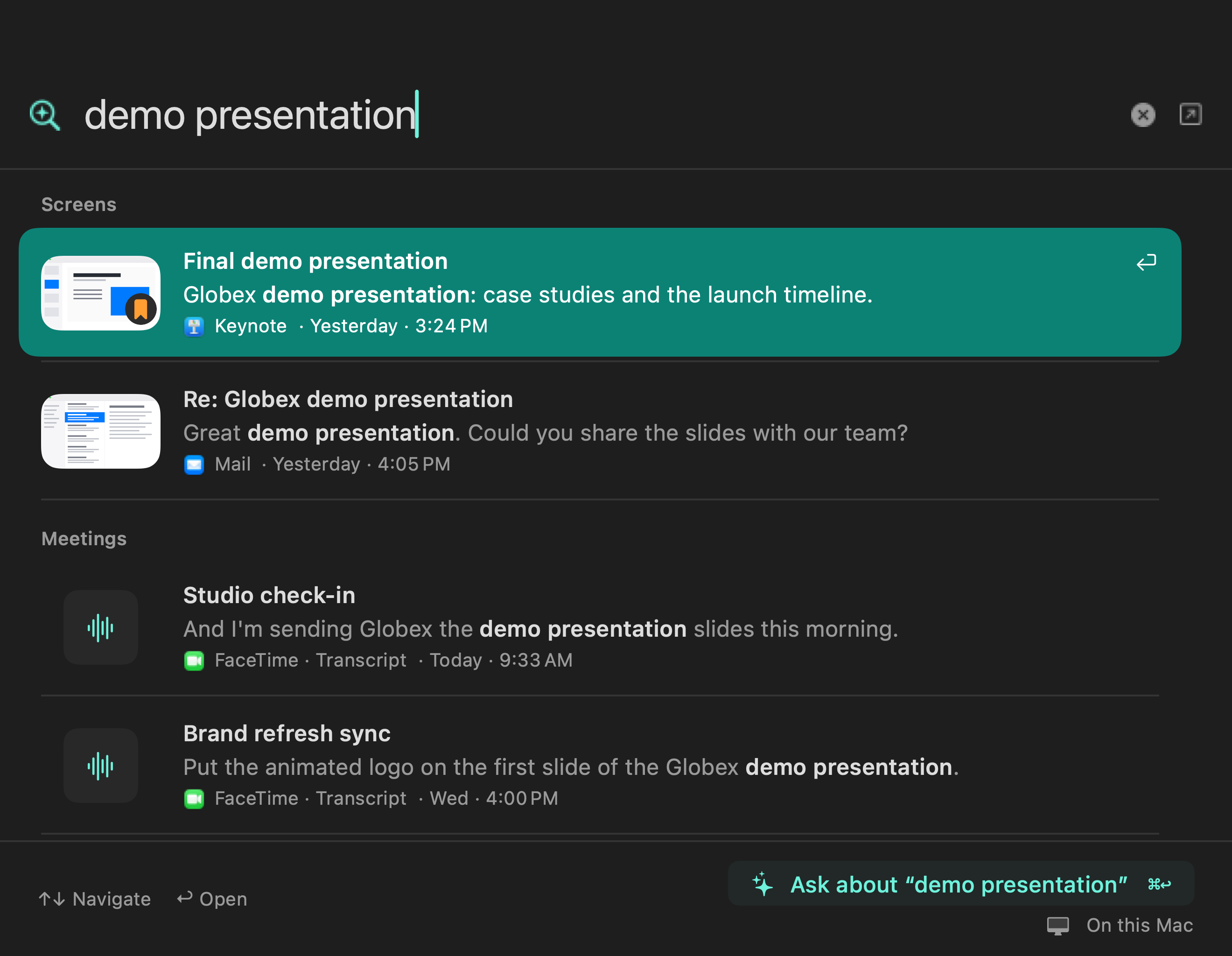
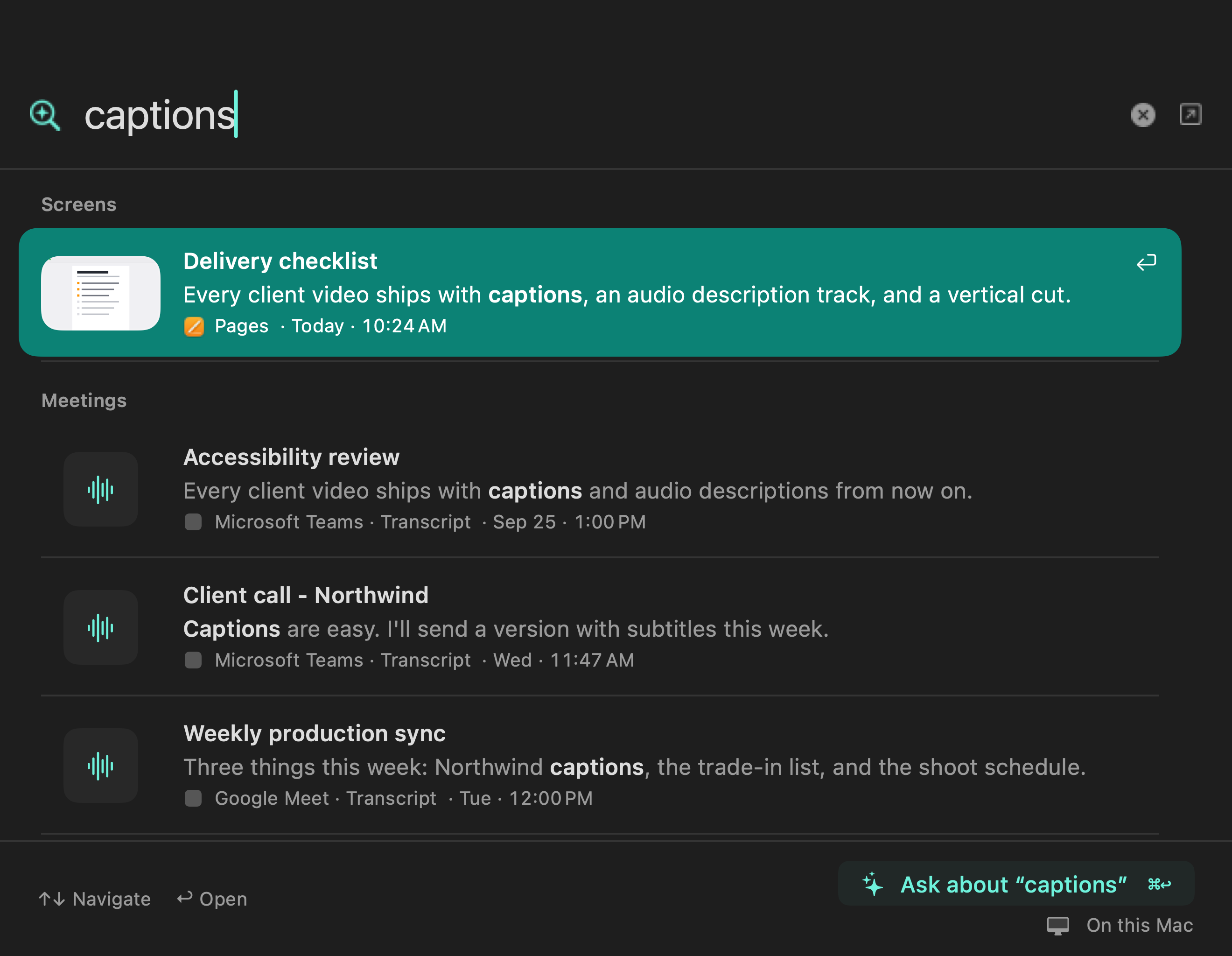
Saved screen text
Find a page by a word you remember, even when you’ve forgotten its title. Search what you saw on screen and open the matching moment.
Screen text and screenshots are optional. You choose which apps and sites to exclude.
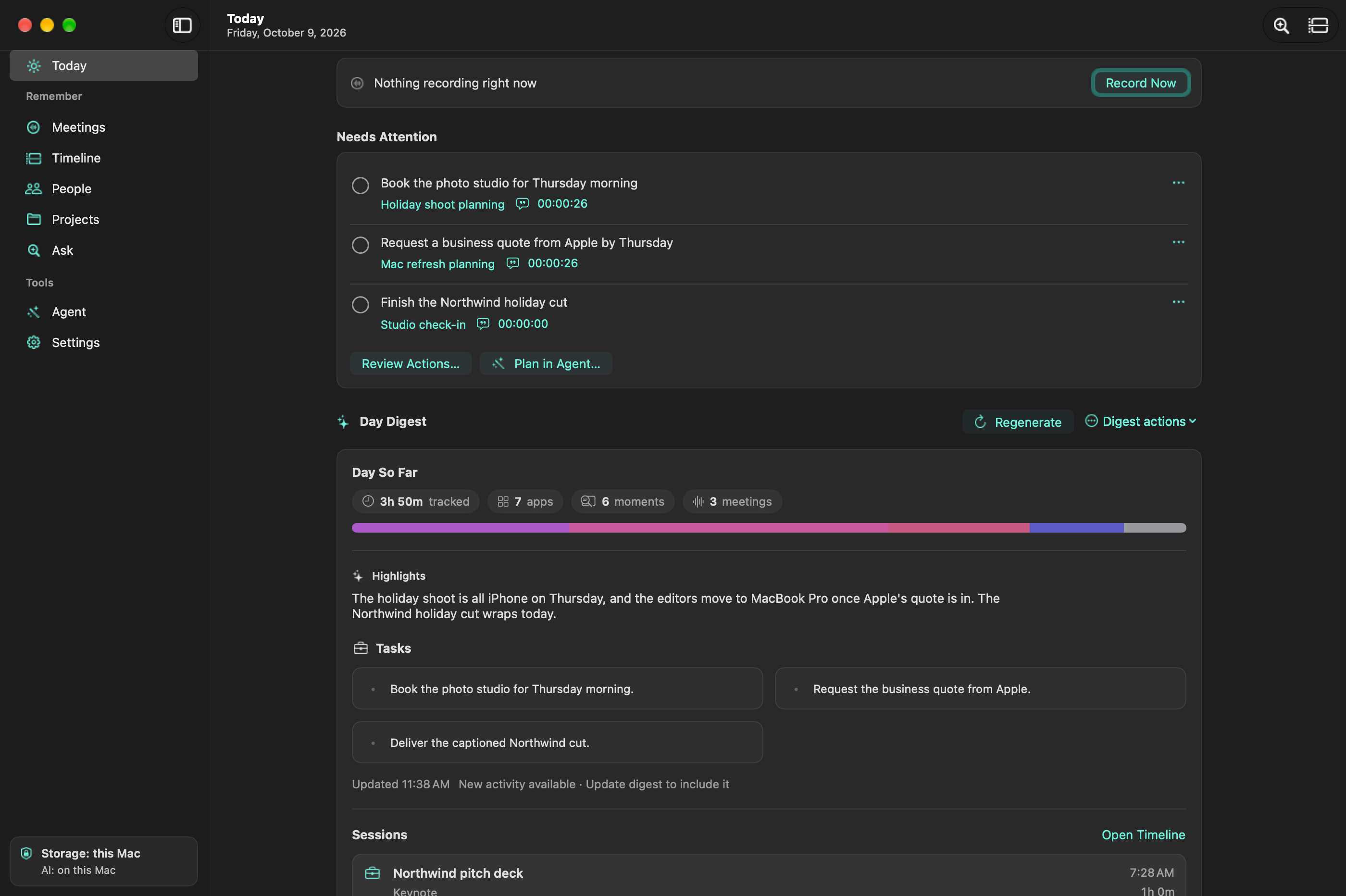
Today
Review the day's summary and open action items without reading every transcript again. Open the timeline when you need to retrace your day.
Screenshots show the app with example data. Select an image to see it full size.
Optional autocomplete suggests how your sentence ends, and Tab takes the next word. It reads the message you're answering and, if you let it, what was decided in your meetings. On Mac it also writes in German, French, Italian, Spanish, and more.
How autocomplete worksHold ⌥ Space (Alt+Space on Windows and Linux), say what you want to write, and release. The words appear at your cursor. Dictation runs on your computer, and your recent dictations are kept so you can copy one again.
On Mac, select text in any app and press ⌃⇧ W to fix the grammar, shorten it, or translate it. Draft a reply with my memory writes a reply that uses what your meetings actually say.
Turn a meeting into a follow-up draft that you review and send. On Mac, also keep a note for every meeting in your Obsidian or Logseq folder and get weekly work logs.
Windows and Linux (alpha)
A native app for Windows 10 and 11 and for Linux has the same pages and reads the same library, so a library moves between computers. Meetings, transcription, Ask, search, day memory, dictation, autocomplete, and agent access all work.
It's an alpha: the Windows build isn't code-signed yet, Wayland support is partial, and a few Mac features haven't been ported. On Linux, the .deb, and the .rpm on Fedora, add the LokalBot repository, so apt or dnf keeps it updated. What works and what's missing · Linux guide · Windows guide
Agent access
Claude Code, Codex, or any MCP client can search your meetings through the bundled lokalbot-cli or its MCP server. Ask what was decided, who owns an action item, or where a topic came up.
Under the hood
A 25-second look at the local models that do the work: Nemotron tells speakers apart, Qwen3-ASR transcribes, Qwen3.5 summarizes, EmbeddingGemma 2 searches by meaning, Apple Vision reads screen text if you opt in, and Gemma 4 E2B finishes your sentences. About 9.6 GB of model files if you use every role, all on your Mac. Windows and Linux run the same jobs with their own local models, about 4 GB by default, on a Vulkan GPU, the CPU, or an NVIDIA GPU with CUDA (experimental).
Privacy
Recording, transcription, and the built-in models run on your computer. Screen text and screenshots are optional. You choose what to capture and how long to keep it.
Models and updates need a download. If you choose a remote model, the app asks before sending it context. Agent commands and external tools have separate permissions and data handling.
Switching
The same bot-free capture, but transcription and summaries run on your computer. No account or subscription.
Nothing joins your call, the audio stays on your computer, and there are no minute caps.
Notes records your microphone, so with headphones on it misses the other side of the call. LokalBot records both sides and keeps every meeting searchable.
Rewind's Mac app is discontinued. LokalBot starts with app and window activity; screen text and screenshots are opt-in and deleted after 14 days by default.
Also open source. Here everything runs on your computer by default, and speaker separation, meeting detection, and a local MCP server are free.
Dictation runs on your computer and comes with meeting notes and recall, for free. For transcribing files you already have, MacWhisper is the better tool.
Competitor details were last verified on October 26, 2026. All comparisons · Alternatives for Linux and Windows
Blog
· Benchmark Recall vs. restraint: which local models know when not to save a memory A 120-case benchmark of local models writing personal memories, scored on what they save and on what they correctly leave out: Qwen3.5 4B and 9B, Hy-Memory 30B-A3B, LFM2.5 24B-A2B, and MemT-1.0-Nano. 6 min read · Release LokalBot is on Windows and Linux, in alpha LokalBot 0.11 adds a native Windows and Linux app written in Rust with GPUI: meeting notes, transcription, dictation, autocomplete, and search on your own computer, reading the same library as the Mac app. 5 min read · Build notes How the Windows and Linux port was built The Windows and Linux app was ported from 150,000 lines of Swift to Rust in three days by coding agents. What made it work, how the result was checked, and a link to the full write-up. 3 min read

Free and open source. No account or subscription.
.dmg installer · or with Homebrew: brew install --cask stevyhacker/tap/lokalbot
macOS · Windows · Linux (alpha) · Release notes
Apple Silicon (M1 or later) with macOS 15+ · Windows 10 or 11, x64 · Linux x86_64
Windows and Linux are in alpha. Models download during setup, and local processing can work offline afterward. Try a sample meeting to see a transcript and notes before you record anything.
New installs start with activity-only tracking. You can turn tracking off, save visible text without pictures, or add encrypted screenshots. Text and screenshots are opt-in. Excluded apps and sites, password managers, and focused password fields are skipped. Private browser windows are captured like any other window, so exclude the browser or site to keep them out. Captured text and screenshots are deleted after 14 days by default. Moments you explicitly save stay until you unsave or delete them.
Recordings and built-in processing stay local. Network access covers model downloads, update checks, and optional agent setup. A remote model receives the context needed for a request only after you approve its server. Approved agent commands can also access the network. Connected CLI or MCP tools have their own data handling; meeting and screen-memory access have separate permissions. See the privacy policy.
Yes. Start with the built-in local models, choose another downloaded model, or connect Ollama, an OpenAI-compatible server, or, on Mac, Apple Intelligence. Summaries and chat can also run on your own ChatGPT or Claude plan, with no API key. A remote server or plan gets context only after you approve it. Transcription, summaries, and autocomplete have their own model choices. See the transcription model guide and offline setup guide.
Transcription covers 52 languages and dialects with the default Qwen3-ASR model, and alternatives such as SenseVoice for Chinese, Japanese, and Korean are available in Settings. Meeting notes are written in the meeting's language unless you choose another, and the app itself is translated into 24 languages. On Mac, autocomplete also keeps up in German, French, Italian, Spanish, and more.
Yes. LokalBot is free and open source under GPLv3. There is no account, subscription, or LokalBot server. See the fact sheet for what it includes.
Apple Silicon Macs (M1 or later) with macOS 15 or later, plus Windows 10 and 11 (x64) and 64-bit Linux in alpha. Intel Macs are not supported, and a few features are Mac only for now. Check the system requirements for memory, disk space, and what each platform supports.
No. LokalBot records your microphone and the meeting's audio on separate tracks; on Windows and Linux the second track is everything your computer plays. Let participants know you're recording and get their consent. Read how recording works.