Jotform ChatGPT App
Create forms in seconds in ChatGPT, refine them through conversation, and turn submissions into actionable insights without switching tabs. Jotform ChatGPT App is an AI-powered form builder workflow that covers creation, editing, design, and analysis end-to-end.
How to use ChatGPT with Jotform
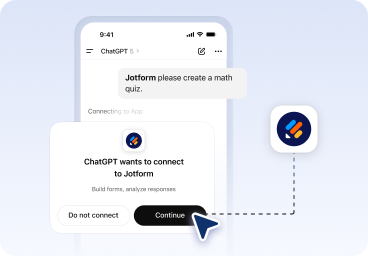
Connect Jotform to ChatGPT
Log in to ChatGPT and mention Jotform in the chat. ChatGPT will prompt you to connect your Jotform account so you can start working with your forms.
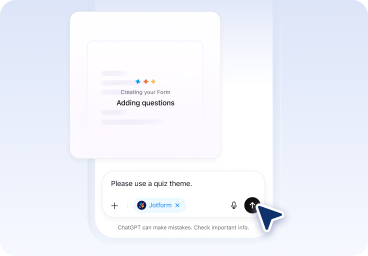
Create and refine your form in chat
Start with a prompt to generate a form in seconds, then keep chatting to add, remove, or reorder fields, rewrite questions, adjust settings, and update the theme, layout, and styling.
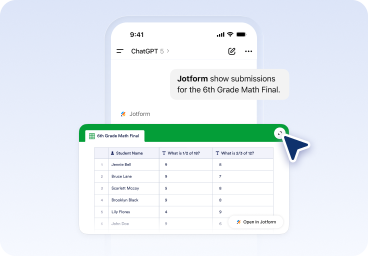
Analyze submissions and improve outcomes
List forms, pull submissions, filter responses by date, status, keywords, or field values, then ask ChatGPT to summarize insights, spot trends, and recommend improvements based on real data.
What you can do with Jotform in ChatGPT
Create forms with AI
Generate complete forms instantly from a prompt with no setup and no blank page.
Edit and improve forms
Update questions, settings, and structure just by asking. No rebuilding required.
Design forms visually
Change themes, layouts, and styling without leaving the conversation.
Add, remove, and reorder fields
Refine your form structure as inspiration hits.
List and manage your forms
View all your forms and select one to work on instantly.
View and filter submissions
Pull response lists, filter by date, status, or keywords, to zero in on what matters.
Analyze form responses with AI
Summarize submissions, identify trends, and get actionable recommendations based on real data.
Do more with Jotform in ChatGPT
See how the Jotform ChatGPT App works in real scenarios. Each example starts with a simple prompt and continues through creation, refinement, and analysis.
Create the form
Create an RSVP form for a company holiday party. Include name, email, plus one, dietary restrictions, and arrival time.
Refine the form
Add a conditional question that asks for meal preference only if dietary restrictions are selected.
Analyze feedback
Summarize attendees by dietary needs and show who has not responded yet.
Build RSVP forms instantly and use ChatGPT to summarize attendees, track responses, and plan follow ups.
Power Up Your Business
Start building smarter forms inside ChatGPT
Create forms faster, refine them effortlessly, and turn responses into insights with Jotform in ChatGPT without changing screens.
FAQ
What is the Jotform ChatGPT App?
The Jotform ChatGPT App is an AI powered app that lets you create, edit, design, and analyze forms directly inside ChatGPT. You can manage your entire form workflow through conversation, from first draft to insights.
Is Jotform a ChatGPT form builder?
What can I do with Jotform inside ChatGPT?
Can I create a form from scratch using a prompt?
Can I edit and redesign forms after they are created?
Can ChatGPT analyze my form responses?
What types of forms can I build with the Jotform ChatGPT App?
Can I filter and review submissions inside ChatGPT?
Do I need coding or technical skills to use the app?
Do I need an existing Jotform account to create a form inside ChatGPT?
Is this different from using Jotform outside ChatGPT?
Can I still share and publish my forms?
Who is the Jotform ChatGPT App for?