Modern Kubernetes homelab
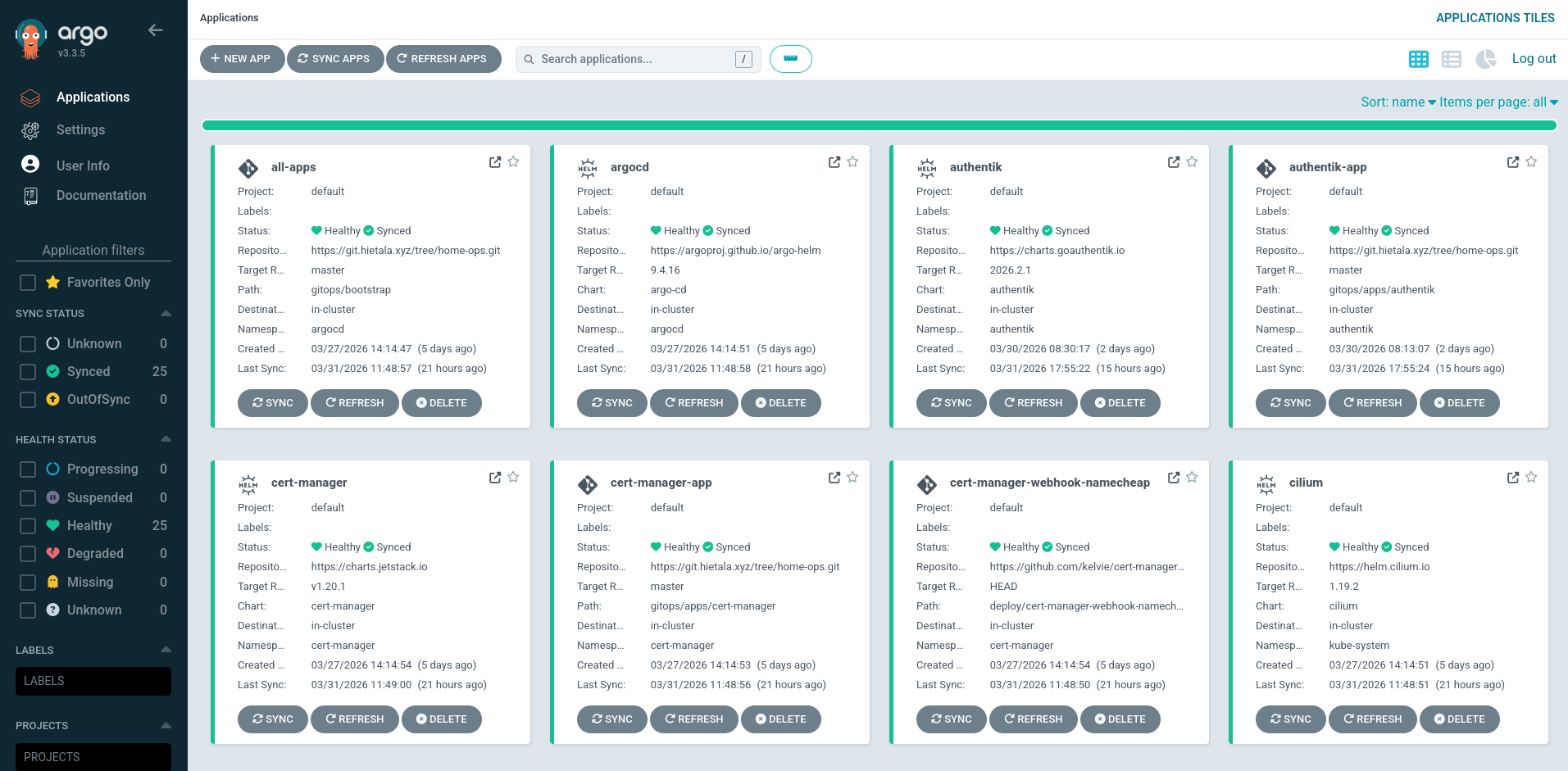
Now we’re getting to the fun stuff: GitOps.
The act of pushing beautifully crafted .yaml files and seeing your Kubernetes cluster get red and stall out is surely what life’s all about.
Install ArgoCD
We have our Kubernetes cluster and now we’re going to bootstrap ArgoCD so it starts syncing from our git repository. Using helm:
helm install argocd \
    --repo https://argoproj.github.io/argo-helm \
    argo-cd \
    --namespace argocd \
    --create-namespace \
    --version 10.1.4
ArgoCD will by default generate an admin password and you can get it with the argocd tool:
# You can use the password to login to the web.
argocd admin initial-password -n argocd
# Make ArgoCD available at localhost:8123
kubectl port-forward -n argocd svc/argocd-server 8123:80
You can use the argocd CLI to manage ArgoCD but I’m going to prefer the declarative way.
Fixed IP
You can use the port forward method above to access ArgoCD but having a fixed IP is nicer, especially if you want to use the argocd CLI (I only used it when trying to get it all working).
I use a separate service for the IP, which allows me to assign an IP outside of the Cilium load balance pool we setup previously (10.1.4.101–10.1.4.255).
It looks like this:
apiVersion: v1
kind: Service
metadata:
name: argocd-server-ip
namespace: argocd
spec:
type: ClusterIP
externalIPs:
- 10.1.4.51
selector:
app.kubernetes.io/name: argocd-server
ports:
- name: http
port: 80
targetPort: 8080
It simply routes 10.1.4.51:80 to the IP of argocd-server and port 8080.
We need to apply it:
kubectl apply -f gitops/bootstrap/argocd.yaml
And you should see it assigned and able to visit it on the web:
$ kubectl get svc -n argocd argocd-server-ip
NAME               TYPE        CLUSTER-IP       EXTERNAL-IP   PORT(S)   AGE
argocd-server-ip   ClusterIP   10.105.209.116   10.1.4.51     80/TCP    3d18h
Repository
I use a self-hosted Forgejo instance (hosted in a Proxmox LXC) but you can use whatever you want. You need an API token with read permissions.
ArgoCD documents a declarative setup that we’ll use. For repositories we need to create a secret:
kubectl create secret generic home-ops-repo \
  --namespace argocd \
  --from-literal=type=git \
  --from-literal=url=<repo-url> \
  --from-literal=username=<username> \
  --from-literal=password=<token> \
  --dry-run=client -o yaml \
  | kubeseal --cert infrastructure/sealed-secrets-cert.pem -o yaml \
  > gitops/bootstrap/argocd-repo-secret.yaml
We also need to add the repository label to the generated file so it looks something like this:
apiVersion: bitnami.com/v1alpha1
kind: SealedSecret
metadata:
name: home-ops-repo
namespace: argocd
spec:
encryptedData:
password: ...
type: ...
url: ...
username: ...
template:
metadata:
name: home-ops-repo
namespace: argocd
labels:
argocd.argoproj.io/secret-type: repository
Apply it:
kubectl apply -f gitops/bootstrap/argocd-repo-secret.yaml
And the repo should show up in the UI or argocd repo list.
Initial admin password
Instead of letting ArgoCD generate a random password we can set the initial password explicitly. It’s possible to do it either via the Helm chart or the declarative way, which I’ll continue with.
After generating it with kubeseal the secret should look like this:
apiVersion: bitnami.com/v1alpha1
kind: SealedSecret
metadata:
name: argocd-secret
namespace: argocd
spec:
encryptedData:
admin.password: ...
admin.passwordMtime: ...
server.secretkey: ...
template:
metadata:
labels:
app.kubernetes.io/name: argocd-secret
app.kubernetes.io/part-of: argocd
name: argocd-secret
namespace: argocd
With three keys:
-
passwordis a bcrypt hash:argocd account bcrypt --password 'supersecret'
-
passwordMtimeis the plaintext modification time:date -u +"%Y-%m-%dT%H:%M:%SZ"
-
secretkeyis a random value:ArgoCD uses
server.secretkeyto sign session and API tokens, and it will regenerate the key if restarted. I kept getting logged out when I was rebuilding things all over the place and it was annoying so I added this to make it stable.
A file structure
ArgoCD is now installed but at this point I think it’s good to take a step back before we steam ahead.
One of the benefits of ArgoCD is that you can create any kind of file structure and organize the repository any way you want. That’s also one of its problems: if you can do anything it’s hard to decide on a plan forward.
I found the blog post How to Structure Your Argo CD Repositories Using Application Sets illuminating and even though their setup is overkill for my homelab, I simplified their ideas into something that works for me.
The basic idea is to have all applications in their own folders under gitops/apps, and place all bootstrap stuff under gitops/bootstrap.
Borrowing the “level” terminology from the above post here’s the basic idea:
Which loads in three phases:
-
The repository gets initiated by sourcing
root.yaml -
Everything under
bootstrap/gets loaded -
bootstrap/appset.yamlin turn loads all folders underapps/
This is what the directory structure looks like:
gitops
├── root.yaml                 # Level 1
├── bootstrap                 # Level 2
│   ├── cilium_config.yaml
│   ├── argocd.yaml
│   ├── appset.yaml
│   └── ...
└── apps                      # Level 3
    ├── authentik
    │   └── ...
    ├── miniflux
    │   └── ...
    └── ...
I’m considering separating infrastructure and user workloads, but for now I’m fine with having everything in the apps/ folder.
App-of-apps
root.yaml will be a master “app-of-apps” as it will be an Application that spawns other applications.
It looks like this:
apiVersion: argoproj.io/v1alpha1
kind: Application
metadata:
name: all-apps
namespace: argocd
annotations:
argocd.argoproj.io/sync-wave: "-100"
finalizers:
- resources-finalizer.argocd.argoproj.io
spec:
project: default
source:
repoURL: https://git.hietala.xyz/tree/home-ops.git
targetRevision: master
path: gitops/bootstrap
destination:
server: https://kubernetes.default.svc
namespace: argocd
syncPolicy:
syncOptions:
- CreateNamespace=true
automated:
prune: true
selfHeal: true
(You’re going to see lots of yaml files like this, better get used to it.)
The important bits are
-
The name
all-appsin theargocdnamespace -
It should be synced before everyone else (
sync-wave: -100) -
Should load everything under
gitops/bootstrapfrom myhome-opsrepo -
I’ll be using pruning and self-healing to tell ArgoCD to keep everything in sync.
This is the entrypoint and it’s the last manual apply command we’ll use, as it’ll load everything else:
kubectl apply -f gitops/root.yaml
Application sets
Inside the bootstrap/ folder lives, among other things, bootstrap/appset.yaml which is responsible for turning subfolders under apps/ into applications and loading them.
This is what I use and it’s an adaption of the code from the aforementioned blog post:
apiVersion: argoproj.io/v1alpha1
kind: ApplicationSet
metadata:
name: appset
namespace: argocd
spec:
# Use Go's engine so we can use basename/path
goTemplate: true
# The engine silently fails on missing keys by default
goTemplateOptions: ["missingkey=error"]
# Generate from all subfolders from my repo under apps/
generators:
- git:
repoURL: https://git.hietala.xyz/tree/home-ops.git
revision: master
directories:
- path: gitops/apps/*
template:
# The Application name will be folder + "-app"
# Creative, I know.
metadata:
name: "{{.path.basename}}-app"
spec:
project: default
# Describes the manifests of the application,
# which is everything under apps/<app-folder>/
source:
repoURL: https://git.hietala.xyz/tree/home-ops.git
targetRevision: master
path: "{{.path.path}}"
# Give the application its own namespace
destination:
server: https://kubernetes.default.svc
namespace: "{{.path.basename}}"
syncPolicy:
syncOptions:
- CreateNamespace=true
# Needed for larger manifests
- ServerSideApply=true
# ArgoCD does a dry run to check for resource kinds
# it doesn't yet recognize. This breaks some things
# so turn it off.
- SkipDryRunOnMissingResource=true
automated:
prune: true
selfHeal: true
I hope the comments make it clear how the above works.
The end result is that everything under apps/ will be loaded and organized under its own application.
Other bootstrap things
Manifests under bootstrap/
Even though we manually apply some manifests during the bootstrap sequence, they can still be managed by ArgoCD after the fact.
This is solved by simply placing the relevant files in bootstrap/, and they’ll be managed going forward.
These are what we’ve collected so far:
-
Cilium
We installed Cilium using a
helm installcommand. Here’s a (hopefully) corresponding example of a manifest that ArgoCD can manage:apiVersion: argoproj.io/v1alpha1
kind: Application
metadata:
name: cilium
namespace: argocd
annotations:
argocd.argoproj.io/sync-wave: "-1"
finalizers:
- resources-finalizer.argocd.argoproj.io
spec:
project: default
source:
repoURL: https://helm.cilium.io
chart: cilium
targetRevision: 1.19.2
helm:
values: |
kubeProxyReplacement: true
k8sServiceHost: 10.1.4.10
k8sServicePort: 6443
l2announcements:
enabled: true
externalIPs:
enabled: true
gatewayAPI:
enabled: true
ipam:
mode: kubernetes
operator:
replicas: 1
securityContext:
privileged: true
destination:
server: https://kubernetes.default.svc
namespace: kube-system
syncPolicy:
syncOptions:
- CreateNamespace=false
- ServerSideApply=true
automated:
prune: true
selfHeal: true
The duplication here is unfortunate but I couldn’t find a way around it.
At least we can reuse
cilium_config.yamlwith the load balancer IP specifications that we created during cluster setup. Just plop it underbootstrap/and we can move on. -
Gateway API
Before installing Cilium we also applied the Gateway CRDs using this command:
kubectl apply -f https://github.com/kubernetes-sigs/gateway-api/releases/download/v1.2.1/standard-install.yaml
This is the corresponding YAML manifest (smaller as we don’t pass dozens of options):
apiVersion: argoproj.io/v1alpha1
kind: Application
metadata:
name: gateway-api
namespace: argocd
annotations:
argocd.argoproj.io/sync-wave: "-2"
finalizers:
- resources-finalizer.argocd.argoproj.io
spec:
project: default
source:
repoURL: https://github.com/kubernetes-sigs/gateway-api.git
targetRevision: v1.2.1
path: config/crd/standard
destination:
server: https://kubernetes.default.svc
namespace: kube-system
syncPolicy:
automated:
prune: true
selfHeal: true
Note that I specify sync-wave
-2for the Gateway and-1for Cilium because the Gateway should sync before Cilium. -
Sealed Secrets
We continue in the same manner of converting Helm installations to manifests:
apiVersion: argoproj.io/v1alpha1
kind: Application
metadata:
name: sealed-secrets
namespace: argocd
annotations:
argocd.argoproj.io/sync-wave: "-1"
finalizers:
- resources-finalizer.argocd.argoproj.io
spec:
project: default
source:
repoURL: https://bitnami-labs.github.io/sealed-secrets
chart: sealed-secrets
targetRevision: 2.16.2
helm:
values: |
        fullnameOverride: sealed-secrets-controller
destination:
server: https://kubernetes.default.svc
namespace: sealed-secrets
syncPolicy:
syncOptions:
- CreateNamespace=true
automated:
prune: true
selfHeal: true
-
ArgoCD
In addition to the secrets used for the declarative setup (repository, admin password) ArgoCD can also manage itself:
apiVersion: argoproj.io/v1alpha1
kind: Application
metadata:
name: argocd
namespace: argocd
finalizers:
- resources-finalizer.argocd.argoproj.io
spec:
project: default
source:
repoURL: https://argoproj.github.io/argo-helm
chart: argo-cd
targetRevision: 10.1.4
helm:
values: |
        configs:
          secret:
            createSecret: false
destination:
server: https://kubernetes.default.svc
namespace: argocd
syncPolicy:
syncOptions:
- CreateNamespace=false
automated:
prune: true
selfHeal: true
---
# Static IP as shown previously, `---` separates different kinds
Updated bootstrap sequence
This is the updated bootstrap recipe that I manage with Just:
[doc("Bootstrap everything from zero")]
full:
just bootstrap::cluster
just bootstrap::cilium
just secrets::restore_sealed_secrets_private_key
just bootstrap::sealed_secrets
just bootstrap::argocd
[doc("Bootstrap ArgoCD")]
[working-directory('../gitops')]
argocd:
helm install argocd \
--repo https://argoproj.github.io/argo-helm \
        argo-cd \
--namespace argocd \
--create-namespace \
--version 10.1.4 \
--set configs.secret.createSecret=false
# We don't let ArgoCD generate the secret, we supply one:
kubectl apply -f bootstrap/argocd-secret.yaml
# Needed to be able to sync from repo.
kubectl apply -f bootstrap/argocd-repo-secret.yaml
# Wait for ArgoCD to deploy.
kubectl rollout status deployment/argocd-server -n argocd --timeout=300s
# Technically not needed as it'll get loaded on sync, this just speeds it up a little.
kubectl apply -f bootstrap/argocd.yaml --force-conflicts --server-side
# Sync everything else from the repo.
kubectl apply -f root.yaml
Renovate
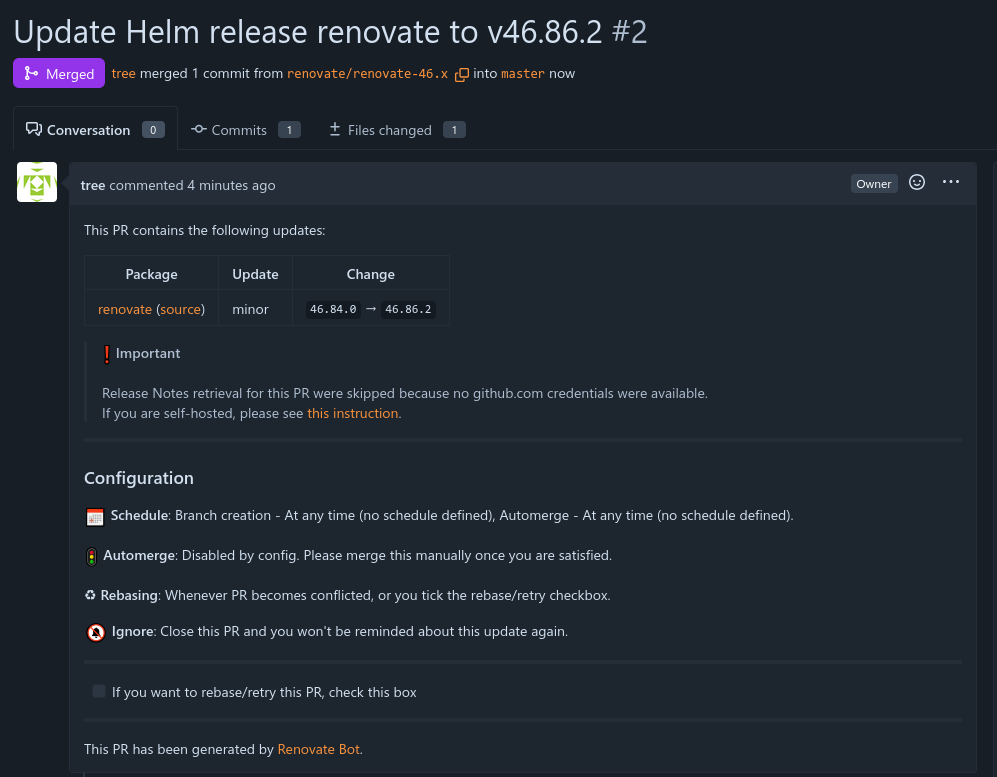
To complete our GitOps setup and to exercise our newfound capabilities let’s setup the Renovate service. Its purpose is to monitor git repositories and to create pull requests where it updates dependencies, see the above image for how it’s created a PR to update itself.
The singularity is here any second now.
To get Renovate setup we need to create three things:
- A secret with a token that authenticates to the repository we want to watch
- A renovate configuration file at the root of the repository
- The Renovate manifest for the application itself
The secret
Renovate will pick up RENOVATE_TOKEN in secrets, generated like so:
kubectl create secret generic renovate-token -n renovate \
  --from-literal=RENOVATE_TOKEN='<token>' \
  --dry-run=client -o yaml \
| kubeseal --cert infrastructure/sealed-secrets-cert.pem -o yaml \
  > gitops/apps/renovate/renovate-secret.yaml
We’ll later add the name renovate-token to the main manifest.
The configuration file
Renovate has a bunch of configurations you can add. I’m good with the defaults except to modify the ArgoCD settings to support the custom directory structure I’m using:
{
"$schema": "https://docs.renovatebot.com/renovate-schema.json",
"extends": ["config:recommended"],
"argocd": {
"managerFilePatterns": ["/gitops/(apps|bootstrap)/.+\\.yaml$/"]
},
"kubernetes": {
"managerFilePatterns": ["/gitops/(apps|bootstrap)/.+\\.yaml$/"]
}
}
This activates the argocd and kubernetes managers, where argocd watches ArgoCD specific manifests (Application/ApplicationSet) and kubernetes watches plain manifests (such as container images in Deployment).
The manifest
The Application manifest is similar to the ones we’ve seen before:
apiVersion: argoproj.io/v1alpha1
kind: Application
metadata:
name: renovate
namespace: argocd
finalizers:
- resources-finalizer.argocd.argoproj.io
spec:
project: default
source:
repoURL: https://docs.renovatebot.com/helm-charts
chart: renovate
targetRevision: 46.236.3
helm:
values: |
        existingSecret: renovate-token
        cronjob:
          schedule: "0 1 * * *"
        renovate:
          config: |
            {
              "platform": "forgejo",
              "endpoint": "https://git.hietala.xyz",
              "repositories": ["tree/home-ops"],
              "gitAuthor": "Renovate Bot <renovate@git.hietala.xyz>",
              "automerge": false
            }
destination:
server: https://kubernetes.default.svc
namespace: renovate
syncPolicy:
syncOptions:
- CreateNamespace=true
automated:
prune: true
selfHeal: true
Note that we configure the secret (renovate-token), how often it should run, and the repository information.
Commit and push and it should be ready to go. ArgoCD has a really good UI where you can see what’s happening, if you made a mistake somewhere, and also trigger the cron job manually.
Or you can use kubectl, for example:
# See the health status of all applications
kubectl get applications -A
# Trigger the cron job
kubectl create job -n renovate --from=cronjob/renovate renovate-manual
# Watch the logs
kubectl logs -n renovate -l job-name=renovate-manual -f
With this we’ve got our first example of managing a Kubernetes service via ArgoCD. We’ll continue to see more examples of this as the series continues.