Terraform for VMware: Key Takeaways and Lessons from Managing Hundreds of VMs
Date: 2025-02-16
Managing a large number of virtual machines can be challenging. As our infrastructure grew, we needed a better way to handle the complexity. That’s when we turned to Terraform to help us manage our VMware environment more efficiently. I’m going to cover the use cases for IaC and share:
- The technology stack used and the evolution of the infrastructure management practices.
- Lessons learned from using Terraform to manage hundreds of VMs in VMware landscape.
The goal is to provide practical insights and tips for anyone looking to improve their VM management with Terraform for VMware.
IaC
IaC: use cases

I’m going to cover some very basic scenarios of VMs lifecycle:
- Create VM templates
- Create VMs
- Configure VMs
IaC tech stack
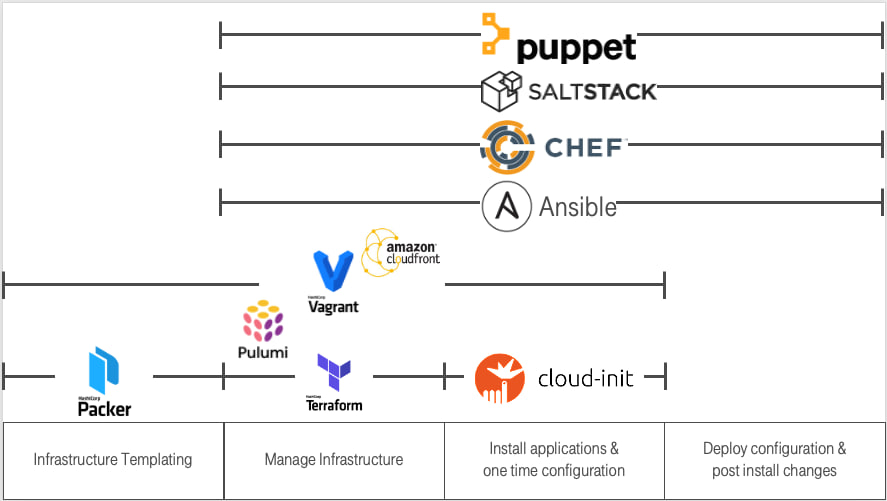
There are many technologies available for different levels of infrastructure management. As DevOps engineers, we had to make specific choices. In our case:
- Create VM templates: Ansible + Packer
- Create VMs: Terraform
- Configure VMs: Ansible
Let us take a look at specific parts and the whole solution.
Packer. How does it work?
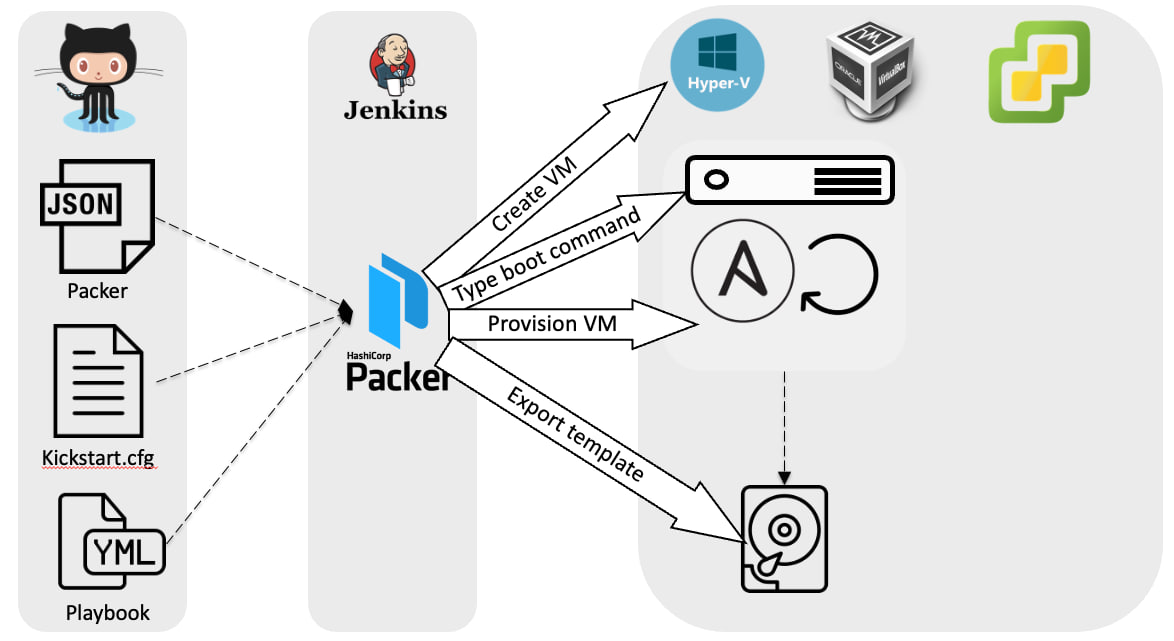
- There is a git repository containing:
- Packer configuration
- Anaconda configuration
- Ansible playbooks and collections
- There is a Jenkins job that weekly runs the Packer build.
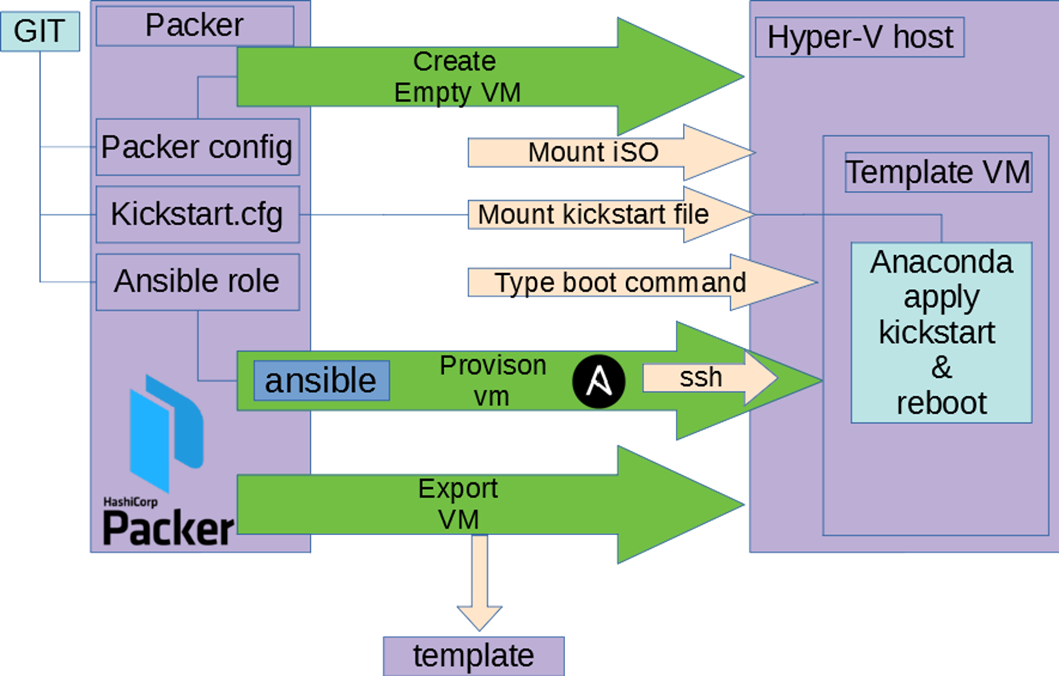 Behind the Packer build command:
- Create an empty VM:
- Mount ISO
- Share kickstart file
- Type boot command to use the kickstart file
- Anaconda (Rocky installer) is started:
- Disk layout is configured
- User for Ansible is created
- Network is configured
- SSH is configured
- VM is booted and reachable
- Run Ansible playbook
- Export the VM template to a content library
Terraform. How does it work?

Terraform is a stateful application with some important concepts:
- Provider API Connection: Terraform connects to provider APIs and manages state above it.
- State Management: Terraform tracks resources and ensures:
- Idempotence: Only updates resources that have changed.
- Dependency Management: Handles dependencies correctly.
Ansible. How does it work?

Ansible automates the configuration of VMs through the following steps:
- Inventory: identifies the target hosts from the inventory file.
- Playbook: reads and parses the playbook to determine the tasks to be executed.
- Generate: generates the necessary executable code based on the playbook.
- Copy: securely copies the generated code to the target hosts.
- Execute: executes the copied Python code on the target hosts to apply the configurations.
Glue it together
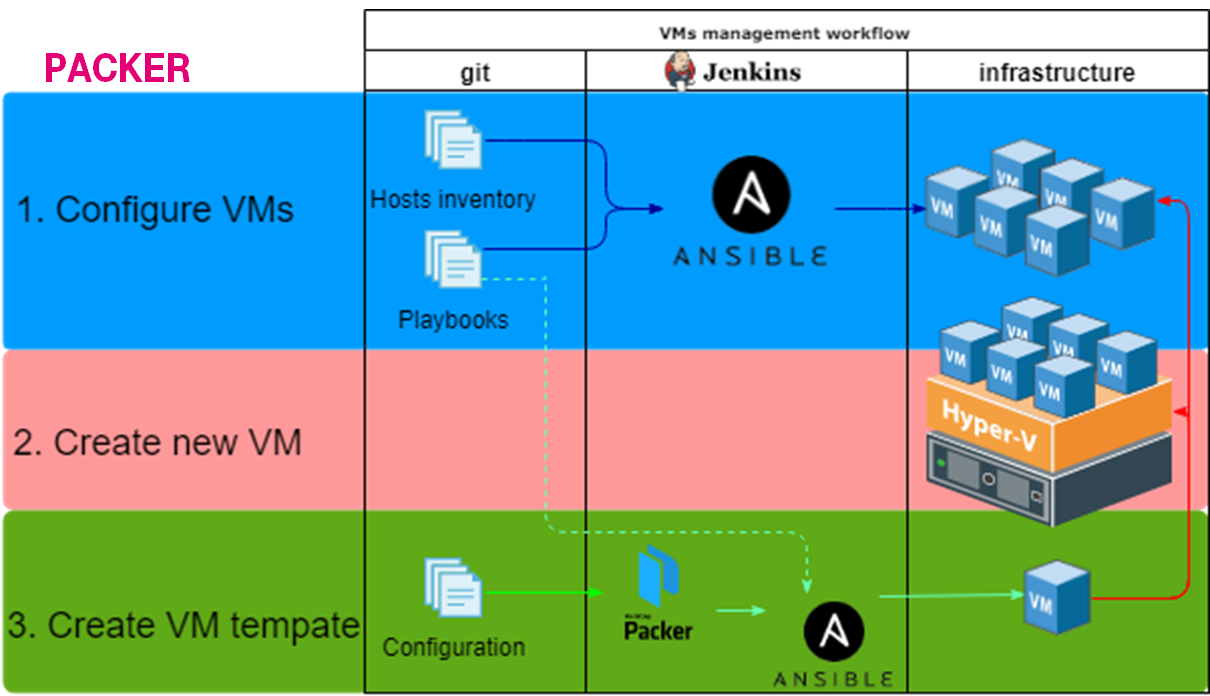
Everything is stored in git. There are some linked processes:
- Packer: Create a VM template via Packer, apply base configuration via Ansible, and save it to the VMware content library.
- Terraform: Create a new VM from the VM template in the content library and assign tags.
- Ansible: Split VMs into groups according to the VMware tags and customize the VMs.
History

The beginning of the story is described in the Ansible: CoreOS to CentOS, 18 months long journey. In short, it describes the migration from a custom configuration management solution to Ansible + Packer for managing the environment. As part of that journey, I created the vmware_content_deploy_ovf_template Ansible module as part of the VMware collection.

But we had the problem of having multiple sources of truth about VM configurations: VMware and the git repository. The goal was to have only one source of truth to make IaC consistent.
Terraform for VMware
I’m going to share some chronological lessons learned from implementing Terraform.
Know-how: Race conditions during terraform apply
Steps to reproduce:
- Person A changes something & runs terraform apply
- Person B changes something & runs terraform apply
Result: infrastructure is not in consistent state How to avoid: use remote state
Problems: Use wrong hostname for customizations
Steps to reproduce:
- You create VM via ctrl+C & ctrl+V
- You change the resource name, but keep hostname for customization
- Vmware creates new VMs and set another VM hostname
Result: original VM is not reachable How to avoid: double check the changes
Problems: Lost VM during increasing RAM
Steps to reproduce:
- You create VM, the creation process returned, but the VM is created on VMware
- The VM is marked as a tainted in terraform state
- You change the RAM
- Terraform delete tainted VM & create a new one instead
  ### module.InfraServices.vsphere_virtual_machine.example-com is tainted, so must be replaced
-/+ resource "vsphere_virtual_machine" "example-com" {
      - boot_delay                              = 0 -> null
      - boot_retry_enabled                      = false -> null
      ~ change_version                          = "2023-07-28T11:41:47.016148Z" -> (known after apply)
Result: data are lost, but nobody has used the VM How to avoid: don’t keep VMs in bad state. fix it or recreate
Know-how: Terraform & vmware use different storages
Steps to reproduce:
- You create VM and set
datastore_id - You configure multiple datastores and policy to move across them(DRS)
- Vmware moves VM to another datastore
- You run terraform & it wants to move it back
  ~ resource "vsphere_virtual_machine" "worker23" {
      ~ datastore_id                            = "datastore-2032" -> "datastore-88"
        id                                      = "423845e7-xxxx-xxxx-xxxx-77240ff97399"
        name                                    = "worker23"
Result: unneeded changes on Vmware
How to avoid: use datastore_cluster_id
Know-how: Changes lead to performance degradation
Steps to reproduce:
- You create VMs and set
datastore_id - You change
datastore_idtodatastore_cluster_id - Run terraform apply
- Terraform applies all changes at the same time
Result: multiple disks can be moved across storages How to avoid: do not do many changes at the same time
Problems: Failed to use datastore_cluster_id
Steps to reproduce:
- You create VM and set
datastore_cluster_id - You run terraform & it fails
│ Error: Cannot use datastore_cluster_id with Content Library source
│
│   with module.TrainingsAndDemo.vsphere_virtual_machine.example-06,
│   on modules/TrainingsAndDemo/example-06.example.local.tf line 2, in resource "vsphere_virtual_machine" "example-06":
│    2: resource "vsphere_virtual_machine" "example-06" {
Result: VM is not created How to avoid:
- You create VM, set
datastore_id& run terraform - You change
datastore_id->datastore_cluster_id& run terraform
Know-how: Run terraform twice to create a VM
Steps to reproduce:
- You create VM, set
datastore_id& run terraform - You change
datastore_id->datastore_cluster_id& run terraform Result: VM is created, but there are too many actions. it’s not bug but API feature
How to avoid:
- You create a storage policy & add all storage to that policy
- You create VM and set
storage_policy_id& run terraform
data "vsphere_storage_policy" "storage_cluster_01" { name = "Storage Cluster 01" }
resource "vsphere_virtual_machine" "customnagpr" {
  name                       = "customnagpr"
  storage_policy_id          = var.storage_policy_id
Problems: Sometimes VM creation is failed
Steps to reproduce:
- You create VM in InfraServices pool & wait till the next backup
- You run terraform & get unneeded changes
│ Error: error detaching tags to object ID "vm-108158": POST <https://vcenter01.example.local/rest/com/vmware/cis/tagging/tag-association/id:urn:vmomi:InventoryServiceTag:2c12366a-xxxx-xxxx-xxxx-59ab8e157645:GLOBAL?~action=detach:> 404 Not Found
│
│   with module.ExamplePersonal.vsphere_virtual_machine.ld-example,
│   on modules/ExamplePersonal/ld-example.example.local.tf line 2, in resource "vsphere_virtual_machine" "ld-example":
│    2: resource "vsphere_virtual_machine" "ld-example" {
Result: terraform exits with non zero code How to avoid: there are no ideas, run it twice
Know-how: Terraform & backups are conflicting
Steps to reproduce:
- You configure backups. It uses custom attributes.
- You create VM
  ~ resource "vsphere_virtual_machine" "example-com" {
      ~ custom_attributes                       = {
          - "304" = "OK" -> null
          - "305" = "31-07-2023 02:31:26" -> null
Result: There is unneeded change How to avoid: add into the VM config
lifecycle {
    ignore_changes = [
      custom_attributes["304"],
      custom_attributes["305"]
Know-how: Move VM to another pool = recreate it
Steps to reproduce:
- You create a VMware module for each pool
- You move file to another module & run terraform
- Terraform recreates the VM
Result: The VM is recreated How to avoid: add temporary code for migration
moved {
  from = module.ExamplePersonal.vsphere_virtual_machine.ld-example
  to   = module.AnoverPersonal.vsphere_virtual_machine.ld-example
}
Links: https://developer.hashicorp.com/terraform/tutorials/configuration-language/move-config
Problems: Move VM to another pool = restart network
Steps to reproduce:
- You create a dedicated network for each pool
- You move a VM to another pool
Result: The VM is not reachable by DNS name & you must restart network to fix it How to avoid: there is no solution
Know-how: Delete the VM TF file = delete the VM
Steps to reproduce:
- You remove the VM TF file & run terraform
- Terraform deleted the VM
Result: The VM is deleted How to avoid:
- Double check the changes
- Set prevent_destroy
...
    prevent_destroy = true
...
Know-how: create VM with 2 disks
Steps to reproduce:
- Assign 2 disks & run
terraform apply
Planning failed. Terraform encountered an error while generating this plan.
│ Error: disk: duplicate SCSI unit_number 0
│
│   with module.InfraServices.vsphere_virtual_machine.commondata,
│   on modules/InfraServices/commondata.example.local.tf line 2, in resource "vsphere_virtual_machine" "commondata":
│    2: resource "vsphere_virtual_machine" "commondata" {
How to avoid: set unit_number
  disk {
    label            = "disk1"
    size             = 120
    controller_type  = "scsi"
    thin_provisioned = true
    unit_number      = 1
Know-how: Import existing VMs
- Create a TF file with the VM description & import it
terraform import module.ExampleGuild.vsphere_virtual_machine.ans-jenkins01 /My\\ Datacenter/vm/ExampleGuild/ans-jenkins01
- Run Terraform apply
      - enable_logging                          = true -> null
      ~ imported                                = true -> false
      + storage_policy_id                       = "eaf0b1ab-xxxx-xxxx-xxxx-348473a5727b"
      - sync_time_with_host                     = true -> null
      - cdrom {
          - client_device  = false -> null
          - device_address = "ide:0:0" -> null
          - key            = 3000 -> null
        }
      ~ disk {
          ~ keep_on_remove   = true -> false
TIP: locator format: <DC NAME>/vm/<Folder>/<VM Name>
Know-how: Import VMs without reboot
Steps to reproduce:
- You have a VM created not via Terraform.
- You create a TF file and import the VM.
Result: The VM is rebooted.
How to avoid: Review the Terraform output and align the VM parameters accordingly.
diff -C0 created-by-terraform.example.local.tf created-manually.example.local.tf
...
*** 9,10 ****
-   sync_time_with_host        = true
-   enable_logging             = true
 8
-
*** 31,32 ****
!   cdrom {
!     client_device = false
 27,35
-
!   clone {
!     template_uuid = data.vsphere_content_library_item.packer_rocky8.id
!     customize {
!       linux_options {
!         host_name = "jenkins-dockerbuild-02"
!         domain    = var.domain
!       }
!       network_interface {}
!     }
***************
*** 34,38 ****
-
-   cdrom {
-     client_device = false
-   }
Know-how: vApp Containers
- Describe the container & the VM
data "vsphere_folder" "folder" { path = "/My Datacenter/vm/example" }
resource "vsphere_vapp_container" "VAPP_demo" {
  name                    = "VAPP-demo"
  parent_folder_id        = data.vsphere_folder.folder.id
- Import the existing container
terraform import module.Imagemaster.vsphere_vapp_container.VAPP_demo /My\ Datacenter/host/My\ Cluster\ 01/Resources/Example/VAPP-demo
- Describe a vm & run terraform apply
resource "vsphere_virtual_machine" "fdemo-docker" {
  name                       = "demo-docker"
  resource_pool_id           = vsphere_vapp_container.VAPP_demo.id
Know-how: sync changes from VMware
Steps to reproduce:
- Change RAM settings in VMware
- Run terraform
  ### module.ExamplePersonal.vsphere_virtual_machine.ld-example will be updated in-place
  ~ resource "vsphere_virtual_machine" "ld-example" {
      - memory_reservation                      = 16384 -> null
      ~ num_cores_per_socket                    = 2 -> 1
      ~ num_cpus                                = 6 -> 2
Result: Terraform wants to revert it How to avoid: Do changes via terraform or sync them
  num_cpus             = 6
  num_cores_per_socket = 2
  memory_reservation   = 16384
Problems: GPU settings & host affinity are not detected
Steps to reproduce:
- add a GPU & set Host/Rule affinity
- Run
terraform apply
  ### module.ExamplePersonal.vsphere_virtual_machine.ld-example will be updated in-place
  ~ resource "vsphere_virtual_machine" "ld-example" {
      - memory_reservation                      = 16384 -> null
      ~ num_cores_per_socket                    = 2 -> 1
      ~ num_cpus
Result: The only RAM changes are detected How to avoid: just added note…
Problems: Not able to create VM with 2 NICs
Steps to reproduce:
- Create a VM with 2 NICs & run
terraform apply - Get the error
│ Error: 400 Bad Request: {"type":"com.vmware.vapi.std.errors.invalid_argument","value":{"error_type":"INVALID_ARGUMENT","messages":[{"args":["network_mappings","com.vmware.vcenter.ovf.library_item.resource_pool_deployment_spec"],"default_message":"Could not convert field 'network_mappings' of structure 'com.vmware.vcenter.ovf.library_item.resource_pool_deployment_spec'","id":"vapi.bindings.typeconverter.fromvalue.struct.field.error"},{"args":[],"default_message":"Element already present in the map.","id":"vapi.bindings.typeconverter.map.duplicate.element"}]}}
Result: Failed to craete How to avoid: create with 1 NIC & after add the 2nd
Know-how: bulk tags update
- You assign single tag to each VM via terraform
- You want to use multiple tags because of ansible inventory
- Terraform fails because VMware allows the only one tag
- You change cardinality to
MULTIPLE - terraform recreates the tag category & reassigns all tags to all VMs
resource "vsphere_tag_category" "terraform_managed_category" {
  name        = "terraform_managed_category"
  cardinality = "MULTIPLE"
  description = "Managed by Terraform"
  associable_types = [
    "VirtualMachine",
Know-how: Re-create VM templates from nothing
- Delete the content library
- Create an empty content library
- Keep calm & re-run jenkins jobs to rebuild packer templates
- Export terraform state
terraform state pull > state.json - Change manually via search & replace:
- template id for each vm
- content library id
- state version
- Push the sate
terraform state push state.json - Open shampain
Know-how: Repo structure
It is not ideal because there is a lot of copy-pasting, but it is quite easy to find the specific VM and tune it.
├── < FOLDER NAME >.tf
├── connections.tf
├── main.tf
├── modules
│   ├── < FOLDER NAME >
│   │   ├── < VM NAME >.example.local.tf
│   │   ├── _main.tf
│   │   └── _variables.tf
├── outputs.tf
├── README.md
├── remote_state.tf
├── tags.tf
├── variables.tf
└── versions.tf
< FOLDER NAME > - the same as Network/Folder/Pool names in VMware
Problems: Add domain_ou support for Windows customization doesn’t work
Steps to reproduce:
- Try to create a Windows VM, join it to the domain, and place it into a specific OU.
- It’s not possible because there is no support.
Result: The VM must be moved manually to the specific OU. How to avoid: Create a PR with the required functionality to the upstream and wait.
Know-how: ansible dynamic inventory
Create tags.tf
resource "vsphere_tag_category" "terraform_managed_category" {
  name        = "terraform_managed_category"
  cardinality = "MULTIPLE"
  description = "Managed by Terraform"

  associable_types = [
    "VirtualMachine",
    "Datastore",
    "VirtualApp",
  ]
}


resource "vsphere_tag" "Sandbox" {
  name        = "Sandbox"
  category_id = vsphere_tag_category.terraform_managed_category.id
  description = "Ansible group default_db_postgres. Managed by Terraform"
}
create a VM tf file and assign the tags
resource "vsphere_virtual_machine" "demo-db-pg" {
  name                       = "demo-db-pg"
  storage_policy_id          = var.storage_policy_id
  resource_pool_id           = vsphere_vapp_container.demo.id
  wait_for_guest_net_timeout = 5
  sync_time_with_host        = true
  enable_logging             = true
  firmware                   = "efi"
  annotation                 = <<-EOT
    !!! Do not edit properties via vcenter via web ui !!!
    Managed by ansible & terraform

    Some important notes

  EOT

  tags = [
    vsphere_tag.Sandbox.id,
  ]
...
Install the community.vmware collection and create the hosts.vmware.yml
plugin: vmware_vm_inventory
hostname: vcenter01.example.com
username: xxx
with_tags: True
keyed_groups:
- key: tag_category.terraform_managed_category
  prefix: ""
  separator: ""
hostnames:
  - 'config.name+".example.com"'
properties:
  - 'config.name'
  - 'summary.runtime.powerState'
  - 'guest.guestFamily'
with_nested_properties: true
filters:
  - tag_category.terraform_managed_category is defined
  - "'Sandbox' in tag_category.terraform_managed_category"
  - guest.guestFamily is defined
  - guest.guestFamily == 'linuxGuest'
  - summary.runtime.powerState == 'poweredOn'
resources:
  - datacenter:
    - My Datacenter
    resources:
    - compute_resource:
      - My Cluster 01
Summary
Known issues
- Use wrong hostname for customizations makes original VM unreachable
- The
datastore_cluster_idis not supported & we must usestorage_policy_id - Sometimes VM creation is failed
- Move VM to another pool requires restart network
- Use wrong hostname for customizations makes original VM unreachable
- The
datastore_cluster_idis not supported & we must usestorage_policy_id - Sometimes VM creation is failed
- Too many code & copy-paste
- Higher entrance level
Lessons learned
- Use remote state
- It’s tricky to catch more than 10 changes at one time
- With great power comes great responsibility
- Bulk changes can lead to performance degradation
- Avoid configuration drift between VMware & terraform
- Instead of recreating VM you can simply move it
- Use
prevent_destroyto avoid VMs deletion - Use simple & obvious structure to make entrance level lower
- Use to ansible dynamic inventory based on tags
- It’s possible to add the missing functionality
Benefits
- It’s really easy to perform bulk updates
- Re-create infra from nothing
- Trackable changes
- Single source of the truth
Want to try
- Terraform pull request automation via Atlantis
- Build green button in jenkins
- Windows automation
- Cloud-init for setting hostname like here (sry it’s in RU)
- Tests for terraform like for ansible