Preventing sensitive data exposure programmatically is one of the more complex challenges in security engineering. The nature of modern, distributed systems means data can travel through intricate and sometimes unpredictable paths—across services, through layers of serialization, and into contexts where its presence isn’t always obvious. These kinds of issues can manifest in subtle ways: an endpoint returning more data than intended, a legacy code path skipping a permission check, or a missing validation that lets users see resources they shouldn’t. In security terms, these are often forms of authorization flaws or inadvertent data overexposure—small mistakes that can have outsized privacy and trust impacts at scale.
To address this challenge head-on at Figma, we needed to build a monitoring system that would act as both a safety net and an early warning system, catching exposures in staging before they ever reached production, and continuing to watch for unexpected regressions once deployed. This meant building something precise enough to trust and broad enough to be valuable across many different parts of the product.
We’re excited to share our experience building Response Sampling, a system designed to detect potential sensitive data leaks in real time. By providing ongoing visibility into the data leaving our services, Response Sampling gives our teams the opportunity to investigate and address issues quickly, reducing the risk of exposure and improving our confidence in how data is handled.
We approached this problem with a platform-security mindset—treating our application surfaces like infrastructure and layering continuous monitoring and detection controls on top. By applying techniques typically reserved for lower-level systems to our application layer, we were able to gain continuous visibility into how data moves through our products, without slowing development.
At Figma, we take permissions and authorization seriously. Over the years we’ve invested in robust preventive controls like PermissionsV2
, our fine-grained authorization framework, as well as continuous testing through negative unit tests, end-to-end testing in staging and production, and ongoing security review programs (including our bug bounty program and regular penetration testing). These systems give us strong confidence in our access boundaries and form the foundation of how we prevent sensitive data exposure.
Sensitive data exposure is a security vulnerability where confidential or protected information is unintentionally made accessible to parties that should not have access, creating risk of misuse or loss of trust.
But preventive measures and testing alone can’t catch every edge case. As our products and infrastructure have grown in complexity, the risk of subtle oversights or unexpected data flows has naturally increased. Even well-designed systems can produce surprises when services interact in new ways or when existing paths behave differently than expected.
Given how important data protection is to Figma, we wanted to add another layer of defense, one focused on detection and observability. Our goal was to build a system that could continuously validate that our preventive controls were working as intended and help us spot anomalies early, before they could affect production.
To make that possible, we needed a system that could:
- Continuously monitor for potential exposure, regardless of where in the product it occurred.
- Provide actionable insights that would allow us to fix problems early, ideally before they reach production.
- Stay active in production as an additional layer of defense to detect regressions in real time.
These goals shaped the foundation of our approach and guided how we balanced detection breadth, performance impact, and operational maintainability.
Step 1: Building Response Sampling for file identifiers
Before we could detect sensitive data exposure programmatically, we first had to decide what counted as sensitive. Not every field in an API response poses a risk, so we started with one well-defined type—file identifiers—where sensitivity and access rules were already clear. File identifiers in Figma are the unique tokens embedded in each file’s URL that link it to specific access controls. Because they’re high-entropy capability tokens with a known character set and consistent length, file identifiers are easy to detect in text streams. That made them a practical starting point for detecting authorization bugs and for building the infrastructure that would later support broader response sampling once a systematic definition of sensitive data became available.

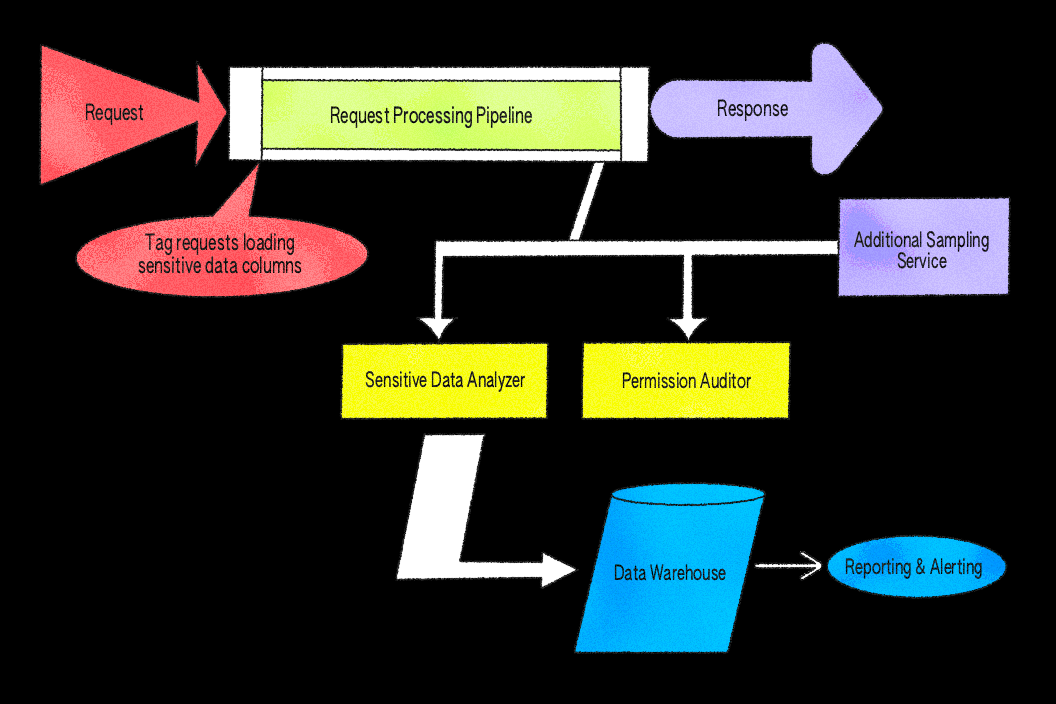
Our initial implementation focused on this data type and the permission checks associated with it. The idea was simple but powerful: Sample a small subset of responses from key services, scan for identifiers tied to files, and verify that the requesting user had permission to access each value. Sampling is performed uniformly at random with a configurable rate across request paths, allowing us to control coverage and limit overhead while still surfacing representative results.
We built the system as middleware in our Ruby application server because it provides direct access to the authenticated user object, the full API response body, and our internal permissions system, PermissionsV2
. This makes it straightforward to inspect response data and evaluate permissions in one place. While we could have implemented similar checks at a proxy layer, like Envoy, doing so would make it significantly harder to perform the user context-aware permission evaluations required in our architecture.
We implemented Response Sampling using an after block and async jobs. The after filter is a built-in hook that runs automatically after each request completes, giving us a consistent place to inspect responses before they’re sent back to the client. The filter inspects eligible responses according to configured sampling rates and parses JSON bodies to extract file identifiers. When a relevant identifier is found, the system enqueues asynchronous jobs to verify permissions. To reduce false positives, the verification logic applies rules that account for known safe cases, ensuring that only unexpected results are surfaced for review. All of this is non-blocking—if sampling or verification fail, the request still completes normally, and errors are logged for monitoring.
An internal endpoint allows other services, like LiveGraph
, our real-time data-fetching service that keeps collaboration experiences in sync, to submit their own sampling data and reuse the processing pipeline. After producing a response, LiveGraph makes a lightweight API call to this endpoint, enabling it to benefit from Response Sampling without adding overhead to its real-time data flow. To keep performance predictable, sampling in LiveGraph is gated by configuration and rate limiting. Findings share the same schema and logging path as other services, so results are unified in our analytics warehouse and triage dashboards, making it straightforward for on-call engineers to interpret alerts regardless of their source.
We embedded this logic directly into our API infrastructure, allowing it to run on both staging and production traffic. Sampling rates were tuned to capture enough coverage for meaningful results without introducing noticeable latency, and all checks were performed asynchronously to avoid slowing down the request-response cycle. Additionally, rate limiting was put in place to prevent the processing pipeline from becoming overloaded and to avoid excessive resource consumption.
This approach immediately started uncovering valuable insights. Within days of rollout, Response Sampling surfaced subtle cases where file-related identifiers were returned in certain responses unnecessarily, prompting better data filtering. It also exposed paths where certain files bypassed permission checks entirely, allowing us to close those gaps and strengthen our overall access controls.
Step one proved the concept, but its scope was limited. File identifiers are important, but they represent just one category of sensitive information we need to protect.
Step 2: Increasing visibility with expanded Response Sampling
With the foundation in place, we set out to broaden the system’s reach. The initial implementation proved that Response Sampling could detect real authorization issues efficiently, but it was limited to a single data type. The next challenge was scaling the same approach to any sensitive field—essentially, teaching the system how to recognize what “sensitive” means across our products.
Expanded Response Sampling, affectionately called “fancy Response Sampling” internally, extended the same sampling principles to all sensitive data by integrating with FigTag, our internal data categorization tool.


FigTag works by annotating every database column with a category that describes its sensitivity and intended usage. These annotations are stored in a central schema and propagated to our data warehouse, making it easy to determine a column’s sensitivity at query time. One of these categories, banned_from_clients, acts as our signal for sensitivity, flagging fields that must not be returned in API responses under normal circumstances (for example, security-related identifiers, billing details, and other PII).
By integrating with FigTag, we are able to sample a subset of responses that contain any sensitive fields, across all of our application server API endpoints. When a database record with a column tagged as banned_from_clients is loaded into the application (in our case via an ActiveRecord model, the object-relational mapping layer used in our Ruby application), a callback records its value into request-local storage. For sampled requests, this ensures only values actually accessed during the request are tracked, avoiding unnecessary overhead.
Once the response is generated, an after filter inspects the serialized JSON and compares it against the recorded sensitive values. If any sensitive values appear in the response, a finding is logged. As before, results flow into our unified analytics warehouse and dashboards.
We also introduced a flexible allowlisting process, so endpoints with intentional, safe exposure can be excluded from Response Sampling without sacrificing the detection of truly unexpected data. For example, an OAuth client secret might be intentionally returned from a dedicated credential management endpoint for authorized users, but would be a serious issue if included in unrelated API responses.
Early detection in action
The expanded Response Sampling system has become a powerful detection layer, surfacing subtle issues that would have been extremely difficult to catch through code review or manual QA alone. It has allowed us to proactively spot risks in staging and respond to production regressions quickly. Here are a few examples:
- We caught a long-unused data field unexpectedly making its way into certain responses. The team confirmed the finding, categorized it, and shipped a targeted fix quickly.
- The system surfaced cases where data from related resources was included in responses without a clear need, leading to targeted clean-up work.
- Response Sampling highlighted scenarios where we were returning a resource list in a response without verifying access for each item individually, prompting enhancements to permission checks.
Lessons learned for balancing precision and performance
Building systems like this is a cross-team effort at Figma. Our security engineers ship code alongside product and platform teams, bringing the same creativity and rigor to detection systems that we do to user-facing features.
After months of building and running Response Sampling, we’ve learned a lot about what it takes to build a programmatic detection system:
- Always think about the performance impact: We found that even small amounts of monitoring can introduce latency if not designed carefully. By tuning sampling rates and running checks asynchronously, we maintained user-facing performance while still gaining meaningful visibility into traffic.
- Manage false positives (or they’ll manage you!): A high false positive rate can overwhelm teams and reduce trust in alerts. To address this, we implemented dynamic allowlisting and rigorous triage workflows. This meant filtering out known-safe cases quickly and allowing engineers to focus on genuinely risky findings.
- Context matters: Not all sensitive data exposures are equally problematic. By using a dynamic configuration, we could quickly tune detection rules without redeploying services. This allowed nuanced handling of legitimate use cases while still flagging abnormal or unexpected scenarios.
- Create a layered defense: Running the system in both staging and production gave us two lines of defense: early detection before release and ongoing monitoring to catch regressions. This defense-in-depth approach has been critical for maintaining long-term resilience.


The path forward
With Response Sampling, we’ve applied a platform-security approach to product security—layering continuous monitoring and detection on top of our application surfaces to catch issues early without slowing down development.
We’re expanding this framework to cover more services and other user-facing touch points so that we can identify potential exposure across all major interaction channels. We also plan to extend coverage to additional sensitive data categories, including broader classes of PII and regulated data, ensuring that our detection capabilities scale with evolving compliance needs.
To keep Response Sampling effective as our systems grow, we’re exploring ways to make it more adaptive and insightful. For example, we’re investigating finer-grained sampling controls to balance resource use with visibility, automated triage to speed up investigations, and richer reporting to surface trends over time. As we expand this framework, our goal remains the same: to protect user data and ensure every Figma experience stays fast, reliable, and secure.
AppSec teams don’t often borrow from infrastructure security approaches, but building Response Sampling showed how effective they can be when applied at the application layer. Bringing continuous detection closer to the application layer helped us find issues sooner and respond faster—an approach we think other teams could benefit from adopting.