For years, our community has asked for a way to easily transform a design into a working website, so we set out to create a tool that pairs the “single click” request with powerful functionality. Launching today, Figma Sites allows you to design, build, and publish websites without leaving your Figma workflow. With responsive layouts; intuitive prototyping tools; and built-in features like custom cursors, marquee, and parallax effects, you can bring your most dynamic ideas to life.
Design and publish directly in Figma
The typical process for bringing designs into production requires context switching and manual work: Design in Figma, prototype flows and interactions, manually build breakpoints, export designs, then work with developers to translate designs to code, test, and publish. Figma Sites enables you to design and publish in one place, evolving the linear workflow to one that’s more iterative and fluid. Whether you’re looking to spin up a personal portfolio, create an event site, or ship a product landing page, with Figma Sites, you can build interactive, live websites—without extra tooling—all in one place.
Find a jumping off point
We wanted to make Figma Sites approachable to any team, even those with limited design and development resources, which is why we’ve included templates, pre-built responsive web elements, and ready-made interactions to get you started. And soon, you’ll be able to use our new chat-to-code feature, which will be powered by Figma Make: Simply describe the interaction or animation you’re looking for, and we’ll build it for you.
Connect your design system
Access your design library and resources to build faster: You can add components and styles from your design systems by linking published libraries directly into your site via the inserts panel. If you don’t have a design system, we've provided some commonly used blocks, like navigation, hero sections, and even full pages so you don't have to start from scratch.
Build responsively
We’ve built interactions and responsiveness directly into Figma Sites so you can focus less on adjusting aspect ratios and more on creating an expressive experience.
Design for any device
Figma Sites automatically adapts layout, text, and designs for different breakpoints. With multi-edit, you can make changes quickly across screen sizes all at once; when creating text styles, you can set different sizing and spacing for each breakpoint without variables. Your designs will translate seamlessly to any device while still giving you the ability to manually adjust any details you want to finesse.
Rapidly prototype and refine
Prototype and share an interactive, live website with collaborators to gather feedback. Previewing a site opens a web-based preview that’s rendered with HTML and CSS, allowing you to view a fully responsive site before publishing—just like you’d see in a Figma prototype, but with website-specific interactions. You can even resize the window to watch layout reflow and switch breakpoints.
Bring your vision to life
The web offers limitless customization, and we’ve built Figma Sites to help designers harness this potential and create rich, interactive experiences that meet the moment.
Pre-built interactions help you make your sites more dynamic:
- Mouse parallax: Displace objects based on cursor movement
- Lightbox: Spotlight an image and dim the background
- Spin: Infinitely rotate an object
- Draggable: Move elements freely around the page
- Typewriter: Print one character at a time
- Scramble text: Randomize and reveal text
Create a fully custom experience
Today we're launching a number of new interactions that are unique to Figma Sites and don’t yet exist in Figma Design: Scroll parallax, Scroll transform, and the ability to create hover and pressed states without interactive components are just a few of our favorites.
Coming soon, we’re adding code layers to let you turn designs into interactive experiences—no plugins or switching tools required. Plus, AI chat will allow you to add interactive elements like draggable lists and geographically accurate clocks by designing a single frame and then describing how that frame should become interactive. You’ll also be able to turn code layers into reusable, shareable components and instances, just like you can with design system libraries in Figma Design.

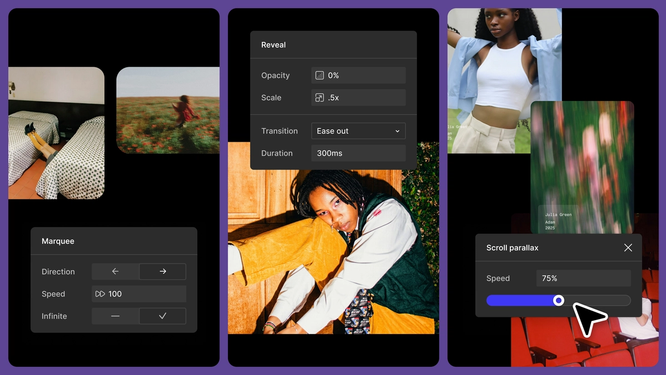
Pre-built interactions help you bring motion to your designs.
See Figma Sites in action
To see the full breadth of what the tool can do, check out two new sites that bring to life just a few of the interactive elements and surprising details we’re excited for you to leverage.
Config.new: Balancing functionality and interactivity
Every year, we share a round-up of what we launched at Config, and this time around, inspired by the launch of Figma Sites, we set out to build a more interactive and story-driven experience. Our Brand Studio team kicked off the project by collecting inspiration and early sketches while riffing on content, tone, and layout simultaneously. After brainstorming, they started pulling design components directly into Figma Sites to rapidly iterate.
While they pulled type and button styles from the Config 2025 web experience, they decided against using the Figma web system
because they wanted the page to feel more expressive—something they couldn’t do on figma.com. Instead of relying on Figma web components, they designed a bespoke section for each feature, created custom buttons and interactions, and pulled in pre-built interactions to show how much you can do without code.
Interactive elements
The site leverages pre-built interactions throughout. Reveal, Scroll parallax, and Scroll transform help the page feel more polished as the user makes their way from top to bottom, while Marquee brings motion to a horizontal section that shows a variety of Figma Make prompts.
Motion
Using an embed block, the team added a custom Rive asset from the Config motion library that plays an animation on hover. The call-to-action text also moves on hover—bringing some creative energy to CTAs—and ties back visually to the Config web expression.
Custom cursor
The cursor transforms into a set of Config glyphs when a user hovers over a pull quote. By containing the custom cursor to one part of the site, the team draws focus to a specific area.
These details resulted in a responsive published site that uses motion, microinteractions, and the entirety of the viewport at any size to complement—but not overpower—feature value propositions.
Type specimen: Pushing the limits of expression
In partnership with creative agency Other Means, we created Practice
, a book about craft and design that Config attendees got as part of their swag haul. For the publication, the Other Means team worked with Kia Tasbihgou to design drop caps for each article. To showcase the full character set, Other Means designed a fun, expressive specimen site where you can explore all the characters and download the Open Type Font (OTF). The team first pulled in letters A-Z in a Figma Design file, then started working through how to tell a story with each drop cap. They landed on an experience that showcases each handcrafted letter in surprising ways—and harnesses the interactive power of Figma Sites.
Scroll effects
The team wanted as much of the site to interact on scroll as possible, so they created a different background pattern for each section that reveals when specified layers are in view, and a navigation that fades in as you move down the page.
Pre-built interactions
Built-in hover states, mouse parallax, and variants allowed the team to create a uniquely customized keyboard that shows glyphs on hover. With draggable elements, users can grab pebbles on top of one of the copy blocks.
Interactive components
With interactive components, the team built a carousel of celebrity names that highlights each drop cap, and a (literal) scroll that unfurls as you scroll down the page.
Together, these features and effects transformed the letterforms—elevating a static type specimen into a dynamic, interactive experience unique to Figma Sites.
because we believe in the collaboration, transparency, and access that only web-based tools can provide. Whether you’re looking to spin up a personal portfolio, rapidly prototype for quick feedback, or find the edges of expression, Figma Sites can streamline how you design, build, and publish—end to end. We can’t wait to see what you create.
We've set up a Discord server to get feedback from the community as we built Figma Sites. Join the conversation here.