Two buckets is all you need
This is the third post in a series about shortest-path algorithms on the GPU. See the first or previous one if you missed it.
In the previous posts of this series we talked about how shortest-paths searches on GPUs need to relax some ordering requirements of the traditional Dijkstra algorithm to be able to efficiently parallelize work. The basic approach was to divide the nodes we need to process into buckets and parallelize within those buckets. Trying to implement the traditional Delta-Step approach from the CPU on the GPU, one quickly runs into many issues. Primarily that managing dynamically sized buckets on the GPU is hard. We don't have all the nice synchronization primitives like locks to implement dynamic buckets efficiently. Worse there is no preemption, so if a thread of a workgroup is holding a lock and blocks progress we can't swap in another workgroup.
One solution to this conundrum is to use buckets without dynamically sizing them. But how should they be sized? As the search progresses the nodes actively being processed (the frontier) increase in number. The image you can conjure up here is a circle increasing in diameter, the area of the circle grows quadratically. So the number of nodes in each bucket can vary widely between early in the search and late in the search. The only real bound we can give is that each bucket may contain at most every node in the graph. This means the buckets are rather large, and we can't really have all that many of them.
Near-Far takes this central insight and just uses two "buckets": All
nodes that are near (e.g. within a delta threshold), and
all nodes that are far (every other node in the search
space). Once there are no nodes in the near bucket anymore
we sieve through the far bucket to create a new near
bucket.

In our Delta-Step implementation we established our current
near bucket at the beginning of each iteration as well. The
crucial difference to the Near-Far algorithm is that by keeping a
far bucket we limit the number of nodes we need to process
to do that. Delta-Step had to scan the whole graph, Near-Far only scans
the nodes in the far bucket. In the animation above you see
the number of nodes in the near bucket in yellow and the
number of nodes in the far bucket in green. Once the
near bucket is empty we refill it from the far
bucket.
There is another trick we can use: For Delta-Step we were using the
paradigm of reading from one buffer that marked the previously
changed nodes and writing to a different buffer that contains the nodes
changed by the current iteration. This approach is called
Double-Buffering and very common in graphics processing. Since we only
have two buckets to deal with, we can feasibly double-buffer both of
them. That means we actually have four buffers: Two for the
near bucket and two for the far bucket. In the
relax shader we switch between reading/writing to each near
bucket and for each compaction step we switch between reading/writing to
the far bucket.
Below is the main shader for the Near-Far algorithm. It is very
similar to the shader for the Delta-Step algorithm since the basic graph
operations are the same. The interesting parts here are how we manage
the near and far buffers.
#version 450

#extension GL_GOOGLE_include_directive : enable
#extension GL_KHR_shader_subgroup_arithmetic: enable
#extension GL_EXT_shader_atomic_int64: enable

#include "nearfar_constants.glsl"

layout(constant_id = 0) const uint WORKGROUP_SIZE = 64;
layout(local_size_x_id = 0) in;

layout(std430, binding = 0) readonly buffer FirstEdges { uint first_edges[]; };
layout(std430, binding = 1) readonly buffer Targets { uint targets[]; };
layout(std430, binding = 2) readonly buffer Weight { uint weight[]; };
layout(std430, binding = 3) coherent buffer Dist { uint dist[]; };
layout(std430, binding = 4) coherent buffer Near { uint near[]; };
layout(std430, binding = 5) coherent buffer NextNear { uint next_near[]; };
layout(std430, binding = 6) coherent buffer Far { uint far[]; };
layout(std430, binding = 7) readonly buffer PhaseParams { uint phase_params[]; };

layout(push_constant) uniform PushConsts {
    uint n;
} pc;

void main() {
    uint tid = gl_GlobalInvocationID.x;

    if (tid < near[pc.n]) {
        uint u = near[tid];
        uint du = dist[u];

        uint phase = phase_params[0];
        uint delta = phase_params[1];
        uint threshold = delta * (phase + 1);

        for (uint eid = first_edges[u]; eid < first_edges[u+1]; ++eid) {
            uint v = targets[eid];
            uint w = weight[eid];
            uint new_dist = du + w;
            uint old_dist = atomicMin(dist[v], new_dist);

            if (new_dist < old_dist) {
                if (new_dist < threshold) {
                    uint idx = atomicAdd(next_near[pc.n], 1);
                    next_near[idx] = v;
                } else {
                    uint idx = atomicAdd(far[pc.n], 1);
                    far[idx] = v;
                }
            }
        }
    }
}
The main difference to Delta-Step is the following section where we
sort the updated node into the near or far
buffers. We use the last element in the buffers
next_near[pc.n] and far[pc.n] to denote the
number of stored elements. We first increase that counter (to claim the
index for the current thread) and then write the updated node ID there.
Note that if two threads concurrently call
atomicAdd(val, 1) and val is 4, then one
thread will get 4 (the old value before the op) and the
other will get 5.
if (new_dist < old_dist) {
    if (new_dist < threshold) {
        uint idx = atomicAdd(next_near[pc.n], 1);
        next_near[idx] = v;
    } else {
        uint idx = atomicAdd(far[pc.n], 1);
        far[idx] = v;
    }
}
The double-buffering we talked about earlier is visible here too on
the near / next_near buffers: We only read
nodes from the near buffer, but we write to the
next_near buffer. In the next dispatch the
near / next_near buffer will be switched. The
far buffer stays the same in the relax shader, the
double-buffering there is only needed for the compaction shader.
When we run out of near nodes we need to move elements
into that buffer from the far buffer. This is called
compaction, and the GLSL shader for that is shown below.
#version 450

#extension GL_GOOGLE_include_directive : enable
#extension GL_KHR_shader_subgroup_arithmetic: enable
#extension GL_EXT_shader_explicit_arithmetic_types_int64: enable
#extension GL_EXT_shader_atomic_int64: enable

#include "bit_vector.glsl"
#include "nearfar_constants.glsl"

layout(constant_id = 0) const uint WORKGROUP_SIZE = 64;
layout(local_size_x_id = 0) in;

layout(std430, binding = 0) readonly buffer Dist { uint dist[]; };
layout(std430, binding = 1) coherent buffer Far { uint far[]; };
layout(std430, binding = 2) coherent buffer NextNear { uint next_near[]; };
layout(std430, binding = 3) coherent buffer NextFar { uint next_far[]; };
layout(std430, binding = 4) coherent buffer Processed { uint processed[]; };
layout(std430, binding = 5) coherent buffer PhaseParams { uint phase_params[]; };

layout(push_constant) uniform PushConsts {
    uint n;
} pc;

void main() {
    uint tid = gl_GlobalInvocationID.x;

    if (tid < far[pc.n]) {
        uint node = far[tid];

        if (!bit_vector_set(processed, node)) {
            uint d = dist[node];

            uint phase = phase_params[0];
            uint delta = phase_params[1];
            uint threshold = delta * (phase + 1);

            if (d < threshold) {
                uint idx = atomicAdd(next_near[pc.n], 1);
                next_near[idx] = node;
            } else {
                uint idx = atomicAdd(next_far[pc.n], 1);
                next_far[idx] = node;
            }
        }
    }
}
In each iteration we increase the threshold by delta and
move all nodes with a distance below that threshold to the
near buffer. While we do this partitioning we can also do
another important operation: Deduplication. Since we only append nodes
to the next_near / far buffers in the relax
shader, we may add them multiple times over different paths. For the
relax iterations on the near buffer doing a little bit of
extra work and processing nodes twice is not that important. When we
process the far buffer we may have accumulated many
different updates on the same nodes though so we'll likely have many
duplicates.
if (!bit_vector_set(processed, node)) {
   // compact node
}
We do this deduplication with a bit-array processed that
marks nodes which have already been compacted. The overall CPU-side
control loop is pretty simple:
uint32_t current_far_buffer_idx = 0;
while (true)
{
    uint32_t current_near_buffer_idx = 0;
    while (*gpu_num_near > 0)
    {
        auto cmd_index = current_near_buffer_idx + (2 * current_far_buffer_idx);
        queue.submit(vk::SubmitInfo{
            0,
            nullptr,
            nullptr,
            1,
            &relax_cmd_bufs[cmd_index]});
        queue.waitIdle();

        current_near_buffer_idx =
            (current_near_buffer_idx + relax_batch_size) % 2;
    }

    queue.submit(vk::SubmitInfo{0, nullptr, nullptr, 1,
        &sync_cmd_bufs[current_far_buffer_idx]});
    queue.waitIdle();

    if (*gpu_best_distance != common::INF_WEIGHT)
    {
        if (*gpu_best_distance < *gpu_phase * *gpu_delta)
        {
            break;
        }
    }

    if (*gpu_num_far == 0)
    {
        break;
    }

    queue.submit(vk::SubmitInfo{0, nullptr, nullptr, 1,
        &compact_cmd_bufs[current_far_buffer_idx]});
    queue.waitIdle();

    current_far_buffer_idx = 1 - current_far_buffer_idx;
}
This looks very different from the Delta-Step shader though. All of the verbose code for building our command buffers is gone. Remember when I mentioned in the first post that Vulkan can reuse command buffers multiple times? That is what is happening here. The GLSL shader and all the copy, barrier and dispatch operations don't change. What changes is the data in the input buffers and output buffers. This can deliver massive speed-ups, since we don't just save the recording of the buffer but also the translation to GPU-specific instructions. Particularly for shorter queries this is more than 70% faster. For longer queries the CPU-overhead is proportionally smaller so the improvement shrinks to 30%.
cmd_buf.begin({vk::CommandBufferUsageFlagBits::eSimultaneousUse});

auto relax_desc_set =
    relax_pipeline
        .descriptor_sets[current_near_buffer_idx + (current_far_buffer_idx * 2)];

nearfar_buffers.cmd_clear_near(cmd_buf, 1 - current_near_buffer_idx);
cmd_buf.pipelineBarrier(vk::PipelineStageFlagBits::eTransfer,
                        vk::PipelineStageFlagBits::eComputeShader,
                        vk::DependencyFlags{},
                        vk::MemoryBarrier{vk::AccessFlagBits::eTransferWrite,
                                          vk::AccessFlagBits::eShaderRead |
                                              vk::AccessFlagBits::eShaderWrite},
                        {},
                        {});

// This shader computes the number of workgroups for the next shader stage
cmd_buf.bindPipeline(vk::PipelineBindPoint::eCompute,
                      prepare_dispatch_pipeline.pipeline);
cmd_buf.bindDescriptorSets(
    vk::PipelineBindPoint::eCompute,
    prepare_dispatch_pipeline.layout,
    0,
    prepare_dispatch_pipeline.descriptor_sets[current_near_buffer_idx],
    {});
cmd_buf.pushConstants(prepare_dispatch_pipeline.layout,
                      vk::ShaderStageFlagBits::eCompute,
                      0,
                      4,
                      &num_nodes);
cmd_buf.dispatch(1, 1, 1);

cmd_buf.pipelineBarrier(vk::PipelineStageFlagBits::eComputeShader,
                        vk::PipelineStageFlagBits::eComputeShader,
                        vk::DependencyFlags{},
                        vk::MemoryBarrier{vk::AccessFlagBits::eShaderWrite,
                                          vk::AccessFlagBits::eShaderRead |
                                          vk::AccessFlagBits::eIndirectCommandRead},
                        {},
                        {});

cmd_buf.bindPipeline(vk::PipelineBindPoint::eCompute, relax_pipeline.pipeline);
cmd_buf.bindDescriptorSets(
    vk::PipelineBindPoint::eCompute, relax_pipeline.layout, 0, relax_desc_set, {});

PushConsts pc{num_nodes};
cmd_buf.pushConstants(
    relax_pipeline.layout, vk::ShaderStageFlagBits::eCompute, 0, sizeof(pc), &pc);
// The number of workgroups we need here is dynamic,
// so we need to pass a buffer with the count.
cmd_buf.dispatchIndirect(dispatch_buffer, 0);

cmd_buf.pipelineBarrier(vk::PipelineStageFlagBits::eComputeShader,
                        vk::PipelineStageFlagBits::eTransfer |
                            vk::PipelineStageFlagBits::eComputeShader,
                        vk::DependencyFlags{},
                        vk::MemoryBarrier{vk::AccessFlagBits::eShaderWrite,
                                          vk::AccessFlagBits::eTransferRead |
                                          vk::AccessFlagBits::eShaderRead},
                        {},
                        {});

// Copies the number of nodes in the current near buffer to host-visible memory
nearfar_buffers.cmd_sync_near_count(cmd_buf, current_near_buffer_idx);

cmd_buf.pipelineBarrier(
    vk::PipelineStageFlagBits::eTransfer,
    vk::PipelineStageFlagBits::eHost | vk::PipelineStageFlagBits::eComputeShader,
    vk::DependencyFlags{},
    vk::MemoryBarrier{vk::AccessFlagBits::eTransferWrite,
                      vk::AccessFlagBits::eHostRead |
                      vk::AccessFlagBits::eShaderRead},
    {},
    {});

cmd_buf.end();
Taking a peek at how we actually record these command buffers will illustrate another important optimization we're doing here: Indirect dispatch. Since we record the command buffers before the execution we don't know how many invocations we will need for a given iteration. Vulkan lets you do something nifty though: Instead of specifying the number of invocations on the CPU by reading the number of nodes in the near/far buffers and dispatching based on that, we dispatch based on values in a GPU-side buffer. We compute the number of workgroups on the GPU using a separate dispatch shader that writes to the dispatch buffer for the following shader stage. This is not conditional though: We can't implement a "loop" with this logic, each shader will only run for as many times as there are dispatches in the command buffer. However, we can make the dispatching a no-op by using 0 workgroups, which is really cheap.
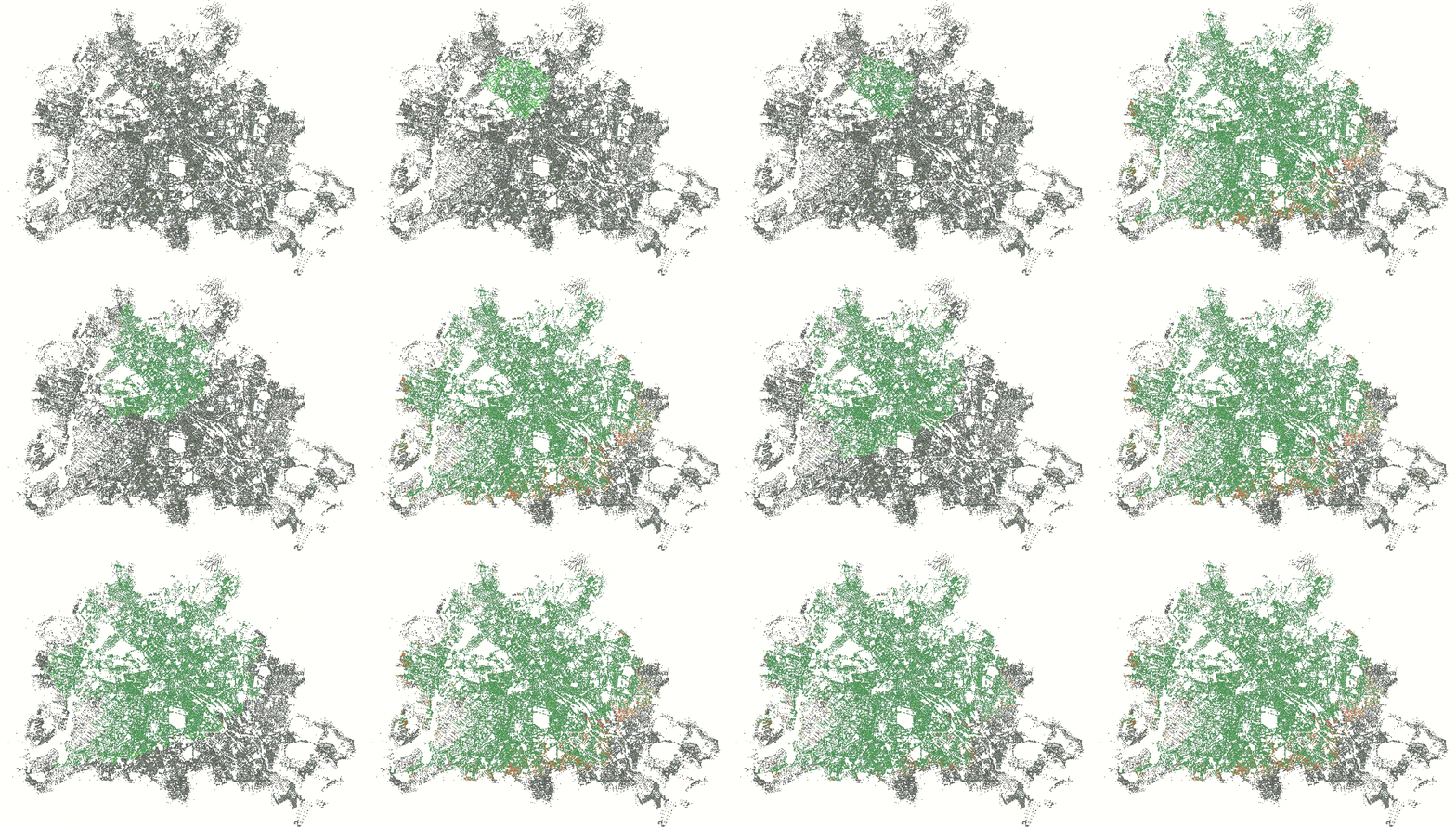
Instead of having a single iteration in each command buffer, we can
chain multiple iterations of the shader as one batch. Batching is
primarily useful for running the relax shader, because we need to run it
to convergence in a CPU-side loop. There is a trade-off to make here
though: Large command buffers take longer to dispatch than smaller ones
and a no-op dispatch is cheap but not for free. That means if we
converge after few iterations of the relax shader, a large batch size is
mostly overhead since most dispatches will be no-ops. At the beginning
of the search few nodes can be reached, hence the near
bucket will not contain many nodes and will converge fairly quickly.
Later we will have lots of nodes in our near bucket and it
may take a lot of invocations of the relax shader until we converge. How
many iterations we need is also governed by the delta value, since that
determines the split between the near bucket and the
far bucket. The above image shows how the delta value and
batch affect the processing, we see the near (light green)
and far (orange) buckets being visualized, dark green are
all settled nodes. On the left-hand side you see a delta value of 512
with a batch size of 32, and on the right-hand side a delta value of
4096 and batch size of 512.
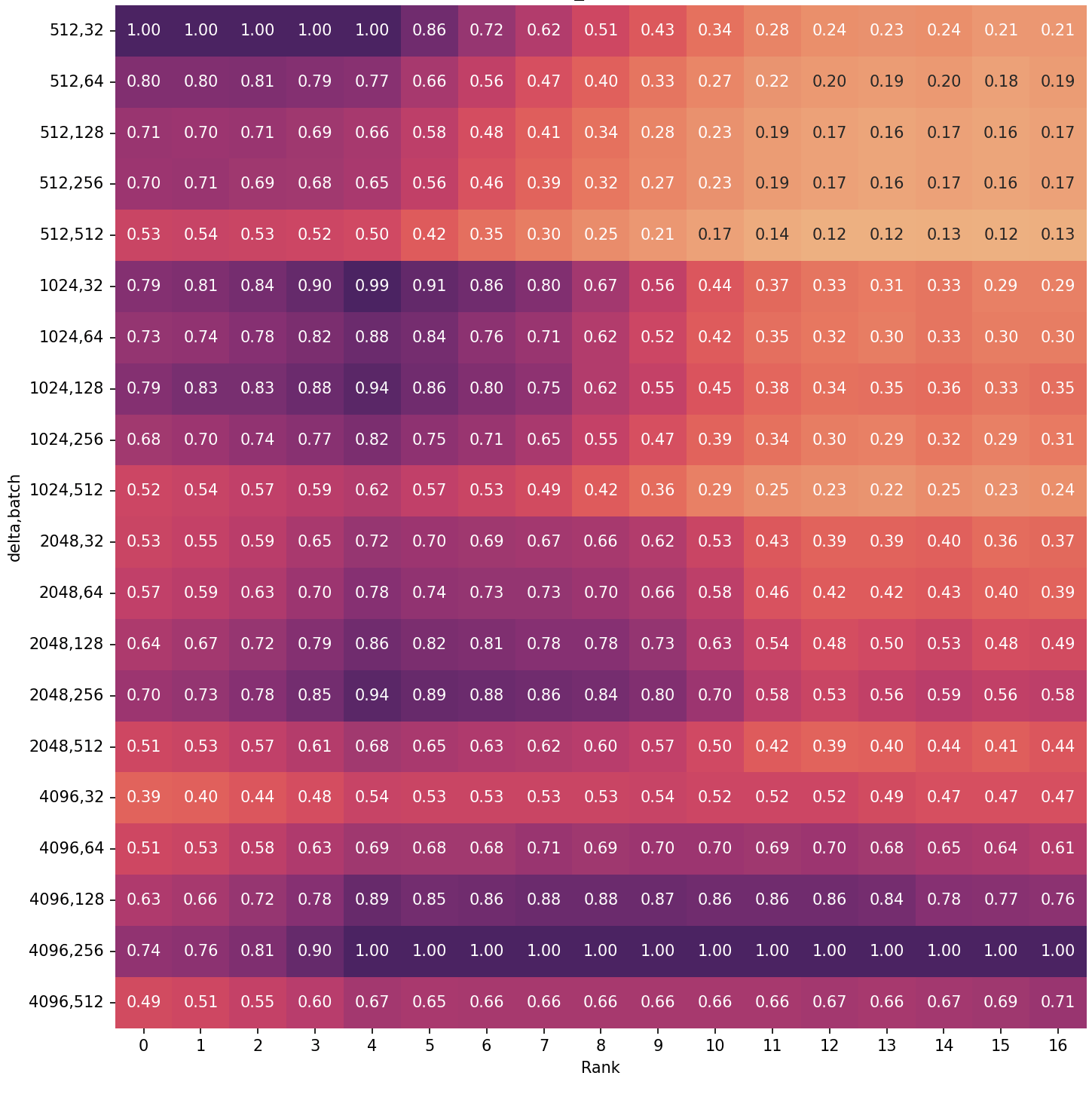
The image above shows the speedup relative to the best combination of
delta and batch size per Dijkstra rank. The fastest queries will have a
speedup of 1.0, everything else will be a slowdown (speedup
< 1.0). For example a delta value of 512 with batch size 32 is
roughly twice as fast for ranks 0, 1, 2 compared to delta 4096 with
batch size 512. Based on the graph above we could conclude using a delta
value of 4096 and a batch size of 256 is the clear winner. The short
queries (ranks 0 - 3) are a bit slower, but otherwise it beats all other
combinations. If we are only interested in running a single query at a
time as fast as possible that would be correct. But that is seldom the
case, usually we are computing multiple queries at the same time or are
sharing the GPU with other computations. For that we are not only
interested in the latency, but also the throughput. One way how we can
estimate how different delta values affect the throughput is to look at
the relative efficiency.
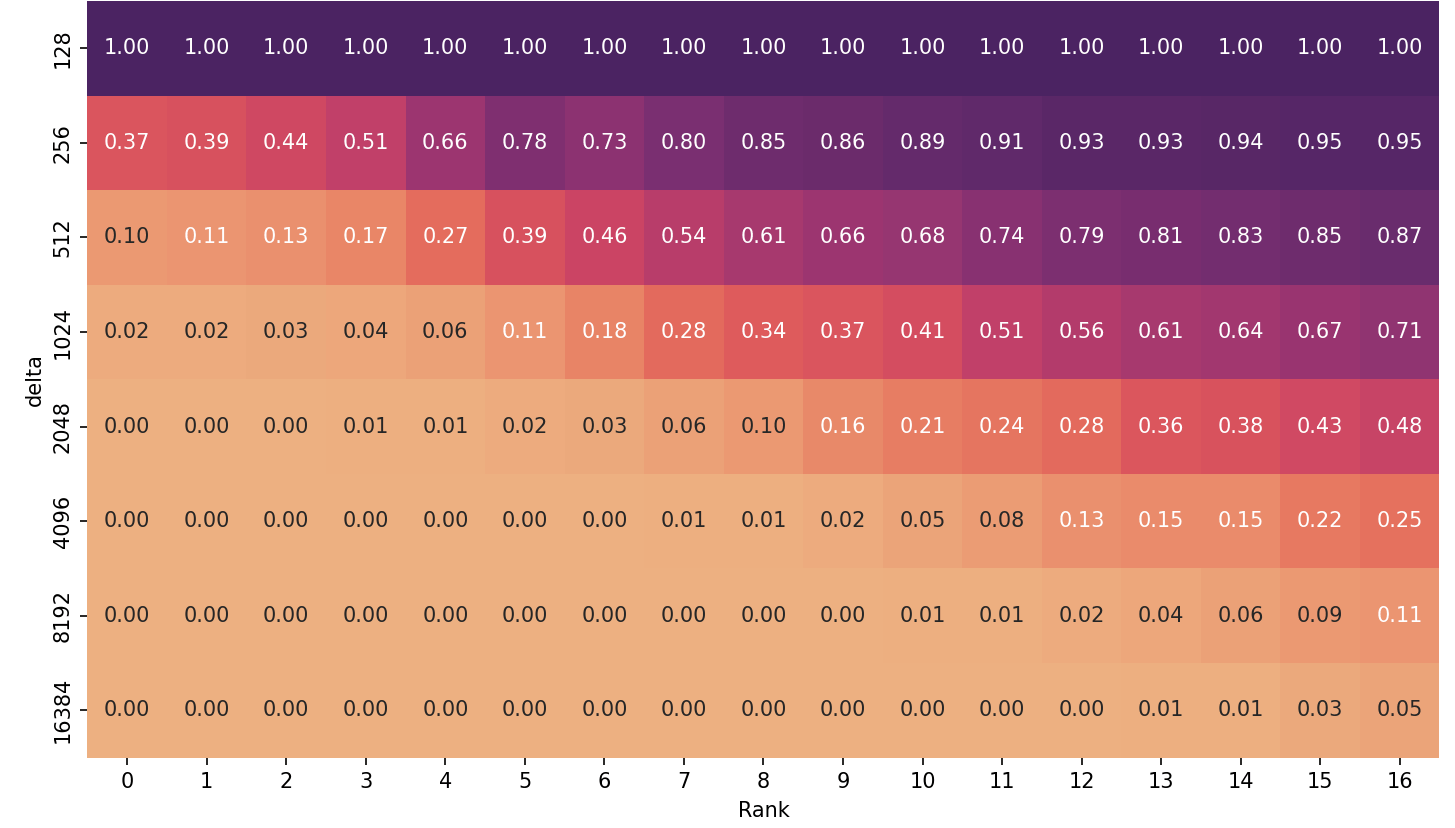
The graph above shows the efficiency of NearFar for different delta
values over all ranks. We determine this by looking at the number of
edges that were processed for each search. A value of 1.0
indicates the least amount of edges processed, i.e., best relative
efficiency; 0.01 means we processed 100x more edges. Higher delta values
quickly lead to a drop in efficiency, especially for lower ranks. The
Near-Far algorithm terminates only after the first near
bucket converged and is empty, so all nodes with a distance of less than
delta from the source need to be settled. This is
independent of the actual distance of the source to the target and
imposes a minimum amount of work that we need to complete for any query.
With large delta values this means we need to settle quite a few nodes
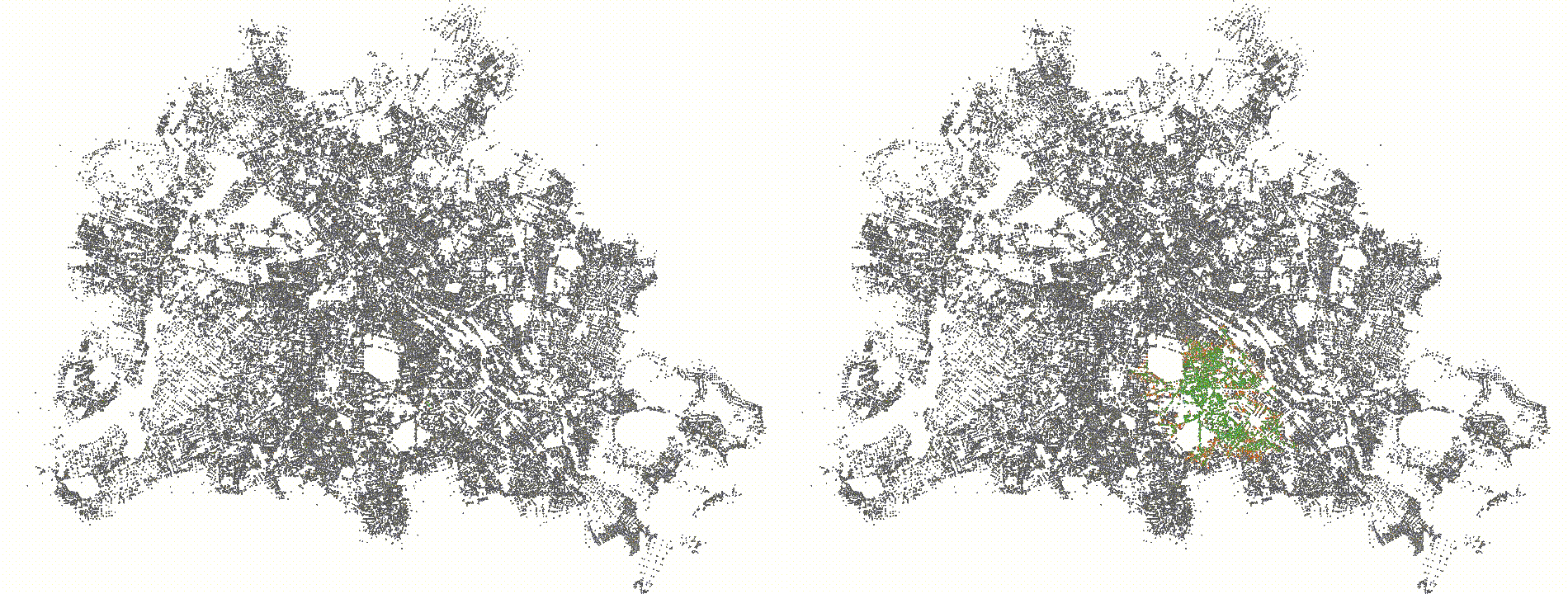
and hence compute a lot of useless values that we would not need. Below
you see a visualization of the settled nodes of the same query with rank
3 for a delta of 512 (left) and 4096 (right). The left search space is
really hard to see since it is so small, but the right search space
covers a decent chunk of Berlin. We could extend the relax/compact
shaders to stall nodes that have a distance larger than the current best
distance to the target. While this has the desired effect for lower
ranks, experiments show a significant slowdown of over 10% for larger
ranks due to the additional overhead.
Naturally this opens the question of whether fixed delta values /
batch sizes make sense, given it highly depends on the query which value
is best. We could try to estimate the query rank based on the
straight-line distance and pick a good value based on that. But if you
consider that if we compute the shortest path for a query of rank
k we will have computed the distances for all queries of
rank 0..k-1, you may wonder if it would be better to adjust
the delta value and batch size as we progress. This dynamic adjustment
is one of the central insights of the ADDS (Asynchronous Dynamic
Delta-Stepping) algorithm from Wang et al. which automatically adjusts
the delta size as the algorithm progresses.
For the following benchmarks we chose a delta values of 4096 with
batch size 256 since the efficiency-loss is still tolerable and
lower-rank queries are still only 30% slower. All benchmarks have been
run on my Radeon RX 480 on the German road-network (based
on OpenStreetMap data).
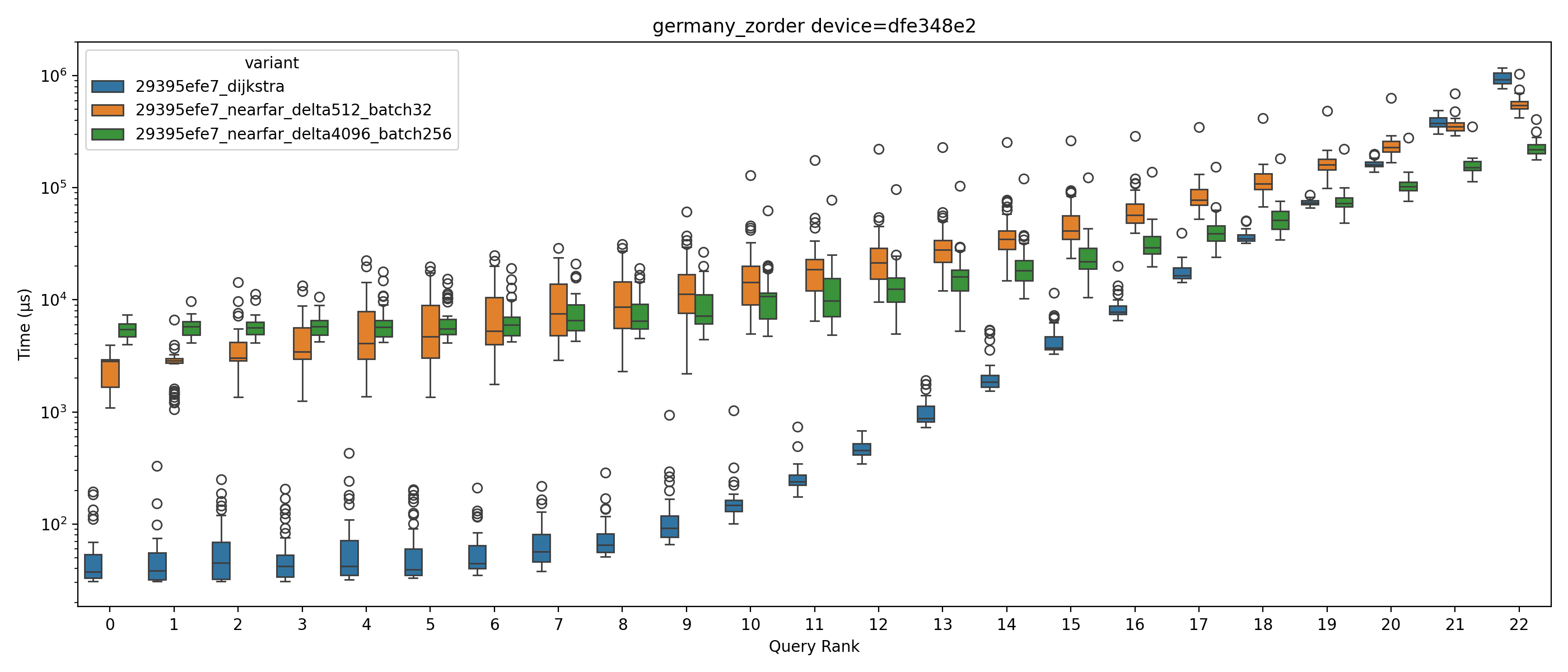
Victory over the naive CPU-based algorithm at last! Starting at queries with rank 20 Near-Far (4096, 256) beats Dijkstra with a speedup between 1.5 and 4.16, and Near-Far (512, 32) beats it starting at rank 21 with a speedup between 1.06 and 1.7. This comes at a cost though: We process roughly twice the amount of edges for a delta value of 4096 (for rank >20). The conservative delta value of 512 achieves a more efficient result with only processing roughly 11-13% more edges than Dijkstra.
There are many more things to try and a lot of nifty things I did not have time to discuss in detail here, for example subgroup operations. The source code for all of this is live on Github. This is not production code and I don't have any ambitions right now of making it a real library or service. However, it is a good playground for different ideas about SSSP on GPUs - feel free to reach out to me if you want to try something or have questions.