Update 2024–11–19: This post took a different direction than I intended. Thanks to several people on the Git mailing list this proposal has been included in upstream Git rather than in individual mergetools. There is now a hideResolved flag in Git v2.31.0 and later. This post now reflects what ramifications that upstream change will have on the mergetools surveyed below. The original post is still available.
Table of Contents:
Conflict Resolution
When there is a merge conflict in Git there are several versions of the conflicted file that all represent different times in the lifecycle of that file:
The LOCAL version of the file is what the file looks like on your branch
before the merge started.
The REMOTE version of the file is what the file looks like on the other
branch before the merge started.
The BASE version of the file is what the file looks like from before the
point that your branch and the other branch diverged. It’s the most recent
common ancestor of both branches.
When there is a conflict a tool that performs conflict resolution will compare those three files against one another in order to try and resolve any conflicting changes without human intervention. Any conflicts that cannot be automatically resolved must be resolved manually by a person.
Git is one such tool that performs conflict resolution but there are also many others. In general, a conflict resolution algorithm will produce the best results by starting with all three versions of the conflicted file instead of just looking at the latest two versions. An excellent algorithm, such as the one Git uses, will do even more work.
If there is a conflict that must be resolved manually then Git will write
a fourth file named MERGED which contains everything Git was able to resolve
by itself and also everything that it was not able to resolve. This is the file
containing conflict markers that you may already be familiar with.
The most notable thing about MERGED is that a file containing conflict
markers represents a two-way diff. Writing conflict markers is a nice,
simple, and static way to represent conflicts. Conflicts may be visualized
directly by just looking at the file (though it’s very difficult to spot subtle
differences), or those same conflicts may be visualized another way using
specialized tools often called “mergetools” in the Git ecosystem.
There are three “categories” of mergetools that I’ve seen in my limited travels. There are many others that I haven’t seen yet, and there’s every likelihood that I have miscategorised some of them, so please take this broad categorization with a grain of salt and corrections are very welcome.
Blind Diff
Most mergetools surveyed below do not perform their own conflict resolution, nor do they make use of Git’s conflict resolution, but rather they simply present the user with a diff of two or more files.
Often this is a diff of LOCAL and REMOTE. As explained above, this approach
will often present the end-user with unnecessary differences that have already
been resolved by Git. This forces the user to re-resolve those differences by
hand.
It is also common to diff LOCAL and REMOTE and BASE. This approach will
usually produce quite a lot of unhelpful visual noise and forces the end-user
to perform all the same mental steps that a merge algorithm would perform –
and, again, steps Git’s merge algorithm already performed.
Finally, another common configuration is to diff LOCAL and REMOTE and
BASE and MERGED. This approach produces an impenetrable amount of
visual noise and is effectively useless.
Some mergetools do allow the user to selectively turn off the diff comparison in order to only compare two panes at a time. This helps to reduce visual noise but still requires the end-user manually resolve all conflicts.
Custom Merge Algorithm
More sophisticated mergetools have their own conflict resolution algorithms. Sometimes these algorithms are quite clever. Although Git’s algorithm is excellent and has many options it is by no means the final word and innovation in conflict resolution algorithms is alive and well. We want other tools to compete with Git in this arena because it will have positive outcomes for everyone.
As described above a conflict resolution algorithm will
almost certainly want to start with LOCAL, REMOTE, and BASE, and any
additional information about the merge or file history can help.
A mergetool with a custom conflict resolution algorithm may want to look at
the result of Git’s algorithm that is stored in MERGED or it may want to do
its own thing entirely. Both approaches are fine – Git does a great job but
maybe somebody else can do better.
Reuse Git’s Algorithm
The last category of mergetools entirely rely on the conflict resolution that
Git automatically performs and stores in MERGED. They usually work by
splitting MERGED into two halves and showing the end-user each half as
a two-way diff.
This is a very simple approach that presents the smallest amount of visual noise to the end-user and relies on Git to do all of the hard work. (Which, it should be noted, Git is already doing anyway.)
These tools may, optionally, show the end-user additional information that
could be useful in understanding the file history leading up to the conflict.
This often includes temporarily showing LOCAL, REMOTE, or BASE or
invoking additional Git commands to show the file history. However the actual
conflict resolution is done by resolving the two halves of MERGED that
contain the minimal, remaining conflicts.
hideResolved Proposal
There is now
a hideResolved
flag in Git v2.31.0 and later that will make the Blind Diff
mergetools work more like the tools that Reuse Git’s
Algorithm by splitting MERGED and overwriting LOCAL and
REMOTE with each half.
This flag will allow these tools to benefit without making any other changes.
Mergetools that want to display the original versions of LOCAL and REMOTE,
or tools that want to use those original versions in their own conflict
resolution algorithm may toggle this flag off. Mergetools that want the
original verions of those files and the result of Git’s resolution can simply
disable the flag and split MERGED themselves.
Given the large prevalence of tools in that first category, defaulting to an opt-out setting will positively affect many more users than an opt-in setting would. Plus the authors of more sophisticated mergetools that prefer it to be disabled are better able to recognize the pros and cons and make an informed choice.
Below is a comparison of several default mergetools that ship with Git plus some other popular tools. I’ll try to add others to the list over time. Fixes and contributions are welcome.
In addition, the tools surveyed below also have a before/after summary to
visualize the ramifications of the new hideResolved flag proposal.
This uses a script in the diffconflicts repository that generates subtle
merge
conflicts.
Here are some results to watch out for the comparisons:
- The
bri1lig->brilligconflict was automatically resolved. It should not be shown to the user. - The
m0me->momeconflict was automatically resolved. It should not be shown to the user. - The
did->Didconflict was automatically resolved. It should not be shown to the user. - All conflicts in the second stanza were automatically resolved. They should not be shown to the user.
- The conflict on the first line is an “ours vs. theirs” situation. We only want theirs.
- The conflict on the third line is not an “ours vs. theirs” situation. We
want changes from both:
- Want the capitalization change from theirs.
- Want the extra ‘r’ removal from ours.
- Want the hanging punctuation change from ours.
- The conflict on the fourth line should be easily noticeable. We want the ‘r’.
Araxis Merge
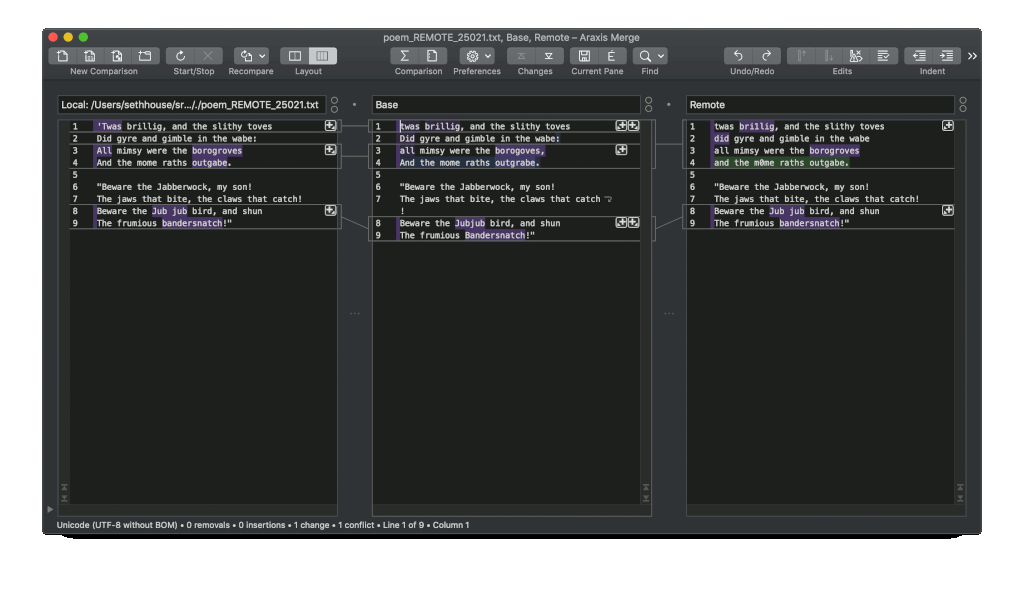
Category: Blind Diff — diffs LOCAL, REMOTE, & BASE.
Before hideResolved:
After hideResolved:
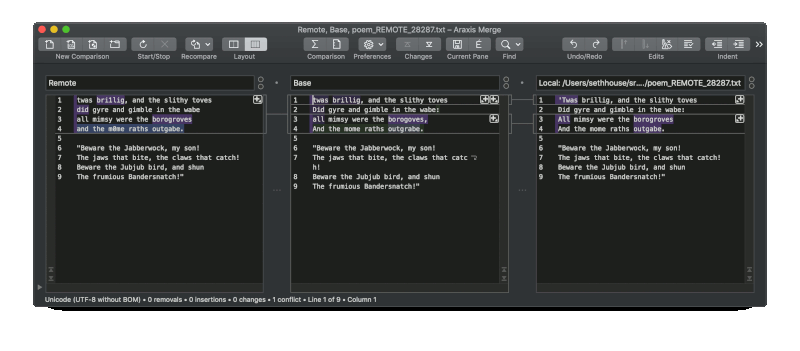
Summary: uneccessary conflicts are no longer shown; no adverse effects.
Suggestions for tool authors:
- Don’t include
BASEin the default diff. Continue to show the file, and have a toggle to compareBASEwith the left or right pane, but the resolution will almost always only come from theLOCALorREMOTEpanes so make it easier to grab individual changes from both.
Beyond Compare
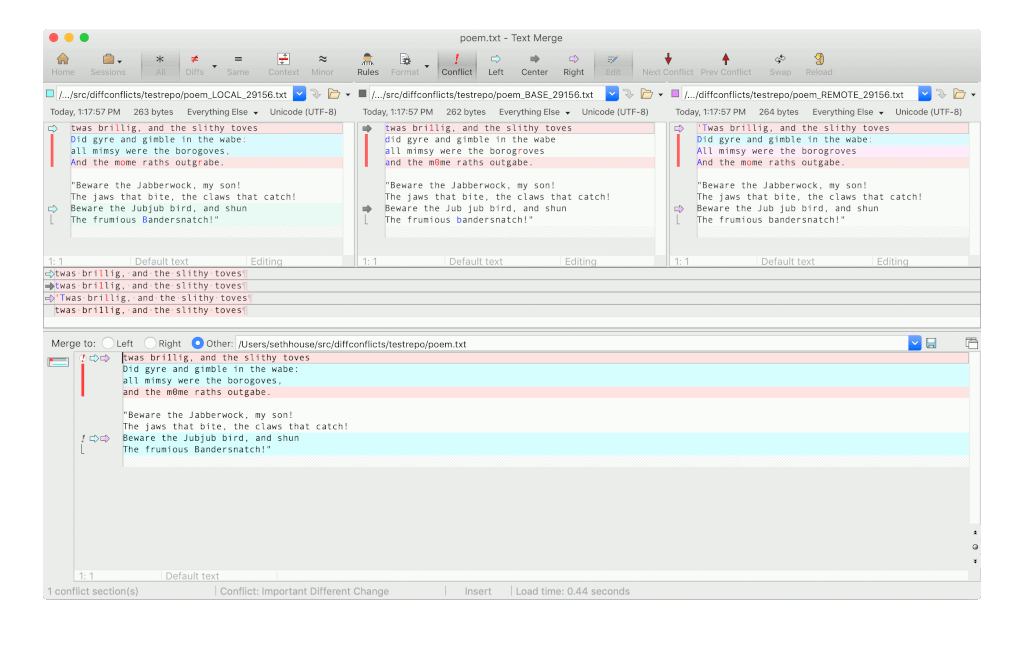
Category: Blind Diff — diffs LOCAL, REMOTE, & BASE.
Before hideResolved:
After hideResolved:
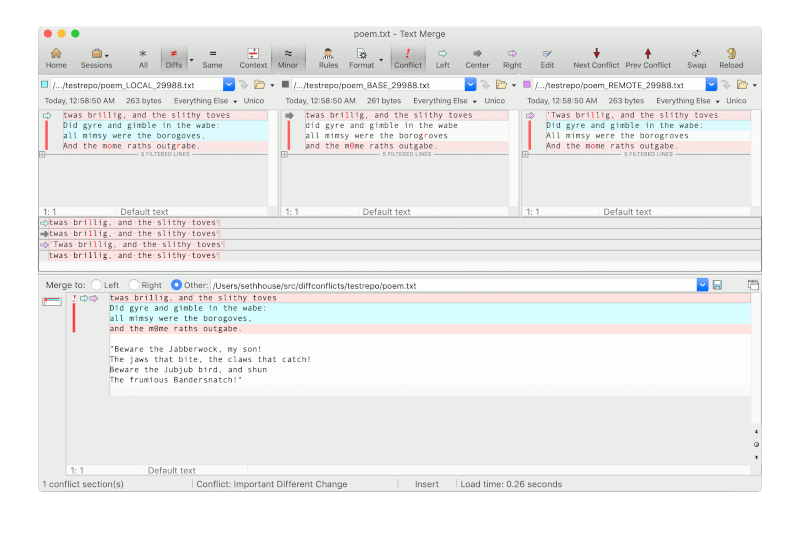
Summary: uneccessary conflicts are no longer shown; no adverse effects.
Suggestions for tool authors:
- Don’t include
BASEin the default diff. The bottom panel doesn’t provide any value over the left and right upper panels; perhaps that would be a good place to display (not compare)BASEinstead. - I tried without success to use the “show conflicts” mode so it’s very possible I’ve overlooking a useful mode.
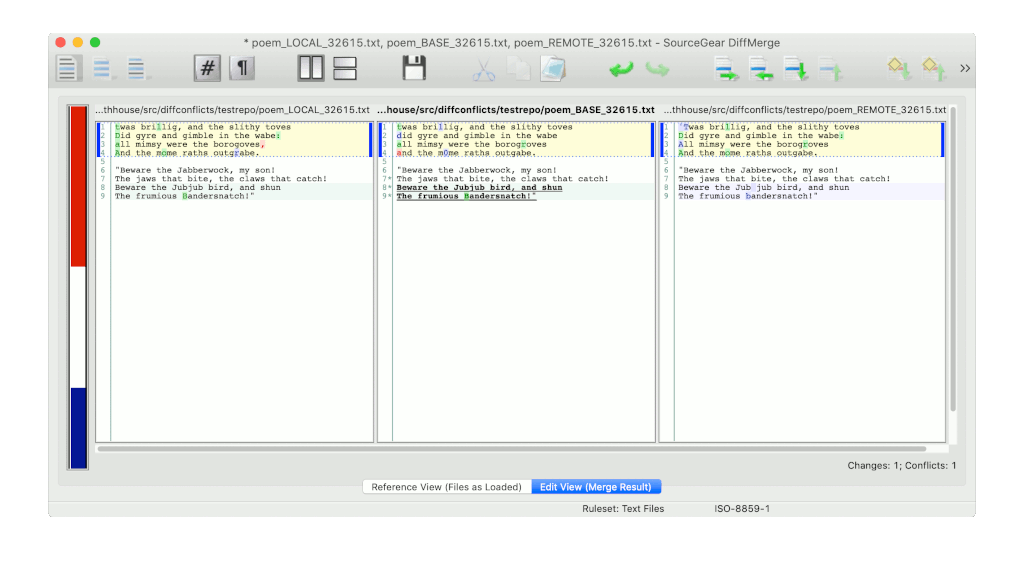
DiffMerge
Category: Custom Merge Algorithm
Before hideResolved:
After hideResolved:
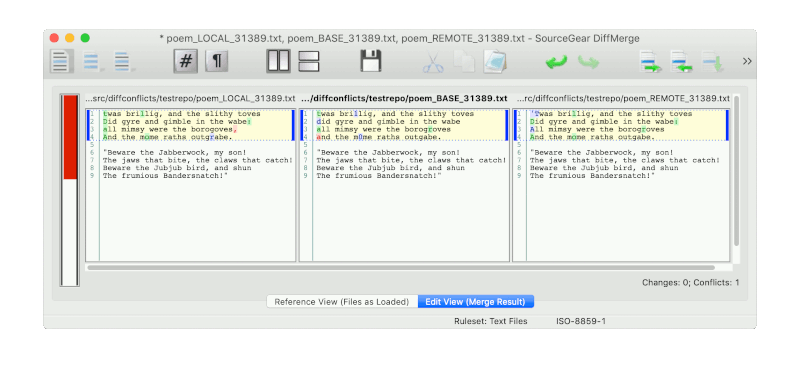
Summary: uneccessary conflicts are no longer shown; no adverse effects on custom merge algorithm or end-result.
Suggestions for tool authors:
- Don’t include
BASEin the default diff. The resolution will almost always only come from theLOCALorREMOTEpanes so make it easier to grab individual changes from both.
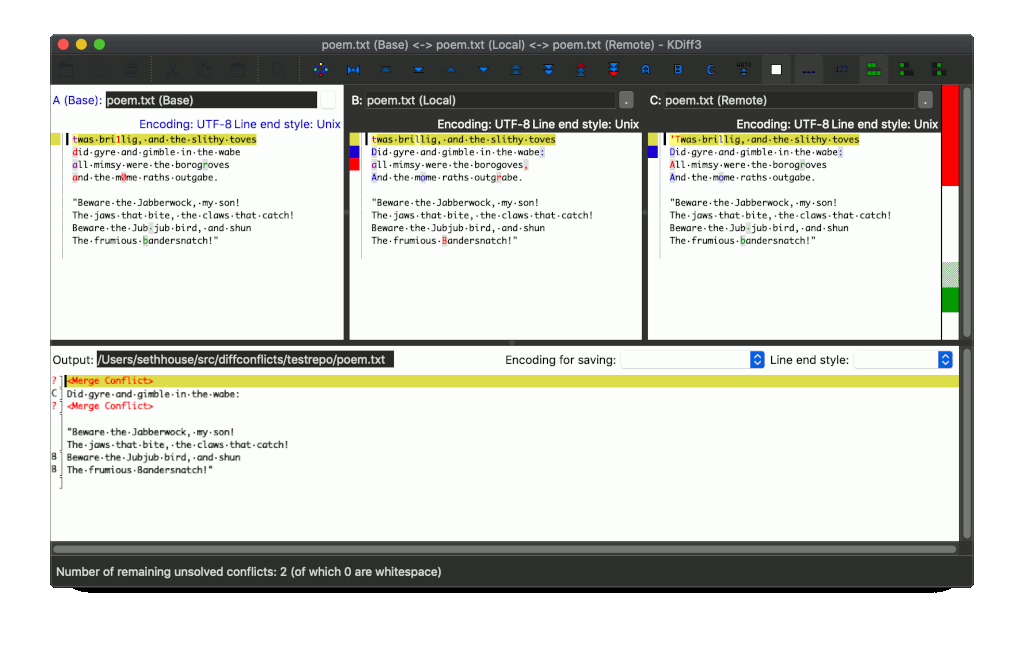
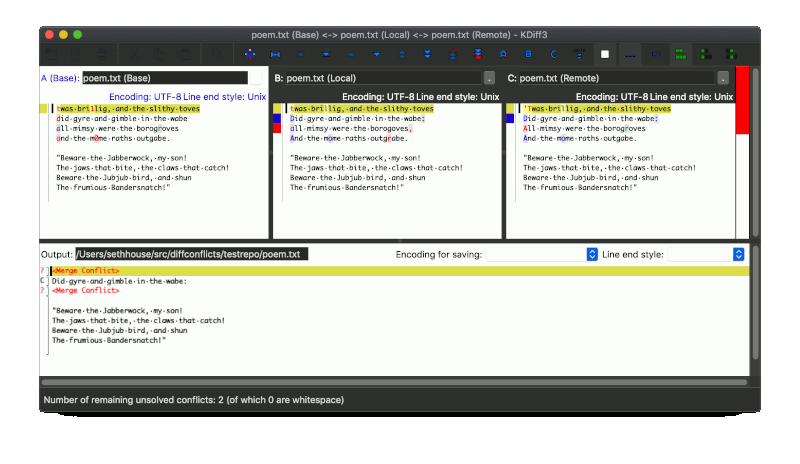
kdiff3
Category: Blind Diff & Custom Merge Algorithm
Before hideResolved:
Default view after hideResolved:
“Auto solve” after hideResolved:
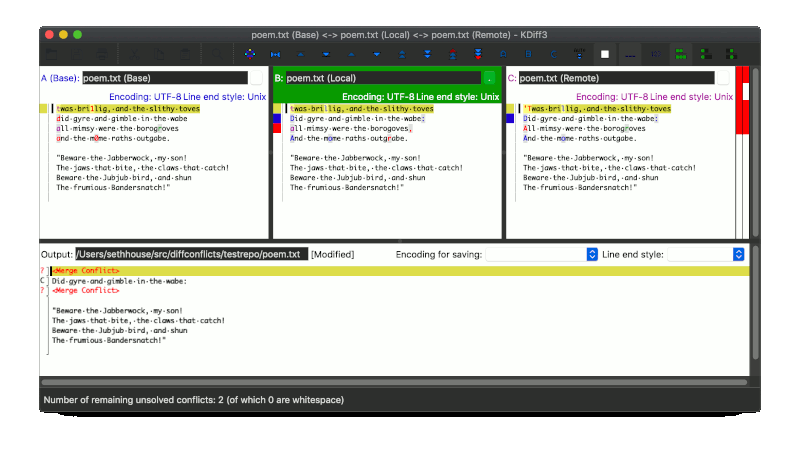
Summary: uneccessary conflicts are no longer shown; no adverse effects on custom merge algorithm or end-result; end result is identical to builtin “auto solve” results.
Suggestions for tool authors:
- The visual emphasis on the
LOCALandREMOTEpanes is good but hard to notice for new users sinceBASEcomes first and becauseBASEis also diffed. - Don’t include
BASEin the default diff. Increase emphasis on the other two panes. - The lower pane isn’t providing any value and that space could be reclaimed.
- I tried and failed to use the toggles between the A B C panes. They sound useful but didn’t seem to have an effect; I’m sure I’m missing something.
Meld
Category: Blind Diff — diffs LOCAL, REMOTE, & BASE.
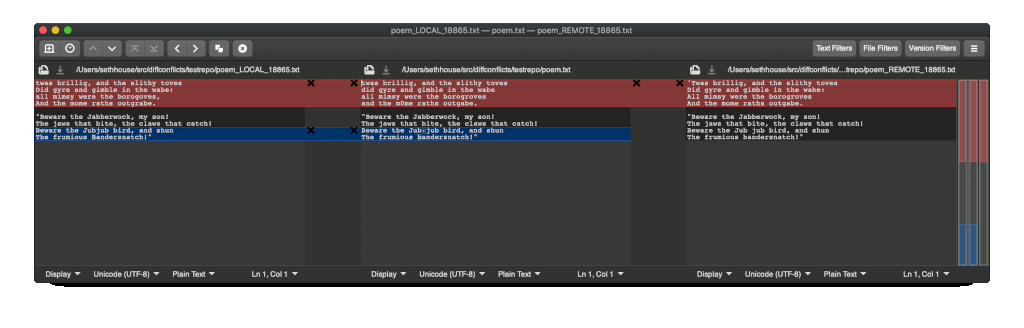
Before hideResolved:
After hideResolved:
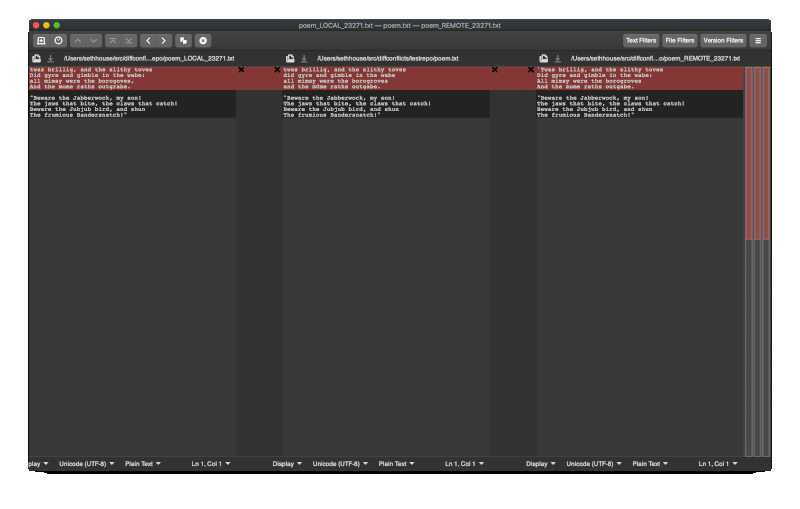
Summary: uneccessary conflicts are no longer shown; no adverse effects.
Suggestions for tool authors:
- Add option to remove the middle pane; it is not providing any benefit for this use-case. Perhaps default to a two-way diff in the upstream Git mergetool wrapper.
Sublime Merge
Category: Custom Merge Algorithm
Before hideResolved:
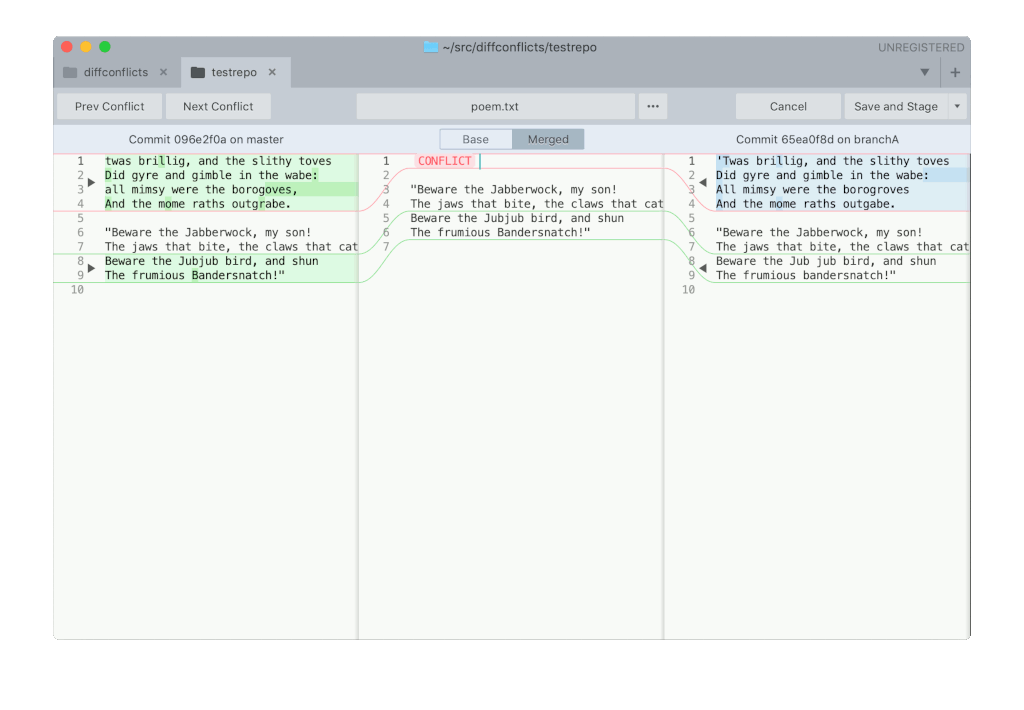
The way Sublime Merge represents differences is much less visually distracting and the merge algorithm works well. It’s tantalizing close to being useful in grasping the history of the conflict at-a-glance.
After hideResolved:
Identical output. I believe Sublime Merge opens files from the repository by
itself rather than integrating with Git’s mergetool. This also seems true when
using the CLI smerge to invoke Sublime Merge.
Summary: Identical output; no benefits; no adverse effects.
Suggestions for tool authors:
- The
CONFLICTplaceholder in the middle pane isn’t useful to resolve the conflict. - I would love to see a two-way diff between each side of
MERGEDin the middle, using the existing character-level highlights. Then bookend those two panes byLOCALandREMOTEusing those wisp lines to direct your eyes from LOCAL to the left conflicts and from REMOTE to the right conflicts. The visual embellishments in this tool are so good this is one place I think a four-panel display would actually help end-users.
SmartGit
Category: Blind Diff & Reuse Git’s Algorithm (sort of)
The tool does an excellent job of navigating a whole repository, not just resolving conflicts, and provides easy-access to file history and the state of the repository. This is exactly the kind of tool that helps new programmers to see what needs to happen and helps seasoned programmers find relevant info quickly. The conflict resolution features are the weakest features (see suggestions below).
Default view before hideResolved:
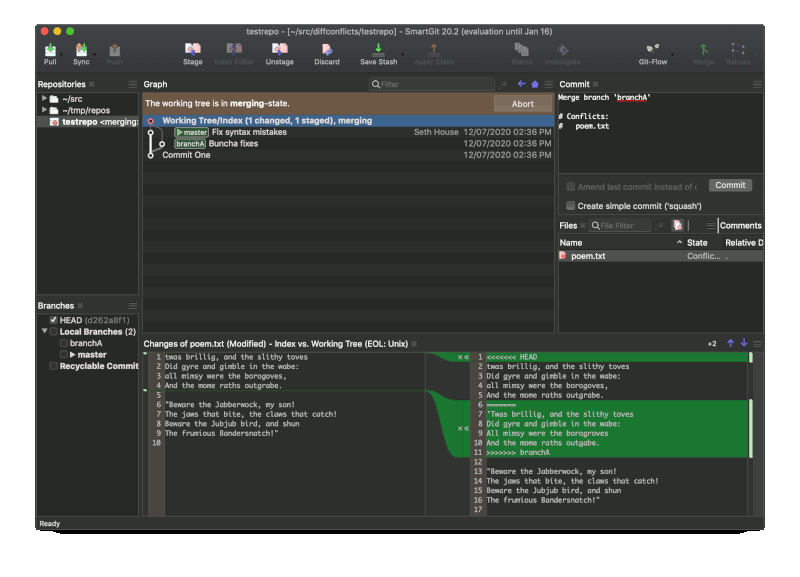
“Conflict resolver” before hideResolved:
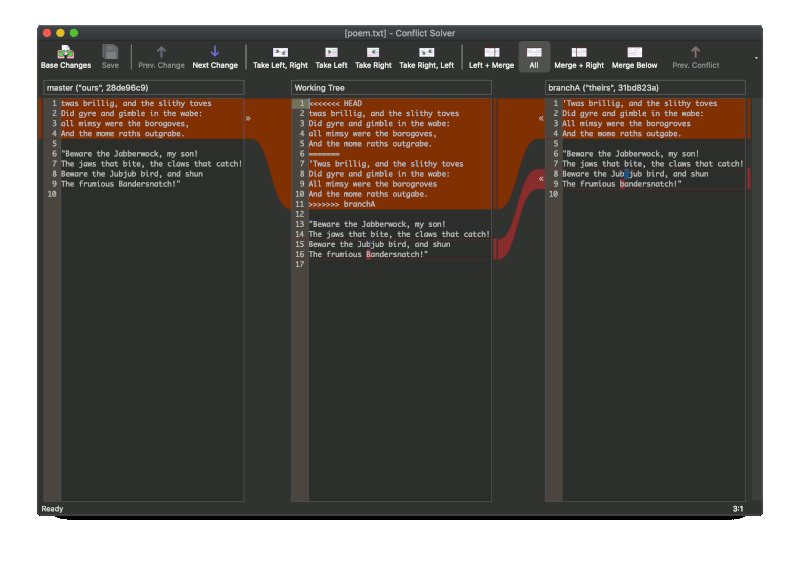
After hideResolved:
SmartGit opens files from the repository itself. I couldn’t find a CLI util to use as a mergetool. (Corrections very welcome.)
Summary: Identical output; no benefits; no adverse effects.
Suggestions for tool authors:
- The default view is visually appealing and almost performs a similar task to
hideResolvedexcept the tool doesn’t highlight differences between the “left” and “right” side of the conflict markers. The tool supports character-level highlighting and that would be useful in this view too. - The “conflict resolver” mode also looks fantastic but doesn’t actually help
the end-user resolve conflicts. A CLI util to invoke SmartGit from Git’s
mergetool would make use of the
hideResolvedaddition and the middle panel could then be removed.
Fork
Category: Blind Diff — diffs LOCAL, REMOTE, & BASE.
Before hideResolved:
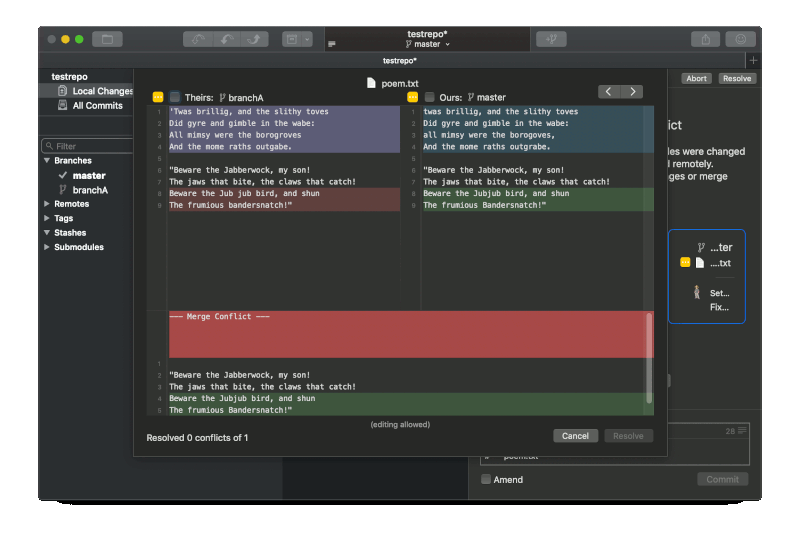
After hideResolved:
Fork opens files from the repository itself. I couldn’t find a CLI util to use as a mergetool. (Corrections very welcome.)
Summary: Identical output; no benefits; no adverse effects.
Suggestions for tool authors:
- The two-way diff is perfect for use with the
hideResolvedflag. Integration with Git’s mergetool wrapper scripts (whether opened from the CLI or directly from the GUI) would provide immediate benefit. This would also make the bottom pane redundant and that space could be reclaimed.
P4Merge
Category: Blind Diff — diffs LOCAL, REMOTE, & BASE.
Before hideResolved:
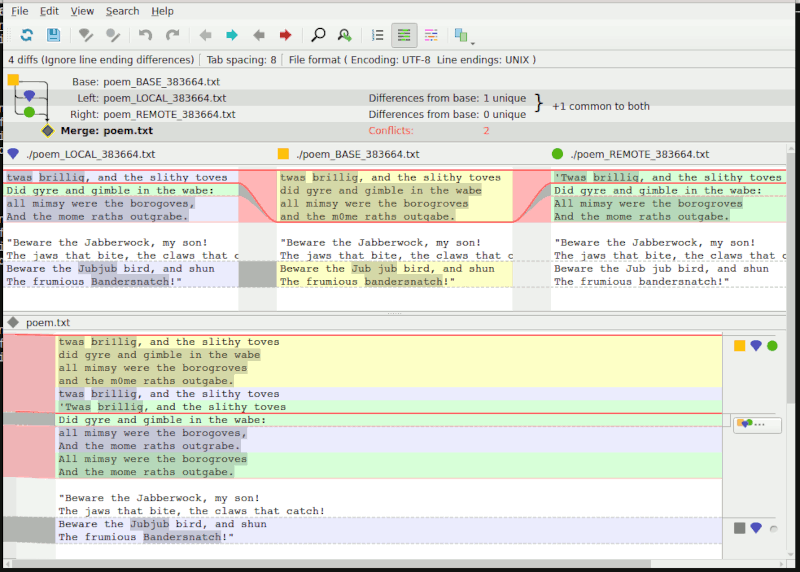
After hideResolved:
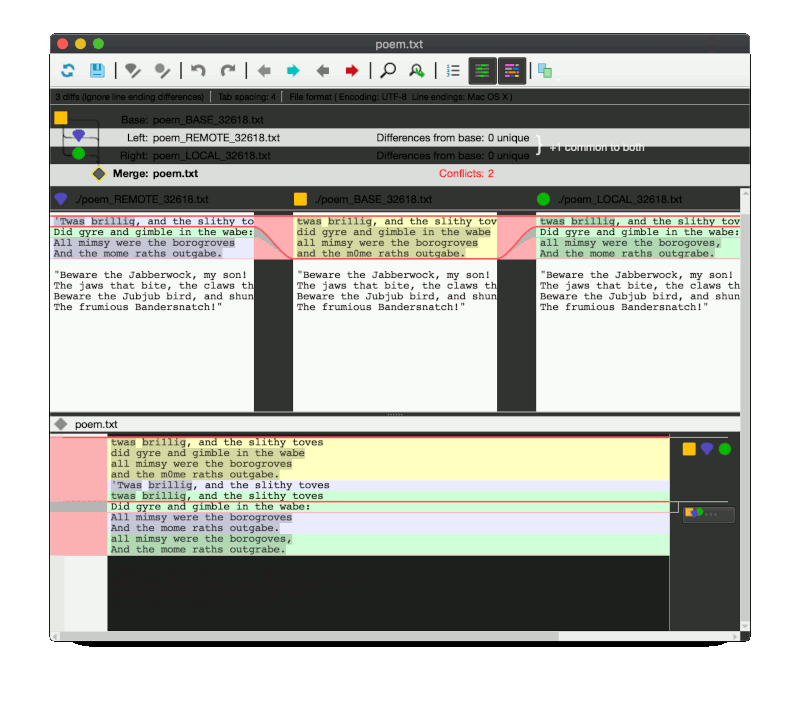
Summary: uneccessary conflicts are no longer shown; no adverse effects.
Suggestions for tool authors:
- The wispy lines that guide your eye between changes are a great visual effect
that would be much more useful in a two-way diff. This tool is well-suited to
benefit from the
hideResolvedflag with small tweaks. - With
hideResolvedenabled the middle pane containingBASEis unecessary to resolve the conflict and should be moved. - The bottom pane is too noisy to be helpful in identifying conflicts. It would
be better as a place to show (not diff)
BASEinstead.
IntelliJ
Category: Blind Diff & Custom Merge Algorithm
Default view before hideResolved:
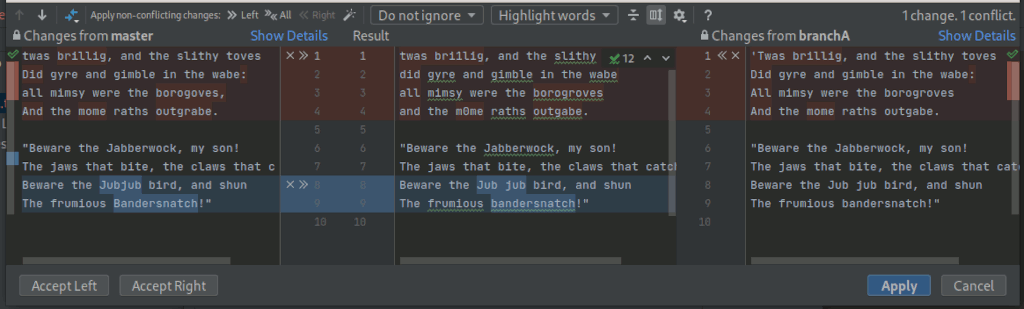
“Resolve simple conflicts” view before hideResolved:
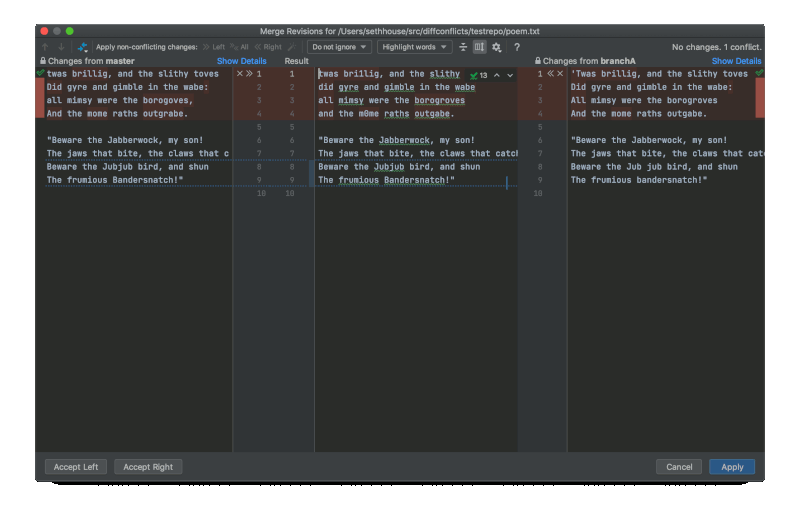
After hideResolved:
Identical output. I could not figure out how to install the IntelliJ CLI util and configure this as Git mergetool. (Corrections very welcome.)
Summary: Identical output; no benefits; no adverse effects.
Suggestions for tool authors:
- The “resolve simple conflicts” button produces similar results to the
hideResolvedflag and this works very well. That also means the middle pane presents already-resolved conflicts and is a visual distraction that should be removed entirely or at least sidelined and not included in the diff by default.
Tortoise Merge
Category: Custom Merge Algorithm (?)
Before hideResolved:
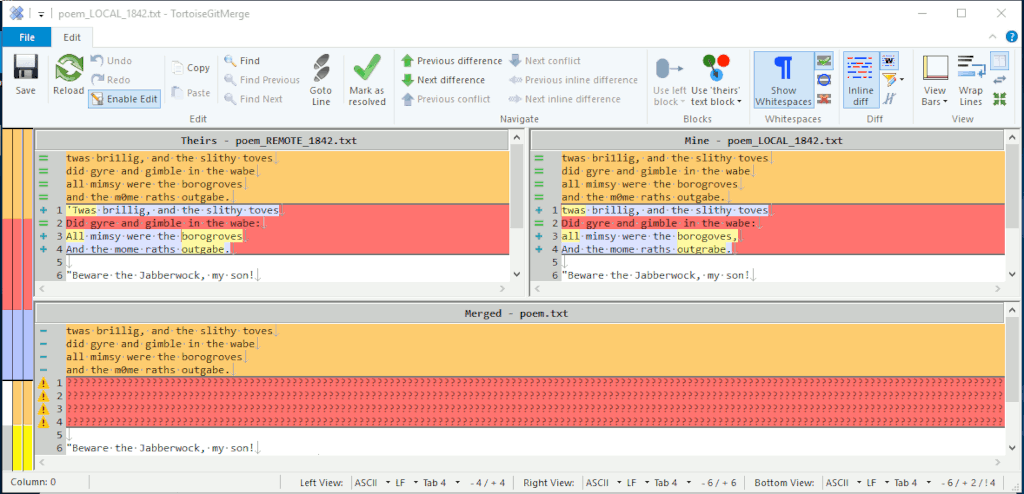
Tortoise appears to automatically resolves trivial conflicts without user intervention.
After hideResolved:
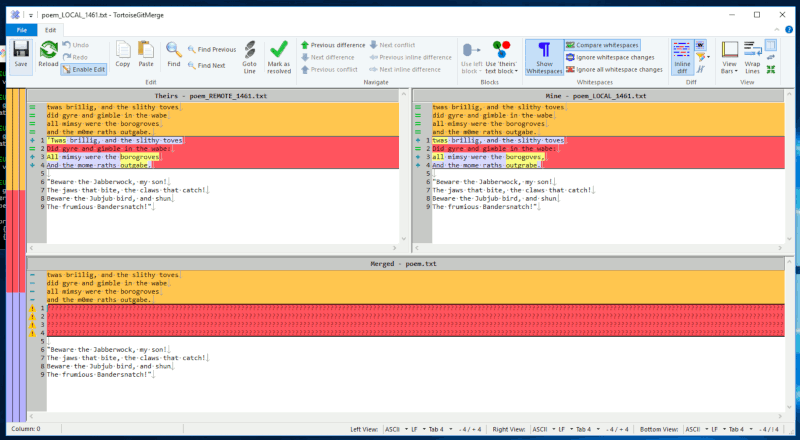
Identical output. Although I’m not convinced I’m using Tortoise correctly (see
below), the result is identical with and without hideResolved enabled so I think
we’re safe to say this is a no-harm change for Tortoise.
Summary: Identical output; no benefits; no adverse effects.
Additional notes:
I mischaracterized Tortoise on my first pass. It does appear to perform it’s
own conflict resolution. Since I’m reviewing so many tools at once it’s hard to
spend more than an hour learning any one tool in depth and I don’t think I’m
giving Tortoise a fair shake; corrections
welcome. I invoked it using
Git-for-Windows with git mergetool -t tortoisemerge but I may have something
misconfigured – the bottom panel says MERGED but looks like BASE. I’m
honestly not sure if repeating the contents of BASE in all three panes is
intentional or if I have something misconfigured. The new-user thoughts below
are assuming it’s intentional.
Thoughts for tool authors:
- The automatic conflict resolution between
REMOTEandLOCALis indeed very effective and worthy of praise. - There’s quite a bit of visual noise and it took me a long time to realize
each side was independently contrasting
REMOTEwithBASEandLOCALwithBASE. That contrast is very helpful and not includingBASEin the diff highlighting is a good call. - I would like to see a way to include part of a change rather than having to choose the entire line.
WinMerge
Category: Custom Merge Algorithm
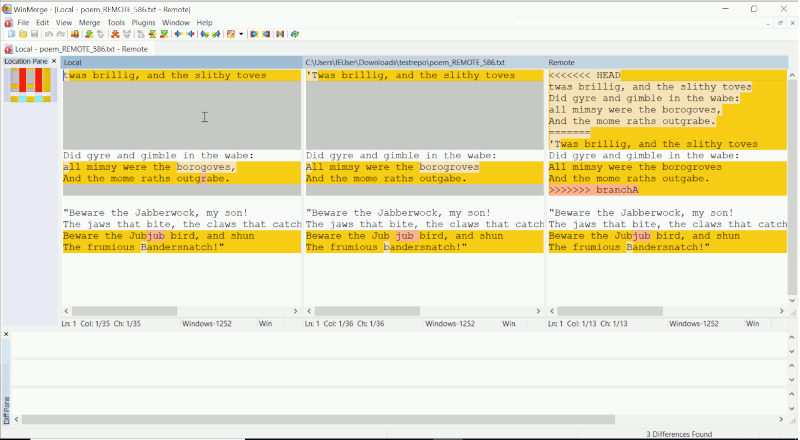
Default view before proposed hideResolved flag:
Results of built-in “auto merge” button before proposed hideResolved flag:
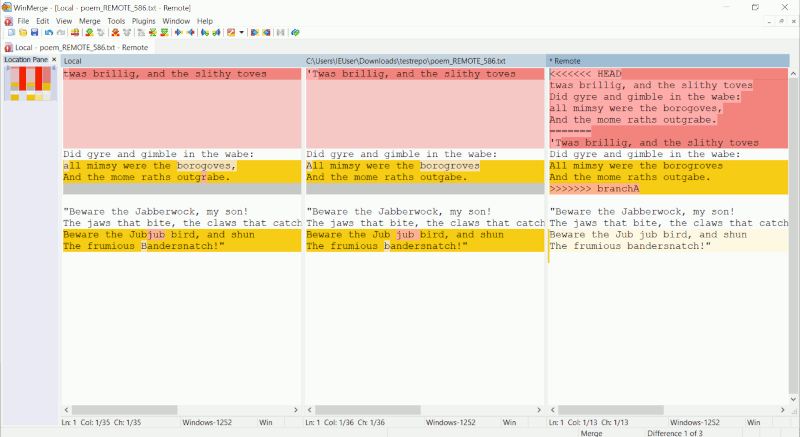
The built-in “auto merge” button does an admirable job of resolving conflicts although the results are not quite as good as Git’s algorithm.
Results of built-in “auto merge” button after proposed hideResolved flag:
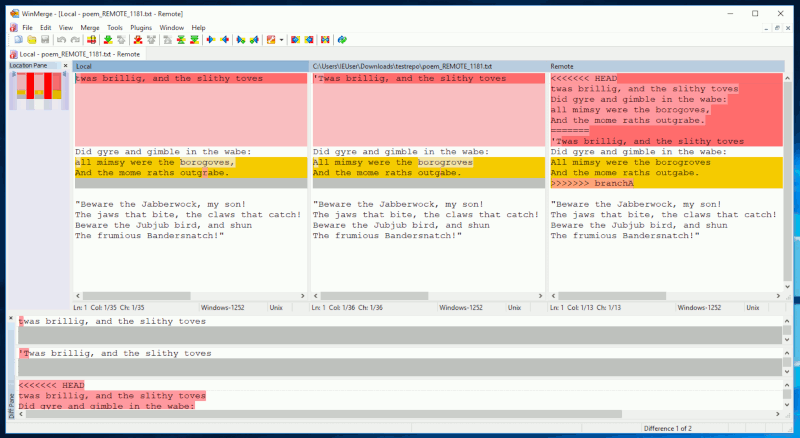
Summary: resolved additional conflict that the tool missed; no adverse effects.
Suggestions for tool authors:
- The conflict markers in the right-hand pane aren’t helpful in resolving the
conflict. With the proposed
hideResolvedflag enabled they could be hidden altogether to reclaim space; without the proposedhideResolvedflag that pane should not be included in the diff by default (an optional toggle would be helpful though).
tkdiff
Category: Custom Merge Algorithm
Before hideResolved:
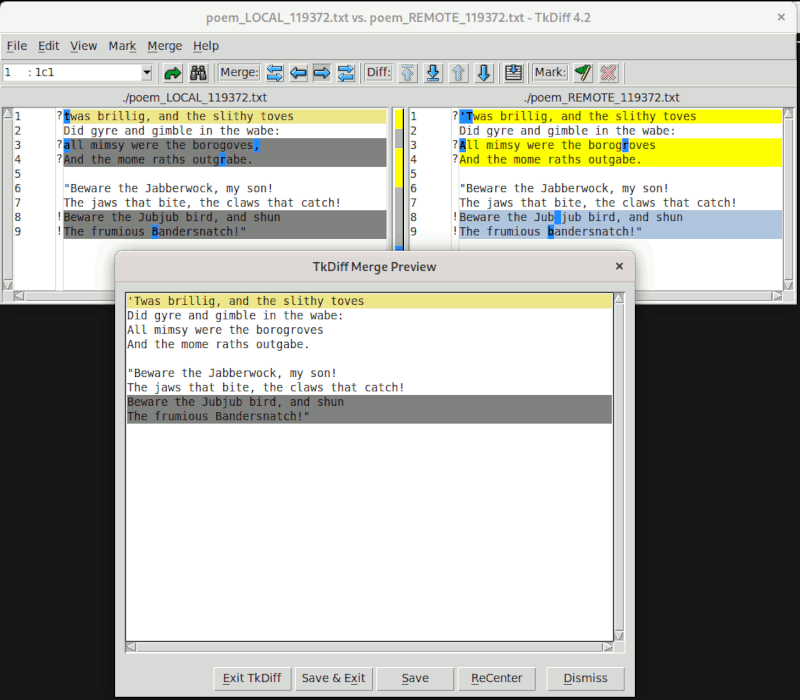
tkdiff has an impressive conflict resolution algorithm. The simple, two-way diff is a simple, straightforward, and effective way to view differences. It will even go so far as to recommend resolutions for all conflicts, though that is more fraught (in this example that loses wanted changes).
After hideResolved:
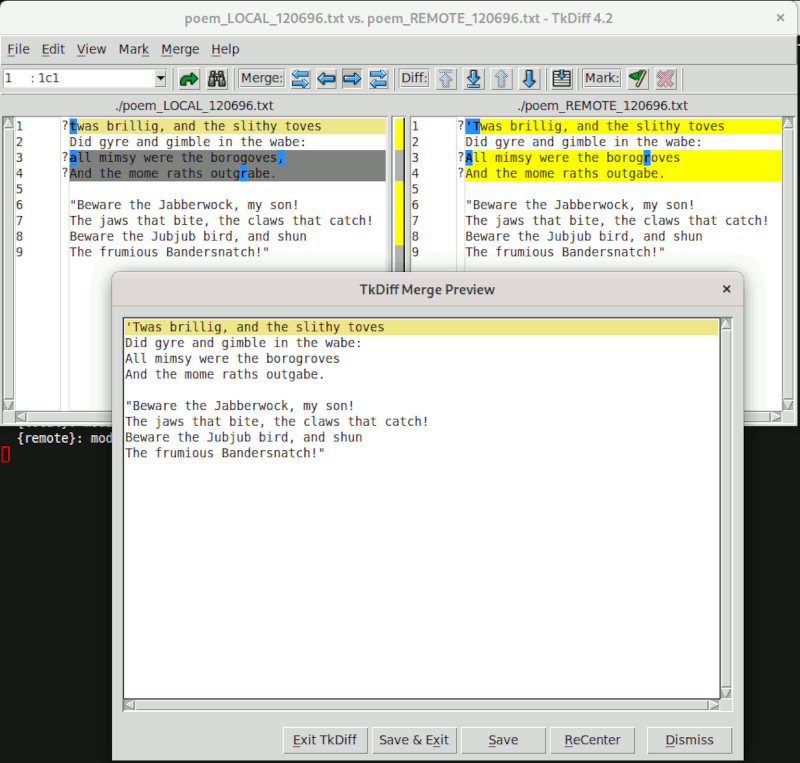
Summary: resolved additional conflict that the tool missed; no adverse effects.
Suggestions for tool authors:
- I really like the workflow of stepping through conflicts and marking the wanted change. It’s the most effective resolution GUI I’ve worked with that isn’t also a text editor. However, I would like to be able to mark individual changes on each line rather than just the line.
Emacs
(I would very much appreciate help filling this subsection out!)
Emacs + Magit
Category: Reuse Git’s Algorithm
Before hideResolved:
After hideResolved:
Untested
General notes:
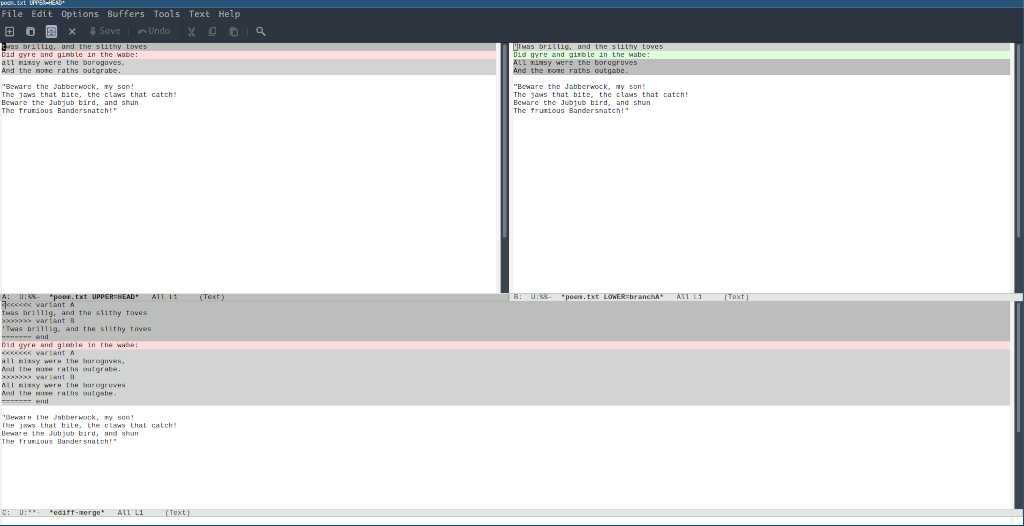
I need to do some code diving to see how they’re achiving this result but the two-way diff on the top looks great. All the resolved conflicts are missing which frees the user to resolve only the remaining conflicts. The diff highlights show just the relevant conflicts. The bottom pane is somewhat noisy but still useful context to look at when resolving in the top panes.
(Thank you to u/tech_addictede for investigating and creating the screenshot.)
vimdiff
Category: Blind Diff — diffs LOCAL, REMOTE, BASE,
& MERGED
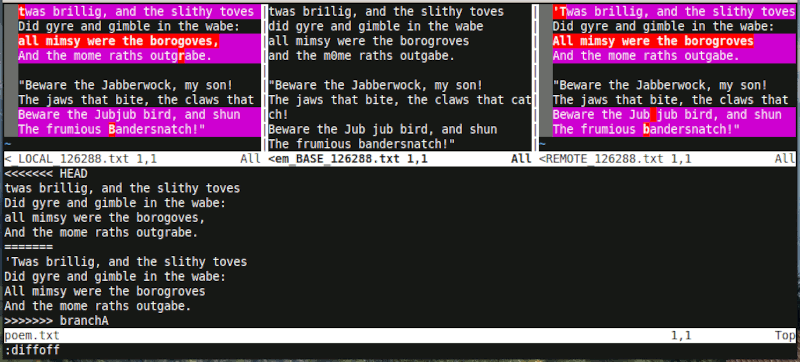
Note: the screenshots below have :diffoff on the BASE and MERGED windows
for clarity and brevity. The vimdiff, vimdiff3, and vimdiff2 mergetools are not
individually detailed because they’re all variations on the same theme – all
need to toggle the diff between individual windows to maximize effectiveness.
Before hideResolved:
After hideResolved:
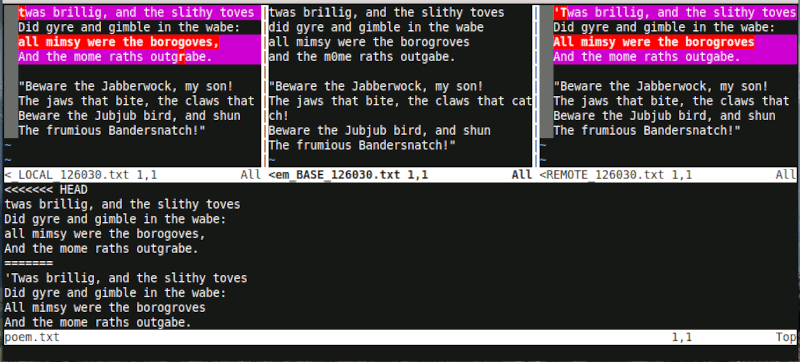
Summary: uneccessary conflicts are no longer shown; no adverse effects.
Suggestions for tool authors:
- The default four-way vimdiff view is decidedly unhelpful because everything is highlighted.
- Most Vim users will know how to selectively disable the diff in individual windows in order to meaningfully compare one change against another.
- That is not a default Vim mapping, however so all Vim users will need to do it manually or add their own mappings.
- Some Vim users will not know how to do that and this mergetool will be much less effective until they do.
- Changing those existing mergetools now is a non-starter however other vimdiff wrappers are easy to add.
Update 2021–03–08: a patch was accepted upstream to add a new vimdiff1
layout
variant
that takes advantage of hideResolved and only shows a simple, two-way diff.
diffconflicts
Category: Reuse Git’s Algorithm
Before hideResolved:
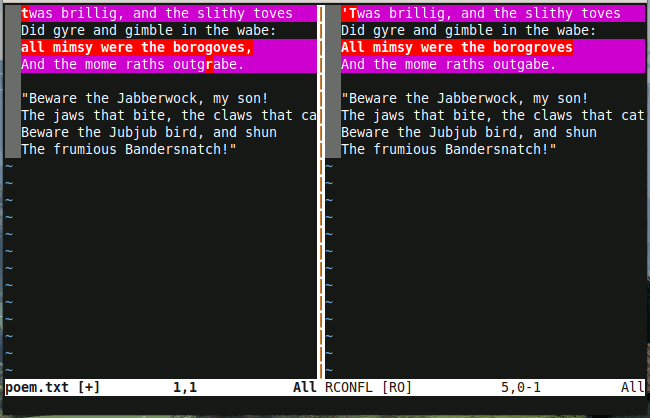
After hideResolved:
Identical output in the first tab. The second tab is now missing the LOCAL
and REMOTE versions of the file from before the merge since they were
overwritten. Users that reference those versions to learn the conflict history
will want to disable the hideResolved flag for this tool.
Summary: Identical output; minor adverse effects.
vim-mergetool
Category: Reuse Git’s Algorithm
Before hideResolved:
(Same default output as diffconflicts above.)
After hideResolved:
Identical output when using the default layout. Users that have configured
another default layout will see surprising results since LOCAL and REMOTE
no longer contain the expected versions. Users that make use of other layouts
will want to disable the hideResolved flag for this tool.
Summary: Identical default output; minor adverse effects.
VS Code
Category: Blind Diff & Reuse Git’s Algorithm (sort of)
Before hideResolved:
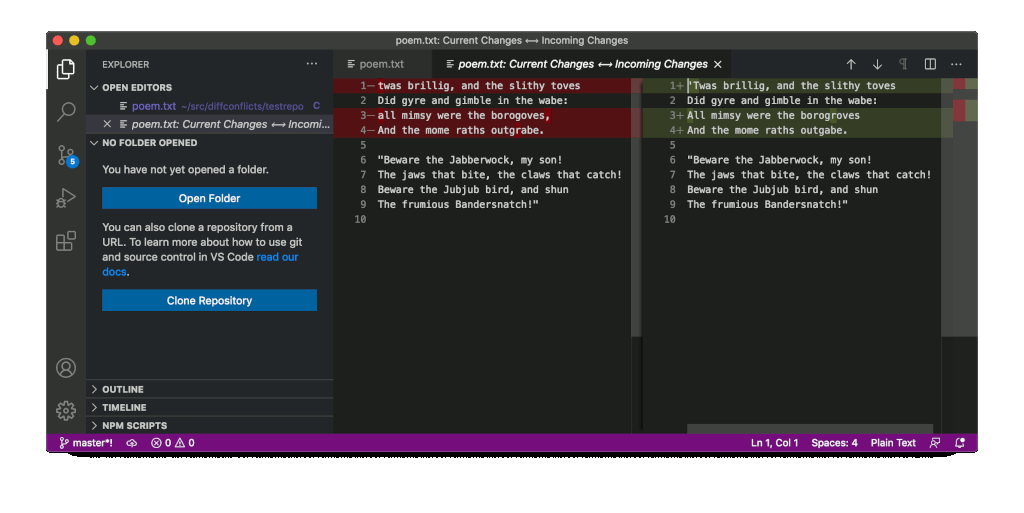
VS Code presents the file containing conflict markers directly, but if you click the “compare changes” button it will open a new view as simple and effective two-way diff that makes it easy to identify differences at a glance. Unfortunately this new view is read-only and the user must return to the file containing conflict markers to resolve the conflict manually.
After hideResolved:
Identical output because LOCAL and REMOTE are not used.
Summary: Identical output; no benefits; no adverse effects.
Suggestions for tool authors:
- Make the two way-diff the default view or emphasize the “compare changes” button as the preferred/recommended action.
- Change the two-way diff to be directly editable using all the awesome power of regular VS Code (linting, completion, etc).
How does Git generate MERGED?
It is worth asking how much work Git puts into creating the MERGED version of
the file to appreciate how much work you lose by instead diffing LOCAL and
REMOTE.
(The following snippets are from the Git manpages for version 2.28.0.)
First, find the common ancestor, the merge base, of both branches:
Given two commits A and B, git merge-base A B will output a commit which is reachable from both A and B through the parent relationship.
For example, with this topology:
         o---o---o---B
        /
 ---o---1---o---o---o---A
the merge base between A and B is 1.
—
git-merge-base
Second, trace the history of all the changes to the file between the merge base and the last commit on the branch (including renames):
git merge-file incorporates all changes that lead from the
to into . —
git-merge-file
Then, try to perform the merge:
Assume the following history exists and the current branch is “master”:
       A---B---C topic
      /
 D---E---F---G master
Then “git merge topic” will replay the changes made on the topic branch since it diverged from master (i.e., E) until its current commit (C) on top of master, and record the result in a new commit along with the names of the two parent commits and a log message from the user describing the changes.
       A---B---C topic
      /	      \
 D---E---F---G---H master
—
git-merge
But when there is a conflict:
During a merge, the working tree files are updated to reflect the result of the merge. Among the changes made to the common ancestor’s version, non-overlapping ones (that is, you changed an area of the file while the other side left that area intact, or vice versa) are incorporated in the final result verbatim. When both sides made changes to the same area, however, Git cannot randomly pick one side over the other, and asks you to resolve it by leaving what both sides did to that area.
—
git-merge
Pretty cool. By default (with the recursive merge strategy) it will follow file renames and grab changes from both sides of the merge that don’t change the same part of the file. For everything else it will wrap it in conflict markers.
A sophisticated mergetool could perform similar steps given LOCAL, REMOTE,
and BASE but it couldn’t follow renames, nor could it follow more complex
merges like when the merge base is itself a merge (thus the “recursive”
strategy name) and it’s necessary to follow the ancestry even farther up.
Git also has other merge strategies (resolve, recursive, octopus, ours, subtree) and merge algorithms (patience, minimal, histogram, myers) that can be employed when useful. Some of those algorithms take arguments too (ignore-space-change, ignore-all-space, ignore-space-at-eol, ignore-cr-at-eol, renormalize, rename-threshold).
So, yes, a mergetool can do some of what Git does. But Git is already a sophisticated and very configurable mergetool. It’s just lacking that graphical visualization of the end-result.