Companies and governments around the world are facing one of the most advanced and far-reaching attacks in recent history. This is clearly a sophisticated operation carried out over a long period of time. The motivations and true extent of how far reaching this campaign has been will be better understood by the security industry and authorities in weeks, maybe months to come. Customer security and transparency are CrowdStrike’s top priority. We have conducted an extensive review of our production and internal environments and found no impact. Whilst doing our review, CrowdStrike was contacted by the Microsoft Threat Intelligence Center on December 15, 2020. Specifically, they identified a reseller's Microsoft Azure account used for managing CrowdStrike’s Microsoft Office licenses was observed making abnormal calls to Microsoft cloud APIs during a 17-hour period several months ago. There was an attempt to read email, which failed as confirmed by Microsoft. As part of our secure IT architecture, CrowdStrike does not use Office 365 email. CrowdStrike conducted a thorough review into not only our Azure environment, but all of our infrastructure for the indicators shared by Microsoft. The information shared by Microsoft reinforced our conclusion that CrowdStrike suffered no impact. Throughout our analysis, we experienced first hand the difficulties customers face in managing Azure’s administrative tools to know what relationships and permissions exist within Azure tenants, particularly with third-party partner/resellers, and how to quickly enumerate them. We found it particularly challenging that many of the steps required to investigate are not documented, there was an inability to audit via API, and there is the requirement for global admin rights to view important information which we found to be excessive. Key information should be easily accessible. In our role supporting organizations impacted by the SUNBURST incident, the CrowdStrike Services team has created a community tool called CrowdStrike Reporting Tool for Azure (CRT) to quickly and easily pull up these excessive permissions and other important information about your Azure AD environment. This includes delegated permissions and application permissions, Federation configurations, Federation trusts, mail forwarding rules, Service Principals, objects with KeyCredentials, and more. Of note, due to the lack of documentation of Microsoft API capabilities, CRT does not pull critical information regarding partner tenant permissions, which includes delegated admin access. We have detailed steps below enabling you to view this critical information manually in the Microsoft 365 admin center; this is also documented in the CRT readme. We have made this tool available to the community in our CrowdStrike github repository. We recommend that all Azure AD administrators review their Azure AD configuration to help determine if they have been impacted and take steps to prevent intrusions. We hope this tool will assist organizations around the world. We would like to thank Microsoft for sharing this abnormal behavior and associated IOCs. We strongly recommend all organizations leverage CRT to review their Azure tenants and understand if they need to take any configuration or mitigation steps, particularly as it relates to third-parties that may be present in your Azure environment. Additionally, it is critical to ensure you review your partner/reseller access, and you mandate multi-factor authentication (MFA) for your partner tenant if you determine it has not been configured. One of the reasons why these attack vectors are so difficult to mitigate is the inherent complexities that organizations face with federated SSO infrastructure and in managing Azure tenants. We hope the findings and recommendations from our experience help your organization. CRT uses PowerShell and automatically installs the Exchange Online PowerShell V2, MSOnline, and AzureAD modules. While we recommend that this tool be run with an account with Global Reader privileges, certain read-only functions nonetheless require authentication as a user with Global Admin or similarly high-risk privileges. When Global Admin privileges are not available, the tool will notify you about what information won’t be available to you as a result. Based on incident response engagements conducted by the CrowdStrike Services team, I want to highlight some additional attack surface and mitigation recommendations. CrowdStrike recommends centralizing storage of logs in a secure location to prevent tampering, unauthorized access, and forensic preservation. Certain log sources must be enabled and diagnostic settings need to be added for sufficient detail to be available. If these additional settings are not configured, the relevant events will not be captured. At a minimum, the following logs should be captured in a Security Incident Event Management (SIEM) system or log storage environment separate from Azure: CrowdStrike recommends reviewing tenant configurations and applying the hardening measures below as applicable. It is important to highlight the need to harden on-premise systems as well as cloud and datacenter-hosted systems for which the organization is ultimately responsible. Based on current intelligence, the ability of this adversary to be successful depends on the initial compromise of hosts configured by or for the organization along with its partners, including hosts in public clouds. Privileged users, roles and organizational units should be synced between cloud and on-premises or self-managed directories with extreme caution. Cloud admin roles must rely on cloud-only authentication and not authenticate with SAML SSO, just as admin roles for on-premises / self managed must not be authenticated through cloud services. Deploy Endpoint Detection and Response solution, such as Falcon Insight, to provide visibility and prevention across the enterprise endpoints and cloud workloads. Monitor Azure using a Cloud Security Posture Management solution such as Falcon Horizon. Achieve unified visibility and adaptive enforcement for both on-premises and in the cloud resources to secure access based on context and use enforcement to prevent identity based threats in real time using a solution like Falcon Zero Trust. This includes protecting legacy systems, unmanaged devices, and all accounts types (privileged, employee, remote, and service). Implement Privileged Identity Management solution to be utilized to limit exposure to administrative permissions by providing just-in-time access. Falcon Zero Trust can also help extend core PIM functionality to systems that require risk based conditional access when PIM is not feasible for all applications, workloads, and privileged users. Enforcing end-to-end email encryption and signing can help to prevent unauthorized access and verify the authenticity of the communication. Having a secure email gateway solution will provide protection, visibility, and data protection. Implementing SPF, DKIM, and DMARC records will ensure email authenticity, prevent spoofing, and provide visibility. Regular phishing exercises and awareness training can assist employees to recognize, avoid, and report potential threats that could compromise the environment. We encourage feedback on the CRT tool. Feel free to contact us at CRT@CrowdStrike.com. Note: On December 24, 2020 the US Department of Homeland Security’s Cybersecurity & Infrastructure Security Agency (CISA) released a new tool, Sparrow.ps1, to help network admins secure their Microsoft 365-based infrastructure following the recent reports that hackers have been exploiting Microsoft 365 to compromise commercial and sensitive government networks. The CISA tool is designed to detect possible compromised accounts and applications in the Azure/m365 environment and can be found here - https://github.com/cisagov/SparrowExecutive Summary
Introducing the CrowdStrike Reporting Tool for Azure
Prerequisites and Deployment
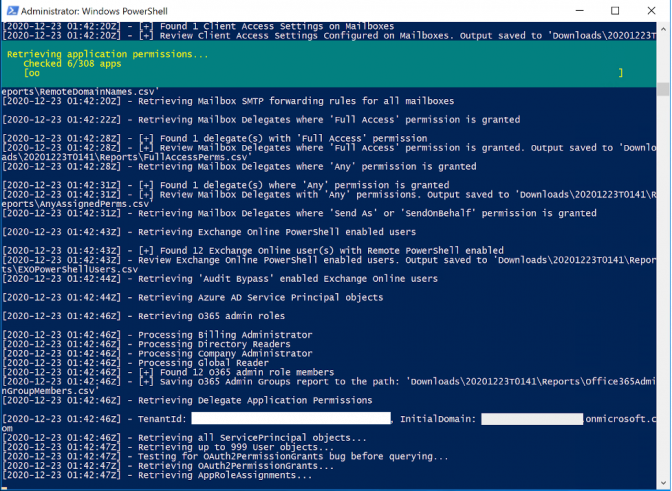 Sample view of CRT while collecting application permissions
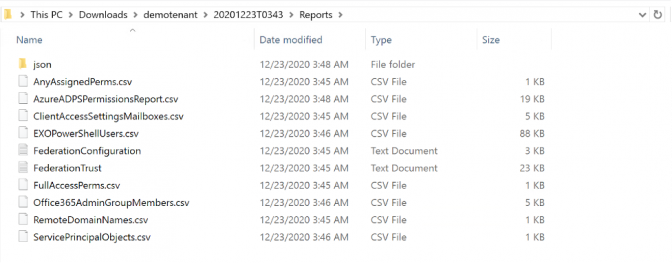 CRT output with CSV and JSON format
Additional Recommendations
Logging
Configuration Review and Hardening Measures
Tenant
Azure ADOAuth Applications
Entitlements Review
Authentication
Exchange
Harden On-Premise and Self-Managed Systems
Endpoint Detection and Response (EDR) Solution
Cloud Security Posture Management (CSPM)
Implement Risk Based Conditional Access Everywhere
Privileged Identity Management (PIM)
Enforce Mail Encryption and Signing
Security Email Gateway Solution
Mail DNS Controls
Conduct Organizational Phishing Campaign and Trainings
Additional Resources