I’m a software developer, a tech nerd and I play video-games. But most importantly when it comes to things I love, I’m one of the most stubborn people I know, and I don’t mean stubborn in an elegant way, I’m quite a messy person, but if I want to get something done, in one way or another, I get it done.
Since I had Cydia on my second generation iPod Touch as a teenager, I fell in love with making systems do what they are not supposed to do. That’s where the idea of a single device for everything came from. We call our phones, wrongly, phones. But it’s quite evident that they are very capable computers, it’s just their software that ( for some good UX reasons) is completely locked up.
In high school, I was so excited to play with Linux-on-Android, but the experience was, and still is, terrible in my opinion. Recently I tried Google’s built in Linux Terminal and Termux with proot-distro, but both feel very fragile, and running my full set of x64 applications on Linux Arm is still a dream.
In 2026, when it was time for me to replace my 16GB laptop for gaming and my 16GB MacBook Air M2, I searched for good deals online, but I got scared by today’s RAM and GPU pricing. I decided to postpone upgrading my gaming laptop (it wasn’t really necessary) and to use a VPS with remote desktop as my working setup. I rented a VPS on Netcup, and heavily used AI to configure it. Of course in the back of my mind, I knew I could run the remote desktop client on my phone.
Remote working station
First of all I needed to choose the best remote desktop streaming configuration, for the love of open source I went with Moonlight and Sunshine. I asked my LLM to set up everything for me, and it created several desktop environments for me depending on the screen size and network connection. When I’m at home I work on a Samsung G8 monitor and when I’m traveling on my MacBook screen.
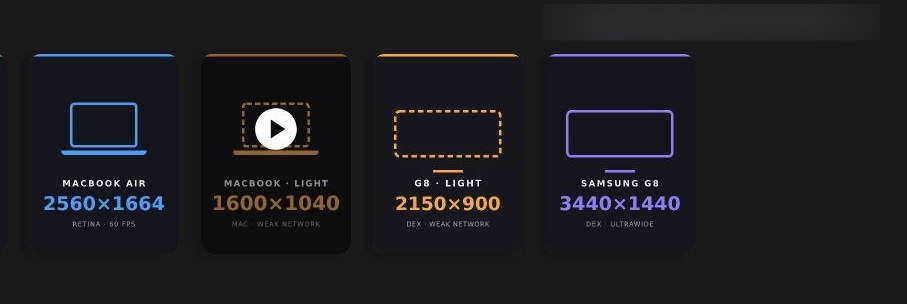
Results are great! With my MacBook light configuration I get 60fps, and a latency of 30ms while connected to my home internet connection. I live in the Italian countryside and use Eolo as my Internet provider. With my phone’s connection over 5G I get similar results, of course depending on the signal strength.
Samsung DeX
Around the same time, while I was avoiding spending thousands of euros on upgrading my machines, Reddit’s feed did its job and showed me posts about foldables, in particular about the Samsung Fold 8. I’m well aware that paying 2k for a smartphone given what I said above doesn’t really make sense. But I’m a tech nerd, and a weak human, I really loved the Fold 8’s screen ratio and I’ve always been fascinated by foldables but have never owned one.
I made the crazy purchase, and told my AI to add another sunshine configuration for my Fold 8, and boom, I had a full flagship Linux machine “running” on a 7.6-inch display. But most importantly, Samsung ships the best, imho, Android to desktop app: DeX. Compared to Google’s similar functionality, it makes the Google one feel like a beta built as a high school project. That said, DeX also has a long way to go before it feels production-ready, but at least it’s usable.
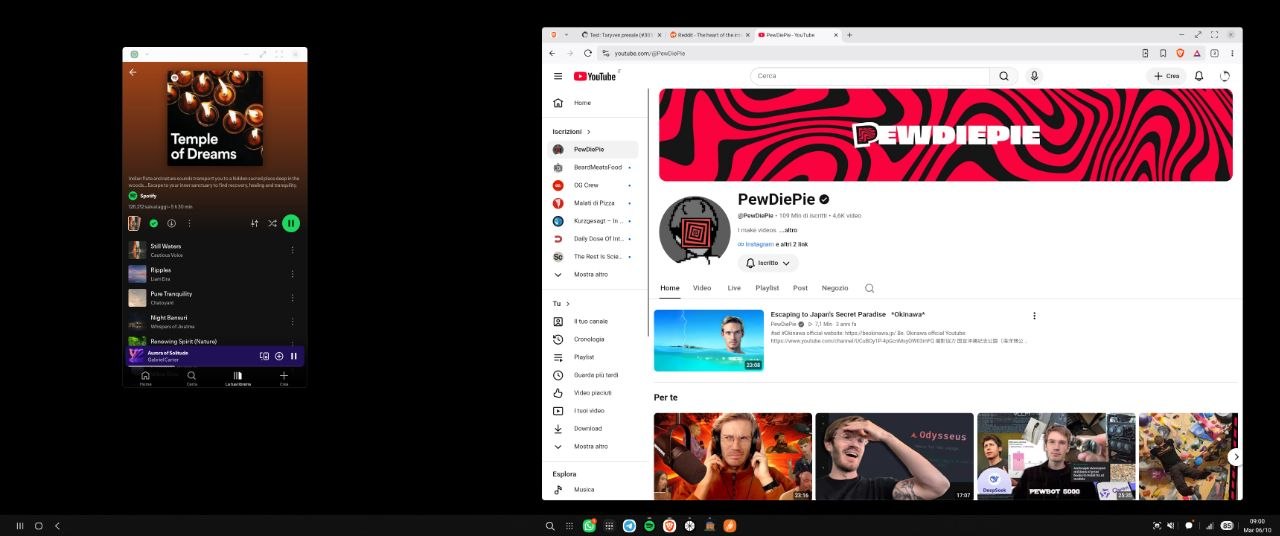 Samsung DeX connected to Samsung G8 (4k@60fps)
Gaming on the Fold 8
As I said I enjoy playing video games, or I should say, I enjoy playing World of Warcraft. I’m the worst player, but I love leveling with friends, it really helps me detach from everyday thoughts.
Given the big screen and good performance of my phone I decided to use LLMs to finally get Wow running on Android in an easy way. So I vibecoded Wow Mobile, and it works so well: it’s amazing how weeks of work can be done in an afternoon as a background task. I think vibecoding is so hated just because it’s being used by non software developers to build “production ready” apps. But when you put vibecoding in the hands of a developer and the objective is to build a hobby app or prototype, it becomes magical.
I also tried cloud gaming via GeForce NOW, but I can’t really get used to it. It works but that small lag really drives me crazy while gaming.
A world of agents
Vibecoding is great but when it comes to writing production-grade software, a human has to review every line of code, and steer the LLM in the right direction. There are a ton of agent tools, probably each one of them vibecoded by their maintainer, and it’s ok. These tools are just wrappers around Codex or Claude Code, allowing developers to wrap their heads around multiple and fast context jumping and automating tasks.
I also built my own, but it’s so specific to my workflow that I don’t plan to publish it. Just to mention a few features:
- Create rooms in which multiple LLMs, terminals or VSCode sessions can be started, context in a room is shared.
- Run SQL queries in a secure way, by encrypting the connection client side protected by biometrics. Every time an LLM wants to run a query, I see the query and accept it with my fingerprint.
- Manage my project’s board for me automatically, so that every time I start/complete a task, the issue is automatically moved to the right column.
- I receive a notification every time an agent finishes working on something or needs my feedback.
- It’s installed on my VPS so it’s always active, and it can use all the tools installed on my VPS. E.g. I have ADB with wireless debugging so I can just ask an agent to do stuff on my phone for me.
- Keyboard shortcuts: if I’m using the app with my keyboard attached I just use shortcuts to move from one terminal to another in a really convenient way.
Tailscale and biometric authentication on VPS
When you use a VPS as your main desktop, having a secure connection between your clients and the remote VPS is mandatory, Tailscale makes this super easy. It’s just a matter of registering your devices, and you get a safe url for each of them. It’s just Hamachi on steroids for those of you who remember remote LAN gaming 😀
In my secure network, I feel ok with doing risky things. One good example is an app that emulates the biometric authentication from my phone inside my VPS, so that when a website asks for a WebAuthn passkey, I can use my finger to log in, even from my remote VPS.
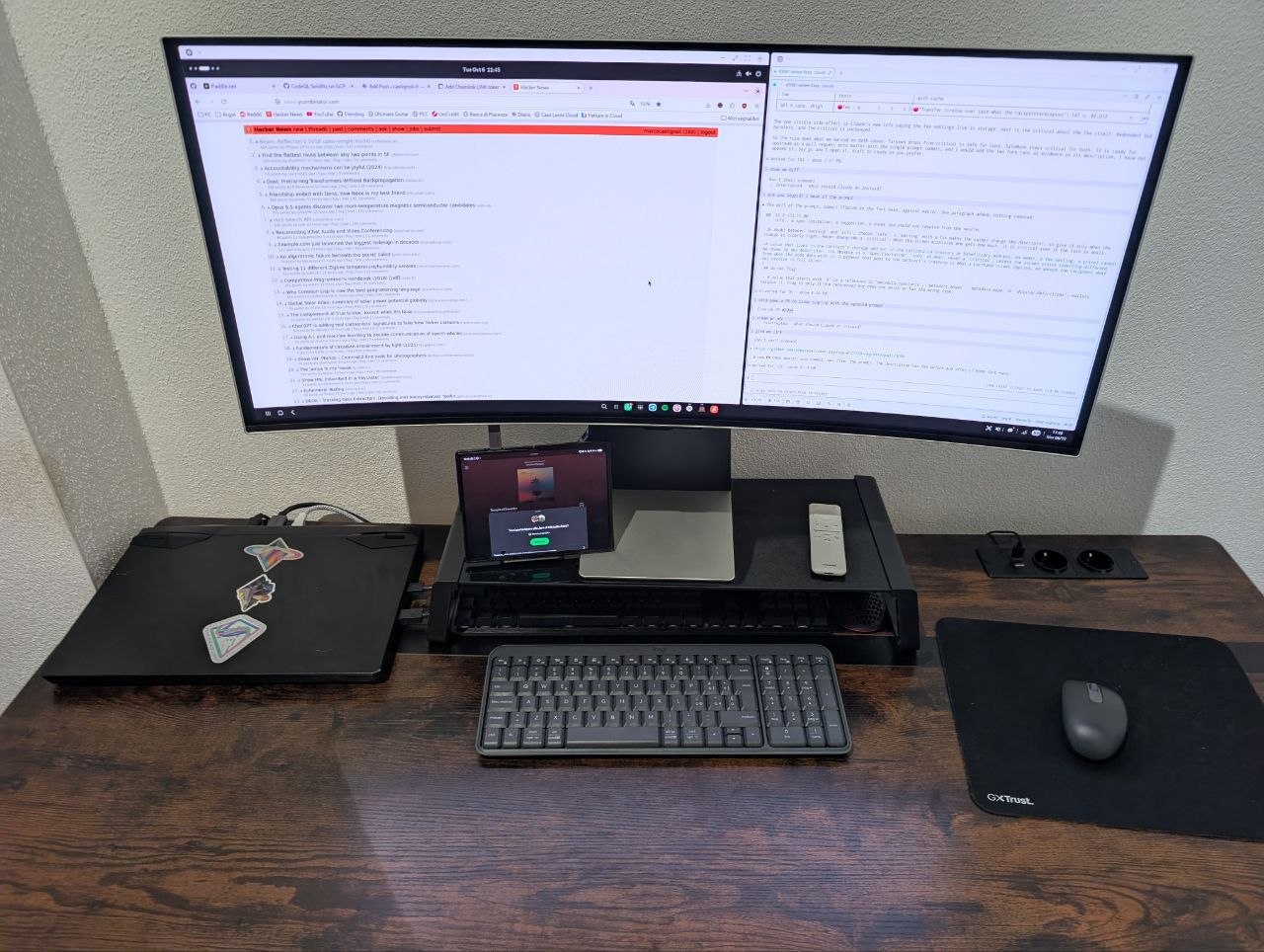
A picture of my desk
You can see my gaming laptop on the left. Then the big screen split in half, on the left the remote desktop to my VPS, on the right my Agent tool. Below my screen, I have my phone attached to the screen with a single USB-C cable. The G8 has a built-in USB hub, so anything plugged into the monitor is passed through to the phone over that same cable.
I also bought a cheap Bluetooth mouse and keyboard, and hid the gaming laptop’s keyboard and mouse under the screen stand.
Things that don’t work properly
I’m just going to report everything that works poorly or doesn’t work at all here:
- Video calls and screen sharing. Quite annoying in general, of course it depends on the app. We are using Jitsi, and it used to work very badly on DeX, but I opened a PR to fix it. Google meet works ok. My current workaround is joining the meeting from both my Android phone and the VPS, to share the VPS’ screen
- Samsung DeX interface not optimized for fast keyboard shortcuts.
- Sometimes the keyboard focus doesn’t go to the right window. It’s very annoying because you think you are typing in a window, but your keyboard sends keys to another app.
- Android apps while in DeX (e.g. Whatsapp) don’t feel native, the UX is designed for mobile and touch, so using them with a mouse is bad. This is not true for every app, Brave browser for example is amazing.