Image licensed under CC-BY-SA – https://flow.movie/
What’s New Recap
Round-up of what’s new in Blender 4.4, in detail.
QUALITY BLEND
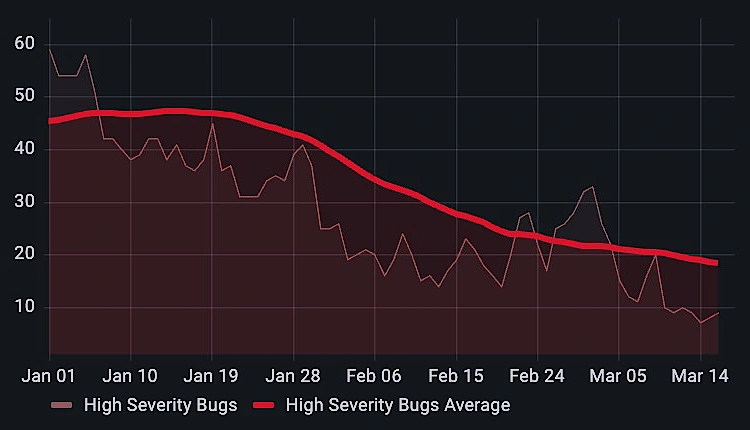
Blender 4.4 is all about stability. During the 2024–2025 northern hemisphere winter, Blender developers doubled down on quality and stability in a group effort called “Winter of Quality.”
Winter of Quality
In just a few months, developers fixed over 700 reported issues, revisited old bug reports, and addressed unreported problems.
Alongside bug fixes, Winter of Quality also included tackling technical debt and improving documentation.
Issues Addressed per Module
ACTION PACKED
Blender 4.4 introduces Action Slots, revolutionizing animation workflows by letting multiple data-blocks share a single Action.
WHAT ARE
ACTION SLOTS?
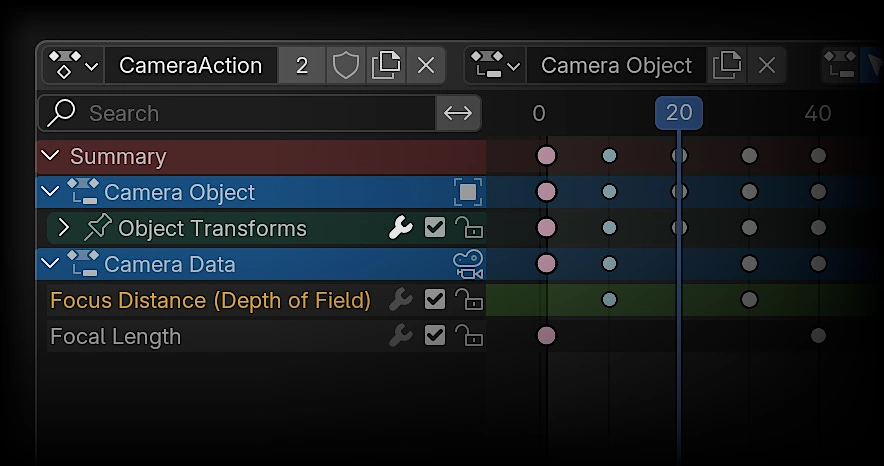
Before Action Slots, each data-block specific animation—like an object’s position, a camera’s depth of field, or a material’s shader properties—needed its own separate Action. This made it difficult to animate multiple elements together or share animations between objects or even projects.
For example, if you wanted to animate a camera moving while also changing its depth of field, you’d need two separate Actions, which couldn’t be easily linked or reused.
Now you can mix all sorts of animations such as an object’s position, its material properties, even compositing effects—all within a single Action.
MORE ANIMATION
VSE: Vastly Superior Editing
The Video Sequencer continues to improve with quality-of-life upgrades for text editing, expanded support for codecs including H.265 and 10/12-bit videos, and performance improvements that make editing faster than ever.
EDIT TEXT ON THE SPOT
Introducing: Edit mode for text strips in Preview!
FIND YOUR CENTER
Multi-line text strips can now be properly aligned to the left, right, or center.
FASTER
EDITING EVERYTHING
- Building proxies for image sequences is faster now.
- Preview playback performance of float/HDR content is faster now.
- Text strip background fill “Box” is several times faster for large fill areas.
- Curves, Hue Correct, White Balance modifiers are 1.5x-2x faster now.
- Many sequencer effects are slightly faster now thanks to more efficient multi-threading.
VIDEO
BEYOND
Blender now supports 10 and 12 bit/channel videos!
During rendering, you can set a color depth of 10 or 12 bits for supported codecs (10 bit for H.264, H.265, AV1, 12 bit for H.265, AV1).
When reading 10-bit or 12-bit videos, they are loaded as floating-point images.
A BIT
MORE
EVEN MORE SEQUENCER
EXPAND
YOUR BLENDER
The Blender Extensions platform keeps growing, with over 500 free add-ons and themes to customize your workflows.
You can also share your own add-ons and themes!
MODELING
Pole Position
A new option in the Select by Trait operator lets you select by pole count.
Easily find all 3-pole or 5-pole points in your mesh.
Given their impact on topology, the default selects all poles that do not have 4 edges, allowing for easy inspection.
MODELING
Influencer
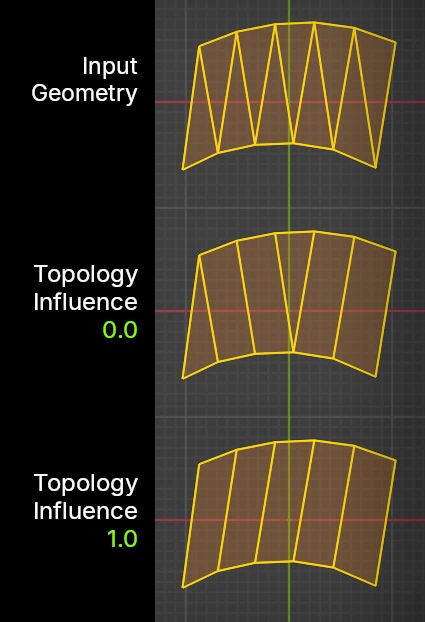
Joining triangles to quads now prioritizes quad-dominant topology, creating a more structured “grid” layout. This helps maintain cleaner geometry and improves mesh flow, especially in models where uniform quads are preferred.
This behavior can be adjusted using a topology influence factor, to better control how triangles are merged.
MODELING
Vertex & Edge Dissolve
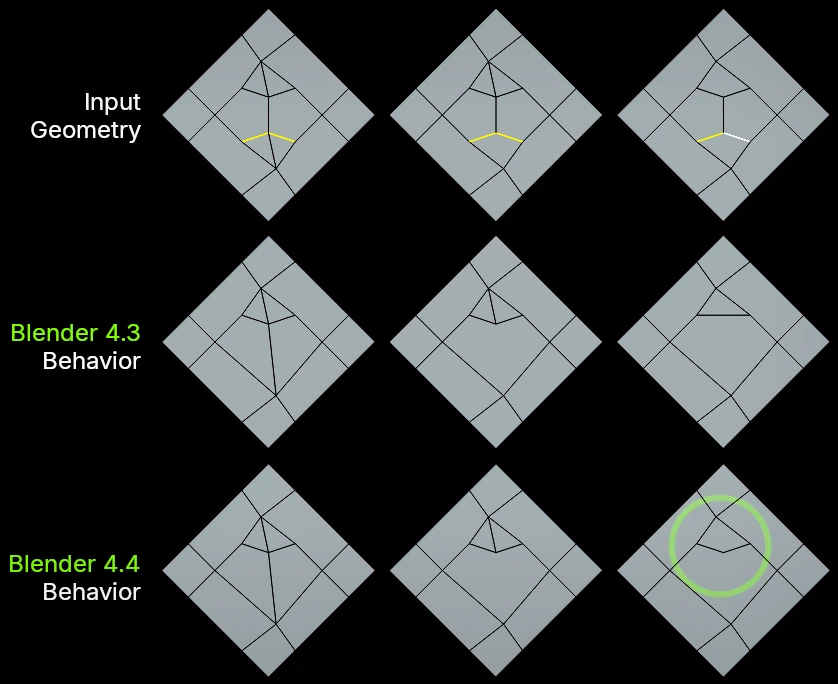
Dissolving edges may remove additional, unselected edges to ensure the mesh remains valid. Previously, this also dissolved vertices connected to those unselected edges.
The new behavior processes only vertices that belonged to the selected, now dissolved edges.
MORE MODELING

SCULPT
Plane & Simple
Stay grounded or reach new heights with a new sculpt brush type: Plane.
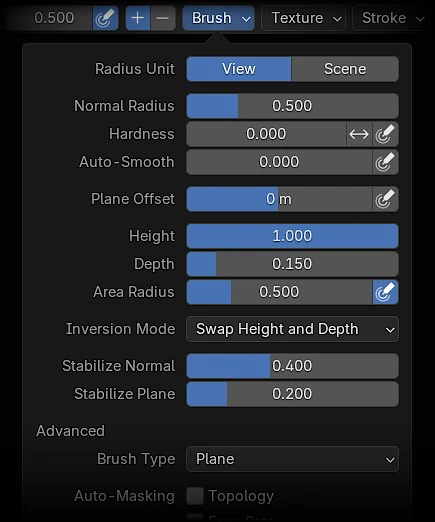
The Plane brush is a generalization of the existing Flatten, Fill, and Scrape brushes, with new options to control stabilization and range of influence above and below the brush plane.
Key features include adjustable height above the brush plane, depth control for vertices below it, and an option to invert these settings.
Stabilization options for the Normal (brush plane’s orientation) and Plane‘s position are also available for precise control.
MORE SCULPT
USER INTERFACE
She Comes in Colors
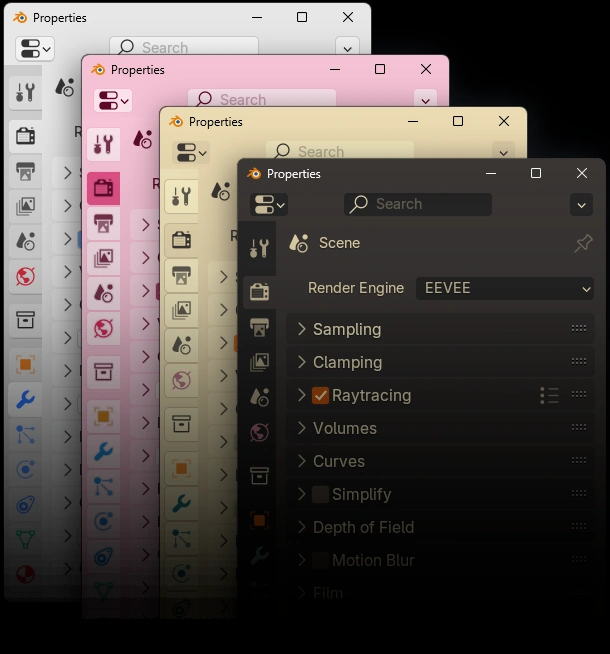
Window decorations now follow the theme colors on Windows 11 and macOS.
Snap Into Place
Editors now softly snap to minimum and maximum sizes, with improved splitting previews and docking feedback.
Scrollbars are hidden for small editors.
Hidden Away
Horizontal scrollbars are now hidden automatically when they don’t fit in the editor.
Node Editor
Fade
In Node Editors, inputs that can’t affect output are now grayed out for group nodes, Geometry Nodes modifiers, and node tools.
OTHER EDITOR IMPROVEMENTS
macOS
Quick Look
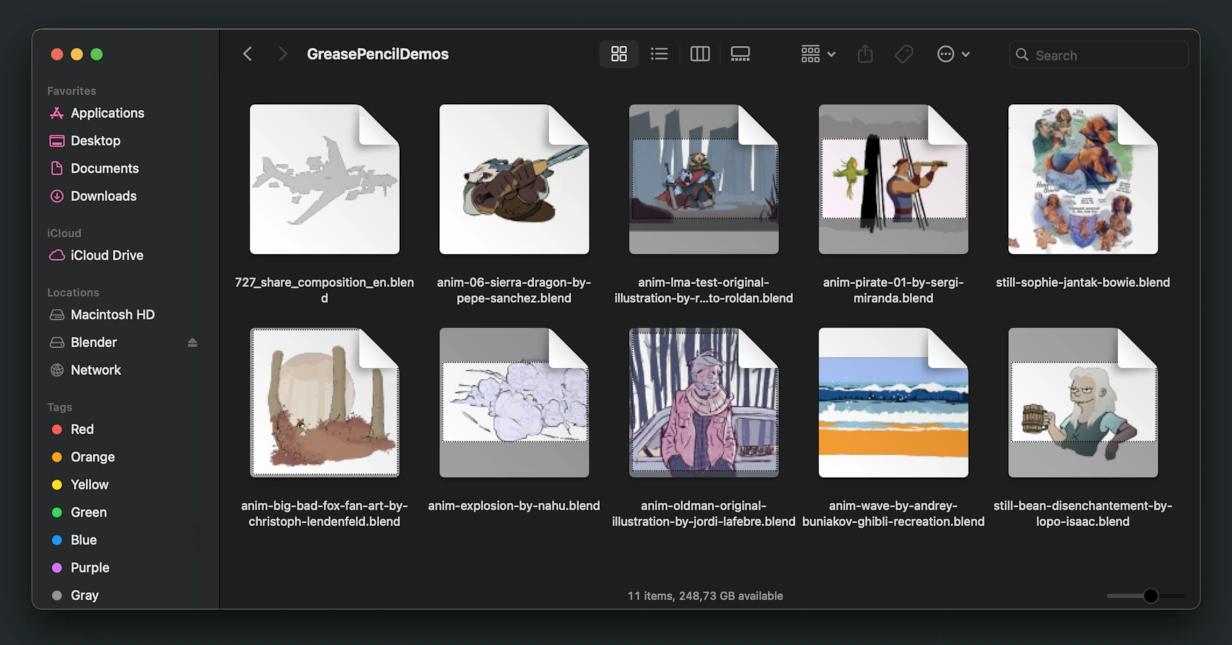
On macOS, you can now preview blend file contents in a thumbnail in Finder, App Exposé and Spotlight.
EVERYTHING UI

COMPOSITOR
Speed
for Everyone
The CPU compositor was rewritten to pave the way for future development.
The rewrite provides significant improvements in performance in certain configurations of some nodes, caching of static resources like images, and less memory usage on node setups with many nodes that operate on pixels.
Filter nodes are particularly faster now:
- Levels node is up to 10x faster.
- Filter and Kuwahara are twice as fast.
- Blur nodes up to four times faster.
- Glare filter is not only more advanced but also 6x more performant.
- Pixelate node is 9x faster.
Adjusting compositor node trees can be significantly faster and more interactive. That’s because the compositor now avoids computing outputs that aren’t viewed by the user through the backdrop or image editor.
The overall compositing experience should now feel more responsive, whether you’re using the CPU or GPU.
- Blender 4.3
- Blender 4.4
-
Levels
-
Pixelate
-
Glare
-
Pixel Nodes
-
Bilateral Blur
-
Variable Blur
-
Kuwahara
-
Masks
-
Lens Distortion
- 0
- 2
- 4
- 6
- 8
- 10
- Relative performance (higher is better)
COMPOSITOR
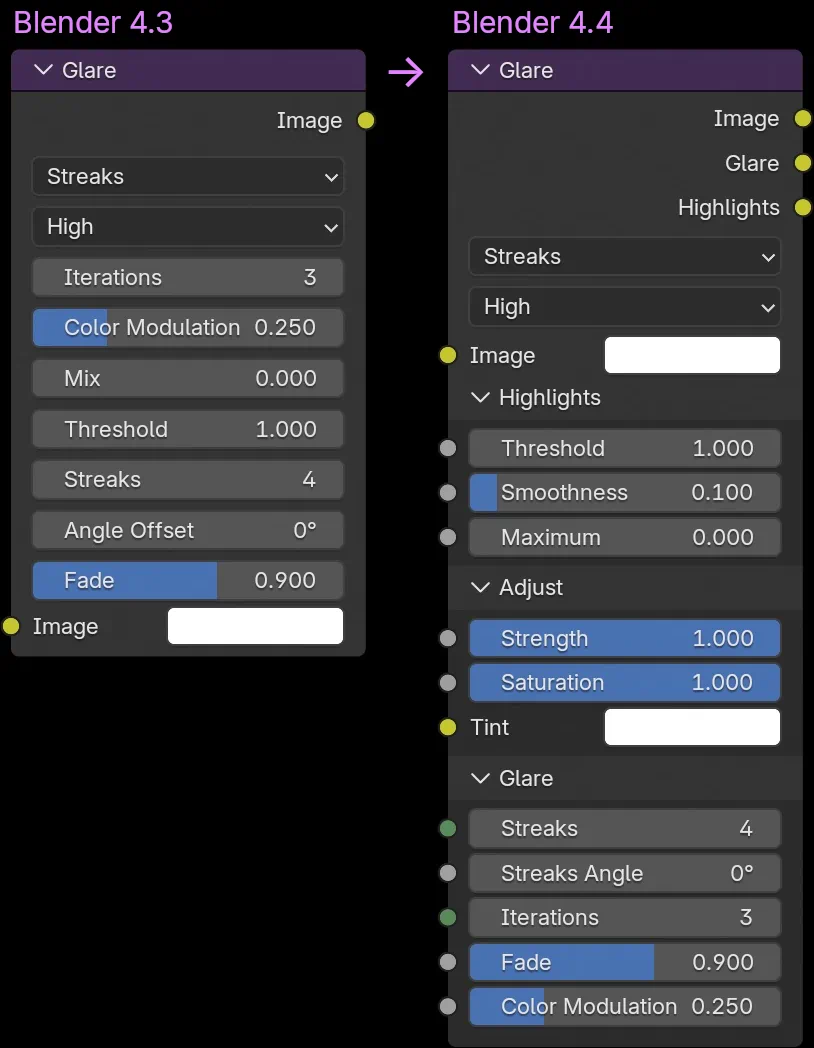
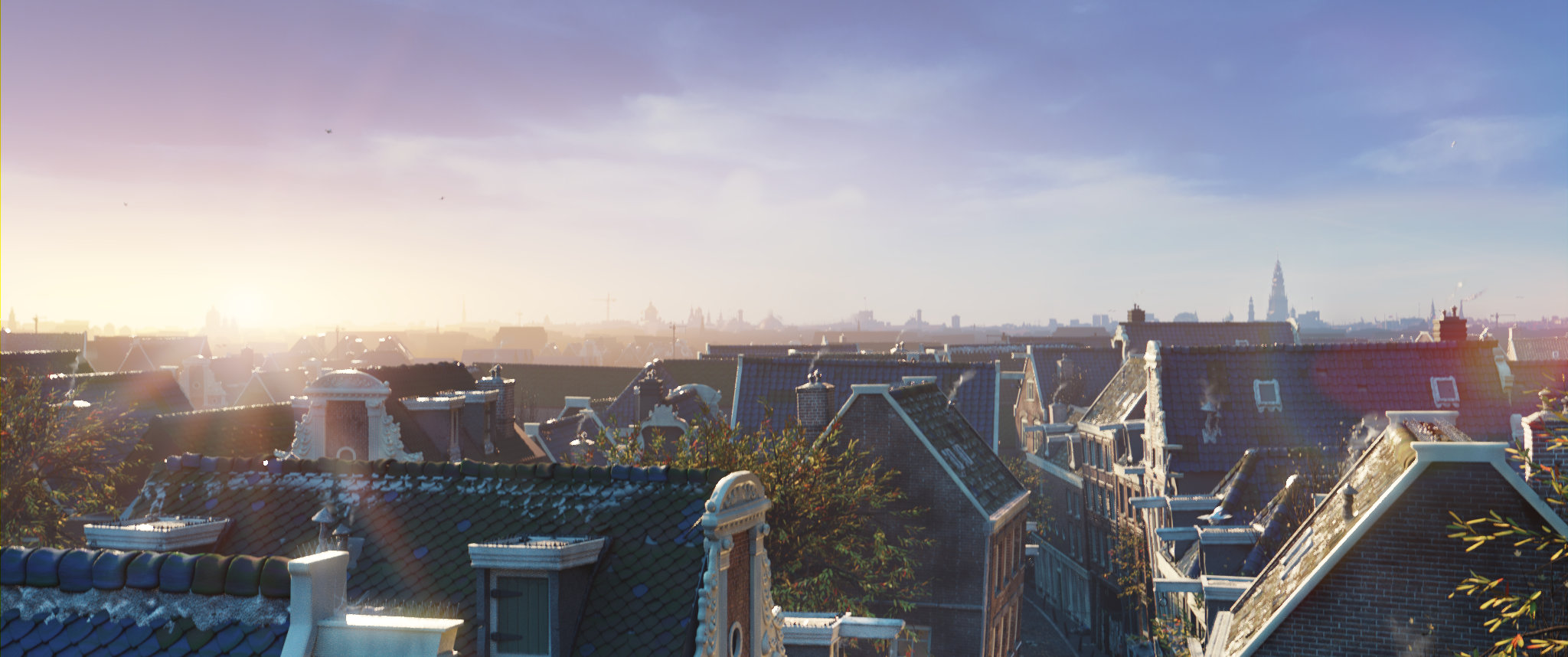
Glare Glow Up
The Glare node got a major revamp for better control and usability:
- Linkable Inputs – Most node options are now input sockets you can connect.
- New Outputs – Generated glare and highlights are now exposed as output sockets.
- A new Strength input lets you adjust glare intensity.
- Fog Glow and Bloom sizes are now linear and scale properly.
- More realistic, energy-conserving, and properly scaled Bloom.
- Adjust glare saturation and tint with dedicated inputs.
- Highlight Control – Clamp and smooth highlights with the new Smoothness and Maximum inputs.
- Tidy UI – Inputs are now neatly organized into collapsible panels.
MORE COMPOSITOR
INDUSTRY READY
All library versions used in Blender 4.4 are aligned with the VFX Reference Platform 2025, making studio pipeline integration and maintenance easier.
BUT WAIT, THERE’S MORE
Geometry Nodes
- New node “Find in String”.
- New input nodes: Collection and Object.
- New “Limit Surface” option available in the Subdivision Surface node.
- Normal input node now outputs proper face corner normals instead of just face normals.
- Join Geometry and Realize Instances nodes now preserve the vertex group status of input attributes.
- The text overlay in the 3D view works for matrix attributes now.
- Performance: Triangulate node is 30x to 100x faster.
- Sort Elements node is 50% faster in common scenarios.
- The Warning node now has a dynamic label depending on the selected type.
- UI: Resizing nodes now support snapping.
Core
- Added support for rendering videos using H.265/HEVC codec.
-
BLENDER_SYSTEM_SCRIPTSnow supports multiple paths. -
New
BLENDER_CUSTOM_SPLASHto replace the splash screen artwork. - EXR images that use DWAA/DWAB compression codec now have a Quality setting
- “Render Audio” can now render to AAC (.aac) format.
- Auto-save and quit.blend files are now always saved with compression.
USD
- Animated volumes from Geometry Nodes or volume modifiers are now supported for export.
- Material displacement for UsdPreviewSurface is now supported in import and export.
- Point instancers with animated attributes are now supported on import.
- The experimental “Instancing” option now supports object hierarchies and non-mesh geometry (e.g., curves, point clouds).
- New Python hooks.
- Added “Merge parent Xform” option to control USD prim merging with its Xform parent during import for better hierarchy preservation.
- Added “Apply Unit Conversion Scale” option to scale objects by the USD stage’s meters per unit value.
- Added “Merge parent Xform” option to control whether Blender object transforms are written to their data prim or kept separate on export, reducing USD prim count and preserving hierarchy.
- Added “Units” and “Meters Per Unit” options to set the USD Stage measurement or a custom value.
- USD & Alembic: Edge and vertex crease processing now respects the value range expected by OpenSubdiv.
Grease Pencil
- Several operators and functionality from the old Grease Pencil were restored.
- Properties of locked materials can be edited (similar to properties of locked layers)
- Invisible layers are no longer part of evaluated data.
- UI: The preview icon of locked materials is no longer grayed out.
- “Lock all” and “Unlock all” operators now work on Layer Groups.
- “Hide Others” operator now also considers layer groups.
- Vertex colors and layer tinting render in “Solid” shading mode.
glTF
- Added support for importing Action Slots.
- Add option to not select created objects.
- Add option to import scene extras or not.
- Export: Several (breaking) changes to hooks.
- Export: Always bake scene animation, so driven animated properties can be exported.
- Export: Add interpolation fallback option.
- Export: Several improvements to Collection export.
- Bug fixes
Python API
- New: `bpy.app.module` indicates if Blender is running as Python module.
- New property to check if installation is portable.
- New operations for Curves.
- New properties for Nodes.
- Grease Pencil Python API updates.
- VSE: Major API breaking changes and deprecated properties.
- Animation: Slotted Action related additions, deprecated properties and breaking changes.
- Complete list of API breaking changes.
Cycles
- Improved OptiX Denoiser
- More accurately render sub-pixel bump mapping.
- Baking: Speed up Selected to Active baking.
- OSL: Improved closure compatibility with MaterialX.
- Improved Sample Subset
- More robust host memory fallback when the GPU runs out of memory.
- NVIDIA: Support GeForce RTX 50×0 series (Blackwell)
- AMD: Support RX 90×0 series (RDNA4)
- AMD: HIP RT library updates and minimum driver version increased.
- Intel: Minimum driver version increased.
- Intel: Improved image texture sampling performance.
Outliner
- Improved vertex group sorting.
- Support Ctrl/Shift for excluding collections.
- Fixed overlapping icons with some display options.
- Can now un-isolate collection when a linked collection is present.
- Non-object active item text now drawn in “text high” color.
- Drag and drop to scene now updates the view.
- Child objects linked to other collections are now faded.
Windows
macOS
On April 15th 2025, Blender 4.4.1 was released featuring 108 additional bug fixes. See the changelog.
On April 29th 2025, Blender 4.4.2 and Blender 4.4.3 were released featuring 8 additional bug fixes. See the changelog.
Plus hundreds of bug fixes, code cleanups and refactors.
See the full list of changes.
CREDITS
List of developers that contributed to Blender 4.4
Blender is a community project.
Learn more on how you can contribute to Blender.
Splash artwork: Flow © Dream Well Studio, Sacrebleu Productions, Take Five – Licensed under CC-BY-SA – flow.movie
Huge thanks to everyone involved 🧡
The Blender team. March 18th, 2025