
Mozilla is now showing ads in the form of sponsored Firefox contextual suggestions when U.S. users type in the URL address bar.
Mozilla says the feature was introduced with Firefox 92 in September to fund development and optimization.
"Beginning in Firefox version 92, you will also receive new, relevant suggestions from our trusted partners based on what you're searching for. No new data is collected, stored, or shared to make these new recommendations," Mozilla says

While blog posts [1, 2] presenting it under the "Firefox Suggest" name were published in September, it was first mentioned in a Firefox changelog with the release of Firefox 93 two days ago and presented as a "faster way to navigate the web."
"Firefox Suggest is a new discovery feature that is built directly into the browser. Firefox Suggest acts as a trustworthy guide to the better web, surfacing relevant information and sites to help people accomplish their goals," Mozilla said at the time.
"Firefox Suggest will enhance this by including other sources of information such as Wikipedia, Pocket articles, reviews and credible content from sponsored, vetted partners and trusted organizations."
Mozilla says it will only work with partners that meet Firefox's privacy standards, with the preferred partner for now being adMarketplace.
Opt-in or opt-out?
Mozilla says on its support site that these suggestions will only be enabled after users provide access to new data types by clicking "Allow suggestions" when prompted or by manually choosing the types of suggestions that will be shown from settings.
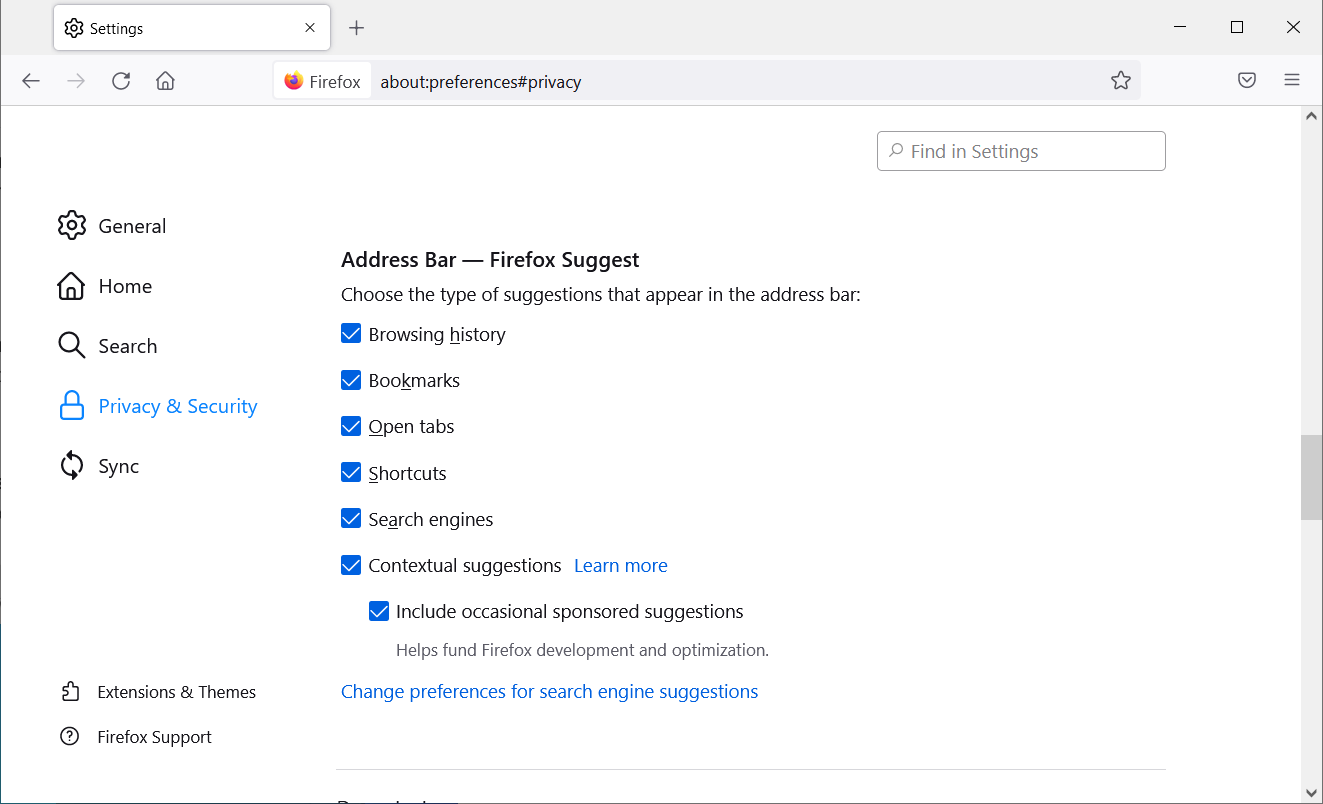
To toggle Firefox Suggest and change the types of suggestions showing up at any time, you have to click the menu button and go to Settings > Privacy & Security on the left, and then go down to the Address Bar — Firefox Suggest section.
To enable or disable contextual suggestions, select or deselect the checkbox next to Contextual suggestions. To toggle traditional address bar suggestions like Firefox Suggest results from browsing history and bookmarks, you will have to check or uncheck their associated checkboxes.
However, while Mozilla describes Firefox Suggest contextual suggestions as opt-in, in BleepingComputer's tests and from what users have reported [1, 2], the feature is on by default.
We also spotted some suggestions that looked like they were sponsored (such as the Retoro one in this screenshot) but weren't tagged as such, however Mozilla said the organizations was not one of their partners.
"All sponsored content displayed via Firefox Suggest is tagged as sponsored. Search engine results are provided as normal and not categorized under Firefox Suggest," a Mozilla spokesperson told BleepingComputer.
It’s not yet clear why the untagged suggestion appeared given that we cleared all browser data, including web history, before the tests.
No PII data shared with partners
When Firefox Suggest is enabled, users' search queries are sent to Mozilla servers, and the clicked suggestions to partners via a Mozilla-owned proxy service.
"The data we share with partners does not include personally identifying information and is only shared when you see or click on a suggestion," Mozilla said.
Right now, Mozilla says it collects the following info to power its Firefox Suggest service when users opt-in contextual suggestions:
- Search queries and suggest impressions: Firefox Suggest sends Mozilla search terms and information about engagement with Firefox Suggest, some of which may be shared with partners to provide and improve the suggested content.
- Clicks on suggestions: When a user clicks on a suggestion, Mozilla receives notice that suggested links were clicked.
- Location: Mozilla collects city-level location data along with searches, in order to properly serve location-sensitive queries.
In this blog post, you can find additional information on how collected data is handled and shared by Mozilla with its partners.
Mozilla revenue and market share
This newly added feature is likely an effort to diversify Mozilla's revenue streams, seeing that most of the organization's yearly revenue comes from a deal made with Google in November 2017 to make Google's search engine the default search provider in the United States, Canada, Hong Kong, and Taiwan.
Mozilla has also introduced sponsored tiles (aka sponsored shortcuts) on the default home page and the New Tab page in Firefox to promote content provided by advertising partners (Mozilla gets paid only when users click on the displayed tiles).
adMarketplace is also the preferred partner for the sponsored tiles feature as it meets Mozilla's privacy standards for Firefox.
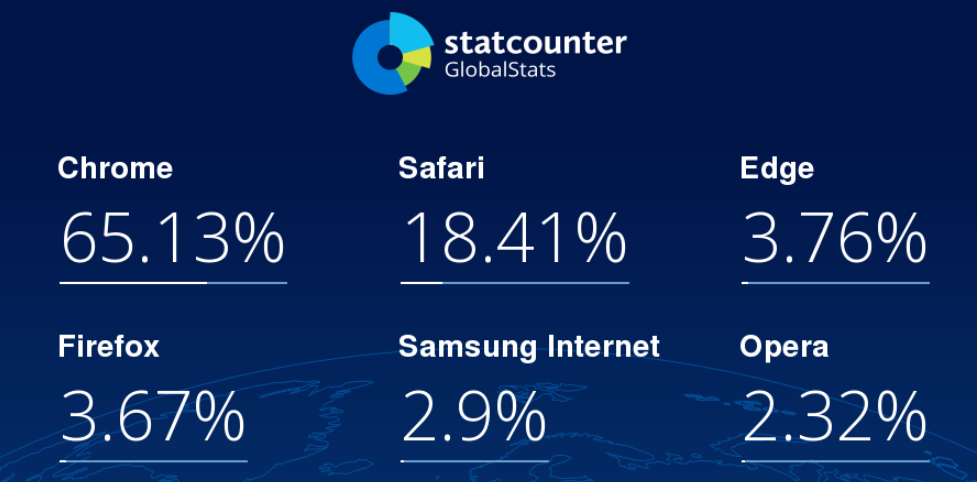
Firefox currently has 3.67% of the browser market share worldwide, compared to Google Chrome's 65.15% and Apple Safari's 18.4%, according to Statcounter's GlobalStats.
Also, according to Mozilla's Firefox Public Data Report, the web browser reported just over 211 million Monthly Active Users (MAU) on September 27, which measures the number of Firefox Desktop clients active during the last 28 days.
Update October 8, 04:06 EDT: A Mozilla spokesperson sent the following answers to BleepingComputer's request for more details:
1. Is the feature live for all Mozilla users or is it part of an A/B testing round?
Firefox Suggest has three modes: history, offline and online.
History was rolled out beginning in our 92 release, which rebranded our history, bookmarks and open tabs management as “Firefox Suggest.”
Offline was also rolled out with our 92 release. This includes sponsored suggestions served from a local file, and does not involve any access to new data types. (SUMO article)
Online is a small-scale opt-in pilot available through our Desktop experience in the United States only. Our method of offering this to users is through our Studies system (visit our documentation to learn more). Data collection needed to provide the service is only enabled if the users offered the study explicitly opt-in through a prompt.
2. In what Firefox version was support for sponsored contextual suggestions added?
Firefox Suggest with offline mode was rolled out with our 92 release by default in the U.S.
Mozilla began to roll out Firefox Suggest with online mode through our Studies system (visit our documentation to learn more). This is a small-scale opt-in pilot available through our desktop experience in the United States only.
Users outside of the U.S. will experience this feature through the history mode, which rebranded our history, bookmarks and open tabs management as “Firefox Suggest.”
3. Is this feature enabled by default?
Firefox Suggest for history is enabled by default globally. Firefox Suggest with offline mode is enabled by default in the U.S.. Firefox Suggest with online mode is a small-scale opt-in pilot available on Desktop only, in the U.S.. Contextual suggestions are not available outside of the U.S. Users outside of the U.S. will experience the Firefox Suggest feature utilizing only local browsing history, bookmarks, and open tabs.
Users in the U.S. will get the opportunity to turn contextual suggestions on with an opt-in prompt or through the settings menu.
If after enabling you do not want to use Firefox Suggest, a user can turn it off: 1) go to the menu bar at the top of the screen, click Firefox and select Preferences; 2) select the Home Panel; 3) in the Firefox Suggest section, unselect Firefox Suggest/Sponsorship shortcuts.
4. What data does Mozilla collect and share with its partners?
In order to deliver a personalized web experience with smarter results for you and requiring less effort from you, Firefox Suggest for online mode will collect and share search queries (what you type into the search bar), collect city-level location data (what's nearby and relevant), as well as, whether you click on a suggestion and which one. Mozilla does not sell data collected from Firefox Suggest or from any other Firefox feature. Mozilla will only share non-identifiable data collected through Suggest to operate, update, and improve the functionality of Firefox and the overall user experience.
When you click on a sponsored suggestion, Firefox sends technical data along with your search query to our partner through a Mozilla-owned proxy service, which removes information that might identify you. The code for this proxy service is available on GitHub for interested technical audiences. This data does not include personally identifying information (PII) and is only shared when you click on a sponsored suggestion.

Break down IAM silos like Bitpanda, KnowBe4, and PathAI
Broken IAM isn't just an IT problem - the impact ripples across your whole business.
This practical guide covers why traditional IAM practices fail to keep up with modern demands, examples of what "good" IAM looks like, and a simple checklist for building a scalable strategy.