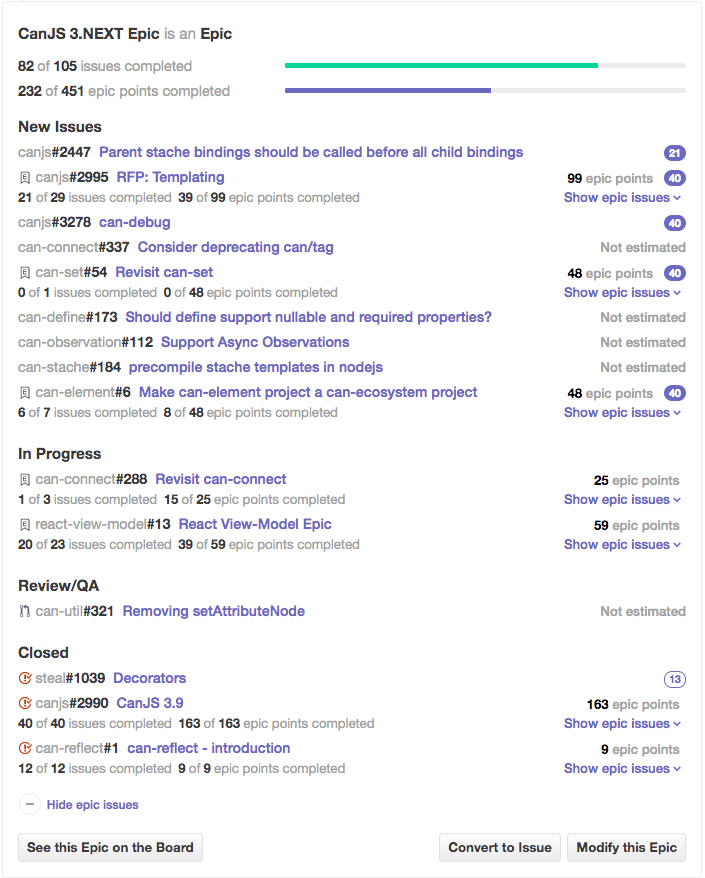
The first, and most important step to supporting stability and innovation within CanJS's codebase has been breaking up CanJS into individual repositories, each with its own npm package and semantic version number. In this article, we will discuss: There are currently over 60 different repositories in CanJS: Organizing CanJS into individual repositories and packages has many benefits. The obvious advantage is that pieces can be used without the whole. You can choose to use CanJS’s observables or can-fixture without the rest of the framework. You could even mix and match CanJS libraries with other libraries like React quite easily. However, the main benefit is that independent repositories improve CanJS’s stability — one half of CanJS’s mission. This is because independent repositories make it easier to upgrade more frequently. For example, let's compare: Despite making relatively few breaking changes, and providing a migration guide, upgrading from CanJS 2.3 to 3.0 looks like a big step: But if you break that step down, CanJS 2.3 is mostly CanJS 3.0 with a bunch of bug fixes, a heap of new features, and a few breaking changes. Most of the difficulties upgrading are the breaking changes, which account for the majority of the upgrade step size: To get all of those bug fixes and new features in 3.0, you have to take on those breaking changes from 2.3 all at once. Depending on your company culture, and scale of your application, this might not be easy. Going forward in CanJS 3.0, packages are released independently of each other. You can upgrade to bug fixes and new features immediately and delay breaking changes (example: Independent repositories also mean that legacy libraries, like can-ejs can continue living through community-driven fixes and releases. They don’t die simply because they are no longer included in the core CanJS build. In short, independent repositories and packages: Managing so many repositories would be a difficult task without great tooling. To make this easy, we use: DoneJS's plugin generator makes it easy to author a JavaScript open source project. It creates the files and scripts necessary for: Walk through the DoneJS plugin generator guide to learn how to create your own plugins. While CanJS is broken out into individual repositories and packages, there’s still a need to test for problems when combining packages. The canjs/canjs repository is used to load every package’s tests and run them all at once within each supported browser. We also have additional integration tests to make sure our guides and production builds work. The canjs/canjs repository is also used to establish specific versions of every package that are verified to work together. Organizations can upgrade to a specific version of CanJS by using the same dependencies. The latest version of CanJS documents its package versions here. We use GreenKeeper.io to know if we’ve broken any upstream dependencies. When we make a new release, GreenKeeper makes pull requests to our repositories using that release, which runs the repositories tests. We get an email when those builds fail. Landscaper is a command-line tool for making sweeping changes to any number of projects using code mods. If we want to change the license copywrite year across all 60 repositories, we write a code mod and use landscaper to submit a pull request to all 60 repositories. We use ZenHub to manage our issues across multiple repositories, including adding complexity scoring and combining issues into epics. The following shows all the issues assigned to the CanJS 3.Next release: Breaking up CanJS into many repositories has been a huge effort. Even with the tools above, the simplicity of a single repository can sometimes still feel appealing. But the results have so far been overwhelmingly positive. We've been able to add three to four times the number of features and bug fixes in the last 10 months than the previous 10 months. Multiple repositories also forced us to write code that is more thoughtfully constructed and better architected. We will see how in the next articles in this series:
Benefits of Independent Repositories
Core
Infrastructure
Ecosystem
Legacy
can-component
can-attribute-encoder
can-connect-cloneable
can-ejs
can-compute
can-cid
can-connect-feathers
can-list
can-connect
can-construct
can-connect-ndjson
can-map
can-define
can-control
can-connect-signalr
can-map-backup
can-route
can-deparam
can-construct-super
can-map-define
can-route-pushstate
can-dom-events
can-define-stream
can-validate-legacy
can-set
can-event
can-define-stream-kefir
can-view-href
can-stache
can-namespace
can-define-stream-validatejs
can-stache-bindings
can-observation
can-element
can-param
can-fixture
can-reflect
can-fixture-socket
can-simple-map
can-jquery
can-symbol
can-kefir
can-types
can-ndjson-stream
can-util
can-observe
can-validate-interface
can-react-component
can-view-callbacks
can-reflect-promise
can-view-live
can-stache-converters
can-view-model
can-stream-kefir
can-view-nodelist
can-validate
can-view-parser
can-validate-validatejs
can-view-scope
can-vdom
can-view-target
can-view-autorender
can-view-import
can-zone
react-view-model
steal-stache
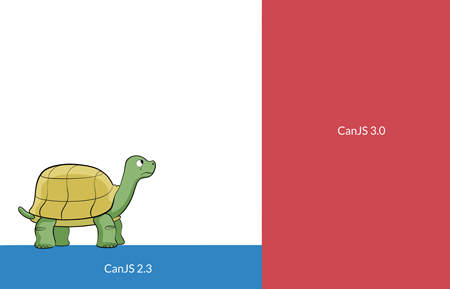
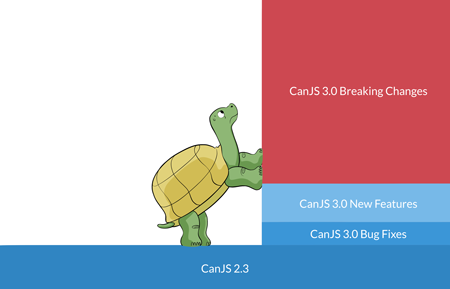
can-route 4.0.0) until later. You can upgrade breaking changes in steps too. For example, you might upgrade to can-route 4.0.0 one month and can-component 4.0.0 the following month. CanJS 3.0’s upgrade path looks like: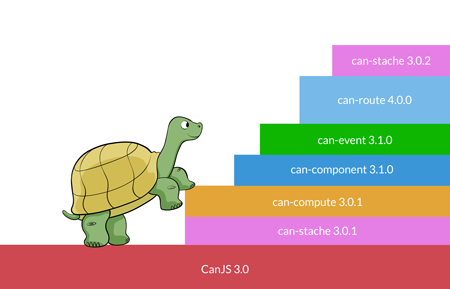
DoneJS's plugin generator
<script>, AMD, and CommonJS builds.Integration tests with the CanJS repository
Test breaking upstream packages with GreenKeeper
Make changes across multiple repositories at once with Landscaper

landscaper https://gist.github.com/andrejewski/8d0b4927f73978e78b0105f84ad8abd4Manage issues across repositories with ZenHub

Conclusions