This tutorial walks through some of CanJS's most useful debugging features. If you are new to CanJS, and want to be impressed, you might checkout it's two most unique and powerful features first: For those actively using CanJS, we encourage you to go through each step: For each of the 12 steps, there's a: Even better, there's a link to that step performed in this video: Lets get started! We want to be able to get this component working: And then be able to see its We also want to be able to write Configure dev.html index.js is-dev.js This CodePen changes Use Add the following after The properties changed write out We want to see what's changing a property. This CodePen is randomly changing Which function ( If you simply listen to when a property changes like: That handler will not be called immediately upon the change of the property. Instead, that handler will be added to the If we do this with the CodePen: We see this: Instead, if you want to be immediately notified of a change, listen to the event in the Add the following to the CodePen: Figure out the properties that result in the final property changing in the following CodePen. There are 5 properties. They will spell out a message. The call stack only tells you the first observable to change. Everything else you see are queues functions: can-queues maintains a stack trace everything it does. CanJS does its best to give descriptive names to what is happening. can.queues.logStack() prints this stack. The properties changed spell While debugging the final property changing in the following CodePen, you want to know what changed in message to cause the final change. Critically, the The property changed to "reason" from "log": There's a Components elements now have their To get the To see it in an object form. If you inspect the element, you can also use Add: And you should see logged: When a binding updates a value, an entry like the following is added to the queue: This means that Bindings can also run the other way, so you might see: This means The properties are updated as This Codepen has a class with a student with a missing parent name. Can you figure out which class and student has the missing parent name by exploring the scope? You can call If you don't want to do it all the time, it helps to do it conditionally: HINT: Conditionally call Then exploring the result will show the class is This Codepen has a class with a student with a missing parent name. Can you figure out which class and student has the missing parent name by logging values in the scope? You can use Use Then exploring the result will show the class is This Codepen has a class with a student with a missing ( There is a bug in the This will break and give you access to a The scope itself is available as PROTIP: If you have Use Then exploring the result will show the class is This CodePen has an Can you figure out which two properties properties of the Use Inspect the This CodePen has a First is changed by
Setup
Problem
mjs builds (CodePen).Component.extend({
tag: "my-counter",
view: `
Count: <span>{{this.count}}</span>
<button on:click='this.increment()'>+1</button>
`,
ViewModel: {
count: {default: 0},
increment() {
this.count++;
}
}
});
ViewModel in the CanJS ViewModel inspector: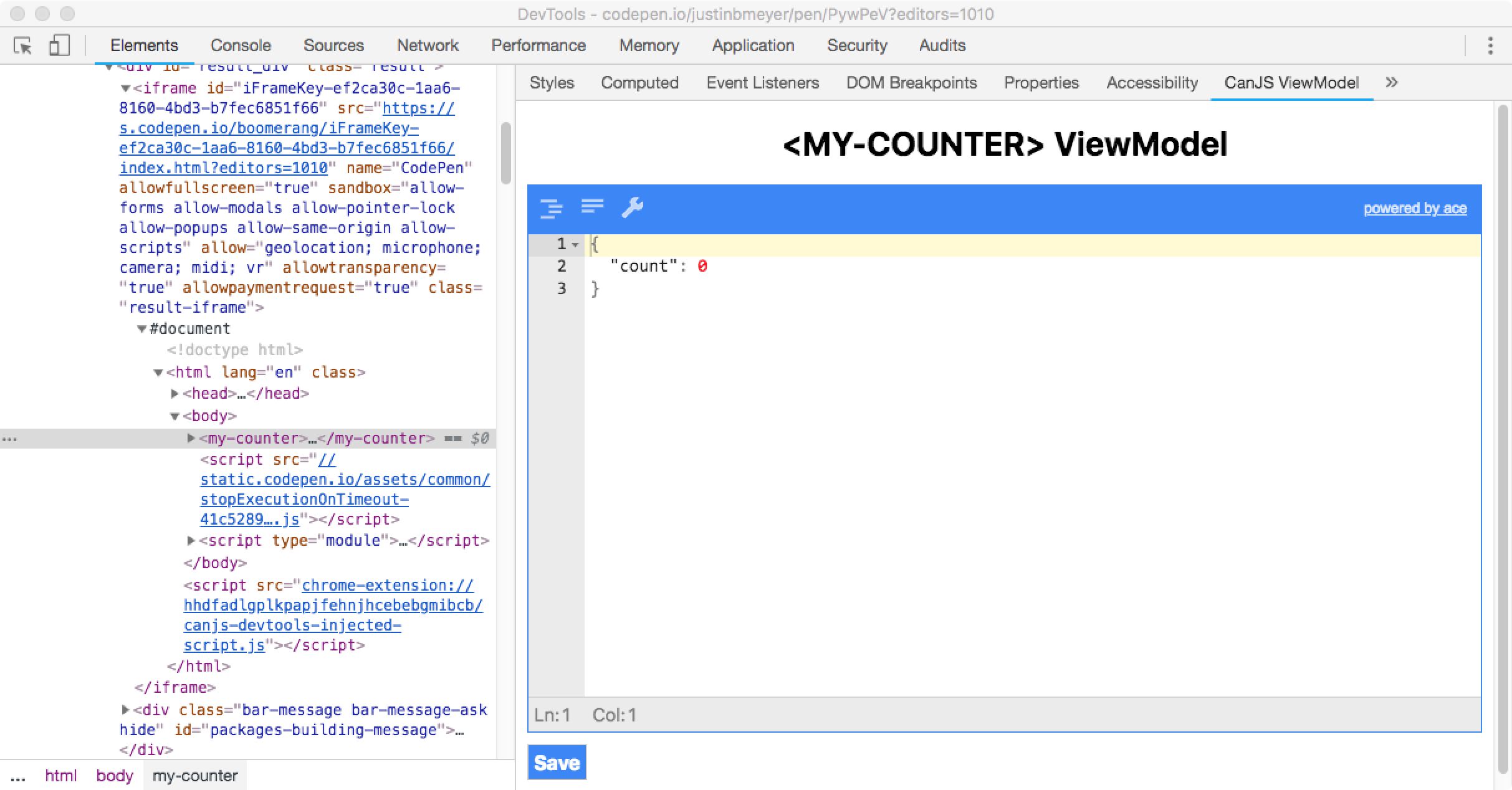
can.debug and access the debugger helpers:
What you need to know
Chrome Dev Tools
CodePen
Component from "https://unpkg.com/can/core.mjs".<my-counter></my-counter> to the HTML.Steal
mkdir can-steal
cd can-steal
npm init --yes
npm i steal can-component can-debug
npm i steal-conditional --save-dev
steal-conditional in package.json{
"name": "can-steal",
"version": "1.0.0",
"description": "",
"main": "index.js",
"scripts": {
"test": "echo \"Error: no test specified\" && exit 1"
},
"keywords": [],
"author": "",
"license": "ISC",
"dependencies": {
"can-component": "^4.4.2",
"can-debug": "^2.0.1",
"steal": "^2.1.3",
"steal-conditional": "^1.1.1"
},
"steal": {
"configDependencies": [
"node_modules/steal-conditional/conditional"
]
}
}
<my-counter></my-counter>
<script src="./node_modules/steal/steal.js" main></script>
import Component from "can-component";
import debug from "can-debug#?./is-dev";
debug();
Component.extend({
    tag: "my-counter",
    view: `
        Count: <span>{{this.count}}</span>
        <button on:click='this.increment()'>+1</button>
    `,
    ViewModel: {
        count: {default: 0},
        increment() {
            this.count++;
        }
    }
});
import steal from "@steal";
export default !steal.isEnv("production")
Log when a property or properties change
The problem
confusing's properties. The property names write out a message.What you need to know
.log() to log when any property changes on an observable. Use .log(key) to log when a specific property changes on an observable.The solution
Click to See
confusing is instantiated:// Maybe listen to properties changing here:
confusing.log();
all you need is love.Break when a property changes
The problem
propA, propB, propC. When those change, final is being incremented:confusing.on("ticker", function(){
var props = ["propA","propB","propC"];
var prop = props[rand()];
confusing[prop]++;
},"domUI");
confusing.on("propA", function canjs(){
confusing.final++;
},"domUI");
confusing.on("propB", function stealjs(){
confusing.final++;
},"domUI");
confusing.on("propC", function donejs(){
confusing.final++;
},"domUI");
canjs, stealjs, or donejs) is the one that is called when final is incremented to 5?What you need to know
map.on("key", function(ev, newVal){
  if(newVal === 5) {
    debugger;
  }
});
mutate queue which fires at the end of a batch of changes.confusing.on("final", function(ev, newVal){
if(newVal === 5) {
debugger;
}
});

"notify" phase as follows:map.on("prop", function handler(){
debugger;
}, "notify");
The solution
Click to See
confusing.on("final", function(ev, newVal){
  if(newVal === 5) {
    debugger;
  }
},"notify");
The answer is stealjs. 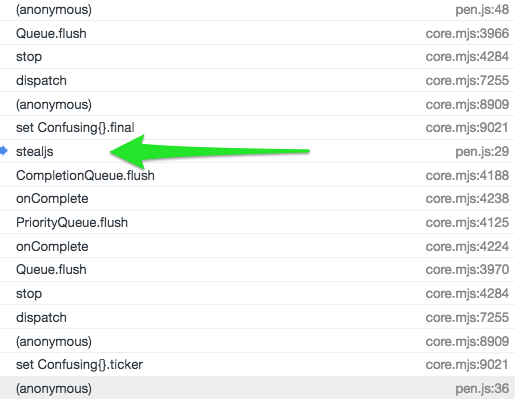
Understand what caused a particular thing to happen with logStack
The problem
What you need to know

The solution
Click to See
s t a c k.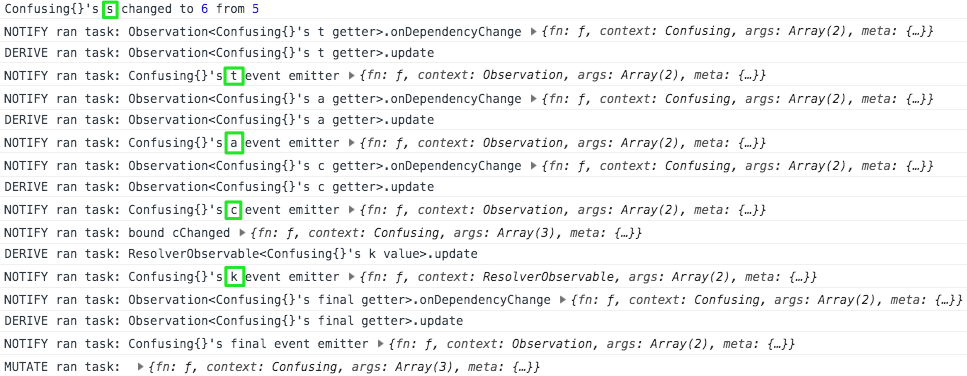
Understand what caused a particular thing to happen with
logStack's reasonLogThe problem
What you need to know
logStack entries are really just function calls. Each entry gets logged with an object that includes:
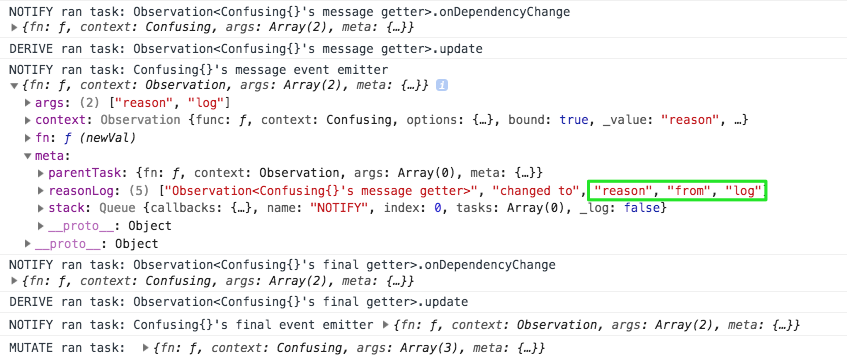
args - The arguments passed to the functioncontext - The this of the functionfn - The function that was calledmeta - Additional information queues uses for debugging.meta object also includes a reasonLog. This is indented to be a human-readable explanation of why that task was queued. CanJS provides it in development mode on most tasks.
The Solution
Click to See
Logging the state of the ViewModel
The problem
<some-state> component on the page in this CodePen. Log its viewModel's properties and values.What you need to konw
viewModel available as element.viewModel. So use:document.querySelector("some-component").viewModel
ViewModel and:document.querySelector("some-component").viewModel.get()
$0 to reference the last element you inspected:$0.viewModel.get()
The solution
Click to See
console.log(document.querySelector('some-state').viewModel.get())
{ a: "viewModel", property: "makes", sense: "right" }
Understand what happened with components and logStack
The problem
foo:bind="bar") resulted in property updates can be confusing.<word-and>'s you property is changing as a result of several child components of <my-app> passing around the value.
<word-hello>'s world property changed, you would record "hello world".What you need to know
DOM_UI ran task: <a-component viewModelProp:bind="scopeKey"> updates <a-component>.viewModelProp from {{scopeKey}}
scopeKey changed and <a-component>.viewModelProp was set to its value.DOM_UI ran task: <a-component viewModelProp:bind="scopeKey"> updates {{scopeKey}} from <a-component>.viewModelProp
<a-component>.viewModelProp changed and scopeKey was set to its value.The solution
Click to See
can.js loves.javascript debugging.tools and.you: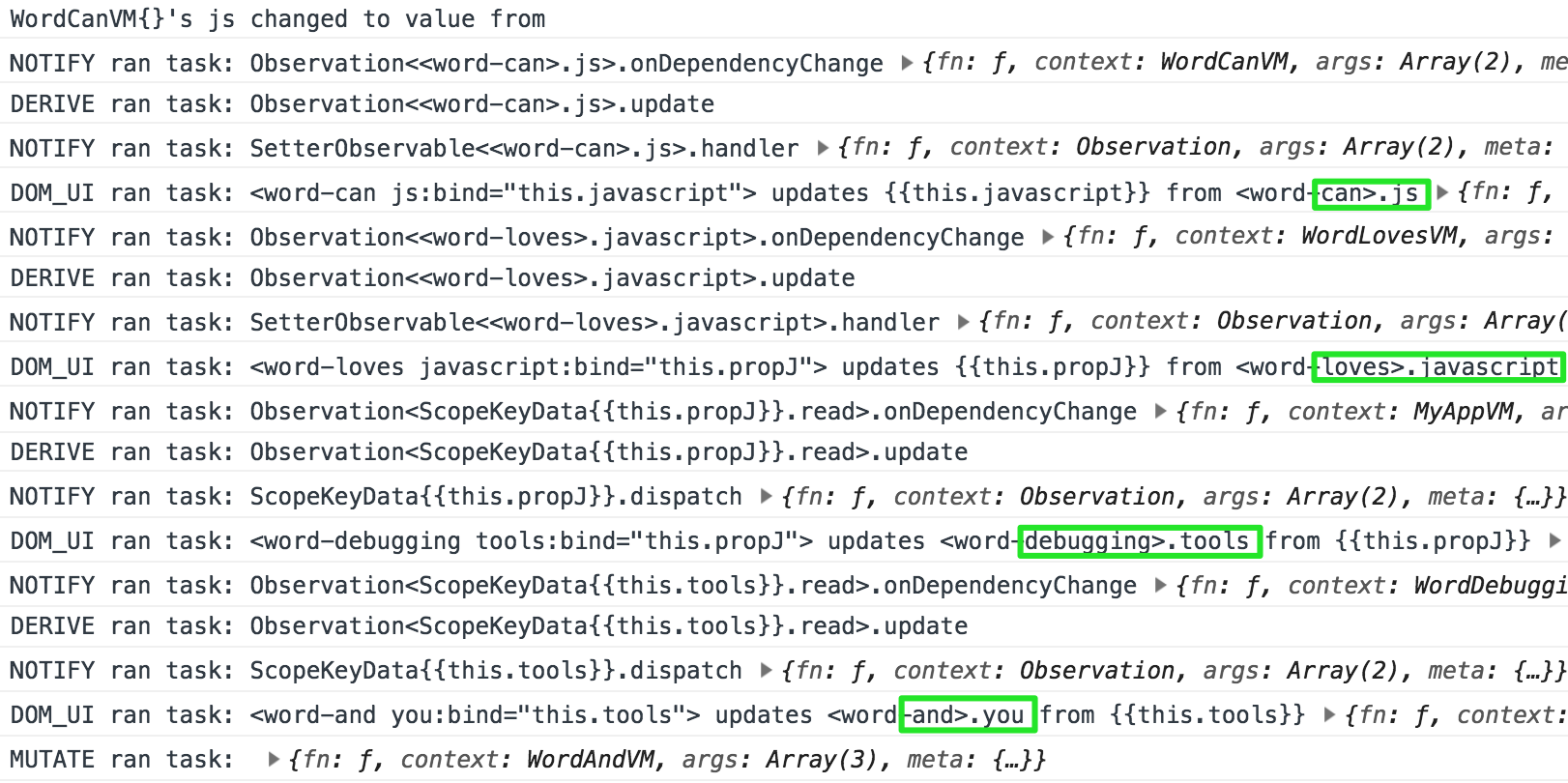
Log the scope
The problem
What you need to know
scope.log() to log stache's scope.{{# if(logTheScope) }} {{ scope.log() }} {{/if}}
{{^ if() }} can be used to inverse logic.The solution
Click to See
scope.log():
          {{# for(parent of student.parents) }}
            {{^ if(parent.name) }} {{scope.log()}} {{/ if }}
            <li>\>{{parent.name}}</li>
          {{ /for}}
math and the student is Rahim: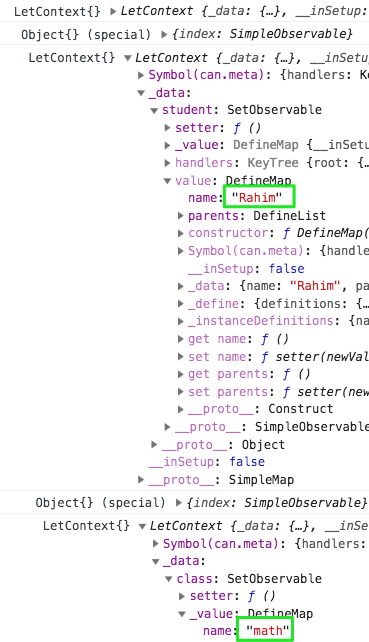
Log values in the scope
The problem
What you need to know
{{ console.log(key) }} to log values in the scope.The solution
Click to See
console.log():
          {{# for(parent of student.parents) }}
            {{console.log(class.name, student.name, parent.name)}}
            <li>\>{{parent.name}}</li>
          {{ /for}}
math and the student is Rahim: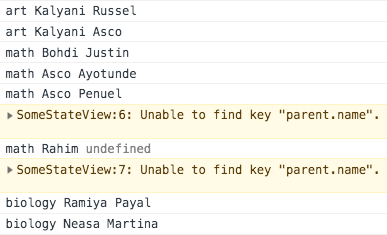
Debug the scope
The problem
undefined) parent name. Can you figure out which class and student has the missing parent name by debugging the scope? The CodePen uses the global build. Click to find out why.
.mjs builds. scope and the get function are being dead code eliminated. If you use the .mjs build, you must write:arguments[2].scope.get("class").nameWhat you need to know
Break anytime this part of the template evaluates
{{debugger()}}

Break when condition is truthy
{{debugger(condition)}}

Break when left equals right
{{debugger(left, right)}}
get function that reads from the scope like:get("class") //-> DefineMap{}
options.scope:options.scope.get("class") //-> DefineMap{}
stacheConverters included, you could use not() like:{{ debugger( not(key) ) }}
The Solution
Click to See
debugger(parent.name, undefined):
          {{# for(parent of student.parents) }}
            {{debugger(parent.name, undefined)}}
            <li>\>{{parent.name}}</li>
          {{ /for}}
reading and the student is Adisa: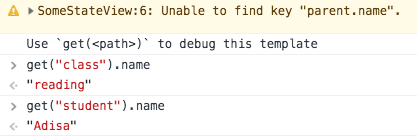
Understand what changes the DOM
The problem
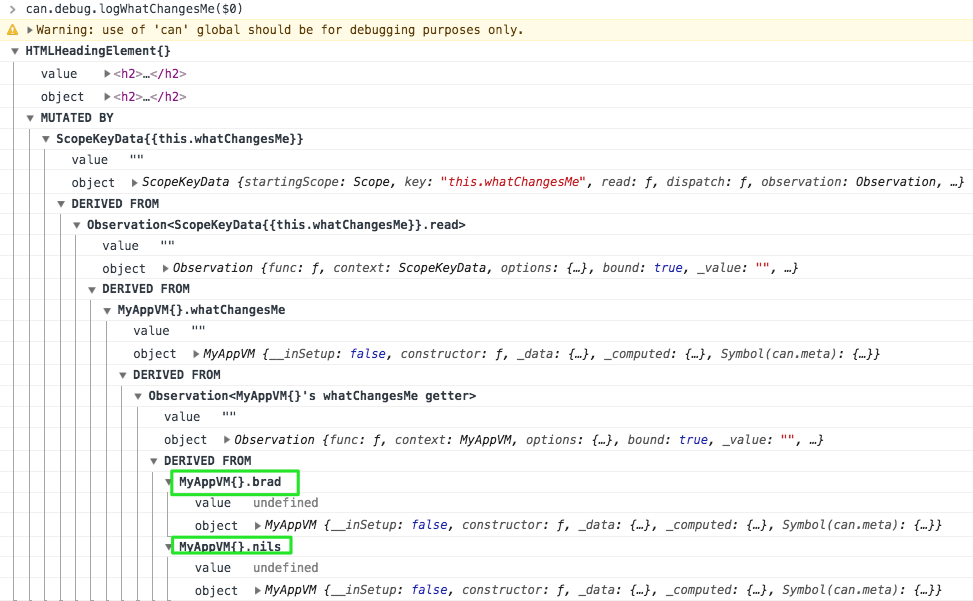
<h2> element that reads a whatChangesMe element like:<h2>What Changes Me? {{this.whatChangesMe}}</h2>
<my-app> ViewModel update the <h2> element? What you need to know
can.debug.logWhatChangesMe(element) to log what changes an HTML element:can.debug.logWhatChangesMe(element)
The solution
Click to See
<h2> element and run the following in the console:can.debug.logWhatChangesMe($0)
Understand what changes an observable
The Problem
<my-app>'s element with a first and last property. One of the 6 inputs changes the first property and one of the 6 inputs changes the last property. Can you discover those inputs without changing the inputs?What you need to know
can.debug.logWhatChangesMe(observable [,key] ) will list out all the values (including elements) that change a value.The Solution
Click to See
can.debug.logWhatChangesMe($0.viewModel, "first")
can.debug.logWhatChangesMe($0.viewModel, "last")
Thomas. Last is changed by Paula.