Designing on-screen digital forms have been perfected over the years. There have been countless blogs written on them, books written on them, best practices established.

I recently built a feature which involved filling a short form - but - with your voice for halfsies (Splitwise clone). I couldn’t find any literature addressing UX considerations when designing forms with voice as the only input mechanism - so I decided to put down some of the lessons I learnt and questions/challenges that came up while building this experience. (I also encountered some novel problems when building in this world, where probabilistic meets deterministic, but that’s for another post. I also wanted to speak about the differences in experience when building using a STT-LLM-TTS pipeline versus a realtime S2S (speech to speech) model which would also be for another post.)
The image below shows the form one would fill if you were doing it the “old fashioned way” and the video shows what the voice experience is like when using voice to fill the form.
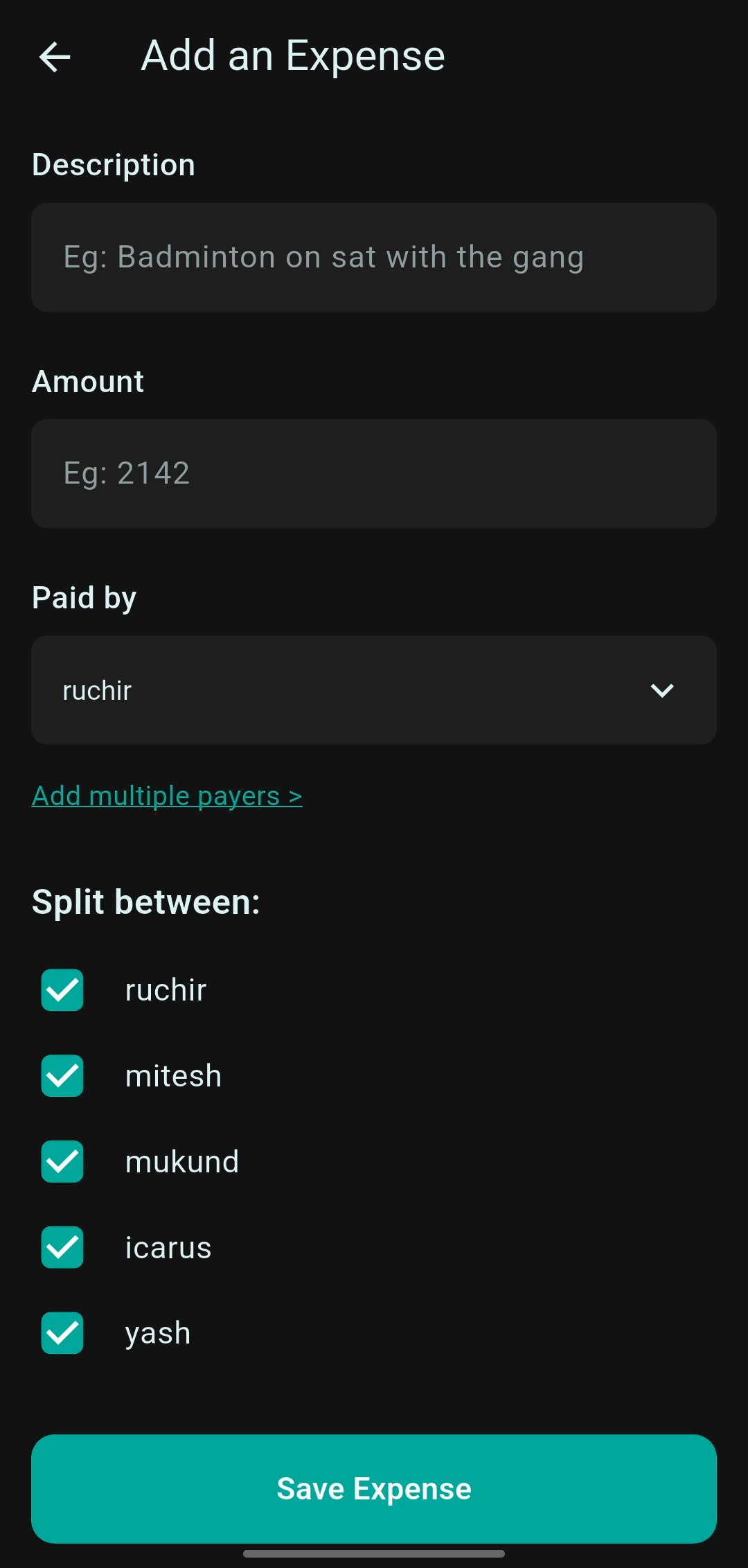
If you saw the video, this is more of an audiovisual experience - I’ll get into why that is shortly. As you can see, the form asks for the following data points for adding an expense:
Description (>0 chars)
Amount (> 0)
Choose Payer (could be more than 1)
Choose Participants (2 or more)
Let’s get into it.
When filling forms on the screen, the only source of error is user input (provided you have designed the form well with the appropriate validations) - they might inadvertently fat thumb the keyboard, make a typo, confuse the labels and input the data for meant for a field into another etc.
When it comes to voice based forms - we introduce another source of error: the ASR/STT engine. I have seen errors like:
omission: you try to say the expense description was “badminton on saturday with friends” but the STT captures it as “badminton with friends”
misinterpretation: “fifty six ninety five” was interpreted not as “5695” but as “56.95”
Hence, if you have ‘free’ input fields - where the user can say anything at all (versus choosing from 1 of the options you presented to them, eg: choose from option A, B, C etc) - the input data would need to be reviewed by the user as part of the conversation. For example: you might ask the user for their email ID and then speak it back to the user to ensure the STT has not introduced any errors before proceeding with the next step. You could make a choice to skip this review pattern too - this probably depends on: the data point you’re collecting, the language, the model and how your tests and evals have gone so far?
Another way one could solve this problem was to design it as an audio visual experience and show the input data, as it’s captured by the STT on screen and then let the user make any edits and submit the form via a button - I will probably try that version soon.
As we saw, you might need to get the user to review the data they just spoke, but as you might imagine, it could get annoying if you ask the user to confirm each and every data point immediately after they just shared it with you. I chose to group the questions so review could happen for 2 questions at a time - but I’m not sure if this is the optimal solution.
Ideally, from a UX POV, it’d be great if we could get rid of this review step all together, but then that could lead to incorrect input values and hence user frustration. In this case - the expense might get created with the wrong amount and the user would then need to go edit it via the screen. Fairly sure ain’t no one using the voice form ever again after that!
Another unrelated issue with this is the LLM re-confirming values which it has already confirmed. So: LLM asks for username, you speak username, LLM speaks it back and ask if it’s correct, you say yes, LLM says great and goes on to again speak it back and ask if it’s correct (again)! Prompting is probably the solution to this problem - but I’ve seen it come up several times even though my prompt explicitly prohibits this. Probably depends on the model you use too.
You have 10 options which the user has to choose from - if this were an on-screen form - easy peasy - you just put them in a single/multi select drop down, user picks and moves on. How do we do this in a voice based form? Are you going to speak the 10 options and expect the user to keep all of them in memory and then pick one? What if we had 50 options to pick from?
I couldn’t come up with a pure play voice based solution for this - hence my decision to show the usernames of the members of the group on the screen - and hence transforming this in to an audio visual experience. You can do the addition of the expense solely via voice - but I believe seeing the usernames of the members on the screen is an essential part of this experience - else the user adding the expense would be expected to remember all the usernames in the group (could be 10, could be 50) which would probably also differ from the real names of the members of the group (‘dheeraj’ becomes ‘gandalfthewise’, ‘jeff’ becomes ‘ninjawarrior007’).
One of the challenges I struggled with (still don’t have a great solution) - was the STT engine struggling with recognising names which are not anglo-saxon in origin and the TTS struggling with pronouncing names like “Ajay”, “Dheeraj”, “Yash”, “Mayawati” etc.
In this particular example:
by recognising I mean: the user has to say the name of the payer and the STT engine has to convert that to text for consumption by the LLM. This is usually misspelt a little or sometimes completely misses the mark. “ruchir” became “richard”, “upasana” became “upsana”, “anamika” became “amika” etc.
pronouncing: this could be partially mitigated by using one of the voices with an Indian accent (or whatever accent you’re working with) that the TTS provider has available (I was using Cartesia in this case) - still didn’t feel a 100% “local” to me though.
there are no S2S realtime models built for Indian audiences/accents AFAIK - so using an Indian accent here isn’t really an option and you’re going to have to settle with some funky pronunciations for non anglo-saxon origin names and other local texts like addresses, food items etc.
One implication of this (correct me if I’m wrong): if you’re building an app/agent which has a global audience and you choose to have a voice based form, are you going to be able to provide a great experience to users from all geographies, specially if the form has inputs like names, addresses etc. Would you need to use different models for different geographies so as to provide a great experience? This might hinder the ability to scale this experience across geographies - which wasn’t the case with on-screen forms?
I think this point is probably more relevant for longer forms.
When designing forms for the screen, it’s fairly easy and standard practice to give the user context about the form they’re about to fill and this is specially important for long forms. You might give the user an overview of the sections involved in the form before they start filling it out (Personal details: 3 questions, Address details: 2 questions, Investment details: 5 questions, etc). You might show them progress bar at the top (You’re 40% done!). You might show UI elements like: “You’re 2 steps away”. You might give them a disclaimer saying: “Keep your passport handy before proceeding. You’ll need the date of expiry”.
Doing some of this with voice based forms would be a challenge. Voice is really efficient when it comes to input (comparing words per minute it’s usually ~200WPM versus ~50WPM) - but - not so much at consuming information as compared to reading text on a screen. If you were to give the user an overview of a long form, say with 3 sections, that would probably take 20-30s - and I’m willing to bet - lead to drop off (no one likes filling forms and you lecturing them about the form for 20s ain’t gonna help!).
Providing progress updates and disclaimers through the form seems more plausible without adding too much friction - but would need to be woven into the conversation (“…we’re done with the personal details and now moving on to the address details..”).
This point too also probably applies to longer forms.
The way you usually structure forms is by logical grouping, while also keeping your users psyched! You you’d have 1) personal details, 2) address details, 3) card details etc. It makes logical sense to the user and it’s sort of the norm, so users are also used to it. But does this same logic hold? Is there additional sub-sections needed based on the kind of inputs i.e. some inputs might not need review from the user and some might - so does that input figure into your decision of how to structure the form. Have not thought about this too much - but I see this coming up if you’re designing a longer form.
This point too also probably applies to longer forms.
Sometimes when you have a long form, you might break it down into, say, 5 sections. And you might show the user those sections, allow them to fill in some parts of section 1, jump to section 3 and fill in some parts of that and come back to section 1. How do we provide such flexibility with voice forms? You could maybe allow the user to say: “go back to section 1” and handle that - but then there’s a real strain on the users memory to remember what was section 1, 2 etc, what they filled in what section, what’s pending. I haven’t thought about this too much since the form I built in this experience was not too lengthy - but I think this is something that would come up when building a longer form.
IT DEPENDS!
I’m not sold in this case of adding an expense - given the length of this specific form and prior experience of users with filling this on screen - I think most users will probably stick to the on-screen version. There might be some specific segments of the audience, like users with visual disabilities, which might have a strong preference for the voice based input. It’s out in the wild now - let’s see how users respond to this!
What is the framework to use to think through when to build voice versus on-screen versus both versus hybrid? I don’t have one yet - but I’ll try to put my thoughts together on this and publish one soon. Have some thoughts on what this framework should be? Leave a comment!