Overview Additional information PricingFree of charge with paid featuresSimulate is a powerful and easy-to-use tool designed to enable Monte Carlo simulation right in your spreadsheet. With Simulate, you can support your decision-making processes by carrying out the following steps:
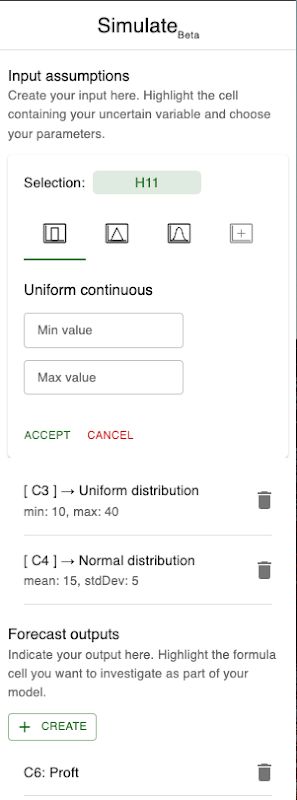
1. Define input assumptions: Select key variables such as revenue estimates, market growth rates, or project costs influencing your model's outcomes (non-formula cells).
2. Set input ranges: Define the range of possible values for each input variable, allowing for comprehensive scenario exploration and what-if analysis (currently triangular, normal or uniform distributions).
3. Select key outputs: Choose outputs you want to analyze, whether it's revenue projections, risk metrics, or other performance indicators (formula cells).
4. Run simulations: With just a click, Simulate leverages Monte Carlo simulation to sample and generate a range of possible outcomes based on your defined inputs and assumptions, providing you with valuable insights into uncertainties and risks associated with your decision.
You can create up to a thousand scenarios with each run and easily export your data for further analysis in any other software. In this way, Simulate acts as your brainstorming partner aiding in the analysis of various scenarios and uncertainties.
With Simulate you can:
✓ Harness uncertainty: Understand the full range of potential outcomes, and assess the likelihood of different scenarios to make better-informed decisions.
✓ Identify risks: Identify potential risks and assess their impact on your objectives by simulating various scenarios, letting you develop risk mitigation strategies proactively.
✓ Analyze sensitivities: Simulate generates the necessary data for conducting more in-depth sensitivity analysis, helping you identify the sensitivities within your models.
✓ Conduct what-if analysis: Explore different what-if scenarios effortlessly and assess the potential consequences of your different actions. You can easily create figures and histograms using the output data or even export it for further analysis in other software.
✓ Improve decision-making: Gain deeper insights into your data, enhance your judgment, and make more informed decisions that align with your goals and objectives.
Simulate eliminates the need to program your own Monte Carlo simulation logic and handles most of the underlying complexity involved, allowing you to focus on generating scenarios, analyzing the results and deriving actionable insights. Whether you're a financial analyst, project manager, or business strategist, Simulate empowers you to see the full range of outcomes helping you improve your judgment and make better decisions with confidence.
Please note: This is a fully functional public Beta release designed to support your basic modeling tasks and to gather public feedback for improving the tool. Features and limitations may change at any time in future updates. To make the tool more robust, improved visual outputs, correlations, sensitivity analysis, real options methods, decomposition functionality and more are being considered to be implemented in the future.




Simulate will ask for the permissions shown below. Learn more Simulate will need access to your Google account This will allow Simulate to : See, edit, create, and delete all your Google Sheets spreadsheets
 Display and run third-party web content in prompts and sidebars inside Google applicationsConnect to an external service
 See your primary Google Account email addressSee your personal info, including any personal info you've made publicly available
Rate & review this app Share your experience to help others. Your review, profile name and photo will appear publicly in Google’s services. Your review must comply with the Google Workspace Marketplace Comment Guidelines and Review Policies. Learn More Very useful Your review, profile name and photo will appear publicly in Google’s services. Your review must comply with the Google Workspace Marketplace Comment Guidelines and Review Policies. Learn More Works great for basic Monte Carlo analysis, it's currently only held back by it's lack of features for digging into detail, such as sensitivity analysis and bandwidth to analyze more data. Your review, profile name and photo will appear publicly in Google’s services. Your review must comply with the Google Workspace Marketplace Comment Guidelines and Review Policies. Learn More This solves a much needed problem in GSheets. However, it desperately needs functionality to accept decimals in the parameters for a distribution. Your review, profile name and photo will appear publicly in Google’s services. Your review must comply with the Google Workspace Marketplace Comment Guidelines and Review Policies. Learn More Santeri Liukkonen June 29, 2024 Hi Vivaan, thank you for leaving your feedback. I agree with you on this one and will consider adding this in the future! -Santeri from Simulate


