[5]
Mixed model: does arm change the trajectory?
Model check
reml True left joinAI re_formula ~monthAI missing dropAI
pain_score ~ treatment_arm * month + ageWhybook
[?] Whybook, an open-source JupyterLab extension
Whybook is a view of a Jupyter notebook with no chat box. Point at a column, a plot or a value, and pick one of the questions it offers, or type or say your own. Whybook writes and runs the cell, and shows each choice it finds behind the result.
Drag IL6 onto the model cell. Or click IL6, then the button that appears on the cell.
[5]
Model check
reml True left joinAI re_formula ~monthAI missing dropAI
pain_score ~ treatment_arm * month + age[5b]
Model check branch
bins [-1, 3, 6, 10]AI distr logitAI
pain_level ~ 0 + arm_b * month + age§1 Why
Language models now finish well-defined programming tasks that take an engineer hours, and they beat the best students at programming contests. They can also run a complete statistical analysis that experts judge sound in most cases. Software development went through this change first. Engineers now spend more of their time reviewing and fixing code they did not write. Projects that adopted coding agents show more complex code and less stable releases, and developers who hand the coding to an AI assistant understand it less. Data analysis is going through the same change now. Tim Hanewich calls the result the understanding gap: a divide "between what is being produced and our understanding of what was produced". In data analysis the gap opens in four ways.
A chat that is asked to "analyse this data" returns an analysis. It does not build insight and it does not exercise curiosity. The analyst no longer decides what to ask next. Asking a chat is the lowest-effort route. Under pressure, analysts default to it, unless their tools make a question-driven exploration fun and fast.
Generated code carries modelling choices that the analyst never sees. In the demo cohort, a constant in prep.py leaves out 27 of 318 patients, and no cell of the notebook sets it.
Even before language models, analysis code moved from notebooks into modules. A default set in a module does not show in the notebook that uses it.
Models reason before they answer, and the analyst does not read that reasoning. Claude never returns its raw chain of thought, and by default its newest models return not even a summary. A trace that is shown does not always report what the model used.
Mathematics has the same debate: is mathematics about solving problems, or about the understanding gained on the way to the solution? OpenAI's AI-made proof that the Navier-Stokes equations can blow up revived the debate in September 2026. An answer has little value when no one understands why it holds.
§2 The idea
Whybook opens any .ipynb file as a second view, in JupyterLab or in Jupyter Notebook 7. Both views share one notebook model and one kernel, so an edit in one shows in the other. Agents do most of the work, under one rule: the result is an ordinary notebook, and the questions, choices and assumptions go into its metadata. The analyst chooses how deep to go on each cell: its question, the choices on its chips, or its code.
| Aspect | A chat assistant | Whybook |
|---|---|---|
| How the analyst asks | Types a prompt | Drags a column onto a cell, or clicks the column and then the cell, and picks a question or types one |
| What comes back | Text to read | The cells the question needs, run in the notebook, and an answer that links them |
| Where the assumptions are | Inside the generated code | Chips on the cell, coloured by where each value comes from: the notebook's code, the AI in Whybook, or a default |
| How to try an alternative | Start another conversation | Branch the cell; the branch runs in parallel, in a kernel subshell of its own |
| What is kept | A chat log | An ordinary .ipynb, with the questions in its metadata |
Drag or click
Anything in the Variables and Contents panels can be dragged onto a cell, a variable or a column, and so can files and database tables. Whybook lists up to 12 ranked questions of , each with in the notebook.
Questions from templates show at once, and most of them run code with no model call: a template is code written in advance, with the selected names filled in. For those marked , an AI writes the code. A connected model adds up to 5 questions of its own a few seconds later. Above the questions, a box takes .
Dragging is optional: in Click mode the analyst clicks the source, then the target, or uses the keyboard. The modes change which questions rank first: Wonder is for finding what else is in the data, Do for carrying the analysis on, and Report for building what goes into a report.
What the prototype offers when the analyst drags, selects or clicks
IL6 column onto cell [5]Add IL6 as a covariateModel checkedit [5] in placeMIN_DAYS constant onto cell [4]What changes if MIN_DAYS changes?Model checkbranch of [4] · runs in parallelsleep_hours column onto pain_scoreAre sleep_hours and pain_score associated, within or between patients?Associationnew celldiary data frame onto itselfProfile diary: types, missingness, duplicatesData qualitypreview onlyDecision chips
After a cell runs, Whybook reads its code against the live kernel and lists the values that the result depends on. Each value becomes a short chip, its name and its value, such as MIN_DAYS 14, or inner join ×2 for two merges that keep pandas' default. The colour shows where the value comes from, and the tooltip describes what the value does. Constants defined in imported files are shown on the cell that uses them.
MIN_DAYS = 14 is set in prep.py. It leaves out 27 of 318 patients, and no cell sets it. Drop MIN_DAYS onto cell [4] and Whybook re-runs [4] with 7, 14 and 21 in a branch.
[4]
Association
prep.py § drop_sparse()line 31
31MIN_DAYS = 14
32
33
34def drop_sparse(df, min_days=MIN_DAYS):
35    """Keep patients with at least ``min_days`` diary days."""
36    keep = df.groupby("patient_id").size() >= min_days
37    return df[df["patient_id"].isin(keep[keep].index)]
[4c]
MIN_DAYS changes?Model check branch
| MIN_DAYS | weekly rows | patient_ids | mean pain_score |
|---|---|---|---|
| 7 | 5,868 | 307 | 2.324 |
| 14 | 5,837 | 291 | 2.309 |
| 21 | 5,837 | 291 | 2.309 |
The prototype's output. With 14 or 21 days, 27 of the 318 patients are left out. With 7 days, 11 are.
Plot selection
Every mark of a plot drawn by Whybook's helpers maps to rows of its data frame. A selection on the plot shows how many rows it holds, what differs there, and questions about it. The analyst can keep the selection as a variable and drag it like any other.
Try it: drag across the plot. This is the plot of the demo's cell [4], weekly pain per patient by treatment arm, with bootstrap intervals. The numbers next to the plot are computed from the plot's data the way the prototype computes them.
pain_score by week
Drag across the plot to select weeks. Every mark maps to rows of weekly.
Markdown cells
The text of a markdown cell shows in each of Whybook's views of the notebook, and it can be questioned like a result. Whybook first lists each number the text states, with the outputs that show it, rounded as the text rounds it. A number that no output shows stands out. Then come the questions, which an agent answers with the cells they need after the text. Words selected in the text are the subject of the questions instead.
Try it: the panel shows the questions about the words "by 0.32 points more per month", marked in the summary. Select other words to question them instead, or press Question this text. This is the summary of the demo after six more hours of analysis, and the matches are the ones the prototype finds in its outputs.
Pain falls over the six months in both arms, faster in arm B, by 0.32 points more per month, and the difference holds without site east and for each value of MIN_DAYS. More patients stop keeping the diary in the first 12 weeks in arm A (26%) than in arm B (9%), so the patients who stay are not a random half of either arm. Of the 4,812 proteins, only NGF tracks how fast pain changes once the false discovery rate is controlled.
Shift+drop, Alt+drop
Shift+drop turns any question into a branch. Alt+drop starts several branches at once. Whybook calls each one a parallel run: underneath, each branch runs in its own kernel subshell (Jupyter Enhancement Proposal 91, in ipykernel 7), so branches run in parallel on the same data without copying it.
The notebook stays a single list of cells. The Code view shows the cells as the notebook does, branches included. There is no reactive execution: an edit to a cell does not re-run the cells after it.
[4]
Association
Branch of [4] · runs in parallelDoes MIN_DAYS = 14 change the result of [4]?
[4b]
MIN_DAYS = 14 change the result of [4]?Model checkbranch
done
[4c]
MIN_DAYS changes?Model checkbranch
done
[4d]
MIN_DAYS an explicit choice in this cellModel checkbranch
done
[5]
Model check
[5b]
Model checkbranch
Parallel 0/8Python 3 (ipykernel)
Answers by an agent
When a question needs AI and its answer goes into a new cell, an agent answers it in the notebook. It adds and runs the cells that the question needs, reads what each one shows, and compares choices side by side as branches that run in parallel, such as another model or another subset. It ends with an answer of a few sentences that links the cells that show it, and with follow-up questions. When one cell is enough, it writes one, and code too long for a cell goes into a module next to the notebook.
Each cell goes into the notebook as it runs, marked as written by AI, with the choices in its code on chips. Stop ends the run, and one click removes its cells, with an Undo. With the data kept on this machine, the agent reads what local models wrote about each table, and only the kind and size of other outputs, never their values.
![A cell with a table of pain by arm, and under it the agent's run for the question 'Does the fall in pain over the weeks differ by arm?': three steps with the cells they added, [3], [4], and the branches [4b] and [4c], an answer that links them, and two follow-up questions. The agent's first cell, a table of mean pain by week and arm, follows.](https://whybook.dev/img/roadmap/agent-strip.png)
A run answered by the screenshot script: the cells ran in the kernel, and the script wrote the steps and the answer.
Code, Bench and Map
Whybook shows one notebook in three views. The map draws the cells and the data frames they use as a graph. The bench shows each cell as a card with its title, its chips and its outputs, and Show code opens its code. The Code view shows every cell as the notebook does. Within each view, the Detail slider sets how much of each output shows, down to a tile with its size and a label.
An agent, Whybook's or any other, does not tire after a hundred cells. The analyst still has to understand those cells, and chooses what to understand, and how deeply. The map shows the whole analysis, the bench each step, and the Code view each line. This is the order of Ben Shneiderman's Visual Information-Seeking Mantra: "Overview first, zoom and filter, then details-on-demand".
In a long notebook, the analyst finds a cell on the map: a double-click on its card shows the cell on the bench. With the setting Minimap on, a minimap in the corner of the bench opens the map again.
Try it: switch between the views, each in a box of the same size, move the Detail slider, and double-click a card on the map.
[4]
Weekly pain per patient, by armAssociation
MIN_DAYS 14 inner join ci bootstrapAI n_boot 1000AI
[5]
Mixed model: does arm change the trajectory?Model check
reml True left joinAI re_formula ~monthAI missing dropAI
[5b]
Ordinal modelModel checkbranch
bins [-1, 3, 6, 10]AI distr logitAI
| Row | patient_id | diary_day | week | pain_score | sleep_hours | analgesic_use | cycle_day | bleeding | mood | notes |
|---|---|---|---|---|---|---|---|---|---|---|
| 0 | P001 | 1 | 1 | 2.0 | 7.4 | none | 17 | False | 4.0 | |
| 1 | P001 | 2 | 1 | 2.0 | 7.5 | none | 18 | False | 5.0 | |
| 2 | P001 | 3 | 1 | 2.0 | 8.4 | none | 19 | False | 4.0 | |
| 3 | P001 | 4 | 1 | 3.0 | 7.6 | none | 20 | False | 4.0 | |
| 4 | P001 | 5 | 1 | 2.0 | 7.3 | none | 21 | False | 5.0 |
| Term | Coef. | Std.Err. | z | P>|z| | [0.025 | 0.975] |
|---|---|---|---|---|---|---|
| Intercept | 5.009 | 0.355 | 14.113 | 0.000 | 4.313 | 5.705 |
| treatment_arm[T.B] | -0.857 | 0.160 | -5.359 | 0.000 | -1.170 | -0.544 |
| month | -0.750 | 0.036 | -20.595 | 0.000 | -0.821 | -0.679 |
| treatment_arm[T.B]:month | -0.318 | 0.050 | -6.383 | 0.000 | -0.416 | -0.221 |
| age | -0.003 | 0.009 | -0.281 | 0.779 | -0.021 | 0.016 |
| patient_id Var | 1.751 | 0.211 | ||||
| patient_id x month Cov | -0.250 | 0.051 | ||||
| month Var | 0.152 | 0.020 |
Exploration panel
Analysis tools have to be fun to use, or analysts take the lowest-effort route of §1. In web design, language models gave people new room to explore, and many of them are happier for it.
Work in progress always has a progress bar. The Exploration panel counts each question by type once its answer has run, apart from those that failed. It also counts guesses: while a cell about a relation or an effect runs, the analyst can say with one click what they expect, such as higher or lower. The panel fills a square for each column, Series or array that the analysis has used, and suggests what to ask next, with the reason. Once a causal question is asked, and while fewer than 15% of the questions are causal, the panel shows the note "Few causal questions so far: the effect estimate rests on untested paths."
The panel rewards questions of one's own. A question the analyst types counts in a darker shade than one picked from the offers, and a column reached only through offered questions gets a lighter square. The box for a question of one's own sits above the suggestions, and the setting "Offered questions per request" at None hides the offers, so that every question is typed.
Across 26 studies, students taught to write questions about what they read understood new texts better.1 In a tool for data, a display of the columns already covered doubled the questions that analysts asked, and raised their main findings from 5.2 to 7.6 each.2 The kind of question counts more than their number: in tutoring, students who asked a larger share of "why" and "how" questions had higher exam scores, and students who asked more questions did not.3
A count on screen makes people do more of what it counts, and the extra work is not always better,4 so we weigh four designs before any reward grows.
Try it: type a question of your own, or press Ask on a suggestion, and watch the counts change. The panel starts from the demo notebook's state after Run all.
1subanalysis
1open assumption
0guesses
Worth asking nextsuggested
§3 Evidence
Several choices in Whybook follow from user studies. Each finding names the choice it supports and links to its source.
Assumptions on the cell
In a study of 22 analysts who checked analyses an AI wrote, participants "often noticed errors faster in tasks where the AI clearly stated its assumptions about the data". Gu et al., CHI 2024
Questions at each step
With 20 users, a copilot that guided each step did better than a fully automated one in user control, software utility and learnability, "especially for exploratory and creative tasks". The automated one saved time on simpler visual tasks. Khurana et al., CHI 2025
Branches beside the answer
AI agents given the same dataset and hypothesis reached different effect sizes, p-values and conclusions, from different choices in preprocessing, model and inference. Another model or persona gave other results. The authors ask for multiverse-style reporting of AI analyses. Bertran et al., PNAS 2026
Editable steps in place of a chat
Against a chat, two systems that showed editable assumptions and steps gave 18 participants significantly more control, and made intervention, correction and verification easier. Task success and completion time did not differ. Kazemitabaar et al., UIST 2024
Offered questions can take the place of the analyst's own. In the Voyager 2 study, recommended views made one participant "start thinking less", while the tool that adds them cut the share of fields that people overlooked from 20% to 7%. Handing the whole task to an AI costs more: developers who let an AI write all the code understood it less than those who asked it only about concepts. Offered questions sit between the two. Studies of overreliance suggest two safeguards: a guess before each result, and a question back in place of an answer.
§4 Prototype
The prototype is an extension for JupyterLab 4.4 and later, on a laptop or on JupyterHub, with a Jupyter server extension. Its demo is a synthetic clinical cohort: a daily pain diary, patient characteristics, a protein panel and a SQLite database of clinic visits. A second copy of the demo shows the notebook after about six more hours of analysis, with 28 cells, larger tables and a written summary.
Each video is one recorded session in JupyterLab, on public data, with a live AI model. Start with the 4-minute demo: a validator checks a notebook that someone else wrote. Or watch a whole analysis, from the raw file to the answer.
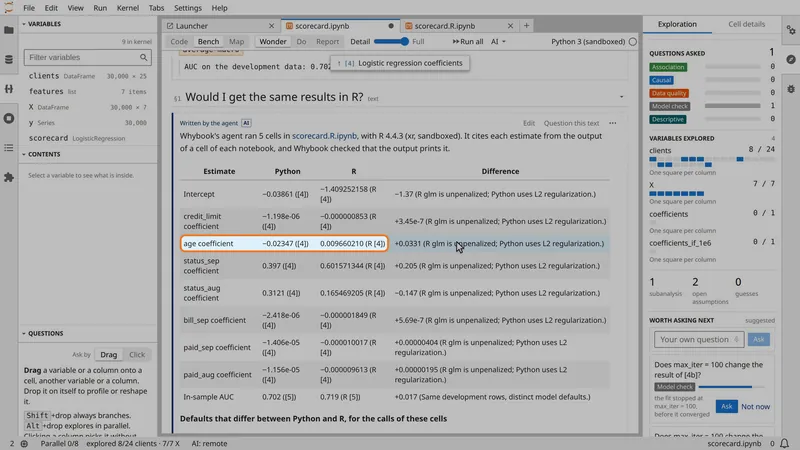
A second example, from another field: 360 homes, their electricity meters, and a time-of-use tariff that a quarter of them chose. Nothing in Whybook is specific to either example.
Whybook is one Python package with two parts: an extension for JupyterLab in the browser, and an extension for the Jupyter server. It needs no kernel and no file format of its own: the notebook's kernel runs the cells, and the sandboxed kernel that it adds is ipykernel in a sandbox.
When the analyst drags a column onto a cell, the browser part asks the server part for questions. Once the analyst picks one, the server part writes or edits its code, the browser part runs that code in the notebook's kernel, and the result is saved in the .ipynb file.
In the browser
Three ways to show a notebook: Code, Bench and Map. The panels Variables, Contents, Questions, Exploration and Cell details. Cell details shows all that Whybook knows of one cell, in one place: the cell that the analyst worked on last, or the one picked on the map. A Databases panel sits under the file browser.
In the Jupyter server
Questions from templates, ordered by the rules and a small learned ranker, or by a model of the analyst's choice. Code edits on the syntax tree. Local models through llama.cpp, and the review guard. Calls to the models of the AI provider that the analyst connects, with a default cost cap of $0.50 on each call and $2 on each run of an agent, where the price is known. SQLite files, read-only.
The notebook's own
The main shell runs the cells. Subshells run branches at the same time, and list variables while a cell runs.
On disk
Cells and outputs, as in any notebook. The whybook metadata keeps each cell's question, assumptions, decisions and branch, so the notebook opens as it was left, and the version of its layout, so later releases can migrate it.
Whybook builds on these parts of Jupyter and adds its own, such as the questions, the AI models and the kernel sandbox: §9 shows what each part of Jupyter gives it.
The roadmap puts this work on the path to v1, through an alpha and a beta, and lists what waits for v2.
§5 Local models in progress
Clinical, financial and other personal data should not leave the analyst's machine. Most of the model work in Whybook is small: order up to 12 questions, label a table, title a cell. A small open model of the analyst's choice can do this work in the Jupyter server: label tables, summarise frames, title code cells, suggest more questions, sort a user question and order the offered questions. In the settings, the analyst chooses the model of each task and can add any other model (§7 lists each use, and §8 compares the methods for each job).
Any laptop, even a Chromebook
A hosted frontier model reads what each task needs and writes the code.
A 16 GB laptop or a Mac mini
Local models read the tables and describe them. A frontier model writes the code from those descriptions and the names, kinds and sizes of the variables.
An AI PC or a small server
Local models read the data and write the code. Nothing leaves the building, and the work goes on with no internet.
| Aspect | Frontier for everything | Data stays here | All local |
|---|---|---|---|
| Reads the data | The frontier model | Local models | Local models |
| Writes the code | The frontier model | The frontier model | A larger local model |
| Sent out | Tables, pictures and variables, as each task needs | , code, questions and the text of markdown cells | Nothing |
| Gives up | Control over where the data goes | Questions about pictures, and labels written by small models | Code from the best models, and the hardware costs up front |
| Works offline | Templates only | : all but AI-written code | Yes |
| Costs | Each call to the provider: about $0.0002 for the questions each time the analyst drags or clicks, and $0.001 to $0.06 for a cell, from GPT-6 Luna to Claude Sonnet 5 | Each call to the remote model: the code, and by default more questions each time the analyst drags or clicks | The hardware, once |
| In the prototype | Built | Built |
When the first notebook opens, Whybook asks which of the three ways to use. Later, one setting, "Keep data on this machine", switches from the first way to the second. Here "this machine" is the machine that runs the Jupyter server, with any model server in its network that the analyst connects as local. c.Whybook.keep_data_local in the server's configuration turns it on for every user, and the setting then shows as fixed. c.Whybook.way_to_use_models sets the way for every user, and with "all-local" the server refuses every model outside this machine and its network.
Connecting a model. The AI models panel finds the model servers that answer on this machine, such as Ollama, and lists their models. There the analyst signs in to OpenRouter, for Claude, GPT, Gemini and open models, or pastes a Hugging Face access token, for open models served by a company that the analyst picks, such as OVHcloud or Scaleway in Europe. It also takes an API key of Anthropic, OpenAI, Google or Mistral AI. A model connected at a provider in one of these ways is the remote model. Each key is the analyst's own, stays on the server and never reaches the browser. A model on this machine reads the data as the small local models do. The calls go through Pydantic AI, which reaches any server with an OpenAI-compatible API.
Marked as written by AI. Every cell, label and question that a model writes carries a mark in the notebook's metadata: which model wrote it, and when. Article 50(2) of the EU AI Act asks providers of AI systems that generate text to mark it "in a machine-readable format", from 2 August 2026. Regulation (EU) 2024/1689, Article 50
§6 Review guard
An analyst who lets AI write and run code needs to know two things: what goes out, and what the code can read, change or send. Whybook checks both before either happens, on the analyst's machine. The privacy guard reads every prompt before it goes to a model on another machine, and looks for patient and household IDs, names, ages, dates, health details, small counts and keys. The execution guard reads every cell, set of branches and module that a model wrote, before it runs, and asks about more while the notebook's kernel runs outside the sandbox. In ask mode the guard shows what it flagged and waits; in reject mode it masks the flagged parts, or holds the cell back, and the work goes on.
| Aspect | Data privacy | Execution safety |
|---|---|---|
| Reads | Every prompt to a model on another machine: questions, a cell's request, an agent's question and each step's result | Every cell, set of branches and Python module that a model wrote, before it runs |
| Looks for | An ID next to a personal detail, several details that point to one person, small counts, names and keys | The network, secrets, files outside the notebook's folder, deletes, shell commands, installs, hidden code, and text written to steer the guard's answer |
| Outside the sandbox | Checks every prompt the same way: a prompt carries the same data in and out of the sandbox | Asks about installs and shell commands, and rejects the network and secrets |
| In the sandbox | Allows what the sandbox stops: the network, files outside the folder, installs and shell commands | |
| A model on this machine | Does not check prompts: the data stays on this machine | Checks every cell, set of branches and Python module that the model wrote, before it runs, as for a model on another machine |
The rules run first, on the analyst's machine, in at most a few hundredths of a second. A guard model, also on the analyst's machine, can read each prompt or cell as well, and the stricter answer wins. Whybook offers three guard models that read a policy written in the analyst's words: IBM's Granite Guardian 4.1, DynaGuard and Mistral AI's Shieldstral. For admin-level enforcement, c.Whybook.review_guard in the server's configuration sets ask or reject for every user and keeps both guards on, and no user can turn them off. c.Whybook.keep_data_local does the same for "Keep data on this machine".
§7 AI uses
AI in a notebook ranges from full agentic control to full user control. Full agentic control gives the fastest results and costs the analyst understanding. Full user control keeps data safe and private but is slow. Whybook keeps the control with the analyst, and one setting keeps the data on the analyst's machine. The analyst still gets results quickly, though not as fast as with full agentic control: the analyst asks the questions, agents write the code, and every choice stays in sight. Each job that Whybook gives to AI: what starts it, what the model reads, where it can run, and what changes when the data must stay on the analyst's machine.
A script draws the list.
§8 Research
Whybook gives AI a few small jobs, such as ordering the offered questions and labelling a table. For each job we tested rules built into Whybook, open models on the analyst's machine and remote models, on what analysts asked in real notebooks. Whybook's default is the simplest method that did the job.
Every result, on the benchmarks pageEach share comes from the tests below. The columns "On this machine" and "Remote" list up to three models that an analyst can pick in Whybook, best first, with their distance from the default in percentage points. A grey line names better models that Whybook does not offer yet. For table labels, the column lists the five models that the settings offer, by the memory of the laptop that each one suits.
a table
small model, this machine
mixed model coefficients3 significant
A table too large for the bench shows as a tile with a description of one to three words and a headline. A small model on the analyst's machine can write them, so that the table stays on the machine.
300 examples from public notebooks. The score is the share of examples where the first question offered had the same type as the question that the notebook's author asked next, a proxy for a good question.
300 examples made from public notebooks, as in the demo at the top. The score is the share of examples where the first question offered had the same type as the question that the notebook's author asked next.
276 questions from public notebooks. The score is the share of questions that a method gave the same type label as a reader who labelled them without seeing any method's labels.
360 questions, each written for one of the four places. The score is the average, over the four places, of the share of questions that a method put where their writer meant.
650 public notebooks. When the analyst drags something, the rules choose the place of the answer, and no model does.
More research is needed on traces of real use. The tests replay saved notebooks, which keep only the questions that their authors asked. They do not show which offered questions an analyst picks, skips or undoes. That needs Whybook's own logs, shared with consent.
§9 Why Jupyter, why now
The future of the notebook as an interface is a common topic in the Jupyter community, and Jupyter has the parts to build it from.
A notebook is JSON with room for metadata. Whybook keeps there the question that each cell answers, the model that wrote it, its cost and its assumptions, so the file records how each result was made.
The variables of the analysis stay in memory while the analyst works. Whybook lists them in the Variables panel. The analyst drags one onto a cell to ask about it, and a chip on a constant offers other values to try.
An output carries a result in rich forms, such as an HTML table, a picture or a plot with its data. The analyst asks about a picture or a region of a plot, whose marks keep their rows. JEP 129 proposes _ai_repr_, a form of an object written for a model.
Kernel subshells (JEP 91, in ipykernel 7) run several branches of an analysis at the same time, on the same data in memory.
The notebook reaches its kernel only through messages, so the kernel can run in a sandbox with access to one folder of files. Whybook runs it under bubblewrap on Linux and Seatbelt on macOS.
Users, universities and companies add an extension to the JupyterLab they already run. A new application costs far more to adopt. A standalone app can come later.
The awesome-jupyter-ai list has over 100 AI extensions for Jupyter. The largest group, nearly 30 of them, are chat panels and agents. We found none built around the analyst's questions about the data. The closest tools each share one part of the idea:
| Closest tool | What it shares with Whybook | What it lacks |
|---|---|---|
| Mito AI, a JupyterLab extension | Next-step buttons, and the assumptions of an analysis stated so that the analyst can correct them | Both sit in a chat, and the chats are kept outside the notebook |
| Notebook Intelligence, a JupyterLab extension | The prompt and the code it generated, kept in the cell's metadata | The prompt is typed, and no questions are offered |
| Positron, Posit's IDE | Three to five next steps as buttons | No branches, and assumptions only as the reasons for a chart |
| marimo, a notebook | The rows behind a plot selection, as a data frame | No question is offered from the selection. With the Lens add-on, the analyst types a note about a marked region for an agent |
§10 Why it lasts
Many AI tools for notebooks have stopped. Forks fell behind the project they copied. Extensions stopped when the company behind them changed course or closed. Results turned into errors when the service that made them shut down. Each of these projects tried something early, and each left a lesson for the community. Several also gave back to Jupyter. Most of the cases come from a survey of more than 100 AI extensions for Jupyter.
An extension of JupyterLab
Pretzel forked JupyterLab 4.2 in 2024 and licensed its changes under AGPLv3, which JupyterLab's BSD licence cannot take in, so they could not go upstream. Its development stopped the same year, and its last release lacks the fixes for 11 security advisories that affect JupyterLab 4.2, 5 of them rated high. Whybook is an extension for JupyterLab 4.4 and later. It uses the extension API that has been stable since JupyterLab 4.0, so users update JupyterLab as usual.
Upstream first
Kite's JupyterLab extension started in 2020 as a copy of jupyterlab-lsp. Kite also contributed improvements to JupyterLab's completer. The copy was last updated in 2021 and Kite shut down in 2022, while jupyterlab-lsp is still maintained, and so are Kite's improvements in JupyterLab. What Whybook needs from other packages goes to those packages as changes, and the roadmap lists them.
No single vendor
Tabnine's JupyterLab client had its last release a week after its first, and Einblick's extension still installs but calls a server that no longer exists. IBM ended its Qiskit Code Assistant service in 2026 and archived the extension, but the models are open on Hugging Face, and the archived extension still supports Ollama and any OpenAI-compatible endpoint. Whybook names no provider: templates need no model, over ten open models run in the Jupyter server and the settings can add others, and the remote model and decision models of several makers, such as Jev of TypeSafe AI, are choices in the settings.
The work is an ordinary notebook
Excel's COPILOT function stopped working on 14 September 2026, and a cell that recalculates now shows #NAME?. Each answer in Whybook is code and outputs in the .ipynb, and the questions, assumptions and labels are in its metadata. Any Jupyter frontend opens it, with no model and without the extension. Microsoft Support
Answers inside the project
retired Databot, its agent for exploratory analysis, and explained why in public: it was "too narrowly scoped", and "EDA does not happen in a vacuum". Whybook puts each answer in the notebook that the project already has, next to its code and its modules. Posit, June 2026
A linear notebook underneath
Observable no longer develops Canvases, where cells sat anywhere on an open board (August 2026). The bench and the map are drawn from one linear notebook, in the order of its cells, so the notebook stays usable if the views change or go.
Ordinary code
Whybook reads what libraries already produce, and its own helpers are optional. Widgets, tqdm bars and Plotly charts show as in the notebook. The analyst can draw a box on a Plotly scatter chart or a matplotlib figure to ask about the rows in it, with no change to the code that makes them.
Community stewards
Whybook comes from long-time maintainers of JupyterLab and its extensions, at a company that builds and supports open-source software. They have reviewed and released JupyterLab for years, so they know which of its parts stay stable, and they can make the changes that the extension needs in JupyterLab itself.
§11 Roadmap
Analysts will ask by dragging and by clicking. The study measures the time to the first question, the questions that go to the wrong cell, and keyboard use.
Whybook will log picks, changes of place and Undo to a local file. A placement model will be fitted to the rules first and then to those corrections, and the learned ranker to the picks.
Whybook offers decision models for the type and the place of a user question. On 276 questions from public notebooks, Decider V1.2 of Perplexity and Jev 1.13 gave the right type for 89%, against 67% for the keywords. For the place, on 360 questions written for a given place, Clef of Cloudflare put 82% right by balanced accuracy, against 43% for the first words on the Ask button. The places that analysts pick in Whybook will test the classifiers on the questions that matter.
The sandboxed kernel will install a package when the analyst asks for one. Whybook will show in its toolbar which kernel runs in the sandbox, as the AI models panel already does.
Templates and questions about plots in R, kernels of other languages such as Julia, JupyterLite, and _ai_repr_ in libraries.
The roadmap sets out the path to v1 through an alpha and a beta, and what waits for v2.
Whybook is on PyPI, and its code is at openteams-ai/whybook. Install it into the environment of your JupyterLab:
Shell
pip install "whybook[kernel,demo,models]"
python -m whybook.demo pain_diary
jupyter lab pain_diary/pain_diary_cohort.ipynb
Add local for the models that run in the Jupyter server: pip builds llama-cpp-python with the system's C++ compiler, in about 4 minutes, and each model is a download of 1.6 to 7 GB.
The second command writes three files of the installed release into the folder pain_diary: the notebook, prep.py and clinic.sqlite. The notebook imports its helpers and data from prep.py. In JupyterLab, choose "Open Notebook in Whybook" in the command palette. The first time, Whybook asks which of three ways to use models: pick one, or press Decide later. Then press Run all. The run takes under a minute. The demo after six more hours of analysis is on GitHub, and it opens with its map and panels before anything runs. Questions marked "needs AI", and questions that the analyst types, need a model connected in the AI models panel: OpenRouter after a sign-in, a Hugging Face access token, an API key of Anthropic, OpenAI, Google or Mistral AI, or a model server on this machine. Until one is connected, Whybook greys those questions and shows what to set up. With the setting "Keep data on this machine", no tables, printed outputs or pictures leave the machine.
Whybook is a research prototype, open source under the Apache-2.0 licence. Taking it to v1, along the roadmap, needs people as much as code: research with analysts, reviews of its statistics and its security, and maintainers. We are looking for partners:
Talk to OpenTeams about a trial with a team, funding or sponsorship, or contribute on GitHub.
Ask a question or share an idea where others can join in. Mike, who created Whybook, replies on GitHub and on the Jupyter forum. No GitHub account? Use the forum.
Send Mike an informal message on LinkedIn or in Jupyter's Zulip chat. On LinkedIn, add your question to the connection request.